
No project description provided

Project description









| Inspect patterns across models, heads, prompts, etc. | Inspect a single pattern |
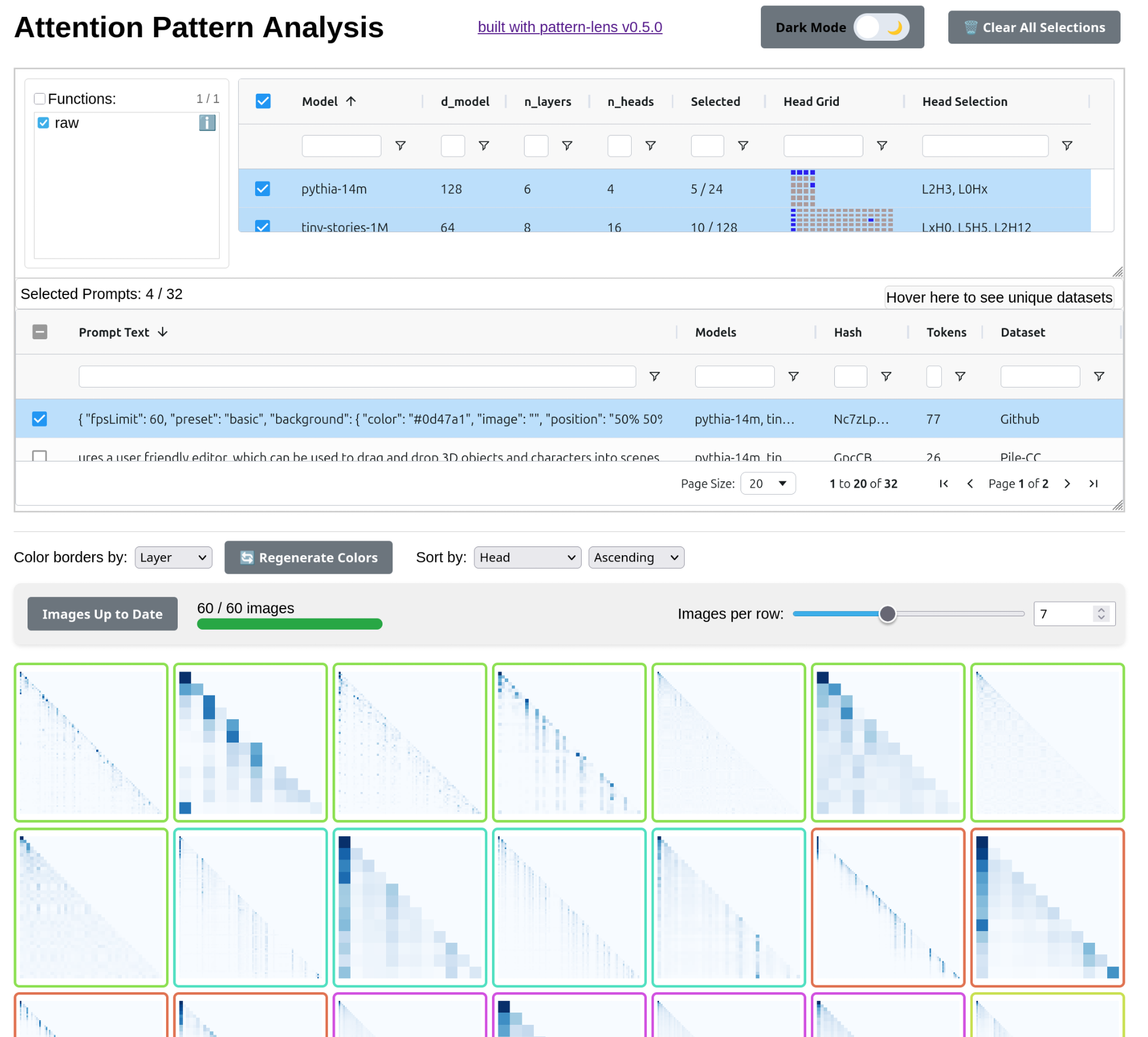 |
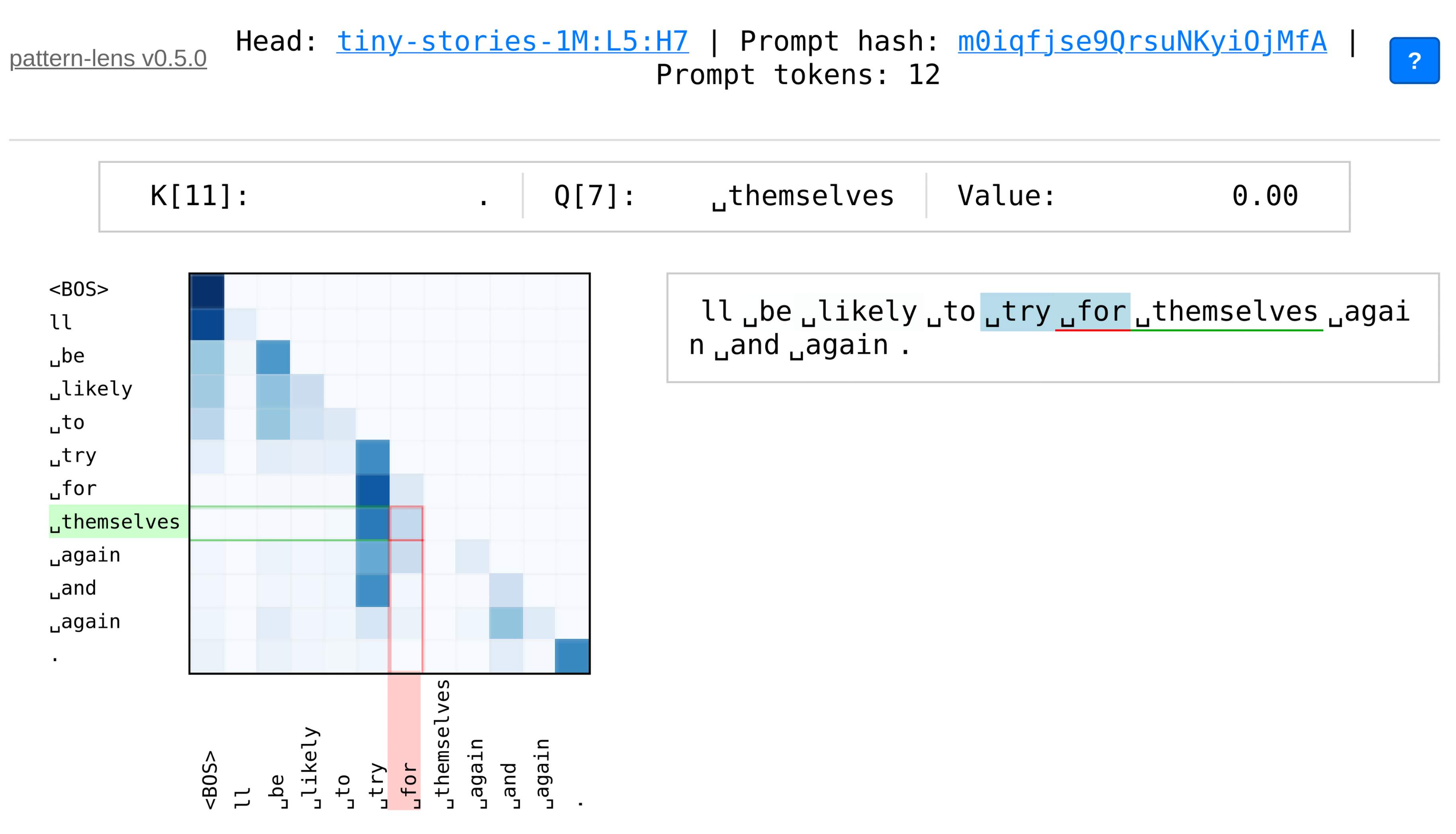 |
pattern-lens
visualization of LLM attention patterns and things computed about them
pattern-lens makes it easy to:
- Generate visualizations of attention patterns, or figures computed from attention patterns, from models supported by TransformerLens
- Compare generated figures across models, layers, and heads in an interactive web interface
Installation
pip install pattern-lens
Usage
The pipeline is as follows:
- Generate attention patterns using
pattern_lens.activations.acitvations_main(), saving them innpzfiles - Generate visualizations using
pattern_lens.figures.figures_main()-- read thenpzfiles, pass each attention pattern to each visualization function, and save the resulting figures - Serve the web interface using
pattern_lens.server-- web interface reads metadata in json/jsonl files, then lets the user select figures to show
Basic CLI
Generate attention patterns and default visualizations:
# generate activations
python -m pattern_lens.activations --model gpt2 --prompts data/pile_1k.jsonl --save-path attn_data
# create visualizations
python -m pattern_lens.figures --model gpt2 --save-path attn_data
serve the web UI:
python -m pattern_lens.server --path attn_data
Web UI
pattern-lens provides two complementary web interfaces for exploring attention patterns:
-
The main interface for comparing attention patterns across models, layers, and heads
- Filter and select patterns by model, layer, head, prompt, etc.
- View multiple patterns simultaneously in a grid layout
- Click patterns to open detailed single-pattern view
-
A focused interface for detailed examination of individual attention patterns
- Interactive heatmap with hover highlights and keyboard navigation
- Token-by-token analysis with Q/K axis highlighting
View a demo of the web UI at miv.name/pattern-lens/demo.
Much of this web UI is inspired by CircuitsVis, but with a focus on just attention patterns and figures computed from them. I have also tried to make the interface a bit simpler, more flexible, and faster.
Custom Figures
Add custom visualization functions by decorating them with @register_attn_figure_func. You should still generate the activations first:
python -m pattern_lens.activations --model gpt2 --prompts data/pile_1k.jsonl --save-path attn_data
and then write+run a script/notebook that looks something like this:
import numpy as np
import matplotlib.pyplot as plt
from scipy.linalg import svd

# these functions simplify writing a function which saves a figure
from pattern_lens.figure_util import matplotlib_figure_saver, save_matrix_wrapper
# decorator to register your function, such that it will be run by `figures_main`
from pattern_lens.attn_figure_funcs import register_attn_figure_func
# runs the actual figure generation pipeline
from pattern_lens.figures import figures_main

# define your own functions
# this one uses `matplotlib_figure_saver` -- define a function that takes matrix and `plt.Axes`, modify the axes
@register_attn_figure_func
@matplotlib_figure_saver(fmt="svgz")
def svd_spectra(attn_matrix: np.ndarray, ax: plt.Axes) -> None:
    # Perform SVD
    U, s, Vh = svd(attn_matrix)

    # Plot singular values
    ax.plot(s, "o-")
    ax.set_yscale("log")
    ax.set_xlabel("Singular Value Index")
    ax.set_ylabel("Singular Value")
    ax.set_title("Singular Value Spectrum of Attention Matrix")


# run the figures pipelne
# run the pipeline
figures_main(
	model_name="pythia-14m",
	save_path=Path("docs/demo/"),
	n_samples=5,
	force=False,
)
See demo.ipynb for a full example.


Download files
Download the file for your platform. If you're not sure which to choose, learn more about installing packages.
Source Distribution
Built Distribution
Filter files by name, interpreter, ABI, and platform.
If you're not sure about the file name format, learn more about wheel file names.
Copy a direct link to the current filters
File details
Details for the file pattern_lens-0.6.0.tar.gz.
File metadata
- Download URL: pattern_lens-0.6.0.tar.gz
- Upload date:
- Size: 56.1 MB
- Tags: Source
- Uploaded using Trusted Publishing? No
- Uploaded via: twine/6.2.0 CPython/3.13.2
File hashes
| Algorithm | Hash digest | |
|---|---|---|
| SHA256 |
0e87aebb00ab4df86f49750ffcc36bd0c5f99787eee4576db7f57f0906f91b28
|
|
| MD5 |
5562668a4e4d55239754dcbe127d9d31
|
|
| BLAKE2b-256 |
58680914a581b2fa00796eca0ea429cea03a71ed1a3f9ee51b03b84f1ee4315e
|
File details
Details for the file pattern_lens-0.6.0-py3-none-any.whl.
File metadata
- Download URL: pattern_lens-0.6.0-py3-none-any.whl
- Upload date:
- Size: 108.5 kB
- Tags: Python 3
- Uploaded using Trusted Publishing? No
- Uploaded via: twine/6.2.0 CPython/3.13.2
File hashes
| Algorithm | Hash digest | |
|---|---|---|
| SHA256 |
0a4425d61ca3a13d711ea2553ff3954a09b213eca80ae7c6fbcda1e7e3b8be7d
|
|
| MD5 |
724a79a0d5216c6a5aa96e87c1a98f78
|
|
| BLAKE2b-256 |
929d9a7cb393b3b5f11f7a8ef9b98dc3a643466a63db4b621151acb5ff0d478e
|






