





Convert scanned PDFs to Markdown and EPUB, with optional translation and translated PDF output.
From scanned pages to usable documents
PDF Craft is a Python library for scanned books and academic or technical documents. It extracts page content and organizes body text, chapters, tables of contents, footnotes, tables, formulas, and images for further editing and reading.
Markdown: edit, search, and process the content.

EPUB: read the book in an ebook reader.

Results depend on scan quality, page layout, and the OCR model. Check a representative document before processing a larger collection.
When you need EPUB bibliographic metadata, opt in to front-page OCR metadata extraction with a separate metadata LLM. PDF Craft verifies every accepted value against OCR evidence and uses PDF file properties only to fill missing fields, never to override printed book information.
What you can do
| Your goal | PDF Craft provides |
|---|---|
| Edit scanned books | PDF → Markdown, with text and image assets |
| Read in an ebook reader | PDF → EPUB, with book metadata and table of contents |
| Read books in another language | Translate during conversion or translate an existing EPUB; translation-only and bilingual output modes |
| Create a translated PDF | Translate extracted text and write it back onto the source pages |
| Integrate conversion into an app | Python APIs and reusable extraction files for later rendering or translation |
Choose how to use it
| Path | Best for | Requirements |
|---|---|---|
| Online | Trying the workflow | A browser; features and usage requirements are defined by the online app |
| Python + remote OCR | Developers who do not want to run OCR models locally | Python, Poppler, a compatible OCR service URL and credentials |
| Python + local OCR | Developers with their own NVIDIA GPU | Python, Poppler, CUDA, sufficient VRAM, and model files |
Remote OCR sends pages to the configured service and does not require local CUDA. Local OCR runs on your machine; using a remote LLM for translation or table-of-contents analysis still sends the corresponding content to that service.
Preview the online app

Quick start
This example uses remote OCR to convert a PDF to Markdown. Prepare Python 3.11–3.13, Poppler, and a working DeepSeek OCR-compatible service configuration. See the installation guide for Poppler setup.
1. Install
python -m pip install pdf-craft
2. Convert a PDF
Place input.pdf in the directory where you run your script. Replace the URL, API key, and model name with your service configuration:
from pdf_craft import DeepSeekOCRVendorConfig, PDFCraft, PDFOptions

craft = PDFCraft(
    pdf=PDFOptions(
        ocr=DeepSeekOCRVendorConfig(
            base_url="https://example.com/v1",
            api_key="your-api-key",
            model="deepseek-ocr",
        ),
    ),
)

craft.convert_pdf_to_markdown("input.pdf", "output.md")
Async applications use the same options through AsyncPDFCraft; callbacks may
also be async def functions and run on the caller's event loop:
import asyncio
from pdf_craft import AsyncPDFCraft, DeepSeekOCRVendorConfig, PDFOptions

async def main():
    craft = AsyncPDFCraft(pdf=PDFOptions(ocr=DeepSeekOCRVendorConfig(
        base_url="https://example.com/v1",
        api_key="your-api-key",
        model="deepseek-ocr",
    )))
    await craft.convert_pdf_to_markdown("input.pdf", "output.md")

asyncio.run(main())
Do not call the synchronous PDFCraft facade from a running event loop; use
AsyncPDFCraft and await its corresponding method instead.
https://example.com/v1 is a placeholder, not a working endpoint. Use a compatible service that actually provides the OCR model. See OCR configuration for other models.
Open output.md after conversion. Documents containing images also produce asset files; keep those files with the Markdown when moving or sharing it.
3. Create an EPUB
Reuse the configured craft instance above and replace the last line with:
craft.convert_pdf_to_epub("input.pdf", "output.epub")
Open output.epub in an EPUB reader. For title, author, and rendering options, see PDF conversion and translation. For installation or runtime problems, see troubleshooting.
Translation and reusable extraction
Translate books. Supply a chapter translator when converting PDF to Markdown or EPUB, or translate an existing EPUB directly. Translation uses a separate text LLM; OCR and translation have independent configurations. EPUB translation can replace the original text or append the translation for bilingual reading.
Create a translated PDF. Extract the content, translate it, and write the translation back onto the original pages. This workflow also needs Ghostscript and suitable local fonts. Check the resulting layout against the source and translated text.
Extract once, reuse later. Save a .pcex extraction file for subsequent rendering, translation, or processing on another machine. Reuse the configured craft instance:
craft.convert_pdf_to_markdown(
    "input.pdf",
    "output.md",
    extraction_path="book.pcex",
)
See PDF conversion and translation, EPUB translation, and the .pcex format reference.
OCR and runtime requirements
PDF Craft supports DeepSeek OCR, DeepSeek OCR 2, and Unlimited OCR, each with local and remote configurations.
The standard installation supports remote OCR. For local OCR, install the extra:
python -m pip install "pdf-craft[local]"
Local execution also requires a matching CUDA-enabled PyTorch build, sufficient VRAM, and model files. Models download from Hugging Face by default; you can also download them in advance and load them locally. Presets and requirements vary by model; see OCR configuration.
Language support depends on the processing stage. README languages describe documentation availability. Text recognition depends on the OCR model, and translation depends on the translator and text LLM. The EPUB lan parameter currently offers zh / en; see the API reference.
Documentation
| Task | Guide |
|---|---|
| Install system dependencies and configure a local GPU | Installation |
| Select OCR models, remote services, or model caches | OCR backends |
| Convert PDFs, create EPUBs, or write translations into PDFs | PDF conversion and translation |
| Translate existing EPUBs and configure bilingual output | EPUB translation |
| Look up parameters, types, and methods | API reference |
| Store or exchange extraction results | .pcex format |
| Resolve installation and conversion issues | Troubleshooting |
Feedback and contributions
Report problems or suggest improvements through Issues. For conversion problems, include the package version, OCR configuration type, error logs, and a minimal file you can share publicly. Remove credentials and private content first.
Pull requests improving code, documentation, and translations are welcome. Keep translated READMEs aligned with the English version, including capability descriptions and examples.
If PDF Craft helps you, a Star helps others discover it.
Related projects
Wiki Graph can turn converted EPUB or Markdown books into structured summaries, chapter topology, and knowledge graphs.
License and acknowledgments
PDF Craft uses the MIT license. Third-party dependencies and selected OCR models retain their own licenses.
Thanks to DeepSeek OCR, DeepSeek OCR 2, Unlimited OCR, doc-page-extractor, pyahocorasick and the open-source projects that make PDF Craft possible.
Contributors
Thanks to everyone who has contributed to PDF Craft. Contributions to code, documentation, and translations are welcome.

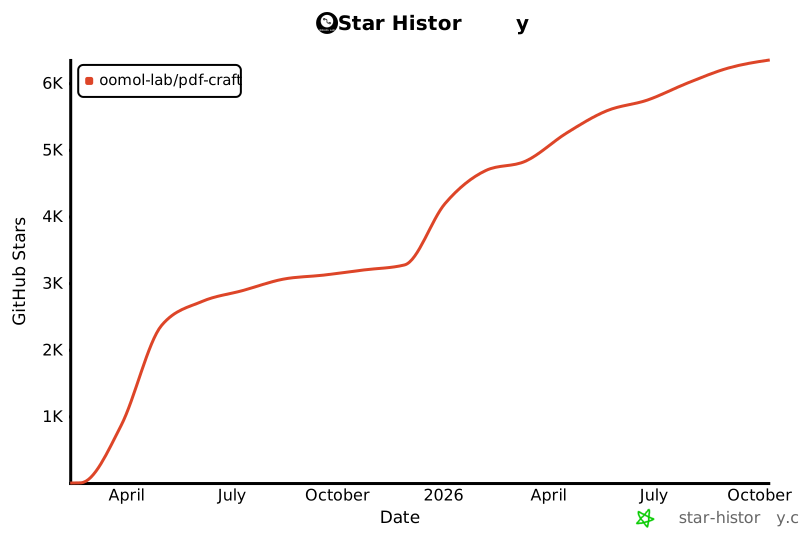
Star History
1 maintainer

Metadata
1 maintainer
Release files for pdf-craft 2.4.0
For a detailed explanation of source distributions (sdists) and built distributions (wheels), please see the package formats documentation.
Source distribution (sdist)
| File | Size | Uploaded | |
|---|---|---|---|
| pdf_craft-2.4.0.tar.gz | 308.8 kB | Details |
Built distribution (wheel)
| File | Interpreter | ABI | Platform | Reset |
|---|---|---|---|---|
| pdf_craft-2.4.0-py3-none-any.whl | Python 3 | none | any | Details |
Total release size: 682.5 kB
Release files / pdf_craft-2.4.0.tar.gz
| Download URL | pdf_craft-2.4.0.tar.gz |
|---|---|
| Size | 308.8 kB |
| Tags | Source |
|
SHA-256 checksum How to use checksums |
88542d71981602bfba791f7153cc74503ec8c937db76cd67e16d11f434e0ee8c
|
|
BLAKE2b-256 checksum How to use checksums |
a98d840e1be1026cd2222b3bd79012deff1e6e47f9050c205e4da71a89013577
|
| Upload date | |
|
Uploaded using Trusted Publishing? What is trusted publishing? |
Yes |
| Uploaded via |
twine/7.0.0 CPython/3.13.14
|
Provenance
Provenance describes where a file came from. On PyPI, provenance is shared via attestations, which provide a verifiable record of the build or publishing details. View details, limitations and caveats.


PyPI Publish Attestation
PyPI verified that this artifact, at this checksum, originated from the publisher listed below.
Signed by GitHub Actions, verified by PyPI on Sep 29, 2026.
Transparency logRelease files / pdf_craft-2.4.0-py3-none-any.whl
| Download URL | pdf_craft-2.4.0-py3-none-any.whl |
|---|---|
| Size | 373.7 kB |
| Tags | Python 3 |
|
SHA-256 checksum How to use checksums |
c964cc15d8cc76e9e69f6d7c3f7a70858cfd29d9b3e9c509cb1fbb3caba04e08
|
|
BLAKE2b-256 checksum How to use checksums |
c5223e085ec0b814892bcb1c621a5cf804d3e25328aed17688a1230f96133b60
|
| Upload date | |
|
Uploaded using Trusted Publishing? What is trusted publishing? |
Yes |
| Uploaded via |
twine/7.0.0 CPython/3.13.14
|
Provenance
Provenance describes where a file came from. On PyPI, provenance is shared via attestations, which provide a verifiable record of the build or publishing details. View details, limitations and caveats.
PyPI Publish Attestation
PyPI verified that this artifact, at this checksum, originated from the publisher listed below.
Signed by GitHub Actions, verified by PyPI on Sep 29, 2026.
Transparency log













