
Surgical PDF access for AI agents: keyword, semantic & hybrid search; structured extraction of text, tables, images & TOC; OCR; and CJK/vertical-script support — with SQLite caching.

Project description
pdf-mcp




Surgical PDF access for AI agents — search, read, and extract without flooding context.
An MCP server that lets Claude Code and other AI agents search a PDF by meaning or keyword, read only the pages that matter, and cleanly pull out tables, images, and scanned text — even from multi-column and Japanese layouts.
mcp-name: io.github.jztan/pdf-mcp
Try it in your browser
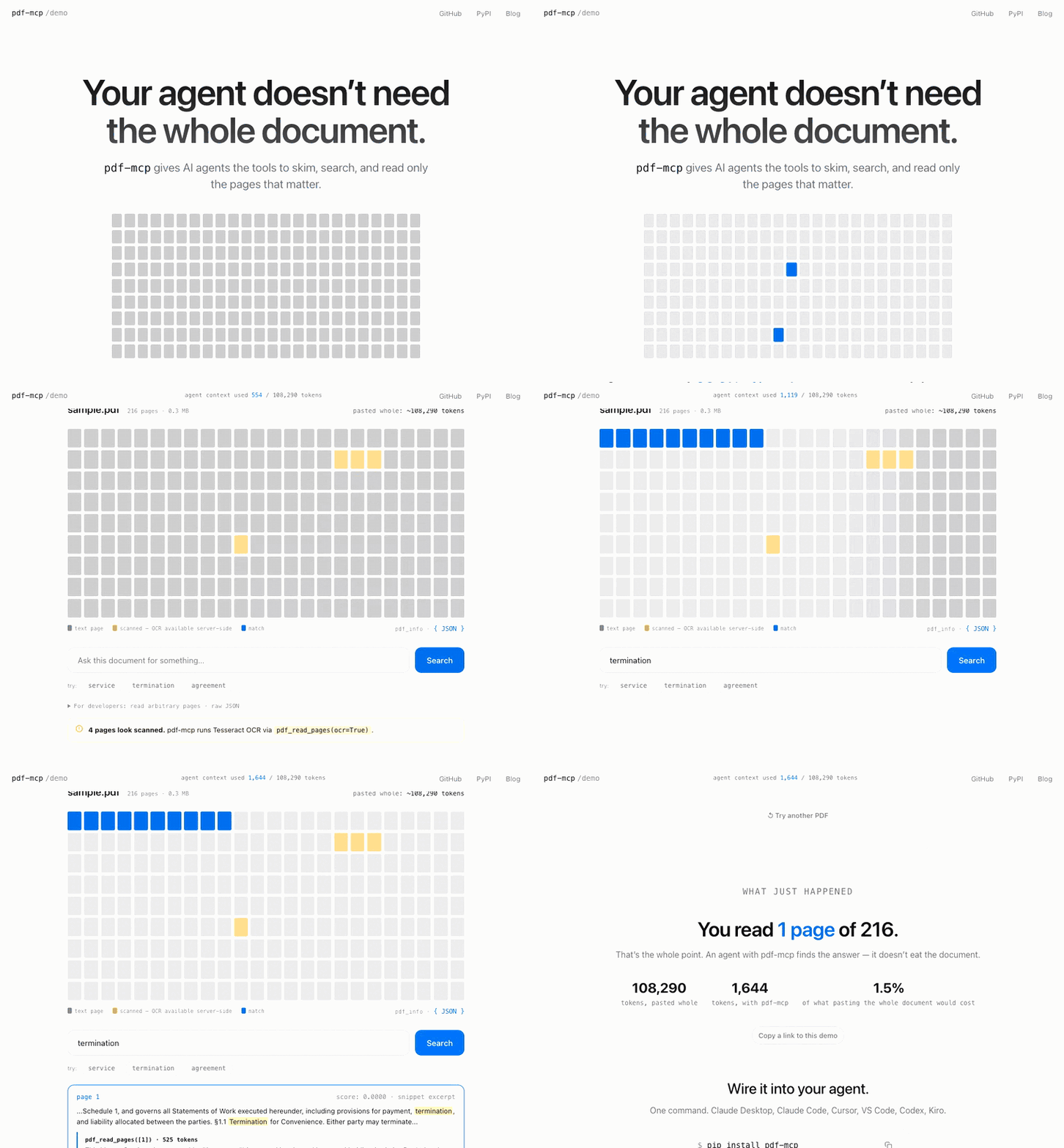
Drop in any PDF and watch an agent skim it, search it, and read only the pages that matter — using a fraction of the tokens. 100% client-side, no install required.
Why pdf-mcp?
| Without pdf-mcp | With pdf-mcp | |
|---|---|---|
| Large PDFs | Context overflow | Chunked reading |
| Token budgeting | Guess and overflow | Estimated tokens before reading |
| Finding content | Load everything | Hybrid search (BM25 keyword + semantic) |
| Tables | Lost in raw text | Extracted and inlined per page |
| Charts | Trapped in the plot image | Extracted as (x, y) data tables |
| Multi-column PDFs | Columns interleaved in extracted text | Column-aware reading order (pdf-mcp[multicolumn]) |
| Vertical scripts (Japanese) | Columns scrambled / glyph soup | Geometric reorder of vertical text (tategaki / 縦書き); CJK keyword search works on unspaced Japanese/Chinese/Korean text via a char-split FTS index |
| Images | Ignored | Extracted as PNG files |
| Repeated access | Re-parse every time | SQLite cache |
| Scanned PDFs | No text extracted | OCR via Tesseract, parallelized across pages (pdf_read_pages(ocr=True)) |
| Visual content | Must describe in words | Render page as image (pdf_render_pages) |
| Hidden / injected text | Silently ingested as if a human vetted it | Flagged as untrusted — hidden-text detection (content_trust=True) |
| Tool design | Single monolithic tool | 10 specialized tools |
Features
- Hybrid search — find relevant pages with a question, not a page range. Combines BM25 keyword and semantic search via Reciprocal Rank Fusion
- Paginated reading — fetch only the pages your agent needs; large documents don't blow your context window
- OCR — scanned and image-based PDFs are fully readable and searchable via Tesseract, parallelized across pages for ~2–3x faster extraction on typical scans
- Structured extraction — tables, embedded images, and table of contents returned as structured data, not text soup
- Chart data extraction — pull exact
(x, y)tables from vector charts, read from the plot geometry rather than guessed from the image; declines with a rendered image when a chart can't be read reliably - Vertical-script reading order — Japanese tategaki (縦書き) reconstructed from glyph geometry into correct top-to-bottom, right-to-left order; article segmentation for dense magazine layouts; mojibake filtered
- Persistent cache — SQLite-backed; re-reads are instant and survive server restarts
- Secure URL fetching — HTTPS-only with SSRF protection; local network ranges are blocked
- Content-trust / hidden-text detection — flags text a human reader can't see (invisible render mode, sub-point fonts, transparent or white-on-white fill, off-page) so an agent treats it as untrusted rather than vetted. Flag-only — nothing is stripped
Contents
Installation
pip install pdf-mcp
For semantic search (adds fastembed and numpy, ~67 MB model download on first use):
pip install 'pdf-mcp[semantic]'
For correct reading order on multi-column PDFs (adds pymupdf4llm, which pulls pymupdf_layout/onnxruntime):
pip install 'pdf-mcp[multicolumn]'
Without it, multi-column pages fall back to positional-sort extraction, which can interleave columns.
For Japanese/Chinese/Korean PDFs, CJK keyword search works out of the box
(a char-split FTS index matches unspaced CJK terms). The [cjk] extra adds
semantic CJK search (embeddings); extraction works without either:
pip install 'pdf-mcp[cjk]'
For OCR on scanned PDFs (requires system Tesseract):
# macOS
brew install tesseract

# Ubuntu/Debian
apt install tesseract-ocr

# Windows — download the installer from:
# https://github.com/UB-Mannheim/tesseract/wiki
# Then add the install directory to your PATH.
Quick Start
Choose your MCP client below to get started:
Claude Code
claude mcp add pdf-mcp -- pdf-mcp
Or add to ~/.claude.json:
{
  "mcpServers": {
    "pdf-mcp": {
      "command": "pdf-mcp"
    }
  }
}
Claude Desktop
Add to your claude_desktop_config.json:
{
  "mcpServers": {
    "pdf-mcp": {
      "command": "pdf-mcp"
    }
  }
}
Config file location:
- macOS:
~/Library/Application Support/Claude/claude_desktop_config.json - Windows:
%APPDATA%\Claude\claude_desktop_config.json
Restart Claude Desktop after updating the config.
Visual Studio Code
Requires VS Code 1.101+ with GitHub Copilot.
CLI:
code --add-mcp '{"name":"pdf-mcp","command":"pdf-mcp"}'
Command Palette:
- Open Command Palette (
Cmd/Ctrl+Shift+P) - Run
MCP: Open User Configuration(global) orMCP: Open Workspace Folder Configuration(project-specific) - Add the configuration:
{
  "servers": {
    "pdf-mcp": {
      "command": "pdf-mcp"
    }
  }
}
- Save. VS Code will automatically load the server.
Manual: Create .vscode/mcp.json in your workspace:
{
  "servers": {
    "pdf-mcp": {
      "command": "pdf-mcp"
    }
  }
}
Codex CLI
codex mcp add pdf-mcp -- pdf-mcp
Or configure manually in ~/.codex/config.toml:
[mcp_servers.pdf-mcp]
command = "pdf-mcp"
Kiro
Create or edit .kiro/settings/mcp.json in your workspace:
{
  "mcpServers": {
    "pdf-mcp": {
      "command": "pdf-mcp",
      "args": [],
      "disabled": false
    }
  }
}
Save and restart Kiro.
Other MCP Clients
Most MCP clients use a standard configuration format:
{
  "mcpServers": {
    "pdf-mcp": {
      "command": "pdf-mcp"
    }
  }
}
With uvx (for isolated environments):
{
  "mcpServers": {
    "pdf-mcp": {
      "command": "uvx",
      "args": ["pdf-mcp"]
    }
  }
}
Verify Installation
pdf-mcp --help
Tools
The typical pattern: call pdf_info first to plan, then pdf_search to locate — its paragraph excerpts are often enough to answer directly. Use pdf_read_pages or pdf_read_all when you need deeper context.
| Tool | What it does |
|---|---|
pdf_info |
Page count, metadata, TOC summary, scanned-page detection. Call first. Pass content_trust=True for a content_trust block (suspicious, hidden_text_runs, hidden_chars, injection_in_hidden, pages_flagged, signals); add detail=True for per-span spans. |
pdf_get_toc |
Full table of contents for documents with >50 bookmarks |
pdf_read_pages |
Read specific pages or ranges; OCR-on-demand; embedded images + tables, each with source bbox + clip coordinates. Always returns hidden_text_detected (response level) and per-page hidden_text; hidden_text_detected: true means some returned text was invisible to a human reader and should be treated as especially untrusted. |
pdf_read_all |
Read entire document in one call (byte-capped for safety). Always returns hidden_text_detected; hidden_text_detected: true means some returned text was invisible to a human reader and should be treated as especially untrusted. |
pdf_render_pages |
Render pages as PNG for vision models — diagrams, handwriting, scans |
pdf_extract_chart |
Extract chart data as exact (x, y) tables from vector charts; declines with a rendered image when not reliably extractable |
pdf_search |
Hybrid RRF search (keyword + semantic), page or section granularity, optional paragraph excerpts (paragraph hits also carry bbox + clip coordinates) |
pdf_cache_stats |
Per-document cache breakdown + total size |
pdf_cache_clear |
Clear expired or all cache entries |
server_info |
Which optional features (column-aware, OCR, semantic) and config are active. Call before feature-dependent calls. |
Example prompts:
"Read the PDF at /path/to/document.pdf"
"Which pages discuss supply chain risks?"
"Find sections about the training process"
"Show me what page 5 looks like"
"OCR pages 3-5 of the scanned PDF"
See docs/tool-reference.md for the complete reference — every parameter, response shape, security contract, and example. For semantic-search model selection, see docs/embedding-models.md.
Example Workflow
For a large document (e.g., a 200-page annual report):
User: "Summarize the risk factors in this annual report"

Agent workflow:
1. pdf_info("report.pdf")
   → 200 pages, TOC shows "Risk Factors" on page 89

2. pdf_search("report.pdf", "risk factors")
   → Matches with structural paragraph excerpts — each excerpt
     is the bullet, paragraph, or heading that matched, not a
     fixed-width window. Often enough to answer directly.

3. If excerpts are sufficient → synthesize answer

4. If more context needed:
   pdf_read_pages("report.pdf", "89-95")
   → Full page text for deeper reading
Configuration
pdf-mcp works out of the box with no configuration. To restrict which paths and URL hosts the server can access, tune cache and worker settings, or understand what's cached, see docs/configuration.md.
- Access control —
~/.config/pdf-mcp/config.tomlallow/deny rules for paths and URLs, plus response byte caps - Content-trust phrases — extend the hidden-text
injection_in_hiddenhint with your own (including non-English) phrases via[content_trust].injection_phrases - Environment variables — cache directory, TTL, and parallel OCR/render worker count
- Caching — SQLite-backed persistence, what's cached, and invalidation
Roadmap
See ROADMAP.md for planned features and release history.
Contributing
Contributions are welcome. See docs/contributing.md for setup, checks, the coherence eval harness, and quality-loop guidelines.
Security
Found a vulnerability? See SECURITY.md for the threat model, reporting channel, and expected response timeline. Please do not open a public GitHub issue for unpatched security reports.
License
MIT — see LICENSE.
Links
Blog posts
Background, benchmarks, and design notes from building pdf-mcp:
Getting started
- How I Built pdf-mcp — The problem with large PDFs in AI agents and a working solution
- How Claude Code Actually Reads PDFs — How AI agents use pdf-mcp tools to read and navigate PDF documents
- How AI Agents Should Read PDFs: 5 Patterns That Survived Production — Five production-tested patterns for how agents should navigate PDFs at scale
Search & retrieval
- Semantic vs Keyword Search for AI Agents — Benchmarks and a dual-search routing pattern: FTS5 for exact identifiers, embeddings for natural language
- Hybrid Search vs Query Routing for AI Agents — Why pdf-mcp uses hybrid RRF instead of query routing: benchmarks showing RRF wins across query types
- Section Chunking vs Page Chunking for AI Agents — Why section-aware search delivers full section content in one call while page-mode costs 2–6 extra tool calls per query
- Section-Level RAG: Why BM25 Beat Hybrid Search in My Benchmark — Why pdf-mcp's section-grain search is BM25-only: hybrid RRF caused a 33% lexical regression at section grain, so granularity decides the search technique
- How One Search Change Eliminated an Entire Agent Step — Switching pdf_search from fixed-width snippets to paragraph excerpts turned it from a pivot tool into a terminal tool: 97% vs 80% answer containment across a 30-query benchmark
Engineering & security
- MCP Server Security: 8 Vulnerabilities — What we found when we audited an MCP server for security holes
- Your LLM Is Free QA for Your MCP Server — Four Payload UX bugs in pdf-mcp that schema tests missed but Claude Desktop surfaced during real use
Release history Release notifications | RSS feed


Download files
Download the file for your platform. If you're not sure which to choose, learn more about installing packages.
Source Distribution
Built Distribution
Filter files by name, interpreter, ABI, and platform.
If you're not sure about the file name format, learn more about wheel file names.
Copy a direct link to the current filters
File details
Details for the file pdf_mcp-1.21.0.tar.gz.
File metadata
- Download URL: pdf_mcp-1.21.0.tar.gz
- Upload date:
- Size: 4.7 MB
- Tags: Source
- Uploaded using Trusted Publishing? No
- Uploaded via: twine/6.2.0 CPython/3.12.13
File hashes
| Algorithm | Hash digest | |
|---|---|---|
| SHA256 |
92a957f9b6768e12c22aae7e468382520f55a4a45165efbea5aaefae90b27189
|
|
| MD5 |
f188a52477f89c9c1235565f1a9c4eca
|
|
| BLAKE2b-256 |
08ed1498cfa5b0eb17f0bf5747957dce029567f5dfa6f82c7a194f0c46d332d5
|
File details
Details for the file pdf_mcp-1.21.0-py3-none-any.whl.
File metadata
- Download URL: pdf_mcp-1.21.0-py3-none-any.whl
- Upload date:
- Size: 130.0 kB
- Tags: Python 3
- Uploaded using Trusted Publishing? No
- Uploaded via: twine/6.2.0 CPython/3.12.13
File hashes
| Algorithm | Hash digest | |
|---|---|---|
| SHA256 |
fe31dd26a876ca4be7aa95bf38c98b85b3d64d26a2079edbd38d5506d9b9efb5
|
|
| MD5 |
1f82c60a220414d3eedce28cb6bcb72f
|
|
| BLAKE2b-256 |
4dc0c34c71679277256059e4fd0e226f77322b82ed51faa86b760531b778759c
|






