
pdfboss
A PDF engine written from scratch in Rust: parse, extract text, rasterize to PNG. One core, a CLI, and pythonic bindings.





Reading a PDF should not require a C library. pdfboss is a clean-room reader built from the ISO 32000 specification: safe Rust, no C dependencies, no bindings to another engine, one core behind the CLI and the native Python extension. It is a lenient reader — real-world files are damaged, so it reconstructs broken cross-reference tables, tolerates wrong stream lengths, and skips garbage operators instead of refusing.
Install
pip install pdfboss           # prebuilt abi3 wheels (CPython 3.12+), no toolchain required
cargo install pdfboss-cli     # the `pdfboss` binary
Usage
pdfboss info    report.pdf                 # version, page count, sizes, metadata
pdfboss text    report.pdf --page 2        # extract text (omit --page for all)
pdfboss md      report.pdf                 # markdown: headings, lists, tables from layout
pdfboss render  report.pdf --page 1 -o page.png --scale 2.0
pdfboss tui     report.pdf                 # interactive terminal explorer
pdfboss create blank  -o out.pdf --pages 3    # new PDF: empty pages
pdfboss create text   notes.txt -o out.pdf    # new PDF: word-wrapped text
pdfboss create images a.png b.jpg -o out.pdf  # new PDF: one page per image
import pdfboss

doc = pdfboss.Document("report.pdf")       # or Document(data=raw_bytes)
text = doc.extract_text()
md   = doc.extract_markdown()              # headings, lists and tables inferred from layout
png  = doc[0].render(scale=2.0)            # PNG bytes
More: explorer subcommands, async Python, Rust
Explorer subcommands. Each accepts a local path or an http(s):// URL, fetched in ranges and never downloaded whole:
pdfboss json    report.pdf                    # dump the document as a JSON value tree
pdfboss json    report.pdf --layout           # ...plus per-page layout blocks
pdfboss hex     report.pdf obj:5              # hexdump the file or a selected element
pdfboss q       report.pdf '.header.version'  # jq-style queries over the JSON tree
pdfboss obj     report.pdf 5                  # pretty-print object 5
page = doc[0]
print(page.width, page.height, page.rotation)

for element in doc.elements():             # lazy: physical + logical, byte spans included
    print(element.kind, element.span)

# Async access over files or http(s) URLs, without reading the whole document.
doc = await pdfboss.AsyncDocument.open_url("https://example.com/report.pdf")
async for element in doc.elements():
    print(element.kind, element.value)
Rust — the library crates are on crates.io (cargo add pdfboss-core pdfboss-text pdfboss-output pdfboss-render pdfboss-aio pdfboss-tui):
use pdfboss_core::Document;

let doc = Document::open("report.pdf")?;
let page = doc.page(0)?;

let text = pdfboss_output::extract_text(&doc, &page)?;
let markdown = pdfboss_output::extract_markdown(&doc)?;
let pixmap = pdfboss_render::render_page(&doc, &page, 2.0)?;
pixmap.save_png("page.png")?;
Benchmarks
Text and parsing
Against other Python PDF libraries over 40 real-world PDFs (pages/sec, higher is faster):
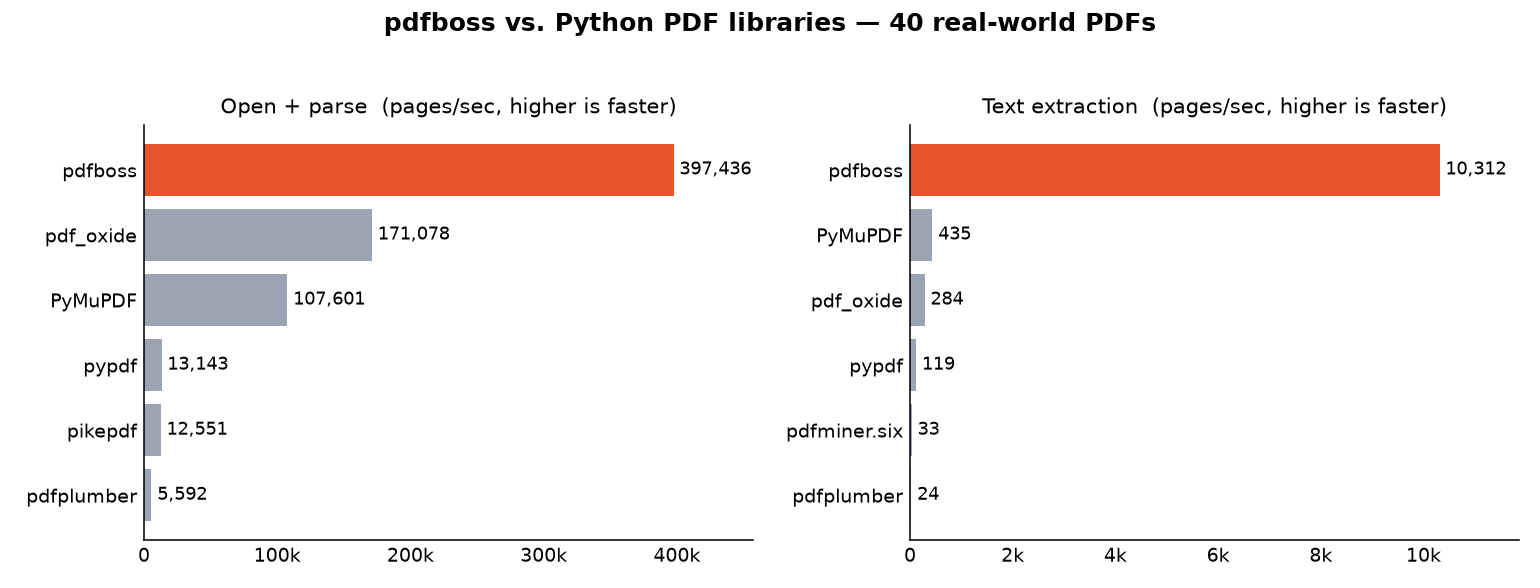
pdfboss is the fastest library measured on both operations, including against the C-backed PyMuPDF and the Rust-backed pdf_oxide: 6,700 pages/s extracting text against PyMuPDF's 460 (about 15×) and pdf_oxide's 300 (about 22×), and 383,000 pages/s opening + parsing against pdf_oxide's 173,000 (about 2.2×).
Method and fine print
Best-of-3 per file, aggregated over the files every library handled; measured with pdfboss 0.20.0 on an Apple M3 Pro, every table on this page from one session. The pure-Python readers are roughly 70× to 360× slower on extraction. Since 0.9.0, doc.extract_text() spreads pages across cores, which widened the gap over the sequential libraries from the 7× measured before that landed; since 0.19.0 every span also carries its style (font, weight, decorations, color), which costs the extraction rows a few percent against older tables. Lazy page-tree loading means opening a document reads only its declared page count instead of parsing every page dictionary up front. Opening is close to free, so the ratio says more about what the others do eagerly than about pdfboss. Rendering is compared in its own section below, restricted to the files pdfboss provably rasterizes completely — timing it against full renderers on the rest would credit it for work it skips.
Numbers are machine-dependent; reproduce with benchmarks/bench.py.
Extraction quality
On opendataloader-bench — the 200-PDF corpus PDF-to-Markdown engines use for their published comparisons — pdfboss reads the whole corpus in about a seventh of a second, about 3× faster than the fastest competing Markdown engine, with a mid-field reading-order score (NID, higher is better):
| Engine | Reading order (NID) | Output | Time (200 docs) |
|---|---|---|---|
| pdf-inspector 0.2.6 | 0.915 | Markdown | 0.44s |
| liteparse 2.10.1 | 0.913 | Markdown | 0.75s |
| opendataloader 2.2.1 | 0.902 | Markdown | 2.57s |
| pymupdf4llm 0.2.0 | 0.886 | Markdown | 17.12s |
pdfboss (md) |
0.877 | Markdown | 0.15s |
| pdfboss | 0.868 | plain text | 0.16s |
| markitdown 0.1.5 | 0.844 | Markdown | 16.17s |
What the score is made of, and how it was measured
Per document, the plain-text output beats pdf-inspector's NID on 105 of the 200 files, ties on 23 and loses on 72. The losses concentrate in table regions, where structured output matches the ground truth more closely than flowed text can. On the benchmark's combined metric the Markdown adapter scores 0.801 (reading order 0.877, headings and lists 0.667, table structure 0.532). It detects tables from column gaps and from drawn borders, so bordered grids and boxed lists without column gaps are found too. Two-column layouts are read column-major. Justified text keeps its word spacing. Ligatures and small-caps variants decode through the full Adobe Glyph List conventions.
Quality rows come from the benchmark's own evaluator over all 200 documents. The two pdfboss timings were measured together in one session on an Apple M3 Pro under the benchmark's protocol: median of five single-process runs after a warm-up, wheel built from main. pdf-inspector was measured the same way on the same machine in an earlier session. The other engines' timings are the ones published with the corpus from an Apple M4 Pro. Read them as order-of-magnitude context, not a same-machine race.
Rendering
A renderer that skips work looks fast, so every file is certified before the stopwatch starts: any page that reports dropped or approximated content excludes its file, and an ink-coverage gate across libraries catches work skipped silently. 38 of the 40 files (888 pages) certify:
| Library | pages/sec |
|---|---|
| pypdfium2 | 122.0 |
| pdfboss | 112.7 |
| pdfplumber (via pdfium) | 103.9 |
| PyMuPDF | 91.9 |
pdfboss rasterizes the mixed corpus second only to pdfium itself — about 8% behind it, ahead of pdfplumber's pdfium stack and PyMuPDF — with no C in it.
Certification and stability details
pdfboss rasterizes each page through render_reporting at the full fonts tier — substituting non-embedded fonts, which is what the other engines do by default — and a file where any page reports dropped or approximated content is excluded, with its reason printed and counted. A second gate renders each file's first page in every library and excludes files whose ink coverage disagrees: a blank page renders instantly and means nothing. Only two files fail certification now, each over a font that lacks a glyph for a code the page draws.
Compare the rows against each other, not against another machine's numbers.
Reproduce with benchmarks/bench_render.py.
Scanned documents
Scans are the other half of the world's PDFs: one full-page bilevel image per page, JBIG2- or CCITT-coded, no text operators. A 544-page JBIG2 book (1994 × 2832 samples per page) rasterized to PNG at 1:1:
| Library | pages/sec | Ink on page 1 |
|---|---|---|
| pdfboss | 66.4 | 4.71% |
| pypdfium2 | 56.5 | 4.85% |
| pdfplumber (via pdfium) | 56.1 | 4.87% |
| PyMuPDF | 55.6 | 4.82% |
pdfboss is the fastest of the four, about 18% ahead of the C-backed renderers, and the only one of them with no C in it.
Where the time goes, and why the ink column matters
All four are timed in one pass. The absolute numbers vary by half as the machine warms and cools — compare the four rows against each other, not against another machine's numbers.
What is left is the codec itself. Four fifths of the time goes to the JBIG2 arithmetic decoder and the context formation that feeds it. That part is a serial dependency chain: every decision needs the interval state the previous one wrote, and every pixel's context contains the pixels just decoded. It neither vectorizes nor parallelizes. The rest was arithmetic that did not need doing: expanding a packed scan into eight times its size in RGBA before sampling a fraction of it, blending opaque pixels through an alpha formula that returns them unchanged, and walking bitmaps a pixel at a time where a row of bytes would do.
The ink column is what makes the timings mean anything. A library that cannot decode a scan's codec usually hands back a blank page instead of raising, and a blank page benchmarks superbly. Agreeing coverage says all four decoded the same picture. They do not agree pixel for pixel, because each library downsamples 1994 × 2832 samples onto a 462 × 663 page with its own resampling.
Reproduce with benchmarks/bench_scans.py.
In the browser
pdfarena races pdfboss against hayro, pdf.js and PDFium on any PDF you drop in, with pdfboss and hayro compiled to WebAssembly. Each engine renders in its own web worker, the stopwatch wraps only the render call, and every challenger is pixel-diffed against pdf.js as the reference. Nothing gets uploaded; the whole benchmark runs in your browser.
What's inside
Ten crates, one implementation: a from-scratch core with its own JPEG 2000, JBIG2, CCITT and ICC codecs, an anti-aliased rasterizer, layout analysis to plain text and Markdown, async range-fetching I/O, a CLI and TUI, and PyO3 bindings.
Crate map
| Crate | Responsibility |
|---|---|
pdfboss-core |
Tokenizer, object model, stream filters, cross-references, object streams, document & page tree, content-stream operators |
pdfboss-text |
Simple and CID/Type0 fonts, standard encodings, ToUnicode CMaps, positional text spans |
pdfboss-output |
Layout analysis over those spans (lines, columns, headings, lists, tables, repeated page headers), rendered as plain text or Markdown |
pdfboss-jpx |
JPEG 2000 decoder for JPXDecode image streams, implemented from ITU-T T.800 |
pdfboss-icc |
ICC profile parser and colour transform to sRGB, implemented from ICC.1:2010 |
pdfboss-render |
Anti-aliased vector rasterizer (paths, fills, strokes, clipping, color, images, glyph outlines) to RGBA/PNG |
pdfboss-aio |
Async I/O: range-fetching document access over files or HTTP, without reading the whole file |
pdfboss-cli |
The pdfboss command-line tool |
pdfboss-tui |
Interactive terminal explorer (pdfboss tui), built on pdfboss-aio |
pdfboss-py |
PyO3 extension module (pdfboss._pdfboss) built with maturin |
Everything supported, in one breath
Supported: classic, stream, and hybrid cross-references with recovery scanning · object streams · FlateDecode, LZWDecode, ASCII85Decode, ASCIIHexDecode, RunLengthDecode + PNG/TIFF predictors · DCTDecode (JPEG) images · JPXDecode (JPEG 2000) images: JP2 containers and raw codestreams, every progression order, both wavelets, palettes, and /SMaskInData alpha (ITU-T T.800) · CCITTFaxDecode scans: Group 3 one-dimensional, Group 3 mixed and Group 4 coding (ITU-T T.4/T.6) · JBIG2Decode scans: the full segment type table — generic, text, halftone and refinement regions, immediate or intermediate, symbol and pattern dictionaries, custom code tables, arithmetic- or Huffman-coded with the MMR variants throughout — with or without /JBIG2Globals · Standard-handler decryption: RC4 and AES-128/256, with the user or owner password (--password, password=; the empty user password opens transparently) · page-tree attribute inheritance · text extraction with ToUnicode and WinAnsi/MacRoman/Standard encodings · Markdown output with headings, lists, emphasis and pipe/HTML tables inferred from the page layout and from drawn table borders · rasterization of paths, fills (nonzero & even-odd), strokes, transforms, clipping, all blend modes (separable and non-separable), soft masks (image /SMask, stencil and color-key /Mask, and Luminosity/Alpha /SMask groups in /ExtGState), image/form XObjects, all seven shading types (the sh operator and shading-pattern fills and strokes: function-based, axial and radial through sampled, exponential, stitching and PostScript-calculator functions, plus Gouraud triangle meshes and Coons/tensor patch meshes), tiling patterns (colored and uncolored, each cell run as its own content stream), annotation normal appearances (/AP /N, with /AS state selection), ICCBased colour through the embedded profile (ICC.1:2010 v2/v4, matrix/TRC, grayTRC, and A2B0 lookup transforms) and the CIE CalRGB/CalGray/Lab families through XYZ, and the glyph outlines of every embedded font program (TrueType, CFF, Type1, Type3), with optional substitution for non-embedded simple fonts · lazy element iteration over physical (objects, xref sections, trailer, with byte spans) and logical (pages, fonts, images, annotations, content operators) elements.
Limitations
Rendering is lenient and it says so: content pdfboss cannot read is skipped so the rest of the page still rasterizes, and every dropped or approximated item lands in a report — pdfboss render warns on stderr, the TUI raises a notice, and the libraries return it through render_page_reporting (Rust) and Page.render_reporting() (Python). The whole not-yet-supported list is two faces: /Symbol and /ZapfDingbats have no license-clean substitute, so they stay blank rather than borrowing an unrelated face's glyphs.
The full accounting: fonts, CMaps, JBIG2, colour, JPX, layers
Glyph painting is staged in tiers, selected with --fonts. The default, all-embedded, paints every embedded font program (TrueType, CFF, Type1 and Type3). embedded-only restricts that to TrueType. full additionally substitutes a replacement face for a non-embedded simple font, from either a directory you supply or the compiled-in OFL Croscore set (behind the substitute-fonts feature). Standard-14 advance widths come from the Adobe Core-14 AFM tables when a substitute is used, behind the PDF's own /Widths.
Type0 /Encoding CMaps resolve — the predefined ISO 32000 Table 118 CJK set is compiled in (behind the predefined-cmaps feature, on by default in the CLI and the wheel), embedded CMap streams parse the same way, widths key on the mapped CID, vertical text (WMode 1) advances by /W2//DW2 with the default position vector, and extraction maps CIDs to Unicode through the character collection when /ToUnicode is absent; deferred: vertical runs still extract as horizontal-schema spans, one per show operator, with x/y at the glyph origin.
A bold sans substitute is not visually distinct from regular weight. Text a tier leaves unpainted still advances — through the PDF's own /Widths, or the Adobe Core-14 AFM tables for a standard-14 face — so everything painted around it stays where the page put it.
JBIG2Decode covers the embedded stream format end to end: generic regions (all four templates, with TPGDON, arithmetic or MMR-coded), symbol dictionaries and text regions in both the arithmetic and the Huffman variant — refinement/aggregate-coded symbols and refined instance placements included — pattern dictionaries and halftone regions, generic refinement regions (both templates, with TPGRON) refining either the page or a retained intermediate region, intermediate regions of every type, and custom code table segments. Nothing in the standard's segment type table is refused any more; a malformed or truncated stream still fails with a message naming what was wrong instead of rendering a blank.
Colour converts to sRGB. ICCBased spaces parse their embedded profile (v2 and v4; matrix/TRC and grayTRC models, and A2B0 lookup pipelines): a profile equivalent to sRGB keeps the exact device-RGB path, others transform per colour with Bradford adaptation from the D50 connection space, and a profile that will not parse falls back to the /N channel-count reduction. CalRGB, CalGray, and Lab convert through CIE XYZ the same way. Only a profile's default transform is used — rendering intents are not switched — and DeviceN keeps a tint approximation.
JPXDecode implements ITU-T T.800 (JPEG 2000 Part 1); what it approximates it reports as a render warning rather than passing off silently. ICC profiles embedded in the JPEG 2000 container are interpreted through the same ICC engine as ICCBased colour — a profile equivalent to sRGB or device gray keeps the exact device path, others transform per sample — and only a profile that will not parse falls back to the channel-count approximation. sYCC converts with the exact IEC 61966-2-1 Amd. 1 inverse. Part 2 (ISO/IEC 15444-2) extensions are tolerated in the container but not decoded. Every output sample is normalized to 8 bits per channel with round-to-nearest, so sources deeper than 8 bits (the spec allows up to 38) still land on an 8-bit output grid.
Optional content groups (PDF layers, ISO 32000 §8.11) are honored per the document's default configuration: rendering and text extraction skip layers it turns off, counting them on the reports' hidden counters.
Development
cargo test --workspace          # Rust test suite
cargo clippy --workspace --all-targets -- -D warnings
maturin develop                 # build the Python extension into your venv
pytest                          # Python integration tests
License
Dual-licensed under either of
- MIT license (LICENSE-MIT)
- Apache License, Version 2.0 (LICENSE-APACHE)
at your option. Unless you explicitly state otherwise, any contribution intentionally submitted for inclusion in the work by you shall be dual-licensed as above, without any additional terms or conditions.
1 maintainer

Download files
Download the file for your platform. If you're not sure which to choose, learn more about installing packages.
Source Distribution
Built Distributions
Filter files by name, interpreter, ABI, and platform.
If you're not sure about the file name format, learn more about wheel file names.
Copy a direct link to the current filters
File details
Details for the file pdfboss-0.20.0.tar.gz.
File metadata
- Download URL: pdfboss-0.20.0.tar.gz
- Upload date:
- Size: 4.6 MB
- Tags: Source
- Uploaded using Trusted Publishing? Yes
- Uploaded via:
twine/7.0.0 CPython/3.13.14
File hashes
| Algorithm | Hash digest | |
|---|---|---|
| SHA256 |
79aada47e5ab1773e122252a54244fdaa3ac77c87c42c57836da2b68a1772e51
|
|
| MD5 |
9534f636b413e4f5072b697230828069
|
|
| BLAKE2b-256 |
f65291febfd28dbf5e1652da6b72a97ec06523e9e1d11ccbd100f5e5005a9411
|
Provenance
The following attestation bundles were made for pdfboss-0.20.0.tar.gz:
Publisher:
release-please.yaml on 4thel00z/pdfboss
-
Statement:
-
Statement type:
https://in-toto.io/Statement/v1 -
Predicate type:
https://docs.pypi.org/attestations/publish/v1 -
Subject name:
pdfboss-0.20.0.tar.gz -
Subject digest:
79aada47e5ab1773e122252a54244fdaa3ac77c87c42c57836da2b68a1772e51 - Sigstore transparency entry: 2613784702
- Sigstore integration time:
-
Permalink:
4thel00z/pdfboss@0c76c49f02b30113b659fcf8e89d4ccc0706f98b -
Branch / Tag:
refs/heads/main - Owner: https://github.com/4thel00z
-
Access:
public
-
Token Issuer:
https://token.actions.githubusercontent.com -
Runner Environment:
github-hosted -
Publication workflow:
release-please.yaml@0c76c49f02b30113b659fcf8e89d4ccc0706f98b -
Trigger Event:
push
-
Statement type:
File details
Details for the file pdfboss-0.20.0-cp312-abi3-manylinux_2_17_x86_64.manylinux2014_x86_64.whl.
File metadata
- Download URL: pdfboss-0.20.0-cp312-abi3-manylinux_2_17_x86_64.manylinux2014_x86_64.whl
- Upload date:
- Size: 4.5 MB
- Tags: CPython 3.12+, manylinux: glibc 2.17+ x86-64
- Uploaded using Trusted Publishing? Yes
- Uploaded via:
twine/7.0.0 CPython/3.13.14
File hashes
| Algorithm | Hash digest | |
|---|---|---|
| SHA256 |
b4994d549f7d0cd9777a6f9a4d36e728c8b3e15be49c9398994209c18b4506de
|
|
| MD5 |
0b5eafa242b54ca9c9a7bc0a7709ecdc
|
|
| BLAKE2b-256 |
7e79a54958873c456998dd39dd3e7219c9a3ff3d89e0572017704354dbccbfa7
|
Provenance
The following attestation bundles were made for pdfboss-0.20.0-cp312-abi3-manylinux_2_17_x86_64.manylinux2014_x86_64.whl:
Publisher:
release-please.yaml on 4thel00z/pdfboss
-
Statement:
-
Statement type:
https://in-toto.io/Statement/v1 -
Predicate type:
https://docs.pypi.org/attestations/publish/v1 -
Subject name:
pdfboss-0.20.0-cp312-abi3-manylinux_2_17_x86_64.manylinux2014_x86_64.whl -
Subject digest:
b4994d549f7d0cd9777a6f9a4d36e728c8b3e15be49c9398994209c18b4506de - Sigstore transparency entry: 2613784769
- Sigstore integration time:
-
Permalink:
4thel00z/pdfboss@0c76c49f02b30113b659fcf8e89d4ccc0706f98b -
Branch / Tag:
refs/heads/main - Owner: https://github.com/4thel00z
-
Access:
public
-
Token Issuer:
https://token.actions.githubusercontent.com -
Runner Environment:
github-hosted -
Publication workflow:
release-please.yaml@0c76c49f02b30113b659fcf8e89d4ccc0706f98b -
Trigger Event:
push
-
Statement type:
File details
Details for the file pdfboss-0.20.0-cp312-abi3-macosx_11_0_arm64.whl.
File metadata
- Download URL: pdfboss-0.20.0-cp312-abi3-macosx_11_0_arm64.whl
- Upload date:
- Size: 4.1 MB
- Tags: CPython 3.12+, macOS 11.0+ ARM64
- Uploaded using Trusted Publishing? Yes
- Uploaded via:
twine/7.0.0 CPython/3.13.14
File hashes
| Algorithm | Hash digest | |
|---|---|---|
| SHA256 |
cfe556a7431ac7fc45ec6b0f26b71268a531370afac5bce1fbd31869130b2240
|
|
| MD5 |
8098e0e15d280f725021908afa06925c
|
|
| BLAKE2b-256 |
122716e4f5857f04d3186adf152c2dfe62adfd55db19d6d84318740dcdeb9126
|
Provenance
The following attestation bundles were made for pdfboss-0.20.0-cp312-abi3-macosx_11_0_arm64.whl:
Publisher:
release-please.yaml on 4thel00z/pdfboss
-
Statement:
-
Statement type:
https://in-toto.io/Statement/v1 -
Predicate type:
https://docs.pypi.org/attestations/publish/v1 -
Subject name:
pdfboss-0.20.0-cp312-abi3-macosx_11_0_arm64.whl -
Subject digest:
cfe556a7431ac7fc45ec6b0f26b71268a531370afac5bce1fbd31869130b2240 - Sigstore transparency entry: 2613784820
- Sigstore integration time:
-
Permalink:
4thel00z/pdfboss@0c76c49f02b30113b659fcf8e89d4ccc0706f98b -
Branch / Tag:
refs/heads/main - Owner: https://github.com/4thel00z
-
Access:
public
-
Token Issuer:
https://token.actions.githubusercontent.com -
Runner Environment:
github-hosted -
Publication workflow:
release-please.yaml@0c76c49f02b30113b659fcf8e89d4ccc0706f98b -
Trigger Event:
push
-
Statement type:














