
pdfboss
A PDF engine written from scratch in Rust — parse, extract text, rasterize to PNG. One core, a CLI, and pythonic bindings.





Motivation
Reading a PDF shouldn't mean linking a C library. pdfboss is a clean-room reader built straight from the ISO 32000 specification: no C dependencies, no bindings to anyone else's engine — just safe Rust with a small, obvious API. The same core powers a CLI and a native Python extension, so a script and a service share one implementation.
It is a lenient reader: real-world files are damaged, and pdfboss recovers rather than refuses — reconstructing broken cross-reference tables, tolerating wrong stream lengths, and skipping garbage operators instead of erroring out.
Install
Python
pip install pdfboss
Prebuilt abi3 wheels (CPython ≥ 3.12) for Linux and macOS; no toolchain required.
Rust
cargo add pdfboss-core pdfboss-text pdfboss-render   # library crates
cargo install pdfboss-cli                            # the `pdfboss` binary
Usage
CLI
pdfboss info    report.pdf                 # version, page count, sizes, metadata
pdfboss text    report.pdf --page 2        # extract text (omit --page for all)
pdfboss render  report.pdf --page 1 -o page.png --scale 2.0
pdfboss obj     report.pdf 5               # pretty-print object 5
Explorer subcommands, each accepting a local path or an http(s):// URL (range-fetched, never downloaded whole):
pdfboss json    report.pdf                    # dump the document as a JSON value tree
pdfboss hex     report.pdf obj:5              # hexdump the file or a selected element
pdfboss q       report.pdf '.header.version'  # jq-style queries over the JSON tree
pdfboss tui     report.pdf                    # interactive terminal explorer
Python
import pdfboss

doc = pdfboss.Document("report.pdf")       # or Document(data=raw_bytes)
print(doc.page_count, doc.version, doc.metadata)

page = doc[0]
print(page.width, page.height, page.rotation)
text = page.extract_text()                 # or doc.extract_text() for all pages
png  = page.render(scale=2.0)              # PNG bytes

for element in doc.elements():             # lazy: physical + logical, byte spans included
    print(element.kind, element.span)

# Async access over files or http(s) URLs, without reading the whole document.
doc = await pdfboss.AsyncDocument.open_url("https://example.com/report.pdf")
async for element in doc.elements():
    print(element.kind, element.value)
Rust
use pdfboss_core::Document;

let doc = Document::open("report.pdf")?;
let page = doc.page(0)?;

let text = pdfboss_text::extract_text(&doc, &page)?;
let pixmap = pdfboss_render::render_page(&doc, &page, 2.0)?;
pixmap.save_png("page.png")?;
What's inside
| Crate | Responsibility |
|---|---|
pdfboss-core |
Tokenizer, object model, stream filters, cross-references, object streams, document & page tree, content-stream operators |
pdfboss-text |
Simple and CID/Type0 fonts, standard encodings, ToUnicode CMaps, positional text extraction |
pdfboss-render |
Anti-aliased vector rasterizer — paths, fills, strokes, clipping, color, images — to RGBA/PNG |
pdfboss-aio |
Async I/O: range-fetching document access over files or HTTP, without reading the whole file |
pdfboss-cli |
The pdfboss command-line tool |
pdfboss-tui |
Interactive terminal explorer (pdfboss tui), built on pdfboss-aio |
pdfboss-py |
PyO3 extension module (pdfboss._pdfboss) built with maturin |
Supported: classic, stream, and hybrid cross-references with recovery scanning · object streams · FlateDecode, LZWDecode, ASCII85Decode, ASCIIHexDecode, RunLengthDecode + PNG/TIFF predictors · DCTDecode (JPEG) images · Standard-handler decryption — RC4 and AES-128/256 (empty user password) · page-tree attribute inheritance · text extraction with ToUnicode and WinAnsi/MacRoman/Standard encodings · rasterization of paths, fills (nonzero & even-odd), strokes, transforms, clipping, image/form XObjects, and embedded-TrueType glyph outlines · lazy element iteration over physical (objects, xref sections, trailer, with byte spans) and logical (pages, fonts, images, annotations, content operators) elements.
Benchmarks
Against other Python PDF libraries over 40 real-world PDFs (best-of-3 per file, aggregated over the files every library handled; pages/sec, higher is faster):
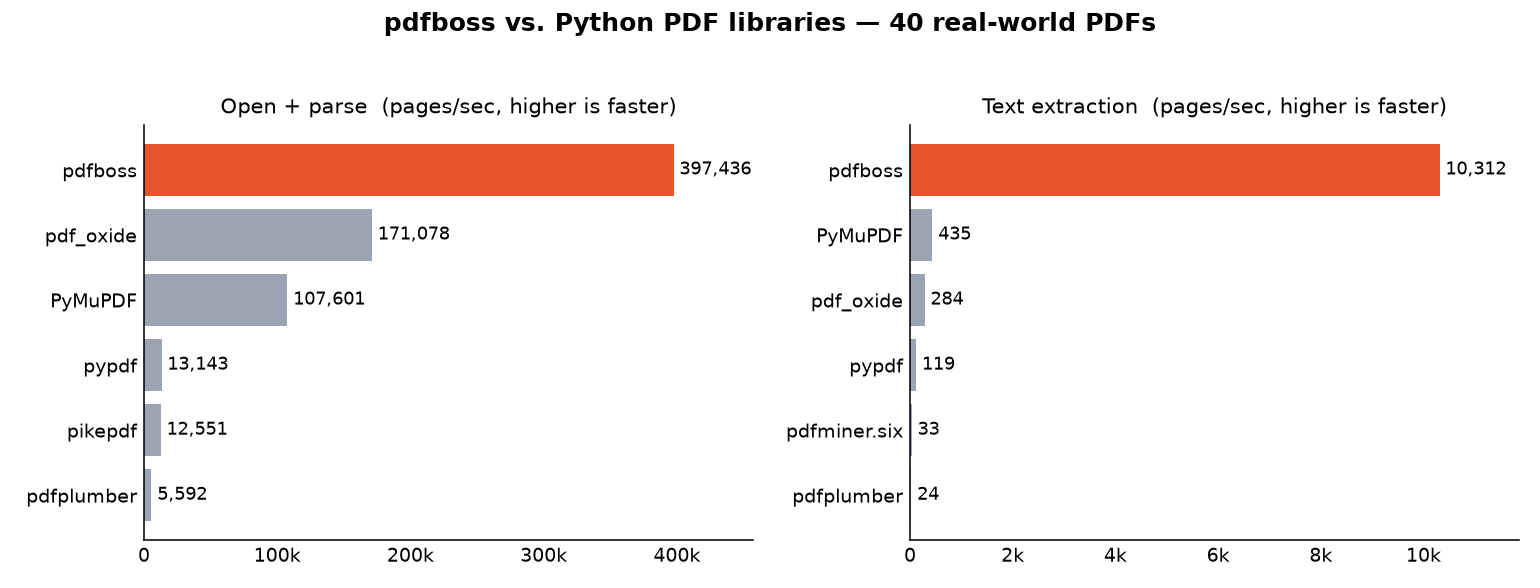
pdfboss is the fastest library measured on both operations — including against the C-backed PyMuPDF. On text extraction it reaches 1,539 pages/s versus PyMuPDF's 279 (≈5.5×), and 25–80× the pure-Python readers. On open + parse it reaches 19,114 pages/s versus PyMuPDF's 3,766 (≈5×): lazy page-tree loading means opening a document reads only its declared page count instead of parsing every page dictionary up front. Rendering is not compared — pdfboss's rasterizer does not yet paint every glyph, so timing it against full renderers would be misleading.
Numbers are machine-dependent; reproduce with benchmarks/bench.py.
Limitations
Rendered pages paint the outlines of embedded TrueType glyphs (Type0/CIDFontType2 under Identity, and simple /TrueType fonts via their cmap). Text in other fonts (CFF/Type1 programs, the standard 14, subset fonts without a usable cmap) is still positioned but not drawn.
Not yet supported in v0.1 (they error or degrade gracefully, and are on the roadmap): password-protected documents (the empty user password is handled for both RC4 and AES) · non-TrueType glyph outlines (CFF/Type1) · shadings and tiling patterns · JPXDecode (JPEG 2000).
The sync and async APIs are not at parity on encryption: Document/Page (and the CLI's info/text/render/obj) decrypt empty-user-password RC4/AES files transparently, as above. AsyncDocument (pdfboss tui, any http(s):// target, and the Python AsyncDocument) currently rejects every encrypted document outright, real password or not — async decryption parity is a tracked follow-up.
Development
cargo test --workspace          # Rust test suite
cargo clippy --workspace --all-targets -- -D warnings
maturin develop                 # build the Python extension into your venv
pytest                          # Python integration tests
License
Dual-licensed under either of
- MIT license (LICENSE-MIT)
- Apache License, Version 2.0 (LICENSE-APACHE)
at your option. Unless you explicitly state otherwise, any contribution intentionally submitted for inclusion in the work by you shall be dual-licensed as above, without any additional terms or conditions.
1 maintainer

Download files
Download the file for your platform. If you're not sure which to choose, learn more about installing packages.
Source Distribution
Built Distributions
Filter files by name, interpreter, ABI, and platform.
If you're not sure about the file name format, learn more about wheel file names.
Copy a direct link to the current filters
File details
Details for the file pdfboss-0.4.0.tar.gz.
File metadata
- Download URL: pdfboss-0.4.0.tar.gz
- Upload date:
- Size: 2.9 MB
- Tags: Source
- Uploaded using Trusted Publishing? Yes
- Uploaded via:
twine/6.1.0 CPython/3.13.14
File hashes
| Algorithm | Hash digest | |
|---|---|---|
| SHA256 |
ce1faffafc5273b10776f1b7a8d227ae9e8077b8f632121e4503f569a665b038
|
|
| MD5 |
e131f7d0004cf44bf53d2e7769a9ce5d
|
|
| BLAKE2b-256 |
d43501506f4aa3c9c986d8162e27bb0683d2cac59cd4a8216ac7e4cfed1320f5
|
Provenance
The following attestation bundles were made for pdfboss-0.4.0.tar.gz:
Publisher:
release-please.yaml on 4thel00z/pdfboss
-
Statement:
-
Statement type:
https://in-toto.io/Statement/v1 -
Predicate type:
https://docs.pypi.org/attestations/publish/v1 -
Subject name:
pdfboss-0.4.0.tar.gz -
Subject digest:
ce1faffafc5273b10776f1b7a8d227ae9e8077b8f632121e4503f569a665b038 - Sigstore transparency entry: 2246014633
- Sigstore integration time:
-
Permalink:
4thel00z/pdfboss@d5cee2de13cdd5258bfeeb91deafc7fad4050f0c -
Branch / Tag:
refs/heads/main - Owner: https://github.com/4thel00z
-
Access:
public
-
Token Issuer:
https://token.actions.githubusercontent.com -
Runner Environment:
github-hosted -
Publication workflow:
release-please.yaml@d5cee2de13cdd5258bfeeb91deafc7fad4050f0c -
Trigger Event:
push
-
Statement type:
File details
Details for the file pdfboss-0.4.0-cp312-abi3-manylinux_2_17_x86_64.manylinux2014_x86_64.whl.
File metadata
- Download URL: pdfboss-0.4.0-cp312-abi3-manylinux_2_17_x86_64.manylinux2014_x86_64.whl
- Upload date:
- Size: 2.5 MB
- Tags: CPython 3.12+, manylinux: glibc 2.17+ x86-64
- Uploaded using Trusted Publishing? Yes
- Uploaded via:
twine/6.1.0 CPython/3.13.14
File hashes
| Algorithm | Hash digest | |
|---|---|---|
| SHA256 |
76ff93d2830af8e4e43064c68f4d8ac212de2246af41989e9495e3c2686478fa
|
|
| MD5 |
9d90cfc93ab973f60510903595e72888
|
|
| BLAKE2b-256 |
f99b12d768d3bea9d260b7458a9bf433e3568d323cb5d699c37cbe25e3c16dd9
|
Provenance
The following attestation bundles were made for pdfboss-0.4.0-cp312-abi3-manylinux_2_17_x86_64.manylinux2014_x86_64.whl:
Publisher:
release-please.yaml on 4thel00z/pdfboss
-
Statement:
-
Statement type:
https://in-toto.io/Statement/v1 -
Predicate type:
https://docs.pypi.org/attestations/publish/v1 -
Subject name:
pdfboss-0.4.0-cp312-abi3-manylinux_2_17_x86_64.manylinux2014_x86_64.whl -
Subject digest:
76ff93d2830af8e4e43064c68f4d8ac212de2246af41989e9495e3c2686478fa - Sigstore transparency entry: 2246015079
- Sigstore integration time:
-
Permalink:
4thel00z/pdfboss@d5cee2de13cdd5258bfeeb91deafc7fad4050f0c -
Branch / Tag:
refs/heads/main - Owner: https://github.com/4thel00z
-
Access:
public
-
Token Issuer:
https://token.actions.githubusercontent.com -
Runner Environment:
github-hosted -
Publication workflow:
release-please.yaml@d5cee2de13cdd5258bfeeb91deafc7fad4050f0c -
Trigger Event:
push
-
Statement type:
File details
Details for the file pdfboss-0.4.0-cp312-abi3-macosx_11_0_arm64.whl.
File metadata
- Download URL: pdfboss-0.4.0-cp312-abi3-macosx_11_0_arm64.whl
- Upload date:
- Size: 2.3 MB
- Tags: CPython 3.12+, macOS 11.0+ ARM64
- Uploaded using Trusted Publishing? Yes
- Uploaded via:
twine/6.1.0 CPython/3.13.14
File hashes
| Algorithm | Hash digest | |
|---|---|---|
| SHA256 |
af8e7ab9b47ad6a68b1c0ca7c39497752a5cabf3ca70fb4d1fe6d3ea6dce8f15
|
|
| MD5 |
b5ce000725ccdbd3a93d0e2fa6d74724
|
|
| BLAKE2b-256 |
9a8ce67d0118934daad98ff9724be89556e0f7257b5cd2c26469d187ba7d1cab
|
Provenance
The following attestation bundles were made for pdfboss-0.4.0-cp312-abi3-macosx_11_0_arm64.whl:
Publisher:
release-please.yaml on 4thel00z/pdfboss
-
Statement:
-
Statement type:
https://in-toto.io/Statement/v1 -
Predicate type:
https://docs.pypi.org/attestations/publish/v1 -
Subject name:
pdfboss-0.4.0-cp312-abi3-macosx_11_0_arm64.whl -
Subject digest:
af8e7ab9b47ad6a68b1c0ca7c39497752a5cabf3ca70fb4d1fe6d3ea6dce8f15 - Sigstore transparency entry: 2246015739
- Sigstore integration time:
-
Permalink:
4thel00z/pdfboss@d5cee2de13cdd5258bfeeb91deafc7fad4050f0c -
Branch / Tag:
refs/heads/main - Owner: https://github.com/4thel00z
-
Access:
public
-
Token Issuer:
https://token.actions.githubusercontent.com -
Runner Environment:
github-hosted -
Publication workflow:
release-please.yaml@d5cee2de13cdd5258bfeeb91deafc7fad4050f0c -
Trigger Event:
push
-
Statement type:














