
A purpose-built PDF link analysis and reporting tool with GUI and CLI.
Verified details
These details have been verified by PyPIProject links
GitHub Statistics
Maintainers

Project description
pdflinkcheck
A purpose-built tool for comprehensive analysis of hyperlinks and link remnants within PDF documents, primarily using the PyMuPDF library. Use the CLI or the GUI.
📥 Access and Installation
The recommended way to use pdflinkcheck is to either install the CLI with pipx or to download the appropriate latest binary for your system from Releases.
🚀 Recommended Access (Binary Files)
For the most user-typical experience, download the single-file binary matching your OS.
| File Type | Primary Use Case | Recommended Launch Method |
|---|---|---|
| Executable (.exe, .elf, .pyz) | GUI (Double-Click) | Double-click the file (use the accompanying .bat file on Windows). |
| PYZ (Python Zip App) | CLI (Terminal) | Run using your system's python command: python pdflinkcheck-VERSION.pyz analyze ... |
Installation via pipx
For an isolated environment where you can access pdflinkcheck from any terminal:
# Ensure you have pipx installed first (if not, run: pip install pipx)
pipx install pdflinkcheck
💻 Graphical User Interface (GUI)
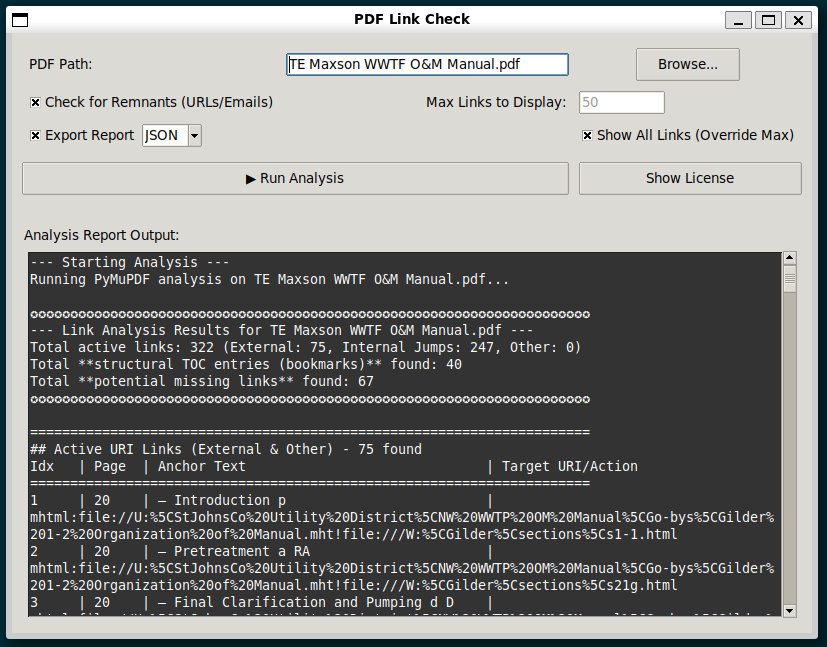
The tool can be run as simple cross-platform graphical interface (Tkinter).
Launching the GUI
There are three ways to launch the GUI interface:
- Implicit Launch: Run the main command with no arguments, subcommands, or flags (
pdflinkcheck). - Explicit Command: Use the dedicated GUI subcommand (
pdflinkcheck gui). - Binary Double-Click:
- Windows: Double-click the
pdflinkcheck-VERSION-gui.batfile. - macOS/Linux: Double-click the downloaded
.pyzor.elffile.
- Windows: Double-click the
Planned GUI Updates
We are actively working on the following enhancements:
- Report Export: Functionality to export the full analysis report to a plain text file.
- License Visibility: A dedicated "License Info" button within the GUI to display the terms of the AGPLv3+ license.
🚀 CLI Usage
The main command is pdflinkcheck analyze.
# Basic usage: Analyze a PDF and check for remnants (default behavior)
pdflinkcheck analyze "path/to/my/document.pdf"
Analyze Command Options
| Option | Description | Default |
|---|---|---|
<PDF_PATH> |
Required. The path to the PDF file to analyze. | N/A |
--check-remnants / --no-check-remnants |
Toggle scanning the text layer for unlinked URLs/Emails. | --check-remnants |
--max-links INTEGER |
Set the maximum number of links/remnants to display in the detailed report sections. Use 0 to show all. | 50 |
--help |
Show command help and exit. | N/A |
Example Run
pdflinkcheck analyze "TE Maxson WWTF O&M Manual.pdf" --max-links 10
✨ Features
- Active Link Extraction: Identifies and categorizes all programmed links (External URIs, Internal GoTo/Destinations, Remote Jumps).
- Anchor Text Retrieval: Extracts the visible text corresponding to each link's bounding box.
- Remnant Detection: Scans the document's text layer for unlinked URIs and email addresses that should potentially be converted into active links.
- Structural TOC: Extracts the PDF's internal Table of Contents (bookmarks/outline).
📜 License Implications (AGPLv3+)
pdflinkcheck is licensed under the GNU Affero General Public License version 3 or later (AGPLv3+).
This license has significant implications for distribution and network use, particularly for organizations:
- Source Code Provision: If you distribute this tool (modified or unmodified) to anyone, you must provide the full source code under the same license.
- Network Interaction (Affero Clause): If you modify this tool and make the modified version available to users over a computer network (e.g., as a web service or backend), you must also offer the source code to those network users.
Before deploying or modifying this tool for organizational use, especially for internal web services or distribution, please ensure compliance with the AGPLv3+ terms.
⚠️ Compatibility Notes
- Platform Compatibility: This tool relies on the
PyMuPDFlibrary. All testing has failed to run in a Termux (Android) environment due to underlying C/C++ library compilation issues with PyMuPDF. It is recommended for use on standard Linux, macOS, or Windows operating systems. - Document Compatibility: While
pdflinkcheckuses the robust PyMuPDF library, not all PDF files can be processed successfully. This tool is designed primarily for digitally generated (vector-based) PDFs. Processing may fail or yield incomplete results for:- Scanned PDFs (images of text) that lack an accessible text layer.
- Encrypted or Password-Protected documents.
- Malformed or non-standard PDF files.
Run from Source (Developers)
git clone http://github.com/city-of-memphis-wastewater/pdflinkcheck.git
cd pdflinkcheck
uv sync
uv run python src/pdflinkcheck/cli.py --help
Project details
Verified details
These details have been verified by PyPIProject links
GitHub Statistics
Maintainers
Release history Release notifications | RSS feed


Download files
Download the file for your platform. If you're not sure which to choose, learn more about installing packages.
Source Distribution
Built Distribution
Filter files by name, interpreter, ABI, and platform.
If you're not sure about the file name format, learn more about wheel file names.
Copy a direct link to the current filters
File details
Details for the file pdflinkcheck-1.1.32.tar.gz.
File metadata
- Download URL: pdflinkcheck-1.1.32.tar.gz
- Upload date:
- Size: 32.3 kB
- Tags: Source
- Uploaded using Trusted Publishing? Yes
- Uploaded via: twine/6.1.0 CPython/3.13.7
File hashes
| Algorithm | Hash digest | |
|---|---|---|
| SHA256 |
9a5573d2b6b8a407a11fde2f3af33c603bad1b5b278d3e2927a9077e222c253c
|
|
| MD5 |
55705714aae79690bd3d768e2f4409be
|
|
| BLAKE2b-256 |
b5f8480f62b50144ec36d329731530a9aad925c31515d6ba46c42e737fc01ad8
|
Provenance
The following attestation bundles were made for pdflinkcheck-1.1.32.tar.gz:
Publisher:
publish.yml on City-of-Memphis-Wastewater/pdflinkcheck
-
Statement:
-
Statement type:
https://in-toto.io/Statement/v1 -
Predicate type:
https://docs.pypi.org/attestations/publish/v1 -
Subject name:
pdflinkcheck-1.1.32.tar.gz -
Subject digest:
9a5573d2b6b8a407a11fde2f3af33c603bad1b5b278d3e2927a9077e222c253c - Sigstore transparency entry: 766222173
- Sigstore integration time:
-
Permalink:
City-of-Memphis-Wastewater/pdflinkcheck@86b7a599f6c82925c725828fc2fc1cc685fc681f -
Branch / Tag:
refs/tags/v1.1.32 - Owner: https://github.com/City-of-Memphis-Wastewater
-
Access:
public
-
Token Issuer:
https://token.actions.githubusercontent.com -
Runner Environment:
github-hosted -
Publication workflow:
publish.yml@86b7a599f6c82925c725828fc2fc1cc685fc681f -
Trigger Event:
release
-
Statement type:
File details
Details for the file pdflinkcheck-1.1.32-py3-none-any.whl.
File metadata
- Download URL: pdflinkcheck-1.1.32-py3-none-any.whl
- Upload date:
- Size: 31.5 kB
- Tags: Python 3
- Uploaded using Trusted Publishing? Yes
- Uploaded via: twine/6.1.0 CPython/3.13.7
File hashes
| Algorithm | Hash digest | |
|---|---|---|
| SHA256 |
b88f6d7e9cd3f9b8846a64dd0c85f6ad3d556e6f344f5546b6f175e57c535f77
|
|
| MD5 |
d4a399462a842505c806bec0cbe3f80d
|
|
| BLAKE2b-256 |
75d182e9c9a1c71d29e1c51fd987f51183aa48f370900f998b98dc9682a445ac
|
Provenance
The following attestation bundles were made for pdflinkcheck-1.1.32-py3-none-any.whl:
Publisher:
publish.yml on City-of-Memphis-Wastewater/pdflinkcheck
-
Statement:
-
Statement type:
https://in-toto.io/Statement/v1 -
Predicate type:
https://docs.pypi.org/attestations/publish/v1 -
Subject name:
pdflinkcheck-1.1.32-py3-none-any.whl -
Subject digest:
b88f6d7e9cd3f9b8846a64dd0c85f6ad3d556e6f344f5546b6f175e57c535f77 - Sigstore transparency entry: 766222213
- Sigstore integration time:
-
Permalink:
City-of-Memphis-Wastewater/pdflinkcheck@86b7a599f6c82925c725828fc2fc1cc685fc681f -
Branch / Tag:
refs/tags/v1.1.32 - Owner: https://github.com/City-of-Memphis-Wastewater
-
Access:
public
-
Token Issuer:
https://token.actions.githubusercontent.com -
Runner Environment:
github-hosted -
Publication workflow:
publish.yml@86b7a599f6c82925c725828fc2fc1cc685fc681f -
Trigger Event:
release
-
Statement type:






