
pdfmd


One command from Markdown to a good-looking PDF. pdfmd wraps
Pandoc and fills in everything you would otherwise
have to remember: sensible fonts and margins, the right Markdown dialect,
your project's metadata/preamble/filter files, and a fallback chain across
every PDF engine you have installed.
$ pdfmd lecture
AUTO: READER TITLE MARGIN MONOFONT. Use --verbose to see in full
OK    lecture.md
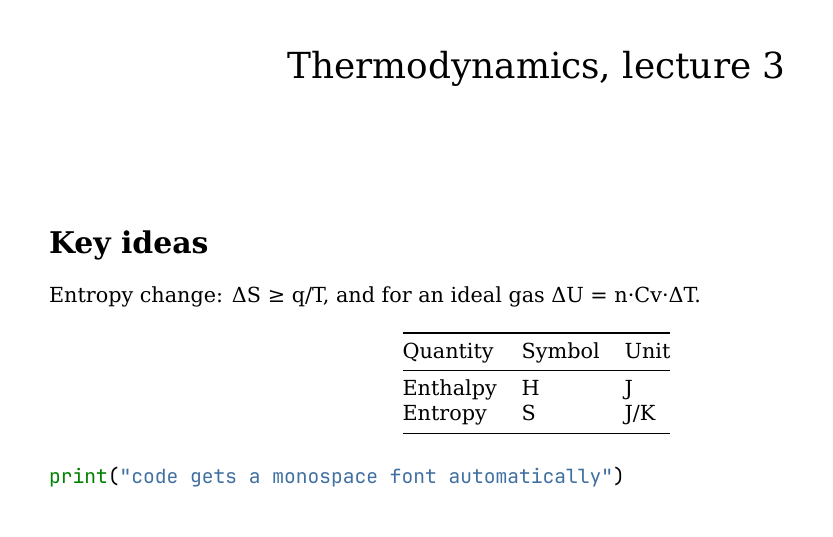
That PDF came from examples/lecture.md, a plain
Markdown file with no front matter and no configuration. Plain pandoc lecture.md -o lecture.pdf doesn't even get that far: its default engine,
pdflatex, stops at the Δ on line 5 with an error. With a Unicode engine
it would build, but with wide default margins, and with the # Title
line as an ordinary section heading instead of a title.
Why
Pandoc can do nearly anything, but its defaults assume you'll pass the right
flags every time. In practice that means one of two things: a long command
you copy from an old shell history, or a Makefile in every folder. pdfmd
turns that knowledge into defaults:
- It decides per document, not globally. A file with no YAML front matter is treated as ordinary GitHub-flavoured Markdown. A file that has front matter is assumed to be written for Pandoc and is left alone.
- It finds your project files. A
metadata.yaml,preamble.texor<name>.luabeside the document (or in ametadata/folder next to it) is picked up automatically, so every document in a folder shares one house style without any flags. - It doesn't give up on the first engine. If
lualatexfails or isn't installed, it tries the next engine, then the next, and tells you why each one failed. - It shows what it did. Every automatic decision prints an
AUTOline,-vshows the exact Pandoc command, and every default can be switched off.
Install
pipx install pdfmd-cli
That puts a pdfmd command on your PATH, with its Python dependencies, in
its own isolated environment. uv tool install pdfmd-cli does the same.
To update later, run pipx upgrade pdfmd-cli. (The package is named
pdfmd-cli because pdfmd on PyPI is an unrelated PDF-to-Markdown tool.
The command is still pdfmd. For the latest unreleased code, use pipx install git+https://github.com/aliperdehan/pdfmd.)
For the full pipeline, pdfmd drives programs that pip can't install, so you
also need (without them it still makes a plain PDF; see
No Pandoc? below). The quickest way, with no
admin rights, is pdfmd --install full, which puts Pandoc and Typst in pdfmd's own
folders; the system installers below do the same job:
- Pandoc
- at least one PDF engine. Typst is the quickest start; a TeX distribution (MacTeX, TeX Live) gives the best results and is what you need for LaTeX packages and math-heavy documents.
brew install pipx pandoc typst              # macOS, the quick start
brew install --cask mactex-no-gui           # optional: full LaTeX (large)
sudo apt install pipx pandoc texlive-xetex # Debian/Ubuntu
py -m pip install --user pipx; py -m pipx ensurepath          # Windows
winget install --id JohnMacFarlane.Pandoc; winget install --id Typst.Typst
Every push is tested on Windows, macOS and Linux (Pandoc + Typst: single files, CSV tables, a book, HTML output); see the Test and publish workflow. LaTeX engines aren't part of that automated test on Windows yet.
Optional extras: Quarto for .qmd files,
pandoc-crossref for @fig:/@tbl: references, and LibreOffice for
Office files.
Without pipx
pdfmd.py is a single file that needs Python 3.10+ (with pdfmd_inkmd/
beside it for the no-Pandoc fallback). It also runs
directly, and pyyaml/pypdf are optional (features that need them are
skipped with a warning):
git clone https://github.com/aliperdehan/pdfmd.git ~/pdfmd
echo 'alias pdfmd="python3 ~/pdfmd/pdfmd.py"' >> ~/.zshrc   # or ~/.bashrc
macOS's built-in /usr/bin/python3 is 3.9, which is too old; pdfmd says
so and exits.
Check what pdfmd can find on your system:
$ pdfmd --check-dependencies
OK    pandoc  (/opt/homebrew/bin/pandoc)
OK    1. lualatex  (/Library/TeX/texbin/lualatex)
OK    2. xelatex  (/Library/TeX/texbin/xelatex)
OK    3. pdflatex  (/Library/TeX/texbin/pdflatex)
OK    4. latexmk  (/Library/TeX/texbin/latexmk)
OK    5. tectonic  (/opt/homebrew/bin/tectonic)
OK    6. typst  (/opt/homebrew/bin/typst)
OK    7. weasyprint  (/opt/homebrew/bin/weasyprint)
MISS  8. wkhtmltopdf
...
OK    14. soffice  (/Applications/LibreOffice.app/Contents/MacOS/soffice)
OK    quarto (only needed for .qmd files)  (/usr/local/bin/quarto)
The numbers are the fallback order, and also shortcuts: -e 6 means
-e typst.
No Pandoc? The built-in fallback
On a machine with no Pandoc, or Pandoc but no PDF engine, pdfmd does not
stop: it builds a plain PDF with a pure-Python renderer that pip installed
with it, and says so.
$ pdfmd notes.md
NOTE  Pandoc was not found: building with the built-in renderer (inkmd). The output is plain ...
NATIVE  notes.md via inkmd
WARN  native (inkmd): notes.md: 2 math expression(s) set as plain text (Unicode, sub/superscripts, display math centred); ...
OK    notes.md
- inkmd is built in (vendored in
pdfmd_inkmd/, about 2 MB, standard library only, works offline, same input gives the same bytes). It reads GitHub-flavoured Markdown: headings, emphasis, lists, task lists, tables, code blocks, quotes, links, images, and PNG/JPEG. It cannot typeset math, so formulas are set as readable text instead: Greek letters and operators as Unicode,x^2andx_ias super/subscripts,\frac{a}{b}asa/b, and display math ($$...$$,\begin{equation},aligned) as its own centred lines. No bookmarks, no page numbers. - md2pdf (pymd2pdf, ReportLab based) is
used when installed, for documents with footnotes, math or a title:
pdfmd --install math(same aspip install "pdfmd-cli[math]"; about 150 MB, Python 3.11+, installs matplotlib so formulas render offline, centred, as real math; the few matplotlib cannot read are set as text like inkmd's). Footnotes, bookmarks and syntax-highlighted code come with it. pdfmd --install emoji(pdfmd-cli[emoji], about 11 MB) adds the colour emoji font; without it emoji print as[rocket]-style labels.pdfmd --install fullleaves the fallback behind: it installs Pandoc (the real binary from PyPI'spypandoc_binary, about 35 MB, also--install pandoc/pdfmd-cli[pandoc]) and Typst (Typst's own release from GitHub, about 15 MB, also--install typst, checked against the SHA-256 GitHub lists) into pdfmd's own folders (~/.local/share/pdfmd/bin,%LOCALAPPDATA%\pdfmd\bin), with no admin rights. A Pandoc or Typst already on your PATH always wins; to remove them,pip uninstall pypandoc_binaryand delete thetypstfile.
Every input is treated as GitHub-flavoured Markdown. Pandoc-only syntax is
converted where possible (\newpage and <!-- pagebreak --> become a page
break, footnotes become endnotes for inkmd, $ prices are not mistaken for math)
and removed otherwise (heading and image attributes, ::: divs, raw LaTeX,
<!-- comments -->), with one warning per kind. CSV tables
(::: {.csv file="data.csv"}) work as they do with Pandoc. The title, author and date in the
front matter become a title block and the PDF's own title and author; other
front-matter keys (documentclass, header-includes, pdfmd-options) are
listed as not used. There are no filters, preambles, citations, slides, parts or
report mode, and only Markdown input: for any of those, pdfmd --install full
(or brew install pandoc typst, winget install JohnMacFarlane.Pandoc Typst.Typst).
The built-in renderer is chosen automatically only when there is no Pandoc
route; a Pandoc build that fails never falls back to it. Ask for it with
-e inkmd, -e md2pdf or -e native, or pdf-engine: inkmd in pdfmd-options.
When it runs on a terminal and had to leave something out, pdfmd offers the
upgrades above (set PDFMD_NO_PROMPT=1 to silence that; choosing "don't ask
again" remembers it).
Usage
Every command below can be run from inside examples/.
One document
pdfmd lecture                 # finds lecture.md, writes lecture.pdf beside it
pdfmd lecture.md --open       # ...and opens it when done
pdfmd ~/notes/lecture.md -d   # write the PDF into the current directory instead
pdfmd lecture -w              # watch: rebuild on every save, until Ctrl+C
A bare name is looked up as <name>.md. The name can contain dots:
pdfmd notes-v1.2 builds notes-v1.2.md.
If no file has exactly that name, pdfmd also looks at what each document is
called inside: its title, and any pdfmd-options: {alias: ...}. Case, spaces,
_, -, accents and script don't matter (pdfmd animportantdocument finds
An Important Document.md; pdfmd glyukoza finds a document titled
Глюкоза), and a unique start of a name or title works too, with a warning
saying what it matched (pdfmd animp, pdfmd glucose). A name that fits two
documents is an error, never a guess; --no-auto lookup switches the guessing
off. An exact file name always wins.
One section
pdfmd doc#onlyapart builds just the section whose heading is "Only a Part"
(down to the next heading of the same or a higher level), written as
doc.only-a-part.pdf beside the document. Headings are named the way files
are: case, spaces and spelling don't matter, a unique start works (with a
warning), and so does a {#label}. doc##yield asks for a level-2 heading,
doc#results/yield for one under another, doc#a+b for several, and
pdfmd '#yield' uses the folder's only Markdown file. pdfmd doc --list-parts
shows what can be named. In a document split into parts the same names work
for headings inside the parts.
Anything with a {#label} can be named too: pdfmd doc#fig:setup builds just
that figure, doc#eq:energy that equation, and likewise a table, a fenced div,
a code block or a span (the figure's number restarts at 1).
Other output formats
The format is taken from -o's extension, or given explicitly with --to:
pdfmd lecture -o lecture.html
pdfmd lecture -o lecture.docx
pdfmd lecture --to typst -o lecture.typ
pdfmd lecture -o lecture.tex      # a complete, compilable .tex, not a fragment
Stopping part-way
--stop-at ends the build after a stage; everything before it runs as normal:
pdfmd report --stop-at markdown   # report.assembled.md: the parts joined into one file
pdfmd report --assemble-only      # the same, shorter
pdfmd report --stop-at tex        # the standalone .tex a LaTeX engine would get (= --to latex)
The assembled file holds just the document text (and is marked
pdfmd-assembled: true), so pdfmd never joins its parts a second time.
By default it holds just the text. --embed-metadata also folds in what pdfmd
finds beside the document (metadata, preamble, Lua filters, and the
bibliography and CSL files the metadata names), so the file no longer needs
them beside it. What the text points at otherwise (images, files a preamble
\inputs) is not embedded: keep it where the document finds it, relative to
the assembled file.
pdfmd report --assemble-only --embed-metadata                  # metadata.yaml, preamble.tex, Lua filters, .bib/.csl
pdfmd report --assemble-only --embed-metadata metadata preamble   # only those
pdfmd report --assemble-only --embed-metadata --lua-mode ref   # name the filter instead of copying it
An embedded Lua filter sits in a {=pdfmd} block at the end of the file. A
Lua filter can run any command, so one only runs if this machine's pdfmd
embedded it (otherwise it is skipped with a warning, unless you pass
--trust-embedded).
--lua-mode apply runs the filters at assembly time instead, so the text
already has their effect (approximate: Pandoc re-writes the text, and a filter
that looks at FORMAT is embedded instead). --unpack goes the other way:
pdfmd report.assembled.md --unpack # filters, preamble and metadata back into report.assembled.unpacked/
pdfmd finds report.assembled.unpacked/ beside report.assembled.md by
itself (its metadata, preambles and Lua filters), and --unpack --slim strips
the unpacked parts out of the assembled file, leaving the lean document plus
that folder.
A document can name its own files and set what to embed, in pdfmd-options:
pdfmd-options:
  yaml: [base.yaml]        # metadata files (like -y); also `metadata:`, or grouped:
  metadata:
    preamble: my-preamble.tex
    lua-filter: my.lua
  embed: {lua: ref}        # what --assemble-only embeds without the flag
Plain HTML output is a fragment. For a finished page, or one file with everything (images, CSS) inlined, ask for it, on the command line or in the document:
pdfmd lecture -o lecture.html --self-contained
pdfmd-options:
  default-output: html     # build to HTML when no format is given
  html: {self-contained: true, css: style.css}
Slides
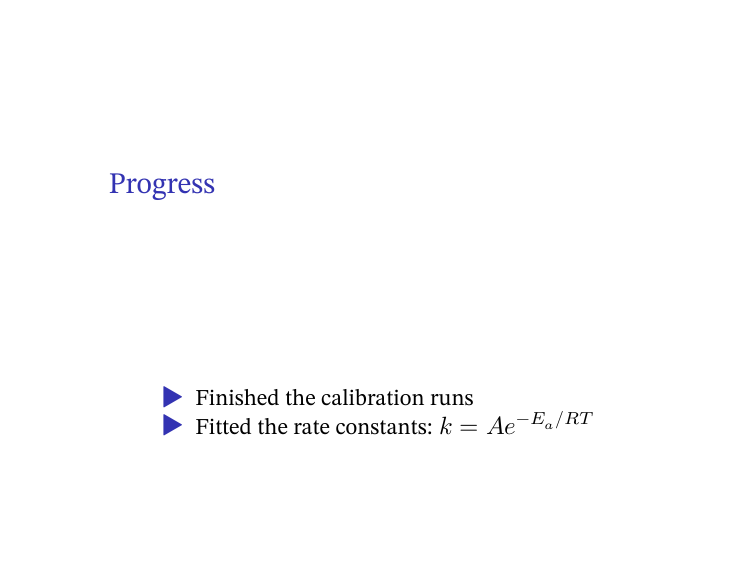
pdfmd slides -p # Beamer slides; each heading starts a slide
A whole folder
$ pdfmd notes -b
AUTO: READER TITLE MARGIN MONOFONT. Use --verbose to see in full
AUTO: MARGIN. Use --verbose to see in full
AUTO: MARGIN. Use --verbose to see in full
OK    notes/lecture.md
OK    notes/week1.md
OK    notes/week2.md
-b converts every .md in the folder into its own PDF, in parallel
(-j N sets the number of workers). Add --recursive to include
subfolders, and -o DIR to collect the PDFs somewhere else.
A book or report from several files
$ pdfmd book -r -o book.pdf
OK    book/01-intro.md
OK    book/02-methods.md
AUTO: MARGIN. Use --verbose to see in full
OK    REPORT  book.pdf
-r (also spelled --report or --book) joins every .md in the folder
into a single PDF, in the order of each file's chapter: front-matter
field. See examples/book/. -i FILE leaves one file
out, and --exclude-unnumbered skips files without a chapter:.
One long document in several files
For an article-style document that has grown too long to edit as one file
(and unlike -r, one that should read as a single document, not a
sequence of chapters), keep a scaffold with the front matter, and the
text in a parts/ folder beside it, one file per section, each starting with
its own heading:
report.md                    front matter only (title, author, ...)
parts/10-introduction.md
parts/20-methods.md
parts/30-discussion.md
Switch it on once, in a metadata.yaml shared by your documents, so the
content files carry no typesetting:
pdfmd-options:
  parts: auto        # a document is a scaffold only if parts/ or sections/ exists
$ pdfmd report                  # the whole document, report.pdf
$ pdfmd report#methods          # just that part, report.methods.pdf
$ pdfmd report#discussion+appendix      # several: always in report order
$ pdfmd parts/20-methods.md     # same as report#methods
$ pdfmd report --list-parts
$ pdfmd old-report.md --split new-folder   # cut an existing single file into parts
$ pdfmd old-report.md --split new-folder --split-depth 2   # ...and subsections too
The parts are joined in filename order into one Pandoc run, so the result is
identical to the same text in a single file: labels, citations and numbering
work across parts, and paths are written relative to the scaffold's folder
whichever part they are in. A part rebuilt alone is much faster to compile
but cannot see the others, so references to them print as ??. See
examples/parts/.
Faster rebuilds: the cache
pdfmd-options:
  cache: {aux: true}      # or: pdfmd report --cache
keeps LaTeX's cross-reference files between builds (in ~/.cache/pdfmd), so
an unchanged document is typeset once instead of two or three times, and a
part built on its own shows the real numbers of the parts left out (taken
from the last full build) instead of ??. It never skips a build: Pandoc and
LaTeX still process the whole document from the current sources and package
every time, so a change shows in the next build. cache: {plots: true} (or
--cache-plots, with nulabreport >= 1.26.0) additionally stores each plot as a
PDF and reuses it until the package, the preamble, the engine or the plot's
data file changes. Off by default; --no-cache for one build; pdfmd --clear-cache
(or deleting the folder) is always safe.
Tables straight from a CSV file
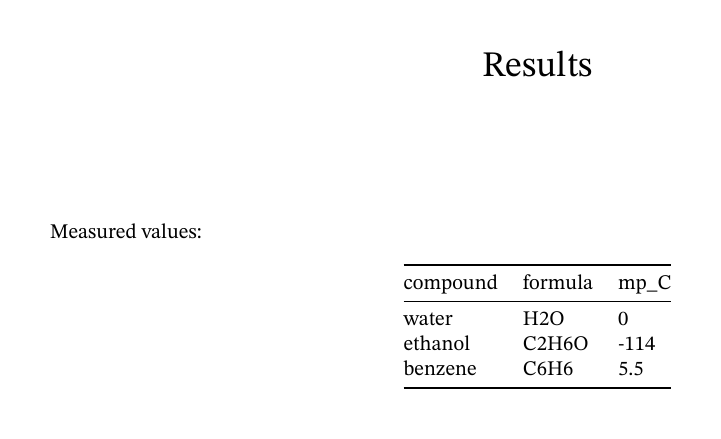
Measured values:

::: {.csv file="data.csv"}
:::
- The delimiter is detected from the extension (
.tsvmeans tab), or set withdelimiter=";". - The first row is the header unless you add
header="false". - Large files are capped at 10 rows × 7 columns, so a huge CSV can't
silently fill 40 pages.
rows=allorcols=20raise the cap. When a table is cut, the PDF itself shows a note saying so.
This works for every output format.
Not just Markdown
pdfmd paper.tex          # compiled directly with a LaTeX engine: reruns until
                         # references settle, runs bibtex/biber, and leaves
                         # no .aux/.log clutter (--keep-aux keeps them)
pdfmd minutes.docx       # Word/PowerPoint/Excel/ODF: converted by LibreOffice
pdfmd analysis.qmd       # handed to Quarto, so code chunks actually run
pdfmd page.html          # anything else Pandoc can read (give the extension)
What it does automatically
Most of these print an AUTO line, and each can be switched off individually.
AUTO kind |
When | What happens |
|---|---|---|
READER |
no YAML front matter | reads the file as GitHub-flavoured Markdown (content-sized table columns, relaxed blank-line rules) |
TITLE |
no front matter, first line is # Title |
that heading becomes the document title, and the remaining headings move up one level |
MARGIN |
no margin or geometry set anywhere | 1-inch margins instead of LaTeX's wide defaults |
MAINFONT |
no mainfont: and no -f |
STIX Two Text, retried with DejaVu Serif if any glyph is missing (Times New Roman if DejaVu isn't installed) |
MONOFONT |
the document contains code | JetBrains Mono for code (Menlo or another installed monospace font if it isn't installed) |
tablewidth |
a wide pipe table | balances column widths so the table fits the page, and leaves narrow tables at their natural width |
YAML / TEX / LUA |
project files found | attaches metadata.yaml, preamble.tex, <name>.lua (see below) |
citeproc |
@key / [@key, p. 90] citations |
adds --citeproc, so citations and the reference list render from your bibliography: without any flag (--no-citeproc turns it off) |
crossref |
@fig:/@tbl: references |
adds the pandoc-crossref filter, ahead of citeproc |
papersize |
pagesize: a4 (a common typo) |
converts it to Pandoc's real papersize: |
-v explains each decision and prints the exact command it runs:
$ pdfmd lecture -v
CMD  pandoc lecture.md -o lecture.pdf --pdf-engine=lualatex -f gfm -V 'mainfont=STIX Two Text' -V geometry:margin=1in -V 'monofont=JetBrains Mono' --shift-heading-level-by=-1 --lua-filter .../pdfmd-tablewidth.lua
CMD  pandoc lecture.md -o lecture.pdf --pdf-engine=lualatex -f gfm -V 'mainfont=DejaVu Serif' ...
AUTO READER  lecture.md: no YAML front matter; reading as gfm
AUTO TITLE  lecture.md: promoted leading '# ' heading to Pandoc title metadata
AUTO MARGIN  lecture.md: no geometry/margin set; using geometry:margin=1in on LaTeX-family engines
AUTO MONOFONT  lecture.md: has code but no monofont set; using JetBrains Mono on LaTeX-family engines
OK    lecture.md
The second CMD line is the font fallback at work: STIX Two Text was
missing a glyph, so the document was rebuilt with DejaVu Serif. (Temporary
file paths are shortened here.)
When a PDF doesn't look the way the Markdown suggests, run -v first.
The cause is usually one of these automatic decisions, and -v names it.
Switching defaults off
pdfmd lecture --no-auto                  # everything off: close to plain pandoc
pdfmd lecture --no-auto margin mainfont  # only these
Passing options to Pandoc
Any option pdfmd doesn't recognise is passed straight to Pandoc:
pdfmd lecture --toc --number-sections
pdfmd lecture -V fontsize=12pt
Settings inside the document
Or put settings in the document itself, so nobody has to remember the flag:
---
title: Lab report
pdfmd-options:
  no-auto: [margin, monofont]
  pdf-engine: tex        # only TeX engines; never fall back to HTML ones
---
pdf-engine: takes an engine name (lualatex, typst, ...) or a family:
tex, typst, html or office. A family limits the fallback chain to
that kind of engine. For example, a document full of chemical structures
can require TeX, and a plain memo can skip the slow LaTeX run. -e on the
command line always wins, and a bare -e means "try every engine".
Project files
pdfmd looks next to the document, and in a metadata/ folder beside it,
for:
| File | Used as |
|---|---|
metadata.yaml |
shared Pandoc metadata (fonts, bibliography, CSL, ...) |
<name>.yaml |
per-document metadata, layered on top of metadata.yaml |
report.yaml / book.yaml |
metadata for -r builds |
preamble.tex, latex-preamble.tex, <name>-preamble.tex, preamble-*.tex |
LaTeX added to the header, generic files first |
<name>.lua |
a Pandoc Lua filter for that document |
Only these names are picked up automatically. An unrelated .lua or
.tex file lying in the folder never changes a render. When several YAML
files could apply and none is clearly meant, pdfmd stops and asks you to
choose with -y FILE, rather than guessing. -y alone turns discovery
off.
With a metadata/ folder, a report's own folder can hold nothing but
report.md and report.pdf. Relative paths inside the metadata (such as
bibliography: refs.bib) resolve from metadata/, and image paths in the
document still resolve from the document's own folder.
One shared metadata file can also be symlinked into many folders. A
relative bibliography: refs.bib inside it then finds the refs.bib
next to the file's real copy, so you never need an absolute path.
Build stamps and snapshots
Both are off by default.
--stampkeeps aBUILD NOTESHTML comment at the end of the.mdup to date. It records when the document was compiled and with whichpdfmdversion, plus the versions of any LaTeX packages you name with--stamp-packages. The comment is invisible in the PDF.--stamp-mode historyalso keeps a list of past compiles.--backupsaves a timestamped copy of the source intobackup/after every successful build. A copy is skipped when nothing changed, andkeep: 30limits how many are kept.
Both can be turned on for a whole folder from metadata.yaml:
pdfmd-options:
  stamp: true
  backup: { dir: backup, keep: 30 }
Separately, when pypdf is installed, every PDF built by pdfmd gets two
hidden metadata keys, PdfmdVersions and PdfmdBuildDate, which you can
read with pdfinfo -meta. Turn this off with --no-stamp-pdf-metadata.
Reference
pdfmd --helplists every flag.- The docstring at the top of
pdfmd.pyis the full reference for each behaviour and its edge cases. CHANGELOG.mdrecords what changed in each version and why.
License
1 maintainer

Metadata
1 maintainer
Release files for pdfmd-cli 3.21.5
For a detailed explanation of source distributions (sdists) and built distributions (wheels), please see the package formats documentation.
Source distribution (sdist)
| File | Size | Uploaded | |
|---|---|---|---|
| pdfmd_cli-3.21.5.tar.gz | 822.5 kB | Details |
Built distribution (wheel)
| File | Interpreter | ABI | Platform | Reset |
|---|---|---|---|---|
| pdfmd_cli-3.21.5-py3-none-any.whl | Python 3 | none | any | Details |
Total release size: 1.6 MB
Release files / pdfmd_cli-3.21.5.tar.gz
| Download URL | pdfmd_cli-3.21.5.tar.gz |
|---|---|
| Size | 822.5 kB |
| Tags | Source |
|
SHA-256 checksum How to use checksums |
697775c0014e28a3046a0f34d506a147a0980d3f04c0e6a673d520b88eba092a
|
|
BLAKE2b-256 checksum How to use checksums |
3d52d7cd39321190031170e7038c4f727eeb81113003694158a1a2d3753c48f8
|
| Upload date | |
|
Uploaded using Trusted Publishing? What is trusted publishing? |
Yes |
| Uploaded via |
twine/7.0.0 CPython/3.13.14
|
Provenance
Provenance describes where a file came from. On PyPI, provenance is shared via attestations, which provide a verifiable record of the build or publishing details. View details, limitations and caveats.


PyPI Publish Attestation
PyPI verified that this artifact, at this checksum, originated from the publisher listed below.
Signed by GitHub Actions, verified by PyPI on Oct 7, 2026.
Transparency logRelease files / pdfmd_cli-3.21.5-py3-none-any.whl
| Download URL | pdfmd_cli-3.21.5-py3-none-any.whl |
|---|---|
| Size | 805.9 kB |
| Tags | Python 3 |
|
SHA-256 checksum How to use checksums |
a6e574cecc7e49e8e8116b1fce5d74e520b1849e6ca98738e05f432cc37cb211
|
|
BLAKE2b-256 checksum How to use checksums |
a7513455b89657a9e6ea8dd53e4f2785757545b65188d31d4c1a0c8bf15183e8
|
| Upload date | |
|
Uploaded using Trusted Publishing? What is trusted publishing? |
Yes |
| Uploaded via |
twine/7.0.0 CPython/3.13.14
|
Provenance
Provenance describes where a file came from. On PyPI, provenance is shared via attestations, which provide a verifiable record of the build or publishing details. View details, limitations and caveats.
PyPI Publish Attestation
PyPI verified that this artifact, at this checksum, originated from the publisher listed below.
Signed by GitHub Actions, verified by PyPI on Oct 7, 2026.
Transparency log













