
pdfmd


One command from Markdown to a good-looking PDF. pdfmd wraps
Pandoc and fills in everything you would otherwise
have to remember: sensible fonts and margins, the right Markdown dialect,
your project's metadata/preamble/filter files, and a fallback chain across
every PDF engine you have installed. The same document also builds to a
Word or OpenDocument file that follows its page setup, fonts and LaTeX (see
Word and OpenDocument output).
$ pdfmd lecture
AUTO: READER TITLE MARGIN MONOFONT. Use --verbose to see in full
OK    lecture.md
In a folder with a single Markdown file you do not even need the name: cd into the folder and run pdfmd. It finds
the file, its metadata, preamble and filters, and writes the PDF beside it (with several Markdown files it asks for
one, or for -b to convert all of them or -r to join them). pdfmd --help is one short page; pdfmd --help all
is the complete option list and pdfmd --help tables (or source, history, output ...) one subject at a time.
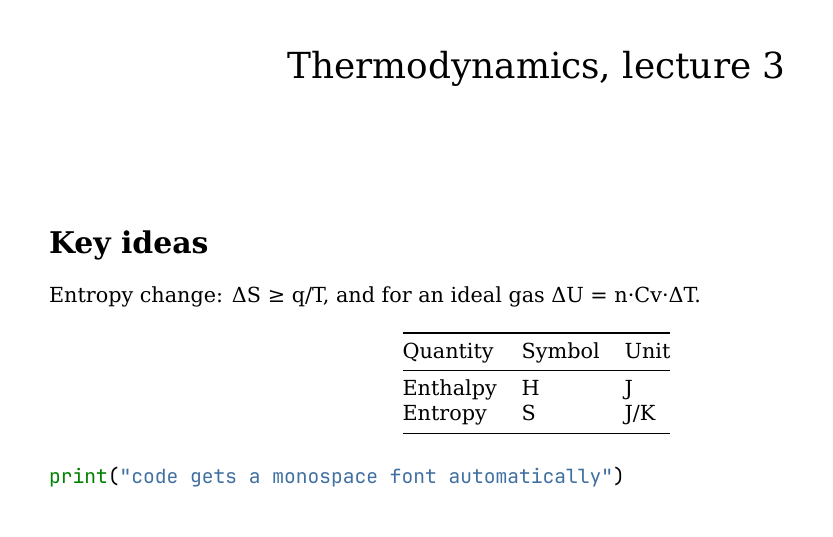
That PDF came from examples/lecture.md, a plain
Markdown file with no front matter and no configuration. Plain pandoc lecture.md -o lecture.pdf doesn't even get that far: its default engine,
pdflatex, stops at the Δ on line 5 with an error. With a Unicode engine
it would build, but with wide default margins, and with the # Title
line as an ordinary section heading instead of a title.
Why
Pandoc can do nearly anything, but its defaults assume you'll pass the right
flags every time. In practice that means one of two things: a long command
you copy from an old shell history, or a Makefile in every folder. pdfmd
turns that knowledge into defaults:
- It decides per document, not globally. A file with no YAML front matter is treated as ordinary GitHub-flavoured Markdown. A file that has front matter is assumed to be written for Pandoc and is left alone.
- It finds your project files. A
metadata.yaml,preamble.texor<name>.luabeside the document (or in ametadata/folder next to it) is picked up automatically, so every document in a folder shares one house style without any flags. - It doesn't give up on the first engine. If
lualatexfails or isn't installed, it tries the next engine, then the next, and tells you why each one failed. - It writes real Word files.
pdfmd report -o report.docxreads the front matter the PDF reads (paper size, margins, fonts, line spacing) and writes it into the file's page setup and styles, so the Word file is laid out the way the PDF is. With LaTeX installed, what only LaTeX can say in the document comes along:\ce{...}chemistry,\SI{...}{...}units and equations become native, editable Word text and equations; a house style's own macros can be given a Word recipe; what is left (tikz, chemfig, math Pandoc cannot convert) is drawn by LaTeX in the document's own preamble and embedded as vector pictures.pdfmd-options: {office: {latex: auto|images|off}},--no-auto officelatexandpdfmd --setupswitch it (see Word and OpenDocument output). - It handles every script and emoji. Text the main font cannot draw (Arabic,
Hebrew, Chinese, Japanese, Korean, Greek, Cyrillic with Kazakh letters, Indic and
more) is set run by run in an installed font for its script, emoji become colour
pictures, and
pdfmd --install fontsfetches missing fonts without admin rights (see Other scripts). - It finds documents by name, in any script.
pdfmd glyukozaopensГлюкоза.md; with--translitpacks,pdfmd tychefindsΤύχη.mdandpdfmd mingyunfinds命運.md. - It reads PDFs too.
pdfmd paper.pdfrestores a PDF's own embedded source or OCRs the pages to Markdown (see PDF to Markdown). - Tables can be data. A
::: {.csv}block puts a table's data in a CSV file or right in the document (any delimiter, alignment and widths as attributes), andpdfmd --extract-tablesturns the tables you already have into such blocks after checking that Pandoc reads the same tables back (see Tables straight from a CSV file). A table that is too wide gets its columns sized by their content. - Long code wraps, SVG and web images work. Code lines wrap at the margin in a LaTeX build, an SVG is converted for LaTeX with whatever is installed, and an image from the web is fetched once and kept.
- Finished files are not rewritten. A
.typfile goes to Typst and an.htmlfile to WeasyPrint or a browser, so the page setup, styles and scripts survive;--hybridmakes the PDF open in LibreOffice as an editable document. - It keeps the history.
pdfmd --historylists the backups, commits and compiles of a file,--history-restoreputs a version back (backing up the one it replaces), and the build history can live in a.hstfile instead of the document (see Build stamps, history and snapshots). - It shows what it did. Every automatic decision prints an
AUTOline,-vshows the exact Pandoc command, and every default can be switched off.
Install
pipx install pdfmd-cli
That puts a pdfmd command on your PATH, with its Python dependencies, in
its own isolated environment. The same with uv:
uv tool install pdfmd-cli        # install; update with: uv tool upgrade pdfmd-cli
uvx --from pdfmd-cli pdfmd file.md   # or run once without installing
On macOS, Homebrew installs it together with Pandoc and Typst, so nothing else is needed for a first PDF:
brew install aliperdehan/tap/pdfmd
To update later, run pipx upgrade pdfmd-cli. (The package is named
pdfmd-cli because pdfmd on PyPI is an unrelated PDF-to-Markdown tool.
The command is still pdfmd. For the latest unreleased code, use pipx install git+https://github.com/aliperdehan/pdfmd.)
For the full pipeline, pdfmd drives programs that pip can't install, so you
also need (without them it still makes a plain PDF; see
No Pandoc? below). The quickest way, with no
admin rights, is pdfmd --install full, which puts Pandoc and Typst in pdfmd's own
folders; the system installers below do the same job:
- Pandoc
- at least one PDF engine. Typst is the quickest start; a TeX distribution (MacTeX, TeX Live) gives the best results and is what you need for LaTeX packages and math-heavy documents.
brew install pipx pandoc typst              # macOS, the quick start
brew install --cask mactex-no-gui           # optional: full LaTeX (large)
sudo apt install pipx pandoc texlive-xetex  # Debian/Ubuntu
sudo dnf install pipx pandoc texlive-xetex  # Fedora (add Typst with `pdfmd --install typst`)
sudo pacman -S python-pipx pandoc-cli typst texlive   # Arch
On any Linux, pdfmd --install full (Pandoc and Typst) needs no package manager and no root.
py -m pip install --user pipx; py -m pipx ensurepath          # Windows
winget install --id JohnMacFarlane.Pandoc; winget install --id Typst.Typst
Every push is tested on Windows, macOS and Linux (Pandoc + Typst: single files, CSV tables, a book, HTML output); see the Test and publish workflow. LaTeX engines aren't part of that automated test on Windows yet.
Optional extras: Quarto for .qmd files,
pandoc-crossref for @fig:/@tbl: references, and LibreOffice for
Office files.
Without pipx
pdfmd.py needs Python 3.9+ and runs straight from a clone, with the folders beside it
(pdfmd_inkmd/ for the no-Pandoc fallback, pdfmd_office/, pdfmd_setup/, pdfmd_unicode/). It also runs
directly, and pyyaml/pypdf are optional (features that need them are
skipped with a warning):
git clone https://github.com/aliperdehan/pdfmd.git ~/pdfmd
echo 'alias pdfmd="python3 ~/pdfmd/pdfmd.py"' >> ~/.zshrc   # or ~/.bashrc
macOS's built-in /usr/bin/python3 is 3.9, which is too old; pdfmd says
so and exits.
Check what pdfmd can find on your system:
$ pdfmd --check-dependencies
OK    pandoc  (/opt/homebrew/bin/pandoc)
OK    1. lualatex  (/Library/TeX/texbin/lualatex)
OK    2. xelatex  (/Library/TeX/texbin/xelatex)
OK    3. pdflatex  (/Library/TeX/texbin/pdflatex)
OK    4. latexmk  (/Library/TeX/texbin/latexmk)
OK    5. tectonic  (/opt/homebrew/bin/tectonic)
OK    6. typst  (/opt/homebrew/bin/typst)
OK    7. weasyprint  (/opt/homebrew/bin/weasyprint)
MISS  8. wkhtmltopdf
...
OK    14. soffice  (/Applications/LibreOffice.app/Contents/MacOS/soffice)
OK    quarto (only needed for .qmd files)  (/usr/local/bin/quarto)
The numbers are the fallback order, and also shortcuts: -e 6 means
-e typst.
For everything at once, pdfmd --doctor is one page on the Markdown-to-PDF tools, fonts
and emoji, PDF reading (batchocr, Tesseract, Poppler, OCR languages), your config file and
the cache, ending with the command that fixes each missing piece:
$ pdfmd --doctor
...
Reading PDFs (PDF to Markdown):
OK    batchocr 1.2.5
MISS  tesseract: not found
MISS  poppler: not found

1 thing(s) to fix:
  1. tesseract (scanned PDFs) and poppler (scanned PDFs)
       brew install tesseract poppler
"Installed" is not "works": a LaTeX engine can be on the PATH and still fail on a missing package or font.
pdfmd --doctor --deep also builds a small page (maths, code, a table) with every engine it found, by running pdfmd
itself in a scratch folder, and says which one built it and how long that took, or why it could not:
$ pdfmd --doctor --deep
...
Smoke test (a small page with maths, code and a table, built with each engine):
OK    lualatex: built a PDF in 8.7 s
MISS  xelatex: could not build it (! LaTeX Error: File `stix2.sty' not found.)
OK    typst: built a PDF in 1.1 s
It takes a few seconds per engine (a minute or more if TeX has to fetch packages); without --deep nothing is built.
Tab completion
pdfmd --completion bash|zsh|fish prints a completion script, generated from the command
line itself so it never goes out of date:
pdfmd --completion zsh > ~/.zfunc/_pdfmd                              # ~/.zfunc in $fpath, then compinit
pdfmd --completion bash > ~/.local/share/bash-completion/completions/pdfmd
pdfmd --completion fish > ~/.config/fish/completions/pdfmd.fish
An older Pandoc, and a machine with no network
The oldest Pandoc pdfmd is tested with is 3.1.3 (what the claude.ai sandbox has); the whole test suite runs against
it. An older one may work, and the first build with it says so once; pdfmd --doctor lists what a given Pandoc does
without. With 3.1.3: Typst PDFs cannot show a picture pdfmd drew itself (before 3.2), a numbered equation in a Word file
sits in a plain table instead of a borderless one (before 3.4), and --extract-tables leaves a table whose caption has
a {#tbl:id} (before 3.8.2: Pandoc reads that as words, so the change could not be checked). A pandoc-crossref must be
the release built for the Pandoc you run; one built for another is not run, with a warning, because it would put ?? where
the numbers go.
Where pip install pdfmd-cli cannot reach the network (a sandbox with no DNS that only takes an upload), two ways:
python3 scripts/build_zipapp.py          # on a machine with pdfmd's source: dist/pdfmd.pyz, 1.4 MB, PyYAML and pypdf inside
python3 pdfmd.pyz report.md              # on the other: needs Python 3.9+, Pandoc and a PDF engine; unpacks itself once
                                         # into ~/.cache/pdfmd/pyz/ because Pandoc has to open the Lua filters as files

pip download pdfmd-cli -d wheelhouse     # or: a folder of wheels, carried over
pip install --no-index --find-links wheelhouse pdfmd-cli
No Pandoc? The built-in fallback
On a machine with no Pandoc, or Pandoc but no PDF engine, pdfmd does not
stop: it builds a plain PDF with a pure-Python renderer that pip installed
with it, and says so.
$ pdfmd notes.md
NOTE  Pandoc was not found: building with the built-in renderer (inkmd). The output is plain ...
NATIVE  notes.md via inkmd
WARN  native (inkmd): notes.md: 2 math expression(s) set as plain text (Unicode, sub/superscripts, display math centred); ...
OK    notes.md
- inkmd, written by Dylan Moir (MIT
licence), is built in (a copy is vendored in
pdfmd_inkmd/, about 2 MB, standard library only, works offline, same input gives the same bytes). It reads GitHub-flavoured Markdown: headings, emphasis, lists, task lists, tables, code blocks, quotes, links, images, and PNG/JPEG. It cannot typeset math, so formulas are set as readable text instead: Greek letters and operators as Unicode,x^2andx_ias super/subscripts,\frac{a}{b}asa/b, and display math ($$...$$,\begin{equation},aligned) as its own centred lines. No bookmarks, no page numbers. - md2pdf (pymd2pdf, ReportLab based) is
used when installed, for documents with footnotes, math or a title:
pdfmd --install math(same aspip install "pdfmd-cli[math]"; about 150 MB, Python 3.11+, installs matplotlib so formulas render offline, centred, as real math; the few matplotlib cannot read are set as text like inkmd's). Footnotes, bookmarks and syntax-highlighted code come with it. pdfmd --install emoji(about 11 MB;pdfmd-cli[emoji]is the pip way for the built-in renderer only) puts the colour emoji font in pdfmd's own fonts folder, where the built-in renderer and every engine that can draw colour emoji (Typst) find it; without it emoji print as[rocket]-style labels in the built-in renderer.pdfmd --install fullleaves the fallback behind: it installs Pandoc (the real binary from PyPI'spypandoc_binary, about 35 MB, also--install pandoc/pdfmd-cli[pandoc]) and Typst (Typst's own release from GitHub, about 15 MB, also--install typst, checked against the SHA-256 GitHub lists) into pdfmd's own folders (~/.local/share/pdfmd/bin,%LOCALAPPDATA%\pdfmd\bin), with no admin rights. A Pandoc or Typst already on your PATH always wins; to remove them,pip uninstall pypandoc_binaryand delete thetypstfile.
Every input is treated as GitHub-flavoured Markdown. Pandoc-only syntax is
converted where possible (\newpage and <!-- pagebreak --> become a page
break, footnotes become endnotes for inkmd, $ prices are not mistaken for math)
and removed otherwise (heading and image attributes, ::: divs, raw LaTeX,
<!-- comments -->), with one warning per kind. CSV tables
(::: {.csv file="data.csv"}) work as they do with Pandoc. The title, author and date in the
front matter become a title block and the PDF's own title and author; other
front-matter keys (documentclass, header-includes, pdfmd-options) are
listed as not used. There are no filters, preambles, citations, slides, parts or
report mode, and only Markdown input: for any of those, pdfmd --install full
(or brew install pandoc typst, winget install JohnMacFarlane.Pandoc Typst.Typst).
The built-in renderer is chosen automatically only when there is no Pandoc
route; a Pandoc build that fails never falls back to it. Ask for it with
-e inkmd, -e md2pdf or -e native, or pdf-engine: inkmd in pdfmd-options.
When it runs on a terminal and had to leave something out, pdfmd offers the
upgrades above (set PDFMD_NO_PROMPT=1 to silence that; choosing "don't ask
again" remembers it).
Usage
Every command below can be run from inside examples/.
One document
pdfmd lecture                 # finds lecture.md, writes lecture.pdf beside it
pdfmd lecture.md --open       # ...and opens it when done
pdfmd ~/notes/lecture.md -d   # write the PDF into the current directory instead
pdfmd lecture -w              # watch: rebuild on every save, until Ctrl+C
A bare name is looked up as <name>.md. The name can contain dots:
pdfmd notes-v1.2 builds notes-v1.2.md.
If no file has exactly that name, pdfmd also looks at what each document is
called inside: its title, and any pdfmd-options: {alias: ...}. Case, spaces,
_, -, accents and script don't matter (pdfmd animportantdocument finds
An Important Document.md; pdfmd glyukoza finds a document titled
Глюкоза), and a unique start of a name or title works too, with a warning
saying what it matched (pdfmd animp, pdfmd glucose). A name that fits two
documents is an error, never a guess; --no-auto lookup switches the guessing
off. An exact file name always wins.
Names in other scripts. Russian, Ukrainian, Belarusian and Kazakh Cyrillic are
always understood. Other scripts are off until you ask, one pack per script, so
nobody carries tables they don't use: --translit greek,hangul (or
PDFMD_TRANSLIT=greek,hangul) makes pdfmd tyche find Τύχη.md and
pdfmd unmyeong find 운명.md. Built in: greek, armenian, georgian,
hebrew, arabic (consonants only, as the scripts write them), hangul
(Revised Romanization) and kana (Hepburn). han gives pinyin without tones
(pdfmd mingyun finds 命運.md) and other covers every remaining script;
they use pypinyin (MIT) and
anyascii (ISC), installed with
pdfmd --install translit (pip install "pdfmd-cli[translit]"; about 3 MB).
--translit all turns every pack on, --translit none even Cyrillic off,
--translit list shows what is ready. These are for finding a name: plain
letters, no tones, vowels left out where the script leaves them out. Names that
romanize alike (homophones) are listed as ambiguous, never picked between. The
same spelling rules find a section by its heading (doc#tyche).
Check a document before you build it
pdfmd report --check                  # read report.md (a scaffold and its parts too) and list what is wrong; builds nothing
pdfmd a.md b.md --check               # several files, one report each
pdfmd report --check --strict         # warnings fail too (exit 1), for CI
pdfmd report --check --check-ignore heading-jump,link-missing
--check reads the source, with no Pandoc and no LaTeX, and prints compiler-style lines
(report.md:12: error: image not found: figs/a.png [image-missing]) that an editor can jump to, then
CHECK report.md: 1 error(s), 2 warning(s). It exits 1 on an error, and on a warning too with --strict. It finds:
| check | |
|---|---|
image-missing, file-missing, link-missing |
an image (, <img>, \includegraphics), a file= of a .csv div or a link to a local file that is not there |
anchor-missing |
[x](#methods) with no heading or {#id} of that name (the ids Pandoc and GitHub make from a heading count) |
id-duplicate, crossref-missing, ref-missing |
the same {#id} twice; a @fig:x, @tbl:x, @eq:x, @sec:x, @lst:x or \ref{x} nothing defines |
cite-missing, cite-no-bibliography, bibliography-missing |
a @key the .bib, CSL JSON or references: lacks (with a "did you mean"), citations with no bibliography set, a bibliography file that is missing |
footnote-missing, footnote-unused |
[^1] with no text, a [^1]: nobody uses |
heading-jump, heading-space, heading-empty |
# then ###; #Heading (a paragraph); a heading with no text |
fence-open, comment-open, div-open, div-stray, math-open |
a code fence, <!--, ::: div or $$ that is never closed, or a stray ::: |
front-matter, front-matter-duplicate |
YAML that does not parse (with its line) or never closes; a key set twice |
Code, comments, math and URLs are not read, so @decorator in a code block or me@x.org is not a citation. A
document in parts is checked as one: a link to #methods in the scaffold is found in a part. A file with no front
matter is taken for a fragment and its citations are not held against a missing bibliography, and neither are those of
a document with a Lua filter or citation-engine (something else may do the citing). A part checked on its own cannot
see the other parts' labels, so check the scaffold, not a part, to judge links across parts.
Leave a check out for the project with pdfmd-options: {check-ignore: [heading-jump]} (a document, a metadata file or
the config), or on one line with <!-- pdfmd-check: ignore image-missing --> on it or on the line above. pdfmd --check
is for Markdown; the build's own WARN and --strict still catch what only a build can see.
A small editor
pdfmd --install tui           # once: prompt_toolkit, about 1 MB
pdfmd --edit lecture          # nano-like full screen; Ctrl-B saves and builds, Ctrl-P opens the PDF
pdfmd --edit (alpha) opens the Markdown file in a plain full-screen editor with the build one key away: Ctrl-S
saves, Ctrl-B saves and builds (what pdfmd said stays at the bottom), Ctrl-P opens the result, Ctrl-W / F3 find,
Ctrl-G go to a line, Ctrl-K / Ctrl-U cut and paste a line, Ctrl-Z / Ctrl-Y undo and redo, Ctrl-X leaves (asking once
when there are unsaved changes); F1 lists them. Options given beside it (pdfmd --edit lecture -e lualatex) are used
for the build, and a name that does not exist yet starts a new file. It is deliberately rough: a base for what comes later.
In VS Code
pdfmd --init-vscode writes a .vscode/tasks.json here (build, build and open, watch, check, extract tables; Terminal > Run
Build Task). The vscode/ folder of the repository is a small
extension over the same command line: build (Cmd/Ctrl+Alt+B), build and open, build as Word/HTML/Typst/slides, extract
tables (all, or chosen ones), file history, compare and restore, restore the source a PDF carries (right-click it). Every
command it runs is written to the pdfmd output panel. Install it with npx @vscode/vsce package and
code --install-extension pdfmd-vscode-*.vsix.
A size budget for images and output
pdfmd report --max-asset-mb 5 --max-output-mb 20     # warn about an image over 5 MB and an output over 20 MB
pdfmd report --check --max-asset-mb 5                # list the images over 5 MB (asset-large), nothing is built
pdfmd-options:
  max-asset-mb: 5        # one image or data file
  max-output-mb: 20      # the file that is made (a mail server's limit, a course site's upload limit)
There is no budget unless one is set. With one, a build says which image is over it before it starts
(WARN report.md: figs/scan.png is 14.2 MB, over the 5 MB asset budget) and, when the file made is over the output
budget, names it and the three largest images behind it. They are WARN lines, so --strict fails them. --max-asset-mb 0
switches a document's budget off for one run.
Start from a template
pdfmd --init                          # the templates: article, report, notes, slides, book, and yours
pdfmd --init article my-paper         # my-paper/my-paper.md + refs.bib, title, author and date filled in
pdfmd --init report .                 # into this folder, if none of its files exist yet
pdfmd --init notes week3 -V author="A. Author" -V title="Week 3"
Each template builds as it is (they are checked with --check --strict and built in the tests): an article with an
abstract, an equation, a table and a citation with its .bib; a report with a contents page, numbered sections and a
table read from a CSV file; notes (headings, math, a code block); slides (build with -p); and a book, a scaffold
with its chapters in parts/. The title comes from the name, the author from -V author= or git config user.name.
Nothing that exists is overwritten: pdfmd names the files in the way and writes nothing. Your own templates are a
folder (or a single .md file) in the templates/ folder of pdfmd's config folder (pdfmd --init shows where), or any
folder or .md file named by its path. In their files and file names {{name}}, {{title}}, {{author}}, {{date}}
and {{year}} are replaced (__name__.md becomes my-paper.md); any other {{...}} stays as written. A
description.txt (one line, for the list) and a next.txt (what to type next) in a template folder are not copied.
One section
pdfmd doc#onlyapart builds just the section whose heading is "Only a Part"
(down to the next heading of the same or a higher level), written as
doc.only-a-part.pdf beside the document. Headings are named the way files
are: case, spaces and spelling don't matter, a unique start works (with a
warning), and so does a {#label}. doc##yield asks for a level-2 heading,
doc#results/yield for one under another, doc#a+b for several, and
pdfmd '#yield' uses the folder's only Markdown file. pdfmd doc --list-parts
shows what can be named. In a document split into parts the same names work
for headings inside the parts.
Anything with a {#label} can be named too: pdfmd doc#fig:setup builds just
that figure, doc#eq:energy that equation, and likewise a table, a fenced div,
a code block or a span (the figure's number restarts at 1).
Other output formats
The format is taken from -o's extension, or given explicitly with --to:
pdfmd lecture -o lecture.html
pdfmd lecture -o lecture.docx
pdfmd lecture --to typst -o lecture.typ
pdfmd lecture -o lecture.tex      # a complete, compilable .tex, not a fragment
Plain Markdown: --to gfm
pdfmd report --to gfm                # report.gfm.md, beside report.md, never over it
pdfmd report --to gfm -o README.md
pdfmd report --to gfm+raw            # Pandoc's own gfm writer, with its HTML, as it was
--to gfm writes Markdown that any viewer shows as it is (GitHub, VS Code, Obsidian, a chat window): no HTML, no
{#id .class} braces, no Pandoc-only syntax. pdfmd runs everything it runs for any other target first (includes, parts,
::: {.csv} tables, pandoc-crossref, citations, your filters), then flattens what is left:
- the title block is written (
# Title, an*Author, Author — date*line, the abstract), since the front matter is not; - a table caption becomes
**Table 1.** textabove the table, a figure caption the same below the figure (the label is split at the number pandoc-crossref wrote, in any language);{#tbl:x}and{#fig:x}are gone; <div>,<span>,<figure>and the bibliography's wrappers are unwrapped; section numbers (number-sections) are written into the headings; a link to a heading points at the anchor GitHub gives it, a link to a vanished id is text;- subscripts and superscripts are Unicode where every character has one (
H₂O,x²,CO₃²⁻) and_(..)/^(..)where not (--gfm-scripts unicode, the default;htmlkeeps<sub>,dropwrites the plain text,asciialways writes_2,^(q+z)); math stays$..$and$$..$$(--gfm-math fencedwrites```math); - raw HTML and raw LaTeX are read into Markdown (
<b>x</b>becomes**x**,\textbf{x}too); a raw Typst piece, a LaTeX picture (tikzpicture,\chemfig, drawn with your preamble), a PDF image and an<img src="x.pdf">become SVG files in<name>_files/beside the output, linked relatively; - definition lists become a bold term and a paragraph; a table Markdown cannot hold (spans, several header rows, block
cells) is written as an HTML table, the one piece of HTML that stays, and counted in a
NOTE; - what no Markdown can carry (Word XML, a LaTeX macro nothing read) is left out, and a
WARNcounts it and shows the first.
pdfmd-options:
  gfm: {scripts: unicode, math: dollars, title: true}
-o notes.gfm.md is --to gfm (it is also the name a flat file gets by default from notes.md); -o notes.md alone still means Pandoc's Markdown, so name the target (--to gfm -o notes.md) to get the flat one under that name. The paragraphs are single lines (--wrap=none; pass --wrap=auto to Pandoc to change it). Image links stay as the document wrote them, relative to the document's folder (a NOTE says so when the output is written elsewhere). The result is meant to be
final: what the flattening removes (ids, cross-reference numbers become text, citations become text) is not recoverable
from it.
The flat file that carries its source: --keep-source
Flattening cannot be undone (ids, cross-reference numbers, citations and scripts are text now). So a Markdown output
can end with its whole source in one HTML comment, the same set of files --attach-source puts into a PDF (the
assembled Markdown, a manifest of the layout, the .csv data), and --restore writes them back:
pdfmd report --to gfm --keep-source            # report.gfm.md ends with the source, compressed (packed)
pdfmd report --to gfm --keep-source readable   # the same, as escaped text you can read and diff
pdfmd --restore report.gfm.md --list           # what it carries
pdfmd --restore report.gfm.md                  # writes report.gfm.restored/ (never overwrites anything)
pdfmd-options:
  keep-source: true        # or readable; --no-keep-source turns it off for a run
Nothing in the source can close the comment early: packed is base64 of the compressed source (no -, < or >
in it), readable escapes every > (so no --> or --!>), a backslash, a carriage return and a line-initial < or =,
and undoes it exactly. A source with <!-- a <!-- b --> c -->, --> in a code block, CRLF line endings or the marker
itself comes back byte for byte. The comment also stores a hash of the Markdown above it, so --restore can tell
you the file was edited since. Comments are stripped from the kept copy unless strip-comments says otherwise (as for
--attach-source); a whole build keeps its source, a part or a section built alone does not; a kept source over 1 MB
gets a warning, since GitHub stops showing a Markdown file that large. It works for every Markdown output: --to gfm,
gfm+raw, markdown, commonmark.
Plain text: --to txt
pdfmd report --to txt                # report.txt; the same as -o report.txt
pdfmd report --to txt --columns=100  # Pandoc's wrapping, 72 columns unless you say otherwise
pdfmd report --to plain              # Pandoc's own plain writer, as it was
--to txt is the flat build of --to gfm written by Pandoc's plain writer: includes, parts, ::: {.csv} tables,
pandoc-crossref, citations, raw HTML and LaTeX and your filters all run first. What a text file shows: the title, the
author line and the abstract, then headings underlined with = (level 1) and - (level 2) and numbered when the
document numbers its sections; Table 1. caption above a table and [Figure 1. caption] for a figure; a link as
words <https://address> (just the words when they are the address, or the link points into the document); no ** or
_; Unicode sub/superscripts (H₂O, x², else _(..) / ^(..); --gfm-scripts drop or ascii change that, html
means unicode here); math as Pandoc's plain writer sets it (E = mc²). A picture cannot be shown: its caption stands
for it, and a Typst or LaTeX picture piece is left out with a WARN. pdfmd-options: {txt: {scripts: unicode, title: true}} holds the settings. Until 3.26.7 --to txt and -o x.txt meant Pandoc's own plain writer; that is --to plain.
ASCII only: --to ascii
pdfmd report --to ascii               # report.ascii.txt: no byte above 127
pdfmd report --to ascii:gfm           # report.ascii.gfm.md (also ascii:markdown, commonmark, rst, org, asciidoc, plain)
pdfmd report -o notes.ascii.txt       # the name asks for it, as notes.gfm.md asks for --to gfm
pdfmd report -o notes.ascii.rst       # any text ending after .ascii: .gfm.md, .md, .rst, .org, .adoc
pdfmd report --to ascii --ascii-missing escape    # what has no ASCII form: \u65e5 instead of ?
For a terminal, an old mail gateway, a legacy system. The build is that of the format after the colon (txt when there
is none), with the words mapped to ASCII before the writer sees them, so the writer escapes what the new spelling needs:
a − at the start of a line that becomes - is written \-, not taken for a list; a table's columns are measured on the
ASCII text. What is mapped, in this order: punctuation and spaces (curly quotes, — as --, … as ..., no-break
spaces, soft hyphens), symbols (≤ <=, ± +/-, → ->, ° deg, ½ 1/2, © (c)), Greek letters by name
(α alpha, Δ Delta, μm um; a Greek word is spelt: Σοφία Sophia), Cyrillic with its case (Привет
Privet), accents (é e, ß ss, ł l), subscripts and superscripts (H_2O, x^2, CO_3^(2-); --gfm-scripts drop writes H2O), then the romanization packs for Hebrew, Arabic, Armenian, Georgian, Korean and Japanese kana, and
Chinese and the rest when pypinyin or anyascii is installed (pdfmd --install translit). Math stays TeX, with macros
($\alpha \geq 2$); a link's address is percent-encoded (%C3%A9), not spelt. A character with no ASCII form is
counted and named in a WARN, and written as ? (--ascii-missing question, the default), as \uXXXX (escape), as
nothing (drop), or the file is not written at all (fail); pdfmd-options: {ascii: {missing: escape}} sets it per
document. --keep-source on an ASCII file keeps the source packed (the readable form would be Unicode). It applies to text
formats only: --to ascii:docx is refused.
Word and OpenDocument output
Plain Pandoc ignores papersize, geometry, mainfont and fontsize when it writes .docx
or .odt: you get a Letter page in the default fonts. pdfmd writes them into the reference
document Pandoc builds the file from, so the page and the text follow the same front matter as the PDF:
| Front matter | In the Word file |
|---|---|
papersize: a4 (also letter, legal, a5, b5..., classoption: [a4paper, landscape]) |
page size and orientation |
geometry: (a list, margin=2cm, top=1in,left=..., paperwidth=...) or margin: |
page margins |
mainfont, sansfont, monofont, CJKmainfont, fontsize, linestretch, lang, indent |
body, heading and code fonts, sizes, line spacing, language, first-line indent |
A .docx carries font names, not fonts, and the person opening it has Times New Roman, not
STIX Two Text. So well-known fonts Word does not ship are mapped to the closest one it does (STIX
Two Text, Libertinus, Latin Modern to Times New Roman; Helvetica Neue, Inter to Arial; JetBrains
Mono, Menlo, Fira Code to Consolas), with an AUTO OFFICE note; office: {fonts: exact} keeps
your names. Without any of these keys pdfmd's own look applies: black bold headings sized like a LaTeX
article, a centred title block, booktabs-style table rules, Times New Roman and Consolas.
Your own template. A reference document decides the page and fonts itself, and pdfmd then
changes only what the document's office: block names. It is found, in order, as
office: {reference-doc: FILE}, <name>-reference.docx or reference.docx (.dotx works too,
.odt/.ott for ODT, .pptx/.potx for slides) beside the document, in its metadata/ folder or
beside its metadata files, and finally in ~/.config/pdfmd/. Pandoc's own --reference-doc is left
alone. Only builds whose output is .docx/.odt/.pptx look for one. pdfmd --init-reference
writes reference.docx (also odt, pptx): Pandoc's styles with pdfmd's look, to restyle in Word.
A template keeps its own style names. office: {styles: {Heading1: LRH1, BodyText: LRNormal, Table: TableGrid}}
makes the Heading 1, Body Text and table Pandoc writes look like the template's own LR H1, LR Normal and
Table Grid (a missing Pandoc style is created from the source); office: {replace: {NULAB-KICKER: "Course wording"}} rewrites text in the template's headers and footers; office: {title-page: true} gives the first
page a page of its own, without header or footer.
A LaTeX package can tell pdfmd about itself. Beside a package's .sty (or in an office/ or pdfmd/ folder there)
pdfmd looks for <package>-pdfmd.yaml, and for its Word support: <package>-reference.docx/.dotx,
<package>-office.lua (the profile above) and <package>-office.yaml (the office: defaults, with by-option:
entries for what an option of \usepackage[opt]{package} adds). A document that loads the package gets all of it with
no setting of its own, and a package without these files behaves exactly as before.
<package>-pdfmd.yaml holds latex-keys:, the front-matter keys the package's macros are filled from
(experiment: LabExperiment turns experiment: Titration into \renewcommand{\LabExperiment}{Titration} after the
preamble), and an optional office: section, the same as <package>-office.yaml, for a package that wants one file:
latex-keys:
  experiment: LabExperiment
  group: LabGroup
office:
  reference-doc: house.dotx
pdfmd-options:
  office:
    reference-doc: ../templates/house.dotx   # or leave it to be found
    papersize: a4                            # change just this on top of the template
    fonts: exact                             # keep STIX Two Text and friends as named
    style: plain                             # no pdfmd look (headings, title block, table rules)
--no-auto officeref turns the search off, --no-auto officestyle leaves Pandoc's default alone.
LaTeX in the document. Pandoc turns $x^2$ into a Word equation and drops everything else of
LaTeX. For .docx and .odt pdfmd adds a filter that makes it native where it can:
\ce{Ag+(aq) + Cl-(aq) -> AgCl(s)}(mhchem) and\si{\gram\per\mole},\SI{5}{\milli\liter},\num{1.5e-3}(siunitx) become formatted text with real subscripts, charges and units, and, inside math, Word equation pieces;\begin{equation},align,reaction... become Word equations with their number at the right;- raw
figure,tabular, lists,\emph,\newpage... are read by Pandoc's own LaTeX reader; \ref,\eqref,\cref,\Cref,\pagerefand the "Figure 3." in front of a caption use the numbers LaTeX itself gave (pdfmd builds the PDF once, in its cache, and reads the.aux; reused while the sources are older), with the caption separator (labelsep=) and\crefnames of your preamble;- what is left is drawn by LaTeX: tikz, chemfig, a house style's own macros, math Pandoc cannot convert are compiled in
your document's own preamble (the same fonts, packages and macros as the PDF, one fragment to a page), and the
pages go into the Word file as vector pictures: an SVG with a 300 dpi PNG fallback (Word 2016 and later draw the SVG,
LibreOffice and older readers the PNG). An inline fragment sits on the text's baseline, a wide one is scaled to the
text width, a figure's caption stays text with its number.
\includegraphics{plot.pdf}and(Word cannot show a PDF) are converted the same way. Pictures are cached by content, so a rebuild draws only what changed (pdfmd --clear-cacheempties it). A fragment that will not compile is named in a warning and left out; the rest of the document is built. Needspdftocairo(Poppler) and a LaTeX engine; without them the fragments are reported only. - a house style's own macros can be told to pdfmd:
office.lua(or<name>-office.lua) beside the document, in itsmetadata/folder or in~/.config/pdfmd/, oroffice: {profile: FILE}, is a small Lua file:return {ignore = {"\\LabCaptionBegin"}, commands = {prelab = function(args) return {pandoc.Strong{pandoc.Str("[pre-lab " .. args[1] .. "]")}} end}}says which macros to drop and what the others mean in a Word file (a command may return text, or blocks such as a native table); an optionalpandoc = function(doc, helpers)hook may restructure the whole document. The helpers includeinlines(tex)/blocks(tex)(LaTeX read with the filter's own math,\ceand\siapplied),read_file(name)(a file the document's\inputwould find),number_caption(table, "table"),labels(),preamble(),meta(),warn(text); a profile can thus build a house table from the package's own data, as nulabreport does for\chemicals. - what cannot be done at all is named in a warning (
-vlists it).
pdfmd report.md --check-docx says what a Word build would make native and what it would draw as pictures, naming the
environment or macro behind each (the tikzpicture environment, the macro \irspectrum), without drawing or writing anything: a
quick way to see what is left to give a recipe (see the profile below).
pdfmd-options: {office: {latex: auto}} is the default; latex: images draws everything LaTeX says as a picture
(formulas, \ce and units too, instead of making them native); latex: off or --no-auto officelatex skips all of it
(Pandoc's own behaviour). office: {labels: off} skips the PDF build (numbers are then counted).
The same filter serves the other outputs when LaTeX is the problem: the soffice fallback (the Word file above, then LibreOffice: pdfmd -e soffice report.md is the .docx as LibreOffice draws it) now
keeps the page size, margins and fonts, shows equations and draws what LaTeX can; a Typst or WeasyPrint run after LaTeX
failed gets what the document says in LaTeX as native text or pictures instead of nothing; and HTML, Typst and
WeasyPrint builds do it on request (pdfmd-options: {office: {latex: auto}}).
Stopping part-way
--stop-at ends the build after a stage; everything before it runs as normal:
pdfmd report --stop-at markdown   # report.assembled.md: the parts joined into one file
pdfmd report --assemble-only      # the same, shorter
pdfmd report --stop-at tex        # the standalone .tex a LaTeX engine would get (= --to latex)
The assembled file holds just the document text (and is marked
pdfmd-assembled: true), so pdfmd never joins its parts a second time.
By default it holds just the text. --embed-metadata also folds in what pdfmd
finds beside the document (metadata, preamble, Lua filters, and the
bibliography and CSL files the metadata names), so the file no longer needs
them beside it. What the text points at otherwise (images, files a preamble
\inputs) is not embedded: keep it where the document finds it, relative to
the assembled file.
pdfmd report --assemble-only --embed-metadata                  # metadata.yaml, preamble.tex, Lua filters, .bib/.csl
pdfmd report --assemble-only --embed-metadata metadata preamble   # only those
pdfmd report --assemble-only --embed-metadata --lua-mode ref   # name the filter instead of copying it
An embedded Lua filter sits in a {=pdfmd} block at the end of the file. A
Lua filter can run any command, so one only runs if this machine's pdfmd
embedded it (otherwise it is skipped with a warning, unless you pass
--trust-embedded).
--lua-mode apply runs the filters at assembly time instead, so the text
already has their effect (approximate: Pandoc re-writes the text, and a filter
that looks at FORMAT is embedded instead). --unpack goes the other way:
pdfmd report.assembled.md --unpack # filters, preamble and metadata back into report.assembled.unpacked/
pdfmd finds report.assembled.unpacked/ beside report.assembled.md by
itself (its metadata, preambles and Lua filters), and --unpack --slim strips
the unpacked parts out of the assembled file, leaving the lean document plus
that folder.
A document can name its own files and set what to embed, in pdfmd-options:
pdfmd-options:
  yaml: [base.yaml]        # metadata files (like -y); also `metadata:`, or grouped:
  metadata:
    preamble: my-preamble.tex
    lua-filter: my.lua
  embed: {lua: ref}        # what --assemble-only embeds without the flag
Plain HTML output is a fragment. For a finished page, or one file with everything (images, CSS) inlined, ask for it, on the command line or in the document:
pdfmd lecture -o lecture.html --self-contained
pdfmd-options:
  default-output: html     # build to HTML when no format is given
  html: {self-contained: true, css: style.css}
The PDF carries its own source
A PDF can hold the document it was built from, so the file you send is also the file you can edit again. Ask for it, on the command line or in the document:
pdfmd report --attach-source     # the source goes into report.pdf as an attachment
pdfmd report --bundle            # ... and the data and files its LaTeX reads
pdfmd --restore report.pdf       # write the folder back into report.restored/
pdfmd-options:
  attach-source: true            # alias: embed-source
  bundle: true                   # or `all`: the whole folder, not just what the text points at
  bundle-packages: true          # also your own LaTeX packages (see below)
  strip-comments: true           # the default for the attached copy; see "Comments"
  attach-bibliography: used      # or `all`
Put these in the shared metadata file and every document that finds it carries
its source. The attachment is the assembled Markdown with the metadata,
preamble, Lua filters, bibliography and CSL style folded in (the file
--assemble-only --embed-metadata writes), plus a manifest of the original
layout, so --restore gives back report.md, metadata/, parts/ and the rest
where they were, each as a standalone file (a symlinked metadata file or
bibliography comes back as a copy). Any PDF viewer lists the attachments, and
pdfmd --restore report.pdf --list shows them and what a rebuild needs. A
restored folder builds the same document: checked on lab reports with a house
style, a compound library, a shared bibliography and parts.
- Images come out of the PDF itself. The PDF holds every picture it drew, so
a plain attach needs no bundle for them: a JPEG comes back byte for byte, a PNG
as the same pixels (alpha kept), and an SVG or PDF figure as a vector PDF
(
fig.svgbecomesfig.pdf, and the restored Markdown follows). --bundleis for what the PDF does not draw: CSV data, LaTeX included with\input, listings. They are stored as separate attachments (files/...), found from the text, the preamble and, in turn, from the files found; also those only your own TeX tree resolves (\input{library}fromtexmf-home).--bundle alltakes the whole folder except output and housekeeping. Over 100 MB (bundle-max-mb) only the source is attached. Data whose file name a macro builds cannot be found: useall.- Your own LaTeX packages (a house style in
texmf-home) are recorded with their version, and--restoretells you what is missing;--bundle-packagesstores them too (with what they\inputand the graphics they name). The TeX distribution's own packages, fonts and Pandoc are not carried. - Comments. Notes to yourself do not travel: the attached source loses its
<!-- -->comments, the LaTeX preamble's%comments, the text between a.bib's entries, a CSL file's XML comments and the#comments of YAML files. Choose per kind:strip-comments: [preamble, bibliography]or{markdown: false}(--strip-comments-in,--keep-comments-in). Code blocks,\verb,\urland verbatim environments are never touched, and a%that closes a line keeps a bare%, because it swallows the line break. Withstrip-comments: false(ormetadatakept) the attached source gives back your metadata files and the document's front matter byte for byte, comments and quoting included;--restoreof such a PDF is a full source copy. The data files of.csvblocks (tables/*.csv) are always stored with the source. - Only the bibliography entries you cite are attached (and what they
cross-reference), not a shared file of hundreds;
attach-bibliography: allkeeps it whole, andnocite: '@*'keeps every entry. - It is opt-in, and it is everything you wrote. An attached source includes
what the author would not send in an email; check
--listbefore sharing. --restorenever overwrites a file and never writes outside its folder. A restored Lua filter is code that pdfmd runs beside the document, so restore names it: read it first if the PDF is not from you.-r/--reportbuilds attach their chapters too. A section build (doc#section) attaches nothing.
PDF to Markdown
The direction follows the files you give it:
pdfmd paper.pdf                  # -> paper.md, beside it
pdfmd paper.pdf -o notes/p.md    # an exact file; -o notes/ puts notes/paper.md
pdfmd paper.pdf --to txt         # plain text
pdfmd scan.pdf --lang eng+rus --ocr tesseract --export-images
A PDF that carries its own pdfmd source (above) is restored instead; --extract
(or naming an output file) reads its pages. Everything else is read by
batchocr: the text layer in reading
order, OCR for scanned pages, headings, lists, tables, running headers removed,
<!-- Page N --> markers (--no-page-markers, --page-breaks, --keep-headers).
pdfmd only routes: any flag it does not know goes to batchocr unchanged, so the
options of M1ck4's pdfmd (--ocr, --lang,
--export-images, --page-breaks, --preview-only, --stats, -q, --output)
work as they did. Install the reader once:
pdfmd --install batchocr         # pip install batchocr[md] from its GitHub release,
                                 # then offers the system programs below
Scanned pages also need Tesseract (OCR) and Poppler (pdftotext, pdftoppm).
Those are separate programs with their own builds for every platform, so pdfmd does not
bundle them; --install batchocr finds your package manager (Homebrew, apt, dnf, pacman,
zypper, apk, scoop, Chocolatey or winget), shows the exact command and, on an interactive
terminal, runs it if you say yes (PDFMD_NO_PROMPT=1 only prints it). By hand:
brew install tesseract poppler                       # macOS (and Linuxbrew)
sudo apt install tesseract-ocr poppler-utils         # Debian/Ubuntu; dnf: tesseract poppler-utils
scoop install tesseract poppler                      # Windows (or choco install ...)
OCR languages are packs of their own. pdfmd --install ocr lists the Tesseract languages
pdfmd can fetch, and pdfmd --install ocr:rus,kaz (or ru, kazakh, zh, ja...) downloads
them into pdfmd's own folder, with no admin rights and each file checked against a checksum
pinned in pdfmd (the compact tessdata_fast models, Apache-2.0; English and the orientation
model come along). pdfmd scan.pdf --lang rus then uses that folder whenever it has every
language you asked for, and Tesseract's own languages otherwise (a TESSDATA_PREFIX you set
always wins). pdfmd --uninstall ocr:rus removes one. The package managers have them too:
brew install tesseract-lang, apt install tesseract-ocr-rus, dnf install tesseract-langpack-rus. pdfmd --check-dependencies reports batchocr, Tesseract and Poppler.
Credits and licences: batchocr's Markdown structure stages are M1ck4's
(MIT; that project is archived) and are vendored inside batchocr with their
licence. PyMuPDF, which they use, is AGPL-3.0: it is installed as its own
package by batchocr's md extra and is never part of pdfmd. The command name
pdfmd is also used by that project and by an unrelated PyPI package of the same
name; this one installs as pdfmd-cli (and pdfmd), so if two are installed use
pdfmd-cli to be sure which one runs.
Bookmarks, header and footer, linked files
Ideas from mdpdf (MIT), done on the finished PDF with pypdf, so they work with every engine. All off unless you ask:
pdfmd report.md --bookmarks                    # PDF bookmarks from the headings, if the engine made none
pdfmd report.md --header "{title},,{date}" --footer ",Page {page} of {pages},{header}"
pdfmd report.md --attach-links                 # the local files the text links to travel inside the PDF
pdfmd report.md --pdf-author "A. Writer" --pdf-keywords "kinetics, rate"  --paper letter
A template is left,middle,right; {page} {pages} {header} {date} {title} are
filled in per page ({header} is the current top-level heading; write \, for a
comma inside a field). The text is Helvetica, so letters outside Latin-1 become
their base letter or ?. --attach-links stores each linked file as
linked/PATH and puts a paperclip in the margin beside the link.
Use it from Python
import pdfmd

pdfmd.convert_file("report.md", "docx")                      # -> Path("report.docx")
pdfmd.convert_file("report.md", "pdf", "out/report.pdf", variables={"geometry": "margin=2cm"},
                   extra_args=["--engine", "typst"])
html = pdfmd.convert_text("# Hi\n\nSome *text*.\n", "html")   # str for text formats, bytes for pdf/docx/odt/pptx/epub
rst = pdfmd.convert_text(open("notes.rst").read(), "docx", format="rst")
Each call runs the command-line tool (as pypandoc runs Pandoc), so a document builds exactly as pdfmd would build it,
with all the auto-discovery of the document's folder, and nothing in the caller's process is touched. The source is not
stamped or backed up unless you ask (stamp=True, backup=True). A failure raises pdfmd.PdfmdError (with
returncode, stdout and stderr); check=False returns the path anyway. metadata= takes metadata files,
variables= a dict of Pandoc variables, extra_args= anything else the command line takes, cwd= the folder it runs
in and timeout= seconds.
Other command names: mdpdf and inkmd
pdfmd also installs mdpdf and inkmd commands that take those tools' own keys
and do what they did, with pdfmd behind them:
mdpdf -o out.pdf -f ",,{page}" -a "Name" -p A4 chapter1.md chapter2.md
inkmd notes.md -o notes.pdf --page-size a4 --family times
cat notes.md | inkmd > notes.pdf            # standard input and output, like inkmd
inkmd notes.md -e lualatex                   # naming another engine uses it instead
mdpdf turns bookmarks and attached links on and combines several inputs into one
PDF. inkmd is pdfmd -e inkmd; like inkmd it writes the PDF to standard output
when you give -o -, or no -o while output is piped (at a terminal it writes
notes.pdf beside the file instead). The default page is pdfmd's, not Letter: pass
-p letter / --page-size letter. If the original mdpdf or inkmd package is
installed too, whichever was installed last owns the command name; both accept the
original's keys.
Slides
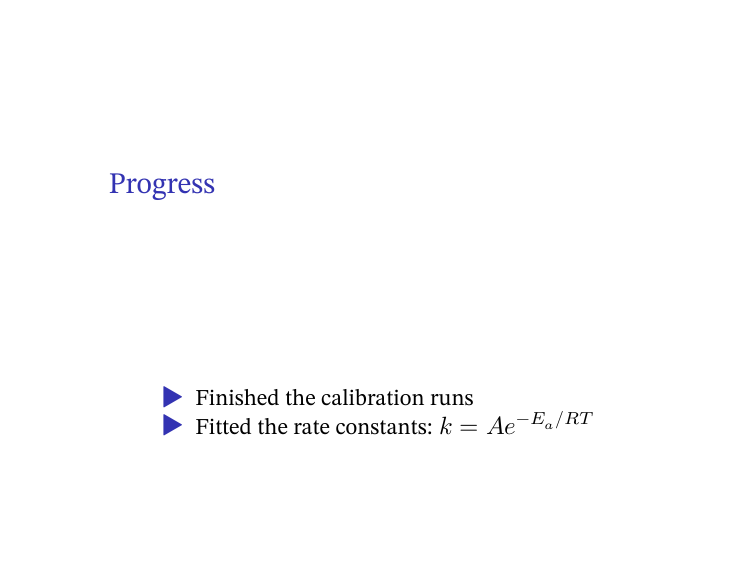
pdfmd slides -p # Beamer slides; each heading starts a slide
A whole folder
$ pdfmd notes -b
AUTO: READER TITLE MARGIN MONOFONT. Use --verbose to see in full
AUTO: MARGIN. Use --verbose to see in full
AUTO: MARGIN. Use --verbose to see in full
OK    notes/lecture.md
OK    notes/week1.md
OK    notes/week2.md
-b converts every .md in the folder into its own PDF, in parallel
(-j N sets the number of workers). Add --recursive to include
subfolders, and -o DIR to collect the PDFs somewhere else.
A book or report from several files
$ pdfmd book -r -o book.pdf
OK    book/01-intro.md
OK    book/02-methods.md
AUTO: MARGIN. Use --verbose to see in full
OK    REPORT  book.pdf
-r (also spelled --report or --book) joins every .md in the folder
into a single PDF, in the order of each file's chapter: front-matter
field. See examples/book/. -i FILE leaves one file
out, and --exclude-unnumbered skips files without a chapter:.
One long document in several files
For an article-style document that has grown too long to edit as one file
(and unlike -r, one that should read as a single document, not a
sequence of chapters), keep a scaffold with the front matter, and the
text in a parts/ folder beside it, one file per section, each starting with
its own heading:
report.md                    front matter only (title, author, ...)
parts/10-introduction.md
parts/20-methods.md
parts/30-discussion.md
Switch it on once, in a metadata.yaml shared by your documents, so the
content files carry no typesetting:
pdfmd-options:
  parts: auto        # a document is a scaffold only if parts/ or sections/ exists
$ pdfmd report                  # the whole document, report.pdf
$ pdfmd report#methods          # just that part, report.methods.pdf
$ pdfmd report#discussion+appendix      # several: always in report order
$ pdfmd parts/20-methods.md     # same as report#methods
$ pdfmd report --list-parts
$ pdfmd old-report.md --split new-folder   # cut an existing single file into parts
$ pdfmd old-report.md --split new-folder --split-depth 2   # ...and subsections too
The parts are joined in filename order into one Pandoc run, so the result is
identical to the same text in a single file: labels, citations and numbering
work across parts, and paths are written relative to the scaffold's folder
whichever part they are in. A part rebuilt alone is much faster to compile
and still shows the numbers of the others: before it is typeset, pdfmd has
Pandoc write the LaTeX of the whole document once more (about a second, no
images, no engine), reads which headings, captions, equations and labels it
holds, and has LaTeX replay them at the start of the part. A reference to a
section, figure, table or equation outside the part then prints its number
(Section 2, Equation (3), a \cref too), in the document's own number style
(Roman sections, numbers per chapter), as a link that leads nowhere; the part's
own sections, figures and equations continue from the parts before it. What the
scan cannot count is whatever the document defines itself (a macro that opens
a figure, say): that label stays ??, and the build says the numbers are
approximate. \pageref is always ??. The last full build's .aux (cache on,
below) is exact and is used first; the scan fills in what it does not know.
pdfmd-options: {seed-labels: auto|aux|scan|draft|off} or --seed-labels picks
the source (draft runs LaTeX once over the whole document without output, for
exact numbers at about half a compile's cost); off brings back the ??. A section of an ordinary document
(doc#results) gets the same for the references it makes, but keeps numbering
its own headings from 1.
For HTML, EPUB, Word, OpenDocument, Typst and PDF through an engine that is not LaTeX the
same idea works differently: pdfmd hands Pandoc the whole document with each part in a
marked div, lets pandoc-crossref number and resolve everything, and then keeps only the
part you asked for (select.lua). Its headings, figures, tables and equations keep the
full document's numbers, and [@sec:x], [@fig:y] to the rest resolve (as links that
lead nowhere). Raw LaTeX \ref{..} is a LaTeX-only reference: use pandoc-crossref's
syntax for those writers. See
examples/parts/.
Faster rebuilds: the cache
pdfmd-options:
  cache: {aux: true}      # or: pdfmd report --cache
keeps LaTeX's cross-reference files between builds (in ~/.cache/pdfmd), so
an unchanged document is typeset once instead of two or three times, and a
part built on its own shows the exact numbers of the parts left out (taken
from the last full build; without the cache they are counted from the
sources, above). It never skips a build: Pandoc and
LaTeX still process the whole document from the current sources and package
every time, so a change shows in the next build. cache: {plots: true} (or
--cache-plots, with nulabreport >= 1.26.0) additionally stores each plot as a
PDF and reuses it until the package, the preamble, the engine or the plot's
data file changes. Off by default; --no-cache for one build; pdfmd --clear-cache
(or deleting the folder) is always safe.
Where the cache lives. By default in ~/.cache/pdfmd, one folder per document.
Folders get moved (a lab report from Downloads into OneDrive), and a cache keyed by
the old path would be lost: so each cache folder records which document it is, and a
document with no cache under its new path takes over the one of the same document
that has lost its original: the same content (SHA-256), or, if you edited it before
moving it, the same name in a folder of the same name, when only one fits. A copy
(the original still there) never takes the original's cache, and plot entries find
their data files again under the new folders. Or keep the cache with the document:
pdfmd-options:
  cache: {aux: true, location: document}   # or: --cache-location document
puts it in a .cache/pdfmd folder beside the document (with a CACHEDIR.TAG, so
backup tools skip it, and a .gitignore), which travels with the folder. It is
yours to choose per document, in the config file for everything, or with
--cache-location. --clear-cache clears both places. (The colour-emoji pictures
LaTeX uses are in the same cache.)
Tables straight from a CSV file
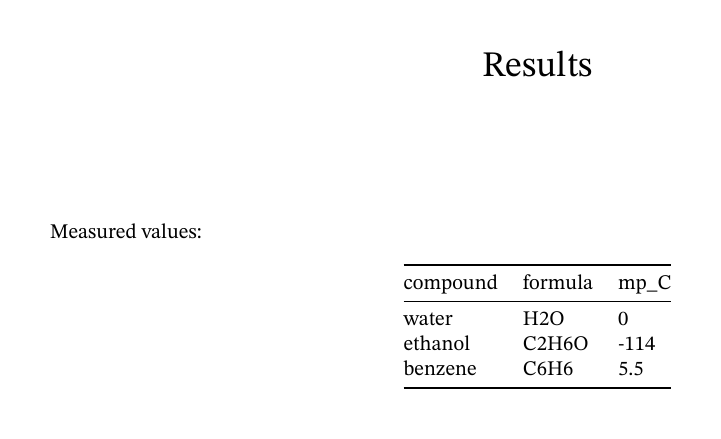
Measured values:

::: {.csv file="data.csv"}
:::
Or write the data in the document itself, in a code block so that nothing in it is read as Markdown:
::: {.csv align="lrr"}
```
Compound,Mass (g),Price
Water,18.015,1.20
"Ethanol, dry",46.07,3.45
```
:::

: Masses and prices {#tbl:m}
- Cells are read as Pandoc Markdown (
H~2~O,$x^2$,\ce{...},[@key]);reader="gfm"makes them plain GFM. - A caption is the line after the block (
: Caption {#tbl:id}, orTable: Caption), orcaption="Caption"inside the braces, with the identifier as#tbl:idthere too. A caption in the attributes wins over a line after the block. - A relative
file=is found beside the document (and along the resource path), wherever Pandoc runs. With bothfile=and data inside the block, the file is used. - The delimiter is
delimiter=";"or its name (semicolon,tab,pipe,space,colon,comma); without one it comes from the extension (.tsvmeans tab) or from the first line (whichever of,;tab|it holds most of). - Columns are aligned with
align="lcr"(oralign="left,center,right"), or by a second row in the data made of---,:--,:-:,--:as in a pipe table;align=wins. If such a row is really data, sayseparator="none".widths="5,1,1"sets relative widths, and a second row with unequal dashes does too. Without either, pdfmd picks widths that suit the contents. - The first row is the header unless you add
header="false". - Large files are capped at 10 rows × 7 columns, so a huge CSV can't
silently fill 40 pages.
rows=allorcols=20raise the cap. When a table is cut, the PDF itself shows a note saying so.
This works for every output format.
Turning tables into CSV blocks, and back
pdfmd --extract-tables report.md      # every table becomes a .csv block reading tables/<name>.csv
pdfmd --expand-tables report.md       # and back to ordinary tables
--extract-tables rewrites the document in place, after copying the old one to the backup folder, and says so. Pipe,
simple, multiline and grid tables are all read (the ones inside code blocks are not tables). The files are named after
the captions (Masses and prices gives tables/masses-and-prices.csv), or table1, table2 by position;
--table-names a,b,c names them, and a list that does not match the number of tables is an error that changes nothing.
--table-numbers 1,3-4 extracts just those tables (by position in the document) and leaves the rest; the names then go to
the chosen ones. In a document in parts the data goes to the report's tables/ folder and an unnamed table is named after
its part (discussion-table1.csv).
The caption, the alignment and the widths the document chose stay as attributes of the block, and before anything is
written Pandoc reads the old and the new document and the tables must come out the same. A table Pandoc cannot write
as CSV (a list inside a cell, a cell spanning rows, no header row) is left as it is, with the reason; so is every
.csv block already in the document, and if the check fails the whole document is left untouched and the command exits
with an error. A document with no front matter is built as gfm, which reads pipe tables only, so only those are
touched there. --tables-inline puts the data
inside the document (in a fenced block) instead of in files, --tables-dir DIR picks the folder, and --dry-run shows
the change without making it. --expand-tables is the reverse, every row included.
A .csv block that holds its data inside the document stays as it is, unless you pass --extract-inline-csv, which moves
that data to a file as well. To keep one table or block as it is whatever you run, put <!-- pdfmd: ignore --> on the
line above it (or under its caption); the comment survives comment stripping, because pdfmd's own comments are kept.
A comment between a table and its caption would stop Pandoc from reading the caption as one, so there is no such
position.
Code: wrapping and line numbers
With a LaTeX engine a long line of code wraps at the margin instead of running off the page (a long path or option list
breaks where the line is full), and {wrap=false} on one block, --no-code-wrap or code-wrap: false in
pdfmd-options lets it run on. Line numbers are off until you ask for them:
``` {.python .numberLines startFrom=10}
def f(x):
    return x * 2
```
--line-numbers (or pdfmd-options: {line-numbers: true}, or the setting in pdfmd --setup) numbers every code block,
--line-numbers 5 numbers every fifth line, {.noNumberLines} leaves one block out, and step=5 and numbersep=8pt
adjust a single block.
Images: SVG and remote ones
LaTeX reads PDF, PNG and JPEG, not SVG. In a LaTeX build pdfmd converts each SVG the document names, once, with
whatever is installed (rsvg-convert, Inkscape, cairosvg, svglib, or LibreOffice, which most machines have), keeps
the PDF by the file's content, and uses it where the document wrote the SVG: a Markdown image, a raw
\includegraphics{figure.svg}, a raw \includesvg{figure}. A raw \includegraphics also gets graphicx loaded,
which Pandoc only does for a Markdown image (a PNG in one used to stop the build with "undefined control sequence").
A Markdown image from the web is fetched once and kept for a week, so the build does not need the network again, an SVG
badge works, and a Pandoc built without HTTP support (Homebrew's is) no longer drops it; with no network there is one
warning and the image's description stays. --no-auto svg and --no-auto remoteimages turn the two off, and
pdfmd --doctor says which converter will be used.
Diagrams written as code
```mermaid
graph LR; Sample --> Reaction --> Product
```

```{.dot #fig:flow caption="The *flow* of the experiment" width=60% engine=neato}
digraph { sample -> reaction -> product }
```

```d2
sample -> reaction -> product
```
A fenced block whose class is mermaid, d2, dot or graphviz is drawn by the tool that reads that language and the
picture takes its place: Graphviz (dot), D2 (d2) and
Mermaid (mmdc). pdfmd asks each for the format the output takes: a PDF
for LaTeX, an SVG for HTML (inside the file, so it can be sent on its own) and Typst (a PNG for Mermaid, whose SVG
Typst cannot show), a PNG for Word and OpenDocument, and for flat Markdown (--to gfm) an SVG in the _files/ folder
beside the output, except a Mermaid block, which stays as it is because GitHub draws it. A text output keeps the source.
Drawings are kept in the cache by their content, so a rebuild does not draw them again. caption="..." makes a figure
({#fig:id} with pandoc-crossref numbers it), width= sizes it, engine= picks the Graphviz layout (dot, neato,
fdp, sfdp, circo, twopi), theme= the Mermaid theme, layout= the D2 layout (dagre, elk). A tool that is
not installed leaves the block as code with one warning (--strict makes it an error) and says how to install it;
a diagram the tool cannot parse stays as code too. pdfmd --doctor shows which tools are there, and
--no-auto diagrams turns the whole thing off. The attributes need Pandoc's Markdown (a file with front matter); a file
read as gfm takes the plain ```dot form. Mermaid needs Chrome (mermaid-cli downloads one); in a sandbox
PDFMD_MMDC_CONFIG=puppeteer.json is handed to mmdc -p.
Editable in LibreOffice, and one file that carries its data
--hybrid makes the PDF a LibreOffice hybrid PDF: besides its pages it carries an OpenDocument copy of the document
(Original.odt, or .odp, .ods), and when LibreOffice opens the PDF it opens that copy as a document you can edit,
instead of the pages in Draw. An Office file (pdfmd minutes.docx --hybrid) is converted by LibreOffice, so the copy is
the file itself; a Markdown file gets an .odt built by pdfmd with its metadata, so what LibreOffice shows is the
Word-route rendering of the source (not the LaTeX pages). pdfmd --restore report.pdf writes the ODF file back out.
pdfmd-options: {hybrid: true} or pdfmd --setup makes it the default.
A single Markdown file can carry its data too: pdfmd report.md --assemble-only --embed-metadata files -o report.one.md
folds in the images, CSV tables and included files the text points at (text as it is, anything else as base64), and the
file builds on its own, in an empty folder; pdfmd --unpack writes them back byte for byte. It is left out of the default
kinds because it can be big (bundle-max-mb caps it); for a PDF, --bundle stores the same files beside the source.
HTML, LaTeX, Typst and Word pieces inside Markdown
Markdown can carry raw pieces: <img>, <table>, <b> and <div> (HTML), \ce{...} or a tikz picture (LaTeX), a
```{=typst} block, Word or OpenDocument XML. Pandoc keeps the ones written in the format it is writing and drops
every other, silently, so a document that mixes them loses pieces in every build. pdfmd-options.raw (or --raw) says
which syntaxes take part in each output family, and carries the foreign ones over:
pdfmd-options:
  raw:
    tex:    [tex, html, typst]   # LaTeX builds: PDF through lualatex, xelatex ...
    typst:  [typst, html, tex]   # Typst builds
    html:   [html, tex, typst]   # HTML, EPUB, PDF through weasyprint and the other HTML engines (-e html)
    office: [office, html]       # Word and OpenDocument, and PDF through soffice
pdfmd report --raw               # everything for every family
pdfmd report --raw-for html=tex,typst --raw-for tex=html      # or per family, on the command line
A family takes the syntaxes it lists, in this way: its own syntax stays as written; HTML is read by Pandoc's HTML
reader, so an <img> becomes the target's image (an SVG then goes through the image conversion below), a <table> a
real table, <b>...</b> bold text and a <div> around Markdown a division, even when the opening and the closing tag
sit in separate pieces; LaTeX is read by Pandoc's LaTeX reader (what it does not know, a custom macro, stays LaTeX
and is lost outside LaTeX; Word builds keep their own LaTeX route, see
Word and OpenDocument output); Typst is drawn by typst compile as a cropped
vector picture, a PDF for LaTeX, Typst and Word, an SVG for HTML. A syntax a family does not list is dropped, its own
included, which is odd but a clear way to say "this output has no HTML in it". A family not mentioned is left to Pandoc
as it always was, raw: all lists everything, and --no-raw turns it off for a run. Pictures are kept in pdfmd's cache by
their content. (An HTML file that is not self-contained points at the cache; use --self-contained to carry them.)
A LaTeX picture Pandoc cannot read (a tikzpicture, circuitikz, pgfpicture, forest, \chemfig...) is drawn by a LaTeX
engine with the standalone class, after the document's own preamble and header-includes, and placed as a vector picture
in HTML, Typst and flat Markdown builds (an SVG for HTML and Markdown; a piece that does not compile is reported and left
out). Not yet: HTML drawn as a picture, Word XML as
anything but Word XML.
PDF images in HTML. A browser does not show a PDF in <img>, an SVG it does. For an HTML build (a web page, an
EPUB, a PDF through WeasyPrint) every image that is a PDF,  or <img src="plot.pdf">, is converted to
an SVG with poppler's pdftocairo (or mutool, pdf2svg, inkscape) and stays vector; the first page is used and the
SVG is kept by the PDF's content. It is on by default, since it only changes what would not have shown; --no-auto pdfimages turns it off. LaTeX and Typst read PDFs themselves, and Word has its own route.
Not just Markdown
pdfmd paper.tex          # compiled directly with a LaTeX engine: reruns until
                         # references settle, runs bibtex/biber, and leaves
                         # no .aux/.log clutter (--keep-aux keeps them)
pdfmd minutes.docx       # Word/PowerPoint/Excel/ODF: converted by LibreOffice
pdfmd analysis.qmd       # handed to Quarto, so code chunks actually run
pdfmd page.html          # built by WeasyPrint, or a browser if the page runs scripts: no Pandoc
pdfmd note.typ           # compiled by Typst itself: the page setup in the file is kept
pdfmd notes.rst          # anything else Pandoc can read (give the extension)
A finished .typ or .html file goes straight to its own engine, because Pandoc would read it into its own model
and write it out again, and the page size, the styles and the scripts would not survive the trip. For a page that is
WeasyPrint first (it is quiet and needs no browser); a page with <script> goes to Chrome, Chromium, Edge or Brave
(headless, printing the page), as does one WeasyPrint cannot draw, and wkhtmltopdf, Prince, pagedjs-cli and LibreOffice
come after. -e edge (or weasyprint, chromium...) picks one. As with an Office file, such a document gets none of
pdfmd's defaults, since it is finished; --apply-defaults (also in pdfmd --setup) gives it the title, author, date,
language, font, font size, paper and margin of its metadata.yaml, ahead of its own settings so those win. A .tex
file that no LaTeX engine can compile is tried through Pandoc, with a warning.
The reader comes from the file's extension, as in Pandoc, and a bare name is looked up as <name>.md, so give the
extension for anything else. The automatic decisions about Markdown (READER, TITLE, citeproc, crossref below)
apply to Markdown files only.
A plain-text file as Markdown (opt-in). pdfmd notes.txt --text-to-markdown reads a .txt file the way a person typed it
and guesses its structure: headings (capitals, 1.2 Title, ==== underlines), bullet and numbered lists, tables from
columns separated by runs of spaces, indented blocks as code, hard-wrapped lines joined into paragraphs. The words never
change (the letters and digits of the result are the input's), and a text that measures as garbled (symbol soup, OCR
noise, replacement characters) gets paragraphs only, with the rule that fired printed. MODE is auto (default),
force (guess even in a garbled text) or paragraphs. It needs batchocr 1.2.5 (pdfmd --install batchocr), writes notes.md
beside the text (never over a file that is there) and builds from it; with -o x.md the conversion is all it does.
Off unless asked: --text-to-markdown, or options: {text-to-markdown: auto} in the config file (or pdfmd --setup).
What it does automatically
Most of these print an AUTO line, and each can be switched off individually.
AUTO kind |
When | What happens |
|---|---|---|
READER |
a Markdown file with no YAML front matter | reads the file as GitHub-flavoured Markdown (content-sized table columns, relaxed blank-line rules). If the file uses what only Pandoc's Markdown reads (H~2~O, x^2^, {#id} attributes, raw LaTeX, fenced divs), a NOTE says gfm leaves it as text; --from markdown, a front-matter block, or reader: below changes it |
TITLE |
a Markdown file with no front matter, first line is # Title |
that heading becomes the document title, and the remaining headings move up one level |
MARGIN |
no margin or geometry set anywhere | 1-inch margins instead of LaTeX's wide defaults |
MAINFONT |
no mainfont: and no -f |
STIX Two Text (Times New Roman if it isn't installed), or a serif that has the letters when the document is mostly in a script STIX Two Text lacks (Kazakh Cyrillic, say); retried with DejaVu Serif if a glyph is still missing. A font you name is never changed except by fallback: document |
UNICODE |
text the main font cannot draw (Arabic, Han, Greek with accents, rare symbols...) | sets each run in an installed font for its script (see Other scripts), instead of printing boxes |
MONOFONT |
the document contains code | JetBrains Mono for code (Menlo or another installed monospace font if it isn't installed) |
tablewidth |
a pipe table with plain --- separators and long lines |
picks the column widths that give the fewest lines within the text width (a column never narrower than its longest word), and gives a table that fits its natural width back; unequal dashes (`-- |
svg, remoteimages |
an SVG, or an image from the web, in a LaTeX build | the SVG is converted to a PDF (once), the remote image is fetched and kept (--no-auto svg, --no-auto remoteimages) |
typstdirect, htmldirect |
a .typ or .html file |
built by Typst / WeasyPrint or a browser, not through Pandoc (--no-auto typstdirect for the old route) |
codewrap |
code blocks in a LaTeX build | long lines wrap at the margin (--no-code-wrap or --no-auto codewrap for the old behaviour) |
YAML / TEX / LUA |
project files found | attaches metadata.yaml, preamble.tex, <name>.lua (see below) |
citeproc |
@key / [@key, p. 90] citations (as Pandoc reads them: @key in a code span or an e-mail address is none) |
adds --citeproc, so citations and the reference list render from your bibliography: without any flag (--no-citeproc turns it off) |
crossref |
@fig:/@tbl: references or {#fig:...} labels |
adds the pandoc-crossref filter, ahead of citeproc |
papersize |
pagesize: a4 (a common typo) |
converts it to Pandoc's real papersize: |
-v explains each decision and prints the exact command it runs:
$ pdfmd lecture -v
CMD  pandoc lecture.md -o lecture.pdf --pdf-engine=lualatex -f gfm -V 'mainfont=STIX Two Text' -V geometry:margin=1in -V 'monofont=JetBrains Mono' --shift-heading-level-by=-1 --lua-filter .../pdfmd-tablewidth.lua
CMD  pandoc lecture.md -o lecture.pdf --pdf-engine=lualatex -f gfm -V 'mainfont=DejaVu Serif' ...
AUTO READER  lecture.md: no YAML front matter; reading as gfm
AUTO TITLE  lecture.md: promoted leading '# ' heading to Pandoc title metadata
AUTO MARGIN  lecture.md: no geometry/margin set; using geometry:margin=1in on LaTeX-family engines
AUTO MONOFONT  lecture.md: has code but no monofont set; using JetBrains Mono on LaTeX-family engines
OK    lecture.md  (lualatex)
The second CMD line is the font fallback at work: STIX Two Text was
missing a glyph, so the document was rebuilt with DejaVu Serif. (Temporary
file paths are shortened here.)
When a PDF doesn't look the way the Markdown suggests, run -v first.
The cause is usually one of these automatic decisions, and -v names it.
The closing line also names the engine that made the PDF. If an earlier one failed, the line says so, so a build that quietly fell back to Typst does not look like one that did not:
$ pdfmd paper
WARN  paper.md: lualatex failed (! Undefined control sequence.); trying xelatex...
WARN  paper.md: xelatex failed (! Undefined control sequence.); trying typst...
OK    paper.md  (typst; lualatex, xelatex failed)
When LaTeX itself stops, the warning also says where: Pandoc reports a line of the LaTeX it wrote, so pdfmd finds those
words in your Markdown and prints near line 9 of paper.md: ...has \badmacro.
--strict (or pdfmd-options: {strict: true} in the document; --no-strict overrides it) makes that, and every other
warning, an error for scripts and CI: a file whose build printed a WARN line, or about which Pandoc warned (an image
or citation it could not find, a LaTeX reference left undefined), is reported FAIL with the first warnings listed and
the exit code is 1. The output file is kept. In a batch only that file fails.
Other scripts
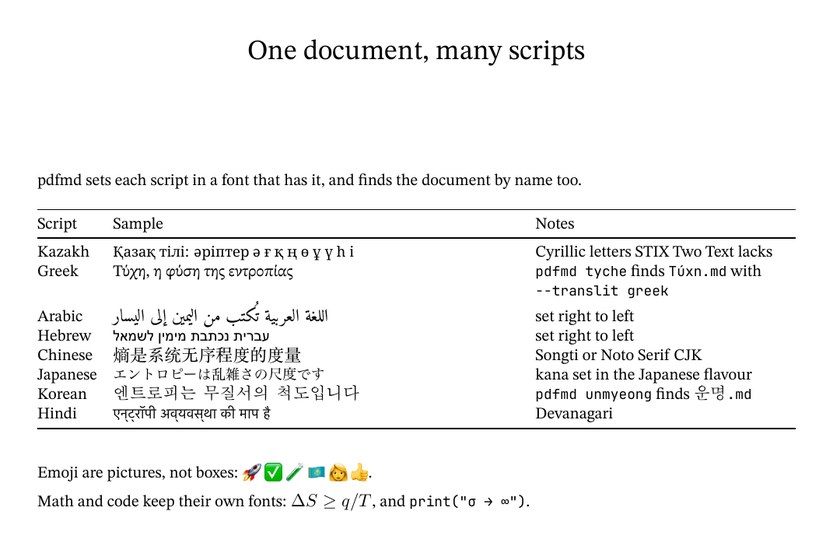
(That is examples/scripts.md, built with no configuration.)
A document that mixes scripts needs more than one font. With lualatex or
xelatex, pdfmd reads the character tables of your installed fonts, finds
the characters the main font cannot draw and sets each run of them in a font
that can: Arabic and Hebrew right to left, Chinese/Japanese/Korean in the
flavour the text (kana, hangul) or lang: points to, punctuation and marks in
the font of the text beside them. Characters that no installed font has are
named in a warning, never dropped or swapped for something else. -v shows
which font each script got.
How much changes is up to you (pdfmd-options: {fallback: MODE}, --fallback MODE,
or the config file's options:):
fallback: |
What happens to a character the main font lacks |
|---|---|
word (default) |
the whole word goes in one fallback font that draws all of it, so no word mixes two fonts; your main font stays for every other word, even if the document names DejaVu Serif |
char |
just that character is set in another installed font |
document |
the installed font that draws most of the document replaces the main font (the old retry-with-DejaVu idea, chosen by coverage) |
off (or false) |
nothing: what Pandoc and TeX do without pdfmd (a missing glyph vanishes or prints a box, and they warn) |
box |
no fallback; each missing character is drawn as a black box, so it cannot be overlooked |
error |
no fallback; the build stops, naming the missing characters |
pdfmd --check-fonts doc.md shows what would happen without building: the main font (and
why it was changed, if it was), which scripts get which fallback font, the characters no
installed font draws and the --install fonts:... that would fix it; it exits 1 when
something can't be drawn.
Code is held to the same standard: a character the monofont lacks (an arrow, a CJK
comment) in inline code or a code block is set in a fallback font under LaTeX (a code
block that needs one is typeset as plain verbatim, without syntax highlighting), and
through Typst's codefont list or a CSS font stack on Typst and WeasyPrint. Math is
left to its own font.
missing: warn | box | error (--missing) says what happens to a character that no installed
font draws, after the fallback (box and error as a fallback mode imply it). char,
word and document also turn emoji into pictures under LaTeX; off, box and
error leave them alone.
Emoji are set as pictures with lualatex and xelatex (which cannot draw colour
fonts): each emoji, flag, skin tone, family or keycap is looked up in the colour
emoji font (pdfmd --install emoji, a system Noto Color Emoji, or else Apple Color Emoji on
a Mac), its picture taken out of the font file and included at the height of the text, in
inline code and code blocks too. Apple's font is read through its glyph names (the same
way for single emoji, skin tones, flags, keycaps and the joined emoji it has a glyph for,
such as a woman scientist); the few it composes in tables pdfmd does not read (a family of
four, say) are reported as undrawable (install Noto for those). The pictures
are kept in pdfmd's cache folder; a .tex written with --to latex points
there.
The same fallback works with Typst (-e typst: #text(font: ...) runs, and
the fonts folder handed to Typst) and WeasyPrint (styled spans). WeasyPrint draws
Noto Color Emoji's bitmaps badly, so emoji are left to the system's own emoji font
there; Typst draws them well.
Getting fonts. Anything installed on the machine is used. For the rest,
pdfmd --install fonts lists what pdfmd can fetch and
pdfmd --install fonts:arabic,cjk-sc (or fonts:core, fonts:scripts,
fonts:all; also fonts:ja, fonts:kazakh...) fetches it into pdfmd's own
folder (~/.local/share/pdfmd/fonts, %LOCALAPPDATA%\pdfmd\fonts; no admin
rights, nothing system-wide). Every file is checked against a checksum pinned in
pdfmd before it is kept, and each package keeps its licence beside it (all SIL OFL,
except DejaVu's own free licence). The list: STIX Two (pdfmd's default main font),
JetBrains Mono (its default code font), Noto Serif, Amiri and Noto Naskh Arabic,
Hebrew, Armenian, Georgian, the Indic and Southeast Asian scripts, Syriac,
Thaana, Cherokee, Oriya, Mongolian, Coptic, Gothic, Runic, Tifinagh, N'Ko,
Canadian syllabics, Urdu Nastaliq (used for lang: ur), sans-serif Indic faces,
symbols, Noto Serif for Chinese (simplified/traditional), Japanese and Korean (one
weight each, bold is synthesised) and the Noto Sans CJK ones (cjk-sans), DejaVu,
and colour emoji. When a document needs a script no installed font has, the warning names
the package to install. pdfmd --uninstall fonts:NAME removes some.
It stays out of the way of a document that has set up its own fonts per
script (ucharclasses, \newfontfamily, xeCJK, \babelfont,
CJKmainfont, mainfontfallback): pdfmd-options: {unicode: true} adds
pdfmd's anyway, and --no-auto unicode turns it off.
Switching defaults off
pdfmd lecture --no-auto                  # everything off: close to plain pandoc
pdfmd lecture --no-auto margin mainfont  # only these (kinds: reader title margin mainfont monofont tablewidth
                                           #  unicode lookup yaml tex lua ...; `pdfmd --help` lists them)
Passing options to Pandoc
Any option pdfmd doesn't recognise is passed straight to Pandoc:
pdfmd lecture --toc --number-sections
pdfmd lecture -V fontsize=12pt
Settings inside the document
Or put settings in the document itself, so nobody has to remember the flag:
---
title: Lab report
pdfmd-options:
  no-auto: [margin, monofont]
  pdf-engine: tex        # only TeX engines; never fall back to HTML ones
---
reader: fixes the Pandoc reader of a Markdown file (markdown, gfm, commonmark_x, ...; auto is the default
choice described under What it does automatically). It is --from for one document, or for a whole folder or all your
documents when it sits in metadata.yaml or the config file's options:.
pdf-engine: takes an engine name (lualatex, typst, ...) or a family:
tex, typst, html or office. A family limits the fallback chain to
that kind of engine. For example, a document full of chemical structures
can require TeX, and a plain memo can skip the slow LaTeX run. -e on the
command line always wins, and a bare -e means "try every engine".
Your own defaults: the config file
pdfmd --init-config writes a commented ~/.config/pdfmd/config.yaml
($XDG_CONFIG_HOME; %APPDATA%\pdfmd on Windows), pdfmd --show-config says
where it is and what it sets. Its options: block takes the same keys as a
document's pdfmd-options: and applies to every document, below anything the
document or its metadata files say (the command line beats all of them);
translit: is the romanization packs of the name lookup. PDFMD_CONFIG=other.yaml
uses another file, PDFMD_CONFIG= (empty) none.
translit: [greek, hangul]
options:
  fallback: word
  pdf-engine: lualatex
pdfmd --setup changes the same defaults from a menu, without editing the files: a numbered list (nothing to
install, works over ssh), each setting with its choices and what they mean. It covers what a document would otherwise
say in pdfmd-options: or its front matter, for every document:
- global metadata (a
metadata.yamlbeside the config file, below anything a document's own folder says): author, language, paper size, font size, page geometry, main and code font, line spacing, coloured links, table of contents, and for citations the bibliography file, the CSL style and linked citations; - characters a font lacks or none draws, fonts for other scripts, romanization packs;
- the citation engine, the PDF engine, the default output format, HTML (one file, math method), LaTeX and reference numbers in Word files;
- PDF finishing (header, footer, bookmarks, attached links) and the source file (the "Compiled with..." stamp, backups, comment stripping, attaching the source and its files to the PDF);
- the cache, reading
.txtas Markdown, and which of pdfmd's automatic behaviours (--no-autokinds) are off.
Choosing 0 (for a text, -) gives a setting its built-in default back; s saves, q quits. The files are rewritten without your
comments (the old one is kept as .bak). The same keys can be written by hand under options: of config.yaml. A
full-screen version is optional: pdfmd --install tui (prompt_toolkit, about 1 MB), then pdfmd --setup fancy, or set
"This setup screen" to fancy to make it the one pdfmd --setup opens. The first time pdfmd finishes a build in a terminal
with no config file yet, it prints one TIP line about --setup (never in a pipe, in CI, or from the Python API;
PDFMD_NO_PROMPT=1 silences it).
The decisions pdfmd remembers for you (the Lua filters it trusts, an offer you
dismissed) live in the same folder, not in ~/.cache/pdfmd, so cleaning the cache
(--clear-cache) cannot lose them; files from an older version are moved there
the first time they are needed.
Project files
pdfmd looks next to the document, and in a metadata/ folder beside it,
for:
| File | Used as |
|---|---|
metadata.yaml |
shared Pandoc metadata (fonts, bibliography, CSL, ...) |
<name>.yaml |
per-document metadata, layered on top of metadata.yaml |
report.yaml / book.yaml |
metadata for -r builds |
preamble.tex, latex-preamble.tex, <name>-preamble.tex, preamble-*.tex |
LaTeX added to the header, generic files first |
<name>.lua |
a Pandoc Lua filter for that document |
Only these names are picked up automatically. An unrelated .lua or
.tex file lying in the folder never changes a render. When several YAML
files could apply and none is clearly meant, pdfmd stops and asks you to
choose with -y FILE, rather than guessing. -y alone turns discovery
off.
With a metadata/ folder, a report's own folder can hold nothing but
report.md and report.pdf. Relative paths inside the metadata (such as
bibliography: refs.bib) resolve from metadata/, and image paths in the
document still resolve from the document's own folder.
A Lua filter can run any command, so pdfmd tells you about the ones it picks up by itself. The first build with a
<name>.lua (or nulabreport.lua) it has not run before prints one NOTE, and so does the first build after the file
changed; the filter runs all the same, and there is never a prompt, so a filter you edit every day, -j, -w, CI and the
Python API are not held up. pdfmd --trust-lua ~/work/reports marks a folder you work in (or one filter, as it is now):
nothing under it is noted again. Only --strict skips a new or edited filter outside such a folder. pdfmd remembers
each filter's path and SHA-256 in known-lua.txt beside its config. This is a notice, not a lock: it does not protect
the first build of a folder you have just downloaded, so read its .lua first.
One shared metadata file can also be symlinked into many folders. A
relative bibliography: refs.bib inside it then finds the refs.bib
next to the file's real copy, so you never need an absolute path.
Build stamps, history and snapshots
All are off by default.
--stampkeeps aBUILD NOTESHTML comment at the end of the.mdup to date. It records when the document was compiled and with whichpdfmdversion, plus the versions of any LaTeX packages you name with--stamp-packages. The comment is invisible in the PDF.--stamp-mode historyalso keeps a list of past compiles.--backupsaves a timestamped copy of the source into.backups/(a hidden folder; an existingbackup/is kept using, and pdfmd says where the first copy went) after every successful build. A copy is skipped when nothing changed, andkeep: 30limits how many are kept.
Both can be turned on for a whole folder from metadata.yaml:
pdfmd-options:
  stamp: true
  backup: { dir: .backups, keep: 30 }
History in a file instead of in the document. --stamp-store file (or stamp: {store: file}) writes each compile
to NAME.hst in the backup folder, and the document itself is not edited by a build. The file is one line per entry,
newest first, so it reads in any editor, two of them join with cat, and pdfmd --merge-history a.hst b.hst -o all.hst
keeps every entry once:
# pdfmd history of report.md -- one entry per line, newest first: WHEN | KIND | TEXT [| key=value ...]
2026-10-09 11:22:01 | compiled | with nulabreport v1.27.7, pdfmd v3.25.7 | sha=3fa91c0d4b21 out=report.pdf
pdfmd --history-to-file report.md moves the whole BUILD NOTES block that pdfmd owns into that file (the compiles as
entries, anything written by hand inside it as one note entry), and --history-to-notes builds the block again (both
back the document up first, --dry-run shows). A document may carry several
BUILD NOTES blocks (yours, an AI agent's): pdfmd writes only into the one that already holds its own lines, or the
only one there is, or starts one of its own when there are several and none is its; the rest is never touched, and a
line pdfmd: ignore in a block keeps pdfmd out of it. The file travels with the document: --embed-metadata folds it
in (hst), --unpack writes it out, and --attach-source stores it in the PDF for --restore.
Going back. pdfmd --history report.md lists every version it can find, newest first: the backups (in .backups,
and in an older backup/, backups/... beside the document, whatever naming each file has), the git commits that
changed the file (the repository may be a folder above), and the compiles recorded in its history. In a terminal the
list is navigable: a number shows what differs, d 3 the diff, r 3 restores. Without one, --history-diff and
--history-restore take a number, a backup's timestamp (any start of it: 20261003), a file name, a commit hash,
latest, or previous (the newest that is not the file as it is). A restore backs the file up first, so nothing is
ever lost; it keeps the build notes and history of the file as it is now, and adds a Restored version ... entry
(stamp: {restored-note: false} or --no-restored-note leave it out; --dry-run shows what would change).
pdfmd --init-backups report.md turns all of this on for a document: backups and a history file, set in its front
matter under an AUTO GENERATED comment (--global for every document), and a first copy.
Separately, when pypdf is installed, every PDF built by pdfmd gets two
hidden metadata keys, PdfmdVersions and PdfmdBuildDate, which you can
read with pdfinfo -meta. Turn this off with --no-stamp-pdf-metadata.
Reference
docs/recipes.mdis the task-by-task manual: fifteen chapters of "how do I..." with the commands (the basics, a house style, long documents, tables, code and images, raw HTML/LaTeX/Typst, other inputs and outputs, the PDF that carries its source, history, fonts and scripts, speed, the editor and VS Code, and what to do when something looks wrong), plus an option reference by task.pdfmd --helplists every flag.- The docstring at the top of
pdfmd.pyis the full reference for each behaviour and its edge cases. CHANGELOG.mdrecords what changed in each version and why.
License
1 maintainer

Metadata
1 maintainer
Release files for pdfmd-cli 3.26.20
For a detailed explanation of source distributions (sdists) and built distributions (wheels), please see the package formats documentation.
Source distribution (sdist)
| File | Size | Uploaded | |
|---|---|---|---|
| pdfmd_cli-3.26.20.tar.gz | 1.4 MB | Details |
Built distribution (wheel)
| File | Interpreter | ABI | Platform | Reset |
|---|---|---|---|---|
| pdfmd_cli-3.26.20-py3-none-any.whl | Python 3 | none | any | Details |
Total release size: 2.6 MB
Release files / pdfmd_cli-3.26.20.tar.gz
| Download URL | pdfmd_cli-3.26.20.tar.gz |
|---|---|
| Size | 1.4 MB |
| Tags | Source |
|
SHA-256 checksum How to use checksums |
c64f0983514d17042e6ef8f844e8fd975909b2a54227657f02935884bbda0c94
|
|
BLAKE2b-256 checksum How to use checksums |
022b230e4c44ed9fc9aa1757e53e0218853fbf6a7b42a89ae5b6da1b68d7980a
|
| Upload date | |
|
Uploaded using Trusted Publishing? What is trusted publishing? |
Yes |
| Uploaded via |
twine/7.0.0 CPython/3.13.14
|
Provenance
Provenance describes where a file came from. On PyPI, provenance is shared via attestations, which provide a verifiable record of the build or publishing details. View details, limitations and caveats.


PyPI Publish Attestation
PyPI verified that this artifact, at this checksum, originated from the publisher listed below.
Signed by GitHub Actions, verified by PyPI on Oct 9, 2026.
Transparency logRelease files / pdfmd_cli-3.26.20-py3-none-any.whl
| Download URL | pdfmd_cli-3.26.20-py3-none-any.whl |
|---|---|
| Size | 1.2 MB |
| Tags | Python 3 |
|
SHA-256 checksum How to use checksums |
f9dcc64e745c622d4c93a872e22d5ed990c732c0b73f1963d7272a7f19fa38d2
|
|
BLAKE2b-256 checksum How to use checksums |
8e5bccc3861b7adc9e71da2b1e5fe3194511586a3b36e4c3d93df2523b2a251e
|
| Upload date | |
|
Uploaded using Trusted Publishing? What is trusted publishing? |
Yes |
| Uploaded via |
twine/7.0.0 CPython/3.13.14
|
Provenance
Provenance describes where a file came from. On PyPI, provenance is shared via attestations, which provide a verifiable record of the build or publishing details. View details, limitations and caveats.
PyPI Publish Attestation
PyPI verified that this artifact, at this checksum, originated from the publisher listed below.
Signed by GitHub Actions, verified by PyPI on Oct 9, 2026.
Transparency log













