
Swarmauri's Peagan - An AI-driven contextual, dependency-based scaffolding tool for rapid content generation.

Project description






Peagen: a Template‑Driven Workflow
Why Use the Peagen CLI?
Reduced Variance in LLM‑Driven Generation
- While LLMs inherently introduce some nondeterminism, Peagen’s structured prompts, injected examples, and dependency‑aware ordering significantly reduce output variance. You’ll still see slight variations on each run, but far less than with ad‑hoc prompt calls.
Consistency & Repeatability
- By centralizing file definitions in a YAML payload plus Jinja2
ptree.yaml.j2templates, Peagen ensures every project run follows the same logic. Changes to templates or project YAML immediately propagate on the nextpeageninvocation.
No Vector Store—Pure DAG + Jinja2
- Peagen does not rely on a vector store or similarity search. Instead, it constructs a directed acyclic graph (DAG) of inter‑file dependencies, then topologically sorts files to determine processing order. Dependencies and example snippets are injected directly into prompt templates via Jinja2.
Built‑In Dependency Management
- The CLI’s
--transitiveflag toggles between strict and transitive dependency sorts, so you can include or exclude indirect dependencies in your generation run.
Seamless LLM Integration
- In GENERATE mode, the CLI automatically fills agent‑prompt templates with context and dependency examples, calls your configured LLM (e.g. OpenAI’s GPT‑4), and writes back the generated content. All model parameters (provider, model name, temperature) flow through CLI flags and environment variables—no extra scripting needed.
When to Choose CLI over the Programmatic API
Interactive Iteration
- Quickly regenerate after tweaking templates or YAML with a single shell command—faster than editing and running a Python script.
CI/CD Enforcement
- Embed
peagen sortandpeagen processin pipelines (GitHub Actions, Jenkins, etc.) to ensure generated artifacts stay up to date. Exit codes and verbosity flags integrate seamlessly with automation tools.
Polyglot & Minimal Overhead
- Teams in Java, Rust, Go, or any language can use Peagen by installing and invoking the CLI—no Python API import paths to manage.
What Is Peagen?
Core Concepts
Peagen is a template‑driven orchestration engine that transforms high‑level project definitions into concrete files - statically rendered or LLM‑generated - while respecting inter‑file dependencies.
At its heart sits the Peagen class (core.py, class Peagen), which encapsulates:
Project Loading
- Reads one or more YAML payloads describing packages, modules, and template locations, turning them into in‑memory project objects.
Template Rendering
- Uses Jinja2 to render each package's ptree.yaml.j2 into a flat list of file records, complete with metadata (path, mode, dependencies). Dependency Graph Construction = Builds a directed acyclic graph (DAG) of file records based on declared DEPEDNENCIES fields, ensuring correct ordering. Topological / Transitive Sorting
- Offers both strict topological sort and a transitive variant to include indirect dependencies via the --transitive flag. File Processing
- Iterates the sorted list of file records and either:
- Renders static COPY templates, or
- Fills an agent‑prompt template and invokes the LLM for GENERATE mode.
Resume & Revision Support
Allows resuming from any file index or template, and writing revisions back to project YAML or templates when peagen revise is used.
Key Public Methods
All methods below belong to core.py, class Peagen:
-
load_projects()Loads and validates the YAML payload(s), returning a list of project dictionaries enriched with template paths and metadata. -
process_all_projects()For each loaded project, runs the full render → graph → sort → process pipeline, returning a mapping of project names to processed file records. -
process_single_project(project: Dict, start_idx: int = 0, start_file: Optional[str] = None)Executes the pipeline for one project, optionally resuming at start_idx or at a specific file path, and returns the sorted records plus the final index processed.
Each of these methods is invoked by the CLI commands in cli.py (e.g. process() calls Peagen.load_projects() then Peagen.process_single_project()). By understanding these core components, you can both use the CLI effectively and extend Peagen programmatically.
Prerequisites & Setup
Installing Peagen
# From PyPI (recommended)
pip install peagen

# From source (latest development)
git clone https://github.com/swarmauri/swarmauri-sdk.git
cd pkgs/standards/peagen
pip install .

peagen --help
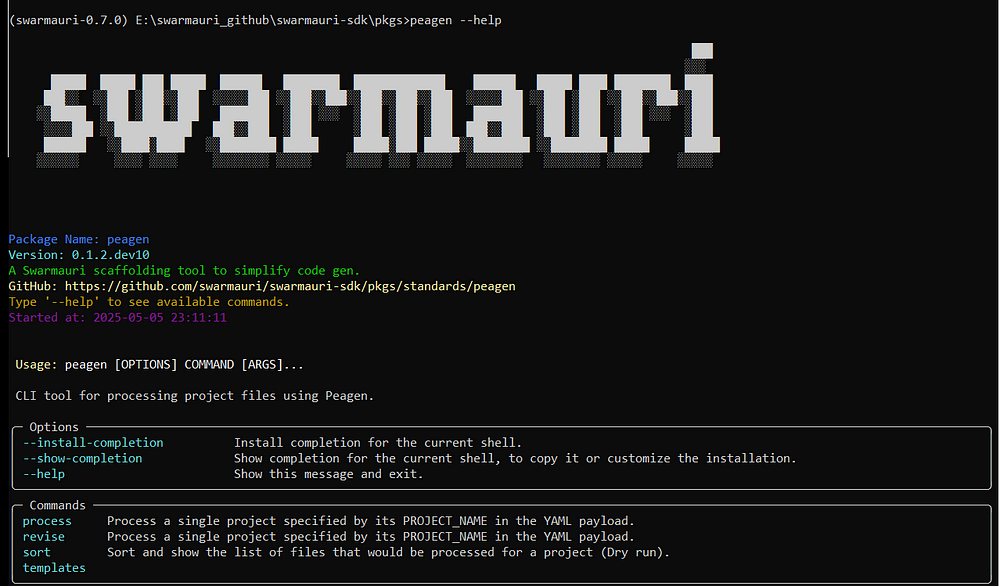
Executing peagen --help
peagen --help
Configuring OPENAI_API_KEY
export OPENAI_API_KEY="sk-…"
CLI Defaults via .peagen.toml
Create a .peagen.toml in your project root to store provider credentials and
command defaults. A typical configuration might look like:
# .peagen.toml
[llm]
default_provider = "openai"
default_model_name = "gpt-4"

[llm.api_keys]
openai = "sk-..."

[storage]
default_adapter = "file"

[storage.adapters.file]
output_dir = "./peagen_artifacts"
With these values in place you can omit --provider, --model-name, and other
flags when running the CLI.
Project YAML Schema Overview
# projects_payload.yaml
PROJECTS:
  - NAME: "ExampleParserProject"
    ROOT: "pkgs"
    TEMPLATE_SET: "swarmauri_base"
    PACKAGES:
      - NAME: "base/swarmauri_base"
        MODULES:
          - NAME: "ParserBase"
            EXTRAS:
              PURPOSE: "Provide a base implementation of the interface class."
              DESCRIPTION: "Base implementation of the interface class"
              REQUIREMENTS:
                - "Should inherit from the interface first and ComponentBase second."
              RESOURCE_KIND: "parsers"
              INTERFACE_NAME: "IParser"
              INTERFACE_FILE: "pkgs/core/swarmauri_core/parsers/IParser.py"
CLI Entry Point Overview
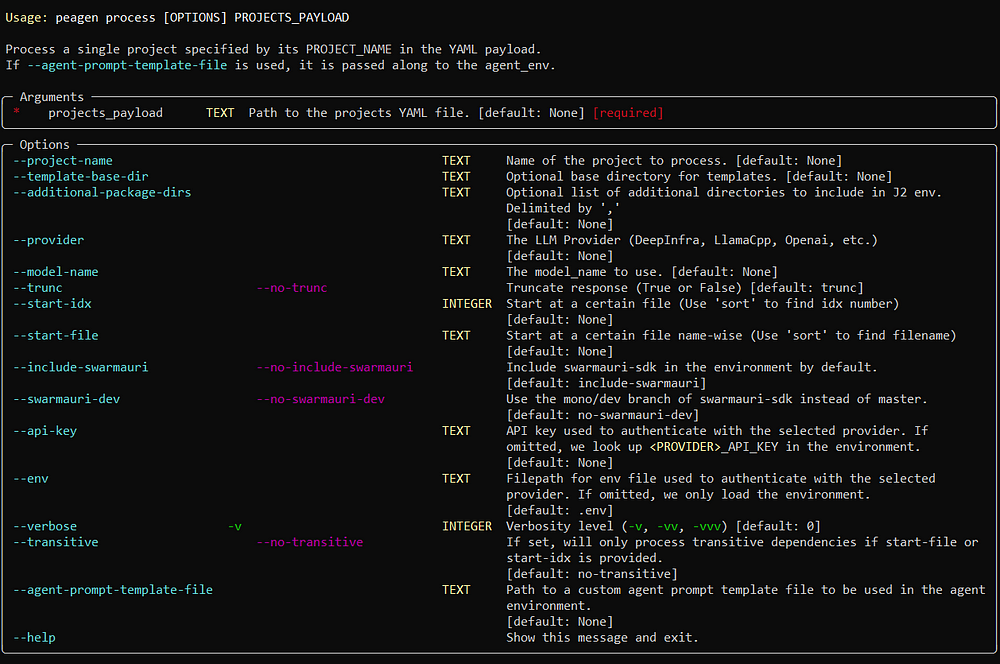
peagen process
Render and/or generate files for one or more projects.
peagen process <PROJECTS_YAML> \
  [--project-name <NAME>] \
  [--include-swarmauri | --swarmauri-dev] \
  [--transitive] \
  [--provider <PROVIDER>] \
  [--model-name <MODEL>] \
  [-v | -vv]
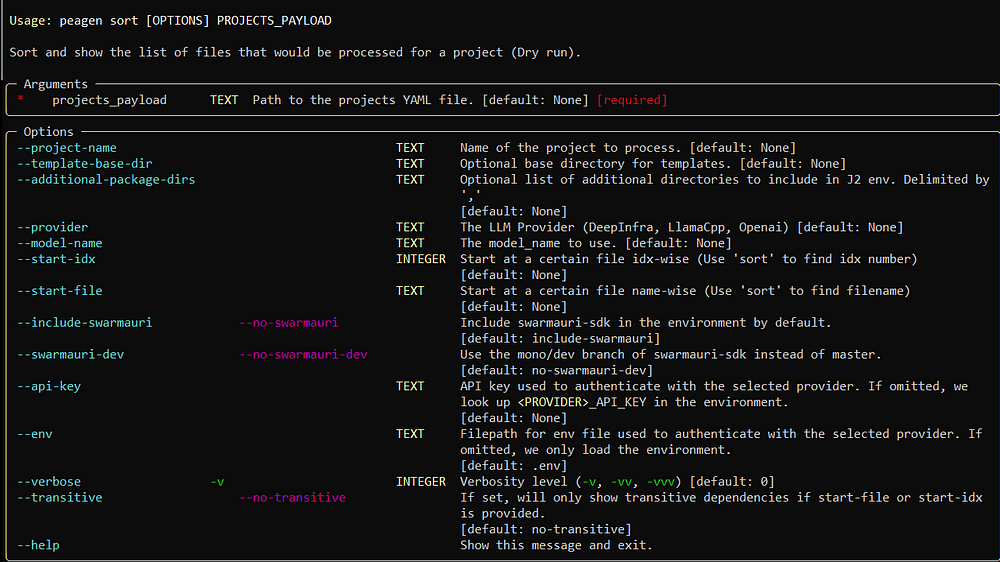
peagen sort
Show the planned file‑generation order without making changes.
peagen sort <PROJECTS_YAML> \
  [--project-name <NAME>] \
  [--transitive] \
  [-v | -vv]
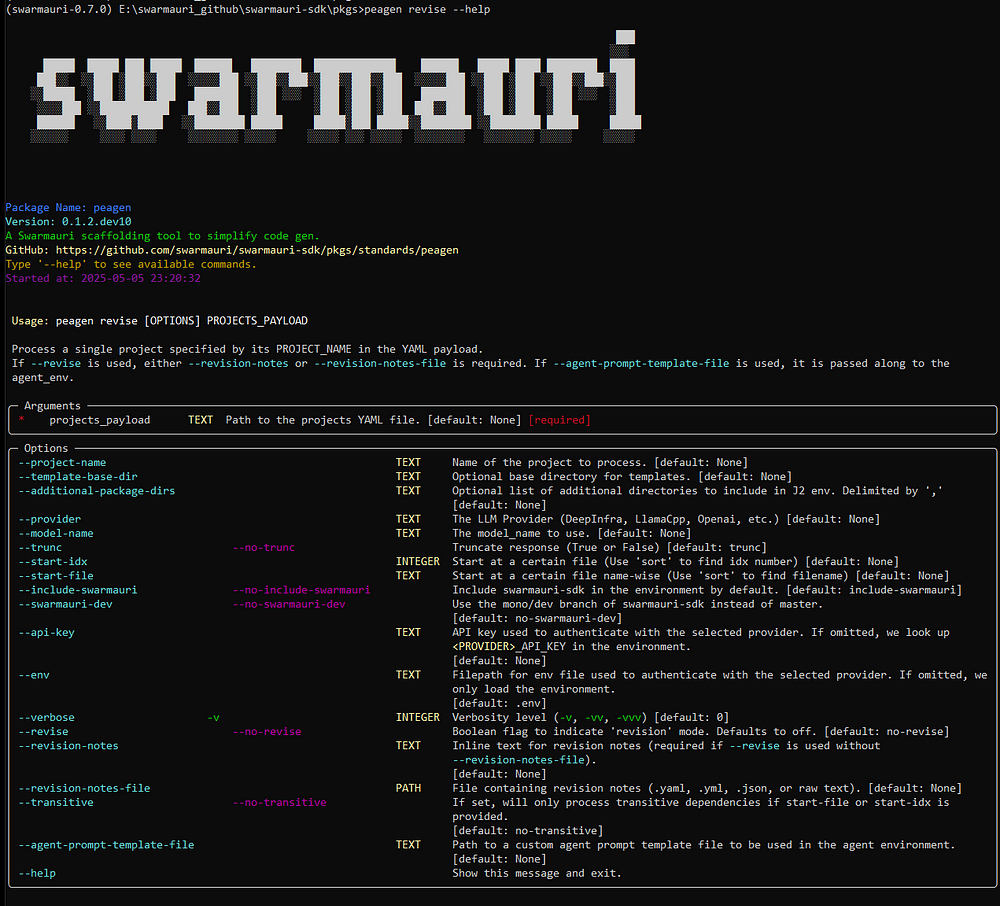
peagen revise
Update project YAML or templates based on previous run metadata.
peagen revise <PROJECTS_YAML> \
  [--project-name <NAME>] \
  [-v | -vv]
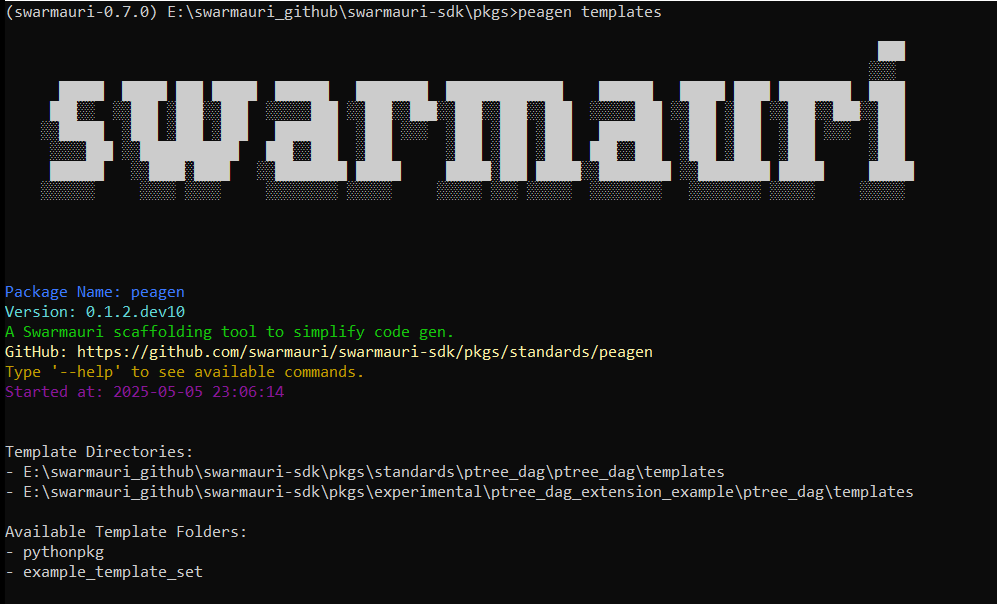
peagen templates
List available template sets and their directories:
peagen templates
peagen doe gen
Expand a Design-of-Experiments spec into a project_payloads.yaml bundle.
peagen doe gen <DOE_SPEC_YML> <TEMPLATE_PROJECT> \
  [--output project_payloads.yaml] \
  [-c PATH | --config PATH] \
  [--dry-run] [--force]
Craft doe_spec.yml using the scaffold created by peagen init doe-spec. Follow the
editing guidelines in peagen/scaffold/doe_spec/README.md:
update factor levels, run peagen validate doe-spec doe_spec.yml, bump the version in
spec.yaml, and never mutate published versions.
For reference implementations, see the sample specs under
tests/examples/doe_specs which demonstrate basic, composite,
and evaluator-pool variations.
Examples & Walkthroughs
Single‑Project Processing Example
peagen process projects.yaml \
  --project-name MyProject \
  --provider openai \
  --model-name gpt-4 \
  -v
- Loads only
MyProjectfromprojects.yaml. - Renders its
ptree.yaml.j2into file records. - Builds the dependency DAG and topologically sorts it.
- Processes each record: static or LLM‑generated.
Batch Processing All Projects
peagen process projects.yaml \
  --provider openai \
  --model-name gpt-4 \
  -vv
- Iterates every project in
projects.yaml. - Processes them sequentially (load → render → sort → generate).
- Uses DEBUG logs to print full DAGs and rendered prompts.
Transitive Dependency Sorting with Resumption
peagen process projects.yaml \
  --project-name AnalyticsService \
  --transitive \
  --start-file services/data_pipeline.py \
  -v
- Builds full DAG including indirect dependencies.
- Topologically sorts all records.
- Skips ahead to
services/data_pipeline.pyand processes from there.
Advanced Tips
Resuming at a Specific Point
--start-file <PATH>: begin at a given file record.--start-idx <NUM>: jump to a zero‑based index in the sorted list.
Custom Agent‑Prompt Templates
peagen process projects.yaml \
  --agent-prompt-template-file ./custom_prompts/my_agent.j2 \
  --provider openai \
  --model-name gpt-4
Integrating into CI/CD Pipelines
# .github/workflows/generate.yml
name: Generate Files
on:
  push:
    paths:
      - 'templates/**'
      - 'packages/**'
      - 'projects.yaml'
jobs:
  build:
    runs-on: ubuntu-latest
    steps:
      - uses: actions/checkout@v3
      - name: Set up Python
        uses: actions/setup-python@v4
        with:
          python-version: '3.x'
      - name: Install dependencies
        run: pip install peagen
      - name: Generate files
        env:
          OPENAI_API_KEY: ${{ secrets.OPENAI_API_KEY }}
        run: |
          peagen process projects.yaml \
            --template-base-dir ./templates \
            --provider openai \
            --model-name gpt-4 \
            --transitive \
            -v
      - name: Commit changes
        run: |
          git config user.name "github-actions[bot]"
          git config user.email "actions@github.com"
          git add .
          git diff --quiet || git commit -m "chore: update generated files"
Conclusion & Next Steps
Embedding Peagen Programmatically
from peagen.core import Peagen
import os

agent_env = {
    "provider": "openai",
    "model_name": "gpt-4",
    "api_key": os.environ["OPENAI_API_KEY"],
}
pea = Peagen(
    projects_payload_path="projects.yaml",
    additional_package_dirs=[],
    agent_env=agent_env,
)

projects = pea.load_projects()
result, idx = pea.process_single_project(projects[0], start_idx=0)
Storage Adapters & Publishers
Peagen's artifact output and event publishing are pluggable. Use the storage_adapter argument to control where files are saved and optionally provide a publisher for notifications. Built-in options include FileStorageAdapter, MinioStorageAdapter, RedisPublisher, RabbitMQPublisher, and WebhookPublisher. See docs/storage_adapters_and_publishers.md for details.
For the event schema and routing key conventions, see docs/eda_protocol.md. Events can also be emitted directly from the CLI using --notify:
peagen process projects.yaml --notify redis://localhost:6379/0/custom.events
Parallel Processing & Artifact Storage Options
Peagen can accelerate generation by spawning multiple workers. Set --workers <N>
on the CLI (or workers = N in .peagen.toml) to enable a thread pool that
renders files concurrently while still honoring dependency order. Leaving the
flag unset or 0 processes files sequentially.
Artifact locations are resolved via the --artifacts flag. Targets may be a
local directory (dir://./peagen_artifacts) using FileStorageAdapter or an
S3/MinIO endpoint (s3://host:9000) handled by MinioStorageAdapter. Custom
adapters and publishers can be supplied programmatically:
from peagen.core import Peagen
from peagen.storage_adapters.minio_storage_adapter import MinioStorageAdapter
from peagen.publishers.webhook_publisher import WebhookPublisher

store = MinioStorageAdapter.from_uri("s3://localhost:9000", bucket="peagen")
bus = WebhookPublisher("https://example.com/peagen")
Another Example:
from peagen.publishers.redis_publisher import RedisPublisher
from peagen.publishers.rabbitmq_publisher import RabbitMQPublisher

store = MinioStorageAdapter.from_uri("s3://localhost:9000", bucket="peagen")
bus = RedisPublisher("redis://localhost:6379/0")
# bus = RabbitMQPublisher(host="localhost", port=5672, routing_key="peagen.events")

pea = Peagen(
    projects_payload_path="projects.yaml",
    storage_adapter=store,
    agent_env={"provider": "openai", "model_name": "gpt-4"},
)

bus.publish("peagen.events", {"type": "process.started"})
pea.process_all_projects()
Contributing & Extending Templates
- Template Conventions: Place new Jinja2 files under your
TEMPLATE_BASE_DIRas*.j2, using the same context variables (projects,packages,modules) that core templates rely on. - Adding New Commands: Define a new subcommand in
cli.py, wire it into the parser, instantiatePeagen, and call core methods. - Submitting Pull Requests: Fork the repo, add/update templates under
peagen/templates/, update docs/README, and open a PR tagging maintainers.
Release history Release notifications | RSS feed


Download files
Download the file for your platform. If you're not sure which to choose, learn more about installing packages.
Source Distribution
Built Distribution
Filter files by name, interpreter, ABI, and platform.
If you're not sure about the file name format, learn more about wheel file names.
Copy a direct link to the current filters
File details
Details for the file peagen-0.1.3.dev1.tar.gz.
File metadata
- Download URL: peagen-0.1.3.dev1.tar.gz
- Upload date:
- Size: 158.7 kB
- Tags: Source
- Uploaded using Trusted Publishing? No
- Uploaded via: uv/0.7.7
File hashes
| Algorithm | Hash digest | |
|---|---|---|
| SHA256 |
4c56edf9f1bc945c63bead71bd67e4e0c89109cd4815db5c651ed7eabee2b048
|
|
| MD5 |
92e88b33c7b25fca8fd8b7d801ab7d41
|
|
| BLAKE2b-256 |
0b66da88c2996d8d1783c6df1d4862d051462081f6e8c853e3e74f6760aa99dc
|
File details
Details for the file peagen-0.1.3.dev1-py3-none-any.whl.
File metadata
- Download URL: peagen-0.1.3.dev1-py3-none-any.whl
- Upload date:
- Size: 264.7 kB
- Tags: Python 3
- Uploaded using Trusted Publishing? No
- Uploaded via: uv/0.7.7
File hashes
| Algorithm | Hash digest | |
|---|---|---|
| SHA256 |
2a044a91caaa0539669d8e6de001d96b2f478e938dfa00d94ac2521ba5fff390
|
|
| MD5 |
a264f62fccab95e62b3c8c73785203b4
|
|
| BLAKE2b-256 |
7670190916bc4b01efc640b268143098e770626f2f60189a1a6802248fc77d1e
|






