
Swarmauri's Peagan - An AI-driven contextual, dependency-based scaffolding tool for rapid content generation.

Project description






Peagen: a Template‑Driven Workflow
Terminology
- Tenant – a namespace used to group related resources, such as repositories.
- Principal – an owner of resources (for example, an individual user or an organization).
Why Use the Peagen CLI?
Reduced Variance in LLM‑Driven Generation
- While LLMs inherently introduce some nondeterminism, Peagen’s structured prompts, injected examples, and dependency‑aware ordering significantly reduce output variance. You’ll still see slight variations on each run, but far less than with ad‑hoc prompt calls.
Consistency & Repeatability
- By centralizing file definitions in a YAML payload plus Jinja2
ptree.yaml.j2templates, Peagen ensures every project run follows the same logic. Changes to templates or project YAML immediately propagate on the nextpeageninvocation.
No Vector Store—Pure DAG + Jinja2
- Peagen does not rely on a vector store or similarity search. Instead, it constructs a directed acyclic graph (DAG) of inter‑file dependencies, then topologically sorts files to determine processing order. Dependencies and example snippets are injected directly into prompt templates via Jinja2.
Built‑In Dependency Management
- The CLI’s
--transitiveflag toggles between strict and transitive dependency sorts, so you can include or exclude indirect dependencies in your generation run.
Seamless LLM Integration
- In GENERATE mode, the CLI automatically fills agent‑prompt templates with context and dependency examples, calls your configured LLM (e.g. OpenAI’s GPT‑4), and writes back the generated content. All model parameters (provider, model name, temperature) flow through CLI flags and environment variables—no extra scripting needed.
When to Choose CLI over the Programmatic API
Interactive Iteration
- Quickly regenerate after tweaking templates or YAML with a single shell command—faster than editing and running a Python script.
CI/CD Enforcement
- Embed
peagen local sortandpeagen local processin pipelines (GitHub Actions, Jenkins, etc.) to ensure generated artifacts stay up to date. Exit codes and verbosity flags integrate seamlessly with automation tools.
Polyglot & Minimal Overhead
- Teams in Java, Rust, Go, or any language can use Peagen by installing and invoking the CLI—no Python API import paths to manage.
What Is Peagen?
Core Concepts
Peagen is a template‑driven orchestration engine that transforms high‑level project definitions into concrete files - statically rendered or LLM‑generated - while respecting inter‑file dependencies.
Peagen’s orchestration layer now lives in the handler modules that back each CLI command. Rather than instantiating a Peagen class, the CLI builds peagen.orm.Task models and forwards them to functions such as peagen.handlers.process_handler.process_handler. Those handlers manage the Git work-tree supplied in task.args["worktree"], resolve configuration via PluginManager, and delegate to helper routines in peagen.core.
Key primitives you will encounter in the codebase are:
load_projects_payload(projects_payload)Parses YAML (or an already loaded document) into a list of project dictionaries and validates it against the current schema.process_all_projects(projects_payload, cfg, transitive=False)Renders every project inside the Git work-tree referenced bycfg["worktree"].process_single_project(project, cfg, start_idx=0, start_file=None, transitive=False)Executes the render → dependency sort → file processing pipeline for a single project and returns both the processed records and the next index.sort_file_records(file_records, *, start_idx=0, start_file=None, transitive=False)Implements the deterministic topological ordering used by both the CLI and worker processes. Dependencies are expressed viarecord["EXTRAS"]["DEPENDENCIES"].
Every call into process_core expects a configuration dictionary containing a pathlib.Path under cfg["worktree"]. That path is where copy templates are materialised, generated files are written, and—if a GitVCS instance is available—commits are staged and pushed. Understanding these functions is the quickest way to extend Peagen programmatically because the CLI is a thin wrapper over them.
Prerequisites & Setup
Installing Peagen
# From PyPI (recommended)
pip install peagen

# With Poetry
poetry add peagen

# With uv managing pyproject dependencies
uv add peagen

# Install the CLI globally with uv
uv tool install peagen

# From source (latest development)
git clone https://github.com/swarmauri/swarmauri-sdk.git
cd pkgs/standards/peagen
pip install .

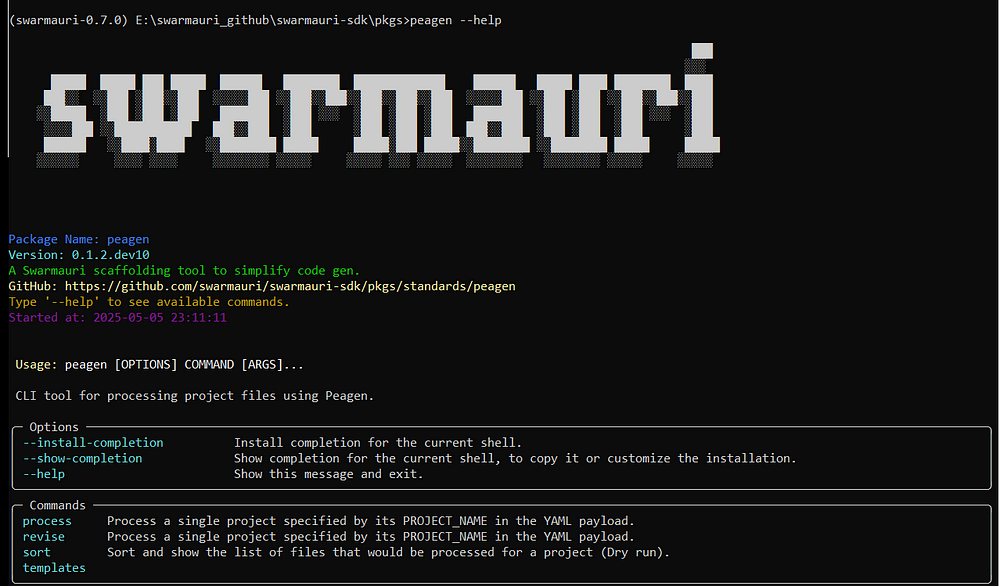
peagen --help
Executing peagen --help
peagen --help
Configuring OPENAI_API_KEY
export OPENAI_API_KEY="sk-…"
CLI Defaults via .peagen.toml
Create a .peagen.toml in your project root to store provider credentials and
command defaults. A typical configuration might look like:
# .peagen.toml
[llm]
default_provider = "openai"
default_model_name = "gpt-4"

[llm.api_keys]
openai = "sk-..."

[storage]
default_filter = "file"

[storage.filters.file]
output_dir = "./peagen_artifacts"

[vcs]

default_vcs = "git"


[vcs.adapters.git]
mirror_git_url = "${MIRROR_GIT_URL}"
mirror_git_token = "${MIRROR_GIT_TOKEN}"
owner = "${OWNER}"


[vcs.adapters.git.remotes]
origin = "${GITEA_REMOTE}"
upstream = "${GITHUB_REMOTE}"
With these values in place you can omit --provider, --model-name, and other
flags when running the CLI.
If --provider is omitted and no default_provider is configured (or the
PROVIDER environment variable is unset), Peagen will raise an error.
Project YAML Schema Overview
# projects_payload.yaml
PROJECTS:
  - NAME: "ExampleParserProject"
    ROOT: "pkgs"
    TEMPLATE_SET: "swarmauri_base"
    PACKAGES:
      - NAME: "base/swarmauri_base"
        MODULES:
          - NAME: "ParserBase"
            EXTRAS:
              PURPOSE: "Provide a base implementation of the interface class."
              DESCRIPTION: "Base implementation of the interface class"
              REQUIREMENTS:
                - "Should inherit from the interface first and ComponentBase second."
              RESOURCE_KIND: "parsers"
              INTERFACE_NAME: "IParser"
              INTERFACE_FILE: "pkgs/core/swarmauri_core/parsers/IParser.py"
CLI Entry Point Overview
Peagen’s CLI is organised into four top-level groups:
peagen fetch– materialise workspaces and template sets on the local machine.peagen local …– run handlers directly against the current environment.peagen remote …– submit tasks to a JSON-RPC gateway.peagen tui– launch the textual dashboard.
peagen fetch
Synchronise workspaces locally (optionally cloning source packages and installing template sets).
peagen fetch [WORKSPACE_URI ...] \
  [--no-source/--with-source] \
  [--install-template-sets/--no-install-template-sets] \
  [--repo <GIT_URL>] \
  [--ref <REF>]
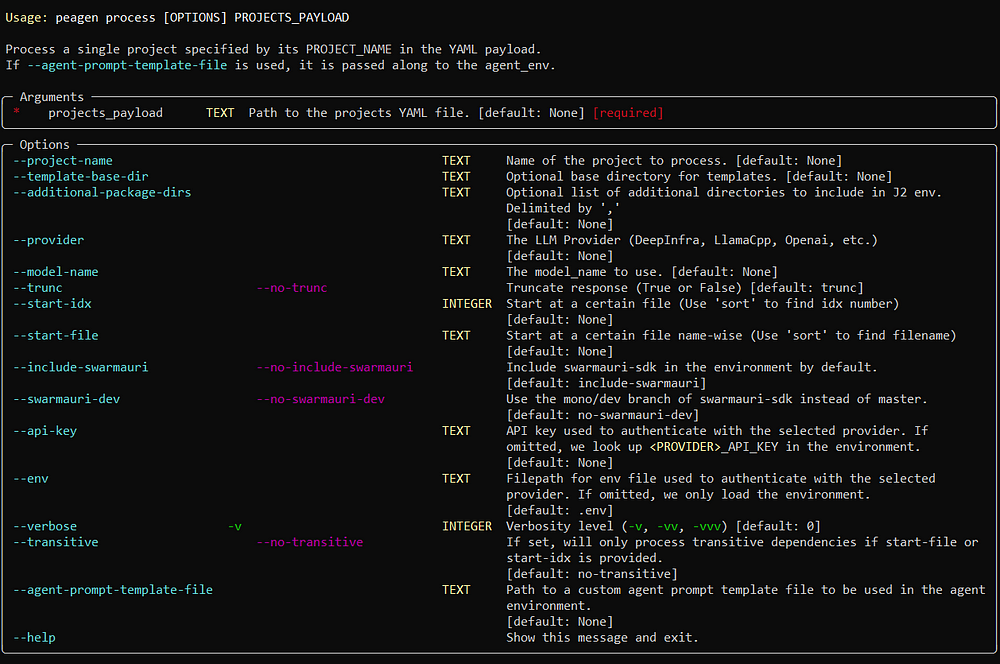
peagen local process
Render and/or generate files for one or more projects inside an existing Git work-tree.
peagen local process <PROJECTS_YAML> \
  --repo <PATH_OR_URL> \
  [--ref <REF>] \
  [--project-name <NAME>] \
  [--start-idx <NUM>] \
  [--start-file <PATH>] \
  [--transitive/--no-transitive] \
  [--agent-env '{"provider": "openai", "model_name": "gpt-4"}'] \
  [--output-base <PATH>]
Pass --repo $(pwd) when operating on a local checkout so the handler can construct the work-tree that process_core expects.
peagen remote process
Submit a processing task to a Peagen gateway.
peagen remote process <PROJECTS_YAML> \
  --repo <GIT_URL> \
  [--ref <REF>] \
  [--project-name <NAME>] \
  [--start-idx <NUM>] \
  [--start-file <PATH>] \
  [--transitive/--no-transitive] \
  [--agent-env <JSON>] \
  [--output-base <PATH>] \
  [--watch/-w] \
  [--interval/-i <SECONDS>]
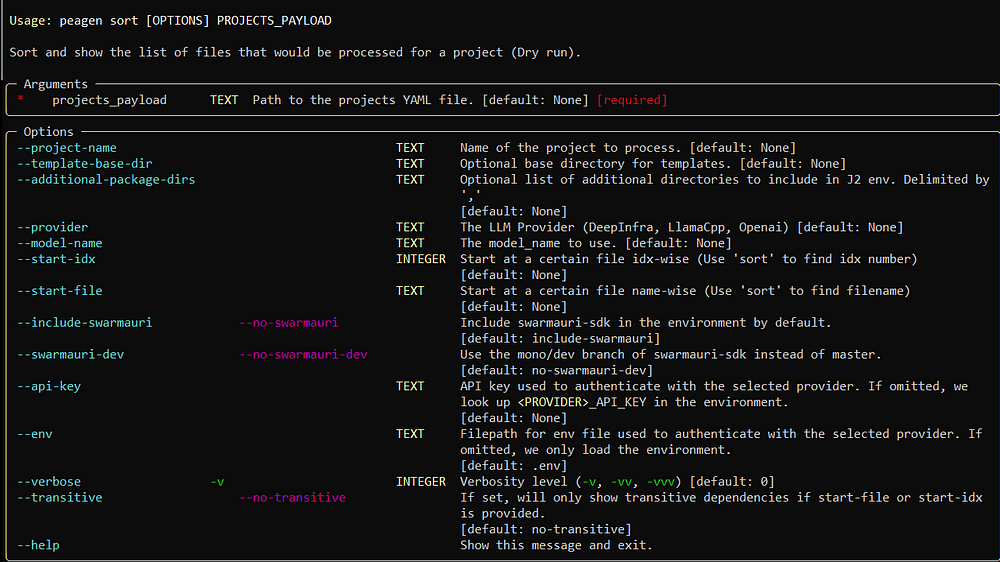
peagen local sort
Inspect the dependency order without writing files.
peagen local sort <PROJECTS_YAML> \
  [--repo <PATH_OR_URL>] \
  [--ref <REF>] \
  [--project-name <NAME>] \
  [--start-idx <NUM>] \
  [--start-file <PATH>] \
  [--transitive/--no-transitive] \
  [--show-dependencies]
peagen remote sort
peagen remote sort <PROJECTS_YAML> \
  --repo <GIT_URL> \
  [--ref <REF>] \
  [--project-name <NAME>] \
  [--start-idx <NUM>] \
  [--start-file <PATH>] \
  [--transitive/--no-transitive] \
  [--show-dependencies] \
  [--watch/-w] \
  [--interval/-i <SECONDS>]
peagen local template-set list
List available template sets and their directories:
peagen local template-set list
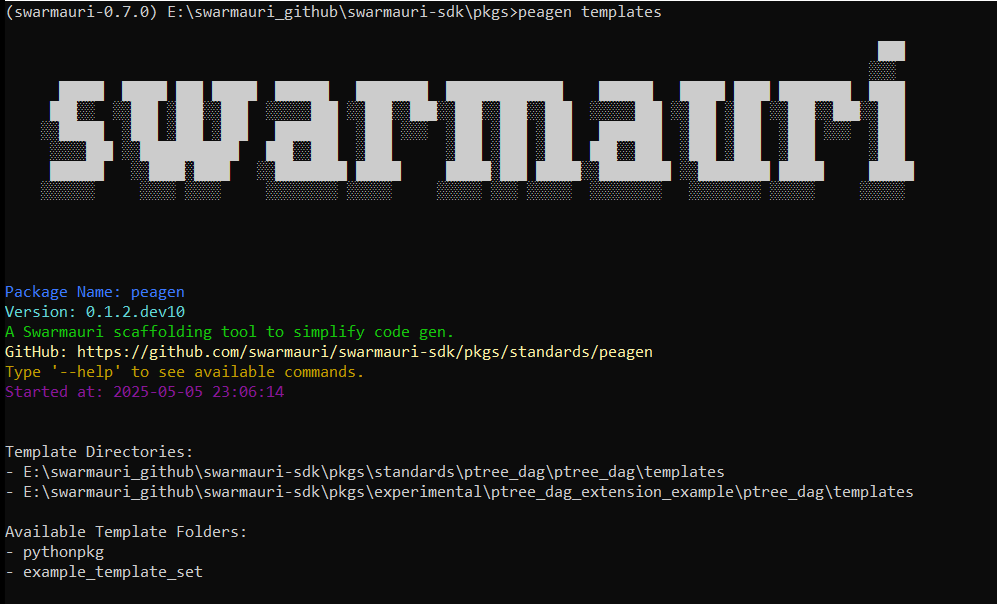
Remote equivalents (peagen remote template-set …) provide the same operations via the gateway.
peagen local doe gen
Expand a Design-of-Experiments spec into a project_payloads.yaml bundle.
peagen local doe gen <DOE_SPEC_YML> <TEMPLATE_PROJECT> \
  [--output project_payloads.yaml] \
  [-c PATH | --config PATH] \
  [--dry-run] \
  [--force]
Craft doe_spec.yml using the scaffold created by peagen init doe-spec. Follow the editing guidelines in peagen/scaffold/doe_spec/README.md: update factor levels, run peagen validate doe-spec doe_spec.yml, bump the version in spec.yaml, and never mutate published versions. Remote execution is available via peagen remote doe gen with the same flags plus --repo/--ref when targeting a gateway.
peagen local db upgrade
Apply Alembic migrations to the latest version. Run this command before starting the gateway to ensure the database schema is current.
peagen local db upgrade
Run migrations on a gateway instance:
peagen remote db upgrade
Remote Processing with Multi-Tenancy
peagen remote process projects.yaml \
  --gateway-url http://localhost:8000/rpc \
  --pool acme-lab \
  --repo https://example.com/org/repo.git
Pass --pool to target a specific tenant or workspace when submitting tasks to the gateway. The shared handler surfaces --repo and --ref so workflows can operate on any Git repository and reference.
Examples & Walkthroughs
Single‑Project Processing Example
peagen local process projects.yaml \
  --repo $(pwd) \
  --project-name MyProject \
  --agent-env '{"provider": "openai", "model_name": "gpt-4"}' \
  -v
- Loads only
MyProjectfromprojects.yaml. - Renders its
ptree.yaml.j2into file records. - Builds the dependency DAG and topologically sorts it.
- Processes each record: static or LLM‑generated.
Batch Processing All Projects
peagen local process projects.yaml \
  --repo $(pwd) \
  --agent-env '{"provider": "openai", "model_name": "gpt-4"}' \
  -vv
- Iterates every project in
projects.yaml. - Processes them sequentially (load → render → sort → generate).
- Uses DEBUG logs to print full DAGs and rendered prompts.
Transitive Dependency Sorting with Resumption
peagen local process projects.yaml \
  --repo $(pwd) \
  --project-name AnalyticsService \
  --transitive \
  --start-file services/data_pipeline.py \
  -v
- Builds full DAG including indirect dependencies.
- Topologically sorts all records.
- Skips ahead to
services/data_pipeline.pyand processes from there.
Python API: dependency ordering
from peagen.core.sort_core import sort_file_records

file_records = [
    {
        "RENDERED_FILE_NAME": "components/db.py",
        "EXTRAS": {"DEPENDENCIES": ["README.md"]},
    },
    {
        "RENDERED_FILE_NAME": "README.md",
        "EXTRAS": {"DEPENDENCIES": []},
    },
    {
        "RENDERED_FILE_NAME": "components/service.py",
        "EXTRAS": {"DEPENDENCIES": ["components/db.py"]},
    },
]

ordered, next_idx = sort_file_records(file_records=file_records)
print([rec["RENDERED_FILE_NAME"] for rec in ordered])
print(next_idx)
Advanced Tips
Resuming at a Specific Point
--start-file <PATH>: begin at a given file record.--start-idx <NUM>: jump to a zero‑based index in the sorted list.
Custom Agent‑Prompt Templates
peagen local process projects.yaml \
  --repo $(pwd) \
  --agent-env '{"provider": "openai", "model_name": "gpt-4"}' \
  --agent-prompt-template-file ./custom_prompts/my_agent.j2
Integrating into CI/CD Pipelines
# .github/workflows/generate.yml
name: Generate Files
on:
  push:
    paths:
      - 'templates/**'
      - 'packages/**'
      - 'projects.yaml'
jobs:
  build:
    runs-on: ubuntu-latest
    steps:
      - uses: actions/checkout@v3
      - name: Set up Python
        uses: actions/setup-python@v4
        with:
          python-version: '3.x'
      - name: Install dependencies
        run: pip install peagen
      - name: Generate files
        env:
          OPENAI_API_KEY: ${{ secrets.OPENAI_API_KEY }}
        run: |
          peagen local process projects.yaml \
            --repo "$GITHUB_WORKSPACE" \
            --agent-env '{"provider": "openai", "model_name": "gpt-4"}' \
            --transitive \
            -v
      - name: Commit changes
        run: |
          git config user.name "github-actions[bot]"
          git config user.email "actions@github.com"
          git add .
          git diff --quiet || git commit -m "chore: update generated files"
Conclusion & Next Steps
Embedding Peagen Programmatically
from peagen.core import Peagen
import os

agent_env = {
    "provider": "openai",
    "model_name": "gpt-4",
    "api_key": os.environ["OPENAI_API_KEY"],
}
pea = Peagen(
    projects_payload_path="projects.yaml",
    agent_env=agent_env,
)

projects = pea.load_projects()
result, idx = pea.process_single_project(projects[0], start_idx=0)
Transport Models
Runtime RPC payloads should be validated using the Pydantic schemas generated
in peagen.orm.schemas. For example, use
TaskRead.model_validate_json() when decoding a task received over the network:
from peagen.orm.schemas import TaskRead

task = TaskRead.model_validate_json(raw_json)
The gateway and worker components rely on these schema classes rather than the
ORM models under peagen.orm.
Important JSON-RPC methods such as
Task.submitonly acceptTaskCreate,TaskUpdate, orTaskReadinstances. Passing dictionaries or nesteddtomappings is unsupported and will trigger aTypeError.
Note Earlier versions exposed these models under
peagen.modelsand the transport schemas underpeagen.models.schemas. Update any imports to usepeagen.ormandpeagen.orm.schemasgoing forward.
Git Filters & Publishers
Peagen's artifact output and event publishing are pluggable. Use the git_filter argument to control where files are saved and optionally provide a publisher for notifications. Built‑ins live under the peagen.plugins namespace. Available filters include S3FSFilter and MinioFilter, while publisher options cover RedisPublisher, RabbitMQPublisher, and WebhookPublisher. See docs/storage_adapters_and_publishers.md for details.
For the event schema and routing key conventions, see docs/eda_protocol.md. Events can also be emitted directly from the CLI using --notify:
peagen local process projects.yaml \
  --repo $(pwd) \
  --notify redis://localhost:6379/0/custom.events
For a walkthrough of encrypted secrets and key management, see docs/secure_secrets_tutorial.md.
Parallel Processing & Artifact Storage Options
Peagen can accelerate generation by spawning multiple workers. Set --workers <N>
on the CLI (or workers = N in .peagen.toml) to enable a thread pool that
renders files concurrently while still honoring dependency order. Leaving the
flag unset or 0 processes files sequentially.
Artifact locations are resolved via the --artifacts flag. Targets may be a
local directory (file:///./peagen_artifacts) using S3FSFilter or an
S3/MinIO endpoint (s3://host:9000) handled by MinioFilter. Custom
filters and publishers can be supplied programmatically:
from peagen.core import Peagen
from swarmauri_gitfilter_minio import MinioFilter
from peagen.plugins.publishers.webhook_publisher import WebhookPublisher

store = MinioFilter.from_uri("s3://localhost:9000/peagen")
bus = WebhookPublisher("https://example.com/peagen")
Another Example:
from peagen.plugins.publishers.redis_publisher import RedisPublisher
from peagen.plugins.publishers.rabbitmq_publisher import RabbitMQPublisher

store = MinioFilter.from_uri("s3://localhost:9000/peagen")
bus = RedisPublisher("redis://localhost:6379/0")
# bus = RabbitMQPublisher(host="localhost", port=5672, routing_key="peagen.events")

pea = Peagen(
    projects_payload_path="projects.yaml",
    git_filter=store,
    agent_env={"provider": "openai", "model_name": "gpt-4"},
)

bus.publish("peagen.events", {"type": "process.started"})
pea.process_all_projects()
Contributing & Extending Templates
- Template Conventions: Place new Jinja2 files under your
TEMPLATE_BASE_DIRas*.j2, using the same context variables (projects,packages,modules) that core templates rely on. - Adding New Commands: Define a new subcommand in
cli.py, wire it into the parser, instantiatePeagen, and call core methods. - Submitting Pull Requests: Fork the repo, add/update templates under
peagen/templates/, update docs/README, and open a PR tagging maintainers.
Textual TUI
Run peagen tui to launch an experimental dashboard that
subscribes to the gateway's /ws/tasks WebSocket. The gateway now emits
task.update, worker.update and queue.update events. Use the tab keys to
switch between task lists, logs and opened files. The footer shows system
metrics and current time. Remote artifact paths are downloaded via their git
filter and re-uploaded when saving.
Streaming Events with wscat
Use the wscat CLI to inspect the
gateway's WebSocket events directly from the terminal:
npx wscat -c https://gw.peagen.com/ws/tasks
Incoming JSON messages mirror those displayed in the TUI, providing a quick way
to monitor task.update, worker.update, and queue.update events.
Results Backends
Peagen supports pluggable results backends. Built-in options include local_fs, postgres, and in_memory.
Release history Release notifications | RSS feed


Download files
Download the file for your platform. If you're not sure which to choose, learn more about installing packages.
Source Distribution
Built Distribution
Filter files by name, interpreter, ABI, and platform.
If you're not sure about the file name format, learn more about wheel file names.
Copy a direct link to the current filters
File details
Details for the file peagen-0.2.1.dev2.tar.gz.
File metadata
- Download URL: peagen-0.2.1.dev2.tar.gz
- Upload date:
- Size: 269.9 kB
- Tags: Source
- Uploaded using Trusted Publishing? No
- Uploaded via: uv/0.10.3 {"installer":{"name":"uv","version":"0.10.3","subcommand":["publish"]},"python":null,"implementation":{"name":null,"version":null},"distro":{"name":"Ubuntu","version":"24.04","id":"noble","libc":null},"system":{"name":null,"release":null},"cpu":null,"openssl_version":null,"setuptools_version":null,"rustc_version":null,"ci":true}
File hashes
| Algorithm | Hash digest | |
|---|---|---|
| SHA256 |
c5646f3863c8725061b50df418c179f311f58f74b36331f4b95dd7e6e02157c3
|
|
| MD5 |
9b1d43ed394c18c66e362f697287fa9b
|
|
| BLAKE2b-256 |
882b2f6537df8a5cb4bfc057f683d80e8a75eba9529b27ac224151e329e21516
|
File details
Details for the file peagen-0.2.1.dev2-py3-none-any.whl.
File metadata
- Download URL: peagen-0.2.1.dev2-py3-none-any.whl
- Upload date:
- Size: 444.8 kB
- Tags: Python 3
- Uploaded using Trusted Publishing? No
- Uploaded via: uv/0.10.3 {"installer":{"name":"uv","version":"0.10.3","subcommand":["publish"]},"python":null,"implementation":{"name":null,"version":null},"distro":{"name":"Ubuntu","version":"24.04","id":"noble","libc":null},"system":{"name":null,"release":null},"cpu":null,"openssl_version":null,"setuptools_version":null,"rustc_version":null,"ci":true}
File hashes
| Algorithm | Hash digest | |
|---|---|---|
| SHA256 |
99ff8f37b4c5c3a37c1273cc001db67009b4f5b145279b8ce8c9081a58ce2a50
|
|
| MD5 |
1ab6a4a5a35e3dde2387e906c678243a
|
|
| BLAKE2b-256 |
30e5494b65129f753df84cdb4531a7e9416edabe396bf84ca2876ea4d2205c57
|






