

Efficient LLM fine-tuning with much less VRAM
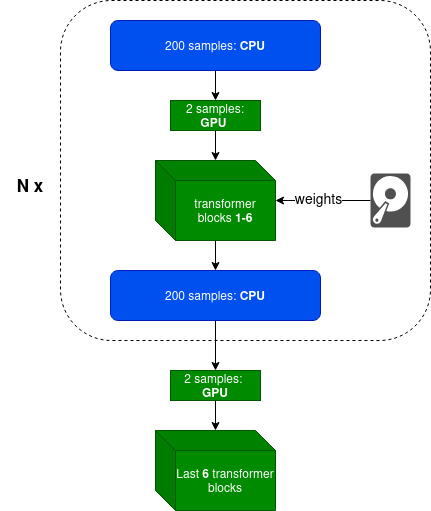
peftee (PEFT-ee) is a lightweight Python library for efficient LLM fine-tuning, built on top of Hugging Face Transformers and PyTorch. It enables fine-tuning models like Llama3-8B on 8 GB GPUs with minimal speed loss ⚡ (~9s per 200 samples at 2k context length) while saving ~14 GB (7.6 vs 21.8) of VRAM ▶️ Colab Notebook. No quantization is used — only fp16/bf16 precision.
💡 Intuition
Today, LLM fine-tuning is mostly about adapting style, structure, and behavior, rather than inserting new knowledge — for that, RAG is a better approach. Moreover, in most cases, there’s no need to fine-tune all transformer layers; updating only the last few (typically 4–8) with an adapter such as LoRA is sufficient. peftee is built precisely for this scenario.
⭐ How do we achieve this:
- Intelligently using Disk (SSD preferable) and CPU offloading with minimal overhead
- Parameter efficient fine-tuning techniques like LoRA
- Gradient checkpointing
- Optimizer states offloading (experimental)
- FlashAttention-2 with online softmax. Full attention matrix is never materialized.
Supported model families: ✅ Llama3, Gemma3 (coming)
Supported GPUs: NVIDIA, AMD, and Apple Silicon (MacBook).
Getting Started
It is recommended to create venv or conda environment first
python3 -m venv peftee_env
source peftee_env/bin/activate
Install peftee with pip install peftee or from source:
git clone https://github.com/Mega4alik/peftee.git
cd peftee
pip install --no-build-isolation -e .

# for Nvidia GPUs with cuda (optional):
Usage
# download the model first. Supported model families: Llama3, Gemma3 (coming)
huggingface-cli download "meta-llama/Llama-3.2-1B" --local-dir "./models/Llama-3.2-1B/" --local-dir-use-symlinks False
Training sample
import torch
from torch.utils.data import DataLoader
from datasets import load_dataset
from transformers import AutoTokenizer, TextStreamer
from peft import LoraConfig
from peftee import SFTTrainer, DefaultDataCollator

model_dir = "./models/Llama-3.2-1B/"
# initialize tokenizer
tokenizer = AutoTokenizer.from_pretrained(model_dir)
tokenizer.pad_token = tokenizer.eos_token

# load dataset (sample)
def preprocess(ex):
		return {
			"prompt": f"Given schema {ex['schema']}, extract the fields from: {ex['text']}",
			"completion": ex["item"]
		}
dataset = load_dataset("paraloq/json_data_extraction")
dataset = dataset.map(preprocess, batched=False)
dataset = dataset.filter(lambda x: len(x["prompt"]) + len(x["completion"]) < 1500*5) #filter
dataset = dataset["train"].train_test_split(test_size=0.06, seed=42)
train_dataset, test_dataset = dataset["train"], dataset["test"]
print("Dataset train, test sizes:", len(train_dataset), len(test_dataset))

# Training
data_collator = DefaultDataCollator(tokenizer, is_eval=False, logging=True) #input: {prompt, completion}. output: {input_ids, attention_mask, labels}
peft_config = LoraConfig(
	target_modules=["self_attn.q_proj", "self_attn.v_proj"], # it will automatically apply to last trainable layers
	r=8, #8-32
	lora_alpha=16, #r*2 normally
	task_type="CAUSAL_LM"
)
trainer = SFTTrainer(
	model_dir,
	output_dir="./mymodel/",
	device="cuda:0",
	trainable_layers_num=4, #4-8, last layers
	offload_cpu_layers_num=0, #99 for maximum offload to CPU
	peft_config=peft_config,
	epochs=3,
	samples_per_step=100, #100-500, depending on available RAM
	batch_size=2,
	gradient_accumulation_batch_steps=2,
	gradient_checkpointing=True,
	learning_rate=2e-4,
	eval_steps=4,
	save_steps=4,
	data_collator=data_collator,
	train_dataset=train_dataset,
	eval_dataset=test_dataset
)
trainer.train(resume_from_checkpoint=None) #checkpoint dir
For Evaluation/Inference, we will be using oLLM, LLM inference library
# Install ollm. Source: https://github.com/Mega4alik/ollm
pip install --no-build-isolation ollm
from ollm import AutoInference
data_collator = DefaultDataCollator(tokenizer, is_eval=True, logging=False)
o = AutoInference(model_dir, adapter_dir="./mymodel/checkpoint-20/", device="cuda:0")
text_streamer = TextStreamer(o.tokenizer, skip_prompt=True, skip_special_tokens=False)
test_ds = DataLoader(test_dataset, batch_size=1, shuffle=True)
for sample in test_ds:
	x = data_collator(sample)
	outputs = o.model.generate(input_ids=x["input_ids"].to(o.device), max_new_tokens=500, streamer=text_streamer).cpu()
	answer = o.tokenizer.decode(outputs[0][x["input_ids"].shape[-1]:], skip_special_tokens=False)
	print(answer)
Contact us
If you have any questions, contact me at anuarsh@ailabs.us.
1 maintainer

Metadata
1 maintainer
Release files for peftee 0.0.2
For a detailed explanation of source distributions (sdists) and built distributions (wheels), please see the package formats documentation.
Source distribution (sdist)
| File | Size | Uploaded | |
|---|---|---|---|
| peftee-0.0.2.tar.gz | 15.1 kB | Details |
Built distribution (wheel)
| File | Interpreter | ABI | Platform | Reset |
|---|---|---|---|---|
| peftee-0.0.2-py3-none-any.whl | Python 3 | none | any | Details |
Total release size: 29.0 kB
Release files / peftee-0.0.2.tar.gz
| Download URL | peftee-0.0.2.tar.gz |
|---|---|
| Size | 15.1 kB |
| Tags | Source |
|
SHA-256 checksum How to use checksums |
1595e8fd09ead066d49dd7ffcc4451b56d154de65cad687ef45f04ed4dafd617
|
|
BLAKE2b-256 checksum How to use checksums |
10e7fc9b7b9d9e7e363834f19ed19f2de652df9f270721369cda189ba5deaee0
|
| Upload date | |
|
Uploaded using Trusted Publishing? What is trusted publishing? |
No |
| Uploaded via |
twine/6.2.0 CPython/3.12.3
|
Release files / peftee-0.0.2-py3-none-any.whl
| Download URL | peftee-0.0.2-py3-none-any.whl |
|---|---|
| Size | 13.9 kB |
| Tags | Python 3 |
|
SHA-256 checksum How to use checksums |
e34f5ec63e7896ae174027fe771402b4d534f6948f3177a1d20769229eb74f8d
|
|
BLAKE2b-256 checksum How to use checksums |
dba2c4da973d6aece36613529914080bf480fbfe95d36e4c0c2f40f83a6240f7
|
| Upload date | |
|
Uploaded using Trusted Publishing? What is trusted publishing? |
No |
| Uploaded via |
twine/6.2.0 CPython/3.12.3
|














