
LLM fine-tuning library

Project description

Efficient LLM fine-tuning with much less VRAM
peftee (PEFT-ee) is a lightweight Python library for efficient LLM fine-tuning, built on top of Hugging Face Transformers and PyTorch. It enables fine-tuning models like Llama3-8B on 8 GB GPUs with minimal speed loss ⚡ (~9s per 200 samples at 2k context length) while saving ~14 GB (7.6 vs 21.8) of VRAM ▶️ Colab Notebook. No quantization is used — only fp16/bf16 precision.
💡 Intuition
Today, LLM fine-tuning is mostly about adapting style, structure, and behavior, rather than inserting new knowledge — for that, RAG is a better approach. Moreover, in most cases, there’s no need to fine-tune all transformer layers; updating only the last few (typically 4–8) with an adapter such as LoRA is sufficient. peftee is built precisely for this scenario.
⭐ How do we achieve this:
- Intelligently using Disk (SSD preferable) and CPU offloading with minimal overhead
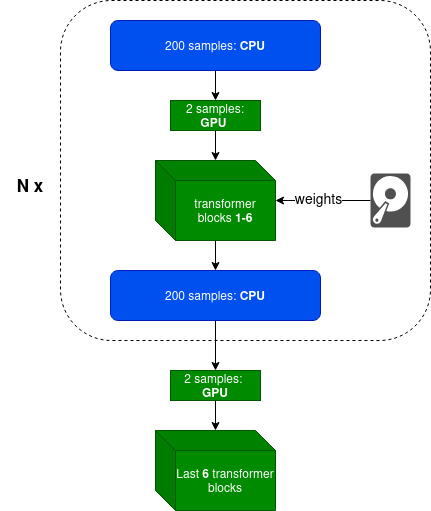
- Parameter efficient fine-tuning techniques like LoRA
- Gradient checkpointing
- Optimizer states offloading (experimental)
- FlashAttention-2 with online softmax. Full attention matrix is never materialized.
Supported model families: ✅ Llama3, Gemma3 (coming)
Supported GPUs: NVIDIA, AMD, and Apple Silicon (MacBook).
Getting Started
It is recommended to create venv or conda environment first
python3 -m venv peftee_env
source peftee_env/bin/activate
Install peftee with pip install peftee or from source:
git clone https://github.com/Mega4alik/peftee.git
cd peftee
pip install --no-build-isolation -e .

# for Nvidia GPUs with cuda (optional):
Usage
# download the model first. Supported model families: Llama3, Gemma3 (coming)
huggingface-cli download "meta-llama/Llama-3.2-1B" --local-dir "./models/Llama-3.2-1B/" --local-dir-use-symlinks False
Training sample
import torch
from torch.utils.data import DataLoader
from datasets import load_dataset
from transformers import AutoTokenizer, TextStreamer
from peft import LoraConfig
from peftee import SFTTrainer, DefaultDataCollator

model_dir = "./models/Llama-3.2-1B/"
# initialize tokenizer
tokenizer = AutoTokenizer.from_pretrained(model_dir)
tokenizer.pad_token = tokenizer.eos_token

# load dataset (sample)
def preprocess(ex):
		return {
			"prompt": f"Given schema {ex['schema']}, extract the fields from: {ex['text']}",
			"completion": ex["item"]
		}
dataset = load_dataset("paraloq/json_data_extraction")
dataset = dataset.map(preprocess, batched=False)
dataset = dataset.filter(lambda x: len(x["prompt"]) + len(x["completion"]) < 1500*5) #filter
dataset = dataset["train"].train_test_split(test_size=0.06, seed=42)
train_dataset, test_dataset = dataset["train"], dataset["test"]
print("Dataset train, test sizes:", len(train_dataset), len(test_dataset))

# Training
data_collator = DefaultDataCollator(tokenizer, is_eval=False, logging=True) #input: {prompt, completion}. output: {input_ids, attention_mask, labels}
peft_config = LoraConfig(
	target_modules=["self_attn.q_proj", "self_attn.v_proj"], # it will automatically apply to last trainable layers
	r=8, #8-32
	lora_alpha=16, #r*2 normally
	task_type="CAUSAL_LM"
)
trainer = SFTTrainer(
	model_dir,
	output_dir="./mymodel/",
	device="cuda:0",
	trainable_layers_num=4, #4-8, last layers
	offload_cpu_layers_num=0, #99 for maximum offload to CPU
	peft_config=peft_config,
	epochs=3,
	samples_per_step=100, #100-500, depending on available RAM
	batch_size=2,
	gradient_accumulation_batch_steps=2,
	gradient_checkpointing=True,
	learning_rate=2e-4,
	eval_steps=4,
	save_steps=4,
	data_collator=data_collator,
	train_dataset=train_dataset,
	eval_dataset=test_dataset
)
trainer.train(resume_from_checkpoint=None) #checkpoint dir
For Evaluation/Inference, we will be using oLLM, LLM inference library
# Install ollm. Source: https://github.com/Mega4alik/ollm
pip install --no-build-isolation ollm
from ollm import AutoInference
data_collator = DefaultDataCollator(tokenizer, is_eval=True, logging=False)
o = AutoInference(model_dir, adapter_dir="./mymodel/checkpoint-20/", device="cuda:0")
text_streamer = TextStreamer(o.tokenizer, skip_prompt=True, skip_special_tokens=False)
test_ds = DataLoader(test_dataset, batch_size=1, shuffle=True)
for sample in test_ds:
	x = data_collator(sample)
	outputs = o.model.generate(input_ids=x["input_ids"].to(o.device), max_new_tokens=500, streamer=text_streamer).cpu()
	answer = o.tokenizer.decode(outputs[0][x["input_ids"].shape[-1]:], skip_special_tokens=False)
	print(answer)
Contact us
If you have any questions, contact me at anuarsh@ailabs.us.
Release history Release notifications | RSS feed


Download files
Download the file for your platform. If you're not sure which to choose, learn more about installing packages.
Source Distribution
Built Distribution
Filter files by name, interpreter, ABI, and platform.
If you're not sure about the file name format, learn more about wheel file names.
Copy a direct link to the current filters
File details
Details for the file peftee-0.0.2.tar.gz.
File metadata
- Download URL: peftee-0.0.2.tar.gz
- Upload date:
- Size: 15.1 kB
- Tags: Source
- Uploaded using Trusted Publishing? No
- Uploaded via: twine/6.2.0 CPython/3.12.3
File hashes
| Algorithm | Hash digest | |
|---|---|---|
| SHA256 |
1595e8fd09ead066d49dd7ffcc4451b56d154de65cad687ef45f04ed4dafd617
|
|
| MD5 |
c23139bfc61abca71ba4f87ef61e213f
|
|
| BLAKE2b-256 |
10e7fc9b7b9d9e7e363834f19ed19f2de652df9f270721369cda189ba5deaee0
|
File details
Details for the file peftee-0.0.2-py3-none-any.whl.
File metadata
- Download URL: peftee-0.0.2-py3-none-any.whl
- Upload date:
- Size: 13.9 kB
- Tags: Python 3
- Uploaded using Trusted Publishing? No
- Uploaded via: twine/6.2.0 CPython/3.12.3
File hashes
| Algorithm | Hash digest | |
|---|---|---|
| SHA256 |
e34f5ec63e7896ae174027fe771402b4d534f6948f3177a1d20769229eb74f8d
|
|
| MD5 |
bcd899f32f2680a1e3f37d5cd4ab00fb
|
|
| BLAKE2b-256 |
dba2c4da973d6aece36613529914080bf480fbfe95d36e4c0c2f40f83a6240f7
|






