
pelican-copy-code
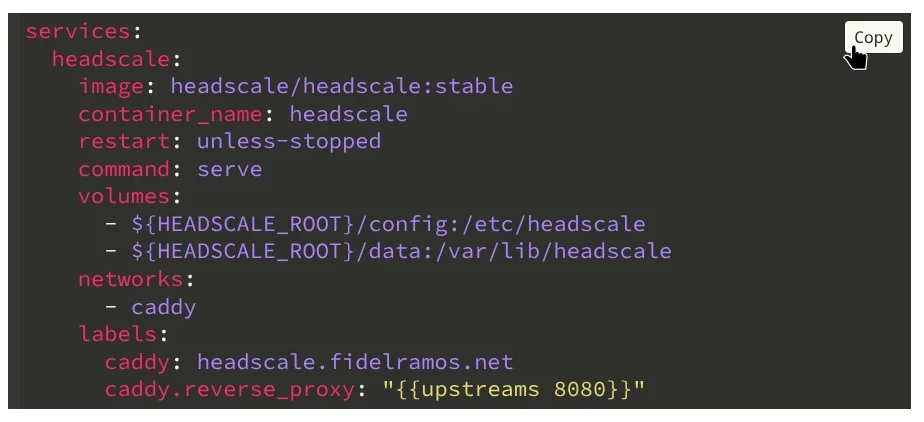
A Pelican namespace plugin that adds a Copy to clipboard button to all code blocks at build time.
Features
- Build-time wrapping: the copy button is injected into HTML during Pelican's build, so there is zero client-side DOM mutation on page load.
- Zero dependencies: the bundled JavaScript uses the native
navigator.clipboardAPI; no external libraries are required. - Theme-agnostic: works with any Pelican theme that produces standard Pygments
<div class="highlight">blocks. - Configurable: optional settings in
pelicanconf.pyfor button text and display behavior.
Installation
pip install pelican-copy-code
The plugin should be automatically detected and enabled by Pelican. However if you define a PLUGINS setting in your pelicanconf.py then you will need to add it there:
PLUGINS = ["copy_code"]
Requirements
- Python >= 3.9
- Pelican >= 4.9
- beautifulsoup4 >= 4.12
Configuration
You can control the behavior of the plugin by setting COPY_CODE_OPTIONS in your pelicanconf.py. It should be a dictionary with these keys:
| Setting | Default | Description |
|---|---|---|
AUTO_INJECT_ASSETS |
True |
If True, the plugin injects the required <link> and <script> tags into every page that has at least one wrapped code block. Set to False if you prefer to include the assets manually in your theme. |
BUTTON_BG |
None |
Background color of the copy button. None defaults to #fff. |
BUTTON_COLOR |
None |
Text and border color of the copy button. None defaults to #000. |
BUTTON_TEXT |
"Copy" |
Text displayed on the copy button. |
COPIED_COLOR |
None |
Text and border color of the copy button after a successful copy. Falls back to #d9411e. |
COPIED_TEXT |
"Copied!" |
Text shown after a successful copy. |
DISPLAY |
"hover" |
"hover" or "always" visibility mode. |
OUTPUT_DIR |
"copy_code" |
Where to put pelican-copy-code assets inside Pelican output |
TARGET_CLASS |
"highlight" |
CSS class of code block <div> elements to target. |
WRAPPER_CLASS |
"code-block-wrapper" |
CSS class applied to the wrapper <div> around each code block. |
Example:
COPY_CODE_OPTIONS = {
    "AUTO_INJECT_ASSETS": True,
    "BUTTON_BG": "#fff",
    "BUTTON_COLOR": "#555",
    "BUTTON_TEXT": "Copy",
    "COPIED_COLOR": "#d9411e",
    "COPIED_TEXT": "¡Copiado!",
    "DISPLAY": "hover",
    "TARGET_CLASS": "highlight",
    "WRAPPER_CLASS": "code-block-wrapper",
}
Theme Integration
No theme or template changes are required. By default, the plugin:
- Copies its bundled
copy-code.cssandcopy-code.jsinto{OUTPUT_PATH}/copy_code/at the end of the build (finalizedsignal). - Injects the corresponding
<link>and<script>tags into each rendered article/page that contains at least one wrapped code block.
If you would rather include the assets yourself (for example to place them in <head> or to bundle them with other static assets), set COPY_CODE_OPTIONS["AUTO_INJECT_ASSETS"] = False and add the tags to your base template:
<link rel="stylesheet" href="{{ SITEURL }}/copy_code/copy-code.css">
<script src="{{ SITEURL }}/copy_code/copy-code.js" defer></script>
The files are always copied to {OUTPUT_PATH}/copy_code/ regardless of the AUTO_INJECT_ASSETS setting.
Internationalization (i18n)
The plugin includes compiled translations to multiple languages (see the i18n dir for the current list). The translations will be activated automatically when using the DEFAULT_LANG Pelican setting or when using the i18n-subsites plugin.
The BUTTON_TEXT and COPIED_TEXT settings will override the texts, they are used as-is without translation.
Contributing a translation
You need to install Babel for its pybabel utility. It's a development dependency so you should have it if you did uv sync.
# Create a new language catalog (e.g. Czech)
./translate.sh create cz

# Edit the .po file with your translations, then compile
./translate.sh compile
Translation catalogs live in pelican/plugins/copy_code/i18n/{lang}/LC_MESSAGES/. Both .po and compiled .mo files are committed to the repository.
Development
This project uses uv for dependency management and building.
git clone https://github.com/haplo/pelican-copy-code.git
cd pelican-copy-code
uv sync
To build the package:
uv build
To run the plugin in a Pelican site during development, install it in editable mode into the site's virtual environment:
pip install -e /path/to/pelican-copy-code
# or with uv
uv add --editable /path/to/pelican-copy-code
How It Works
- At build time,
process_code_blocks()finds every<div>matching the configuredTARGET_CLASS(default:highlight) in article/page content and wraps it in a<div>with the configuredWRAPPER_CLASS(default:code-block-wrapper) and appends a<button class="copy-button">. IfAUTO_INJECT_ASSETSis enabled (the default), it also appends<link>and<script>tags pointing at the plugin's CSS and JS. - At the end of the build,
copy_static_files()copiescopy-code.cssandcopy-code.jsinto{OUTPUT_PATH}/copy_code/. - At runtime, the bundled
copy-code.jsattaches click listeners to each button. When clicked, it extracts thetextContentof the adjacent<pre>element and writes it to the clipboard vianavigator.clipboard.writeText().
License
MIT
1 maintainer

Metadata
1 maintainer
Release files for pelican-copy-code 0.2.0
For a detailed explanation of source distributions (sdists) and built distributions (wheels), please see the package formats documentation.
Source distribution (sdist)
| File | Size | Uploaded | |
|---|---|---|---|
| pelican_copy_code-0.2.0.tar.gz | 71.4 kB | Details |
Built distribution (wheel)
| File | Interpreter | ABI | Platform | Reset |
|---|---|---|---|---|
| pelican_copy_code-0.2.0-py3-none-any.whl | Python 3 | none | any | Details |
Total release size: 102.8 kB
Release files / pelican_copy_code-0.2.0.tar.gz
| Download URL | pelican_copy_code-0.2.0.tar.gz |
|---|---|
| Size | 71.4 kB |
| Tags | Source |
|
SHA-256 checksum How to use checksums |
ed468330f6297c214e2c6e5d98dce4631c6883a842366c72fe8b536ba20bcde4
|
|
BLAKE2b-256 checksum How to use checksums |
9c6913f464b66010bf29cca3ae19c64f9474a3b0c4053eebd52e5c6cc7e75a9c
|
| Upload date | |
|
Uploaded using Trusted Publishing? What is trusted publishing? |
No |
| Uploaded via |
uv/0.11.16 {"installer":{"name":"uv","version":"0.11.16","subcommand":["publish"]},"python":null,"implementation":{"name":null,"version":null},"distro":{"name":"Arch Linux","version":null,"id":null,"libc":null},"system":{"name":null,"release":null},"cpu":null,"openssl_version":null,"setuptools_version":null,"rustc_version":null,"ci":null}
|
Release files / pelican_copy_code-0.2.0-py3-none-any.whl
| Download URL | pelican_copy_code-0.2.0-py3-none-any.whl |
|---|---|
| Size | 31.4 kB |
| Tags | Python 3 |
|
SHA-256 checksum How to use checksums |
b6745322b4422373f840160c235242e6b7fcac6afa81562d352309c94abe7c89
|
|
BLAKE2b-256 checksum How to use checksums |
c7169c54faa26722491e30b81dfb27f9cfcc82299adfed68957c9b6aadb1356c
|
| Upload date | |
|
Uploaded using Trusted Publishing? What is trusted publishing? |
No |
| Uploaded via |
uv/0.11.16 {"installer":{"name":"uv","version":"0.11.16","subcommand":["publish"]},"python":null,"implementation":{"name":null,"version":null},"distro":{"name":"Arch Linux","version":null,"id":null,"libc":null},"system":{"name":null,"release":null},"cpu":null,"openssl_version":null,"setuptools_version":null,"rustc_version":null,"ci":null}
|














