
Adds a copy-to-clipboard button to code blocks in Pelican sites

Project description
pelican-copy-code
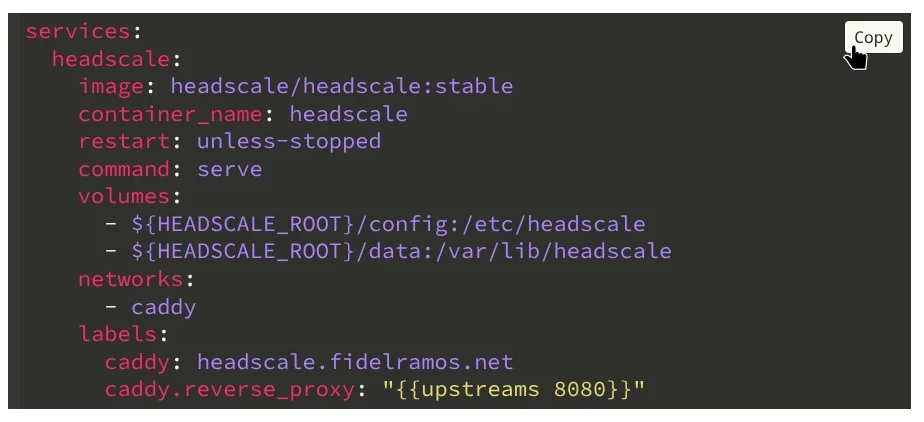
A Pelican namespace plugin that adds a Copy to clipboard button to all code blocks at build time.
Features
- Build-time wrapping: the copy button is injected into HTML during Pelican's build, so there is zero client-side DOM mutation on page load.
- Zero dependencies: the bundled JavaScript uses the native
navigator.clipboardAPI; no external libraries are required. - Theme-agnostic: works with any Pelican theme that produces standard Pygments
<div class="highlight">blocks. - Configurable: optional settings in
pelicanconf.pyfor button text and display behavior.
Installation
pip install pelican-copy-code
The plugin should be automatically detected and enabled by Pelican. However if you define a PLUGINS setting in your pelicanconf.py then you will need to add it there:
PLUGINS = ["copy_code"]
Requirements
- Python >= 3.9
- Pelican >= 4.9
- beautifulsoup4 >= 4.12
Configuration
You can control the behavior of the plugin by setting COPY_CODE_OPTIONS in your pelicanconf.py. It should be a dictionary with these keys:
| Setting | Default | Description |
|---|---|---|
AUTO_INJECT_ASSETS |
True |
If True, the plugin injects the required <link> and <script> tags into every page that has at least one wrapped code block. Set to False if you prefer to include the assets manually in your theme. |
BUTTON_BG |
None |
Background color of the copy button. None defaults to #fff. |
BUTTON_COLOR |
None |
Text and border color of the copy button. None defaults to #000. |
BUTTON_TEXT |
"Copy" |
Text displayed on the copy button. |
COPIED_COLOR |
None |
Text and border color of the copy button after a successful copy. Falls back to #d9411e. |
COPIED_TEXT |
"Copied!" |
Text shown after a successful copy. |
DISPLAY |
"hover" |
"hover" or "always" visibility mode. |
OUTPUT_DIR |
"copy_code" |
Where to put pelican-copy-code assets inside Pelican output |
TARGET_CLASS |
"highlight" |
CSS class of code block <div> elements to target. |
WRAPPER_CLASS |
"code-block-wrapper" |
CSS class applied to the wrapper <div> around each code block. |
Example:
COPY_CODE_OPTIONS = {
    "AUTO_INJECT_ASSETS": True,
    "BUTTON_BG": "#fff",
    "BUTTON_COLOR": "#555",
    "BUTTON_TEXT": "Copy",
    "COPIED_COLOR": "#d9411e",
    "COPIED_TEXT": "¡Copiado!",
    "DISPLAY": "hover",
    "TARGET_CLASS": "highlight",
    "WRAPPER_CLASS": "code-block-wrapper",
}
Theme Integration
No theme or template changes are required. By default, the plugin:
- Copies its bundled
copy-code.cssandcopy-code.jsinto{OUTPUT_PATH}/copy_code/at the end of the build (finalizedsignal). - Injects the corresponding
<link>and<script>tags into each rendered article/page that contains at least one wrapped code block.
If you would rather include the assets yourself (for example to place them in <head> or to bundle them with other static assets), set COPY_CODE_OPTIONS["AUTO_INJECT_ASSETS"] = False and add the tags to your base template:
<link rel="stylesheet" href="{{ SITEURL }}/copy_code/copy-code.css">
<script src="{{ SITEURL }}/copy_code/copy-code.js" defer></script>
The files are always copied to {OUTPUT_PATH}/copy_code/ regardless of the AUTO_INJECT_ASSETS setting.
Internationalization (i18n)
The plugin includes compiled translations to multiple languages (see the i18n dir for the current list). The translations will be activated automatically when using the DEFAULT_LANG Pelican setting or when using the i18n-subsites plugin.
The BUTTON_TEXT and COPIED_TEXT settings will override the texts, they are used as-is without translation.
Contributing a translation
You need to install Babel for its pybabel utility. It's a development dependency so you should have it if you did uv sync.
# Create a new language catalog (e.g. Czech)
./translate.sh create cz

# Edit the .po file with your translations, then compile
./translate.sh compile
Translation catalogs live in pelican/plugins/copy_code/i18n/{lang}/LC_MESSAGES/. Both .po and compiled .mo files are committed to the repository.
Development
This project uses uv for dependency management and building.
git clone https://github.com/haplo/pelican-copy-code.git
cd pelican-copy-code
uv sync
To build the package:
uv build
To run the plugin in a Pelican site during development, install it in editable mode into the site's virtual environment:
pip install -e /path/to/pelican-copy-code
# or with uv
uv add --editable /path/to/pelican-copy-code
How It Works
- At build time,
process_code_blocks()finds every<div>matching the configuredTARGET_CLASS(default:highlight) in article/page content and wraps it in a<div>with the configuredWRAPPER_CLASS(default:code-block-wrapper) and appends a<button class="copy-button">. IfAUTO_INJECT_ASSETSis enabled (the default), it also appends<link>and<script>tags pointing at the plugin's CSS and JS. - At the end of the build,
copy_static_files()copiescopy-code.cssandcopy-code.jsinto{OUTPUT_PATH}/copy_code/. - At runtime, the bundled
copy-code.jsattaches click listeners to each button. When clicked, it extracts thetextContentof the adjacent<pre>element and writes it to the clipboard vianavigator.clipboard.writeText().
License
MIT
Release history Release notifications | RSS feed


Download files
Download the file for your platform. If you're not sure which to choose, learn more about installing packages.
Source Distribution
Built Distribution
Filter files by name, interpreter, ABI, and platform.
If you're not sure about the file name format, learn more about wheel file names.
Copy a direct link to the current filters
File details
Details for the file pelican_copy_code-0.2.0.tar.gz.
File metadata
- Download URL: pelican_copy_code-0.2.0.tar.gz
- Upload date:
- Size: 71.4 kB
- Tags: Source
- Uploaded using Trusted Publishing? No
- Uploaded via: uv/0.11.16 {"installer":{"name":"uv","version":"0.11.16","subcommand":["publish"]},"python":null,"implementation":{"name":null,"version":null},"distro":{"name":"Arch Linux","version":null,"id":null,"libc":null},"system":{"name":null,"release":null},"cpu":null,"openssl_version":null,"setuptools_version":null,"rustc_version":null,"ci":null}
File hashes
| Algorithm | Hash digest | |
|---|---|---|
| SHA256 |
ed468330f6297c214e2c6e5d98dce4631c6883a842366c72fe8b536ba20bcde4
|
|
| MD5 |
a01d59c4c72b7a9b78b91885351576dc
|
|
| BLAKE2b-256 |
9c6913f464b66010bf29cca3ae19c64f9474a3b0c4053eebd52e5c6cc7e75a9c
|
File details
Details for the file pelican_copy_code-0.2.0-py3-none-any.whl.
File metadata
- Download URL: pelican_copy_code-0.2.0-py3-none-any.whl
- Upload date:
- Size: 31.4 kB
- Tags: Python 3
- Uploaded using Trusted Publishing? No
- Uploaded via: uv/0.11.16 {"installer":{"name":"uv","version":"0.11.16","subcommand":["publish"]},"python":null,"implementation":{"name":null,"version":null},"distro":{"name":"Arch Linux","version":null,"id":null,"libc":null},"system":{"name":null,"release":null},"cpu":null,"openssl_version":null,"setuptools_version":null,"rustc_version":null,"ci":null}
File hashes
| Algorithm | Hash digest | |
|---|---|---|
| SHA256 |
b6745322b4422373f840160c235242e6b7fcac6afa81562d352309c94abe7c89
|
|
| MD5 |
b150d7fbd6437380f986074b1f2adb64
|
|
| BLAKE2b-256 |
c7169c54faa26722491e30b81dfb27f9cfcc82299adfed68957c9b6aadb1356c
|






