
Post-exploitation shell handler for authorized security testing

Project description





Penelope is a modern shell handler for penetration testers and CTF players. It provides a more capable alternative to basic netcat listeners, adding automatic PTY upgrades, session management, logging, file transfers and helper modules.
Table of Contents
- 📥 Installation
- ⚙️ Features
- 💻 Usage
- 📝 TODO
- ❓ FAQ
- 🙌 Thanks to the early birds
Installation
Penelope runs on Unix-like systems, including Linux, macOS and FreeBSD, and requires Python 3.6+.
Kali Linux
Penelope is available in Kali Linux:
sudo apt update
sudo apt install penelope
Standalone execution
Penelope is implemented entirely with Python’s standard library, allowing it to run as a standalone script without any external dependencies:
wget -q https://raw.githubusercontent.com/brightio/penelope/refs/heads/main/penelope.py && python3 penelope.py
pipx
To install the latest upstream version directly from GitHub:
pipx install git+https://github.com/brightio/penelope
For a versioned and more stable release path, Penelope is also available on PyPI:
pipx install penelope-shell-handler
Features
Session Features
| Description | Unix with Python>=2.3 | Unix without Python>=2.3 | Windows |
|---|---|---|---|
| Auto-upgrade shell | PTY | PTY(*) | readline(**) |
| Real-time terminal resize | ✅ | ✅ | ❌ |
| Logging shell activity | ✅ | ✅ | ✅ |
| Download remote files/folders | ✅ | ✅ | ✅ |
| Upload local/HTTP files/folders | ✅ | ✅ | ✅ |
| In-memory local/HTTP script execution with real-time output downloading | ✅ | ❌ | ❌ |
| Local port forwarding | ✅ | ❌ | ❌ |
| Spawn shells on multiple tabs and/or hosts | ✅ | ✅ | ❌ |
| Maintain X amount of active shells per host no matter what | ✅ | ✅ | ❌ |
(*) opens a second TCP connection
(**) Can be manually upgraded with the upgrade command
Global Features
- Streamline interaction with the targets via modules
- Multiple sessions
- Multiple listeners
- Serve files/folders via HTTP (-s switch)
- Can be imported by python3 exploits and get shell on the same terminal (see extras)
- Can work in conjunction with Metasploit exploits by disabling the default handler with
set DisablePayloadHandler True
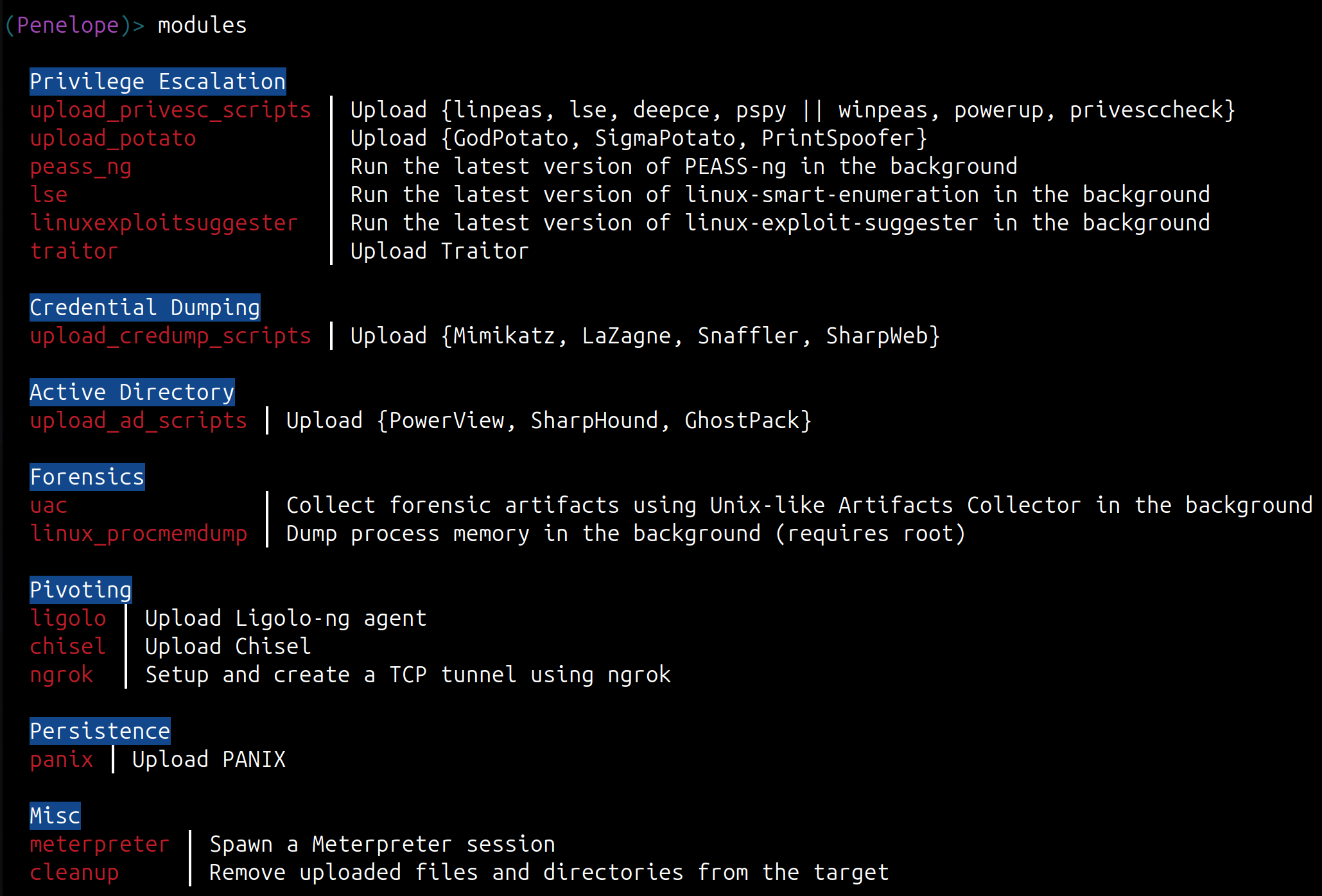
Modules
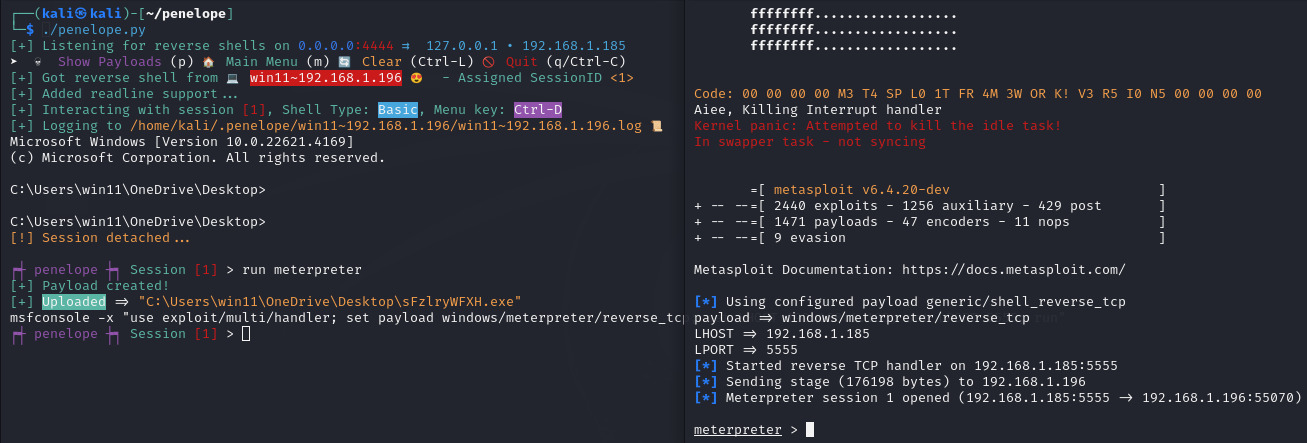
Meterpreter module demonstration
Usage
Sample Typical Usage
penelope                          # Listening for reverse shells on 0.0.0.0:4444
penelope -p 5555                  # Listening for reverse shells on 0.0.0.0:5555
penelope -p 4444,5555             # Listening for reverse shells on 0.0.0.0:4444 and 0.0.0.0:5555
penelope -i eth0 -p 5555          # Listening for reverse shells on eth0:5555
penelope -a                       # Listening for reverse shells on 0.0.0.0:4444 and show sample reverse shell payloads

penelope -c target -p 3333        # Connect to a bind shell on target:3333

penelope ssh user@target          # Get a reverse shell from target on local port 4444
penelope -p 5555 ssh user@target  # Get a reverse shell from target on local port 5555
penelope -i eth0 -p 5555 -- ssh -l user -p 2222 target  # Get a reverse shell from target on eth0, local port 5555 (use -- if ssh needs switches)

penelope -s <File/Folder>         # Share a file or folder via HTTP
Demonstrating Random Usage
As shown in the video below, within only a few seconds we can:
- Get a fully functional auto-resizable PTY shell while logging every interaction with the target
- Execute the latest version of LinPEAS on the target without touching the disk and save the output to a local file in real time
- Open one more PTY shell in another tab
- Upload the latest versions of LinPEAS and linux-smart-enumeration
- Upload a local folder with custom scripts
- Upload an exploit-db exploit directly from URL
- Download and open a remote file locally
- Download the remote /etc directory
- Automatically spawn a new shell if an existing shell dies, helping keep access available during unstable shell sessions
https://github.com/brightio/penelope/assets/65655412/7295da32-28e2-4c92-971f-09423eeff178
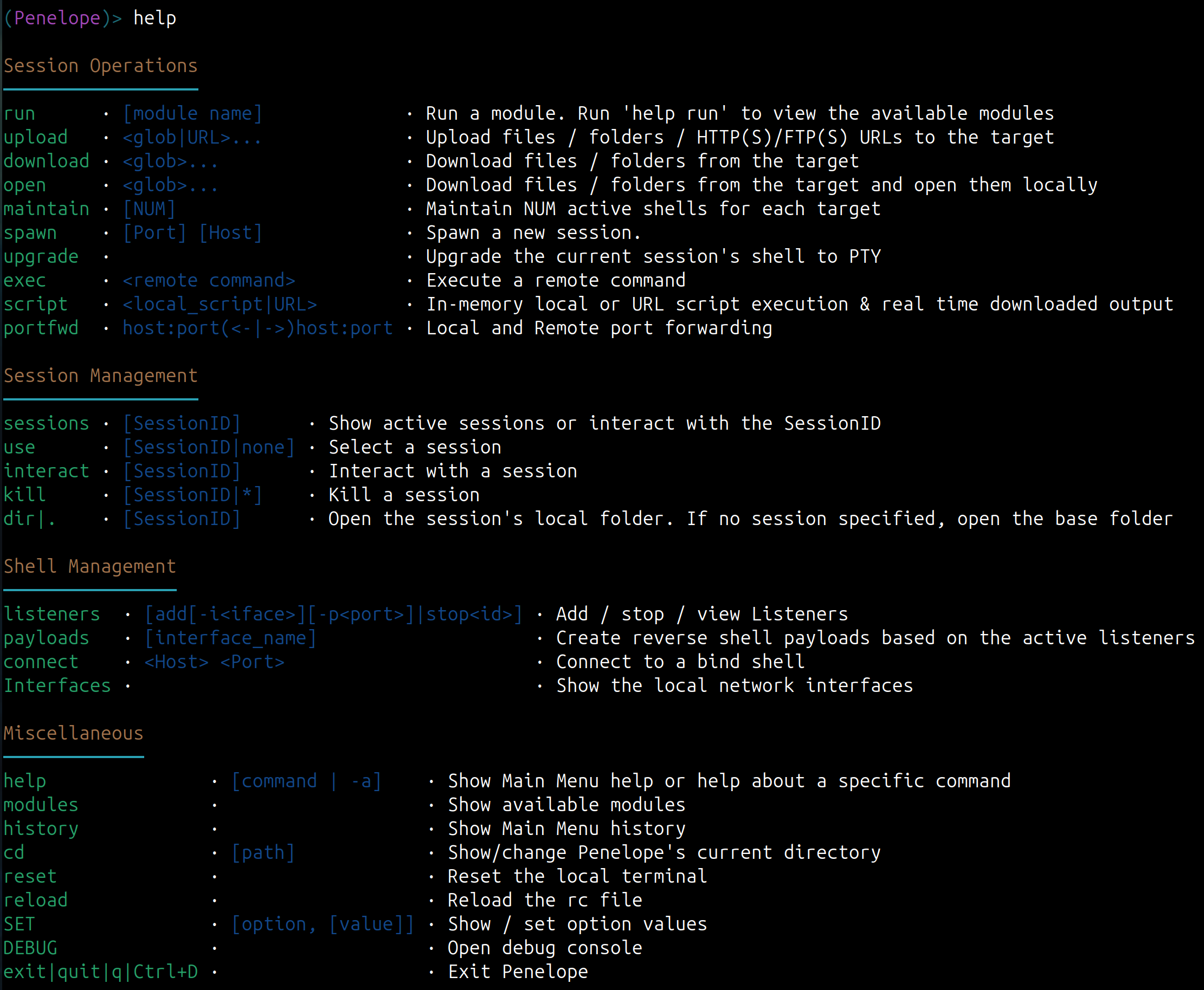
Main Menu Commands
Some Notes:
- By default you need to press
F12to detach the PTY shell and go to the Main Menu. If the upgrade was not possible and you ended up with a basic shell, you can detach it withCtrl+C. This also prevents the accidental killing of the shell. - The Main Menu supports TAB completion and also short commands. For example instead of
interact 1you can just typei 1.
Command Line Options
positional arguments:
  args                          Arguments for -s/--serve and SSH reverse shell modes

options:
  -p PORTS, --ports PORTS       Ports (comma separated) to listen/connect/serve, depending on -i/-c/-s options
                                (Default: 4444/5555/8000)

Reverse or Bind shell?:
  -i , --interface              Local interface/IP to listen. (Default: 0.0.0.0)
  -c , --connect                Bind shell Host
  -j , --jump                   Reverse shell jump endpoints

Hints:
  -a, --payloads                Show sample reverse shell payloads for active Listeners
  -l, --interfaces              List available network interfaces
  -h, --help                    show this help message and exit

Session Logging:
  -L, --no-log                  Disable session log files
  -T, --no-timestamps           Disable timestamps in logs
  -CT, --no-colored-timestamps  Disable colored timestamps in logs

Misc:
  -m , --maintain               Keep N sessions per target
  -M, --menu                    Start in the Main Menu.
  -S, --single-session          Accommodate only the first created session
  -C, --no-attach               Do not auto-attach on new sessions
  -U, --no-upgrade              Disable shell auto-upgrade
  -O, --oscp-safe               Enable OSCP-safe mode

File server:
  -s, --serve                   Run HTTP file server mode
  -prefix , --url-prefix        URL path prefix

Debug:
  -N , --no-bins                Simulate missing binaries on target (comma-separated)
  -v, --version                 Print version and exit
  -d, --debug                   Enable debug output
  -dd, --dev-mode               Enable developer mode
  -cu, --check-urls             Check hardcoded URLs health and exit
TODO
Features
- encryption
- remote port forwarding
- socks & http proxy
- team server
- HTTPs and DNS agents
Known Issues
- Session logging: commands that use alternate buffers, such as nano, may leave escape sequences in the log if they terminate abnormally. The data is still preserved, but viewing the logfile with tools like
catmay look corrupted. Filtering these escape sequences is planned to make log output smoother.
FAQ
► Is Penelope allowed in the OSCP exam?
Penelope’s core shell-handling features do not perform automatic exploitation, which makes them suitable for OSCP-style usage. However, exam rules can change, so always verify the current official OffSec rules before using any tool during an exam.
Some modules require extra caution:
- The meterpreter module should only be used in a way that complies with the current exam rules.
- The traitor module uploads Traitor, which performs automatic privilege escalation.
If you want to avoid accidental rule violations, use the -O / --oscp-safe switch.
► How can I return from the remote shell to the Main Menu?
It depends on the type of shell upgrade in use:
- PTY: press
F12 - Readline: send EOF (
Ctrl-D) - Raw: send SIGINT (
Ctrl-C)
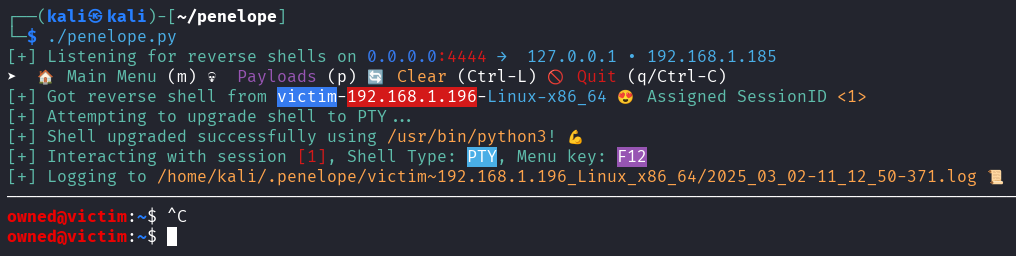
In any case, the correct key is always displayed when you attach to a session. For example:

► How can I customize Penelope (change default options, create custom modules, etc.)?
See peneloperc
► Why aren’t my current working directory and/or user respected when I use menu commands like download/upload?
This usually means you opened a new interactive shell, possibly under a different user. The Penelope agent only tracks the directory of the initial shell and keeps the permissions of the user from that first shell. The best workaround is to cd /tmp before opening a new shell, or, if you switched users, spawn a new reverse shell as the new user.
► How can I contribute?
Your contributions are invaluable! If you’d like to help, please report bugs, unexpected behaviors, or share new ideas. You can also submit pull requests but avoid making commits from IDEs that enforce PEP8 and unintentionally restructure the entire codebase.
► Where does the name come from?
Penelope was the wife of Odysseus and is known for her loyalty and patience while waiting for him to return. The tool is named after her because it was built to be a faithful and stable shell handler for workflows that go beyond a basic listener.
Thanks to the early birds
- Cristian Grigoriu - @crgr for inspiring me to automate the PTY upgrade process. This is how this project was born.
- Paul Taylor - @bao7uo for the idea to support bind shells.
- Longlone - @WAY29 for indicating the need for compatibility with previous versions of Python (3.6).
- Carlos Polop - @carlospolop for the idea to spawn shells on listeners on other systems.
- @darrenmartyn for indicating an alternative method to upgrade the shell to PTY using the script command.
- @bamuwe for the idea to get reverse shells via SSH.
- @strikoder for numerous enhancement ideas.
- @root-tanishq, @robertstrom, @terryf82, @RamadhanAmizudin, @furkan-enes-polatoglu, @DerekFost, @Mag1cByt3s, @nightingalephillip, @grisuno, @thinkslynk, @stavoxnetworks, @thomas-br, @joshoram80, @TheAalCh3m1st, @r3pek, @bamuwe, @six-two, @x9xhack, @dummys, @pocpayload, @anti79, @strikoder, @bestutsengineer for bug reporting.
- Special thanks to @Y3llowDuck for spreading the word!


Download files
Download the file for your platform. If you're not sure which to choose, learn more about installing packages.
Source Distribution
Built Distribution
Filter files by name, interpreter, ABI, and platform.
If you're not sure about the file name format, learn more about wheel file names.
Copy a direct link to the current filters
File details
Details for the file penelope_shell_handler-0.20.0.tar.gz.
File metadata
- Download URL: penelope_shell_handler-0.20.0.tar.gz
- Upload date:
- Size: 73.8 kB
- Tags: Source
- Uploaded using Trusted Publishing? No
- Uploaded via: twine/6.1.0 CPython/3.13.12
File hashes
| Algorithm | Hash digest | |
|---|---|---|
| SHA256 |
3a415c64b25877ac245d07162e5d9b96f6bf3601e6627183a7161b80f27eff36
|
|
| MD5 |
9652aeb38c18af8f6dbecf80c01ff7db
|
|
| BLAKE2b-256 |
870cbde40f8f89d7830e596ca9ed0bdaa8416a495e8caf53579d7a1acbcf41ff
|
File details
Details for the file penelope_shell_handler-0.20.0-py3-none-any.whl.
File metadata
- Download URL: penelope_shell_handler-0.20.0-py3-none-any.whl
- Upload date:
- Size: 69.6 kB
- Tags: Python 3
- Uploaded using Trusted Publishing? No
- Uploaded via: twine/6.1.0 CPython/3.13.12
File hashes
| Algorithm | Hash digest | |
|---|---|---|
| SHA256 |
29a9e5e065153880e57a7b3781a9d5352f699cf6835ed820b387f2046607dd0c
|
|
| MD5 |
7f1a75554e4e10a734b4684c9fb1cac6
|
|
| BLAKE2b-256 |
0908cf6097103d66f1f4d1c8c35c2f828106c260e9548e140092ea75b93a25ae
|






