
NVIDIA GPU tuning tool for Linux: automatic and adaptive undervolting, an in-game monitoring overlay with PC latency and pre-frame-generation FPS, plus MSI Afterburner imports and LACT exports

Project description
 NVIDIA GPU Auto Tuning Linux Tool












PenguinBurner tunes your NVIDIA GPU on Linux, starting with automatic and adaptive undervolting, plus an optional in-game monitoring overlay with a PC latency meter and pre-frame-generation FPS that updates live.
You get quieter fans, lower temperatures, and lower power draw, with no manual trial and error. It tests your card under real load, finds a stable efficient setting, and can switch settings automatically as your frame rate changes.
Works on the NVIDIA proprietary driver with RTX 50 (Blackwell), RTX 40 (Ada), and RTX 30 (Ampere) cards. A recent driver is recommended.
The goal is an all-in-one package for NVIDIA on Linux that is easy to install and use, closing the feature gap with the Windows tools Linux users miss: the NVIDIA App, NVUV, and MSI Afterburner.
Install
python -m pip install --user --upgrade penguin-burner
Also packaged for Fedora (COPR), Arch / CachyOS (AUR), and Ubuntu (PPA) — commands in the Install guide.
Run the GUI with penguin-burner (or pburn). Install the NVIDIA driver and
CUDA first.
Quick start
- Install (above) with the NVIDIA driver and CUDA already set up.
- Launch PenguinBurner (
penguin-burner). - Click Setup Auto Undervolt, choose a performance bias, and let the scan find and verify a stable curve.
- On the Profiles tab, select the result and click Apply Selected. Toggle Silent fan curve for the quiet fan profile.
- Enable Persist on Startup to apply it at boot, or Apply Adaptive to switch tiers as your frame rate changes.
Automatic Tuning
Tests your card under real load and finds the most efficient stable undervolt curve for you. The sweep runs a path-tracing game scene (Q2RTX) plus a CUDA compute test, with stability and performance checks built in.
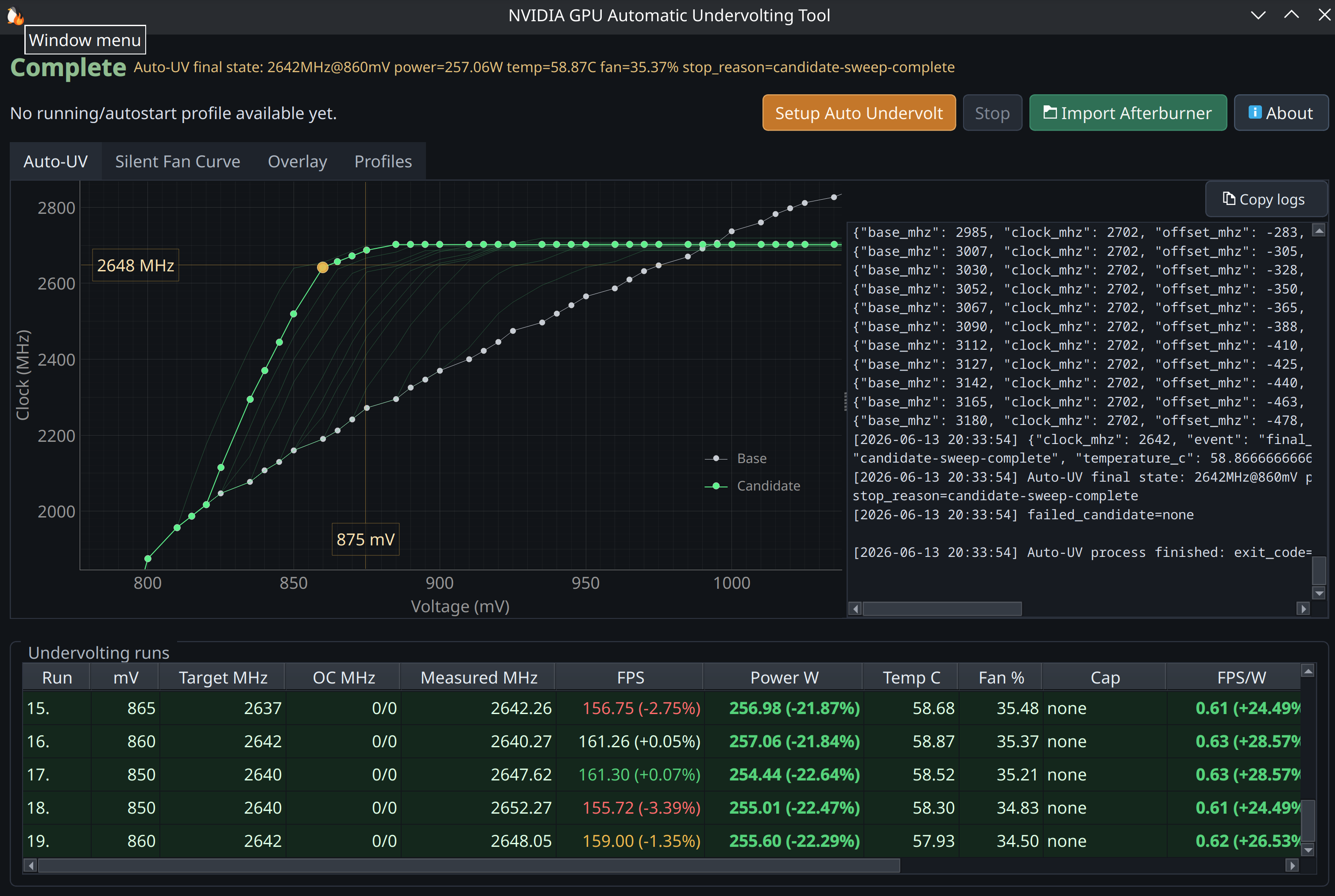
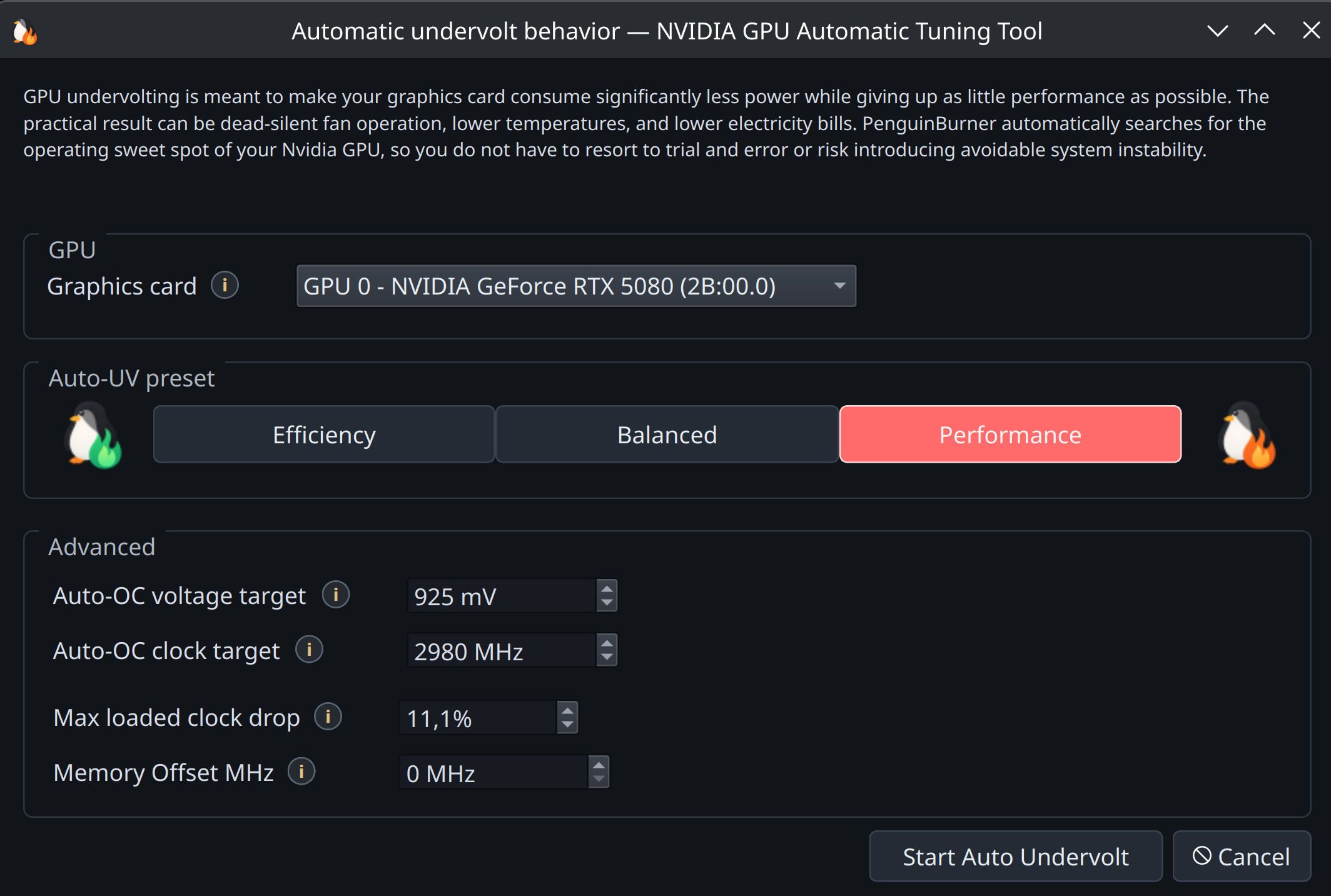
Pick a bias (Efficiency, Balanced, or Performance) and it finds the matching sweet spot, then verifies it before saving.
Adaptive Undervolting
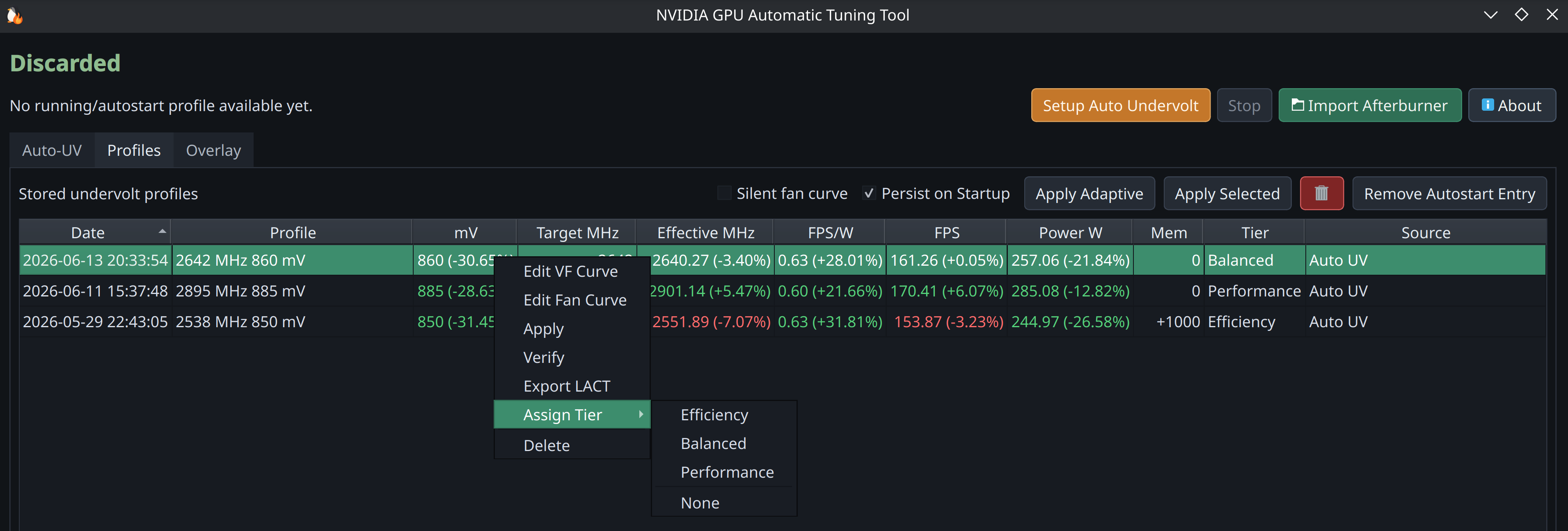
Tag your saved profiles as Efficiency, Balanced, or Performance, and PenguinBurner switches between them while you play: efficient and silent when you have headroom, more clock when frames start to drop.
PenguinBurner vs LACT (NVIDIA)
LACT is the broader, more established Linux GPU app, and it landed a working Nvidia VF curve setter before we did. It supports more brands and has deeper monitoring than we do. PenguinBurner is narrower on purpose: automatic undervolting, an in-game overlay, and adaptive switching. NVIDIA-only comparison, to the best of our knowledge:
| Capability (NVIDIA) | PenguinBurner | LACT |
|---|---|---|
| Automatic undervolt search (stability + perf verified) | ✅ Q2RTX + CUDA sweep | ❌ manual only |
| Adaptive undervolt (switches tiers by frame rate) | ✅ | ❌ |
| In-game performance overlay | ✅ | ❌ |
| PC latency meter | ✅ | ❌ |
| Pre-frame-generation FPS counter (base vs FG FPS) | ✅ | ❌ |
| Manual V/F curve editor | ✅ | ✅ |
| Fan curve control | ✅ auto silent curve + editor | ✅ custom curves |
| Power limit | 🚧 planned | ✅ |
| Steam library import | 🚧 planned | ❌ |
| Per-game tuning profiles | 🚧 planned | ❌ |
| Runtime profile switching | ✅ by present-frame FPS pacing | ✅ by running process / gamemode |
| MSI Afterburner import | ✅ | ❌ |
| Historical telemetry charts | 🚧 planned (live overlay today) | ✅ charts + CSV export |
| Detailed GPU info (VBIOS / VRAM / Vulkan / throttling) | ❌ tuning-focused | ✅ |
| Other GPU brands (AMD / Intel) | ❌ NVIDIA-native, for now | ✅ AMD · Intel · NVIDIA |
| systemd daemon · CLI / headless | ✅ · ✅ | ✅ · ✅ |
✅ available · ❌ not available · 🚧 planned/in progress
LACT monitors inside its own window (charts and CSV) and has no in-game overlay; on Linux that is usually a separate tool like MangoHud. PenguinBurner's overlay is built in.
The two interoperate via LACT export, so you can tune with PenguinBurner and run the resulting curve under LACT if you prefer.
Roadmap (planned, not yet shipped)
- Power limit control — set the GPU board power cap.
- Historical data plotting — power, clocks, and FPS over time.
- Steam library discovery — find installed games automatically.
- Per-game tuning — save and auto-apply a profile per game.
Performance Overlay
A lightweight live on-screen readout over your game. It can visualize PC latency and pre-frame-generation FPS — things most Linux overlays can't — alongside frame-gen FPS, clocks, voltage, power, temperatures, and the active tier.
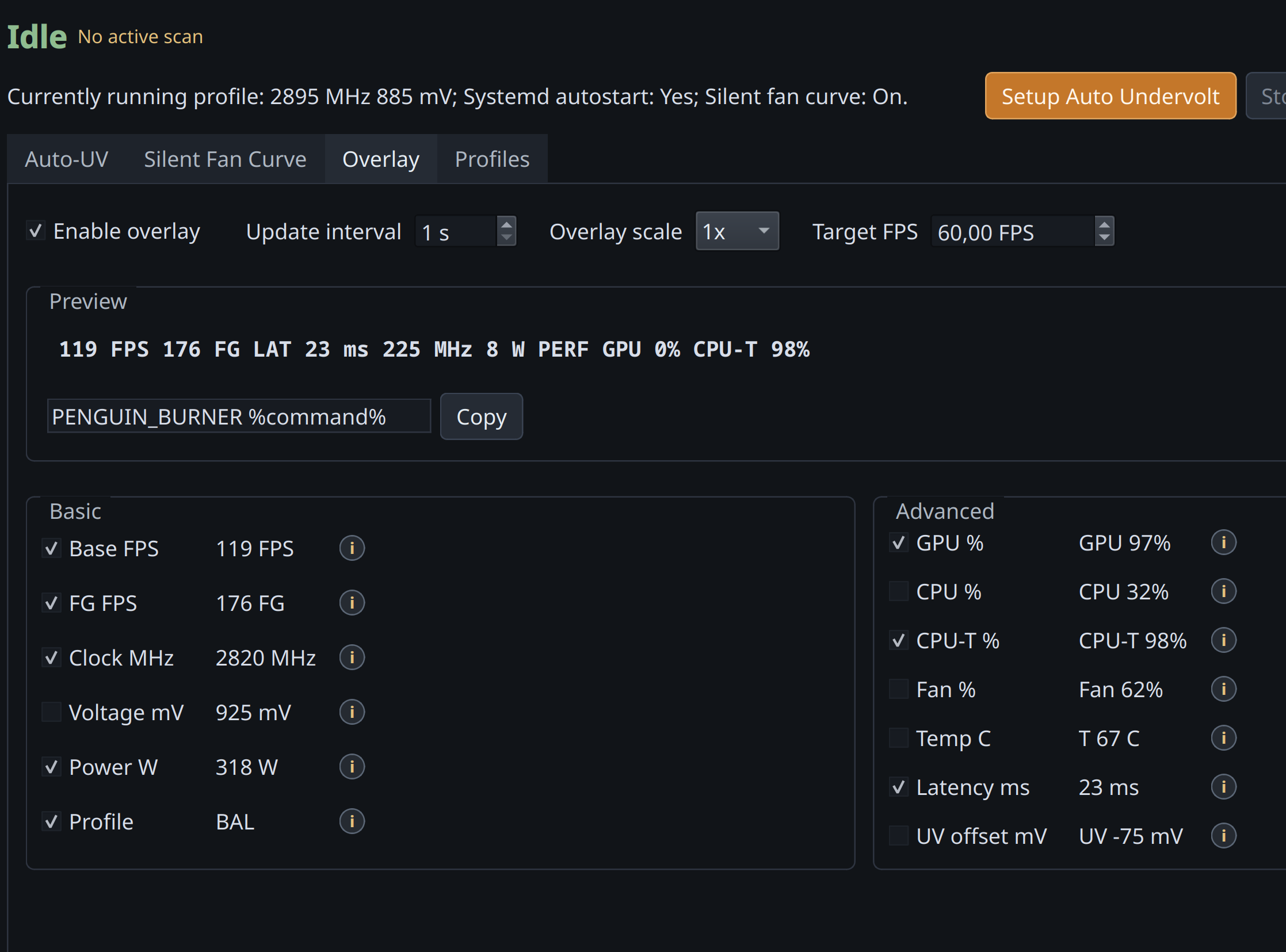
Launch it with the game via PENGUIN_BURNER %command%, then toggle the fields
you want. Any tuning change you make is reflected live in the overlay while you
play, so you see the effect of an undervolt, clock, or fan change in real time
without leaving the game.
More features
- Profile management — apply, verify, tier, export, and clean up saved curves.
- Curve editors — Afterburner-style manual V/F and fan curve editors with full keyboard control.
- Silent fan curve — auto-generated quiet fan curve once the undervolt brings temperatures down.
MSI Afterburner Import
Bring your Windows MSI Afterburner profile over and import its V/F curve.
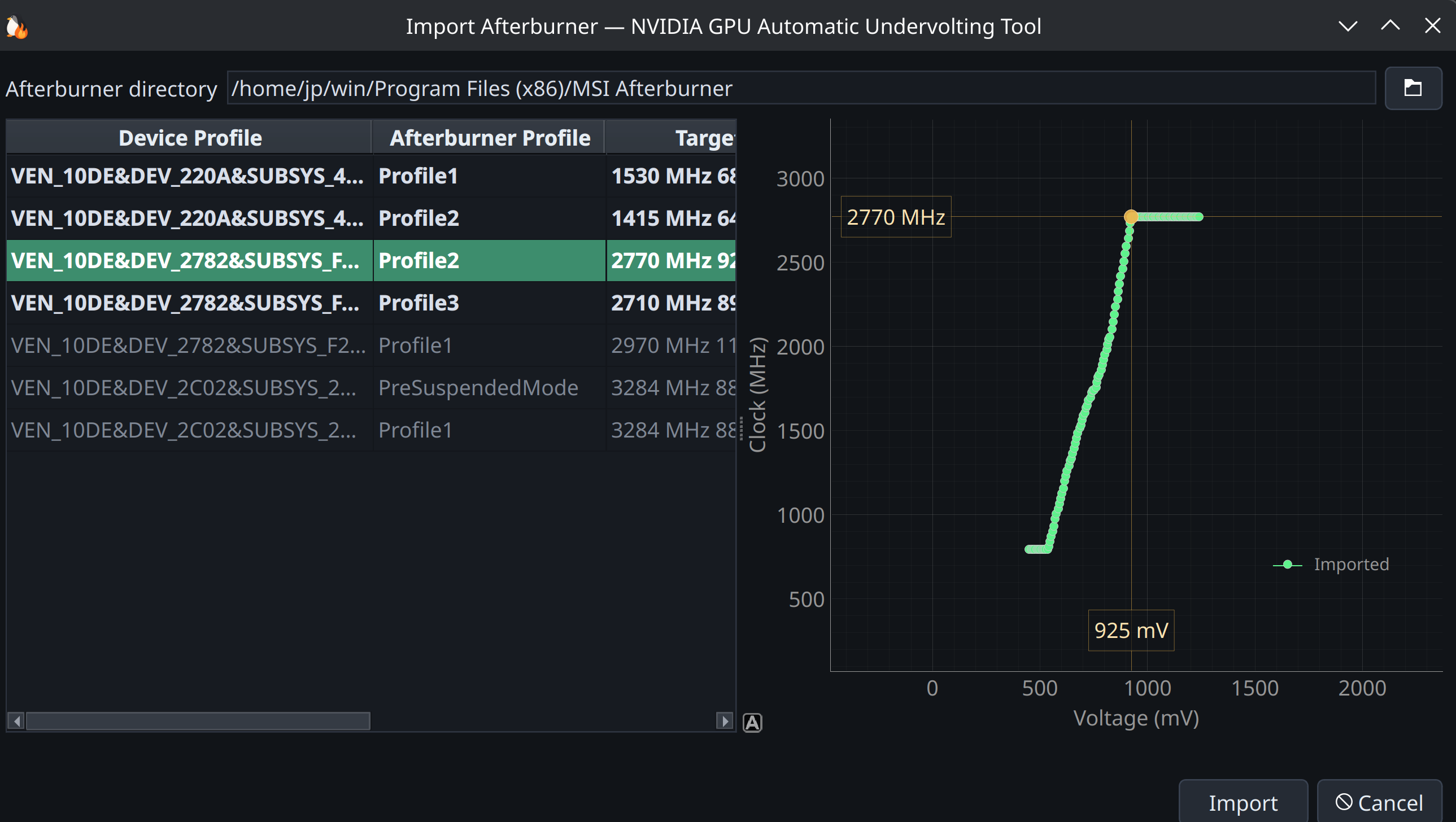
Point PenguinBurner at the real MSI Afterburner directory (no Afterburner binaries or profiles are bundled in this repo). Default Windows path:
C:\Program Files (x86)\MSI Afterburner
LACT Export
Export any saved V/F (and optionally fan) curve as a complete Nvidia LACT config from the profiles view or the CLI. See the Auto-UV guide for the commands.
Run At Your Own Risk
Auto-UV makes real hardware changes — enabling persistence mode, setting board power limits, writing core/memory V/F offsets, and taking over fan control.
Acknowledgements
PenguinBurner was built through agentic AI development, guided by human ideas and direction. The implementation, research, and reverse engineering were driven primarily by GPT 5.5 (OpenAI) and Claude Opus (Anthropic), with brief use of Fable (Anthropic).
- NVIDIA — for the graphics technology that, unfortunately, lacks some features and polish on Linux.
- Qt Project — for the excellent Qt6 UI.
Special thanks to the LACT project and Ilya Zlobintsev for pushing Linux NVIDIA tuning forward — in particular LACT #957 (Nvidia VF curve editor), merged April 18, 2026.
Support
CLI Documentation
The CLI-focused README is archived in readme-cli.md.
Start clean
Reset PenguinBurner user state for a fresh run:
rm -rf ~/.config/PenguinBurner ~/.local/share/PenguinBurner ~/.cache/PenguinBurner
Installing from a local checkout? See the Install guide.
Release history Release notifications | RSS feed


Download files
Download the file for your platform. If you're not sure which to choose, learn more about installing packages.
Source Distribution
File details
Details for the file penguin_burner-0.4.5.tar.gz.
File metadata
- Download URL: penguin_burner-0.4.5.tar.gz
- Upload date:
- Size: 4.5 MB
- Tags: Source
- Uploaded using Trusted Publishing? No
- Uploaded via: twine/6.2.0 CPython/3.14.5
File hashes
| Algorithm | Hash digest | |
|---|---|---|
| SHA256 |
f58135cac4c13a36d140d5d4736d5015b2d6d6b482ec678426ea6f224ae330be
|
|
| MD5 |
63ff84196131891eddf5a7dac27e587c
|
|
| BLAKE2b-256 |
57f160f676af1d8a58b21dd4603c093a3b1ebab51e8f75cea130ed9e1198dfe5
|






