
PerfTrack
PerfTrack is a command-line tool that helps detect performance regressions in open-source projects and CI pipelines. It requires no external services and tracks performance locally.
Designed for Python projects (Django, Pandas, FastAPI, ML libraries), internal tooling, and personal benchmarking workflows
Why PerfTrack?
Performance regressions often go unnoticed because:
- CI timing is noisy and unreliable for benchmarking
- Tools like ASV or pytest-benchmark require setup and maintenance
- There is no simple utility to store a baseline and fail CI when performance drops
PerfTrack stores local performance snapshots and compares them against future runs, both locally and in CI.
What It Measures
- Wall-clock time
- CPU time
- Peak RSS memory usage
Baseline cached locally → regression check in CI.
Installation
pip install perftrack
Quick start
# run a command and record performance
perftrack run "python script.py"

# set the latest run as baseline
perftrack baseline set-latest

# later compare new results with baseline
perftrack compare --fail-on-regression

# Generate Simple HTML report
perftrack report
Replace "python script.py" with whatever you want to benchmark (scripts, test suites, build steps, ML training, etc.)
Directory
Perftrack store results under:
.perftrack/
  baseline.json
  latest.json
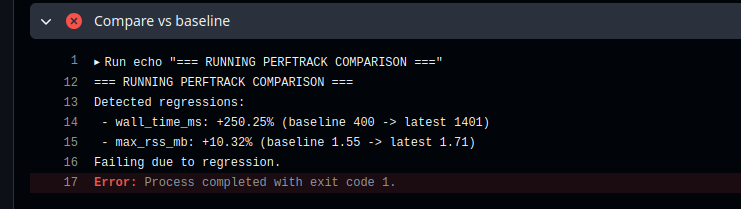
CI Regression Example
PerfTrack guarantees that performance regressions are caught before merge. Here is a (pull request) where we intentionally slowed down code to demonstrate PerfTrack in CI.
1 maintainer

Metadata
1 maintainer
Release files for perftrack 0.1.1
For a detailed explanation of source distributions (sdists) and built distributions (wheels), please see the package formats documentation.
Source distribution (sdist)
| File | Size | Uploaded | |
|---|---|---|---|
| perftrack-0.1.1.tar.gz | 7.1 kB | Details |
Built distribution (wheel)
| File | Interpreter | ABI | Platform | Reset |
|---|---|---|---|---|
| perftrack-0.1.1-py3-none-any.whl | Python 3 | none | any | Details |
Total release size: 15.1 kB
Release files / perftrack-0.1.1.tar.gz
| Download URL | perftrack-0.1.1.tar.gz |
|---|---|
| Size | 7.1 kB |
| Tags | Source |
|
SHA-256 checksum How to use checksums |
1fc919ca99d7d5d32299ee4a872af28a5b1ad0eea1b7ba3aa5367769dd66b3a3
|
|
BLAKE2b-256 checksum How to use checksums |
4d04b3d8101c652375ce49d4b26814f7cbdf8847cd6c8eb7cd1b9c7b5de81f25
|
| Upload date | |
|
Uploaded using Trusted Publishing? What is trusted publishing? |
No |
| Uploaded via |
twine/6.2.0 CPython/3.13.7
|
Release files / perftrack-0.1.1-py3-none-any.whl
| Download URL | perftrack-0.1.1-py3-none-any.whl |
|---|---|
| Size | 8.0 kB |
| Tags | Python 3 |
|
SHA-256 checksum How to use checksums |
befa459950f84f2f75c434cf09a669d29ba5d3566723e8cb872c5026aa789974
|
|
BLAKE2b-256 checksum How to use checksums |
f2e3671442655e8a3de7de68a1d66e2b4c3841955edfdac7b0dd65730b663c62
|
| Upload date | |
|
Uploaded using Trusted Publishing? What is trusted publishing? |
No |
| Uploaded via |
twine/6.2.0 CPython/3.13.7
|














