
Lightweight CLI tool to detect performance regressions by comparing local benchmark snapshots.

Project description
PerfTrack
PerfTrack is a command-line tool that helps detect performance regressions in open-source projects and CI pipelines. It requires no external services and tracks performance locally.
Designed for Python projects (Django, Pandas, FastAPI, ML libraries), internal tooling, and personal benchmarking workflows
Why PerfTrack?
Performance regressions often go unnoticed because:
- CI timing is noisy and unreliable for benchmarking
- Tools like ASV or pytest-benchmark require setup and maintenance
- There is no simple utility to store a baseline and fail CI when performance drops
PerfTrack stores local performance snapshots and compares them against future runs, both locally and in CI.
What It Measures
- Wall-clock time
- CPU time
- Peak RSS memory usage
Baseline cached locally → regression check in CI.
Installation
pip install perftrack
Quick start
# run a command and record performance
perftrack run "python script.py"

# set the latest run as baseline
perftrack baseline set-latest

# later compare new results with baseline
perftrack compare --fail-on-regression

# Generate Simple HTML report
perftrack report
Replace "python script.py" with whatever you want to benchmark (scripts, test suites, build steps, ML training, etc.)
Directory
Perftrack store results under:
.perftrack/
  baseline.json
  latest.json
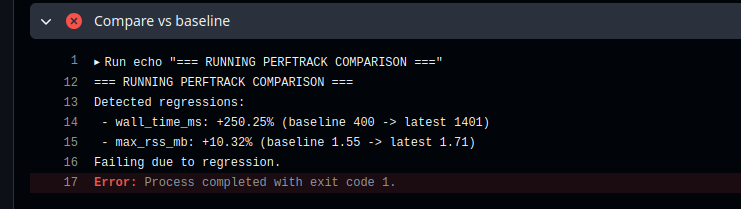
CI Regression Example
PerfTrack guarantees that performance regressions are caught before merge. Here is a (pull request) where we intentionally slowed down code to demonstrate PerfTrack in CI.
Release history Release notifications | RSS feed


Download files
Download the file for your platform. If you're not sure which to choose, learn more about installing packages.
Source Distribution
Built Distribution
Filter files by name, interpreter, ABI, and platform.
If you're not sure about the file name format, learn more about wheel file names.
Copy a direct link to the current filters
File details
Details for the file perftrack-0.1.0.tar.gz.
File metadata
- Download URL: perftrack-0.1.0.tar.gz
- Upload date:
- Size: 6.7 kB
- Tags: Source
- Uploaded using Trusted Publishing? No
- Uploaded via: twine/6.2.0 CPython/3.13.7
File hashes
| Algorithm | Hash digest | |
|---|---|---|
| SHA256 |
14ba6a5e8741b7c69af829003170a9ccb989b66a2f0be92fa68a51d4dddbb7bb
|
|
| MD5 |
e92cdc80e373b9d6ddbe68c687b8b5e5
|
|
| BLAKE2b-256 |
c66e4cbccee6dd649ecc0cfff90aefb889810865c83c7b5c21df736ec76cef01
|
File details
Details for the file perftrack-0.1.0-py3-none-any.whl.
File metadata
- Download URL: perftrack-0.1.0-py3-none-any.whl
- Upload date:
- Size: 8.2 kB
- Tags: Python 3
- Uploaded using Trusted Publishing? No
- Uploaded via: twine/6.2.0 CPython/3.13.7
File hashes
| Algorithm | Hash digest | |
|---|---|---|
| SHA256 |
61a95aea94f5ae4e1be4112d7cfc39f7ee794055223dec9011d92d185c3ad703
|
|
| MD5 |
692157a6a2af3f6d150f8819f46ea8bb
|
|
| BLAKE2b-256 |
77c4802fbd5269720eacc4a190f4f27205a063da601aef626bf0a3893c08ac82
|






