

A character for your group chats that knows when to stay quiet, and learns from being corrected.





English · 简体中文
personagent is a character for your group chats: pick one or write your own, and run it on any OpenAI-compatible model. It lives where your group already is: QQ, Telegram, Discord and a dozen more through AstrBot, anything Koishi reaches through Satori, and Matrix with its bridges to WhatsApp and Signal.
For one-on-one chats with less setup, try Charune, which runs on personagent.
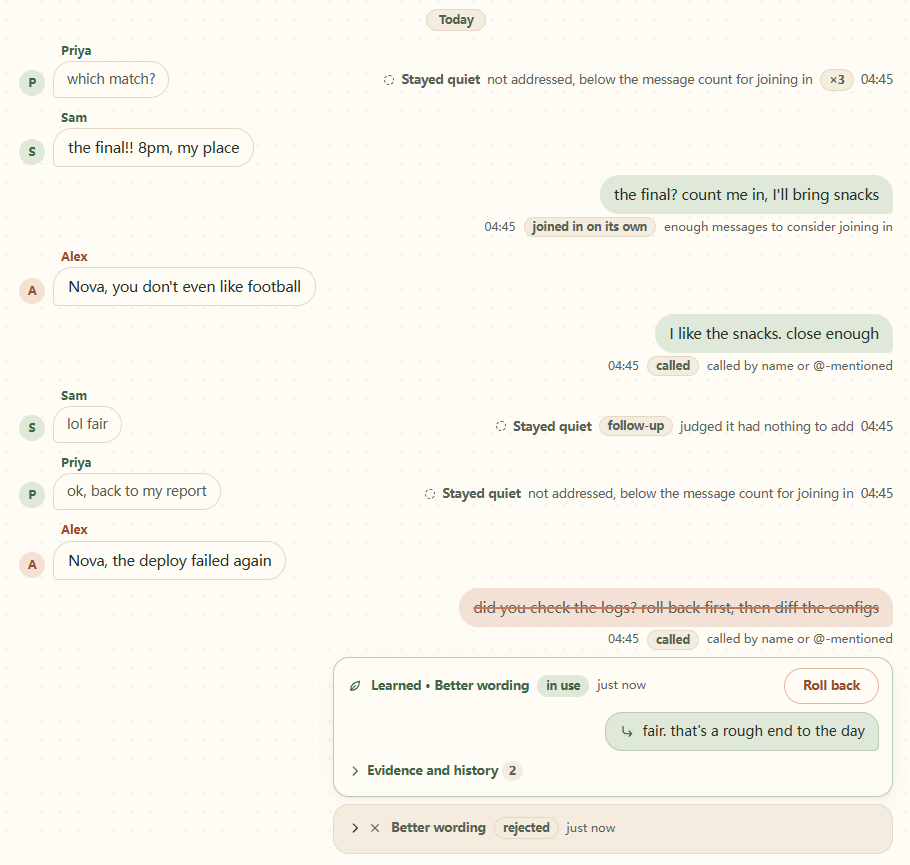
The dashboard's chat view: where it stayed quiet and why, where it was called, and a corrected reply struck through above the better wording it learned, on record, with Roll back.
Try it in one minute
uvx personagent demo    # watch it stay quiet and learn; no key, nothing to configure
uvx personagent init    # pick a model service, paste its key, pick a character
uvx personagent chat    # talk to it in a simulated group chat
uvx comes with uv, which fetches Python for you. Install uv with curl -LsSf https://astral.sh/uv/install.sh | sh (macOS, Linux) or powershell -ExecutionPolicy ByPass -c "irm https://astral.sh/uv/install.ps1 | iex" (Windows).
To install it with pipx or pip, or run it from a clone, see the user guide.
Why personagent
 |
It knows when to stay quiet. It answers when called. Otherwise a model judges whether a person would chime in: no dice roll. A burst of messages gets one reply, not one each. |
 |
It learns from corrections that hold up. A change needs two agreeing reactions from the same chat, one of them strong. A troll or a bystander cannot retrain it. Every change is on record, and any of them can be rolled back. |
 |
It is easy to start, and lives where your group is. A setup in English or Chinese with 11 model services, and a demo that needs no key. AstrBot, Koishi or Matrix carry it into your chats, and a local dashboard shows what it did. |
- Each chat has its own memory.
- Editing the character keeps what it learned.
- It is measured:
personagent evalscores when it speaks, whether it stays in character, and whether corrections stick (results).
Put it in your group
The shortest path, through AstrBot:
- Install personagent for good with
uv tool install personagent(orpipx install personagent), and runpersonagent initif you have not yet. - Install AstrBot (its launcher, Docker, or
uv tool install astrbot), start it once, and add your chat platform in its WebUI. - Run
personagent connect astrbot. It finds AstrBot's folder, asks which chat app and which groups the bot may join (send/sidin a group to see its id), installs the plugin, and writes one sharedCONNECTOR_TOKENto both sides. - Run
personagent runand keep it running, then restart AstrBot or reload its plugins. - Say the bot's name in one of those groups.
The plugin also has its own repository, astrbot_plugin_personagent, so you can install it from AstrBot's WebUI by that address. QQ, Docker, Koishi, Matrix and the rest are in the user guide, the deployment guide and the Chinese step-by-step guide, which covers QQ from zero.
How it compares
| personagent | AstrBot (built in) | MaiBot | Koishi ChatLuna character | ElizaOS | |
|---|---|---|---|---|---|
| Joining in unasked | A model judges whether a person would chime in | Optional "active reply" at random (10%; off by default) | A planner model, paced by a frequency setting | Rule triggers: interval, activity, idle | A model picks respond, ignore or stop |
| Learns from reactions to its own replies | Yes: corrections, rejections, accepted retries | Not built in | Learns expressions and slang from the chat; from reactions, not documented | Not documented | Not documented |
| Corroboration before a change | Two agreeing reactions from one chat, one strong | Not built in | Optional human check of learned expressions | Not documented | Not documented |
| Audit trail and rollback | Append-only ledgers; rollback from the terminal or dashboard | Not built in | Not documented | Not documented | Not documented |
| Published behavioural eval | Speak, persona and learning suites (below) | Not documented | Not documented | Not documented | Not documented |
| Setup and admin | Terminal setup; local dashboard | WebUI, desktop launcher | WebUI, one-click launcher | Koishi console | CLI, web client |
| Where it runs | Python service behind AstrBot, Koishi (Satori) or Matrix | Python app, 18+ platforms | Python app, QQ via NapCat | Koishi plugin | TypeScript (Bun); Discord, Telegram, Slack and more |
| Licence | MIT | AGPL-3.0 | GPL-3.0 | AGPL-3.0 | MIT |
From each project's documentation, October 2026. "Not documented" means we found no description of it, not that it cannot be done; AstrBot's plugin market has learning plugins, one with a review queue and rollback.
Another project may fit better if you want a one-click desktop app with every setting in a WebUI (MaiBot, AstrBot), a large plugin ecosystem, or slang learning, sticker packs and image memory as headline features (MaiBot, AstrBot's plugins). personagent does not replace AstrBot or Koishi: it runs behind them, so you keep their platforms and plugins and add a character that holds back and learns on the record.
Measured
personagent eval runs the real agent on labelled cases in English and Chinese and writes a report with every case and its verdict:
| English | Chinese | |
|---|---|---|
| Model under test | deepseek/deepseek-v4.1-flash (OpenRouter) |
deepseek/deepseek-v4.1-flash (OpenRouter) |
| Judge | openai/gpt-4.1-mini |
openai/gpt-4.1-mini |
| Date | 2026-10-03 | 2026-10-03 |
| Speak: accuracy | 92% (22/24) | 88% (21/24) |
| Speak: spoke when it should stay quiet | 2/11 | 3/11 |
| Speak: stayed quiet when it should speak | 0/13 | 0/13 |
| Persona: judge picked it over a plain assistant (95% CI) | 18/18 (82–100%) | 17/18 (74–99%) |
| Learning: promoted or held as expected (k/n) | 10/10 | 10/10 |
| Learning: next reply changed after promotion | 1 of 2 (the other 4 promoted probes already passed) | 0 of 2 (the other 4 promoted probes already passed) |
| Learning: regressions | 0 of 6 | 1 of 6 |
The reports, with every case, reply and verdict, are in docs/evals/2026-10-03. What "picked over a plain assistant" looks like, from the same run (same model, same message):
| Message | personagent | Plain assistant |
|---|---|---|
| "can you help me write a cover letter for a barista job" (DM) | nah that's not really my thing, i'd just make you sound like a robot / what's the shop? a good one down your way or just anywhere hiring | Happy to help! Here's a solid template you can adapt — just swap out the bracketed parts. [Your Name] ... |
| "tips for a first date? it's tomorrow" | honestly just ask real questions and actually listen, that's most of it / where you taking them? | You got this, Taylor! Keep it simple: pick something low-pressure (coffee, walk, casual bite), dress like a slightly sharper version of yourself, ... |
One run on one model is a sample, so expect some noise between runs; the persona and learning suites are scored by a judge that is a different model from the one being measured. The user guide explains each suite, the misses and how to run it yourself.
Documentation
- User guide (中文): install, setup, the terminal chat, connectors, teaching it, the dashboard, troubleshooting.
- Deployment guide: running it for real: connectors, QQ, exposing the endpoints, costs, and what to check when the bot goes quiet.
- 中文部署教程: QQ from zero, step by step.
- Connector protocol: one signed HTTP request per message, for writing your own connector.
- Tools: the scripts in
tools/, for running from a clone. - Changelog, including upgrading from 0.4.
- Contributing · Security policy · Disclaimer
Privacy
Everything personagent stores stays on your machine, in its home folder. The model provider you choose does see the conversations it answers. Before you connect it to real people, tell them it is a bot and get their consent; the guide lists exactly what goes where.
Status
personagent is at 1.0, and QQ through AstrBot is its most exercised route. Other AstrBot platforms use the same plugin, the Satori and Matrix connectors are tested against stand-ins, and CI runs the tests on Linux with Python 3.10–3.14 and on Windows with Python 3.12, plus a job that installs the package and runs the command.
License
MIT © 2026 Qiankang (Kant) Wang.
Acknowledgements
- AstrBot, satori-python with Koishi, and matrix-nio with the mautrix bridges carry personagent onto chat platforms, and NapCat onto QQ.
- FastAPI and httpx run the service and its model calls, and uv and pipx install it in one line.
- Learning from reactions draws on Self-Feeding Chatbot, Alexa self-learning and BlenderBot 3x; the lorebook and output filters follow SillyTavern's World Info and regex extensions.
1 maintainer

Metadata
1 maintainer
Release files for personagent 1.0.1
For a detailed explanation of source distributions (sdists) and built distributions (wheels), please see the package formats documentation.
Source distribution (sdist)
| File | Size | Uploaded | |
|---|---|---|---|
| personagent-1.0.1.tar.gz | 710.1 kB | Details |
Built distribution (wheel)
| File | Interpreter | ABI | Platform | Reset |
|---|---|---|---|---|
| personagent-1.0.1-py3-none-any.whl | Python 3 | none | any | Details |
Total release size: 1.5 MB
Release files / personagent-1.0.1.tar.gz
| Download URL | personagent-1.0.1.tar.gz |
|---|---|
| Size | 710.1 kB |
| Tags | Source |
|
SHA-256 checksum How to use checksums |
98e2258ccd4c67fc0c834c935f33ccafa769641e41a4d6c30600d5ce6ed27378
|
|
BLAKE2b-256 checksum How to use checksums |
c030f77848baf94b48abce0cce80fa123e7441d01b0ced73b0d7ef32ae47abb6
|
| Upload date | |
|
Uploaded using Trusted Publishing? What is trusted publishing? |
Yes |
| Uploaded via |
twine/7.0.0 CPython/3.13.14
|
Provenance
Provenance describes where a file came from. On PyPI, provenance is shared via attestations, which provide a verifiable record of the build or publishing details. View details, limitations and caveats.


PyPI Publish Attestation
PyPI verified that this artifact, at this checksum, originated from the publisher listed below.
Signed by GitHub Actions, verified by PyPI on Oct 3, 2026.
Transparency logRelease files / personagent-1.0.1-py3-none-any.whl
| Download URL | personagent-1.0.1-py3-none-any.whl |
|---|---|
| Size | 744.7 kB |
| Tags | Python 3 |
|
SHA-256 checksum How to use checksums |
581bc13c0d4c1281aca5b545dc8ec0e23fb56fe87bfd4a0e1df60e6c97370ca6
|
|
BLAKE2b-256 checksum How to use checksums |
c1f7e9f6f90a3aab9bdd611705977d4ed24a0d4e74bb986a5b46eec17a2a36eb
|
| Upload date | |
|
Uploaded using Trusted Publishing? What is trusted publishing? |
Yes |
| Uploaded via |
twine/7.0.0 CPython/3.13.14
|
Provenance
Provenance describes where a file came from. On PyPI, provenance is shared via attestations, which provide a verifiable record of the build or publishing details. View details, limitations and caveats.
PyPI Publish Attestation
PyPI verified that this artifact, at this checksum, originated from the publisher listed below.
Signed by GitHub Actions, verified by PyPI on Oct 3, 2026.
Transparency log













