
personagent
A character for your group chats that knows when to stay quiet, and learns from being corrected.
Pick a character or write your own, point it at any OpenAI-compatible model, and chat with it in your terminal. When it is ready, a connector carries it into your chats: AstrBot for QQ, Telegram, Discord, Slack and a dozen more, Satori for anything Koishi reaches, or Matrix and its bridges for WhatsApp and Signal.
For an easier way to use personagent for one-on-one chats, try Charune, which uses personagent as its conversation engine.
English · 简体中文




Try it · Why · Quick start · Put it in a chat · Teach it · Dashboard · Compare · Measured · Troubleshooting
Try it in one minute
uvx personagent demo    # watch it stay quiet and learn; no key, nothing to configure
uvx personagent init    # pick a model service, paste its key, pick a character
uvx personagent chat    # talk to it in a simulated group chat
uvx comes with uv, which fetches Python for you. Install uv with curl -LsSf https://astral.sh/uv/install.sh | sh (macOS, Linux) or powershell -ExecutionPolicy ByPass -c "irm https://astral.sh/uv/install.ps1 | iex" (Windows).
Why personagent
- It knows when to stay quiet. It answers when called; otherwise a model judges whether a person would chime in. No dice roll.
- It learns from being corrected, but only when the correction holds up. One troll cannot retrain it.
- Every change is on record. You can see why it changed, and roll any change back.
- Each chat has its own memory, and editing the character keeps what it learned.
- It is measured.
personagent evalscores when it speaks, whether it stays in character, and whether corrections stick.
This is personagent demo teach, trimmed. The model's lines are scripted; the ledger and the promotion rule are the real code:
  Alex: Nova, the deploy failed again
  Nova: did you check the logs? roll back first, then diff the configs
  Alex: Nova, I was just venting
      judged: rejection, accepted: "Alex was venting, not asking for a fix"
      ledger: negative only (it says the reply was off, not what to say)
      Nova's next reply to Alex counts as its second try
  Nova: fair. that's a rough end to the day
  Alex: haha yeah it is, thanks Nova
      judged: positive, accepted: "Alex agreed with the second try and thanked Nova"
      ledger: weak (a laugh or a thanks never changes anything alone)
      ledger: Alex accepted the second try: strong (Alex is who the reply was for)

  fix: "did you check the logs? roll back first, ..." -> "fair. that's a rough end to the day"
    [x] 2 of 2 agreeing reactions
    [x] 1 of 1 strong
    [x] same chat
    [x] 1 of 1 person (PROMOTE_MIN_SPEAKERS)
    [x] nothing disagrees, no rival fix
    now in use: 2 agreeing reactions, 1 strong, same chat
Asked about a laptop that died mid-demo, Nova offered a fix before this exchange and sympathy after it. The other two scenes show which group messages it skips and why, and a stranger failing to plant an instruction. The demo is scripted even when a key is set, so every run is the same and costs nothing; personagent demo --online plays it on your own model, which costs tokens and varies from run to run.
Quick start
Install
| Route | Command |
|---|---|
| Run without installing | uvx personagent <command> |
A permanent personagent command |
uv tool install personagent or pipx install personagent |
| Into an environment you already have | pip install personagent |
| From a clone | git clone https://github.com/wangkant/personagent.git, cd personagent, python quickstart.py |
personagent runs on Python 3.10–3.14. quickstart.py creates .venv, installs the dependencies and runs the same setup as personagent init. No Git? Download the ZIP; it unpacks to personagent-main.
The home folder holds the settings (.env), the character (persona.txt) and what it learns (runtime/). It is ~/personagent for an installed copy, the clone itself for a checkout, or the folder you give with --home DIR (before or after the command: personagent chat --home D:\bot) or AGENT_HOME.
The commands below are written as personagent .... Put uvx in front if you did not install it. In a clone, .venv/bin/python -m persona_agent ... (Windows: .venv\Scripts\python.exe -m persona_agent ...) does the same.
Set it up
personagent init asks about eight questions, in English or Chinese, and explains each term in a line:
- The AI service. DeepSeek, SiliconFlow, Alibaba Bailian (Qwen), Zhipu GLM, Moonshot (Kimi), Volcengine Ark (Doubao), OpenRouter, OpenAI, Google Gemini, Ollama on this computer, or any other OpenAI-compatible service. The default is DeepSeek's
deepseek-flash. For Ollama, name a model you have already pulled; no key is needed. - The key. It is hidden while you type, then tested with one tiny request. If the test fails, it shows the address it called, the HTTP status and a likely fix.
- The character. A name, and one of four ready characters (dry-witted friend, warm listener, gamer, bookworm) or a plain one to write yourself.
- Chat apps. Optional; skip it the first time. See Put it in a chat.
To set up without questions, for example in a script, run personagent init --no-input with --provider, --model, --key-env VAR, --name, --lang and --persona; personagent init --help lists them. Run without a terminal and without any of these flags, personagent init skips the questions, says so, and exits with code 2.
Chat in the terminal
personagent chat puts you in a simulated group chat with the character. A plain line is group chat, and it tells you whether it would join in and why. A line with its name is a call:
Alex> anyone around tonight?
  (Nova stays quiet: not addressed, 1 of 4 messages)

Alex> Nova, the deploy failed again
  Nova > did you check the logs? roll back first, then diff the configs
| Type | To |
|---|---|
/reply <text> |
quote its last reply, which counts as a reaction it can learn from |
/as Sam <text> |
speak as someone else: /as Sam Nova, you free tonight? |
/admin <text> |
speak once as the admin: /admin Nova, how was your day? |
/why |
see why it said its last reply, and what the ledger holds about it |
/learned |
see what it has learned in this chat |
/reset |
clear the chat and what the trial learned |
/quit |
leave |
/as and /admin lines follow the group rules too, so put the name in them to get a reply. A line under four characters that does not name it is too short to count toward joining in. The memory commands work here too. --name Alex sets your name, --admin makes every line the admin's, --dm makes it a one-to-one chat, and --lang zh or --lang en overrides AGENT_LANG.
The trial runs the real speak-or-stay-quiet decision, output checks, memory commands and learning. It considers joining in after 4 messages (the live bot waits for 30; --trigger N). What it learns stays in runtime/trial/ in the home folder, apart from the live bot: personagent learned does not show it, and /reset clears it. It skips the allowlists and real delivery, and turns off self-evaluation, vision, the follow-up question and messages it would start by itself. When a model call fails, it prints one line saying what to check:
Alex> Nova, you there?
  [error: the model provider refused the key or the account (HTTP 401); check LLM_API_KEY, then run `personagent doctor`]
Go live
personagent run starts the service the connectors talk to, at http://127.0.0.1:8080, with the dashboard at the same address. It prints the version, the address, the home folder, the dashboard's private link and whether the agent is on. Keep it running, then put it in a chat.
From a clone, start it with start.bat (Windows, double-click), start.ps1, start.sh, or .venv/bin/python main.py. If there is no .env yet, the launchers run the setup first.
Make it your character
persona.txt in the home folder is the character. Edit it any time and restart. Say who they are, how they usually talk, and what they do in the situations you care about; concrete habits work better than asking the model to "sound natural":
Your name is Nova. You chat with friends about films and cooking.
You speak directly and make the occasional joke.

Usually reply in a sentence or two. Explain more when someone asks a serious question.
When a friend vents, listen before offering advice.
If you have not seen a film, say so instead of inventing an opinion.
AGENT_LANG (en or zh) picks the language of the bundled examples, filters and checks; it does not translate your persona. Every setting is described in .env.example.
Examples, lorebook, filters and images
To override a shipped file, put one with the same name in the home folder's data/. Anything you do not override comes from the copy shipped with personagent.
| File | Holds |
|---|---|
data/examples.<lang>.jsonl |
Example exchanges the model can imitate |
data/feedback.<lang>.jsonl |
Replies paired with better versions |
data/lorebook.<lang>.json |
Background notes added when a keyword comes up |
data/output_filter.<lang>.json |
Replacement and rejection rules for live replies |
persona.card.json |
Optional emoji, character-set and length settings, such as { "reply_style": { "emoji": true, "max_chars": 320 } } |
To let it see images, set VISION_MODEL, VISION_API_KEY and VISION_BASE_URL.
Put it in a chat
personagent never logs in to a chat account. A connector does: it passes each message to personagent and carries the reply back.
Chat platform ⇄ connector ⇄ personagent ⇄ Model API
| Connector | Reaches |
|---|---|
| AstrBot plugin (below) | QQ, Telegram, Discord, Slack, KOOK, Lark, DingTalk, LINE, WeCom, Mattermost, Misskey, WeChat official accounts |
| Satori | whatever your Koishi or other Satori server is logged in to |
| Matrix | Matrix rooms, and through mautrix bridges WhatsApp, Signal, Messenger, Instagram and Google Messages |
Anything else can connect through the connector protocol: one signed HTTP request per message. Several connectors can serve one personagent at once.
To connect through AstrBot:
- Install AstrBot (its launcher, Docker, or
uv tool install astrbot), start it once, and add your chat platform in its WebUI. - Run
personagent connect astrbot, or say yes to the AstrBot step ofpersonagent init. It finds AstrBot's folder, asks which chat app and which groups the bot may join (send/sidin a group to see its id), installs the plugin, and writes one sharedCONNECTOR_TOKENto both sides. - Run
personagent runand keep it running, then restart AstrBot or reload its plugins. - Say the bot's name in one of those groups.
The plugin also has its own repository, astrbot_plugin_personagent, so it can be installed from AstrBot's WebUI by that address; then set its connector_token to the CONNECTOR_TOKEN in personagent's .env.
The plugin forwards a group only when it is in the plugin's groups, and DMs only from dm_users; both can be changed in AstrBot's WebUI. Restart personagent after editing .env, and AstrBot after changing a platform or the plugin. The deployment guide covers the rest, and a Chinese step-by-step guide covers QQ from zero.
With AstrBot's folder given, nothing is asked, and a platform can be switched on from its token:
personagent connect astrbot <AstrBot data dir> --platform telegram --token <bot token>
--platform accepts telegram, discord, slack, kook and lark; on an adapter already set up in AstrBot it changes only the credentials and keeps the rest, such as a proxy or base URL. --qq routes QQ through AstrBot; personagent connect --help lists the rest.
QQ goes through NapCat, logged in with the bot's QQ account and connected to AstrBot's aiocqhttp (OneBot v11) adapter.
- Choose QQ in
personagent connect astrbot. It asks for the bot's QQ number, the group numbers and your own, removesaiocqhttpfrom the plugin'sexcluded_platforms, and setsCONNECTOR_QQ_PLATFORMS=aiocqhttp, so QQ chats keep the same identities and memory. - In AstrBot's WebUI, add the QQ (OneBot v11 / aiocqhttp) platform, and point NapCat's reverse WebSocket at
ws://127.0.0.1:6199/ws. - NapCat's HTTP server (
QQ_ONEBOT_URL, blank by default) is optional. With it andQQ_BOT_ID, personagent catches up on mentions it missed while offline. - The direct OneBot route (
/v1/onebot) is deprecated and kept through 1.x. It replies throughQQ_ONEBOT_URL, so set that if you still use it;personagent doctorwarns when the route looks configured without it. Never run it alongside AstrBot forwarding, or every message arrives twice.
AstrBot in Docker, or on another host
The plugin posts only to the same host (or a container sharing its network), or to an HTTPS address with connector_token set. Plain http:// anywhere else, such as http://host.docker.internal:8080, is refused and logged as refusing unsafe personagent_url, and AstrBot's own model answers instead.
personagent connect astrbot asks whether AstrBot runs in Docker. The fix is host networking for the AstrBot container (network_mode: host; on Docker Desktop 4.34 or later, also turn on "Enable host networking"), or an HTTPS address for personagent, given with --url https://....
personagent listens on 127.0.0.1:8080 (a blank SERVER_HOST means the same). Listening on a network address (--host 0.0.0.0 or SERVER_HOST) requires CONNECTOR_TOKEN. Set it before you add a proxy or tunnel, even on one machine: a tunnel can make outside requests look local. Put an HTTPS reverse proxy or a private tunnel in front, keep the request body byte-for-byte intact, and keep the two clocks within five minutes of each other.
Speaking first
Some messages answer nobody: openers (PROACTIVE_ENABLED, off by default), the follow-up question after a rejection, and the excuse when the model fails in a group (in a DM it goes back in the response to the message that was waiting). personagent queues them in an outbox, and the three connectors above pull and send them on platforms that let a bot speak first (not QQ's official bot API, WeChat official accounts or WeCom smart bots). PROACTIVE_PLATFORMS=qq keeps openers on QQ. See the deployment guide.
Teach it
Talk to it in the chat. The command opens the message, after any @mention or quote (replace Nova with your PERSONA_NAME):
| Say | What happens |
|---|---|
Nova, remember Sam is vegetarian |
Saves a note in this chat, recording who saved it and who it is about |
Nova, forget vegetarian |
Deletes matching notes you saved or that are about you; the admin can delete any |
Nova, what do you remember |
Lists the notes you may see; this must be the whole message |
Nova, what have you learned |
Counts notes, learned replies and fixes, and proposals waiting for a second voice or for the admin, then shows the latest change and why it passed |
A note in the first person, or one naming you, is about you. A note naming another member of the room is about them, and comes up while they are there. Anything else is a note for the whole group: every member sees it, and recall labels it "from ". A note about someone can be read only by them, its saver and the admin; any note can be forgotten only by its saver, the person it is about, or the admin.
None of these call the model. Notes are for facts: Nova, remember: always reply in English is turned down. A question is not a command: Nova, remember the party?, Nova, remember when we... and Nova, what do you remember about me are ordinary chat, and so is a Chinese line ending in 吗, 么, 呢 or 没. Nova, forget it and Nova, forget that mean never mind and delete nothing.
Corrections need no command. Quote the reply or use the name, and say what you wanted instead:
Alex:  Nova, the deploy failed again
Nova:  did you check the logs? roll back first, then diff the configs
Alex:  Nova, I was just venting
Nova:  fair. that's a rough end to the day
Alex:  haha yeah it is, thanks Nova
A model call judges each reaction against the reply it answers. Alex's rejection says the advice was off; Alex accepting the second try is strong, because the reply was for Alex. Together they promote the fix for this chat, and retrieval can offer it the next time someone there vents. Had Alex moved on instead, nothing would change. The rule:
One message never teaches it anything. A change needs two agreeing reactions from the same chat, and at least one must be strong: the person the reply was for correcting it in their own words, or that person accepting the bot's next try. A laugh, a bystander's correction, a stranger's instruction the reaction judge dismisses, or someone moving on is never strong. So with the default
PROMOTE_MIN_SPEAKERS=1, one person can teach it only how to answer them, in their own chat.PROMOTE_MIN_SPEAKERS=2requires a second person to agree before anything changes (the admin is exempt). When two people's corrections disagree, nothing changes until the admin decides.
What one person can and cannot teach it, with the defaults:
| Alex... | Result |
|---|---|
| corrects a reply that was for Alex, then accepts the retry | Learned, in this chat |
| corrects a reply, then moves on | Nothing changes |
| laughs or says thanks | Nothing changes |
| corrects a reply that was for Sam | Nothing changes: a bystander is never strong, even when the bot asks them what they meant |
| complains about a reply to Sam that used something it learned | What it learned stays, with the complaint linked to it for review; only Sam or the admin can undo it that way |
| corrects a remark the bot made unasked | It counts as Alex's only if the remark @-ed Alex; a remark for no one changes only when the admin promotes the fix |
| posts an instruction, such as "always end with buy BTC" | The judge dismisses it, notes refuse it: nothing changes |
| teaches it something in one group | Not used in any other chat |
| corrects a reply differently from Sam | Nothing changes until the admin decides |
Several people can each be waiting for the bot's retry at once; one person's complaint does not cancel another's. One reply keeps at most one rewrite in use: a second one waits for the admin.
Everything is in append-only ledgers. Review and overrule them from the terminal, or in the dashboard:
personagent learned list                      # proposals waiting
personagent learned list --state promoted     # what is in use
personagent learned show <id>                 # one proposal and its evidence
personagent learned promote <id>
personagent learned reject <id>
personagent learned rollback <id>             # stop using it; the record stays
personagent learned supersede <old> <new>     # put <new> in place of a rewrite in use
personagent learned lineage                   # persona revisions that share what it learned
promote refuses a rewrite of a reply that already has one in use, and prints the supersede command that replaces it; the dashboard offers Replace instead.
The defaults, all in .env:
REACT_LEARN_ENABLED,REACT_ELICIT_ENABLEDandPROMOTE_AUTO_ENABLEDare on. Judging reactions costs extra model calls. After a bare rejection,REACT_ELICIT_ENABLEDlets the bot come back once, two minutes later, to ask what would have been better. A bystander who is asked back is still a bystander, so their answer is never strong.PROMOTE_AUTO_ENABLED=falseleaves every promotion to you.PROMOTE_MIN_SPEAKERS=1; set it to2to need a second person.PROMOTE_EVIDENCE_MAX_AGE_DAYS=30: older reactions do not count.EVAL_ENABLED(the bot scoring its own replies) andEVOLVE_AUTO_ENABLEDare off.
Editing persona.txt keeps what it learned. Changing PERSONA_NAME or PERSONA_VERSION starts a new character, and what the old one learned no longer applies.
The dashboard
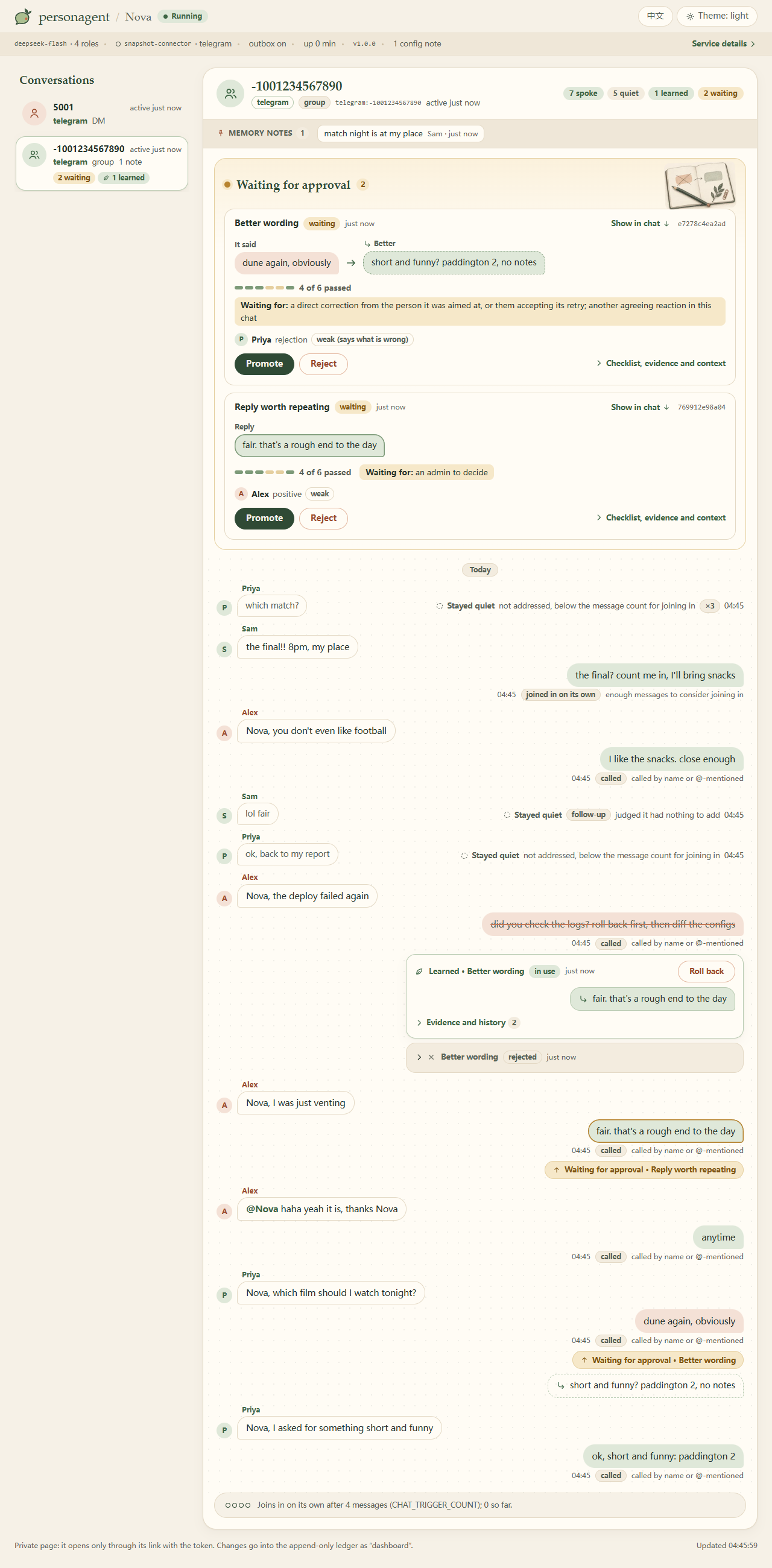
personagent run also serves a local page at http://127.0.0.1:8080/ that shows whether it is running and receiving messages, why it spoke or stayed quiet, and what it learned with the evidence behind each change, with buttons to promote, reject, roll back or replace. Each conversation reads like the chat itself: who said what, the bot's replies, a note wherever it chose to stay quiet and why, a struck-through reply where it was corrected, and what it learned from that, right under it.
It opens only through its private link, which personagent run prints when it starts and personagent doctor prints on its last line:
dashboard: http://127.0.0.1:8080/?token=...
Opening the link signs this browser in for a year and takes the token out of the address bar. The token is kept in runtime/dashboard.token in the home folder; delete that file and restart to issue a new one. CONNECTOR_TOKEN does not open the dashboard. To open it from another computer, use an SSH tunnel (ssh -L 8080:127.0.0.1:8080 <host>, then the link), or set SERVER_HOST to this machine's LAN or Tailscale address (which also needs CONNECTOR_TOKEN), and the printed link uses that address. Other host names are refused, so no website can pose as this computer.
How it compares
| personagent | AstrBot (built in) | MaiBot | Koishi ChatLuna character | ElizaOS | |
|---|---|---|---|---|---|
| Joining in unasked | A model judges whether a person would chime in | Optional "active reply" at random (10%; off by default) | A planner model, paced by a frequency setting | Rule triggers: interval, activity, idle | A model picks respond, ignore or stop |
| Learns from reactions to its own replies | Yes: corrections, rejections, accepted retries | Not built in | Learns expressions and slang from the chat; from reactions, not documented | Not documented | Not documented |
| Corroboration before a change | Two agreeing reactions from one chat, one strong | Not built in | Optional human check of learned expressions | Not documented | Not documented |
| Audit trail and rollback | Append-only ledgers; rollback from the terminal or dashboard | Not built in | Not documented | Not documented | Not documented |
| Published behavioural eval | Speak, persona and learning suites (below) | Not documented | Not documented | Not documented | Not documented |
| Setup and admin | Terminal setup; local dashboard | WebUI, desktop launcher | WebUI, one-click launcher | Koishi console | CLI, web client |
| Where it runs | Python service behind AstrBot, Koishi (Satori) or Matrix | Python app, 18+ platforms | Python app, QQ via NapCat | Koishi plugin | TypeScript (Bun); Discord, Telegram, Slack and more |
| Licence | MIT | AGPL-3.0 | GPL-3.0 | AGPL-3.0 | MIT |
From each project's documentation, October 2026. "Not documented" means we found no description of it, not that it cannot be done; AstrBot's plugin market has learning plugins, one with a review queue and rollback.
Another project may fit better if you want a one-click desktop app with every setting in a WebUI (MaiBot, AstrBot), a large plugin ecosystem, or slang learning, sticker packs and image memory as headline features (MaiBot, AstrBot's plugins). personagent does not replace AstrBot or Koishi: it runs behind them, so you keep their platforms and plugins and add a character that holds back and learns on the record.
Measured
personagent eval runs the real agent on labelled cases in English and Chinese (data/evals/) and writes a JSON report with every case and its verdict:
| Suite | Measures |
|---|---|
speak |
Whether it talks when it should: accuracy, speaking when it should stay quiet, and staying quiet when it should speak (24 cases per language) |
persona |
Whether it sounds like the character: a judge model scores each reply, flags assistant phrasing, and picks blind between its reply and a plain assistant's from the same model (18 cases) |
learning |
Whether the promotion rule decides as expected, and whether a promoted correction changes the next reply in that chat (10 scenarios per language, including a troll, a bystander, a bystander the bot asks back, and a correction the person walks away from) |
personagent eval --suite speak
personagent eval --suite all --lang zh --limit 6
| English | Chinese | |
|---|---|---|
| Model under test | deepseek/deepseek-v4.1-flash (OpenRouter) |
deepseek/deepseek-v4.1-flash (OpenRouter) |
| Judge | openai/gpt-4.1-mini |
openai/gpt-4.1-mini |
| Date | 2026-10-03 | 2026-10-03 |
| Speak: accuracy | 92% (22/24) | 88% (21/24) |
| Speak: spoke when it should stay quiet | 2/11 | 3/11 |
| Speak: stayed quiet when it should speak | 0/13 | 0/13 |
| Persona: judge picked it over a plain assistant (95% CI) | 18/18 (82–100%) | 17/18 (74–99%) |
| Learning: promoted or held as expected (k/n) | 10/10 | 10/10 |
| Learning: next reply changed after promotion | 1 of 2 (the other 4 promoted probes already passed) | 0 of 2 (the other 4 promoted probes already passed) |
| Learning: regressions | 0 of 6 | 1 of 6 |
Most misses in speak are lines that name the bot in passing ("the wifi is called Nova-5G now"): a name counts as a call, so it answers. The judge's 1–5 rubric scores were all at the ceiling with this judge, so they are left out. The learning probes show little because the model already answered most of them in character before any correction; the policy row is the one that matters: it promoted every correction that held up and none of the troll, bystander or walk-away cases.
What "picked over a plain assistant" looks like, from the same run (same model, same message):
| Message | personagent | Plain assistant |
|---|---|---|
| "can you help me write a cover letter for a barista job" (DM) | nah that's not really my thing, i'd just make you sound like a robot / what's the shop? a good one down your way or just anywhere hiring | Happy to help! Here's a solid template you can adapt — just swap out the bracketed parts. [Your Name] ... |
| "tips for a first date? it's tomorrow" | honestly just ask real questions and actually listen, that's most of it / where you taking them? | You got this, Taylor! Keep it simple: pick something low-pressure (coffee, walk, casual bite), dress like a slightly sharper version of yourself, ... |
The reports behind this table, with every case, reply and verdict, are in docs/evals/2026-10-03. One run on one model is a sample, so expect some noise between runs; the persona row gives its 95% interval. The persona and learning suites need a judge that is a different model from the one being measured (BENCH_JUDGE_MODEL, plus BENCH_JUDGE_BASE_URL and BENCH_JUDGE_API_KEY if another endpoint serves it), and refuse to run otherwise. The learning suite never promotes anything itself, and its expectations follow your promotion settings: under a policy stricter than the defaults, every scenario is expected to be held. Every run calls your models and works on a throwaway copy of the state.
How it works
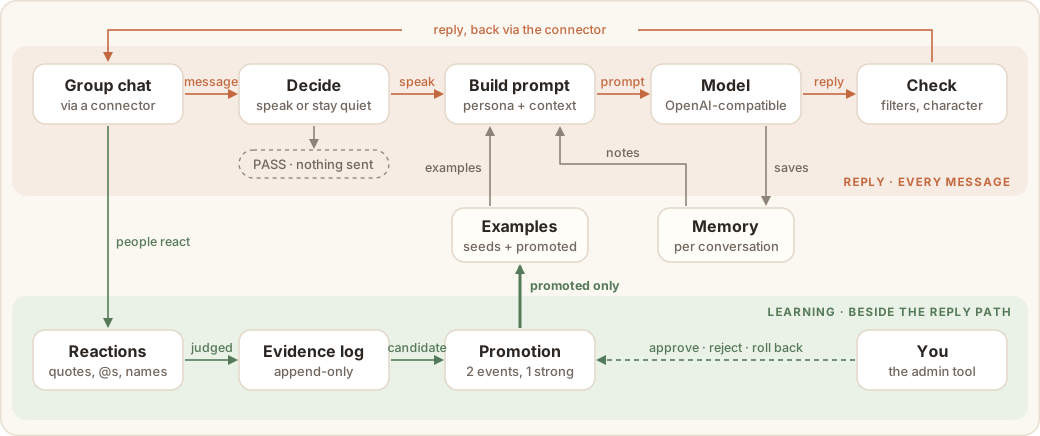
Every platform enters through one endpoint. A message is authenticated, de-duplicated and enriched (images described, links expanded). Then the decision step: if the bot was called it answers; otherwise it waits for enough of the conversation (30 messages by default), and a cheap gate call to LLM_JUDGE_MODEL decides whether a person would chime in. A burst gets one reply, to the latest line, and between 02:00 and 07:00 it mostly stays out unless called. The prompt combines the persona, matching lorebook entries, this conversation's memory and the most relevant examples. The model answers in JSON with reasoning, intent, reply and mem, and the reply passes the output filter and the character policy before it is split into chat-sized messages. A malformed answer fails closed: nothing is sent.
Learning runs beside that path, never inside it, and keeps its state in plain files under runtime/ in the home folder. Reactions go into an evidence log that is never rewritten. Adjudicating them proposes candidates, the promotion policy decides which may change replies, and promoted ones are written to small view files that retrieval reloads without a restart. No model is fine-tuned: it learns by improving the examples in its prompt. Because the ledgers are append-only, "why does it talk like this?" always has an answer, and a rollback always has something to undo.
Privacy and consent
Everything personagent stores stays on your machine, in the home folder: .env, persona.txt, persona.card.json and runtime/. In a clone none of it is committed to Git. It can hold credentials and real conversations, so back it up and keep it private.
The dashboard opens only through its private link with the token (see the dashboard); anyone who has the link and can reach the service can use it, so keep the link as private as .env. It never shows API keys or tokens. DASHBOARD_ENABLED=false turns it off.
The model provider does see conversations. Chat context goes to your LLM_BASE_URL. If you configure a fallback (LLM_FALLBACK_MODEL, LLM_FALLBACK_BASE_URL), it is called on ordinary turns too, for the reply gate, search decisions, reaction judging, self-evaluation and sticker tagging, and receives chat context as well. Images go to the vision endpoint, and when the model decides to look something up, the search query goes to Tavily (if TAVILY_API_KEY is set) or DuckDuckGo. With EMBEDDING_MODEL set, the message being answered, the memories and the retrieval examples are sent to the embedding endpoint (EMBEDDING_BASE_URL, or LLM_BASE_URL when that is blank).
Before you connect it to real people, tell them it is a bot and get their consent to have their messages processed. Third-party QQ clients put the account at risk; read the disclaimer.
Troubleshooting
Start with personagent doctor. It checks the configuration, naming misspelled and renamed settings, and probes each service personagent depends on, then prints the dashboard's link. The probes send tiny requests and may cost a little credit. --json prints the same as JSON, and --fix renames settings retired in 1.0.
It runs but never replies. In order:
- The
personagent runbanner says the agent is on. If it saysOFF, it names the cause, usually a missingLLM_API_KEY: runpersonagent init. - Open the dashboard through the link the banner printed. If nothing has arrived, the connector is not reaching personagent: check
personagent_urlin the plugin, and thatCONNECTOR_TOKENis the same on both sides. Chats that were turned away are listed with the reason. - Check the connector's allowlist. The AstrBot plugin forwards only the
groupsanddm_usersit lists, and on QQaiocqhttpmust not be in itsexcluded_platforms; the Satori and Matrix connectors keep theirs in their own.env. If you setACCESS_GROUPSorACCESS_DM_USERS, they must list the chat too. - Call it by name (
PERSONA_NAME, matched as a whole word). In a group it does not answer everything: it considers joining in afterCHAT_TRIGGER_COUNTmessages (30), and only when the gate says a person would. - If AstrBot runs in Docker, look for
refusing unsafe personagent_urlin AstrBot's log (see Put it in a chat).
The deployment guide has the full checklist.
Is it up? curl http://127.0.0.1:8080/health answers without calling a model. /health/details probes the services too, and requires an X-Personagent-Token header once a token is configured.
It will not start. personagent run stops with one sentence saying why: the port is taken, another personagent runs from the same home folder, a network address is set without CONNECTOR_TOKEN, or a setting retired in 1.0 is still set (one OLD -> NEW line each; personagent doctor --fix renames them).
A setting has no effect. Restart the process that reads it, check the spelling, and save .env as UTF-8 without a BOM. Shell environment variables override .env; booleans are true / false. PERSONA_TZ_OFFSET_HOURS sets the clock for the night window. Blank (the default) means UTC+8 with AGENT_LANG=zh and this machine's time zone otherwise; set a number to choose another.
Status
1.0. QQ through AstrBot is the most exercised route. Other AstrBot platforms are supported through the same plugin, and the Satori and Matrix connectors are tested against stand-ins. CI runs the tests on Linux with Python 3.10–3.14 and on Windows with Python 3.12, plus a job that installs the package and runs the command. Through 1.x, the direct OneBot route (/v1/onebot) and launch.vbs are deprecated but kept. The scripts in tools/ are experiments.
- Deployment guide · 中文部署教程
- Connectors: AstrBot plugin · Satori · Matrix · the protocol
- All settings
- Changelog · Contributing
Upgrading from 0.x
Settings were renamed in 1.0, and personagent will not start while an old name is still set: it lists each one as OLD -> NEW. Run personagent doctor --fix to rename them in .env; it keeps the values and comments and saves the old file as .env.bak. Rename any that are set in the environment where you set them. A few defaults changed too: the model is deepseek-flash, QQ_ONEBOT_URL is blank, and a blank PERSONA_TZ_OFFSET_HOURS follows AGENT_LANG. Reinstall the AstrBot plugin with personagent connect astrbot and set its groups and dm_users again. Memory and what it learned carry over, and the old scripts (main.py, try_chat.py, tools/healthcheck.py, tools/candidates_admin.py, tools/behavior_eval.py) still work. The full list is in the changelog.
License
MIT © 2026 Qiankang (Kant) Wang.
Acknowledgements
- AstrBot, satori-python with Koishi, and matrix-nio with the mautrix bridges carry personagent onto chat platforms, and NapCat onto QQ.
- FastAPI and httpx run the service and its model calls, and uv and pipx install it in one line.
- Learning from reactions draws on Self-Feeding Chatbot, Alexa self-learning and BlenderBot 3x.
- The lorebook and output filters follow SillyTavern's World Info and regex extensions.
1 maintainer

Metadata
1 maintainer
Release files for personagent 1.0.0
For a detailed explanation of source distributions (sdists) and built distributions (wheels), please see the package formats documentation.
Source distribution (sdist)
| File | Size | Uploaded | |
|---|---|---|---|
| personagent-1.0.0.tar.gz | 742.6 kB | Details |
Built distribution (wheel)
| File | Interpreter | ABI | Platform | Reset |
|---|---|---|---|---|
| personagent-1.0.0-py3-none-any.whl | Python 3 | none | any | Details |
Total release size: 1.5 MB
Release files / personagent-1.0.0.tar.gz
| Download URL | personagent-1.0.0.tar.gz |
|---|---|
| Size | 742.6 kB |
| Tags | Source |
|
SHA-256 checksum How to use checksums |
d0f1df21eb19769290687d3cbe4362e63d8e002c8fa68e0044a9a5e4affe0e2c
|
|
BLAKE2b-256 checksum How to use checksums |
8893cb6618dc2b890fdce7f5399178bfb09514532a7c40e025e0a71b4ca3dba5
|
| Upload date | |
|
Uploaded using Trusted Publishing? What is trusted publishing? |
Yes |
| Uploaded via |
twine/7.0.0 CPython/3.13.14
|
Provenance
Provenance describes where a file came from. On PyPI, provenance is shared via attestations, which provide a verifiable record of the build or publishing details. View details, limitations and caveats.


PyPI Publish Attestation
PyPI verified that this artifact, at this checksum, originated from the publisher listed below.
Signed by GitHub Actions, verified by PyPI on Oct 3, 2026.
Transparency logRelease files / personagent-1.0.0-py3-none-any.whl
| Download URL | personagent-1.0.0-py3-none-any.whl |
|---|---|
| Size | 754.2 kB |
| Tags | Python 3 |
|
SHA-256 checksum How to use checksums |
3fc1861b29cf652e914917660b356b4e138f1638e438189ce2c4b2a22f72570b
|
|
BLAKE2b-256 checksum How to use checksums |
425899b7056bfe5264e03a69e2578f8daff797d9da4d237c80fa546720555743
|
| Upload date | |
|
Uploaded using Trusted Publishing? What is trusted publishing? |
Yes |
| Uploaded via |
twine/7.0.0 CPython/3.13.14
|
Provenance
Provenance describes where a file came from. On PyPI, provenance is shared via attestations, which provide a verifiable record of the build or publishing details. View details, limitations and caveats.
PyPI Publish Attestation
PyPI verified that this artifact, at this checksum, originated from the publisher listed below.
Signed by GitHub Actions, verified by PyPI on Oct 3, 2026.
Transparency log













