
peter: Your Linux Command Translator (Peter Griffin Edition)

Hey Lois, ever wanted to understand those geeky Linux commands but were afraid you'd end up more confused than a monkey trying to do its taxes? Well, fear no more! peter is here to break down those brainy terminal things in a way even I can understand (well, mostly).
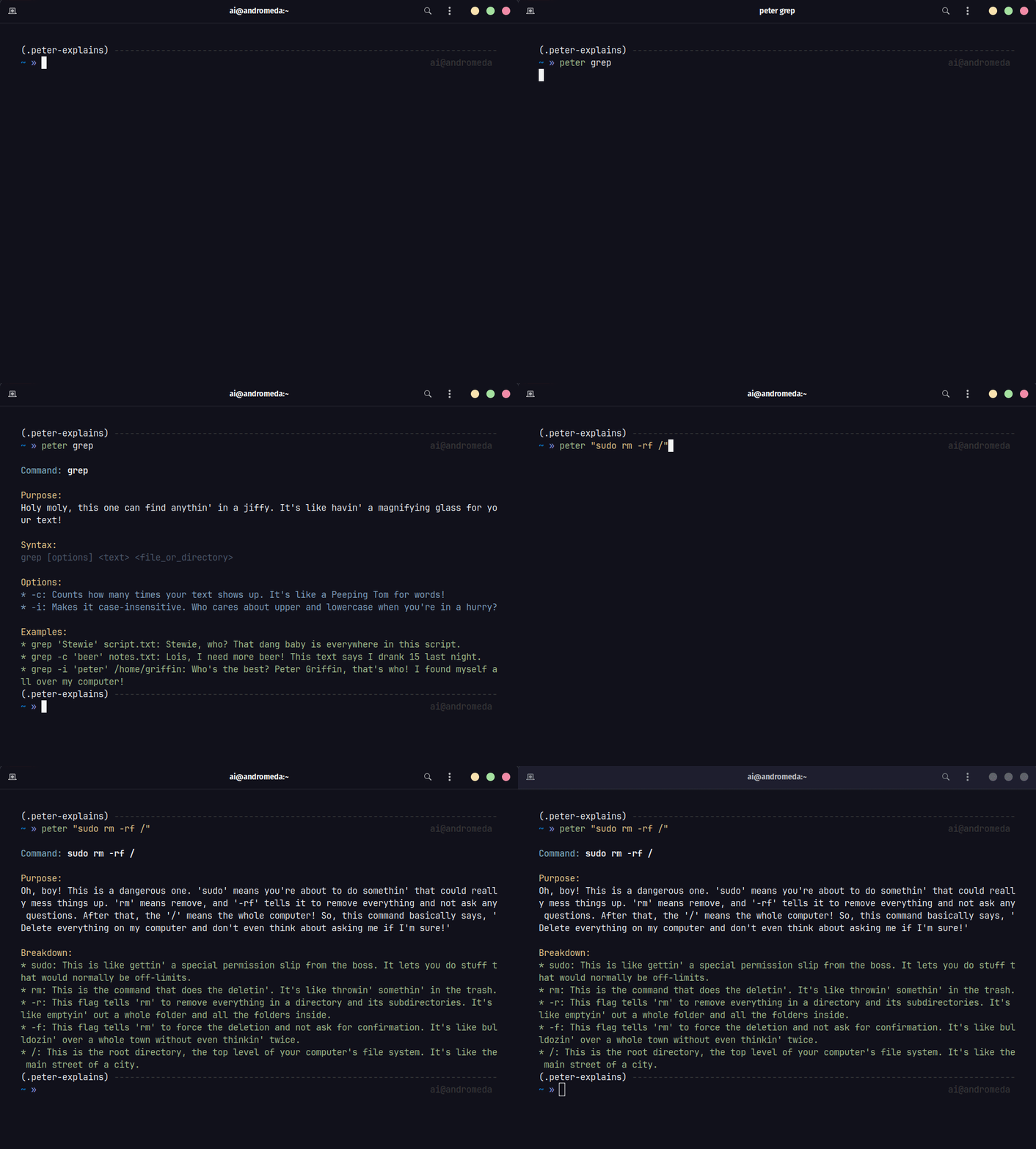
How the Heck Does This Work?
- You type somethin' like:
peter lsorpeter "grep hello world.txt" - I whip out my trusty Gemini AI translator: This thing's smarter than Stewie after a bowl of spinach, and it'll turn that boring command into a hilarious hot mess of an explanation.
- You laugh (or groan), but hey, at least you learn somethin': Maybe you'll actually remember what those commands do instead of just blindly copying stuff from the internet like a parrot.
Gettin' Started (For Dummies Like Me) 
- Make sure you got that pip thing installed: You know, for downloading packages and stuff.
- Use pip to install this amazingness:
$ pip install peter-explains
- Set the API Key: Get one o those for free from here. The run:
 $ peter --api <YOUR_API_KEY>
 $ peter --api <YOUR_CORRECT_API_KEY>
- Boom! Unleash the Peter: Try something like
peter grep. Just don't ask me to explain it – that's the AI's job. - Too Slow? I know. This thing can be slow at first. But try running the same command again. See that? That's the magic of cache.
[!TIP] Confused about what a fancy-ass command does? Put em inside
" "after peter. I'll handle the rest.$ peter "find . -name "node_modules" -type d -prune -exec rm -rf '{}' +"
[!WARNING]
Retep is gonna ruin your day if you try to use it without the API KEY
Don't worry. Meg's here to help. You need a FREE Google Gemini API KEY.

- Get yours from here: [https://aistudio.google.com/app/](https://aistudio.google.com/app/)
- Save the `API KEY` to your Environment by running the following:

  $ peter --api <YOUR_API_KEY>
[!TIP] If yo dumbass scews up setting the API key, run the following to delete and try setting it up again.
$ peter --delete-api
Help
Run the following for help. Probally won't help.
$ peter --help
Need more?

For the Brainiacs (a.k.a. Potential Contributors)
Hey Meg, turns out even I can't make this thing perfect on my own. If you're the type who knows their way around Python and AI, feel free to poke around the code and make it even funnier (or, dare I say, educational).
$ git clone https://github.com/atick-faisal/peter-explains
$ cd peter-explains
$ pip install -r requirements.txt
$ pip install -r requirements-dev.txt
$ pip install -e .
[!NOTE] Make sure you test your crap before making a PR. I ain't got time for yo buggy code. You're gonna need the API key in your exvironment to run the tests.
$ export GOOGLE_API_KEY=<YOUR_API_KEY>Run the tests like this:
$ pytestDon't forget to check your linting before pushing:
$ python -m pylint $(git ls-files '*.py') --rcfile .pylintrc
Disclaimer 
I ain't responsible if this tool makes you dumber, offends your delicate sensibilities, or causes your computer to explode. Use at your own risk, and remember: laughter is the best medicine... unless you're choking on a hot dog. Then you probably need a doctor.
Let me know if you want me to make it even more absurd or add specific installation instructions based on your project setup!
1 maintainer

Metadata
1 maintainer
Release files for peter-explains 0.0.14
For a detailed explanation of source distributions (sdists) and built distributions (wheels), please see the package formats documentation.
Source distribution (sdist)
| File | Size | Uploaded | |
|---|---|---|---|
| peter_explains-0.0.14.tar.gz | 1.1 MB | Details |
Built distribution (wheel)
| File | Interpreter | ABI | Platform | Reset |
|---|---|---|---|---|
| peter_explains-0.0.14-py3-none-any.whl | Python 3 | none | any | Details |
Total release size: 1.1 MB
Release files / peter_explains-0.0.14.tar.gz
| Download URL | peter_explains-0.0.14.tar.gz |
|---|---|
| Size | 1.1 MB |
| Tags | Source |
|
SHA-256 checksum How to use checksums |
76af137936c69d8a824b3a56932a52c5b84eb5482f0fe79b095ec7bce6b6438f
|
|
BLAKE2b-256 checksum How to use checksums |
489d67729ac3b2a5721395fccb2d841b2c83e207f9ac67190ba344c876ec37d5
|
| Upload date | |
|
Uploaded using Trusted Publishing? What is trusted publishing? |
Yes |
| Uploaded via |
twine/7.0.0 CPython/3.13.14
|
Provenance
Provenance describes where a file came from. On PyPI, provenance is shared via attestations, which provide a verifiable record of the build or publishing details. View details, limitations and caveats.


PyPI Publish Attestation
PyPI verified that this artifact, at this checksum, originated from the publisher listed below.
Signed by GitHub Actions, verified by PyPI on Aug 4, 2026.
Transparency logRelease files / peter_explains-0.0.14-py3-none-any.whl
| Download URL | peter_explains-0.0.14-py3-none-any.whl |
|---|---|
| Size | 15.1 kB |
| Tags | Python 3 |
|
SHA-256 checksum How to use checksums |
c698ea8f96be9db81c7f32049bf39ff460b5109add6e22640aeb4d178f426432
|
|
BLAKE2b-256 checksum How to use checksums |
9f32934058959c3af40a23bdc109591c3082dd552607726fd92ce64bc7ddbbb0
|
| Upload date | |
|
Uploaded using Trusted Publishing? What is trusted publishing? |
Yes |
| Uploaded via |
twine/7.0.0 CPython/3.13.14
|
Provenance
Provenance describes where a file came from. On PyPI, provenance is shared via attestations, which provide a verifiable record of the build or publishing details. View details, limitations and caveats.
PyPI Publish Attestation
PyPI verified that this artifact, at this checksum, originated from the publisher listed below.
Signed by GitHub Actions, verified by PyPI on Aug 4, 2026.
Transparency log













