
Automated correction pipeline for JupyterLab sessions using LLMs
Verified details
These details have been verified by PyPIProject links
GitHub Statistics
Maintainers

Project description
pevaluate
pevaluate helps grade Moodle submissions with an LLM. It can unpack Moodle downloads, extract nested student zips, convert notebooks to Markdown, prefer notebooks over exported HTML, clean noisy HTML artifacts, save structured feedback as YAML, and compile that feedback back into a Moodle marks CSV.
The package installs as pevaluate. The older autocorrect command is still available as a CLI alias.
Installation
Install the package in editable mode from this repository:
pip install -e .
Install the Playwright browser binaries used for HTML-to-PDF export:
playwright install chromium
Create a .env file with your OpenRouter API key:
OPENROUTER_API_KEY=your_api_key_here
Moodle Setup
For Moodle upload/download workflows, enable the feedback tools in the assignment settings:
- Open the assignment settings.
- Under Feedback types, enable Feedback files and Offline grading worksheet.
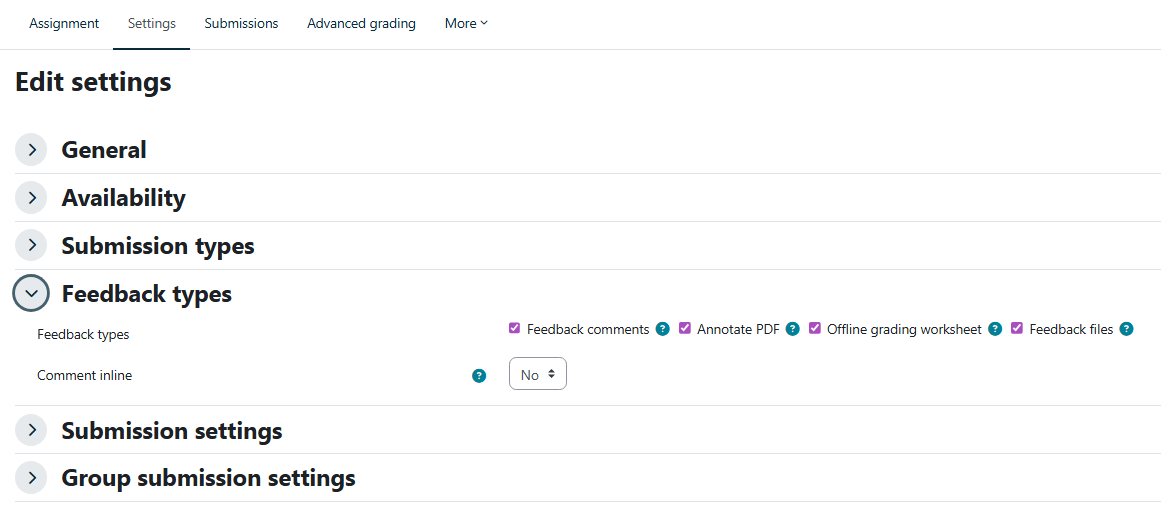
- Download the Moodle submissions zip and, later, download the grading worksheet or marks CSV.
You do not need to unzip the Moodle submissions zip manually. The simplest workflow is to put the downloaded zip in the session folder and let pevaluate unpack it.
If you already unzipped the Moodle download yourself, use --no-unzip --students-dir path/to/submissions.
Session Folder
A representative session folder looks like this:
my_assignment/
  moodle_submissions.zip
  rubric.txt
  example.txt
  marks.csv
marks.csv is only needed when compiling feedback back into a Moodle upload CSV. If student submissions contain their own zip files, add --extract-nested-zips.
Representative Workflow
First run a dry pass. This unpacks submissions, extracts nested zips, converts notebooks for inspection, and does not call the LLM:
pevaluate "my_assignment" \
  --extract-nested-zips \
  --no-grade \
  --no-reference \
  --files-regex ".*\.(ipynb|html)$" \
  --prefer-extensions ".ipynb;.html"
After checking the generated files, run grading without unpacking/converting again:
pevaluate "my_assignment" \
  --no-unzip \
  --no-convert \
  --no-reference \
  --rubric rubric.txt \
  --example example.txt \
  --files-regex ".*\.(ipynb|html)$" \
  --prefer-extensions ".ipynb;.html" \
  --keep-prompt \
  --model "google/gemini-3.1-pro-preview"
For an already unzipped Moodle download:
pevaluate "my_assignment" \
  --no-unzip \
  --students-dir "my_assignment/submissions" \
  --extract-nested-zips \
  --no-reference \
  --files-regex ".*\.(ipynb|html)$" \
  --prefer-extensions ".ipynb;.html"
By default, if both .ipynb and .html exist for the same submission, pevaluate grades the .ipynb and reports the skipped .html. HTML artifacts are cleaned from .ipynb, .md, and .html content before prompting. Disable this only when those artifacts are relevant to grading:
pevaluate "my_assignment" --no-cleanup-html
--not-cleanup-html is accepted as an alias.
Rubric File
The rubric should explain the grading criteria, expected output style, and any automatic benchmark or competition scores the model should consider. If feedback must name the students, include a roster in the rubric, especially for group assignments.
Example:
Grade from 0 to 10. Be brief and assertive.

Notebook, 70%:
- 1.5 points: data understanding and validation.
- 3.0 points: classical model.
- 3.0 points: modern model.
- 1.0 point: experimental comparison.
- 0.5 points: error analysis and conclusions.
- 0.5 points: clarity and reproducibility.

Challenge, 30%:
Use the challenge table below. Report the team's challenge mark and combine:
final_mark = 0.70 * notebook_mark + 0.30 * challenge_mark.

Groups:
| Group | Students |
| --- | --- |
| G01 | Ana García López; Luis Pérez Soler |
| G02 | Marta Ferrer Vidal; Pablo Ruiz Mora |

Challenge results:
| Group | Rank | score | challenge_mark |
| --- | --- | --- | --- |
| G01 | 1 | 0.812 | 10.0 |
| G02 | 2 | 0.790 | 8.5 |
Example Feedback File
The example file should show the tone and level of detail you want. It does not need to match the assignment exactly.
Grupo G01:
- Ana García López
- Luis Pérez Soler

Notebook (70%):
0. Errores de código: 0.5/0.5.
1. Planteamiento, datos y validación: 1.25/1.5. La validación es razonable, pero faltó justificar mejor la partición.
2. Modelo clásico: 2.75/3.0. Buen resultado; faltó comparar algún hiperparámetro adicional.
3. Modelo moderno: 3.0/3.0.
4. Comparación experimental: 0.75/1.0. La tabla de resultados es clara, pero el análisis es algo superficial.
5. Análisis de errores y conclusiones: 0.25/0.5.
6. Claridad y reproducibilidad: 0.5/0.5.

Challenge (30%): posición 2/20. Nota challenge: 8.5/10.

Nota notebook: 8.75/10.
Nota final: 8.30/10.
Structured Feedback YAML
Each graded submission is saved in feedback/ as YAML. Filenames include a readable name plus a short source hash, so repeated generic filenames do not overwrite each other.
students:
  - full_name: Ana García López
  - full_name: Luis Pérez Soler
feedback: |
  Grupo G01:
  - Ana García López
  - Luis Pérez Soler

  Notebook (70%): 8.75/10.
  Challenge (30%): 8.5/10.

  Buen trabajo. La validación es razonable y los resultados son sólidos; faltó un análisis de errores más concreto.

  Nota final: 8.30/10.
mark: 8.3
submission_file: C:\path\to\submission.ipynb
source_id: 1a2b3c4d
The LLM is instructed to return this schema. If it returns plain text, pevaluate saves the text under feedback and tries to extract a numeric mark.
Moodle CSV Export
Compile YAML feedback into a Moodle upload CSV:
pevaluate moodle-csv "my_assignment/marks.csv" \
  --feedback-dir "my_assignment/feedback" \
  --output "my_assignment/marks_filled.csv" \
  --feedback-format html \
  --partial \
  --clear-timestamps
The converter writes the same group mark and feedback to every student listed in a YAML file. It matches students by normalized full name, handling both Nombre Apellido and Apellido, Nombre.
Moodle column headers vary by site language. pevaluate moodle-csv resolves common Catalan, Spanish, and English headers automatically for full name, grade, feedback comments, and timestamp columns. If your Moodle uses custom names, pass them explicitly with --name-column, --grade-column, --feedback-column, --submission-modified-column, and --grade-modified-column.
--feedback-format html escapes the feedback text and converts newlines to <br>, which is useful when Moodle flattens raw CSV newlines during import. Use --feedback-format plain to keep literal newlines.
--partial writes only the rows that pevaluate updated. This is safer for Moodle offline grading worksheets because a full worksheet can unintentionally clear existing feedback in rows that are blank in the uploaded file. --clear-timestamps sets Moodle's last-modified columns to - for updated rows; this helps when Moodle refuses rows whose worksheet timestamps are older or already populated.
For a second pass after downloading the current Moodle worksheet, fill only rows still missing a grade or feedback:
pevaluate moodle-csv current_moodle_marks.csv \
  --feedback-dir feedback \
  --output marks_filled_missing_only.csv \
  --feedback-format html \
  --partial \
  --skip-filled \
  --clear-timestamps
If exact matching fails, it uses fuzzy matching with a normalized Levenshtein threshold of 70/100 by default and reports each fuzzy match:
pevaluate moodle-csv marks.csv \
  --feedback-dir feedback \
  --output marks_filled.csv \
  --fuzzy-threshold 70
Use --fuzzy-threshold 0 to disable fuzzy matching. If your Moodle CSV uses different column names, pass them explicitly:
pevaluate moodle-csv marks.csv \
  --feedback-dir feedback \
  --output marks_filled.csv \
  --name-column "Full name" \
  --grade-column "Grade" \
  --feedback-column "Feedback comments"
Upload the generated CSV back to Moodle using the assignment grading import/upload option.
Open-Answer Exam Evaluation
pevaluate exam-open grades the open-answer crops extracted by pexams correct. It expects:
open_responses_index.csvfrom thepexamscorrection output.- The original
pexamsexam directory containingexam_model_*_questions.json. - The crop images referenced from the index CSV.
Basic run:
pevaluate exam-open \
  --index-csv generated_exam/correction_results/open_responses_index.csv \
  --exam-dir generated_exam \
  --output-dir generated_exam/open_evaluation \
  --model google/gemini-3.1-pro-preview
The editable canonical artifact is:
open_evaluations.yaml
It combines the previous per-response JSON, converted Markdown, feedback, score, warnings, and paths into one multiline-friendly file. Edit this YAML to manually adjust scores, feedback, or converted Markdown, then rerun pevaluate exam-open without --force-regrade to reuse the edited artifacts and regenerate reports.
Useful flags:
| Option | Description |
|---|---|
--dry-run |
Write prompts and pending YAML/CSV rows without calling an LLM. |
--keep-prompts |
Save the grading prompt for each response. |
--force-regrade |
Ignore existing YAML evaluations and call the model again. |
--post-analysis |
Analyze graded responses, summarize typical errors, and suggest a revised rubric in post_analysis.yaml. |
--re-evaluate |
Run a second grading pass in a sibling reevaluation/ folder after post-analysis. First-pass artifacts are kept. |
--mc-correction-dir |
Optional pexams correction directory. Adds corrected MC template PNGs to student PDFs and includes stats_report.html in the global report when present. |
Outputs include:
open_scores.csv
open_evaluations.yaml
model_inputs/*.png
open_responses_report.html
open_responses_report.pdf
student_feedback_pdfs/<student_id>.pdf
reevaluation/
  open_scores.csv
  open_evaluations.yaml
  post_analysis.yaml
  open_responses_report.html
  open_responses_report.pdf
The report starts with an overall mark page and distribution. When --mc-correction-dir points at a pexams correction directory with stats_report.html, the multiple-choice report is included before the open-answer section. The open-answer section includes one score-distribution histogram per open question, plus percentile examples at p0, p25, p75, and p100. Each sample shows the highlighted crop passed to the model, rendered Markdown, Markdown source, score, feedback, and conversion warnings. Rendered responses support MathJax formulas and Mermaid diagrams.
Per-student PDFs include the corrected multiple-choice template PNG from scanned_pages/ when available, plus unhighlighted open-answer response crops with score and feedback.
Reevaluation reports reuse the first-pass model_inputs/*.png highlighted crops instead of copying them.
Run the fake full open-answer smoke pipeline without spending tokens:
pevaluate test-open --output-dir generated/open_answer_eval_smoke
Run the same smoke test with real OpenRouter calls:
pevaluate test-open --real-llm --output-dir generated/open_answer_eval_real
Main Options
| Option | Description | Default |
|---|---|---|
session_folder |
Folder containing the assignment materials. | required |
--model |
OpenRouter model. | google/gemini-3.1-pro-preview |
--rubric |
Rubric file in the session folder. | rubric.txt |
--example |
Example feedback file in the session folder. | example.txt |
--reference |
Optional reference file(s), separated by ;. |
empty |
--no-reference |
Do not include a reference solution in the prompt. | false |
--files-regex |
Student files to grade. | .*\.ipynb$ |
--prefer-extensions |
Extension priority for duplicate submission files. | .ipynb;.html |
--students-dir |
Directory containing unpacked student submissions. | <session_folder>/students |
--extract-nested-zips |
Extract zip files found inside students-dir. |
false |
--no-cleanup-html |
Keep HTML styles/scripts/images in prompts. | false |
--keep-prompt |
Save prompts to prompts/. |
false |
--student |
Filter submissions by filename text. | empty |
--no-unzip |
Skip Moodle zip extraction. | false |
--no-convert |
Skip notebook-to-Markdown conversion. | false |
--no-grade |
Skip LLM grading. | false |
Notes
- Prompt size is printed for each submission in characters and approximate tokens.
- HTML sanitization removes
<style>,<script>, embedded images, SVGs, comments, and other noisy artifacts. - Prompt files are saved in
prompts/when--keep-promptis used. - Feedback files are saved in
feedback/as YAML and can be compiled into a Moodle marks CSV withpevaluate moodle-csv.
Project details
Verified details
These details have been verified by PyPIProject links
GitHub Statistics
Maintainers
Release history Release notifications | RSS feed


Download files
Download the file for your platform. If you're not sure which to choose, learn more about installing packages.
Source Distribution
Built Distribution
Filter files by name, interpreter, ABI, and platform.
If you're not sure about the file name format, learn more about wheel file names.
Copy a direct link to the current filters
File details
Details for the file pevaluate-0.1.1.tar.gz.
File metadata
- Download URL: pevaluate-0.1.1.tar.gz
- Upload date:
- Size: 41.9 kB
- Tags: Source
- Uploaded using Trusted Publishing? Yes
- Uploaded via: twine/6.1.0 CPython/3.13.12
File hashes
| Algorithm | Hash digest | |
|---|---|---|
| SHA256 |
73b0cf38beb46569e6586b9b578a90ee9d58cb348bb5b8b69933006a386c5ab4
|
|
| MD5 |
2cdefdff2e6ed95acac4b7610bd91732
|
|
| BLAKE2b-256 |
a291978bb67ec4c158abc75488d4c18764809da545ca4f750084ed80799dd9d0
|
Provenance
The following attestation bundles were made for pevaluate-0.1.1.tar.gz:
Publisher:
release.yml on OscarPellicer/pevaluate
-
Statement:
-
Statement type:
https://in-toto.io/Statement/v1 -
Predicate type:
https://docs.pypi.org/attestations/publish/v1 -
Subject name:
pevaluate-0.1.1.tar.gz -
Subject digest:
73b0cf38beb46569e6586b9b578a90ee9d58cb348bb5b8b69933006a386c5ab4 - Sigstore transparency entry: 1781816579
- Sigstore integration time:
-
Permalink:
OscarPellicer/pevaluate@eca1dff628f96a641b1c21ba0462e0e0dda7782d -
Branch / Tag:
refs/heads/main - Owner: https://github.com/OscarPellicer
-
Access:
public
-
Token Issuer:
https://token.actions.githubusercontent.com -
Runner Environment:
github-hosted -
Publication workflow:
release.yml@eca1dff628f96a641b1c21ba0462e0e0dda7782d -
Trigger Event:
push
-
Statement type:
File details
Details for the file pevaluate-0.1.1-py3-none-any.whl.
File metadata
- Download URL: pevaluate-0.1.1-py3-none-any.whl
- Upload date:
- Size: 36.4 kB
- Tags: Python 3
- Uploaded using Trusted Publishing? Yes
- Uploaded via: twine/6.1.0 CPython/3.13.12
File hashes
| Algorithm | Hash digest | |
|---|---|---|
| SHA256 |
46075a56a2204739cbb55cfe1c0275fb52270a84b180de303646c539daddd983
|
|
| MD5 |
532e1fee7d5c810786c4ab9cedba244d
|
|
| BLAKE2b-256 |
12908c23ad3cbe542e001693d27eb89be399aa18e853d0e743ee813486d6d146
|
Provenance
The following attestation bundles were made for pevaluate-0.1.1-py3-none-any.whl:
Publisher:
release.yml on OscarPellicer/pevaluate
-
Statement:
-
Statement type:
https://in-toto.io/Statement/v1 -
Predicate type:
https://docs.pypi.org/attestations/publish/v1 -
Subject name:
pevaluate-0.1.1-py3-none-any.whl -
Subject digest:
46075a56a2204739cbb55cfe1c0275fb52270a84b180de303646c539daddd983 - Sigstore transparency entry: 1781817771
- Sigstore integration time:
-
Permalink:
OscarPellicer/pevaluate@eca1dff628f96a641b1c21ba0462e0e0dda7782d -
Branch / Tag:
refs/heads/main - Owner: https://github.com/OscarPellicer
-
Access:
public
-
Token Issuer:
https://token.actions.githubusercontent.com -
Runner Environment:
github-hosted -
Publication workflow:
release.yml@eca1dff628f96a641b1c21ba0462e0e0dda7782d -
Trigger Event:
push
-
Statement type:






