
pevaluate
pevaluate helps grade Moodle submissions with an LLM. It can unpack Moodle downloads, extract nested student zips, convert notebooks to Markdown, prefer notebooks over exported HTML, clean noisy HTML artifacts, save structured feedback as YAML, and compile that feedback back into a Moodle marks CSV.
The package installs as pevaluate. The older autocorrect command is still available as a CLI alias.
AI4Exams
Pevaluate is used together with ptestgen (writing and reviewing questions, the main entry point) and pexams (exam PDFs and scan correction). Agents should start from the ptestgen skill (ptestgen skill install), which covers the whole workflow.
Installation
Install the package in editable mode from this repository:
pip install -e .
Install the Playwright browser binaries used for HTML-to-PDF export:
playwright install chromium
Create a .env file with the API key of the provider you use:
ANTHROPIC_API_KEY=your_api_key_here   # for bare Claude model ids, e.g. claude-opus-5-5 (the default)
OPENROUTER_API_KEY=your_api_key_here  # for any other model name, e.g. google/gemini-3.1-pro-preview
Bare claude-... model ids are called through the official Anthropic SDK (with streaming and Anthropic's server-side refusal fallback); every other model name goes to OpenRouter. Use --api-key-env NAME to read the key from another variable, and --effort low|medium|high to set the reasoning effort (default medium).
Moodle Setup
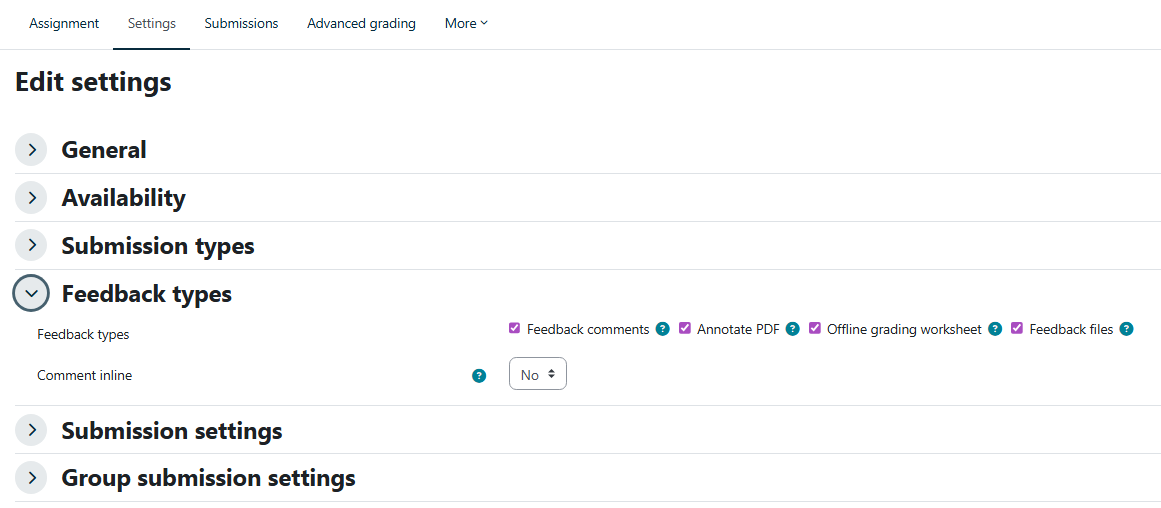
For Moodle upload/download workflows, enable the feedback tools in the assignment settings:
- Open the assignment settings.
- Under Feedback types, enable Feedback files and Offline grading worksheet.
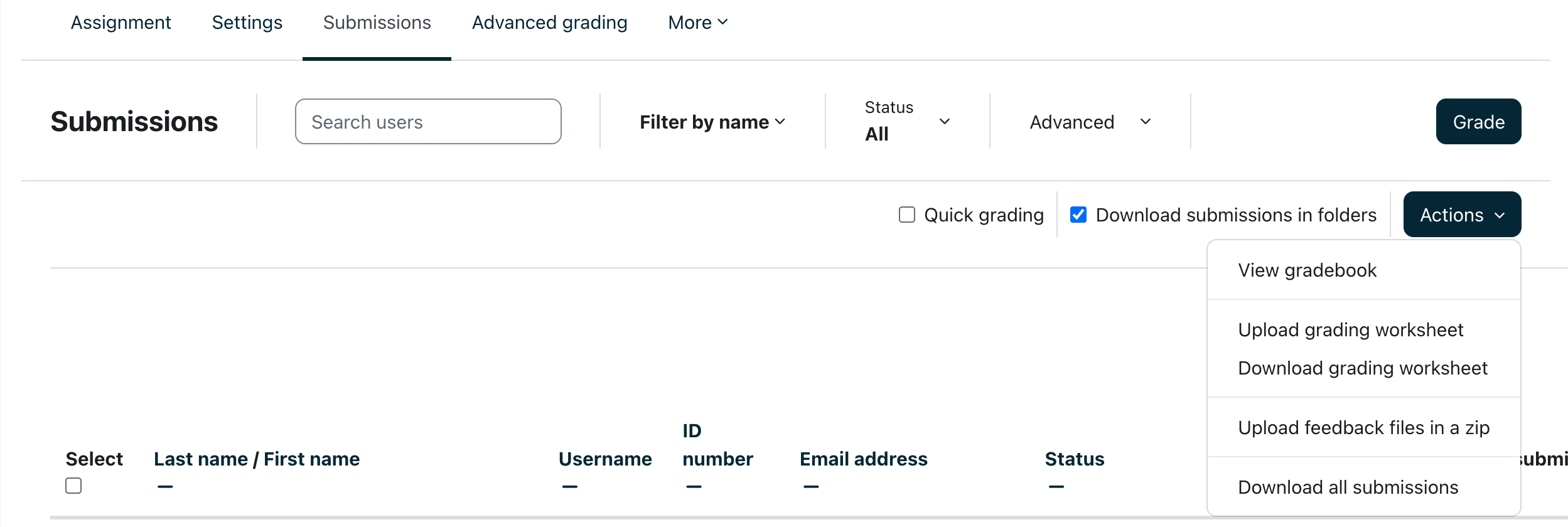
- In Submissions → Actions (with Download submissions in folders ticked):
- Download all submissions: the zip to put in the session folder.
- Download grading worksheet: the CSV that
pevaluate moodle-csvfills; upload it back with Upload grading worksheet. - Upload feedback files in a zip: per-student files, e.g. the corrected exams from
pexams moodle-feedback-zip.
You do not need to unzip the Moodle submissions zip manually. The simplest workflow is to put the downloaded zip in the session folder and let pevaluate unpack it.
If you already unzipped the Moodle download yourself, use --no-unzip --students-dir path/to/submissions.
Session Folder
A representative session folder looks like this:
my_assignment/
  moodle_submissions.zip
  rubric.txt
  example.txt
  marks.csv
marks.csv is only needed when compiling feedback back into a Moodle upload CSV. If student submissions contain their own zip files, add --extract-nested-zips.
Representative Workflow
First run a dry pass. This unpacks submissions, extracts nested zips, converts notebooks for inspection, and does not call the LLM:
pevaluate "my_assignment" \
  --extract-nested-zips \
  --no-grade \
  --no-reference \
  --files-regex ".*\.(ipynb|html)$" \
  --prefer-extensions ".ipynb;.html"
After checking the generated files, run grading without unpacking/converting again:
pevaluate "my_assignment" \
  --no-unzip \
  --no-convert \
  --no-reference \
  --rubric rubric.txt \
  --example example.txt \
  --files-regex ".*\.(ipynb|html)$" \
  --prefer-extensions ".ipynb;.html" \
  --keep-prompt \
  --model claude-opus-5-5 --effort medium
For an already unzipped Moodle download:
pevaluate "my_assignment" \
  --no-unzip \
  --students-dir "my_assignment/submissions" \
  --extract-nested-zips \
  --no-reference \
  --files-regex ".*\.(ipynb|html)$" \
  --prefer-extensions ".ipynb;.html"
For a single submission file, pass the file directly. Use --output-dir when you want prompts and feedback somewhere other than the file's parent folder:
pevaluate "path/to/Memoria_TFG.pdf" \
  --output-dir "generated/tfg_evaluation" \
  --rubric rubric.txt \
  --example example.txt \
  --no-reference \
  --include-images \
  --keep-prompt \
  --no-evaluate
By default, if both .ipynb and .html exist for the same submission, pevaluate grades the .ipynb and reports the skipped .html. HTML artifacts are cleaned from .ipynb, .md, and .html content before prompting. Disable this only when those artifacts are relevant to grading:
pevaluate "my_assignment" --no-cleanup-html
--not-cleanup-html is accepted as an alias.
If submissions include relevant visual material in .pdf, .pptx, .docx, .md, .html, or direct image files, opt in to sending extracted images to the LLM:
pevaluate "my_assignment" \
  --no-unzip \
  --no-convert \
  --no-reference \
  --files-regex ".*\.(pdf|pptx|docx|md|html|png|jpg)$" \
  --include-images
Images are deduplicated by content hash before sending, which avoids repeatedly attaching common logos or reused slide assets. Use --max-images to cap attachments per submission, or --no-dedupe-images when repeated images are intentionally meaningful.
Use --keep-prompt to save the exact prompt as Markdown in prompts/. When --include-images is enabled, the prompt Markdown includes local image references and the extracted images are written to a sibling prompt asset folder. For PDFs, pevaluate uses pymupdf4llm.to_markdown by default with header=False, footer=False, use_ocr=False, and force_text=True, so figures are referenced near their extracted position in the Markdown instead of being collected at the end. Use --markdown-config with a JSON object or JSON file path to override converter options. Use --no-evaluate to prepare prompts and print approximate token consumption without calling the model.
Document inputs are first converted to a Markdown intermediate representation:
| Input | Markdown pipeline | Image handling |
|---|---|---|
pymupdf4llm.to_markdown(..., header=False, footer=False, use_ocr=False, force_text=True) using the modern layout backend by default; optional pdf_backend="legacy" only as an escape hatch |
Extracted to relative Markdown references; only attached to the LLM with --include-images. |
|
| DOCX | python-docx paragraphs/tables/media |
Extracted to relative Markdown references; only attached with --include-images. |
| PPTX | PyPI python-pptx, with package-XML fallback |
Extracted to relative Markdown references; only attached with --include-images. |
| MD/HTML | Native text with local/data image reference rewriting | References are kept/rebased; only attached with --include-images. |
| IPYNB | nbconvert.MarkdownExporter |
Notebook Markdown output is used; embedded images are not sent unless extracted by the selected path. |
| Direct image | Markdown image reference | Only attached with --include-images. |
| TXT/code/SQL | UTF-8 text | No image extraction. |
The modern PyMuPDF4LLM layout backend usually gives better Markdown and is the recommended default. If you explicitly prefer the older RAG backend for a particular file, you can use a JSON config file like:
{
  "pdf_backend": "legacy",
  "ignore_graphics": true,
  "image_size_limit": 0.08
}
The legacy backend exposes ignore_graphics, image_size_limit, and graphics_limit, but it may produce worse layout. pevaluate also normalizes common PDF ligatures and control-code artifacts after extraction, including fi/fl substitutions.
pevaluate depends on the standard PyPI python-pptx package so releases can be uploaded to PyPI. For local work with PPTX files that need improved equation/MathML extraction, you can manually replace it with Oscar's fork after installing pevaluate:
pip install --force-reinstall --no-deps git+https://github.com/OscarPellicer/python-pptx.git
Rubric File
The rubric should explain the grading criteria, expected output style, and any automatic benchmark or competition scores the model should consider. If feedback must name the students, include a roster in the rubric, especially for group assignments.
Example:
Grade from 0 to 10. Be brief and assertive.

Notebook, 70%:
- 1.5 points: data understanding and validation.
- 3.0 points: classical model.
- 3.0 points: modern model.
- 1.0 point: experimental comparison.
- 0.5 points: error analysis and conclusions.
- 0.5 points: clarity and reproducibility.

Challenge, 30%:
Use the challenge table below. Report the team's challenge mark and combine:
final_mark = 0.70 * notebook_mark + 0.30 * challenge_mark.

Groups:
| Group | Students |
| --- | --- |
| G01 | Ana García López; Luis Pérez Soler |
| G02 | Marta Ferrer Vidal; Pablo Ruiz Mora |

Challenge results:
| Group | Rank | score | challenge_mark |
| --- | --- | --- | --- |
| G01 | 1 | 0.812 | 10.0 |
| G02 | 2 | 0.790 | 8.5 |
Example Feedback File
The example file should show the tone and level of detail you want. It does not need to match the assignment exactly.
Grupo G01:
- Ana García López
- Luis Pérez Soler

Notebook (70%):
0. Errores de código: 0.5/0.5.
1. Planteamiento, datos y validación: 1.25/1.5. La validación es razonable, pero faltó justificar mejor la partición.
2. Modelo clásico: 2.75/3.0. Buen resultado; faltó comparar algún hiperparámetro adicional.
3. Modelo moderno: 3.0/3.0.
4. Comparación experimental: 0.75/1.0. La tabla de resultados es clara, pero el análisis es algo superficial.
5. Análisis de errores y conclusiones: 0.25/0.5.
6. Claridad y reproducibilidad: 0.5/0.5.

Challenge (30%): posición 2/20. Nota challenge: 8.5/10.

Nota notebook: 8.75/10.
Nota final: 8.30/10.
Structured Feedback YAML
Each graded submission is saved in feedback/ as YAML. Filenames include a readable name plus a short source hash, so repeated generic filenames do not overwrite each other.
students:
  - full_name: Ana García López
  - full_name: Luis Pérez Soler
feedback: |
  Grupo G01:
  - Ana García López
  - Luis Pérez Soler

  Notebook (70%): 8.75/10.
  Challenge (30%): 8.5/10.

  Buen trabajo. La validación es razonable y los resultados son sólidos; faltó un análisis de errores más concreto.

  Nota final: 8.30/10.
mark: 8.3
submission_file: C:\path\to\submission.ipynb
source_id: 1a2b3c4d
The LLM is instructed to return this schema. If it returns plain text, pevaluate saves the text under feedback and tries to extract a numeric mark.
Moodle CSV Export
Compile YAML feedback into a Moodle upload CSV:
pevaluate moodle-csv "my_assignment/marks.csv" \
  --feedback-dir "my_assignment/feedback" \
  --output "my_assignment/marks_filled.csv" \
  --feedback-format html \
  --partial \
  --clear-timestamps
The converter writes the same group mark and feedback to every student listed in a YAML file. It matches students by normalized full name, handling both Nombre Apellido and Apellido, Nombre.
Moodle column headers vary by site language. pevaluate moodle-csv resolves common Catalan, Spanish, and English headers automatically for full name, grade, feedback comments, and timestamp columns. If your Moodle uses custom names, pass them explicitly with --name-column, --grade-column, --feedback-column, --submission-modified-column, and --grade-modified-column.
--feedback-format html escapes the feedback text and converts newlines to <br>, which is useful when Moodle flattens raw CSV newlines during import. Use --feedback-format plain to keep literal newlines.
--partial writes only the rows that pevaluate updated. This is safer for Moodle offline grading worksheets because a full worksheet can unintentionally clear existing feedback in rows that are blank in the uploaded file. --clear-timestamps sets Moodle's last-modified columns to - for updated rows; this helps when Moodle refuses rows whose worksheet timestamps are older or already populated.
For a second pass after downloading the current Moodle worksheet, fill only rows still missing a grade or feedback:
pevaluate moodle-csv current_moodle_marks.csv \
  --feedback-dir feedback \
  --output marks_filled_missing_only.csv \
  --feedback-format html \
  --partial \
  --skip-filled \
  --clear-timestamps
If exact matching fails, it uses fuzzy name matching with a similarity threshold of 70/100 by default and reports each fuzzy match:
pevaluate moodle-csv marks.csv \
  --feedback-dir feedback \
  --output marks_filled.csv \
  --name-threshold 70
Use --name-threshold 0 to disable fuzzy matching (--fuzzy-threshold is accepted as an alias). If your Moodle CSV uses different column names, pass them explicitly:
pevaluate moodle-csv marks.csv \
  --feedback-dir feedback \
  --output marks_filled.csv \
  --name-column "Full name" \
  --grade-column "Grade" \
  --feedback-column "Feedback comments"
Upload the generated CSV back to Moodle using the assignment grading import/upload option.
Open-Answer Exam Evaluation
pevaluate exam-open grades the open-answer crops extracted by pexams correct. It expects:
open_responses_index.csvfrom thepexamscorrection output.- The original
pexamsexam directory containingexam_model_*_questions.json. - The crop images referenced from the index CSV.
Basic run:
pevaluate exam-open \
  --index-csv generated_exam/correction_results/open_responses_index.csv \
  --exam-dir generated_exam \
  --output-dir generated_exam/open_evaluation \
  --model claude-haiku-5-5
Crops are converted to grayscale and downscaled to --max-image-width pixels (default 900) before they are sent: this halves the image tokens and did not change the grades in our tests. Progress is saved to open_evaluations.yaml after every graded response, so an interrupted run can be resumed by running the same command again.
The editable canonical artifact is:
open_evaluations.yaml
It combines the previous per-response JSON, converted Markdown, feedback, score, warnings, and paths into one multiline-friendly file. Edit this YAML to manually adjust scores, feedback, or converted Markdown, then rerun pevaluate exam-open without --force-regrade to reuse the edited artifacts and regenerate reports.
Useful flags:
| Option | Description |
|---|---|
--dry-run |
Write prompts and pending YAML/CSV rows without calling an LLM. |
--keep-prompts |
Save the grading prompt for each response. |
--force-regrade |
Ignore existing YAML evaluations and call the model again. |
--post-analysis |
Analyze graded responses, summarize typical errors, and suggest a revised rubric in post_analysis.yaml. |
--re-evaluate |
Run a second grading pass in a sibling reevaluation/ folder after post-analysis. First-pass artifacts are kept. |
--mc-correction-dir |
Optional pexams correction directory. Adds corrected MC template PNGs to student PDFs and includes stats_report.html in the global report when present. |
--student-converted-response |
Also show the transcribed response in per-student PDFs. Off by default (students see their crop, score and feedback); the global report always includes it. |
--void-questions |
Comma-separated open questions (exam number, e.g. 26, or original id) removed for everyone, from both score and max. |
--void-questions-nicely |
Comma-separated open questions that count for a student only if they raise that student's mark: the question's score/max is compared with the rest of the exam, including the multiple-choice part from --mc-correction-dir, so it never lowers anyone's mark. Several are added in decreasing ratio while they raise the mark. Void multiple-choice questions in pexams (--void-questions-nicely with --only-analysis), which final_marks.csv then reflects. The final marks per student go to overall_marks.csv, and the PDFs show the voided questions. Re-running with these flags reuses the existing grades (no new LLM calls). |
--regrade-outside-box |
Regrade only the answers with writing outside their box (pexams ink_outside_box=yes) that were graded from the box alone, e.g. before pexams detected it. Those answers are always graded from the context crop with the box outlined; other grades and teacher edits are kept. |
--lang {en,es,ca} |
Language of the per-student feedback PDFs (default en). |
Feedback is written for the student as if by the teacher: the prompt forbids mentioning the image, the box, the transcription, legibility or automatic grading, and a blank answer gets score 0 and no feedback. Feedback may contain Markdown and $math$, rendered in the PDFs like the question statements.
Besides the files below, exam-open writes needs_review.csv: the answers a teacher should look at before publishing (not graded, crop not on the printed box, writing outside the box not seen by the grader, confidence below 0.75, grader warnings about blank, cut or illegible text), with the reasons and the images to check. Answers the teacher already edited (score or feedback different from the model's, kept in the grader block) are left out; open_scores.csv marks them teacher_edited=yes. overall_marks.csv has one column per open question (q_<number>) and the multiple-choice counts.
Outputs include:
open_scores.csv
open_evaluations.yaml
model_inputs/*.png
open_responses_report.html
open_responses_report.pdf
student_feedback_pdfs/<student_id>.pdf
reevaluation/
  open_scores.csv
  open_evaluations.yaml
  post_analysis.yaml
  open_responses_report.html
  open_responses_report.pdf
The report starts with an overall mark page and distribution. When --mc-correction-dir points at a pexams correction directory with stats_report.html, the multiple-choice report is included before the open-answer section. The open-answer section includes one score-distribution histogram per open question, plus percentile examples at p0, p25, p75, and p100. Each sample shows the highlighted crop passed to the model, rendered Markdown, Markdown source, score, feedback, and conversion warnings. Rendered responses support MathJax formulas and Mermaid diagrams.
Per-student PDFs include the corrected multiple-choice template PNG from scanned_pages/ when available, plus unhighlighted open-answer response crops with score and feedback.
Reevaluation reports reuse the first-pass model_inputs/*.png highlighted crops instead of copying them.
Run the fake full open-answer smoke pipeline without spending tokens:
pevaluate test-open --output-dir generated/open_answer_eval_smoke
Run the same smoke test with real model calls (--model):
pevaluate test-open --real-llm --output-dir generated/open_answer_eval_real
Main Options
pevaluate <session_folder> [options] is short for pevaluate grade <session_folder> [options]; pevaluate --help lists the other subcommands (exam-open, exam-free, combine-marks, moodle-csv, test-open) and pevaluate <subcommand> --help their options.
| Option | Description | Default |
|---|---|---|
session_folder |
Folder containing the assignment materials, or a single submission file. | required |
--model |
Grading model: a bare claude-... id (Anthropic API) or any OpenRouter model name. |
claude-opus-5-5 |
--effort |
Reasoning effort (low, medium, high); empty for the provider default. |
medium |
--api-key-env |
Environment variable that holds the API key. | ANTHROPIC_API_KEY / OPENROUTER_API_KEY |
--rubric |
Rubric file in the session folder. | rubric.txt |
--example |
Example feedback file in the session folder. | example.txt |
--reference |
Optional reference file(s), separated by ;. |
empty |
--no-reference |
Do not include a reference solution in the prompt. | false |
--files-regex |
Student files to grade. | .*\.ipynb$ |
--prefer-extensions |
Extension priority for duplicate submission files. | .ipynb;.html |
--students-dir |
Directory containing unpacked student submissions. | <session_folder>/students |
--output-dir |
Output/session folder for single-file inputs. | input file parent |
--extract-nested-zips |
Extract zip files found inside students-dir. |
false |
--no-cleanup-html |
Keep HTML styles/scripts/images in prompts. | false |
--include-images |
Extract supported images and attach them to the LLM request. | false |
--no-dedupe-images |
Keep duplicate extracted images instead of deduplicating by content hash. | false |
--max-images |
Maximum extracted images attached per LLM request. Use 0 for no limit. |
20 |
--markdown-config |
JSON object or JSON file path with document-to-Markdown converter options. PDF options are passed to pymupdf4llm.to_markdown. |
empty |
--keep-prompt |
Save prompts as Markdown to prompts/, with image assets when --include-images is used. |
false |
--no-evaluate |
Prepare prompts and token estimates without calling the LLM. | false |
--student |
Filter submissions by filename text. | empty |
--no-unzip |
Skip Moodle zip extraction. | false |
--no-convert |
Skip notebook-to-Markdown conversion. | false |
--no-grade |
Skip grading entirely, including prompt preparation. | false |
Free-Form Exams (answers on blank paper)
pevaluate exam-free grades handwritten exams written on blank sheets, without answer boxes. Each exam (--pages-per-exam consecutive pages) is sent whole to a vision model together with every question, expected answer and rubric from the pexams exam directory. The model reads the student's name and ID, matches each answer to its question by content (students may number answers differently, e.g. with the numbering of a longer original exam) and grades it. The output has the same format as exam-open (open_scores.csv, editable open_evaluations.yaml, report and per-student PDFs), and manual edits in the YAML are kept on the next run.
pevaluate exam-free \
  --input-path scans_blank_paper.pdf \
  --exam-dir generated_exam \
  --output-dir generated_exam/free_evaluation \
  --pages-per-exam 1 \
  --model claude-haiku-5-5
Combining Lab and Exam Marks
pevaluate combine-marks builds one table per student from the lab feedback YAML files and one or more exam open_scores.csv files. Names are matched across sources ignoring accents, case and order (fuzzy). Pair submissions give the lab mark to every member listed in the YAML; a student who appears in two submissions is flagged in lab_conflict instead of silently keeping one.
pevaluate combine-marks \
  --lab-feedback my_assignment/feedback \
  --exam-scores exam/correction/open_evaluation/open_scores.csv exam/free_evaluation/open_scores.csv \
  --output marks.csv
Names whose similarity reaches --name-threshold (default 75/100; old spelling --threshold) are merged. The CSV is UTF-8 with BOM and ; separators (opens directly in Excel) and includes the source of every value and the names merged as aliases.
The final mark is --lab-weight × lab + --exam-weight × exam (default 0.3 and 0.7; a missing part counts as 0). Each student also gets a composed feedback text with both marks, their feedback, the weighted merge and an optional --notice. A student in two submissions gets the higher lab mark (both are listed in lab_conflict).
To fill a grade file (CSV or Excel, e.g. a Moodle gradebook export), add --roster grades.xlsx. Rows are matched by ID digits (against the ID read from the exam), then by name; the mark column (--roster-mark-column, default Nota numérica) gets the final mark and a feedback column (--roster-feedback-column, default Retroalimentación) is added. The filled copy is written to --roster-output and unmatched rows are listed.
Uploading the final marks to Moodle
Moodle assignments accept two uploads (Submissions → Actions), not a filled Excel file:
- Upload grading worksheet (CSV): sets the mark and the feedback comment of each student. This is the one for marks.
- Upload feedback files in a zip: attaches files (e.g. corrected exams, per-student PDFs) without changing marks.
For each assignment, download its grading worksheet (Download grading worksheet) and fill it from the combine-marks output:
pevaluate moodle-csv "Qualificacions-...-Sesión 1 - L1-....csv" --marks notas_P1.csv \
    --output moodle/P1_L1_moodle.csv --partial --feedback-format html
- Every worksheet lists the whole course. A student is filled in only in the assignment where they or their lab partner submitted (worksheet status column), so a session split into several assignments (e.g. one per lab group) gets each mark exactly once. The rest are reported as "not in this assignment".
- Students without any lab submission (exam only) are left out and listed; add
--include-no-labto the one assignment that should carry their mark.--all-rowsignores the status and fills every matched student. --feedback-format htmlkeeps the line breaks of the composed feedback (Moodle shows the comment as HTML);--partialwrites only the filled rows, so other students' grades are not touched.- Students are matched by name (all the names seen for them, fuzzy if needed); matches that are not exact are printed.
Uploading marks and feedback to PoliformaT (UPV, Sakai)
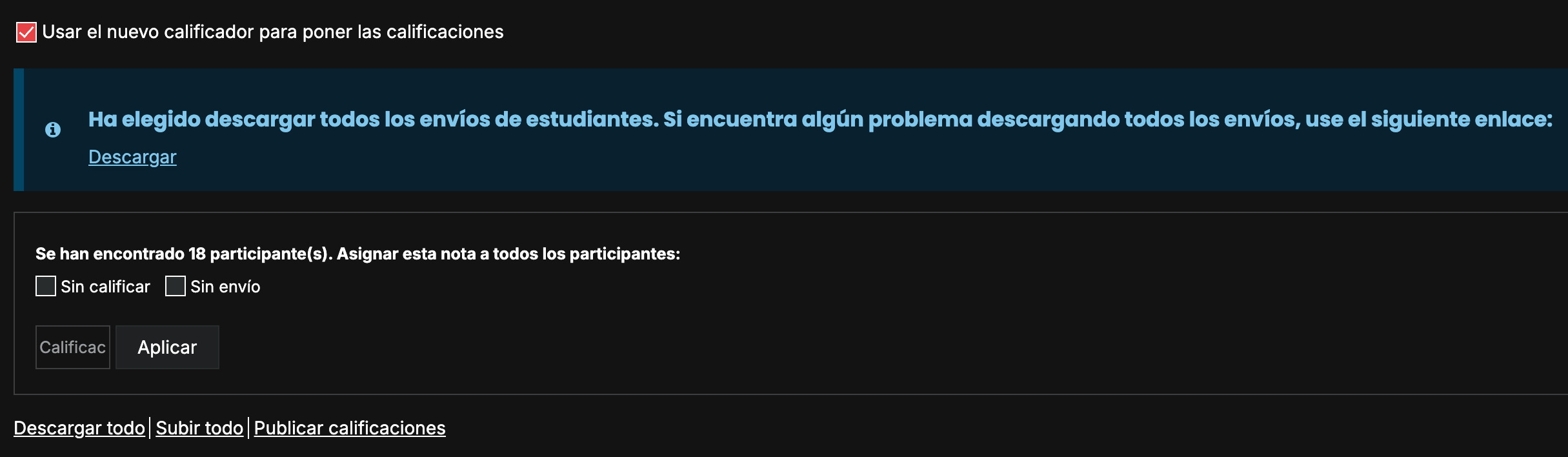
A PoliformaT assignment ("Tarea") takes everything in one zip through Subir todo: the grade of each student, a comment ("Comentarios del docente") and attachments (e.g. their feedback PDF). The zip must have the structure of Descargar todo, so that download is used as the template:
-
In the assignment's list of submissions (Ver envíos, with "Usar el nuevo calificador" ticked), click Descargar todo:
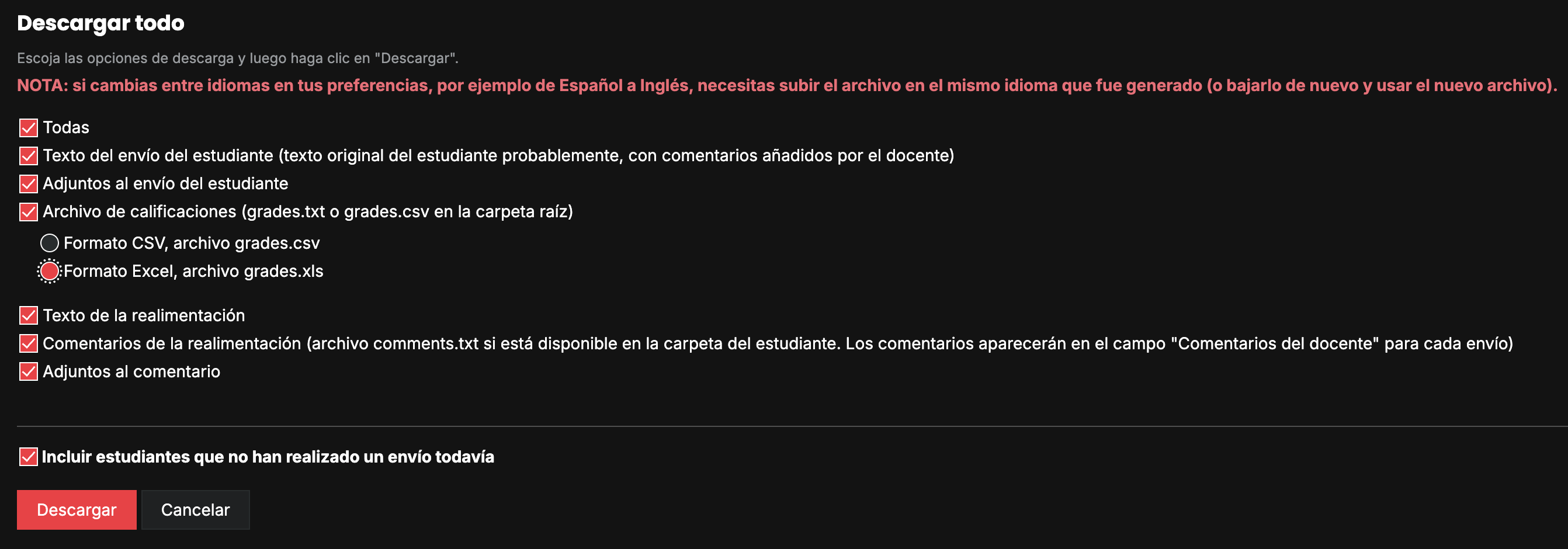
-
Tick Todas, the grades file (either format) and Incluir estudiantes que no han realizado un envío todavía (for a paper exam nobody submitted anything), and download:
The zip has a folder named after the assignment with
grades.xls(orgrades.csv:Identificador, ID, Apellido, Nombre, Calificación, Fecha de envío, Envío fuera de plazo) and one folder per student,Apellido, Nombre(ID), withcomments.txt,feedbackText.html,..._submissionText.html,Adjuntos al comentario/andAdjuntos de la entrega/. -
Fill it:
pevaluate poliformat-zip "Parcial I_20261027141129.zip" --marks correction/open/overall_marks.csv \
    --feedback-pdfs correction/open/student_feedback_pdfs --output "Parcial I_subir.zip" --lang es
--marks:overall_marks.csvfromexam-open(or acombine-marksoutput):student_id,student_name,mark.- Students are matched by ID first (the ID read from the exam contains the PoliformaT one, e.g. the DNI digits), then by name (
--name-threshold, default 70). Every match is printed with its method; check the ones by name. Students without a mark are left ungraded, and marks without a student are listed. - The grade goes into
grades.xls/grades.csvwith two decimals and a decimal comma (--decimal-sep);comments.txtgets "Nota: 8,60 sobre 10. La corrección de cada pregunta está en el PDF adjunto." (--lang es|ca|en, or your own text with--comment "... {mark} ...", plus thefeedbackcolumn when the marks file has one); the student's<student_id>.pdfgoes intoAdjuntos al comentario/(--attachment-name). - Student folders and grade rows are linked by the ID in brackets: folder names have no accents while
grades.xlshas them. Everything else in the download is kept as it was.
-
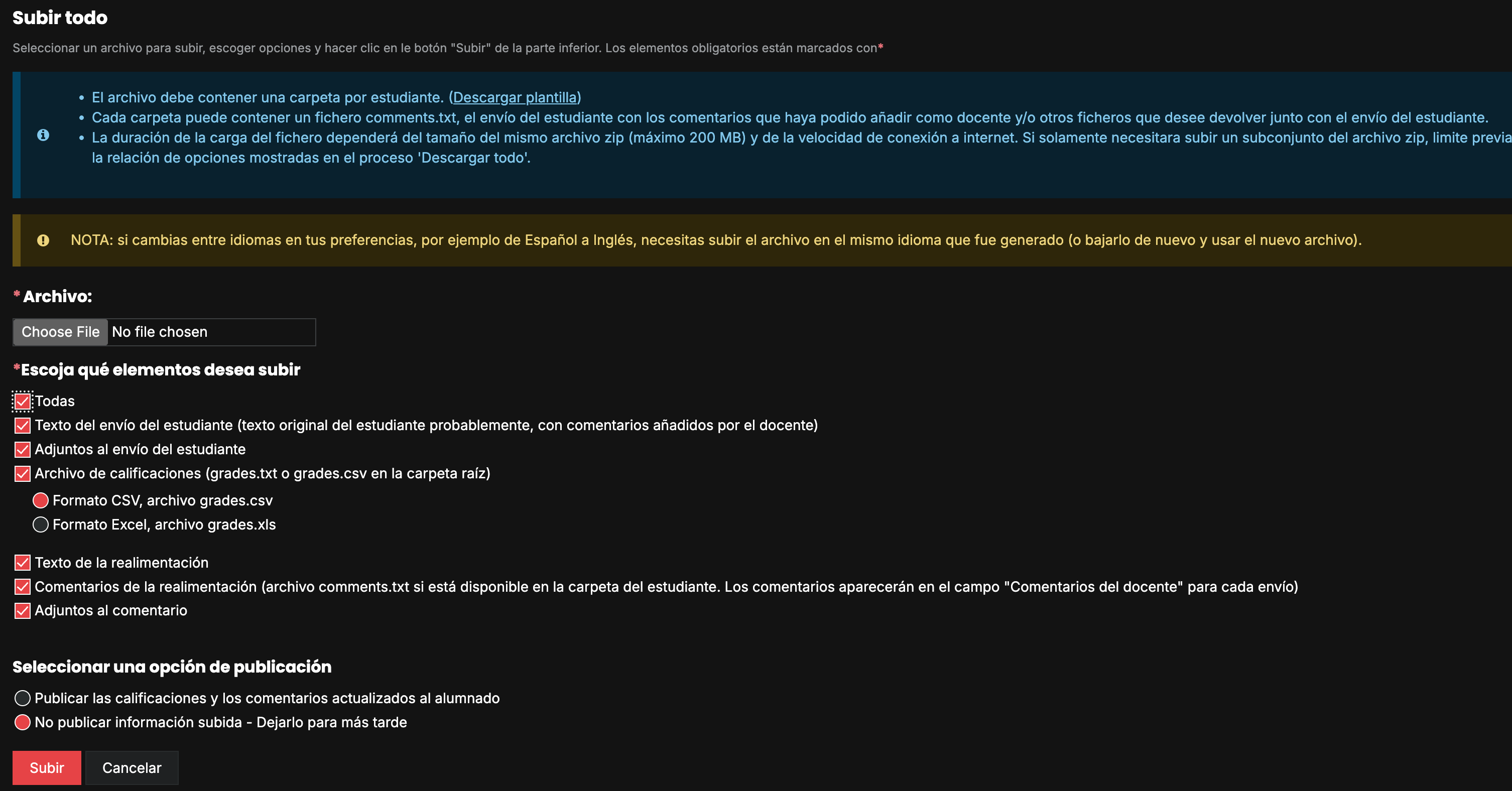
Upload it with Subir todo: tick Todas, choose the same format of the grades file as in the download, and No publicar información subida – Dejarlo para más tarde. Check a couple of students in the grader (grade, comment, attachment), then Publicar calificaciones. The zip must stay under 200 MB, and the site language must be the one the download was made in.
Traceability
Every output folder records how it was produced:
run_manifest.json: command line, Python and platform, versions and git commits of pexams/ptestgen/pevaluate and of the SDKs, model, provider and effort, and the SHA-256 of the input files.llm_calls.jsonl: one line per LLM call with the purpose and context (student, question), model requested and model actually served, whether a refusal fallback was used, effort, request id, token usage, latency, and the SHA-256 of the system prompt, prompt, images and response.- A
graderblock next to every graded response (exam) or submission (lab feedback YAML): model, effort, request id, time, package version and, for submissions, the rubric and prompt hashes. It also keeps the model's ownscore/feedback(mark/feedbackfor submissions): edit only the top-level fields, so the differences between the model's grade and the final one can be counted (ptestgen course edits).
Cost
Measured on one lab session (21 notebooks, 27 three-question exams; options compared on samples of 5 notebooks and 24 answers). Opus 5.5 at medium effort is the reference; the differences are the mean absolute difference from it. The default, Opus 5.5 at medium effort (low for reading exam headers), favours correctness and costs about $4.70 per session; Sonnet 5.5 at high effort costs about half with similar grades, and Haiku 5.5 for exam answers lowers it further.
| What | Option | Cost | Difference |
|---|---|---|---|
| Lab notebooks | Opus 5.5, before notebook compaction | $7.15 | reference |
| Lab notebooks | Opus 5.5, compacted notebooks (default) | ~$3.40 | 0.22 / 10 (same as rerun noise) |
| Lab notebooks | Opus 5.5, effort low | ~$3.20 | 0.36 / 10 |
| Lab notebooks | Sonnet 5.5, effort high | ~$1.70 | 0.20 / 10 |
| Lab notebooks | Sonnet 5.5, effort medium | ~$1.45 | 0.94 / 10 (skims; avoid) |
| Lab notebooks | Haiku 5.5 | ~$0.11 | 0.49 / 10, slightly more lenient |
| Exam answers | Opus 5.5, full-size crops | $1.90 | reference (rerun: 0.01 / 1) |
| Exam answers | Opus 5.5, crops at 900 px (default) | ~$1.30 | 0.02 / 1 |
| Exam answers | Sonnet 5.5, effort high, 900 px | ~$0.61 | 0.04 / 1 |
| Exam answers | Haiku 5.5, 900 px | ~$0.05 | 0.06 / 1 |
| Exam answers | three answers of a student in one call | ~$1.60 | 0.04 / 1 |
Notebook compaction (on by default) sends the plain-text version of outputs that also have HTML (pandas tables), collapses repeated lines (e.g. thousands of identical warnings) and keeps only the head and tail of outputs longer than 3000 characters. Change the limit with --markdown-config '{"max_output_chars": 6000}', or disable it with 0.
For long runs on a laptop, prevent sleep (e.g. caffeinate -i pevaluate … on macOS): a request in flight when the machine sleeps can block the run for as long as it sleeps.
Notes
- Prompt size is printed for each submission in characters and approximate tokens.
- Moodle zips are unpacked with the students' real names (Moodle stores UTF-8 names without the zip UTF-8 flag), and
students/_submissions_index.jsonmaps every flattened file to its Moodle submission folder. Files from the same submission (e.g. a notebook and its HTML export) are grouped with it, so--prefer-extensionskeeps only one. - PDF extraction uses PyMuPDF4LLM for Markdown/layout-aware output. Pandoc remains useful for DOCX/HTML/Markdown workflows, but it is not used for PDF extraction because it does not provide comparable PDF layout recovery.
- HTML sanitization removes
<style>,<script>, embedded images, SVGs, comments, and other noisy artifacts. - Prompt files are saved in
prompts/when--keep-promptis used. - Feedback files are saved in
feedback/as YAML and can be compiled into a Moodle marks CSV withpevaluate moodle-csv.
1 maintainer

Metadata
1 maintainer
Release files for pevaluate 0.3.0
For a detailed explanation of source distributions (sdists) and built distributions (wheels), please see the package formats documentation.
Source distribution (sdist)
| File | Size | Uploaded | Provenance | Actions |
|---|---|---|---|---|
| pevaluate-0.3.0.tar.gz | 119.4 kB | With provenance | Details for pevaluate-0.3.0.tar.gz |
Built distribution (wheel)
| File | Interpreter | ABI | Platform | Actions Reset |
|---|---|---|---|---|
| pevaluate-0.3.0-py3-none-any.whl | Python 3 | none | any | Details for pevaluate-0.3.0-py3-none-any.whl |
Total release size: 214.8 kB
Release files / pevaluate-0.3.0.tar.gz
| Download URL | pevaluate-0.3.0.tar.gz |
|---|---|
| Size | 119.4 kB |
| Tags | Source |
|
SHA-256 checksum How to use checksums |
e91457c272d3ebc19e59811b76ae4aca65a084ce9bcf94cd536bb37cd31a7aa1
|
|
BLAKE2b-256 checksum How to use checksums |
dd5014c048a95ea624db340e0603523065c0726a41a4bc47a48e118583bee07c
|
| Upload date | |
|
Uploaded using Trusted Publishing? What is trusted publishing? |
Yes |
| Uploaded via |
twine/7.0.0 CPython/3.13.16
|
Provenance
Provenance describes where a file came from. On PyPI, provenance is shared via attestations, which provide a verifiable record of the build or publishing details. View details, limitations and caveats.


PyPI Publish Attestation
PyPI verified that this artifact, at this checksum, originated from the publisher listed below.
Signed by GitHub Actions, verified by PyPI on Oct 27, 2026.
Transparency logRelease files / pevaluate-0.3.0-py3-none-any.whl
| Download URL | pevaluate-0.3.0-py3-none-any.whl |
|---|---|
| Size | 95.4 kB |
| Tags | Python 3 |
|
SHA-256 checksum How to use checksums |
c7db18b55e7a16ec5030114d706ceda5ca70b8bcf96a14bdfec972a55fca5bcb
|
|
BLAKE2b-256 checksum How to use checksums |
badc74dc77f0cf65896351e8cfde4a5ac0c0d22631d8f309cf2a3d7562280f12
|
| Upload date | |
|
Uploaded using Trusted Publishing? What is trusted publishing? |
Yes |
| Uploaded via |
twine/7.0.0 CPython/3.13.16
|
Provenance
Provenance describes where a file came from. On PyPI, provenance is shared via attestations, which provide a verifiable record of the build or publishing details. View details, limitations and caveats.
PyPI Publish Attestation
PyPI verified that this artifact, at this checksum, originated from the publisher listed below.
Signed by GitHub Actions, verified by PyPI on Oct 27, 2026.
Transparency logSecurity for pevaluate 0.3.0
Provenance
Provenance describes where a file came from. On PyPI, provenance is shared via attestations, which provide a verifiable record of the build or publishing details. View details, limitations and caveats.
Full provenance
Both files in this release have been uploaded with provenance metadata.
Attestation for pevaluate-0.3.0.tar.gz
PyPI Publish Attestation
PyPI verified that this artifact, at this checksum, originated from the publisher listed below.
Signed by GitHub Actions, verified by PyPI on Oct 27, 2026.
Transparency logA note on package security
PyPI is a repository for distributing packages, not a service for auditing them. While third-party security researchers and our staff do their best to detect and remove malicious packages, PyPI cannot guarantee the quality, security or suitability of any given package.
To learn more about protecting yourself from malicious actors, visit our package security documentation.














