
AI Toolkit for Engineers

Project description
phidata
AI Toolkit for Engineers



🧰 Phidata is a everything-included toolkit for building products using LLMs
It solves the problem of building LLM applications by providing:
💻 Software layer
- Components for building LLM apps: RAG, Agents, Workflows
- Components for extending LLM apps: VectorDbs, Storage, Memory, Cache
- Components for monitoring LLM apps: Model Inputs/Outputs, Quality, Cost
- Components for improving LLM apps: Fine-tuning, RLHF
- Components for securing LLM apps: I/O Validation, Guardrails
📱 Application layer
- Tools for serving LLM apps: FastApi, Django, Streamlit
- Tools for serving LLM components: PgVector, Postgres, Redis
🌉 Infrastructure layer
- Infrastructure for running LLM apps locally: Docker
- Infrastructure for running LLM apps in production: AWS
- Best practices like testing, formatting, CI/CD, security and secret management.
Our goal is to integrate the 3 layers of software development using 1 toolkit and build production-grade LLM Apps.
🚀 How it works
- Create your LLM app from a template using
phi ws create - Run your app locally using
phi ws up dev:docker - Run your app on AWS using
phi ws up prd:aws
🎯 For more information:
- Read the documentation
- Read about phidata basics
- Chat with us on Discord
- Email us at help@phidata.com
👩💻 Quickstart: Build a LLM App 🧑💻
Let's build a LLM App with GPT-4 using PgVector for Knowledge Base and Storage. We'll serve the app using Streamlit and FastApi, running locally on Docker.
Install docker desktop before moving ahead
Setup
Open the Terminal and create a python virtual environment
python3 -m venv ~/.venvs/llmenv
source ~/.venvs/llmenv/bin/activate
Install phidata
pip install phidata
Create your codebase
Create your codebase using the llm-app template that is pre-configured with FastApi, Streamlit and PgVector. Use this codebase as a starting point for your LLM product.
phi ws create -t llm-app -n llm-app

This will create a folder named llm-app with the following structure:
llm-app
├── api               # directory for FastApi routes
├── app               # directory for Streamlit apps
├── db                # directory for database components
├── llm               # directory for LLM components
    ├── conversations       # LLM conversations
    ├── knowledge_base.py   # LLM knowledge base
    └── storage.py          # LLM storage
├── notebooks         # directory for Jupyter notebooks
├── Dockerfile        # Dockerfile for the application
├── pyproject.toml    # python project definition
├── requirements.txt  # python dependencies generated by pyproject.toml
├── scripts           # directory for helper scripts
├── utils             # directory for shared utilities
└── workspace
    ├── dev_resources.py  # Dev resources running locally
    ├── prd_resources.py  # Production resources running on AWS
    ├── jupyter           # Jupyter notebook resources
    ├── secrets           # directory for storing secrets
    └── settings.py       # Phidata workspace settings
Set OpenAI Key
Set the OPENAI_API_KEY environment variable. You can get one from OpenAI here.
export OPENAI_API_KEY=sk-***
Serve you LLM App using Streamlit
Streamlit allows us to build micro front-ends for our LLM App and is extremely useful for building basic applications in pure python. Start the app group using:
phi ws up --group app

Press Enter to confirm and give a few minutes for the image to download (only the first time). Verify container status and view logs on the docker dashboard.
Open localhost:8501 to view streamlit apps that you can customize and make your own.
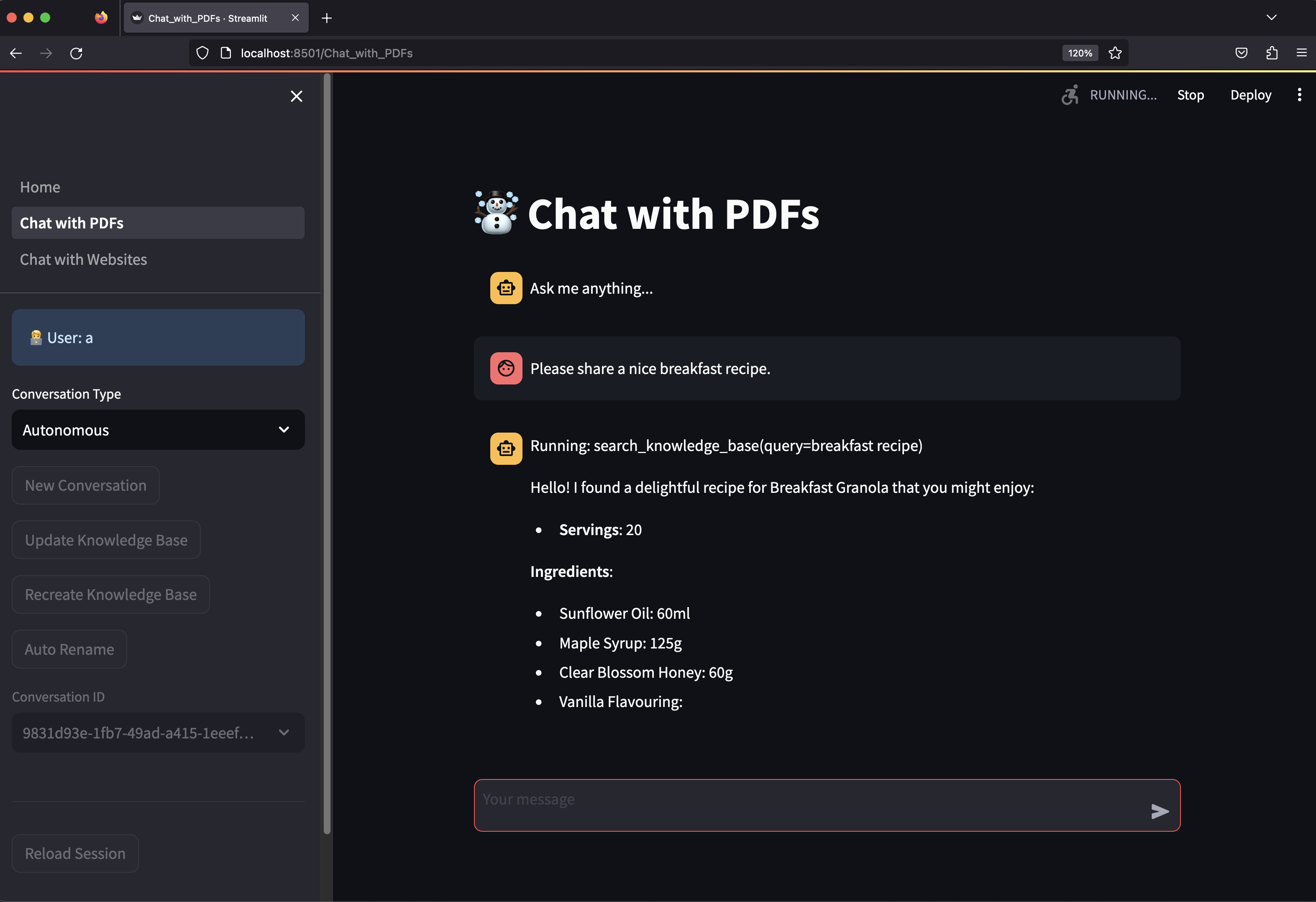
Chat with PDFs
- Click on Chat with PDFs in the sidebar
- Enter a username and wait for the knowledge base to load.
- Choose between
RAGorAutonomousmode. - Ask "How do I make chicken tikka salad?"
- The streamlit apps are defined in the
appfolder. - The
Conversationspowering these apps are defined in thellm/conversationsfolder. - The Streamlit application is defined in the
workspace/dev_resources.pyfile.
Serve your LLM App using FastApi
Streamlit is great for building micro front-ends but any production application will be built using a front-end framework like next.js backed by a RestApi built with a framework like FastApi.
Your LLM App comes pre-configured with FastApi, start the api group using:
phi ws up --group api
Press Enter to confirm and give a few minutes for the image to download.
View API Endpoints
- Open localhost:8000/docs to view the API Endpoints.
- Test the
v1/pdf/conversation/chatendpoint with{"message": "how do I make chicken tikka salad"} - Checkout the
api/routes/pdf_routes.pyfile for endpoints that you can integrate with your front-end or product. - The FastApi application is defined in the
workspace/dev_resources.pyfile.
Delete local resources
Play around and stop the workspace using:
phi ws down
Run your LLM App on AWS
Read how to run your LLM App on AWS here.
More information:
- Read the documentation
- Read about phidata basics
- Chat with us on Discord
- Email us at help@phidata.com
Release history Release notifications | RSS feed


Download files
Download the file for your platform. If you're not sure which to choose, learn more about installing packages.
Source Distribution
Built Distribution
Filter files by name, interpreter, ABI, and platform.
If you're not sure about the file name format, learn more about wheel file names.
Copy a direct link to the current filters
File details
Details for the file phidata-2.0.16.tar.gz.
File metadata
- Download URL: phidata-2.0.16.tar.gz
- Upload date:
- Size: 291.5 kB
- Tags: Source
- Uploaded using Trusted Publishing? No
- Uploaded via: twine/4.0.2 CPython/3.9.18
File hashes
| Algorithm | Hash digest | |
|---|---|---|
| SHA256 |
f1b7c67f218f388b181002012d996e461e32acdde09ef2e4f6e0b560571ed009
|
|
| MD5 |
0f9cb5b29dd01a4f6bc1c38aca8d29a8
|
|
| BLAKE2b-256 |
017768e5c77629bf7900c4c307856bac9dba70513c976494175523c69e61cc15
|
File details
Details for the file phidata-2.0.16-py3-none-any.whl.
File metadata
- Download URL: phidata-2.0.16-py3-none-any.whl
- Upload date:
- Size: 431.1 kB
- Tags: Python 3
- Uploaded using Trusted Publishing? No
- Uploaded via: twine/4.0.2 CPython/3.9.18
File hashes
| Algorithm | Hash digest | |
|---|---|---|
| SHA256 |
49d6526d82d10fb192e3c59ef28c260e399903ba626dcde7ce99718123d5a48b
|
|
| MD5 |
543d969bd3371c9739ff0e15d91e7d87
|
|
| BLAKE2b-256 |
e43f6e86b4e26f6715e9df37c21749df789b6a98b3c259d3eb196f14a61543d2
|






