
Creates custom weekly/monthly/... photo calendars

Project description
PhotoCalendar
A Python utility to create custom weekly/monthly/... photo calendars.
For example:
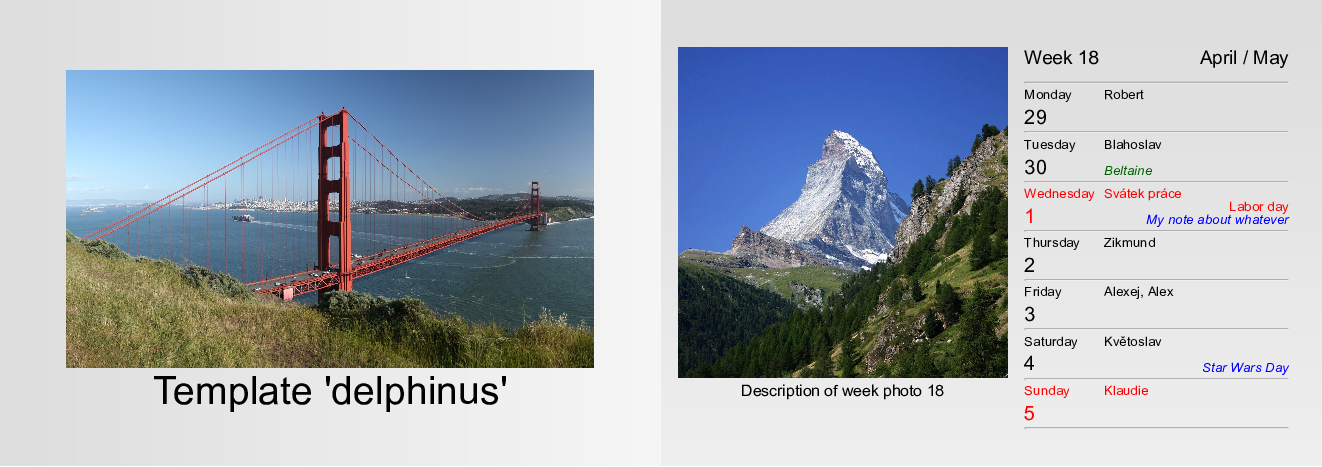
Table of Contents
Overview
The program creates the calendar in HTML format.
Note: you can then print it to PDF using browser or, e.g., weasyptint utility.
User may provide (see examples below):
- name of weekdays and months and their abbreviations
- images (for each week, for title page, for backgrounds)
- name-days
- public holidays
- religious holidays
- notes (friends' birthdays, anniversaries, ...)
- template how the final calendar looks like
- title, first week day, ...
HTML templates
The produced HTML structure and CSS styling is defined by template - a python module defining toHTMLString(calendar) function and CSSString string variable.
As an example and inspiration, a few predefined templates are provided.
See examples, documentation or source code for more information how to create a custom template.
Compatibility
The package works with both Python 2 and 3 (tested on Ubuntu 16.04 LTS and Python 2.7.12 and Python 3.5.2).
Examples
Usage
Python:
from photocalendar import PhotoCalendar
calendar = PhotoCalendar( # not all arguments are mandatory
	outputBase                = "/some/output/base",
	year                      = 2019,
	firstWeekDay              = "Tu", # Tuesday as the first week day? Well, why not...
	imagesDirectory           = "/some/directory/with/images/for/each/week",
	imageDescriptionsFile     = "/some/file/with/image/descriptions/for/each/week",
	backgroundImagesDirectory = "/some/directory/with/backround/images/for/each/week",
	title                     = "Some calendar title",
	titlePageImage            = "/some/image/for/title/page",
	titlePageBackground       = "/some/background/image/for/titlepage",
	lastPageBackground        = "/some/background/image/for/last/page",
	nameDaysFile              = "/some/file/with/name-days",
	religiousHolidaysFile     = "/some/file/with/religious/holidays",
	publicHolidaysFile        = "/some/file/with/public/holidays",
	notesFile                 = "/some/file/with/notes/like/birthdays/etc",
	weekDayNamesFile          = "/some/file/with/custom/weekday/names",
	abbrWeekDayNamesFile      = "/some/file/with/custom/abbreviated/weekday/names",
	monthNamesFile            = "/some/file/with/custom/month/names",
	abbrMonthNamesFile        = "/some/file/with/custom/abbreviated/month/names",
	template                  = "delphinus",
)
calendar.toHTML()
Shell:
# not all arguments are mandatory
photocalendar \
	--output-base                 /some/output/base \
	--year                        2019 \
	--first-week-day              Tu \
	--images-directory            /some/directory/with/images/for/each/week  \
	--image-descriptions-file     /some/file/with/image/descriptions/for/each/week \
	--background-images-directory /some/directory/with/backround/images/for/each/week \
	--title                       "Some calendar title" \
	--title-page-image            /some/image/for/title/page \
	--title-page-background       /some/background/image/for/titlepage \
	--last-page-background        /some/background/image/for/last/page \
	--name-days-file              /some/file/with/name-days \
	--religious-holidays-file     /some/file/with/religious/holidays \
	--public-holidays-file        /some/file/with/public/holidays \
	--notes-file                  /some/file/with/notes/like/birthdays/etc \
	--week-day-names-file         /some/file/with/custom/week/day/names \
	--abbr-week-day-names-file    /some/file/with/custom/abbreviated/week/day/names \
	--month-names-file            /some/file/with/custom/month/names \
	--abbr-month-names-file       /some/file/with/custom/abbreviated/month/names \
	--template                    delphinus
Template examples
Note: the photos and backgrounds are only illustrative. They are provided by the user in the real use case.
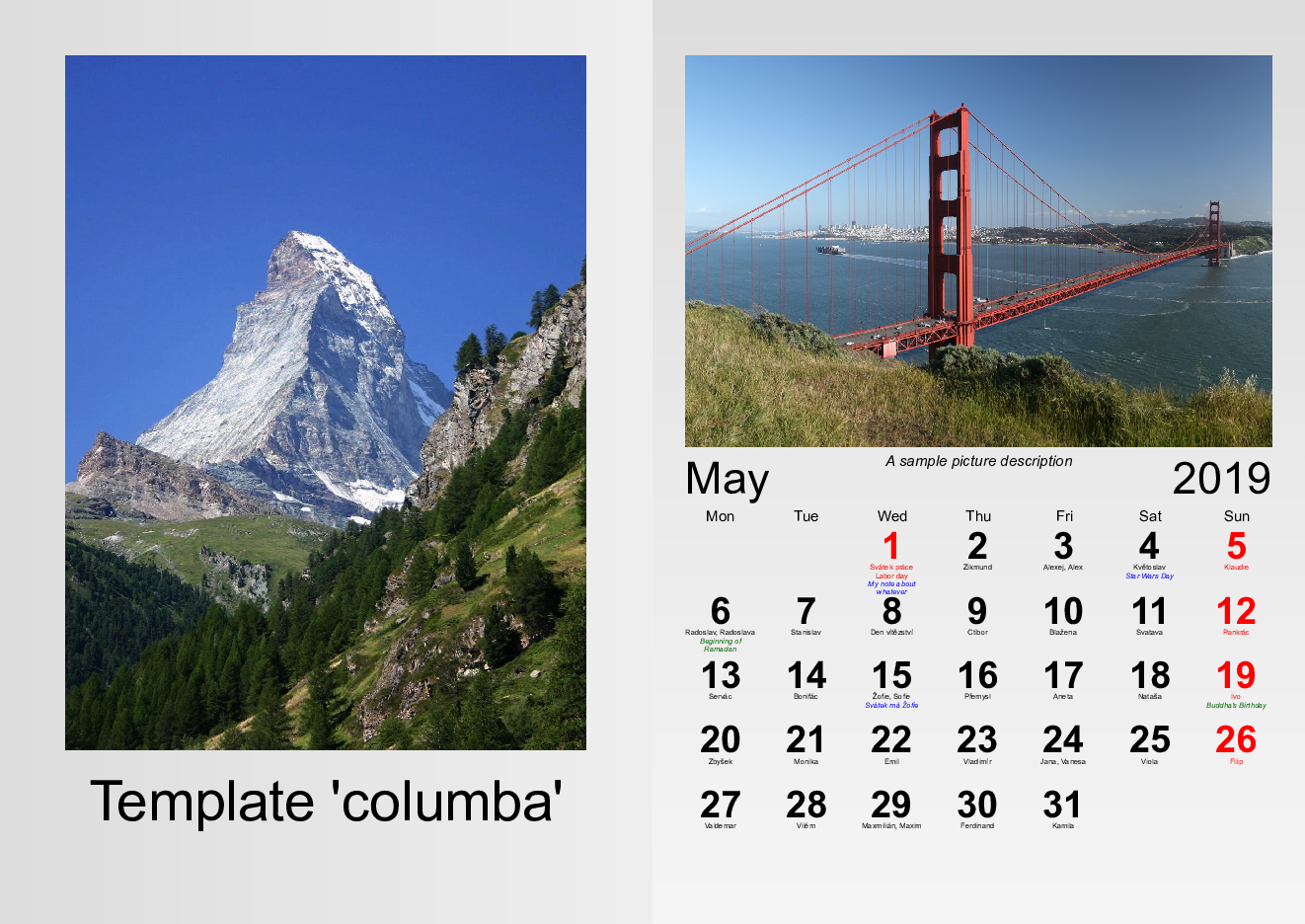
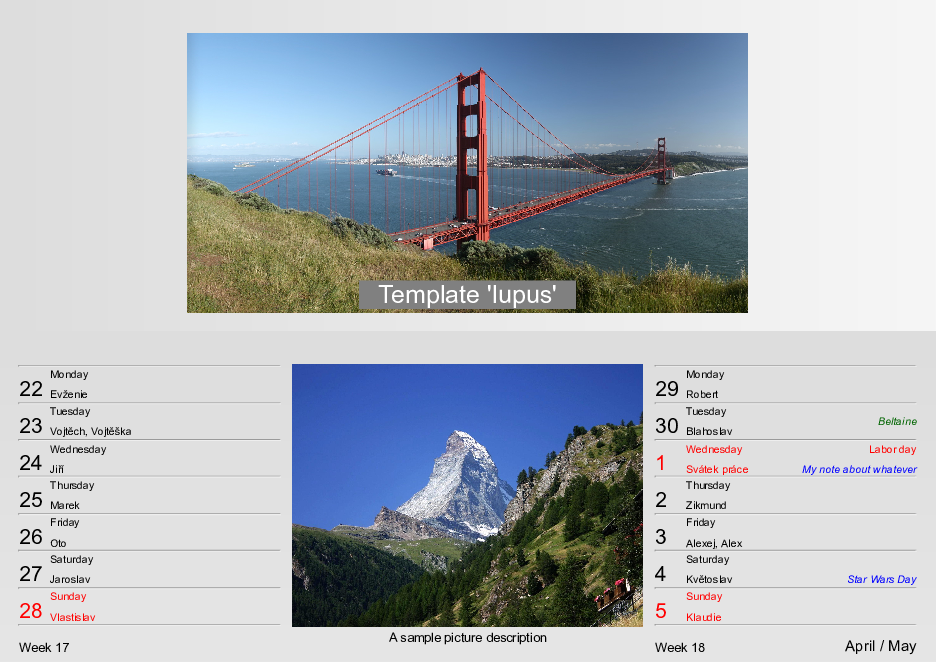
The title page and one inside page is shown.
In the illustrations, picture of Golden Gate Bridge and picture of Matterhorn are used.
Template delphinus:
Weekly A5 landscape calendar
Template columba:
Monthly A4 portrait calendar
Template lupus:
Two-weeks calendar
Installation
-
Using
setup.pyfile:python setup.py install [options], e.g.python setup.py --user -
Using
make(callssetup.pyinternally):make install [options], e.g.make install USER=TRUE PYTHON=python3 -
Using
pip[sudo] pip install [options] photo-calendar, e.g.pip install --user photo-calendar
What is here
| file/directory | description |
|---|---|
| bin | directory containing executable python script |
| doc | source files for HTML documentation |
| examples | directory with examples |
| images | images for github page (e.g., templates illustrations) |
| locale | files for localization (public holidays, name days, etc.) |
| Makefile | makefile for the project (with targets help, install, doc, test, clean, dist) |
| photocalendar | actual python package |
| setup.py | python setup file for installation |
| tests | python unit tests |
Contribution
Pull Requests
Are welcome. Especially:
- locales (name-days, public holidays)
- templates
But, please, discuss the intention beforehand with the author.
Bug reporting
In case of any question or problem, please leave an issue at the githup page of the project.
Contributors
License
This project is licensed under the LGPL License - see the license file for details.
Acknowledgements
- to Petr Hlaváček for the inital idea and LaTeX implementation and providing his source code
- to dominate python package for HTML creation inspiration
Release history Release notifications | RSS feed


Download files
Download the file for your platform. If you're not sure which to choose, learn more about installing packages.
Source Distribution
Built Distributions
Filter files by name, interpreter, ABI, and platform.
If you're not sure about the file name format, learn more about wheel file names.
Copy a direct link to the current filters
File details
Details for the file photo-calendar-0.1.1.tar.gz.
File metadata
- Download URL: photo-calendar-0.1.1.tar.gz
- Upload date:
- Size: 18.3 kB
- Tags: Source
- Uploaded using Trusted Publishing? No
- Uploaded via: twine/1.12.1 pkginfo/1.4.2 requests/2.20.0 setuptools/40.4.3 requests-toolbelt/0.8.0 tqdm/4.28.1 CPython/3.6.6
File hashes
| Algorithm | Hash digest | |
|---|---|---|
| SHA256 |
ed713c939f9ae8c6b6a3f0c934cefc7ba767dc8089a60c02fe6d2b71c68659d0
|
|
| MD5 |
af20c9489c2dbc4c24409588a0916135
|
|
| BLAKE2b-256 |
106e3f1c903d4d937adb7fea055db25d85ff9949869371f578e95ab52216f5fa
|
File details
Details for the file photo_calendar-0.1.1-py3-none-any.whl.
File metadata
- Download URL: photo_calendar-0.1.1-py3-none-any.whl
- Upload date:
- Size: 28.1 kB
- Tags: Python 3
- Uploaded using Trusted Publishing? No
- Uploaded via: twine/1.12.1 pkginfo/1.4.2 requests/2.20.0 setuptools/40.4.3 requests-toolbelt/0.8.0 tqdm/4.28.1 CPython/3.6.6
File hashes
| Algorithm | Hash digest | |
|---|---|---|
| SHA256 |
f16d7dd5440cbf94d33f95578c360958d1647b709c66984f1f1dc0015d7e9b3c
|
|
| MD5 |
ea08e6035011deb325794bf4663a8719
|
|
| BLAKE2b-256 |
ce1f5c1a6c8672159cf3eb39a46719f7ddda29a594d7582eff478a5389f7557c
|
File details
Details for the file photo_calendar-0.1.1-py2-none-any.whl.
File metadata
- Download URL: photo_calendar-0.1.1-py2-none-any.whl
- Upload date:
- Size: 28.1 kB
- Tags: Python 2
- Uploaded using Trusted Publishing? No
- Uploaded via: twine/1.12.1 pkginfo/1.4.2 requests/2.20.0 setuptools/40.4.3 requests-toolbelt/0.8.0 tqdm/4.28.1 CPython/3.6.6
File hashes
| Algorithm | Hash digest | |
|---|---|---|
| SHA256 |
ff427226adf532fe8c9d86a823a740211f410a002a5a284d34518bf1bce297e6
|
|
| MD5 |
c4d73266432879d079ecc3cfa6f42186
|
|
| BLAKE2b-256 |
5b517f060ea4af4433a3d89f17ff01dd36a39b7b65a9157c932e93ede7eb8f15
|








