
Languages: English | 繁體中文
PhotoMapAI
Rediscover your photo collection!
PhotoMapAI is a fast, modern image browser and search tool for large photo collections. It uses the CLIP computer vision model to enable text and image-based search, image clustering, and interactive slideshows with a responsive web interface. Its unique feature is a "semantic map" that clusters and visualizes your images by their content. Browse the semantic map to find and explore thematically-related groups of photos, or use text and/or image similarity search to find specific people, places, events, styles and themes.
Features
- Fast browsing of large image collections
- All images are local to your computer; nothing goes out to the internet
- AI-based text and image similarity search
- Thematic image clustering and visualization
- Flexible album management
- Bookmark images for quick access, batch download, or deletion
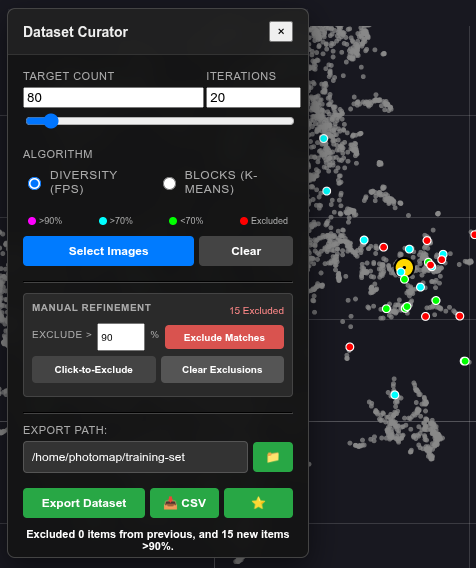
- Curator mode for selecting a balanced set of images to use for LoRA training
- Responsive UI for desktop and mobile
- Support for a wide range of image formats, including Apple's HEIC
- Video support: clips are indexed by an extracted still, so they appear in search and on the semantic map, and play in an embedded player
- Integration with the InvokeAI AI image generation system
- Extensible backend (FastAPI)
Try it out!
The Semantic Map
PhotoMap's unique feature is its ability to identify thematically similar images and automatically cluster them, creating a "semantic map":
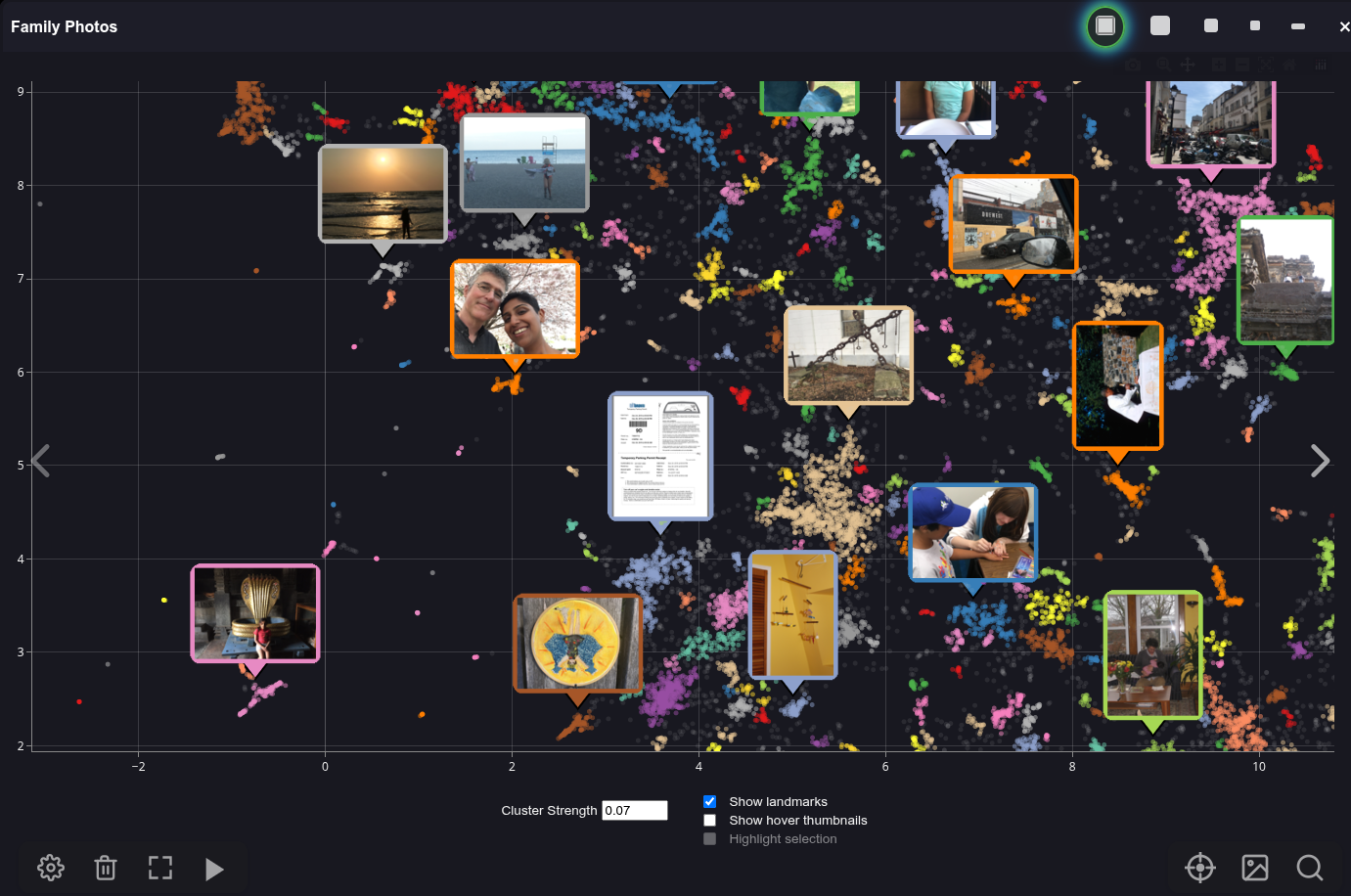
In this map, each image in the photo collection is represented as a dot. The colors distinguish different clusters of related images. You can zoom in and out of the map and pan around it. Hover the mouse over a dot in order to see a preview thumbnail of its image, or click on a cluster to view its contents at full resolution.
You can move the semantic map around, shrink it down in size, or hide it altogether. As you browse your photo collection, a yellow dot marker will highlight the location of the current image in the map.
Text and Image Similarity Search
PhotoMap lets you search your collection by similarity to another image, by text, or by a combination of image and text as shown below:
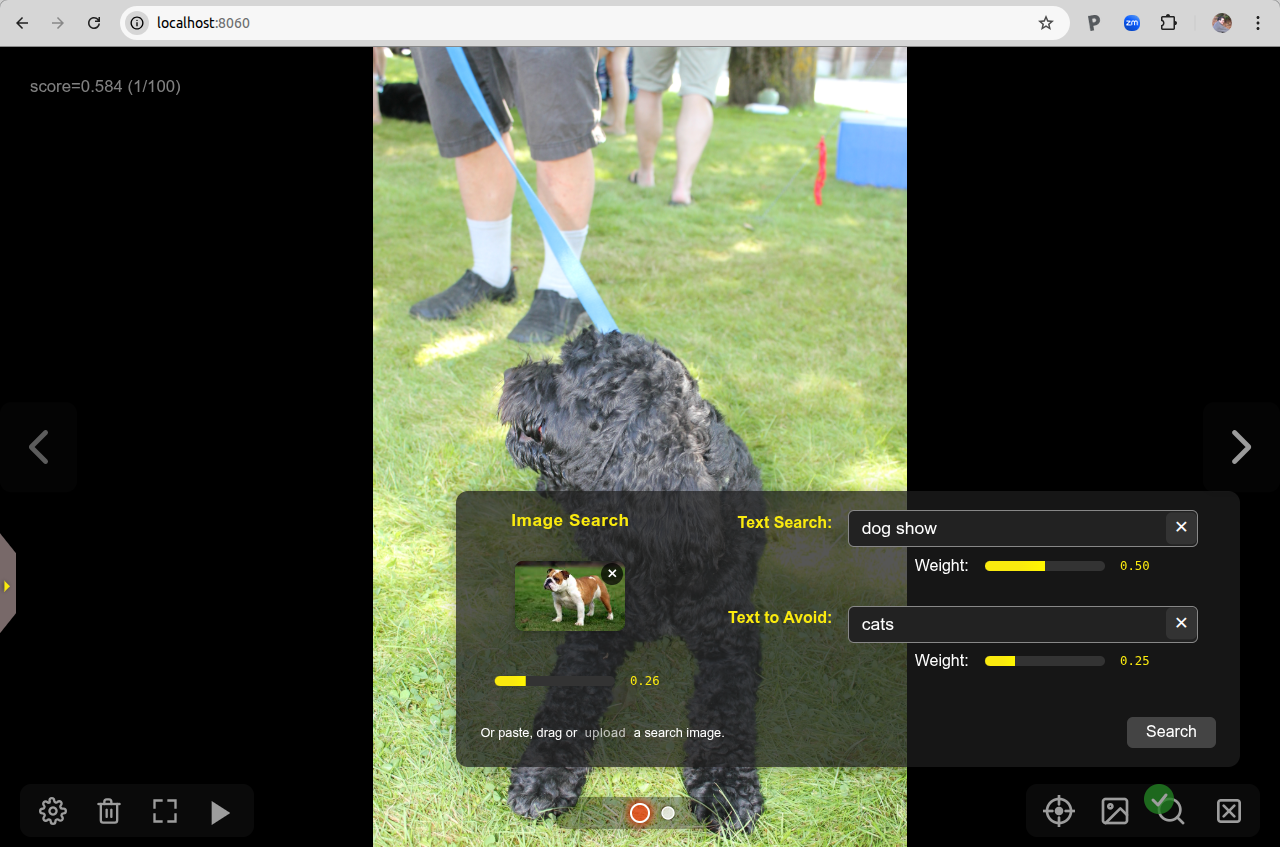
You can start an image similarity search by uploading a local image file, dragging an image from a web browser window or file browser, or by selecting an existing image from your collection. There's also a "Text to Avoid" field, which can be used to disfavor certain image content.
Support for Image Metadata
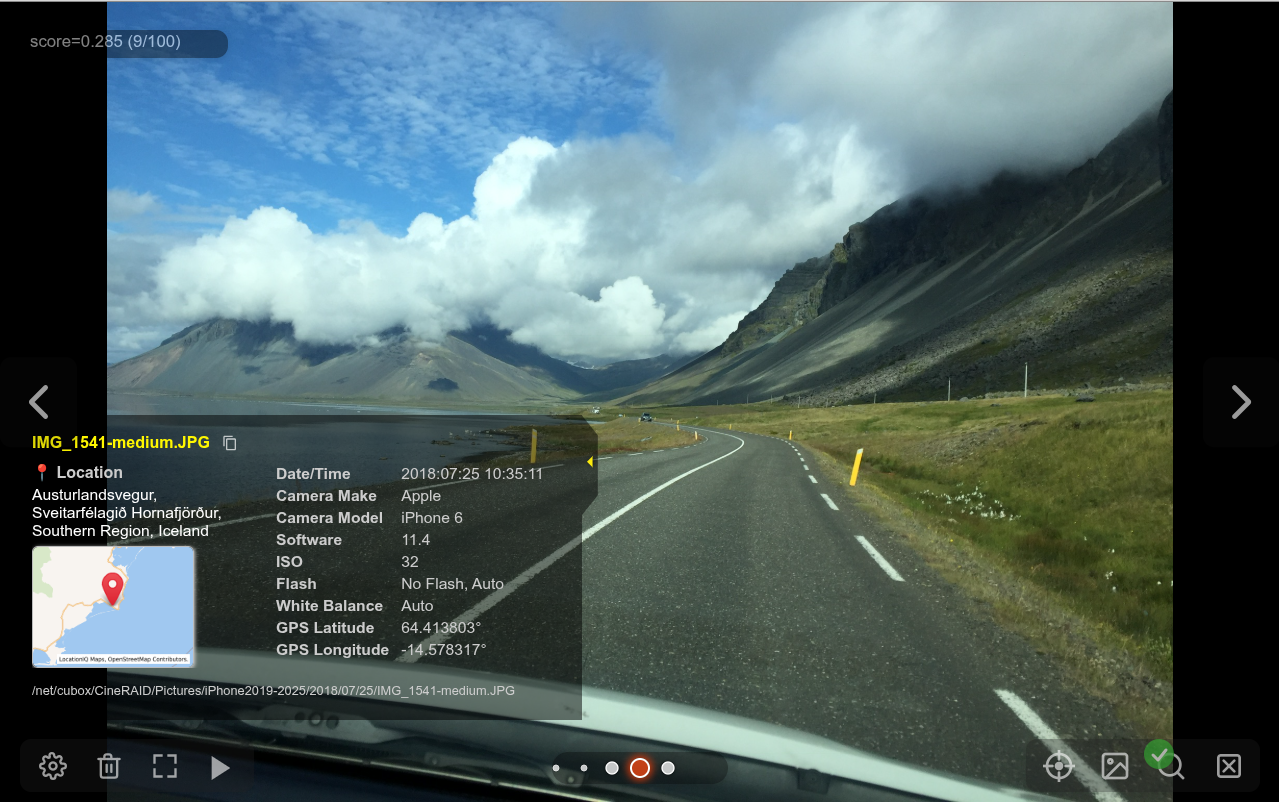
When viewing a photo in full-screen mode, you can pop out a little drawer to show its metadata, including the GPS location (if available), and the camera/phone settings:
Curator Mode
The curator mode allows you to use a combination of algorithms and manual selection to identify a subset of images suitable for use to train image generation models (such as LoRAs) and classifiers.
InvokeAI Support
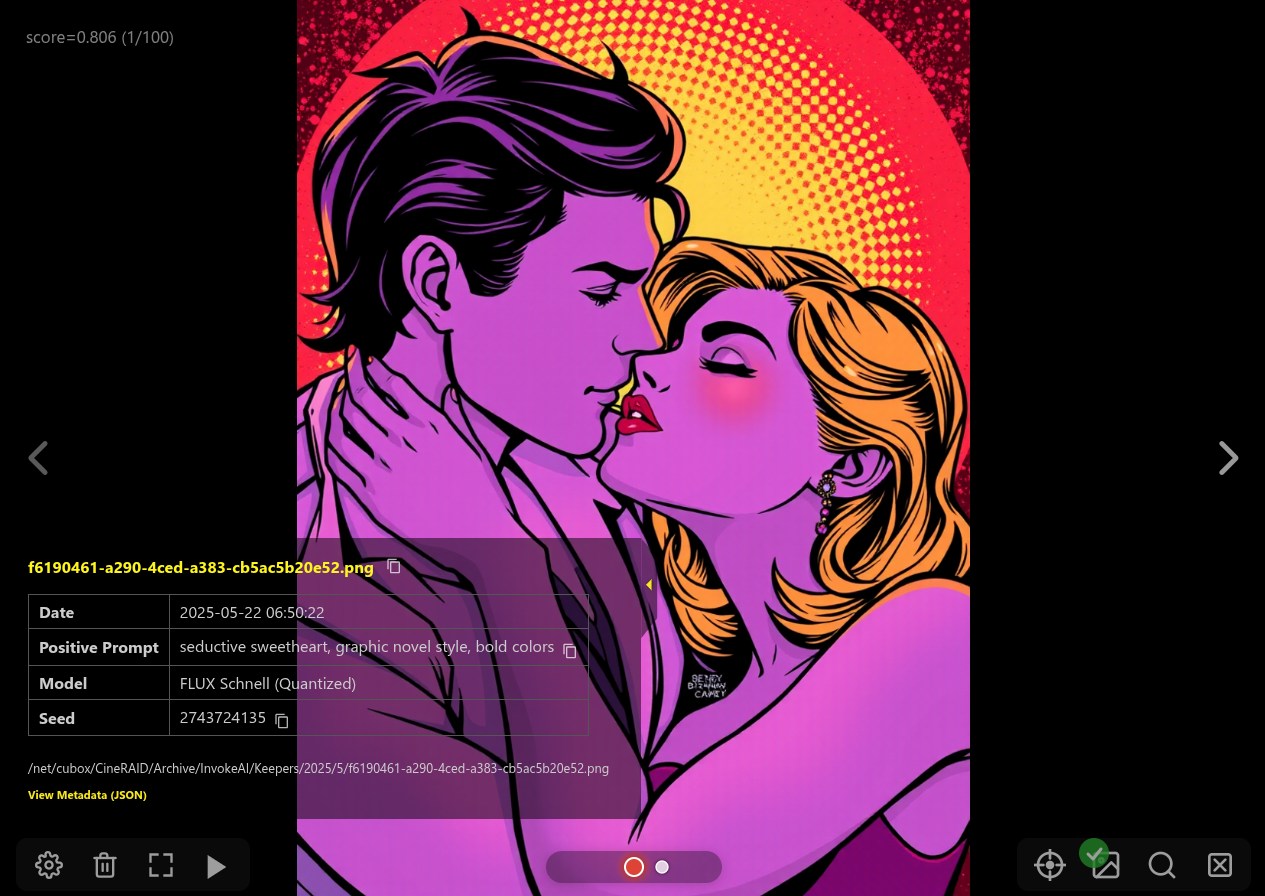
If you are a user of the InvokeAI text-to-image generation tool, you can get quick access to the key settings used to generate the image, including the prompts, model and LoRAs in use, and the input images used for IPAdapters, ControlNets and the img2img raster layer. You can also display and copy the full generation graph in native JSON format and copy it to the clipboard.
Other Features
PhotoMap supports most of the other features you would expect, including support for multiple separate photo albums, the ability to browse photos chronologically, an uncluttered fullscreen mode, and of course a configurable slideshow mode that can show images sequentially or shuffled.
Quick Start
The easiest way to install PhotoMapAI is the native installer for your platform. You don't need Python, CUDA, or anything else first — the installer sets everything up on first launch.
Download the file for your system from the latest Releases page (under Assets), where X.X.X is the current version:
| Platform | Download | Install |
|---|---|---|
| macOS | PhotoMapAI-X.X.X.dmg |
Open the .dmg, drag PhotoMapAI to Applications |
| Windows | PhotoMapAI-X.X.X-setup.exe |
Run the installer (no admin rights needed) |
| Linux | PhotoMapAI-X.X.X-x86_64.AppImage |
chmod +x it and double-click, or run from a terminal |
The first launch downloads a private copy of Python and the AI libraries (a multi-gigabyte, one-time download that takes a few minutes; a console window shows progress). When it finishes the server starts and your browser opens automatically. Later launches start in seconds. An NVIDIA GPU is detected and used automatically; Apple Silicon acceleration is automatic too.
For PyPI, Docker, and manual install instructions, see the Installation guide.
Install from PyPI (command line)
If you already have Python 3.10–3.14 and prefer the command line:
uv tool install photomapai --torch-backend auto   # or: pip install photomapai
start_photomap
Then open your browser to http://127.0.0.1:8050 (it opens automatically) and follow the prompts to create your first album.
Other Installation Methods
In addition to the above, PhotoMapAI can be installed via Docker, PyPI, or from source.
Detailed Guides
1 maintainer

Metadata
1 maintainer
Release files for photomapai 1.3.2
For a detailed explanation of source distributions (sdists) and built distributions (wheels), please see the package formats documentation.
Source distribution (sdist)
| File | Size | Uploaded | Provenance | |
|---|---|---|---|---|
| photomapai-1.3.2.tar.gz | 2.1 MB | Without provenance | Details |
Built distribution (wheel)
| File | Interpreter | ABI | Platform | Reset |
|---|---|---|---|---|
| photomapai-1.3.2-py3-none-any.whl | Python 3 | none | any | Details |
Total release size: 4.2 MB
Release files / photomapai-1.3.2.tar.gz
| Download URL | photomapai-1.3.2.tar.gz |
|---|---|
| Size | 2.1 MB |
| Tags | Source |
|
SHA-256 checksum How to use checksums |
5a769b49e038decb8a6c23f360d066f36758581d31a2ac362f68dd10b8e7d3bd
|
|
BLAKE2b-256 checksum How to use checksums |
1e6e71ebf72c3ecd6013ac5640d9b4e1d41c5937f9f6dc9cc3a7dfae52ef8510
|
| Upload date | |
|
Uploaded using Trusted Publishing? What is trusted publishing? |
No |
| Uploaded via |
twine/7.0.0 CPython/3.13.16
|
Release files / photomapai-1.3.2-py3-none-any.whl
| Download URL | photomapai-1.3.2-py3-none-any.whl |
|---|---|
| Size | 2.1 MB |
| Tags | Python 3 |
|
SHA-256 checksum How to use checksums |
b3e8fc9b13de5d466628e97d584e74fd952c0eb68d0be020fb27626eafa3798e
|
|
BLAKE2b-256 checksum How to use checksums |
f721f0dc48bb32477a656aed8d8ed1aae352c4d80747f59633b883bcf2ae9509
|
| Upload date | |
|
Uploaded using Trusted Publishing? What is trusted publishing? |
No |
| Uploaded via |
twine/7.0.0 CPython/3.13.16
|
Security for photomapai 1.3.2
Provenance
Provenance describes where a file came from. On PyPI, provenance is shared via attestations, which provide a verifiable record of the build or publishing details. View details, limitations and caveats.
No provenance found
None of the files in this release were uploaded with provenance metadata.
A note on package security
PyPI is a repository for distributing packages, not a service for auditing them. While third-party security researchers and our staff do their best to detect and remove malicious packages, PyPI cannot guarantee the quality, security or suitability of any given package.














