
Photonamer: Autonomous AI Image File Renamer for Apple Silicon Macs
PhotoNamer is a fast, privacy-first CLI tool that uses local a Vision-Language Model (specifically Qwen2.5-VL) to analyze your photos and automatically rename them based on their visual composition, lighting, and mood.
Built specifically for Apple Silicon using the MLX framework, it processes heavy RAW and JPEG files entirely offline—meaning your personal photos never leave your Mac.
Features
- True Visual Understanding: Powered by Qwen2.5-VL, it looks at the image and extracts the subject, mood, lighting, and photographic principles.
- 100% Local & Private: No API keys, no cloud uploads, no subscriptions. Everything runs on your own hardware.
- Apple Silicon Optimized: Uses Apple's native MLX framework for unified memory processing, keeping RAM usage perfectly stable even when processing thousands of photos.
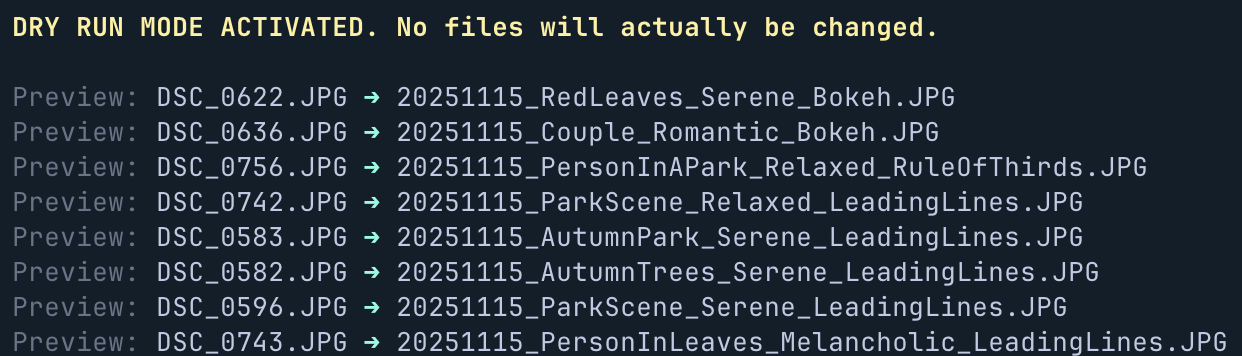
- Fail-Safe Dry Runs: By default, the app runs in "Preview Mode" so you can see exactly how files will be renamed before altering your file system.
- Highly Customizable: Interactive wizard lets you build your naming template on the fly and choose your preferred casing (PascalCase, snake_case, UPPERCASE, lowercase).
Installation
Prerequisites
- A Mac with an Apple Silicon chip (M1/M2/M3/M4), at least 16GB of RAM is recommended.
- Python 3.10 or newer.
For Photographers & End-Users (Recommended)
The safest and easiest way to install PhotoNamer globally is using pipx. This ensures the heavy AI dependencies don't conflict with your Mac's system files.
- Install
pipxvia Homebrew (if you haven't already):brew install pipx pipx ensurepath
- Install the app via
pipx:pipx install photonamer
Alternative: pip
If you're already working inside a virtual environment:
pip install photonamer
For Developers
If you want to modify the source code or contribute, install it in editable mode:
git clone https://github.com/Kevo-03/Automatic-Photo-Namer.git
cd Automatic-Photo-Namer
python3 -m venv .venv
source .venv/bin/activate
pip install -e .
Uninstallation
1. Remove the Package
If you installed with pipx:
pipx uninstall photonamer
If you installed with pip:
pip uninstall photonamer
2. Remove the Downloaded AI Model
PhotoNamer downloads a ~5 GB model to the Hugging Face cache on first run. Uninstalling the package does not delete these cached model files automatically.
To remove only the PhotoNamer model while keeping other Hugging Face models intact:
rm -rf ~/.cache/huggingface/hub/models--mlx-community--Qwen2.5-VL-7B-Instruct-4bit
To remove the entire Hugging Face cache (only do this if no other apps depend on it):
rm -rf ~/.cache/huggingface
Usage
Navigate to any folder containing your photos (.jpg, .jpeg, .png, .nef) and simply run the command:
photonamer
[!NOTE] First Run: On the very first launch, PhotoNamer will download the ~5 GB AI model from Hugging Face. This is a one-time process and may take several minutes depending on your connection. The CLI will prompt you with a message suggesting you create a free Hugging Face access token for faster, authenticated downloads. Subsequent runs will use the cached model instantly.
The interactive wizard will guide you through the process:
- Fields: Choose what information you want in the filename (Options: date, subject, mood, lighting, principle).
- Separator: Choose how fields are connected (e.g., _ or -).
- Casing Style: Format the text (pascal, snake, upper, lower).
- Execution: Confirm if you want a safe dry-run (Preview) or a live execution.
Running with Flags
You can skip the interactive wizard entirely by passing options as flags. Any flag you provide will not be prompted for—only missing options trigger a prompt.
# Skip the wizard completely
photonamer --fields "date,subject,mood" --sep _ --casing pascal --execute

# Skip only some prompts (remaining options will still be prompted)
photonamer --sep - --casing kebab
| Flag | Short | Options | Default |
|---|---|---|---|
--fields |
-f |
date, subject, mood, lighting, principle |
date, subject, mood, principle |
--sep |
-s |
_, - |
_ |
--casing |
-c |
pascal, snake, kebab, upper, lower |
pascal |
--dry-run / --execute |
-d / -e |
— | --dry-run (preview only) |
Dry Run Example
Architecture Under the Hood
- Engine: Apple mlx-vlm for hardware-accelerated inference.
- Model: Qwen/Qwen2.5-VL-3B-Instruct for optimal speed-to-accuracy ratio.
- Memory Management: Implements isolated sequential processing. The 5GB AI model loads into unified memory exactly once, and Python's garbage collector destroys individual image tensors post-inference, preventing thermal throttling or RAM overflow during massive batch jobs.
- CLI Framework: Built with Typer and Rich for a beautiful, type-safe terminal experience.
1 maintainer

Release files for photonamer 0.1.9
For a detailed explanation of source distributions (sdists) and built distributions (wheels), please see the package formats documentation.
Source distribution (sdist)
| File | Size | Uploaded | |
|---|---|---|---|
| photonamer-0.1.9.tar.gz | 8.5 kB | Details |
Built distribution (wheel)
| File | Interpreter | ABI | Platform | Reset |
|---|---|---|---|---|
| photonamer-0.1.9-py3-none-any.whl | Python 3 | none | any | Details |
Total release size:18.1 kB
Release files / photonamer-0.1.9.tar.gz
| Download URL | photonamer-0.1.9.tar.gz |
|---|---|
| Size | 8.5 kB |
| Tags | Source |
|
SHA-256 checksum How to use checksums |
15e27f24b3613b7b2876c80417710da96de7dfa604828f1dee35730327e8e121
|
|
BLAKE2b-256 checksum How to use checksums |
acb56a3380e2b43e7d70ae98cb396449b04c0bf820a0b92086bc1c5ef0c43e1d
|
| Upload date | |
|
Uploaded using Trusted Publishing? What is trusted publishing? |
No |
| Uploaded via |
twine/6.2.0 CPython/3.13.5
|
Release files / photonamer-0.1.9-py3-none-any.whl
| Download URL | photonamer-0.1.9-py3-none-any.whl |
|---|---|
| Size | 9.6 kB |
| Tags | Python 3 |
|
SHA-256 checksum How to use checksums |
d2fdc5c5b1c064f7043792006ad259751e3f09d41a67c5a9c41e13ec6e6b1c5d
|
|
BLAKE2b-256 checksum How to use checksums |
0df1991f957daf62537d3dcd0e14fb83d64be8936622a211c12b543493a9b850
|
| Upload date | |
|
Uploaded using Trusted Publishing? What is trusted publishing? |
No |
| Uploaded via |
twine/6.2.0 CPython/3.13.5
|














