
Photonamer: Autonomous photo file renaming tool using local Visual-Language Models

Project description
Photonamer: Autonomous AI Image File Renamer for Apple Silicon Macs
PhotoNamer is a fast, privacy-first CLI tool that uses local a Vision-Language Model (specifically Qwen2.5-VL) to analyze your photos and automatically rename them based on their visual composition, lighting, and mood.
Built specifically for Apple Silicon using the MLX framework, it processes heavy RAW and JPEG files entirely offline—meaning your personal photos never leave your Mac.
Features
- True Visual Understanding: Powered by Qwen2.5-VL, it looks at the image and extracts the subject, mood, lighting, and photographic principles.
- 100% Local & Private: No API keys, no cloud uploads, no subscriptions. Everything runs on your own hardware.
- Apple Silicon Optimized: Uses Apple's native MLX framework for unified memory processing, keeping RAM usage perfectly stable even when processing thousands of photos.
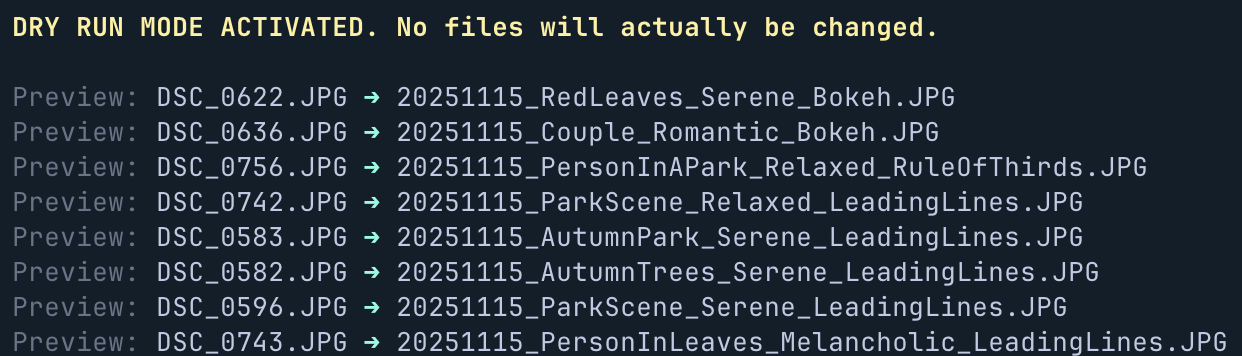
- Fail-Safe Dry Runs: By default, the app runs in "Preview Mode" so you can see exactly how files will be renamed before altering your file system.
- Highly Customizable: Interactive wizard lets you build your naming template on the fly and choose your preferred casing (PascalCase, snake_case, UPPERCASE, lowercase).
Installation
Prerequisites
- A Mac with an Apple Silicon chip (M1/M2/M3/M4), at least 16GB of RAM is recommended.
- Python 3.10 or newer.
For Photographers & End-Users (Recommended)
The safest and easiest way to install PhotoNamer globally is using pipx. This ensures the heavy AI dependencies don't conflict with your Mac's system files.
- Install
pipxvia Homebrew (if you haven't already):brew install pipx pipx ensurepath
- Install the app via
pipx:pipx install photonamer
Alternative: pip
If you're already working inside a virtual environment:
pip install photonamer
For Developers
If you want to modify the source code or contribute, install it in editable mode:
git clone https://github.com/Kevo-03/Automatic-Photo-Namer.git
cd Automatic-Photo-Namer
python3 -m venv .venv
source .venv/bin/activate
pip install -e .
Usage
Navigate to any folder containing your photos (.jpg, .jpeg, .png, .nef) and simply run the command:
photonamer
The interactive wizard will guide you through the process:
- Fields: Choose what information you want in the filename (Options: date, subject, mood, lighting, principle).
- Separator: Choose how fields are connected (e.g., _ or -).
- Casing Style: Format the text (pascal, snake, upper, lower).
- Execution: Confirm if you want a safe dry-run (Preview) or a live execution.
Running with Flags
You can skip the interactive wizard entirely by passing options as flags. Any flag you provide will not be prompted for—only missing options trigger a prompt.
# Skip the wizard completely
photonamer ./photos --fields "date,subject,mood" --sep _ --casing pascal --execute

# Skip only some prompts (remaining options will still be prompted)
photonamer ./photos --sep - --casing kebab
| Flag | Short | Options | Default |
|---|---|---|---|
--fields |
-f |
date, subject, mood, lighting, principle |
date, subject, mood, principle |
--sep |
-s |
_, - |
_ |
--casing |
-c |
pascal, snake, kebab, upper, lower |
pascal |
--execute |
-e |
— | Dry run (preview only) |
Dry Run Example
Architecture Under the Hood
- Engine: Apple mlx-vlm for hardware-accelerated inference.
- Model: Qwen/Qwen2.5-VL-3B-Instruct for optimal speed-to-accuracy ratio.
- Memory Management: Implements isolated sequential processing. The 5GB AI model loads into unified memory exactly once, and Python's garbage collector destroys individual image tensors post-inference, preventing thermal throttling or RAM overflow during massive batch jobs.
- CLI Framework: Built with Typer and Rich for a beautiful, type-safe terminal experience.
Release history Release notifications | RSS feed


Download files
Download the file for your platform. If you're not sure which to choose, learn more about installing packages.
Source Distribution
Built Distribution
Filter files by name, interpreter, ABI, and platform.
If you're not sure about the file name format, learn more about wheel file names.
Copy a direct link to the current filters
File details
Details for the file photonamer-0.1.5.tar.gz.
File metadata
- Download URL: photonamer-0.1.5.tar.gz
- Upload date:
- Size: 8.1 kB
- Tags: Source
- Uploaded using Trusted Publishing? No
- Uploaded via: twine/6.2.0 CPython/3.13.5
File hashes
| Algorithm | Hash digest | |
|---|---|---|
| SHA256 |
d46bd8686b7350e6d27d10d175d758275626138cbeb9b0c9cb6440e816d28132
|
|
| MD5 |
743ee2f83f054bd867fc4565d06f9c2f
|
|
| BLAKE2b-256 |
49b30d6865e500915d4aa8ff3a64ed50cb7b4d0db85b56d61c74e8ecfa8e8ab8
|
File details
Details for the file photonamer-0.1.5-py3-none-any.whl.
File metadata
- Download URL: photonamer-0.1.5-py3-none-any.whl
- Upload date:
- Size: 9.1 kB
- Tags: Python 3
- Uploaded using Trusted Publishing? No
- Uploaded via: twine/6.2.0 CPython/3.13.5
File hashes
| Algorithm | Hash digest | |
|---|---|---|
| SHA256 |
18a2feec72207965bd4869a25da37ed5d77d12c04374badaa734e91f1af7636b
|
|
| MD5 |
d095796e75e0aa0615ae4713c8bdaada
|
|
| BLAKE2b-256 |
4461a4a7fc5d46be46c51e170f7f19ebda219478af05cd379393da5aa4b6915e
|






