
photorand

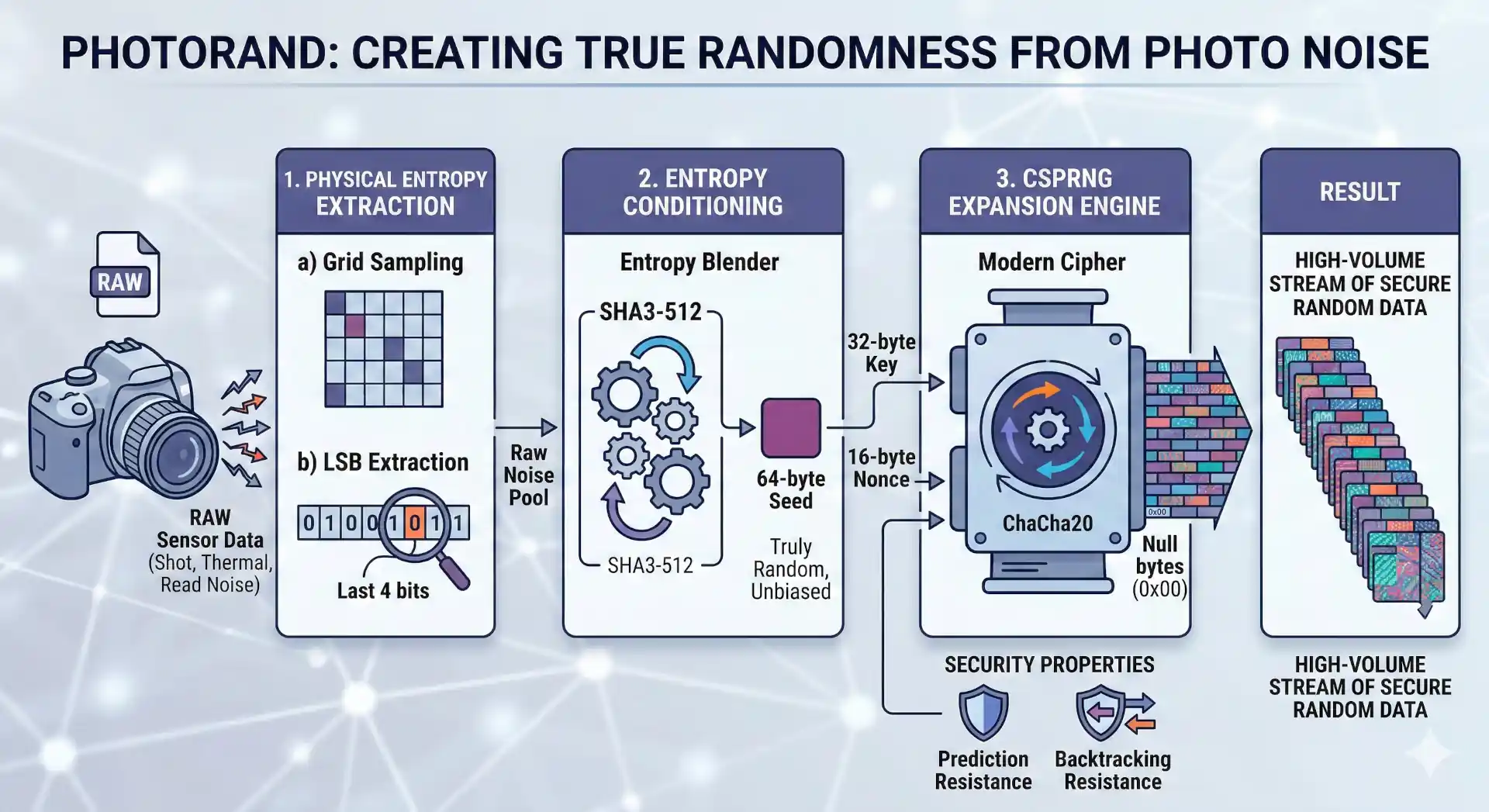
A True Random Number Generator (TRNG) using raw camera sensor data to extract physical entropy.
Project Structure
src/photorand/- Main package source code.low_level/- Modular primitives (ingest, sample, hash, csprng).high_level/- Clean OO abstractions (PhotoRandSeed,PhotoRandEngine).cli/- Command-line interface logic.
docs/- Technical and scientific documentation detailing the entropy extraction and entropy expansion mechanisms.tests/- Comprehensive test suite organized by architectural layer.examples/- Code samples, useful scripts
Installation
This project is available on PyPI:
pip install photorand
From Source (Development)
This project uses pyproject.toml for managing dependencies.
-
Create and activate a virtual environment (recommended):
python -m venv .venv
source .venv/bin/activate  # On Windows, use `.venv\Scripts\activate`
-
Install the project in editable mode:
pip install -e .
# or this one for also installing the dev tools
pip install -e ".[dev]"
Note: you can use photorand from the cli using python -m photorand instead of just photorand
1. High-Level Classes (Recommended)
The high-level classes provide a stateful and convenient interface for both TRNG and CSPRNG operations.
PhotoRandSeed (TRNG)
Encapsulates the process of extracting entropy from a RAW image. It is perfect for generating one-off secure seeds, keys, or dice rolls directly from physical noise.
from photorand import PhotoRandSeed

# 1. Extract entropy from a RAW image
seed = PhotoRandSeed("path/to/image.raw")

# 2. Access as bytes, hex, or large integer
print(seed.to_hex_string())
print(seed.to_int())

# 3. Roll a D100 using physical entropy (Rejection Sampling)
luck = seed.to_int_range(1, 100)

# 4. Get a float in range
prob = seed.to_float_range(0.5, 1.5)
PhotoRandEngine (CSPRNG)
An infinite stream generator powered by ChaCha20, seeded by a PhotoRandSeed. It handles salting (Time + PID) automatically to ensure that even consecutive runs with the same image produce unique streams.
from photorand import PhotoRandEngine

# 1. Initialize from image or existing Seed object
engine = PhotoRandEngine("path/to/image.raw")

# 2. Pull arbitrary amounts of secure data
key = engine.next_bytes(32)
pin = engine.next_string(length=6, charset='numeric')
dice = engine.next_int_range(1, 20)
float_luck = engine.next_float_range(10.5, 20.5)
coin_flip = engine.next_bool()
probability = engine.next_float()

# 3. Batch generation
multiple_passwords = engine.generate_batch(engine.next_string, count=5, length=16)
CLI (Command Line Interface)
The package includes a powerful CLI to use these classes directly from your terminal.
# Extract 64-byte photorand seed (hex)
photorand extract hex --from path/to/raw_image.ARW

# Roll a D20
photorand extract int-range --from path/to/raw_image.ARW --min 1 --max 20

# Extract a float in range (e.g. -1.0 to 1.0)
photorand extract float-range --from path/to/raw_image.ARW --min -1.0 --max 1.0

# Generate 5 random 16-char alphanumeric passwords
photorand generate string --from path/to/raw_image.ARW -n 5 -l 16 --charset alpha

# Extract a floating point number between 0 and 1
photorand extract float --from path/to/raw_image.ARW

# Generate 10 boolean values
photorand generate bool --from path/to/raw_image.ARW -n 10

# Generate 5 floats in a specific range
photorand generate float-range --from path/to/raw_image.ARW --min 0.5 --max 1.5 -n 5
For more details, run: photorand --help
2. Low-Level Modular Functions
For maximum control or research, you can use the modular primitives directly.
from photorand.low_level import ingest_raw_image
from photorand.low_level import sample_entropy_grid
from photorand.low_level import hash_entropy_pool

# 1. Ingest raw sensor data
raw_data = ingest_raw_image("path/to/image.raw")

# 2. Extract raw LSB bits
entropy_pool = sample_entropy_grid(raw_data)

# 3. Condition entropy into uniform bytes
seed_bytes = hash_entropy_pool(entropy_pool)
Alternatively, use the functional pipeline. It accepts custom functions for each part of the algorithm (ingest_fn, sample_fn and hash_fn) although we already provide the values as default parameters:
from photorand.low_level import generate_true_random_number
seed = generate_true_random_number("path/to/image.raw") # returns bytes
Development
Running the Tests
python -m pytest -v --log-cli-level=INFO
# or just this one to skip logs
pytest
Formatting
ruff check --fix src tests examples
Resources
- Blog Post: Physical Entropy with PhotoRand
- PyPI Package: photorand on PyPI
1 maintainer

Release files for photorand 1.1.0
For a detailed explanation of source distributions (sdists) and built distributions (wheels), please see the package formats documentation.
Source distribution (sdist)
| File | Size | Uploaded | |
|---|---|---|---|
| photorand-1.1.0.tar.gz | 24.1 kB | Details |
Built distribution (wheel)
| File | Interpreter | ABI | Platform | Reset |
|---|---|---|---|---|
| photorand-1.1.0-py3-none-any.whl | Python 3 | none | any | Details |
Total release size: 41.6 kB
Release files / photorand-1.1.0.tar.gz
| Download URL | photorand-1.1.0.tar.gz |
|---|---|
| Size | 24.1 kB |
| Tags | Source |
|
SHA-256 checksum How to use checksums |
2493027efa1416003ca4151f4f865be2281307a12aa3cd8a419c6c649d5aeb20
|
|
BLAKE2b-256 checksum How to use checksums |
442ad42cd472e8e57da16fd454d689dcbf1d11fdf1b9f167822e474b15b36312
|
| Upload date | |
|
Uploaded using Trusted Publishing? What is trusted publishing? |
No |
| Uploaded via |
twine/6.2.0 CPython/3.14.2
|
Release files / photorand-1.1.0-py3-none-any.whl
| Download URL | photorand-1.1.0-py3-none-any.whl |
|---|---|
| Size | 17.5 kB |
| Tags | Python 3 |
|
SHA-256 checksum How to use checksums |
28eb138443a4e6aaba70e9895cb19e7b5955a8c5a9a08ef6af1a05fc0c57fffa
|
|
BLAKE2b-256 checksum How to use checksums |
4efae932e66f99df4b137e516bf052c2c363d10878b05ff43978a6274acf804f
|
| Upload date | |
|
Uploaded using Trusted Publishing? What is trusted publishing? |
No |
| Uploaded via |
twine/6.2.0 CPython/3.14.2
|














