
π-MetaboQC: a comprehensive and traceable workflow for automated quality assessment and preprocessing of LC-MS untargeted metabolomics data


π-MetaboQC is a traceable, adaptive Python workflow for quality control and preprocessing of LC-MS metabolomics feature-intensity matrices. It combines missingness-aware feature filtering, preservation-aware method selection, stage-wise quality assessment, and automated reporting for large, multi-batch studies. The project is distributed on PyPI as pi-metaboqc and exposes the Python package pimqc.
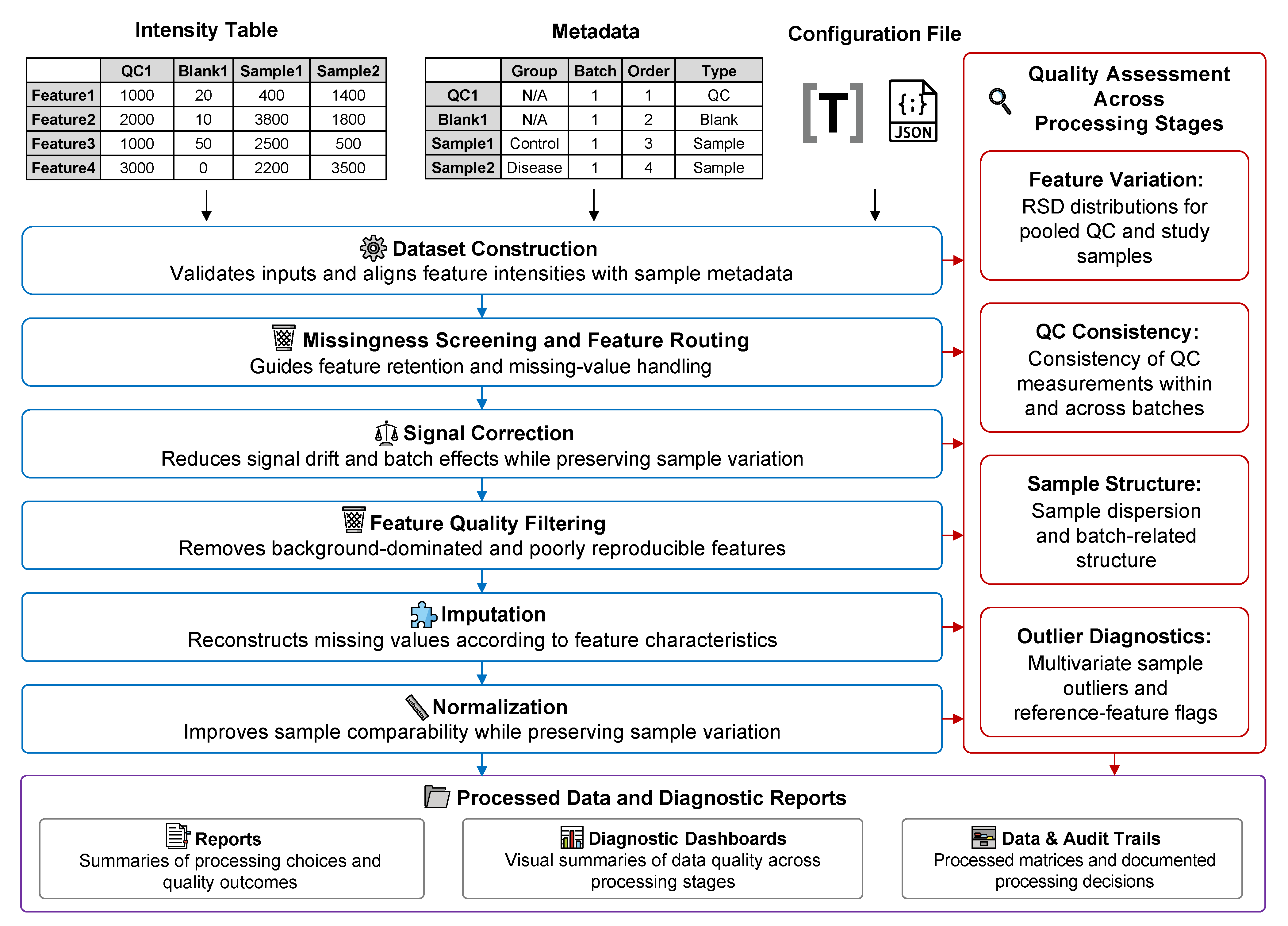
The overview figure is a conceptual workflow summary. In v1.4.0, the framework-neutral object produced after construction is MetaboDataset. MetaboDatasetBuilder.run_build() returns this dataset and its typed audit through StageResult, the same boundary used by later processing actions. The same boundaries are intended to support future workflow-plugin and LLM-skill adapters while keeping those integrations outside the scientific core. The figure should therefore be read together with the current object contracts in the native API reference.
✨ Core Capabilities
-
Matrix-level LC-MS metabolomics QC workflow: π-MetaboQC focuses on feature-intensity matrices from large, multi-batch metabolomics studies. It integrates dataset construction, missing-value triage, blank/QC filtering, signal correction, imputation, normalization, QA diagnostics, and report generation in a single reproducible workflow.
-
Explicit Python-native data model and method implementations: The core
MetaboDatasetkeeps the intensity matrix, sample metadata, feature metadata, schema, and processing context as separate values. Classical preprocessing methods that often require R dependencies, including quantile normalization, VSN, QRILC, BPCA, RUV-III, and WaveICA 2.0, are implemented or reconstructed in Python and checked against optional R reference tests where applicable. -
Adaptive missing-value classification and imputation: High-missing-value features are routed through biological-group MNAR rescue, QC-level MNAR rescue, MAR eligibility checking, or exclusion. MAR candidates are compared using a GMM- and low-intensity-noise mask that reflects the greater dropout risk of low-abundance MS signals. Selection integrates total and low-intensity NRMSE with masked-value distribution fidelity and study-sample structure preservation.
-
Evidence- and preservation-aware adaptive selection:
AUTOmode uses a common design across correction, imputation, and normalization. Candidate methods are evaluated with stage-specific evidence and a study-sample structure-preservation guardrail; the selected method and candidate metrics remain available for audit. -
Typed and serializable stage contracts: Each stage returns a
StageResultcontaining the data product and a stage-specificAuditPayload. Versioned, checksummed serialization makes these boundaries reproducible across Python sessions and suitable for workflow-plugin or LLM-skill adapters without relying on hidden DataFrame state. -
End-to-end quality assessment and traceability: A fixed QA suite tracks QC or batch correlation, RSD distributions, PCA structure, and multivariate outliers across stage snapshots. Processing dashboards carry method-selection evidence; QA dashboards show how each processing stage changed the data.
-
Parallel computation and scalable execution: Computationally intensive steps, including feature-wise correction, model fitting, candidate evaluation, and large-matrix transformations, use
joblib,Numba, and vectorized Scientific Python routines where appropriate. The workflow is designed for clinical-scale cohorts while remaining runnable from notebooks, scripts, and command-line workflows. -
Automated reporting and publication-ready visualization: The pipeline records stage-level decisions, retained feature counts, selected methods, evaluation metrics, and diagnostic figures. Users can generate Brief or Comprehensive reports in Markdown, HTML, or PDF, while diagnostic plots are exported as editable SVG or PDF files for downstream inspection and manuscript preparation.
📦 Installation
We strongly recommend installing π-MetaboQC (pi-metaboqc) within a Conda virtual environment using Miniforge (preferred), Miniconda, or Anaconda. The package metadata supports Python 3.10 and newer; Python 3.13 is the recommended environment for the current release.
Report conversion requires Pandoc. PDF rendering additionally requires WeasyPrint and its graphical libraries, or an optional XeLaTeX installation with rsvg-convert for SVG figures. On Windows, Conda is recommended for provisioning the graphical dependencies.
Follow the installation steps below to prepare the recommended WeasyPrint environment before running report export.
Report fallback:
reporter.export_report(pdf_engine="weasyprint")tries WeasyPrint first, then XeLaTeX, and finally HTML. Specifying WeasyPrint selects the preferred engine; it does not disable fallback. Missing tools are never downloaded or installed automatically. Install XeLaTeX separately if you need the LaTeX fallback. Pandoc is required for all three routes.
Export status: Successful HTML fallback counts as successful report export, so a
Truereturn value does not guarantee that a PDF was generated. Check the log and output files for the actual format. Failed report conversion does not remove completed scientific outputs or generated Markdown reports. The CLI exits with0on success,1on input or processing failure, and2when processing completes but report export fails.
Step 1: Create and Activate Conda Environment
conda create -n metaboqc python=3.13 pip -y
conda activate metaboqc
Step 2: Pre-install Graphical Engines (Recommended)
Install pandoc, weasyprint, tinycss2 and librsvg via conda-forge to ensure all necessary system graphical libraries are correctly linked before installing the Python package:
conda install -c conda-forge pandoc weasyprint tinycss2 librsvg -y
Step 3: Install pi-metaboqc
For standard users: Install the stable release directly from PyPI:
pip install pi-metaboqc
Alternatively, install the latest development version directly from GitHub:
pip install git+https://github.com/PHOENIXcenter/pi-metaboqc.git
For developers (Editable mode): If you plan to modify the source code or contribute to the project:
git clone https://github.com/PHOENIXcenter/pi-metaboqc.git
cd pi-metaboqc
pip install -e .
🚀 Quickstart & Tutorials
π-MetaboQC is designed for zero-friction deployment. You only need three files to trigger the fully automated pipeline: a sample metadata table, a raw intensity matrix, and a TOML or JSON configuration file.
We provide execution modalities for different use cases in the examples/ directory. For first-time users, we strongly recommend starting with the Interactive Notebook.
| Resource | Purpose |
|---|---|
| Interactive Notebook Tutorial | Step-by-step processing and QA dashboards |
| Headless CLI Example | Scripted execution for production and batch workflows |
| Native Python API Reference (1.4.0) | Dataset and audit contracts, current method signatures, configuration, plotting, serialization, and reporting |
1. Interactive Notebook (Recommended for Onboarding)
Interactive Tutorial (interactive_tutorial.ipynb): The maintained, end-to-end introduction to π-MetaboQC. It presents the native API step by step and displays the corresponding processing and QA dashboards at each stage. Use this notebook as the canonical template for adapting the workflow to a new dataset.
Pre-rendered HTML Viewer: A zero-loading, fully rendered static webpage. This ensures all inline high-resolution plots and metrics are displayed instantly, bypassing any GitHub API rendering timeouts or file size limits.
2. Headless CLI Execution (For Production & Batch Processing)
For deployment on HPC clusters or integration into larger bioinformatics workflows, utilize our robust command-line interface script (run_pimqc.py).
# Navigate to the examples directory
cd examples

# Option A: Run out-of-the-box with bundled demo data
python run_pimqc.py

# Option B: Run with your own custom clinical cohort
python run_pimqc.py \
    --meta /path/to/your_meta.csv \
    --intensity /path/to/your_intensity.csv \
    --config /path/to/custom_params.toml \
    --outdir /path/to/output_directory

# Option C: Hide progress and non-error logs (errors remain visible)
python run_pimqc.py -q
⚠️ Troubleshooting Note for VS Code Users: When running the CLI script via the integrated terminal in Visual Studio Code, the IDE may occasionally fail to properly inherit full Conda environment variables. This prevents the PDF rendering engine from locating essential system-level C libraries (e.g., GTK3/Pango), causing the report generation to gracefully degrade and output an HTML report instead.
Resolution: You can bypass this by executing the script from a native system terminal (e.g., Anaconda Prompt, macOS Terminal). Alternatively, to permanently configure VS Code for seamless PDF rendering and resolve PowerShell restrictions, please refer to our VS Code Environment & Troubleshooting Guide.
📂 Project Structure
pi-metaboqc/
├── README.md
├── pyproject.toml
├── LICENSE
├── examples/
│   ├── interactive_tutorial.ipynb
│   └── run_pimqc.py
├── src/pimqc/
│   ├── core/                  # Core data model
│   ├── config/                # Configuration schema and resolution
│   ├── dataset/               # Dataset construction and validation
│   ├── io/                    # Configuration and filesystem I/O
│   ├── runtime/               # Opt-in logging, progress, and diagnostics
│   ├── processing/            # Processing stages and shared lifecycle
│   │   ├── audit.py           # Typed stage audit payloads
│   │   ├── assessment/
│   │   ├── correction/        # Orchestration and correction engines
│   │   ├── filtering/         # Filtering analysis and execution
│   │   ├── imputation/
│   │   ├── normalization/
│   │   ├── methods.py         # Shared method specifications
│   │   └── stage.py           # Compute/export/render lifecycle
│   ├── statistics/            # Metrics, PCA, and candidate selection
│   ├── plotting/              # Shared plotting infrastructure
│   │   ├── payloads.py        # Immutable plotting contracts
│   │   ├── assessment/
│   │   ├── correction/
│   │   ├── filtering/
│   │   ├── imputation/
│   │   └── normalization/
│   ├── reporting/             # Report assembly and rendering
│   ├── templates/             # Markdown report templates
│   ├── resources/demo/        # Example tables and TOML/JSON configurations
│   ├── serialization/         # Versioned artifact persistence
│   └── pipeline.py            # Automated pipeline orchestrator
└── tests/
    ├── unit/                  # Fast isolated behavior
    ├── integration/           # End-to-end pipeline execution
    └── reference/             # Optional Python-to-R comparisons
*💡 Note on Configuration: The analytical workflow can be configured with either a
pipeline_parameters.tomlorpipeline_parameters.jsonfile. Notebook or runtime keyword arguments take priority over file configuration, and file configuration takes priority over built-in defaults. Most users can therefore change datasets and analysis settings without modifying package source code.
📖 Hands-on Case Study
To demonstrate the robustness, reproducibility, and correction efficacy of π-MetaboQC in real-world scenarios, we provide a dedicated case study repository. It contains paper-reproduction materials and is not a runtime dependency of π-MetaboQC.
The case study repository contains:
-
Diverse Real-World & Benchmark Datasets: Includes actual metabolomics datasets generated in-house and benchmark data from published tools. Both the originally downloaded raw datasets and the fully pre-processed versions are provided.
-
Transparent Data Preparation: We provide all data cleaning and formatting scripts used to convert raw matrices into the standardized input formats required by π-MetaboQC.
-
Highly Organized Project Structure: All ready-to-run data is systematically categorized by project under the
data/processed/directory. Each project directory is self-contained with its specific matrices, metadata, and a dedicatedpipeline_parameters.tomlconfiguration file. -
Project-Specific Analytical Notebooks: For every dataset, you will find a dedicated, interactive Jupyter Notebook that executes the complete π-MetaboQC analytical pipeline under the
scripts/evaluationdirectory, providing step-by-step demonstrations and embedded diagnostic visualizations.
The case study is intended for reproducibility and method comparison; new users should first use the interactive notebook to learn the pipeline's configuration and capabilities.
🤝 Contributing & License
This project is licensed under the MIT License. Contributions, issues, and feature requests are welcome! Feel free to check the issues page.
1 maintainer

Metadata
1 maintainer
Release files for pi-metaboqc 1.4.0
For a detailed explanation of source distributions (sdists) and built distributions (wheels), please see the package formats documentation.
Source distribution (sdist)
| File | Size | Uploaded | |
|---|---|---|---|
| pi_metaboqc-1.4.0.tar.gz | 1.2 MB | Details |
Built distribution (wheel)
| File | Interpreter | ABI | Platform | Reset |
|---|---|---|---|---|
| pi_metaboqc-1.4.0-py3-none-any.whl | Python 3 | none | any | Details |
Total release size: 2.5 MB
Release files / pi_metaboqc-1.4.0.tar.gz
| Download URL | pi_metaboqc-1.4.0.tar.gz |
|---|---|
| Size | 1.2 MB |
| Tags | Source |
|
SHA-256 checksum How to use checksums |
06842f042443f5d81e3c87b5bca5c7f232572b4943a2c6c771c796579929ff17
|
|
BLAKE2b-256 checksum How to use checksums |
a117472b8741ee9c92557744eba7ca5d660ae06877c7ce8dc98f8cf13287f59b
|
| Upload date | |
|
Uploaded using Trusted Publishing? What is trusted publishing? |
Yes |
| Uploaded via |
twine/7.0.0 CPython/3.13.14
|
Provenance
Provenance describes where a file came from. On PyPI, provenance is shared via attestations, which provide a verifiable record of the build or publishing details. View details, limitations and caveats.


PyPI Publish Attestation
PyPI verified that this artifact, at this checksum, originated from the publisher listed below.
Signed by GitHub Actions, verified by PyPI on Sep 9, 2026.
Transparency logRelease files / pi_metaboqc-1.4.0-py3-none-any.whl
| Download URL | pi_metaboqc-1.4.0-py3-none-any.whl |
|---|---|
| Size | 1.3 MB |
| Tags | Python 3 |
|
SHA-256 checksum How to use checksums |
432ab78d58add15500a0e4e92971dc7412df3bc177c7355dbc913fdc89fa12a0
|
|
BLAKE2b-256 checksum How to use checksums |
25e19e6928860fe82cbd04865187b1d52db4488b3988a28c1e4bed97a3b1038c
|
| Upload date | |
|
Uploaded using Trusted Publishing? What is trusted publishing? |
Yes |
| Uploaded via |
twine/7.0.0 CPython/3.13.14
|
Provenance
Provenance describes where a file came from. On PyPI, provenance is shared via attestations, which provide a verifiable record of the build or publishing details. View details, limitations and caveats.
PyPI Publish Attestation
PyPI verified that this artifact, at this checksum, originated from the publisher listed below.
Signed by GitHub Actions, verified by PyPI on Sep 9, 2026.
Transparency log













