
A comprehensive LC-MS metabolomics quality-control and preprocessing package that provides an object-oriented pipeline for dataset construction, sample and feature filtering, signal drift and batch-effect correction, missing-value imputation, normalization, quality assessment, and report generation.
Verified details
These details have been verified by PyPIProject links
GitHub Statistics
Maintainers

Project description
pi-metaboqc: $\pi$-Metabolomics-Quality Control


pi-metaboqc is a high-performance, fully automated data quality control pipeline designed specifically for large-scale, multi-batch clinical metabolomics.
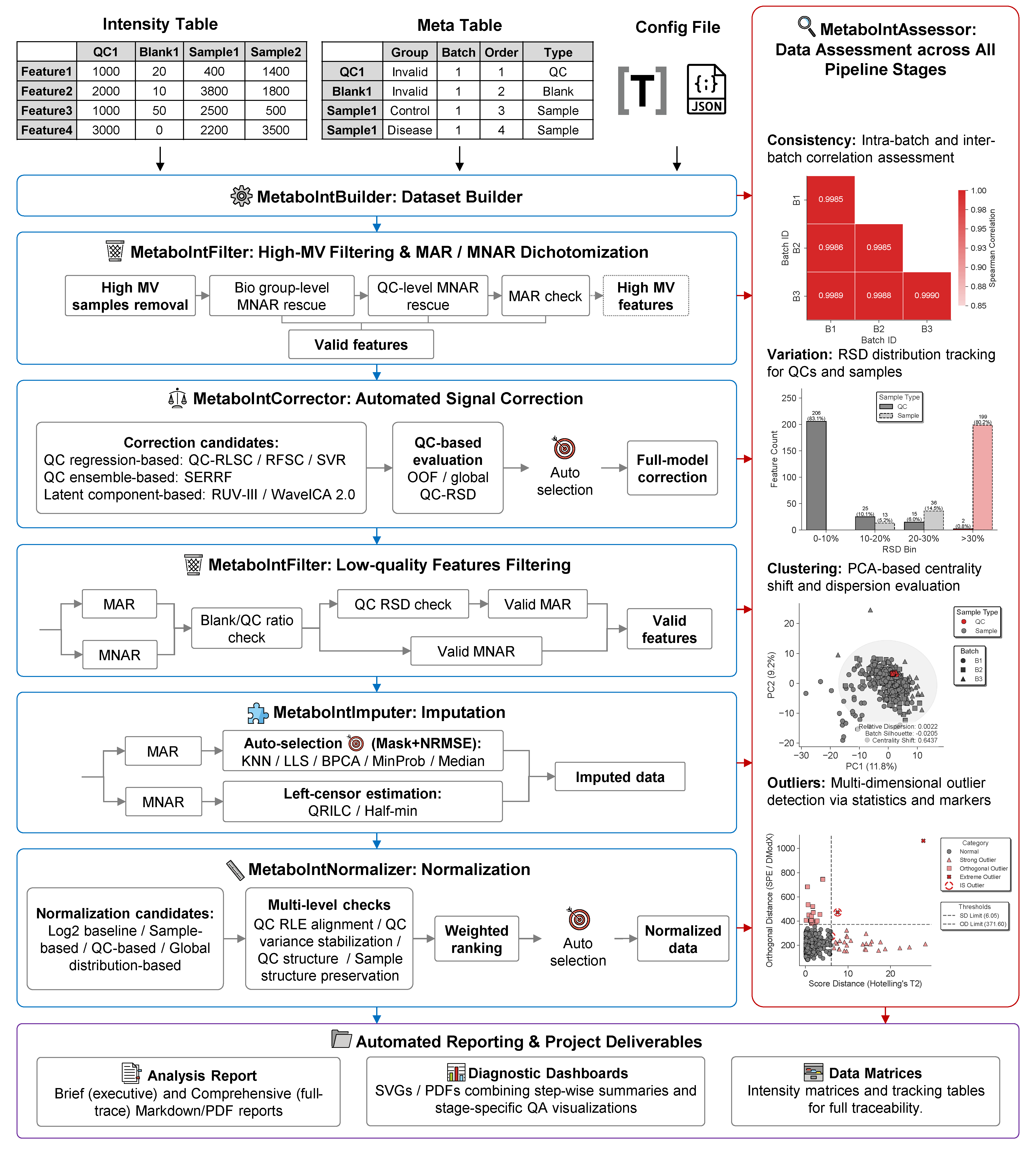
✨ Core Capabilities
-
Matrix-level LC-MS metabolomics QC workflow:
pi-metaboqcfocuses on feature-intensity matrices from large, multi-batch metabolomics studies. It integrates dataset construction, missing-value triage, blank/QC filtering, signal correction, imputation, normalization, QA diagnostics, and report generation in a single reproducible workflow. -
Python-native data model and method implementations: The core
MetaboIntobject inherits frompandas.DataFrame, allowing users to work with standard tabular operations while preserving pipeline metadata. Classical preprocessing methods that often require R dependencies, including quantile normalization, VSN, QRILC, BPCA, RUV-III, and WaveICA 2.0, are implemented or reconstructed in Python and checked against R reference implementations where applicable. -
Adaptive missing-value classification and imputation: High-missing-value features are separated into biologically structured MNAR, QC/low-intensity MNAR, MAR-like, and invalid categories using group-level, QC-level, and intensity-aware rules. For MAR-like features, candidate imputers are evaluated through a mask-based NRMSE strategy, allowing the pipeline to select the imputation method that best reconstructs observed data under the dataset's own missingness structure.
-
Adaptive correction and normalization selection: For signal correction, the pipeline compares QC-anchored regression methods (QC-RLSC, QC-RFSC, and QC-SVR) with global model correction methods (SERRF, RUV-III, and WaveICA 2.0), using internal OOF evaluation where applicable and global refitting for final output. For normalization, it evaluates robust log transformation, TIC, median, PQN, MDFC, quantile normalization, and VSN on a common log-like view using QC RLE alignment change, QC variance stabilization, QC structure distance improvement, and sample structure preservation relative to the robust-log baseline.
-
End-to-end quality assessment and traceability: QA dashboards are generated across pipeline stages to summarize feature retention, missing-value behavior, QC precision, batch correlation, PCA structure, outlier diagnostics, correction performance, imputation quality, and normalization effects. These outputs make the preprocessing trajectory inspectable rather than hidden behind a single final matrix.
-
Parallel computation and scalable execution: Computationally intensive steps, including feature-wise correction, model fitting, candidate evaluation, and large-matrix transformations, use
joblib,Numba, and vectorized Scientific Python routines where appropriate. The workflow is designed for clinical-scale cohorts while remaining runnable from notebooks, scripts, and command-line workflows. -
Automated reporting and publication-ready visualization: The pipeline records stage-level decisions, retained feature counts, selected methods, evaluation metrics, and diagnostic figures. Users can generate Brief or Comprehensive reports in Markdown, HTML, or PDF, while diagnostic plots are exported as editable SVG or PDF files for downstream inspection and manuscript preparation.
📦 Installation
We strongly recommend installing pi-metaboqc within a Conda virtual environment using Miniforge (preferred), Miniconda, or Anaconda.
Generating high-fidelity HTML and PDF reports requires advanced graphical engines (pandoc, weasyprint, tinycss2 and librsvg). These tools depend on complex, system-level C libraries (e.g., GTK3, Pango) that are notoriously difficult to compile and configure via standard pip, particularly on Windows.
Conda effortlessly resolves these low-level dependencies. To guarantee maximum stability across all operating systems, please follow the Standard Installation guide below.
⚠️ Note: While we have integrated an automatic fallback download feature for missing dependencies, it has not been exhaustively tested across all edge cases. Proceeding with the Conda installation remains the most robust and officially supported approach.
Step 1: Create and Activate Conda Environment
conda create -n metaboqc python=3.13 pip -y
conda activate metaboqc
Step 2: Pre-install Graphical Engines (Recommended)
Install pandoc, weasyprint, tinycss2 and librsvg via conda-forge to ensure all necessary system graphical libraries are correctly linked before installing the Python package:
conda install -c conda-forge pandoc weasyprint tinycss2 librsvg -y
Step 3: Install pi-metaboqc
For standard users: Install the stable release directly from PyPI:
pip install pi-metaboqc
Alternatively, install the latest development version directly from GitHub:
pip install git+https://github.com/KaikunXu/pi-metaboqc.git
For developers (Editable mode): If you plan to modify the source code or contribute to the project:
git clone https://github.com/KaikunXu/pi-metaboqc.git
cd pi-metaboqc
pip install -e .
🚀 Quickstart & Tutorials
pi-metaboqc is designed for zero-friction deployment. You only need three files to trigger the fully automated pipeline: a sample metadata table, a raw intensity matrix, and a TOML configuration file.
We provide execution modalities for different use cases in the examples/ directory. For first-time users, we strongly recommend starting with the Interactive Notebook.
1. Interactive Notebook (Recommended for Onboarding)
Interactive Tutorial (interactive_tutorial.ipynb): An end-to-end Jupyter Notebook. This is the optimal way to experience pi-metaboqc. It allows you to step through the pipeline, visually inspect intermediate QA diagnostic dashboards, and intuitively grasp the core algorithmic logic.
- Pre-rendered HTML Viewer: A zero-loading, fully rendered static webpage. This ensures all inline high-resolution plots and metrics are displayed instantly, bypassing any GitHub API rendering timeouts or file size limits..
2. Headless CLI Execution (For Production & Batch Processing)
For deployment on HPC clusters or integration into larger bioinformatics workflows, utilize our robust command-line interface script (run_pimqc.py).
# Navigate to the examples directory
cd examples

# Option A: Run out-of-the-box with bundled demo data
python run_pimqc.py

# Option B: Run with your own custom clinical cohort
python run_pimqc.py \
    --meta /path/to/your_meta.csv \
    --intensity /path/to/your_intensity.csv \
    --config /path/to/custom_params.toml \
    --outdir /path/to/output_directory

# Option C: Run in silent mode (For background processing)
python run_pimqc.py -q
⚠️ Troubleshooting Note for VS Code Users: When running the CLI script via the integrated terminal in Visual Studio Code, the IDE may occasionally fail to properly inherit full Conda environment variables. This prevents the PDF rendering engine from locating essential system-level C libraries (e.g., GTK3/Pango), causing the report generation to gracefully degrade and output an HTML report instead.
Resolution: You can bypass this by executing the script from a native system terminal (e.g., Anaconda Prompt, macOS Terminal). Alternatively, to permanently configure VS Code for seamless PDF rendering and resolve PowerShell restrictions, please refer to our VS Code Environment & Troubleshooting Guide.
📂 Project Structure
pi-metaboqc/
├── README.md                      # Project documentation and quickstart guide
├── pyproject.toml                 # Modern Python build and dependency config
├── LICENSE                        # MIT license
├── examples/                      # Directory for tutorials and examples
│   ├── interactive_tutorial.ipynb # Interactive Jupyter Notebook for onboarding
│   └── run_pimqc.py               # Production-ready CLI execution script
├── src/                           # Core source code directory
│   └── pimqc/                     # Core pi-metaboqc package
│       ├── __init__.py            # Package initialization file
│       ├── core_classes.py        # Core DataStructure class (MetaboInt)
│       ├── visualizer_classes.py  # Core Visualization class (BaseMetaboVisualizer)
│       ├── dataset_builder.py     # MetaboInt instantiation
│       ├── assessment.py          # Data quality assessment
│       ├── correction.py          # Signal drift & batch correction
│       ├── filtering.py           # High-missing value & low-quality features filtering
│       ├── imputation.py          # Missing values imputation
│       ├── normalization.py       # Data normalization
│       ├── pipeline.py            # Automated pipeline orchestrator
│       ├── io_utils.py            # I/O operations
│       ├── plot_utils.py          # Plotting utilities
│       ├── pca_utils.py           # Underlying PCA dimensionality reduction
│       ├── stat_utils.py          # Shared statistical utility functions
│       ├── report_utils.py        # Automated markdown and pdf report rendering
│       ├── config_schema.py       # Configuration schema and parameter validation
│       ├── templates/...          # Template file for generating reports...
│       └── data/                  # Demo data and configuration file directory
│           ├── project_meta.csv          # Demo project metadata file
│           ├── project_intensity.csv     # Demo project intensity file
│           └── pipeline_parameters.toml  # Demo pipeline parameters file
│── tests/...                      # Unit testing and E2E stress testing...
└── ...                            # Other files required by this module...
*💡 Note on Configuration: The entire analytical workflow of
pi-metaboqcis centrally governed bypipeline_parameters.toml. Users can fine-tune all analysis parameters exclusively through this file, without modifying any underlying Python code.
📖 Hands-on Case Study
To demonstrate the robustness, reproducibility, and correction efficacy of pi-metaboqc in real-world scenarios, we provide a dedicated case study repository.
The case study repository contains:
-
Diverse Real-World & Benchmark Datasets: Includes actual metabolomics datasets generated in-house and benchmark data from published tools. Both the originally downloaded raw datasets and the fully pre-processed versions are provided.
-
Transparent Data Preparation: We provide all data cleaning and formatting scripts used to convert raw matrices into the standardized input formats required by
pi-metaboqc. -
Highly Organized Project Structure: All ready-to-run data is systematically categorized by project under the
data/processed/directory. Each project directory is self-contained with its specific matrices, metadata, and a dedicatedpipeline_parameters.tomlconfiguration file. -
Project-Specific Analytical Notebooks: For every dataset, you will find a dedicated, interactive Jupyter Notebook that executes the complete
pi-metaboqcanalytical pipeline under thescripts/evaluationdirectory, providing step-by-step demonstrations and embedded diagnostic visualizations.
We highly recommend new users start with the case study to familiarize themselves with the pipeline's configuration and capabilities.
🤝 Contributing & License
This project is licensed under the MIT License. Contributions, issues, and feature requests are welcome! Feel free to check the issues page.
Project details
Verified details
These details have been verified by PyPIProject links
GitHub Statistics
Maintainers
Release history Release notifications | RSS feed


Download files
Download the file for your platform. If you're not sure which to choose, learn more about installing packages.
Source Distribution
Built Distribution
Filter files by name, interpreter, ABI, and platform.
If you're not sure about the file name format, learn more about wheel file names.
Copy a direct link to the current filters
File details
Details for the file pi_metaboqc-1.1.4.tar.gz.
File metadata
- Download URL: pi_metaboqc-1.1.4.tar.gz
- Upload date:
- Size: 1.1 MB
- Tags: Source
- Uploaded using Trusted Publishing? Yes
- Uploaded via: twine/6.1.0 CPython/3.13.12
File hashes
| Algorithm | Hash digest | |
|---|---|---|
| SHA256 |
c71c7c850f719e7466ac2df0b7f070539dbab19515384f8cf6469b118a529bdd
|
|
| MD5 |
a4a46e2ecdb6419120f785e05f244ff8
|
|
| BLAKE2b-256 |
b8304efb9d50956f50dabb02b1595e9aa50a749c903d743754468283968c0d51
|
Provenance
The following attestation bundles were made for pi_metaboqc-1.1.4.tar.gz:
Publisher:
publish.yml on KaikunXu/pi-metaboqc
-
Statement:
-
Statement type:
https://in-toto.io/Statement/v1 -
Predicate type:
https://docs.pypi.org/attestations/publish/v1 -
Subject name:
pi_metaboqc-1.1.4.tar.gz -
Subject digest:
c71c7c850f719e7466ac2df0b7f070539dbab19515384f8cf6469b118a529bdd - Sigstore transparency entry: 1936298959
- Sigstore integration time:
-
Permalink:
KaikunXu/pi-metaboqc@95cffc0a644f32a1f74ad2e441f0461aaa0b5cc5 -
Branch / Tag:
refs/tags/v1.1.4 - Owner: https://github.com/KaikunXu
-
Access:
public
-
Token Issuer:
https://token.actions.githubusercontent.com -
Runner Environment:
github-hosted -
Publication workflow:
publish.yml@95cffc0a644f32a1f74ad2e441f0461aaa0b5cc5 -
Trigger Event:
release
-
Statement type:
File details
Details for the file pi_metaboqc-1.1.4-py3-none-any.whl.
File metadata
- Download URL: pi_metaboqc-1.1.4-py3-none-any.whl
- Upload date:
- Size: 1.1 MB
- Tags: Python 3
- Uploaded using Trusted Publishing? Yes
- Uploaded via: twine/6.1.0 CPython/3.13.12
File hashes
| Algorithm | Hash digest | |
|---|---|---|
| SHA256 |
4ec050071374ba36639def3b6f90d2ae5a78bbd4ccc99181d905770e86ef6b98
|
|
| MD5 |
11261e62d51b1e637d2b7fe76378ab73
|
|
| BLAKE2b-256 |
a3811bcaca08e00f43af988e0757d1c572625c68aac3b636c41467b83ba0a6c9
|
Provenance
The following attestation bundles were made for pi_metaboqc-1.1.4-py3-none-any.whl:
Publisher:
publish.yml on KaikunXu/pi-metaboqc
-
Statement:
-
Statement type:
https://in-toto.io/Statement/v1 -
Predicate type:
https://docs.pypi.org/attestations/publish/v1 -
Subject name:
pi_metaboqc-1.1.4-py3-none-any.whl -
Subject digest:
4ec050071374ba36639def3b6f90d2ae5a78bbd4ccc99181d905770e86ef6b98 - Sigstore transparency entry: 1936299059
- Sigstore integration time:
-
Permalink:
KaikunXu/pi-metaboqc@95cffc0a644f32a1f74ad2e441f0461aaa0b5cc5 -
Branch / Tag:
refs/tags/v1.1.4 - Owner: https://github.com/KaikunXu
-
Access:
public
-
Token Issuer:
https://token.actions.githubusercontent.com -
Runner Environment:
github-hosted -
Publication workflow:
publish.yml@95cffc0a644f32a1f74ad2e441f0461aaa0b5cc5 -
Trigger Event:
release
-
Statement type:






