
pibooth-extra-lights-vim4



pibooth-extra-lights-vim4 is a plugin for the pibooth application.
It adds 3 extra lights:
startup : light on at pibooth startup
sequence : light on during the entire capture sequence
flash : light on when the capture is taken
Install
$ pip3 install pibooth-extra-lights-vim4
Configuration
Here below the new configuration options available in the pibooth configuration. The keys and their default values are automatically added to your configuration after first pibooth restart.
The physical pin numbering is used.
[CONTROLS]

# Physical GPIO OUT pin to light a LED at pibooth startup (list of pins accepted)
startup_led_pin = 29

# If True, startup LED is lighting by setting pin(s) to HIGH else by setting to LOW
startup_led_active_high = True

# Physical GPIO OUT pin to light a LED during the entire capture sequence (list of pins accepted)
preview_led_pin = 31

# If True, preview LED is lighting by setting pin(s) to HIGH else by setting to LOW
preview_led_active_high = True

# Physical GPIO OUT pin to light a LED when the capture is taken (list of pins accepted)
flash_led_pin = 33

# If True, flash LED is lighting by setting pin(s) to HIGH else by setting to LOW
flash_led_active_high = TrueStates description
Here is the pibooth state sequence updated with the lights activated by this plugin:

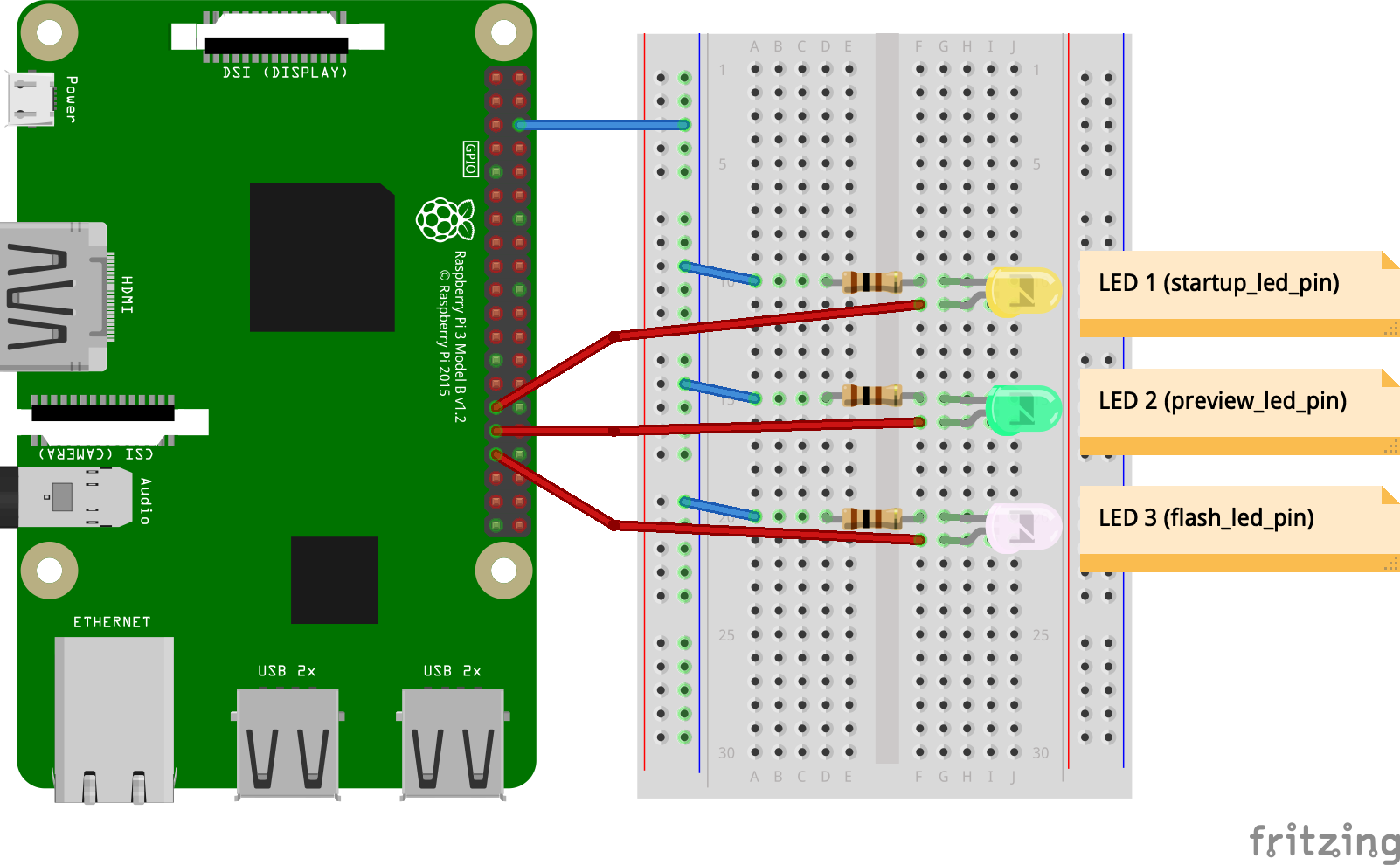
Circuit diagram
Here is the diagram for hardware connections.
Fork
This is a fork of pibooth-extra-lights by Vincent Verdeil and Antoine Rousseaux, released under the same GPLv3 licence. It is published under its own name so that both can live side by side, and it runs on a Raspberry Pi just as well as on the boards the upstream plugin can not reach.
Change from the upstream version: the LEDs are driven through app.board, the GPIO layer of pibooth-ceeeeb, instead of gpiozero. The plugin therefore also works on boards exposing their GPIO through /dev/gpiochipN, a Khadas VIM4 for instance, and pin numbers stay the physical ones of the 40 pins header. Beware that the header pinout of a Khadas VIM4 is not the one of a Raspberry Pi: see the VIM4 GPIO header documentation.
1 maintainer

Release files for pibooth-extra-lights-vim4 1.1.0
For a detailed explanation of source distributions (sdists) and built distributions (wheels), please see the package formats documentation.
Source distribution (sdist)
| File | Size | Uploaded | |
|---|---|---|---|
| pibooth_extra_lights_vim4-1.1.0.tar.gz | 16.5 kB | Details |
Built distribution (wheel)
| File | Interpreter | ABI | Platform | Reset |
|---|---|---|---|---|
| pibooth_extra_lights_vim4-1.1.0-py3-none-any.whl | Python 3 | none | any | Details |
Total release size: 33.0 kB
Release files / pibooth_extra_lights_vim4-1.1.0.tar.gz
| Download URL | pibooth_extra_lights_vim4-1.1.0.tar.gz |
|---|---|
| Size | 16.5 kB |
| Tags | Source |
|
SHA-256 checksum How to use checksums |
bd63b23c6599bd42ef4f510c6572c28e7ddebdedb01efe79d2b56fd4e73f3105
|
|
BLAKE2b-256 checksum How to use checksums |
aebedaef67670ff86657f11ddf3c549a30df9cb49cecb0be36f568c9355890d6
|
| Upload date | |
|
Uploaded using Trusted Publishing? What is trusted publishing? |
No |
| Uploaded via |
twine/6.2.0 CPython/3.12.3
|
Release files / pibooth_extra_lights_vim4-1.1.0-py3-none-any.whl
| Download URL | pibooth_extra_lights_vim4-1.1.0-py3-none-any.whl |
|---|---|
| Size | 16.5 kB |
| Tags | Python 3 |
|
SHA-256 checksum How to use checksums |
f0820b58b9bc61944de4ea39ed943553a3637132df1d62a9436534e662164822
|
|
BLAKE2b-256 checksum How to use checksums |
06ae9e966f0a5f64172d3db5b3c8bc9900ad0a6e2ec4d0fd06560c520d4bbb7b
|
| Upload date | |
|
Uploaded using Trusted Publishing? What is trusted publishing? |
No |
| Uploaded via |
twine/6.2.0 CPython/3.12.3
|













