
One-command local streaming server for PiEEG (8/16-channel EEG shield for Raspberry Pi)
Verified details
These details have been verified by PyPIProject links
GitHub Statistics
Maintainers

Project description
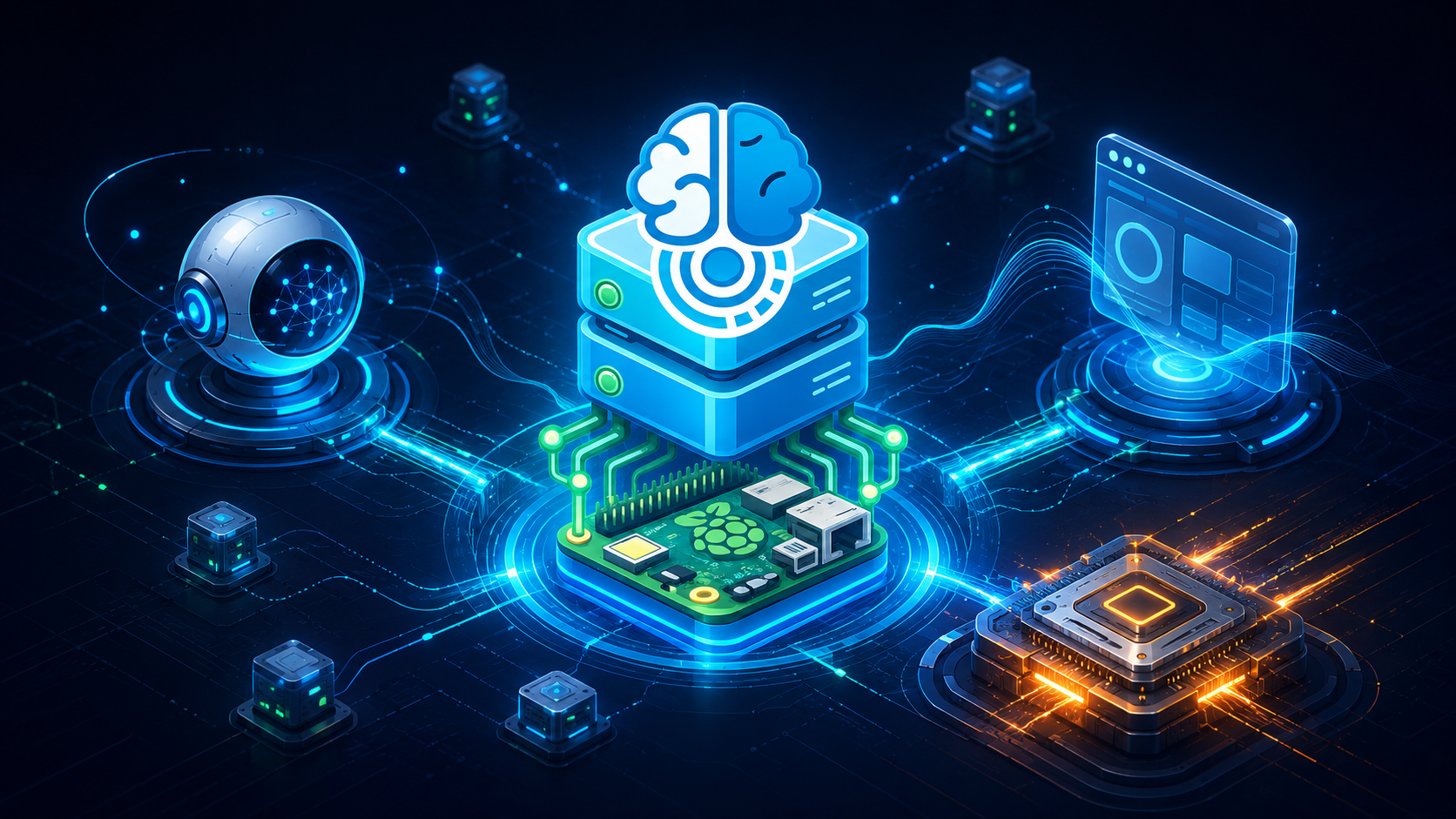
PiEEG-server
Real-time EEG streaming platform for PiEEG (8/16 ch), IronBCI (8 ch BLE) and IronBCI (32 ch USB serial)
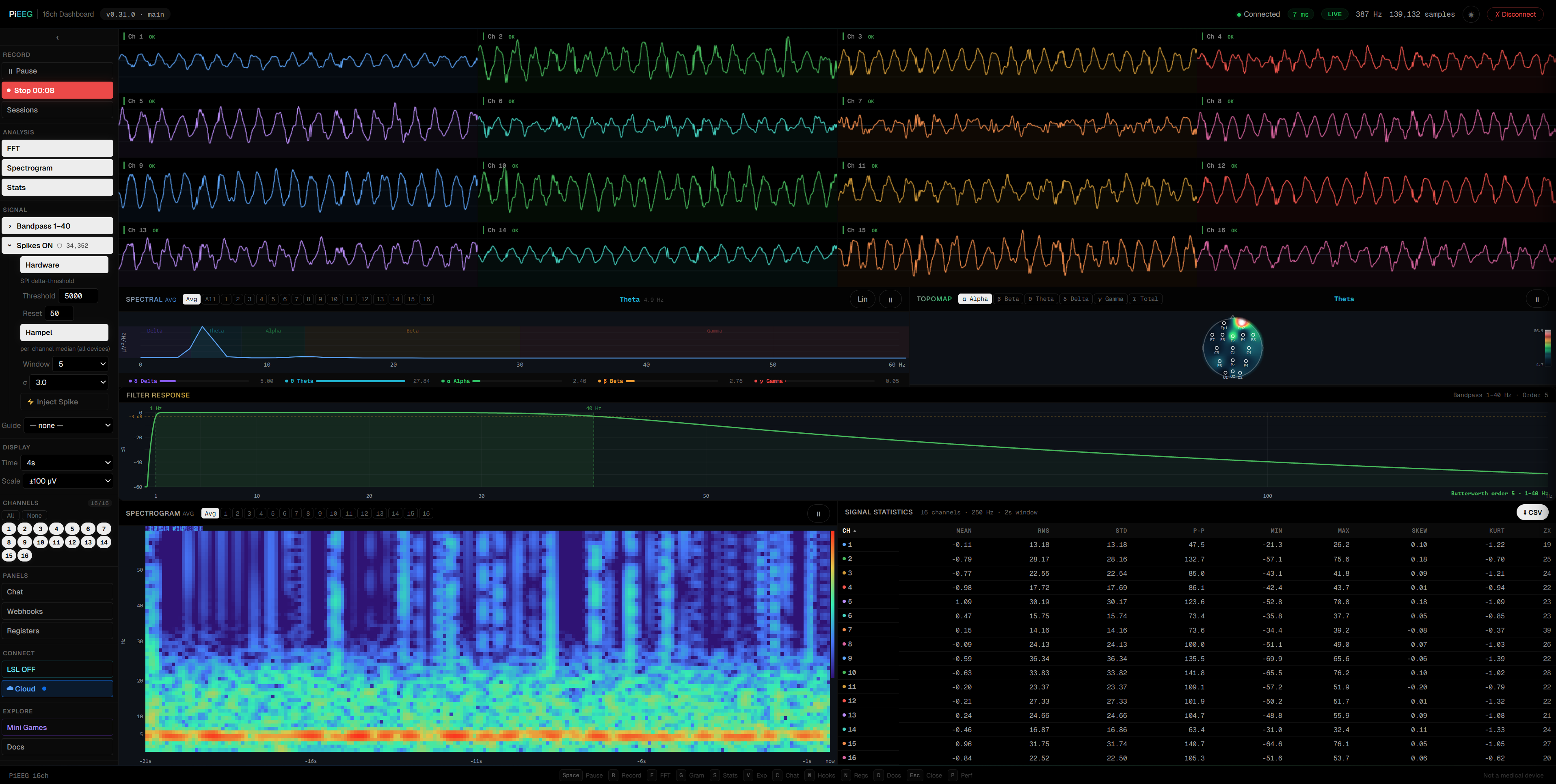
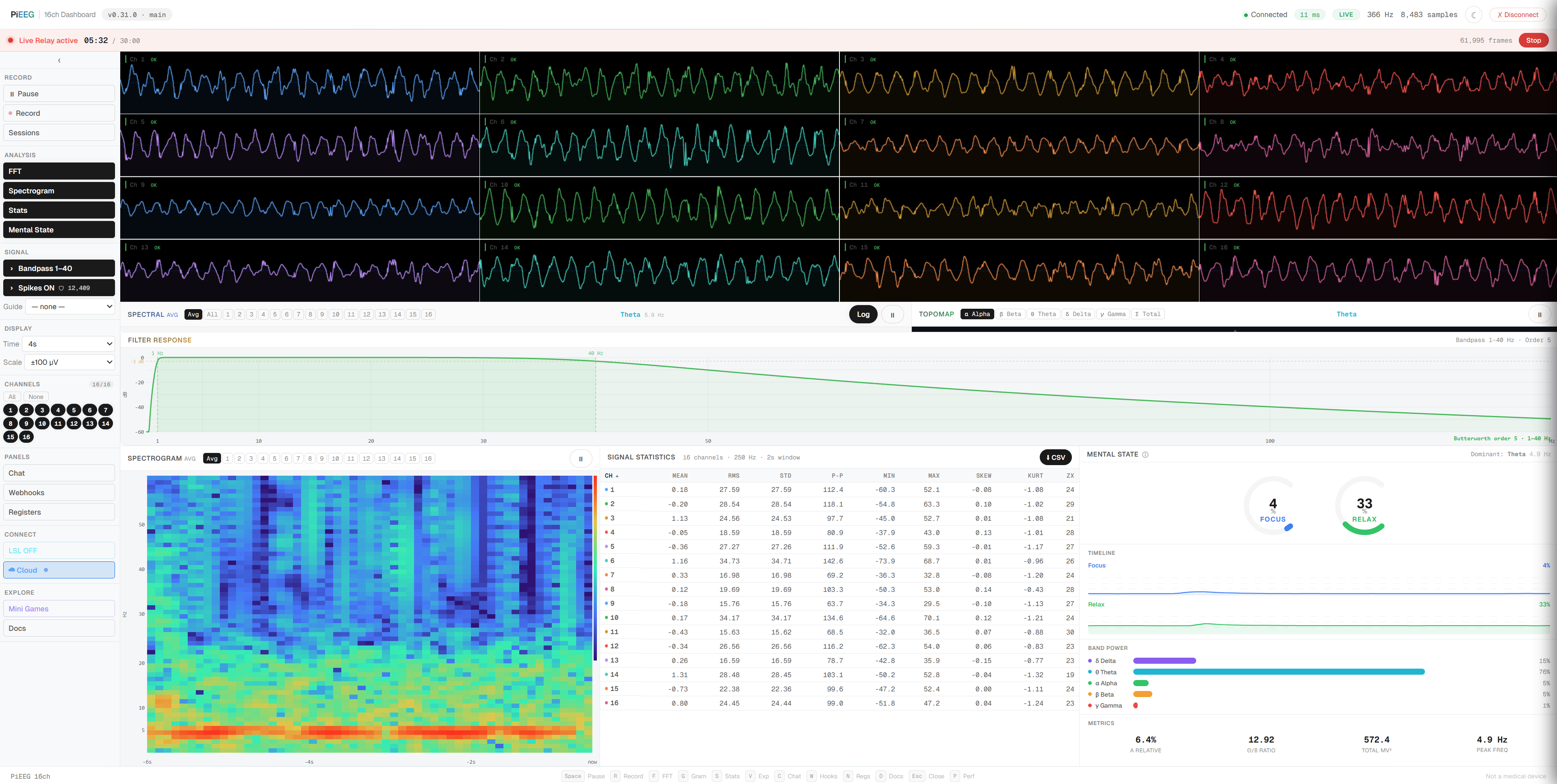
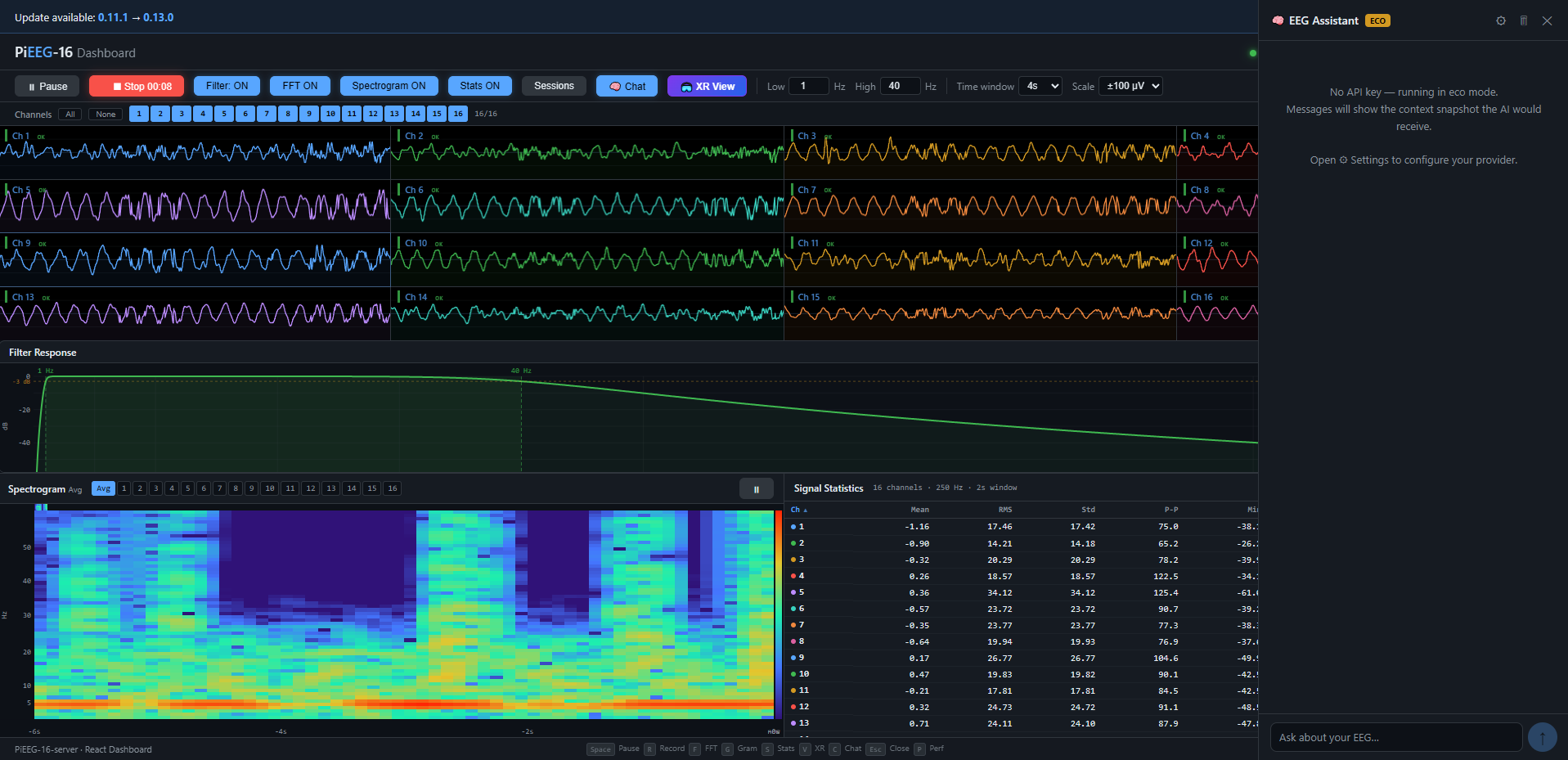
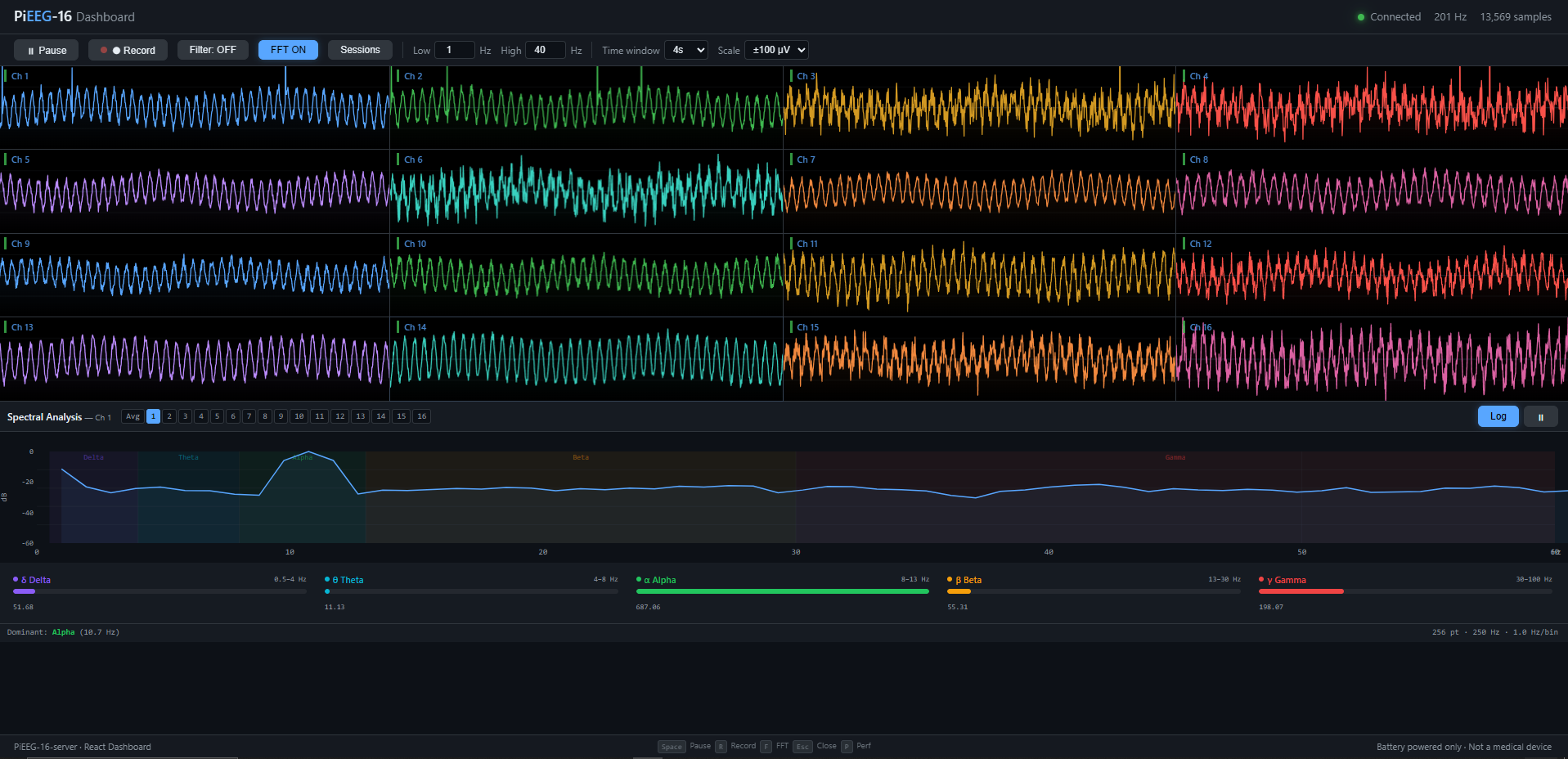
Reads at 250 Hz · streams over WebSocket · live dashboard with spectral analysis, topographic maps, experiences gallery, VRChat OSC, Lab Streaming Layer, webhook automation — Raspberry Pi (SPI), IronBCI (Bluetooth LE), or IronBCI-32 (USB serial).











Try it now — no hardware needed, click ▶ Use Demo Server then Connect. Have an IronBCI? Connect it over Bluetooth straight from the browser — no install, no server (Chrome/Edge). Documentation — full guides, API reference, and integration docs. Chat with us — Join PiEEG Discord community
curl -sSL https://raw.githubusercontent.com/pieeg-club/PiEEG-server/main/install.sh | bash
|
Getting Started |
Features |
Integrations |
Reference |
Install
Pick one method — they all get you
pieeg-serverready to run.
| Method | Command | Notes |
|---|---|---|
| A) One-line (recommended) | curl -sSL https://raw.githubusercontent.com/pieeg-club/PiEEG-server/main/install.sh | bash |
Run sudo reboot first time to enable SPI |
| B) Clone & setup | git clone https://github.com/pieeg-club/PiEEG-server.git && cd PiEEG-server && ./setup.sh |
Same reboot note |
| C) pip | pip install pieeg-server |
Requires Python 3.10+ |
| D) pip + IronBCI | pip install pieeg-server[ironbci] |
Adds bleak for Bluetooth LE |
| E) pip + IronBCI-32 | pip install pieeg-server[ironbci32] |
Adds pyserial for USB serial (32 ch) |
IronBCI / EAREEG users: install the BLE extra for Bluetooth Low Energy support:
pip install pieeg-server[ironbci]Then run with
pieeg-server --device ironbci8. See CLI Reference for BLE options.
IronBCI-32 users: install the serial extra and pass the USB port:
pip install pieeg-server[ironbci32]
pieeg-server --device ironbci32 --serial-port /dev/ttyACM0   # Linux/macOS
pieeg-server --device ironbci32 --serial-port COM3           # Windows
Pure-Python pyserial driver — no BrainFlow required. Speaks the FreeEEG wire protocol at 921600 baud.
Optional: native accelerator (pieeg-core)
pieeg-server ships with a pure-Python reference implementation for every
DSP hot path (24-bit ADC decode, Butterworth bandpass, Hampel spike
rejection). Installing the optional pieeg-core
Rust accelerator transparently swaps those hot paths for compiled
equivalents (~15–30× faster) — no config, no code changes:
pip install 'pieeg-server[fast]'
The active engine is announced on startup and reported in the WebSocket
connected message as "engine": {"native": true, "engine": "pieeg-core", "version": "..."},
and pieeg-server doctor prints a DSP Engine section. If the wheel
is missing or fails to import, pieeg-server falls back to the Python
implementation automatically — nothing breaks.
pieeg-core is licensed AGPL-3.0-or-later; installing it is strictly
opt-in so the default MIT-licensed pieeg-server install stays
license-clean.
Benchmark the two engines side-by-side with the bundled script:
python -m scripts.bench_native --seconds 5
Sample results (Windows, 5 s @ 250 Hz × 16 ch):
| Hot path | Python | pieeg-core | Speedup |
|---|---|---|---|
MultichannelFilter (bandpass 1–40 Hz) |
992 samples/s | 1,048,658 samples/s | ~1057× |
HampelFilter (spike removal) |
24,619 samples/s | 358,361 samples/s | ~15× |
decode_channels (24-bit SPI → µV) |
121,352 samples/s | 1,134,301 samples/s | ~9× |
Real-time streaming at 250 Hz × 16 ch requires 4,000 samples/s — the
pure-Python MultichannelFilter is below that threshold, so installing
pieeg-core is effectively required when server-side filtering is
enabled on 16-channel rigs.
Run
pieeg-server                        # stream 16 ch (PiEEG)
pieeg-server --device pieeg8        # 8-channel PiEEG shield
pieeg-server --device ironbci8      # IronBCI via Bluetooth LE
pieeg-server --device ironbci8 --ble-name MyBoard   # custom BLE name
pieeg-server --device ironbci32 --serial-port /dev/ttyACM0  # IronBCI-32 via USB serial
pieeg-server --filter               # 1–40 Hz bandpass
pieeg-server --monitor              # terminal sparklines
pieeg-server --mock                 # synthetic data, no hardware
pieeg-server --auth                 # require 6-digit access code
pieeg-server --osc                  # VRChat OSC bridge
pieeg-server --lsl                  # Lab Streaming Layer outlet
pieeg-server doctor                 # diagnose everything
| Port | Purpose |
|---|---|
:1616 |
WebSocket data stream |
:1617 |
Web dashboard |
Open http://raspberrypi.local:1617 in any browser on your network.
Quick Start
1. Install & launch
curl -sSL https://raw.githubusercontent.com/pieeg-club/PiEEG-server/main/install.sh | bash
sudo reboot                # first time only, enables SPI
pieeg-server               # or: pieeg-server --mock  (no hardware)
2. Open the dashboard
Browse to http://raspberrypi.local:1617 — you'll land on the Session Lobby.
The server URL is pre-filled with ws://raspberrypi.local:1616 — click Connect to start streaming.
No hardware? Click ▶ Use Demo Server to connect to a public mock instance with synthetic EEG data.
3. Connect from code
import asyncio, json, websockets

async def main():
    async with websockets.connect("ws://raspberrypi.local:1616") as ws:
        async for msg in ws:
            frame = json.loads(msg)
            print(f"#{frame['n']}: {frame['channels']}")

asyncio.run(main())
const ws = new WebSocket("ws://raspberrypi.local:1616");
ws.onmessage = (e) => {
  const frame = JSON.parse(e.data);
  console.log(`#${frame.n}:`, frame.channels);
};
websocat ws://raspberrypi.local:1616 # CLI one-liner
That's it. Every frame is plain JSON — no SDK, no binary protocol, works in any language that has WebSocket support.
Browser SDK (pieeg.js)
Zero-dependency JavaScript library for connecting to PiEEG / IronBCI boards directly from the browser via Web Bluetooth and Web Serial — extract neural states (relaxation, focus, meditation) with a few lines of code.
Supported devices
Select a board with the device option on connectBLE() / connectSerial():
device id |
Board | ADC | Transport | Channels | Rate |
|---|---|---|---|---|---|
ironbci-8 |
IronBCI-8 | 1 × ADS1299 | Web Bluetooth | 8 | 250 Hz |
ironbci-16 |
IronBCI-16 | 2 × ADS1299 | Web Bluetooth | 16 | 250 Hz |
octopus-16 |
Octopus 16 | 2 × ADS131M08 | Web Bluetooth | 16 | 250 Hz |
ironbci-32 |
IronBCI-32 | AD7771 | Web Serial | 32 | 500 Hz |
connectBLE() defaults to ironbci-8; connectSerial() defaults to
ironbci-32. List them at runtime with PiEEG.devices().
Install
A single file, distributed straight from GitHub — no npm account or publish step. Pick whichever fits your setup:
<!-- CDN (browser) — no build step -->
<script src="https://cdn.jsdelivr.net/gh/pieeg-club/PiEEG-server@main/pieeg.js"></script>
# Package manager — installs from GitHub, no registry account
pnpm add github:pieeg-club/PiEEG-server
npm  install pieeg-club/PiEEG-server
# pin a tag for reproducible installs:
pnpm add github:pieeg-club/PiEEG-server#v1.2.0
import PiEEG from '@pieeg/sdk'; // when installed via a package manager
Important: Web Bluetooth / Web Serial require
connectBLE()/connectSerial()to be called from a user gesture (e.g. a button click). Browsers throwSecurityError: Must be handling a user gestureif you call them automatically on page load.
<script src="https://cdn.jsdelivr.net/gh/pieeg-club/PiEEG-server@main/pieeg.js"></script>

<button id="connect">Connect PiEEG</button>

<script>
  const pieeg = new PiEEG();

  // The click is the required user gesture for the Bluetooth prompt
  document.getElementById('connect').addEventListener('click', async () => {
    await pieeg.connectBLE();

    pieeg.onBandPowers((bands) => {
      const relaxation = pieeg.getRelaxationIndex();  // 0.0 – 1.0
      const focus = pieeg.getFocusIndex();
      const meditation = pieeg.getMeditationIndex();

      console.log(`Relaxation: ${(relaxation * 100).toFixed(0)}%`);
      console.log('Alpha power:', bands.Alpha);
    });
  });
</script>
Features
- Multi-device — IronBCI-8/16 & Octopus 16 (Web Bluetooth), IronBCI-32 (Web Serial)
- One-call connect —
connectBLE({ device })orconnectSerial({ device }) - Signal filtering — Hampel spike removal → Butterworth bandpass → notch, in-browser (on by default)
- Band powers — Delta, Theta, Alpha, Beta, Gamma (µV²)
- Mental states — Relaxation, focus, meditation indices
- FFT & spectral — 256-point FFT, configurable update rate
- Zero dependencies — Single file, works anywhere
Connecting
const pieeg = new PiEEG();

await pieeg.connectBLE();                        // IronBCI-8 (default)
await pieeg.connectBLE({ device: 'ironbci-16' });
await pieeg.connectBLE({ device: 'octopus-16' });
await pieeg.connectSerial();                     // IronBCI-32 (default)

PiEEG.devices('ble');   // → list of supported Bluetooth boards
pieeg.getStats();       // → { device, deviceLabel, numChannels, sampleRate, … }
Signal Processing
Because direct connections bypass the Python server, pieeg.js conditions the
raw device stream in the browser — the same chain the PiEEG-server applies
server-side (see pieeg_server/filters.py and
pieeg_server/spike_filter.py):
Hampel spike removal → Butterworth bandpass → IIR notch → FFT / band powers
Filtering is enabled by default (Hampel on, 1–40 Hz bandpass on, notch off)
so band powers and onData samples are clean out of the box. Customise or
disable it via the filter option:
new PiEEG();                                  // defaults (server-matching)
new PiEEG({ filter: false });                 // raw, no DSP
new PiEEG({ filter: { notch: 60 } });         // add a 60 Hz powerline notch
new PiEEG({ filter: {                         // fully custom
  bandpass: { low: 0.5, high: 45, order: 5 },
  notch: { freq: 50, q: 30 },
  hampel: { enabled: true, windowSize: 7, nSigma: 3 },
} });
Adjust it live after connecting:
pieeg.setBandpass(true, 1, 40);   // enable, low, high (order optional)
pieeg.setNotch(true, 50);         // enable, freq (q optional)
pieeg.setHampel({ enabled: true, windowSize: 5, nSigma: 3 });
pieeg.getFilterConfig();          // inspect chain + Hampel replacedCount
Complete Example: Meditation App
<!DOCTYPE html>
<html>
<head><title>Meditation Tracker</title></head>
<body>
  <h1>Calm Score: <span id="score">0%</span></h1>
  <button id="start">Start</button>

  <script src="https://cdn.jsdelivr.net/gh/pieeg-club/PiEEG-server@main/pieeg.js"></script>
  <script>
    const pieeg = new PiEEG();
    const button = document.getElementById('start');

    // connectBLE() must run inside this click handler (user gesture)
    button.addEventListener('click', async () => {
      button.disabled = true;
      button.textContent = 'Connecting…';
      try {
        await pieeg.connectBLE();
        button.textContent = 'Connected';

        pieeg.onBandPowers(() => {
          const calm = pieeg.getRelaxationIndex();
          document.getElementById('score').textContent =
            (calm * 100).toFixed(0) + '%';
        });
      } catch (err) {
        // User cancelled the picker or the device is unavailable
        console.error(err);
        button.disabled = false;
        button.textContent = 'Start';
      }
    });
  </script>
</body>
</html>
React Integration
import { useState } from 'react';

function BrainMonitor() {
  const [pieeg, setPieeg] = useState(null);
  const [relaxation, setRelaxation] = useState(0);

  const connect = async () => {
    const device = new window.PiEEG();
    try {
      // onClick is the user gesture required by Web Bluetooth
      await device.connectBLE();
    } catch (err) {
      console.error(err); // user cancelled picker or device unavailable
      return;
    }

    device.onBandPowers(() => {
      setRelaxation(device.getRelaxationIndex());
    });

    setPieeg(device);
  };

  return (
    <div>
      {!pieeg ? (
        <button onClick={connect}>Connect</button>
      ) : (
        <h2>Relaxation: {(relaxation * 100).toFixed(0)}%</h2>
      )}
    </div>
  );
}
Add the script tag to your HTML:
<script src="https://cdn.jsdelivr.net/gh/pieeg-club/PiEEG-server@main/pieeg.js"></script>
Server Features
| Feature | Description |
|---|---|
| 250 Hz streaming | WebSocket (ws://<host>:1616), plain JSON, language-agnostic |
| 8 / 16 / 32 channel | PiEEG-8, PiEEG-16 (SPI), IronBCI-8 (BLE) and IronBCI-32 (USB serial) |
| IronBCI BLE | Bluetooth Low Energy support for IronBCI / EAREEG boards; auto-scan or direct MAC address |
| IronBCI-32 USB | Pure-Python pyserial driver for IronBCI-32 (32 ch, FreeEEG wire protocol, 921600 baud) — no BrainFlow required |
| Bandpass filter | Butterworth IIR (SOS), per-channel state, adjustable live via WebSocket |
| Notch filter | 50/60 Hz powerline rejection; IIR notch (SOS), per-channel state, toggle live via WebSocket |
| CSV recording | Start/stop from dashboard or CLI; auto-timestamped; optional duration limit |
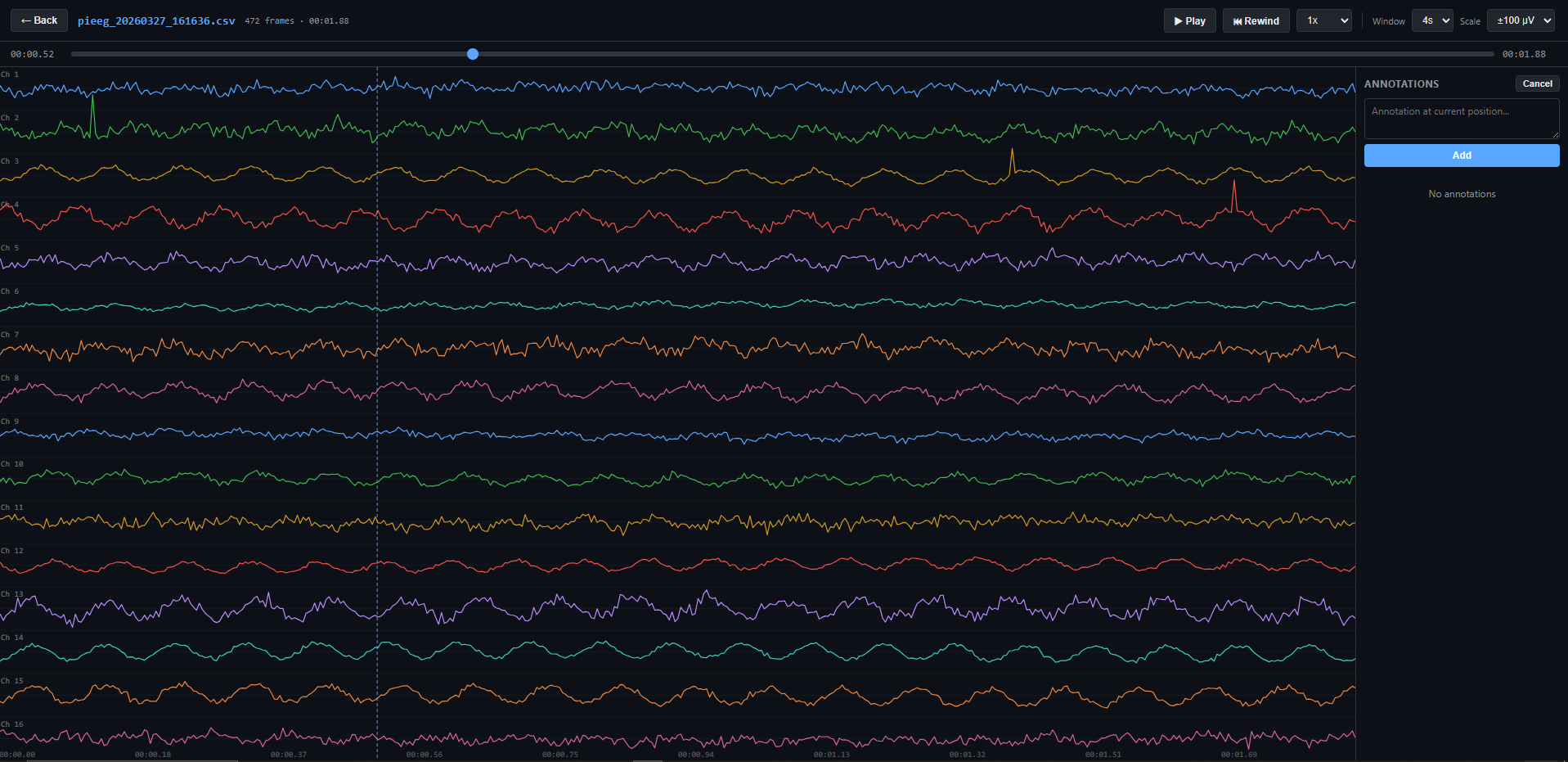
| Session annotations | Text notes on any frame; sidecar .annotations.json |
| Terminal monitor | Rich TUI with per-channel sparklines and µV readout; works over SSH |
| Mock mode | Realistic synthetic EEG (alpha rhythm, drift, noise, blink artifacts) |
| Authentication | Optional 6-digit code, rate limiting, HMAC timing-safe verify, HttpOnly cookies |
| VRChat OSC | Band powers via UDP OSC; chatbox + avatar parameters; per-region streaming; rolling normalization |
| LSL | Push raw samples to LSL network; discoverable by OpenViBE, MNE, LabRecorder |
| Webhooks | HTTP callbacks on EEG events; IFTTT & Zapier presets; per-rule cooldown |
| HTTP API | GET /api/spectrum — band-power snapshot at ~4 Hz; no SDK, no WebSocket |
| ADS1299 registers | Live ADS1299 register config via WebSocket & dashboard; presets, noise test |
| Self-diagnostics | pieeg-server doctor checks Pi model, SPI/GPIO, ports, deps, systemd |
| Self-update | Detects pip/git install; checks PyPI or remote; one-click upgrade from dashboard |
| Systemd service | Auto-starts on boot; standard systemctl management |
| Zero-dep GPIO | Direct Linux chardev v1 ioctl; stable ABI since Linux 4.8 |
| Spike rejection | Two-layer: hardware delta-threshold + device-agnostic Hampel filter (per-channel median-based replacement) |
| Cloud-ready | Dockerfile + Fly.io config for mock-mode demo hosting |
Dashboard Features
| Feature | Description |
|---|---|
| Real-time waveforms | Canvas 2D, adaptive quality; time window 2–16 s, Y-scale ±50–500 µV |
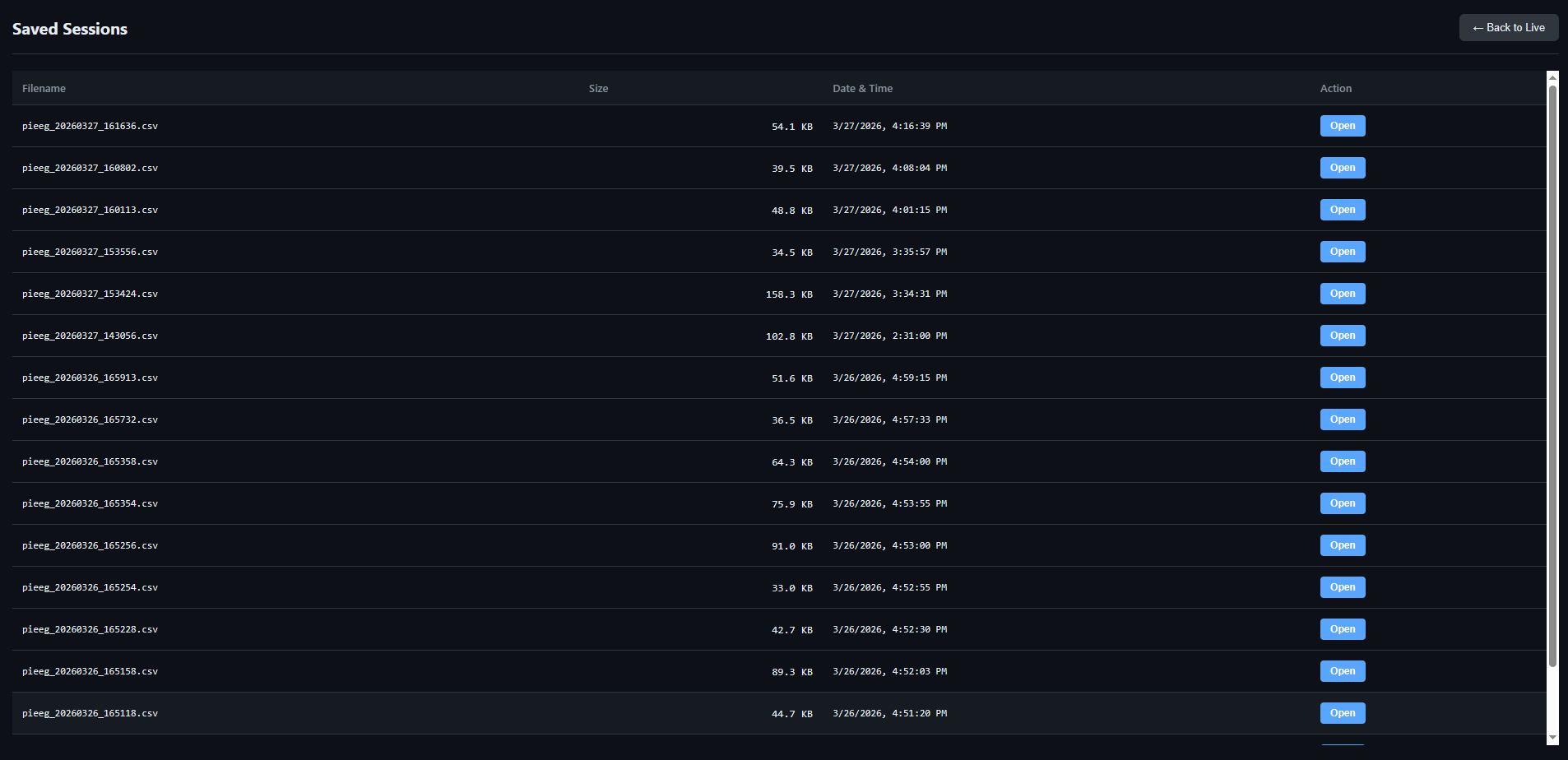
| Session lobby | Enter server URL and click Connect; ▶ Use Demo Server prefills the public mock endpoint; Disconnect button returns to lobby |
| Browser-native Bluetooth | Connect an IronBCI / EAREEG board directly via Web Bluetooth — no server, no install. 100% client-side; decodes ADS1299 packets and applies in-browser DSP (Hampel + bandpass + notch) in the browser. Chrome/Edge over HTTPS. See Browser-native Bluetooth |
| Signal quality badges | Live per-channel RMS with color feedback (green / yellow / red / gray) |
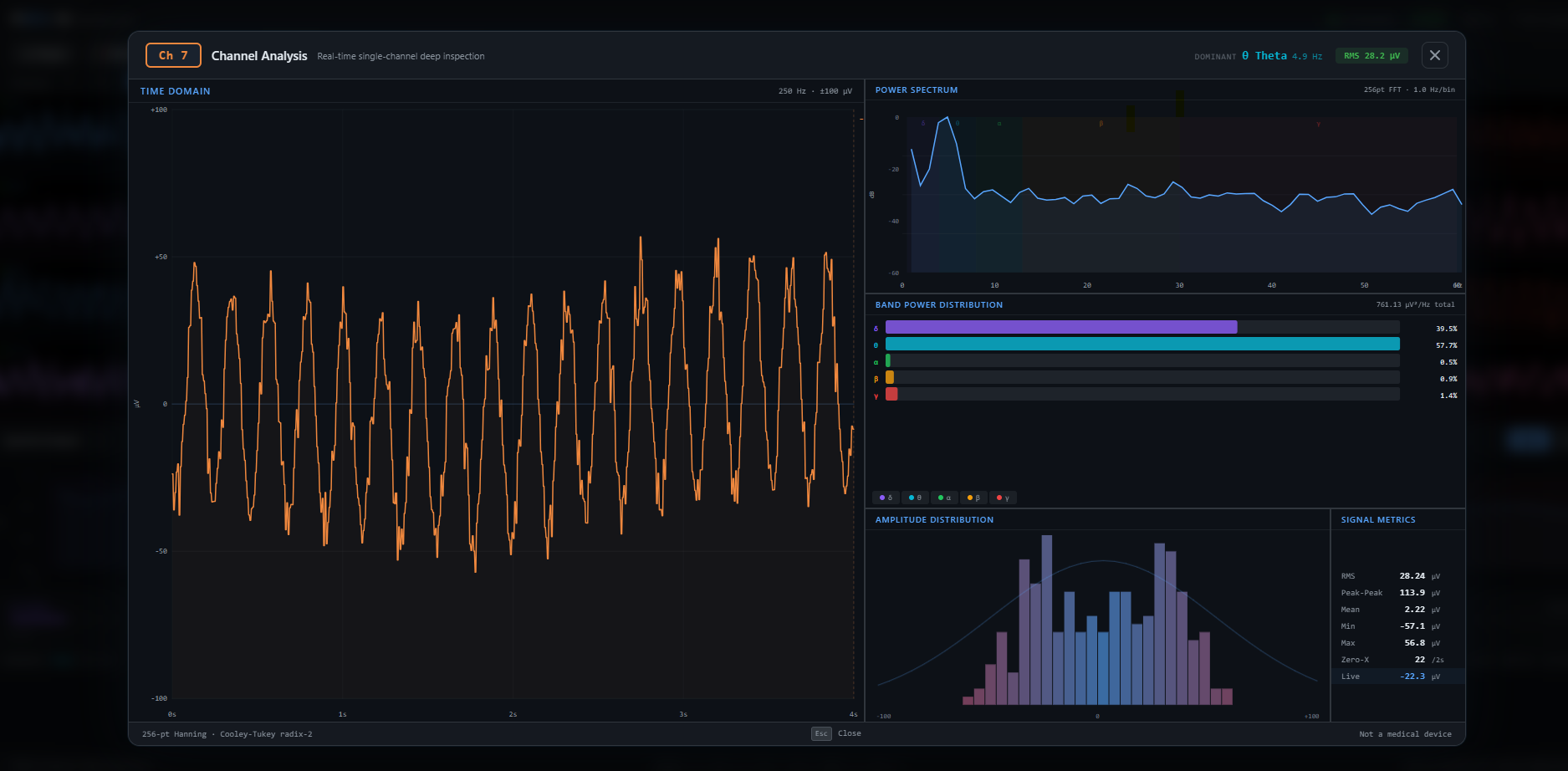
| Channel detail panel | Click to expand: zoomed trace, FFT, band power bars, histogram, statistics |
| Spectral analysis | 256-point FFT in Web Worker; PSD (log dB / linear); band power bars δ θ α β γ |
| Spectrogram | Scrolling time-frequency heatmap (Turbo colormap, –60 → 0 dB) |
| Topographic map | IDW-interpolated scalp heatmap over 10-20 montage; selectable band metric |
| Statistics panel | 10 metrics per channel; sortable columns; CSV export |
| Filter preview | Live Butterworth magnitude response with –3 dB reference |
| Session library | Browse, replay recordings; play/pause, seek, speed control (0.5×–2×); annotations |
| LSL channel groups | Create separate LSL streams per signal type (EEG, EOG, EMG); config UI with channel selection; persists to ~/.pieeg/lsl_groups.json |
| AI chat assistant | BYO provider (OpenAI, Anthropic, Ollama, Groq, LM Studio); SSE streaming |
| Webhook panel | Visual rule builder; POST/PUT/PATCH/GET; Authorization headers; IFTTT & Zapier |
| Webcam feed | Optional video overlay |
| Performance monitor | FPS, frame time, JS heap overlay |
| Update banner | Version upgrade notification |
| Responsive | Desktop: all 16 channels. Mobile: 4-channel subset |
Keyboard Shortcuts
| Key | Action | Key | Action |
|---|---|---|---|
Space |
Toggle pause | V |
Experiences gallery |
R |
Toggle record | C |
Toggle chat |
F |
Toggle FFT | W |
Toggle webhooks |
G |
Toggle spectrogram | P |
Toggle perf monitor |
S |
Toggle stats | Esc |
Close overlays |
? |
Show shortcut help |
Browser-native Bluetooth (IronBCI / EAREEG)
The hosted dashboard can talk to an IronBCI board directly over Web Bluetooth — no Python server, no install. Open cloud.pieeg.com, click Connect IronBCI (Bluetooth), pick your board, and the live stream starts. A blue Bluetooth badge in the header shows the paired device name.
This path is 100% client-side: the browser subscribes to the board's GATT notifications and decodes the 24-bit ADS1299 packets into microvolts, mirroring the Python ironbci driver. The raw stream is then conditioned in the browser with the same Hampel → bandpass → notch chain the server applies, so direct connections get a clean signal too — the dashboard's Bandpass, Notch, and spike-filter controls drive this client-side DSP just as they drive the server when connected via WebSocket.
| Browser (Web Bluetooth) | Server (--device ironbci8) |
|
|---|---|---|
| Install required | None | pip install pieeg-server[ironbci] |
| Visualization, FFT, spectrogram, topomap, stats | ✅ | ✅ |
| Experiences & detectors (P300, blink, face, avatar) | ✅ | ✅ |
| DSP: bandpass / notch / Hampel spike filter | ✅ in-browser (Hampel + 1–40 Hz on by default) | ✅ server-side |
| CSV recording | ✅ in-browser (records the displayed signal; downloads a pieeg_*.csv file) |
✅ server-side (saved to recordings/) |
| LSL, OSC, webhooks, cloud relay | ❌ | ✅ |
Requirements: a Chromium-based browser (Chrome / Edge) over HTTPS. Firefox, Safari, and iOS do not support Web Bluetooth. The board streams 8 channels at 250 Hz.
Recording: on browser-native connections the Record button captures the live stream in the browser and downloads a
pieeg_YYYYMMDD_HHMMSS.csvfile (same format as the server) when you stop. These files download straight to your machine, so they don't appear in the server's Sessions library — reopen them via the notebooks or by loading them into a running server.
Tip: only one host can hold a BLE connection at a time — disconnect the board from the browser before connecting with the Python server (or vice versa).
Experiences Gallery
Community-driven immersive EEG visualizations — lazy-loaded, card-based launcher, simple registry for contributors.
| Experience | Description |
|---|---|
| Neural Wave Space | Three.js 3D arc of 16 wave strips with amplitude-responsive color, starfield, WebXR + hand tracking |
| Blink Browser | Scroll articles via eye blinks; per-user calibration; frontal electrode monitoring |
| Neural Sonification | Brainwaves → live music; bands mapped to drone, FM pad, lead, harmonics, shimmer; DJ controls |
| VRChat OSC | Stream band powers into VRChat; chatbox + avatar parameter output; per-region streaming; live config UI |
| Spoon Bend | Matrix-style telekinesis controlled by focus/beta/gamma; 3D spoon + digital rain |
| Webhook Wizard | Guided 60-second first-webhook setup; live EEG feedback; IFTTT/Zapier templates |
Creating an Experience
Time to first playable: ~15 minutes. One
.tsxfile + one line in the registry.
1. Create your component in dashboard/src/experiences/my-game/MyGame.tsx:
import { useRef, useEffect } from "react";
import type { ExperienceProps } from "../registry";
import { useFocus, useRelax, useBlink } from "../../hooks/detectors";

export default function MyGame({ eegData, onExit }: ExperienceProps) {
  const { state: focus } = useFocus(eegData);
  const { state: relax } = useRelax(eegData);
  const { state: blink } = useBlink(eegData);
  const canvasRef = useRef<HTMLCanvasElement>(null);

  useEffect(() => {
    let raf: number;
    function loop() {
      const f = focus.current.focus;       // 0–1
      const r = relax.current.relaxation;  // 0–1
      const b = blink.current.blinked;     // true for one cycle per blink
      // --- your game logic here ---
      raf = requestAnimationFrame(loop);
    }
    raf = requestAnimationFrame(loop);
    return () => cancelAnimationFrame(raf);
  }, []);

  return (
    <div style={{ position: "fixed", inset: 0, background: "#000" }}>
      <canvas ref={canvasRef} />
      <button onClick={onExit} style={{ position: "absolute", top: 12, left: 12 }}>
        ← Exit
      </button>
    </div>
  );
}
2. Register in dashboard/src/experiences/registry.ts:
const MyGameExperience = lazy(() => import("./my-game/MyGame"));

// Add to EXPERIENCES array:
{
  id: "my-game",
  name: "My Game",
  description: "One-sentence summary.",
  tag: "Focus",
  gradient: ["#ec4899", "#8b5cf6"],
  component: MyGameExperience,
  author: "Your Name",
}
The gallery picks it up automatically. Each experience is code-split — no impact on initial load.
Client-side Detectors
Browser-side EEG processing hooks — React refs, zero re-renders. Read .current in your requestAnimationFrame loop.
import { useBandPowers, useBlink, useFocus, useRelax } from "../../hooks/detectors";
useBandPowers(eegData, config?)
Foundation layer. Single FFT instance, averaged spectral band powers.
| Field | Type | Description |
|---|---|---|
absolute |
BandPowers |
Absolute power per band (µV²/Hz) — Delta, Theta, Alpha, Beta, Gamma |
relative |
BandPowers |
Normalized to sum = 1 |
totalPower |
number |
Sum across all bands |
dominantFrequency |
number |
Peak PSD bin (Hz) |
Config: { updateHz?, channels?, smoothing? }
useBlink(eegData, config?)
Ocular artifact detector. Amplitude-threshold state machine on frontal channels (Fp1/Fp2).
| Field | Type | Description |
|---|---|---|
blinked |
boolean |
true for exactly one poll cycle per blink |
count |
number |
Cumulative blink count |
amplitude |
number |
Current peak-to-peak µV |
lastBlinkTime |
number |
Epoch ms of last confirmed blink |
Config: { channels?, threshold?, windowMs?, minDurationMs?, maxDurationMs?, refractoryMs?, pollHz? }
useFocus(eegData, config?)
Cortical engagement index — (Beta + Gamma) / (Alpha + Theta + Delta).
| Field | Type | Description |
|---|---|---|
focus |
number |
0 (relaxed) – 1 (highly focused), smoothed |
raw |
number |
Unsmoothed, uncalibrated ratio |
calibrated |
boolean |
Whether baseline has been captured |
Config: { channels?, updateHz?, smoothing?, scaleDivisor? } · Returns: { state, calibrate(), resetCalibration(), calibrating }
useRelax(eegData, config?)
Alpha-dominance + theta-beta ratio composite relaxation index.
| Field | Type | Description |
|---|---|---|
relaxation |
number |
0 (alert) – 1 (deeply relaxed), smoothed |
alphaRelative |
number |
Alpha / total power (0–1) |
thetaBetaRatio |
number |
θ / β raw ratio |
calibrated |
boolean |
Whether baseline has been captured |
Config: { channels?, updateHz?, smoothing?, alphaWeight?, tbrCeiling? } · Returns: { state, calibrate(), resetCalibration(), calibrating }
ADS1299 Register Configuration
PiEEG-server exposes real-time ADS1299 register configuration over WebSocket. Change channel input modes, run noise diagnostics, and apply presets — all live, without restarting the stream.
Configurable registers
Channels CH1SET–CH8SET (addresses 0x05–0x0C) can be written at runtime. Configuration registers (CONFIG1–CONFIG3) are protected.
| Value | Input mode | Use case |
|---|---|---|
0x00 |
Normal electrode | Standard EEG measurement |
0x01 |
Input shorted | Baseline noise testing |
0x02 |
Bias measurement | Bias current check |
0x04 |
Temperature sensor | On-chip temp readout |
0x05 |
Test signal | Internal 1× square wave |
WebSocket commands
{"cmd": "reg_read"}
{"cmd": "reg_write", "regs": {"0x05": "0x00", "0x06": "0x01"}}
{"cmd": "reg_preset", "preset": "internal_short"}
{"cmd": "noise_test", "duration": 3}
Presets: normal, internal_short, test_signal, temp_sensor.
The dashboard Register panel provides a visual interface — click to switch modes per channel, run noise tests with automated pass/fail verdicts, no code required.
HTTP API
The dashboard server (:1617) exposes a small REST API alongside the dashboard UI. All endpoints return JSON. No authentication required — only derived/aggregate data is exposed, no raw EEG samples.
GET /api/info
Server health and version. Used by the PiEEG Chrome extension to detect the server.
{ "version": "0.42.0", "branch": "main" }
GET /api/spectrum
Latest per-band, per-channel power spectral density (µV²/Hz), updated at ~4 Hz. Returns warming_up: true for the first ~2 s while the ring buffers fill.
{
  "bands": {
    "Delta": [12.3, 11.8, 10.2, ...],
    "Theta": [4.1, 3.9, 4.4, ...],
    "Alpha": [22.7, 21.0, 23.5, ...],
    "Beta":  [6.3, 5.8, 6.1, ...],
    "Gamma": [1.2, 1.0, 1.3, ...]
  }
}
Each array has one element per channel. Frequency bands: δ 0.5–4 Hz · θ 4–8 Hz · α 8–13 Hz · β 13–30 Hz · γ 30–100 Hz.
Used by the PiEEG Chrome extension to show a live band-power strip in the popup — no WebSocket required.
curl http://raspberrypi.local:1617/api/spectrum
// Poll at 1 Hz — cheap, no persistent connection
const data = await fetch("http://raspberrypi.local:1617/api/spectrum").then(r => r.json());
if (!data.warming_up) {
  const avgAlpha = data.bands.Alpha.reduce((s, v) => s + v, 0) / data.bands.Alpha.length;
  console.log("mean alpha power:", avgAlpha, "µV²/Hz");
}
WebSocket API
Plain WebSocket, UTF-8 JSON frames on ws://<host>:1616. No SDK needed.
Connection
| Scenario | URL |
|---|---|
| No auth | ws://raspberrypi.local:1616 |
| With auth | ws://raspberrypi.local:1616?token=<ws-token> |
Authenticated connection flow (TypeScript)
With --auth enabled: POST /auth with the 6-digit code → GET /auth/ws-token → connect with ?token=....
const dashboardBase = "http://raspberrypi.local:1617";
const wsBase = "ws://raspberrypi.local:1616";

async function connectAuthenticated(code: string): Promise<WebSocket> {
  await fetch(`${dashboardBase}/auth`, {
    method: "POST",
    headers: { "Content-Type": "application/json" },
    credentials: "include",
    body: JSON.stringify({ code }),
  });

  const { token } = await fetch(`${dashboardBase}/auth/ws-token`, {
    credentials: "include",
  }).then((r) => r.json());

  const ws = new WebSocket(`${wsBase}?token=${encodeURIComponent(token)}`);
  ws.addEventListener("message", (e) => {
    const frame = JSON.parse(e.data as string);
    console.log(`#${frame.n}:`, frame.channels);
  });
  return ws;
}
Commands (Client → Server)
Filter
{"cmd": "set_filter", "enabled": true, "lowcut": 1.0, "highcut": 40.0}
{"cmd": "set_filter", "enabled": false}
Notch (powerline rejection)
{"cmd": "set_notch", "enabled": true, "freq": 60.0, "q": 30.0}
{"cmd": "set_notch", "enabled": false}
The notch filter removes mains hum (use freq: 60.0 for US/Japan, 50.0 for EU/Asia). It runs after the bandpass and is independent of it, so you can reject 60 Hz even with a wide bandpass (e.g. 1–100 Hz for gamma). q is the quality factor (default 30, narrower notch at higher values). freq must be below the Nyquist frequency (sample rate / 2).
Recording
{"cmd": "start_record"}
{"cmd": "stop_record"}
Webhooks
{"cmd": "webhook_list"}
{"cmd": "webhook_create", "rule": {"name": "Alpha alert", "trigger_type": "band_power_above", "params": {"band": "alpha", "threshold": 20}, "url": "https://example.com/hook", "method": "POST", "headers": {"Authorization": "Bearer ..."}, "cooldown": 30}}
{"cmd": "webhook_update", "rule": {"id": "abc123", "enabled": false}}
{"cmd": "webhook_delete", "id": "abc123"}
{"cmd": "webhook_test", "id": "abc123"}
VRChat OSC
{"cmd": "osc_start"}
{"cmd": "osc_stop"}
{"cmd": "osc_configure", "host": "127.0.0.1", "port": 9000, "mode": "both", "interval": 0.25}
{"cmd": "osc_configure", "groups": [
  {"name": "Frontal", "channels": [0, 1]},
  {"name": "Occipital", "channels": [6, 7]}
]}
{"cmd": "osc_status"}
Per-region streaming via groups parameter:
- Standard mode (no
groups): emits/avatar/parameters/EEG_Alpha,/avatar/parameters/EEG_Beta, etc. - Region mode: emits
/avatar/parameters/EEG_Frontal_Alpha,/avatar/parameters/EEG_Occipital_Beta, etc. - Regions may overlap; values normalized to [0, 1] using per-region rolling max
Lab Streaming Layer
{"cmd": "lsl_start"}
{"cmd": "lsl_stop"}
{"cmd": "lsl_status"}
{"cmd": "lsl_groups_get"}
{"cmd": "lsl_groups_set", "groups": [
  {"name": "EEG", "channels": [0, 1, 2, 3]},
  {"name": "EOG", "channels": [4, 5]}
]}
Channel groups let you create separate LSL streams per signal type (EEG, EOG, EMG, etc.):
lsl_groups_get→{"num_channels": 8, "groups": [...]}lsl_groups_setvalidates no overlap, saves to~/.pieeg/lsl_groups.json, broadcasts to all clients- Empty groups
[]→ single default streamPiEEGwith all channels (backward compatible)
ADS1299 Registers (see full details)
{"cmd": "reg_read"}
{"cmd": "reg_write", "regs": {"0x05": "0x00", "0x06": "0x01"}}
{"cmd": "reg_preset", "preset": "internal_short"}
{"cmd": "noise_test", "duration": 3}
Data Format
Every frame from the WebSocket is a JSON object:
{ "t": 1711234567.123, "n": 42, "channels": [12.34, -5.67, 8.90, ...] }
| Field | Type | Description |
|---|---|---|
t |
float | Unix timestamp (seconds, 6-decimal precision) |
n |
int | Sample number (monotonic, incremental) |
channels |
float[] | µV per channel (8 or 16 elements) |
Welcome message (on connect)
{
  "status": "connected",
  "sample_rate": 250,
  "channels": 16,
  "filter": false,
  "notch_filter": false,
  "notch_freq": 60.0,
  "recording": false
}
EEG Frequency Bands
| Band | Range | Color |
|---|---|---|
| Delta (δ) | 0.5–4 Hz | 🟣 #8b5cf6 |
| Theta (θ) | 4–8 Hz | 🔵 #06b6d4 |
| Alpha (α) | 8–13 Hz | 🟢 #22c55e |
| Beta (β) | 13–30 Hz | 🟡 #f59e0b |
| Gamma (γ) | 30–100 Hz | 🔴 #ef4444 |
Webhooks
HTTP callbacks fired when EEG conditions are met. Build rules in the dashboard or via WebSocket commands.
Trigger Types
| Type | Fires when… |
|---|---|
band_power_above |
Band power exceeds threshold |
band_power_below |
Band power drops below threshold |
amplitude_above |
Peak amplitude exceeds threshold |
amplitude_below |
Peak amplitude drops below threshold |
band_ratio_above |
Band ratio (e.g. β/θ) exceeds threshold |
band_ratio_below |
Band ratio drops below threshold |
Payload
{
  "event": "band_power_above",
  "rule": "Alpha alert",
  "value": 23.45,
  "threshold": 20,
  "channel": 0,
  "timestamp": 1711234567.12
}
Each rule has an independent cooldown (seconds) to prevent spam. Enforced server-side.
IFTTT & Zapier
Webhook rules support three service modes — Generic, IFTTT, Zapier — selectable per rule.
| Service | Setup | Payload shape |
|---|---|---|
 IFTTT IFTTT |
Get key at ifttt.com/maker_webhooks → Documentation | value1 (value), value2 (trigger type), value3 (full JSON) |
 Zapier Zapier |
Create Zap → Webhooks trigger (Catch Hook) → paste URL | Flat JSON: event, rule, value, threshold, channel, band, timestamp, source |
| Generic | Any POST-accepting endpoint (n8n, Home Assistant, Node-RED…) | event, rule, value, threshold, channel, timestamp |
Example payloads
// IFTTT
{"value1": "23.45", "value2": "band_power_above", "value3": "{\"event\":\"band_power_above\",\"rule\":\"Alpha alert\",\"value\":23.45,\"threshold\":20}"}

// Zapier
{"event": "band_power_above", "rule": "Alpha alert", "value": 23.45, "threshold": 20, "channel": 0, "band": "alpha", "timestamp": 1711234567.12, "source": "pieeg"}

// Generic
{"event": "band_power_above", "rule": "Alpha alert", "value": 23.45, "threshold": 20, "channel": 0, "timestamp": 1711234567.12}
VRChat OSC
Stream EEG band powers to VRChat via UDP OSC. Enable with --osc or from the dashboard.
pieeg-server --osc                                          # defaults
pieeg-server --osc --osc-mode chatbox --osc-interval 0.5    # chatbox only, 2 Hz
| Mode | Output |
|---|---|
chatbox |
Band powers as text in VRChat chatbox |
parameters |
Avatar parameter floats (normalized 0–1) |
both |
Chatbox + avatar parameters (default) |
Standard Mode (Global Band Powers)
By default, PiEEG streams one value per frequency band:
/avatar/parameters/EEG_Delta(0.5–4 Hz)/avatar/parameters/EEG_Theta(4–8 Hz)/avatar/parameters/EEG_Alpha(8–13 Hz)/avatar/parameters/EEG_Beta(13–30 Hz)/avatar/parameters/EEG_Gamma(30–100 Hz)
Uses either all-channel average (channel: "avg") or a single selected channel.
Region-Aware Mode (Per-Region Band Powers)
Stream separate band powers for each brain region by configuring channel groups:
{
  "groups": [
    {"name": "Frontal", "channels": [0, 1]},
    {"name": "Temporal", "channels": [2, 3]},
    {"name": "Parietal", "channels": [4, 5]},
    {"name": "Occipital", "channels": [6, 7]}
  ]
}
Avatar parameters (per region × band):
/avatar/parameters/EEG_Frontal_Alpha/avatar/parameters/EEG_Frontal_Beta/avatar/parameters/EEG_Occipital_Alpha/avatar/parameters/EEG_Temporal_Theta- (5 bands × N regions parameters total)
Setup:
- Dashboard → OSC config panel → "Configure Regions"
- Define groups: name + select channels (e.g., "Frontal: ch0-1")
- Save → server emits per-region parameters
- VRChat avatar: add float parameters matching region names
Use cases:
- Standard mode: Avatar reacts to overall brain state (e.g., global alpha level for calm/focus)
- Region mode: Spatial awareness — different visuals for frontal (attention), occipital (visual processing), temporal (emotion)
Notes:
- Regions may overlap (same channel can belong to multiple groups)
- Region names are sanitized (alphanumerics + underscore only)
- Values normalized to [0, 1] using rolling 5-minute maximum
WebSocket commands: osc_start, osc_stop, osc_configure, osc_status — see WebSocket API.
Lab Streaming Layer
Push raw EEG samples to the LSL network. Discoverable by OpenViBE, MNE-LSL, BCI2000, NeuroPype, LabRecorder.
pieeg-server --lsl                    # enable on startup
pieeg-server --lsl --lsl-name MyEEG   # custom stream name
Toggle at runtime via dashboard or WebSocket (lsl_start / lsl_stop).
Channel Groups
Create separate LSL streams for different signal types (e.g., EEG, EOG, EMG) using the dashboard:
- Click "Enable LSL" → modal opens (first time)
- Define groups: name + select channels (e.g., "EEG: ch0-3", "EOG: ch4-5")
- Save → server creates multiple LSL outlets:
EEG_PiEEG(4 channels: ch0, ch1, ch2, ch3)EOG_PiEEG(2 channels: ch4, ch5)
- LabRecorder sees N separate streams with correct channel counts
- Groups persist to
~/.pieeg/lsl_groups.json(auto-loaded on restart)
Click "Edit LSL Groups" anytime to reconfigure.
No groups configured? → Single default stream PiEEG with all channels (backward compatible).
Receive in Python:
from pylsl import StreamInlet, resolve_stream

# Resolve specific group stream
streams = resolve_stream('name', 'EEG_PiEEG')
inlet = StreamInlet(streams[0])
sample, timestamp = inlet.pull_sample()  # Only EEG channels

# Or resolve all PiEEG streams
all_streams = resolve_stream('type', 'EEG')
for stream in all_streams:
    print(f"{stream.name()}: {stream.channel_count()} channels")
Record & Replay
pieeg-server record session.csv                          # standalone, Ctrl-C to stop
pieeg-server record session.csv --duration 300           # 5 minutes
pieeg-server record session.csv --native --sample-rate 2000   # high-rate native capture
pieeg-server --record session.csv                        # record while streaming
record options
| Flag | Default | Description |
|---|---|---|
--duration SEC |
— | Stop after N seconds (default: until Ctrl-C) |
--native |
— | Use the native pieeg-core acquisition loop — recommended for high sample rates (e.g. 2000 SPS × 16 ch) where the pure-Python read loop drops samples. Requires pieeg-core built with the hardware feature (aarch64 Pi wheel). |
--sample-rate SPS |
device native | ADC output data rate for --native: 250, 500, 1000, 2000, or 4000. |
--device DEVICE |
pieeg16 |
pieeg8, pieeg16, ironbci8, or ironbci32 |
--gpio-chip PATH |
/dev/gpiochip4 |
GPIO chip device |
--mock |
— | Synthetic EEG (no hardware needed) |
Native capture:
--nativehands the SPI/GPIO/ADC lifecycle to a dedicated Rust read thread (GIL released) that feeds a lock-free queue. Dropped samples are always counted and logged — never silent. Build the wheel withmaturin build --release --features hardwareon the Pi first.
| Feature | Details |
|---|---|
| Format | CSV: timestamp, ch1, ch2, ..., chN |
| Location | recordings/pieeg_YYYYMMDD_HHMMSS.csv |
| Annotations | Frame-based text markers; sidecar .annotations.json |
| Playback | Dashboard session library: play/pause, seek, speed (0.5×–2×) |
| Export | CSV with annotation column, or JSON with metadata |
Jupyter Notebooks
| # | Notebook | Description |
|---|---|---|
| 1 | 01_load_and_plot_session |
Load CSV or stream live, plot all channels |
| 2 | 02_detect_blinks |
Eye-blink artifact detection (threshold-based) |
| 3 | 03_bandpower_and_alpha |
Band powers via Welch's method, alpha tracking |
| 4 | 04_export_features_for_ml |
Windowed features → ML-ready CSV (scikit-learn) |
cd notebooks && pip install -r requirements.txt
pieeg-server --mock &
jupyter lab
CLI Reference
pieeg-server [OPTIONS] [COMMAND]
Commands
| Command | Description |
|---|---|
doctor |
Diagnose hardware, software, and configuration |
record FILE |
Record EEG to CSV (standalone, no server) |
monitor |
Live terminal display (standalone, no server) |
Server Options
| Flag | Default | Description |
|---|---|---|
--device DEVICE |
pieeg16 |
pieeg8, pieeg16, ironbci8, or ironbci32 |
--ble-name NAME |
EAREEG |
BLE advertised device name (IronBCI only) |
--ble-address ADDR |
— | BLE MAC address — skip scan, connect directly |
--serial-port PORT |
— | USB serial port for IronBCI-32 (e.g. /dev/ttyACM0, COM3) |
--host HOST |
0.0.0.0 |
Bind address |
--port PORT |
1616 |
WebSocket port |
--dashboard-port PORT |
1617 |
Dashboard HTTP port |
--no-dashboard |
— | Disable web dashboard |
--auth |
— | Enable 6-digit access code |
--gpio-chip PATH |
/dev/gpiochip4 |
GPIO chip device |
--profile NAME |
auto |
Raspberry Pi hardware profile: auto, pi4, pi5 (auto-detected from /proc/device-tree) |
--filter |
— | Enable 1–40 Hz bandpass filter |
--lowcut HZ |
1.0 |
Filter low cutoff |
--highcut HZ |
40.0 |
Filter high cutoff |
--record FILE |
— | Record to CSV while streaming |
--record-duration SEC |
— | Stop recording after N seconds |
--monitor |
— | Show terminal monitor alongside server |
--mock |
— | Synthetic EEG (no hardware needed) |
--no-webhooks |
— | Disable webhooks |
--osc |
— | Enable VRChat OSC bridge |
--osc-host HOST |
127.0.0.1 |
VRChat receiver |
--osc-port PORT |
9000 |
VRChat OSC port |
--osc-mode MODE |
both |
chatbox, parameters, or both |
--osc-interval SEC |
0.25 |
OSC update rate |
--lsl |
— | Enable Lab Streaming Layer outlet |
--lsl-name NAME |
PiEEG |
LSL stream name |
-v, --verbose |
— | Debug logging |
Architecture
┌──────────────────────────────────────────────────────────┐
│  Raspberry Pi + PiEEG Shield (8 or 16 ch)                │
│  — or — IronBCI / EAREEG board (8 ch, Bluetooth LE)      │
│                                                          │
│  hardware.py     → SPI/GPIO init, ADS1299 config (PiEEG) │
│  ironbci.py      → BLE scan + GATT notifications (IronBCI)│
│       ↓                                                  │
│  acquisition.py  → 250 Hz read loop (SPI or BLE)         │
│       ↓ pub/sub                                          │
│       ├── server.py     → WebSocket broadcast            │
│       ├── recorder.py   → CSV writer                     │
│       ├── monitor.py    → Terminal sparklines             │
│       ├── osc_vrchat.py → VRChat OSC bridge              │
│       └── lsl.py        → Lab Streaming Layer outlet     │
│                                                          │
│  webhooks.py  → event rules + HTTP relay                 │
│  dashboard.py → HTTP server (React UI)                   │
│  auth.py      → session + WS token management            │
│  filters.py   → Butterworth bandpass (SOS)               │
│  updater.py   → version check + upgrade                  │
│  doctor.py    → system diagnostics                       │
│       ↓                                                  │
│  ws://0.0.0.0:1616  │  http://0.0.0.0:1617              │
└──────────┬───────────────────────────────────────────────┘
           │  Local network / internet
           ├── Browser dashboard (React + Vite)
           ├── Python / Jupyter notebook
           ├── VRChat (OSC over UDP)
           ├── LSL consumers (OpenViBE, MNE, LabRecorder…)
           ├── IFTTT / Zapier (webhooks)
           └── Any WebSocket client
Dashboard Tech Stack
| Module | Responsibility |
|---|---|
hardware.py |
SPI/GPIO initialization, ADS1299 register config (PiEEG) |
ironbci.py |
BLE scan, GATT notifications, ADS1299 packet parsing (IronBCI) |
acquisition.py |
250 Hz read loop (SPI, BLE, or mock), pub/sub queues |
| Layer | Tech |
|---|---|
| Framework | React 19 |
| Bundler | Vite 6 |
| Rendering | Canvas 2D (waveforms, spectra), Three.js (WebXR) |
| FFT | Pure-JS Cooley-Tukey radix-2 (256-point, Hanning window) |
| State | React hooks + refs (no external state library) |
| Styling | Plain CSS |
Systemd Service
Setup creates a service that auto-starts on boot:
sudo systemctl status pieeg-server
sudo systemctl restart pieeg-server
journalctl -u pieeg-server -f
Authentication
Start with --auth to require a 6-digit access code (printed at startup, changes every restart). Sessions persist 24 hours via HttpOnly cookies.
╔══════════════════════════════════════╗
║        DASHBOARD ACCESS CODE         ║
║            Code: 847291              ║
╚══════════════════════════════════════╝
| Layer | Protection |
|---|---|
| Access code | HMAC timing-safe comparison |
| Sessions | secrets.token_urlsafe (256-bit), 24h TTL |
| Cookies | HttpOnly, SameSite=Lax |
| WebSocket | Short-lived single-use token |
| Rate limit | 5 attempts / 60s per IP |
| Recordings | Path traversal protection |
| CORS | Origin-reflecting (not wildcard) |
Without
--auth, dashboard and WebSocket are open to your local network.
Development
git clone https://github.com/pieeg-club/PiEEG-server.git
cd PiEEG-server
python -m venv .venv && source .venv/bin/activate  # Windows: .venv\Scripts\Activate.ps1
pip install -e ".[dev,ironbci]"
Dashboard (React + Vite)
# Terminal 1
pieeg-server --mock

# Terminal 2
cd dashboard && npm install && npm run dev   # → http://localhost:3000
Vite proxies /auth and /ws to the Python server.
Build: cd dashboard && npm run build — output committed to pieeg_server/static/dashboard/ so pip users don't need Node.
Auto-build hook:
cp scripts/pre-commit .git/hooks/pre-commit && chmod +x .git/hooks/pre-commit
Tests
pytest                # all tests
pytest -v             # verbose
Release
./scripts/build_release.sh            # React build → wheel → dist/
./scripts/build_release.sh --upload   # + upload to PyPI
- Bump version in
pyproject.toml+pieeg_server/__init__.py git commit -am "release v0.X.0" && git tag v0.X.0./scripts/build_release.sh --upload && git push origin main --tags
Security
Designed for trusted local networks (home lab, research bench). Not hardened for the public internet.
Assumes: private network, physical access to Pi, trusted client devices.
Does NOT defend against: MITM (no TLS), public internet exposure, untrusted users on the same network.
| Not secured | Mitigation |
|---|---|
| No TLS | Dedicated network; or nginx/caddy reverse proxy with self-signed cert |
| No user accounts | Single-user device on home network |
| No CSP headers | Static React build, no user-generated content |
| In-memory sessions | By design — code changes on restart |
| 6-digit code (900k possibilities) | Rate limiting + trusted network; use firewall/VLAN if concerned |
For sensitive deployments: private network only → TLS termination (nginx/caddy) → firewall rules → VPN (WireGuard/Tailscale) for remote access.
Troubleshooting
pieeg-server doctor     # checks Pi model, SPI, GPIO, ports, deps, systemd
                        # exit 0 = ok, 1 = warnings, 2 = errors
Windows
Windows only supports mock mode (--mock). If pip install -e . fails with WinError 2:
pip uninstall pieeg-server -y
pip install -e .
Or use the bundled wrapper: .\pieeg-server.cmd --mock
GPIO: no gpiod dependency
The server talks to GPIO directly via Linux chardev v1 ioctl — no gpiod pip package. Two GPIO pins (chip-select + data-ready) use ~20 lines of struct packing instead of an external dep that has breaking v1/v2 API changes, requires libgpiod-dev C headers, and only works on Linux. The chardev ABI has been stable since Linux 4.8 (2016).
Safety
PiEEG must operate from battery power (5V) only. Do NOT connect to mains-powered equipment via USB. PiEEG is NOT a medical device.
Acknowledgments
Built with guidance from Ildar Rakhmatulin, PhD, creator of the PiEEG platform.
License
MIT
Project details
Verified details
These details have been verified by PyPIProject links
GitHub Statistics
Maintainers
Release history Release notifications | RSS feed


Download files
Download the file for your platform. If you're not sure which to choose, learn more about installing packages.
Source Distribution
Built Distribution
Filter files by name, interpreter, ABI, and platform.
If you're not sure about the file name format, learn more about wheel file names.
Copy a direct link to the current filters
File details
Details for the file pieeg_server-0.47.0.tar.gz.
File metadata
- Download URL: pieeg_server-0.47.0.tar.gz
- Upload date:
- Size: 9.7 MB
- Tags: Source
- Uploaded using Trusted Publishing? Yes
- Uploaded via: twine/6.1.0 CPython/3.13.14
File hashes
| Algorithm | Hash digest | |
|---|---|---|
| SHA256 |
57498d1c53fc4846d2bcb7171217b761c834299d1b577b249c8a2e0e400a69cf
|
|
| MD5 |
05b2f6d14251d79baf3a9e821fe02112
|
|
| BLAKE2b-256 |
6eabb20b544759156748141290a5106f5cc7dd7c24499ae7e1811f0b09f430dd
|
Provenance
The following attestation bundles were made for pieeg_server-0.47.0.tar.gz:
Publisher:
release.yml on pieeg-club/PiEEG-server
-
Statement:
-
Statement type:
https://in-toto.io/Statement/v1 -
Predicate type:
https://docs.pypi.org/attestations/publish/v1 -
Subject name:
pieeg_server-0.47.0.tar.gz -
Subject digest:
57498d1c53fc4846d2bcb7171217b761c834299d1b577b249c8a2e0e400a69cf - Sigstore transparency entry: 2212062827
- Sigstore integration time:
-
Permalink:
pieeg-club/PiEEG-server@da16c494528fe6cc84e13145d93dab14ec216403 -
Branch / Tag:
refs/tags/v0.47.0 - Owner: https://github.com/pieeg-club
-
Access:
public
-
Token Issuer:
https://token.actions.githubusercontent.com -
Runner Environment:
github-hosted -
Publication workflow:
release.yml@da16c494528fe6cc84e13145d93dab14ec216403 -
Trigger Event:
push
-
Statement type:
File details
Details for the file pieeg_server-0.47.0-py3-none-any.whl.
File metadata
- Download URL: pieeg_server-0.47.0-py3-none-any.whl
- Upload date:
- Size: 9.7 MB
- Tags: Python 3
- Uploaded using Trusted Publishing? Yes
- Uploaded via: twine/6.1.0 CPython/3.13.14
File hashes
| Algorithm | Hash digest | |
|---|---|---|
| SHA256 |
53f2f997e94c4a4b06cca102a5c59c6d69d7b4924bf327940a03ce718c0d0466
|
|
| MD5 |
f086ed09dacd1b9397fb39927408ab1d
|
|
| BLAKE2b-256 |
b247f279cc49e05c26058c0a5da79ed44726d4a3940500c1caac0058897650fe
|
Provenance
The following attestation bundles were made for pieeg_server-0.47.0-py3-none-any.whl:
Publisher:
release.yml on pieeg-club/PiEEG-server
-
Statement:
-
Statement type:
https://in-toto.io/Statement/v1 -
Predicate type:
https://docs.pypi.org/attestations/publish/v1 -
Subject name:
pieeg_server-0.47.0-py3-none-any.whl -
Subject digest:
53f2f997e94c4a4b06cca102a5c59c6d69d7b4924bf327940a03ce718c0d0466 - Sigstore transparency entry: 2212062859
- Sigstore integration time:
-
Permalink:
pieeg-club/PiEEG-server@da16c494528fe6cc84e13145d93dab14ec216403 -
Branch / Tag:
refs/tags/v0.47.0 - Owner: https://github.com/pieeg-club
-
Access:
public
-
Token Issuer:
https://token.actions.githubusercontent.com -
Runner Environment:
github-hosted -
Publication workflow:
release.yml@da16c494528fe6cc84e13145d93dab14ec216403 -
Trigger Event:
push
-
Statement type:






