
pikslide
A text language for drawing diagrams that live inside Office slides.
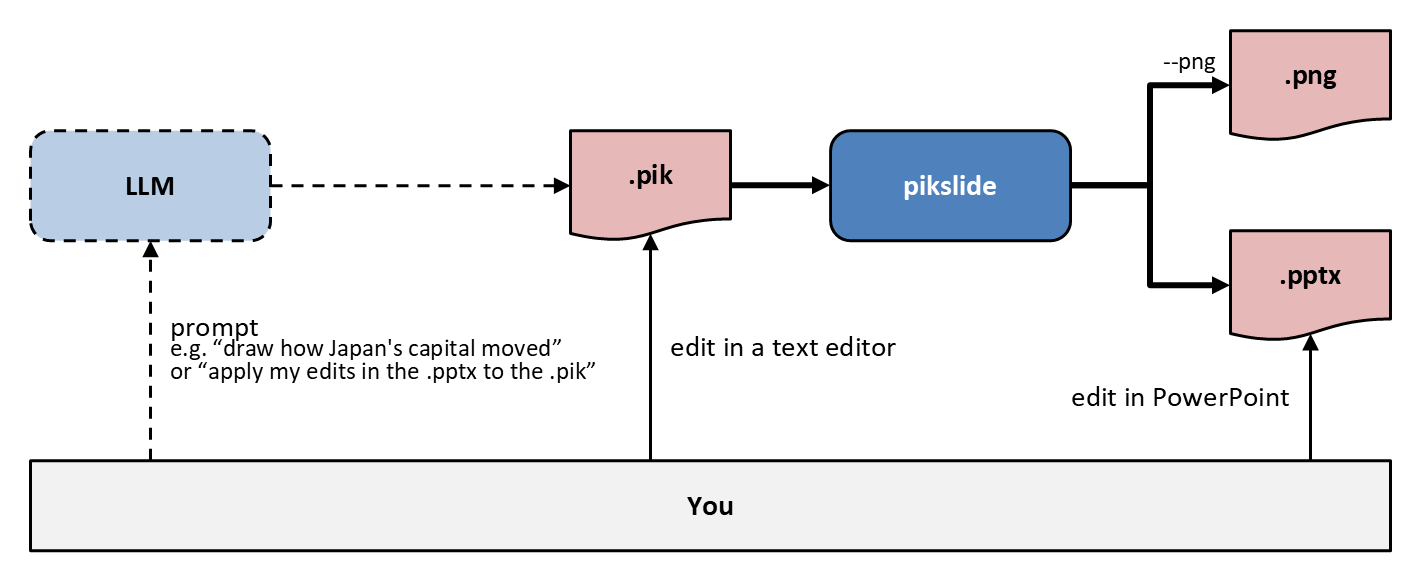
You don't write coordinates: you place objects one after another in a direction, and refer to earlier objects by name. A diagram becomes native, editable PowerPoint objects — shapes a person can select, restyle and move afterwards.
The language is specified in docs/spec.md and defined, in BNF, in docs/grammar.md. (pikslide's own design traces back through two earlier languages; see Acknowledgments, below.)
Status
v1 (docs/spec.md §1) is implemented: a parser, a layout stage, and
PowerPoint output; colors as a type of their own, with theme colors
(theme "accent1", lighter/darker) rendered as real schemeClr,
never resolved to RGB; fonts the same way — text set in the theme's own
font by default, not a hard-coded family, with major selecting the
heading font and typeface overriding both with one literal family;
three fixed text sizes (small/medium/large); a prelude of built-in
names (CSS color names, built-in defaults, the theme-color names); preset
shapes (shape roundRect, any of the ~180 OOXML presets, matched
case-insensitively); images (PNG/JPEG/GIF, and SVG — embedded together
with a PNG fallback for older viewers, sized explicitly or by aspect
ratio, path resolved and contained under the source file's own
directory); include "house.pik" for shared definitions (contained the
same way, with cycle detection); object identity — a label becomes the
shape's real PowerPoint name (an unlabeled object gets a default box 1-style name), and behind X places an object immediately below X
in z-order — so the Selection Pane reads like the source ([ ... ]
blocks are a source-level grouping construct only, flattened rather than
turned into a PowerPoint group when written out); starting a new
standalone deck from another file's theme instead of the built-in Office
one (--template); a template's settings file (<name>.theme.pik, or
--settings FILE), for its slide layout, font, accent colors and text
sizes; and diagnostics — file:line:column, the source line and a caret
for a syntax error (naming the right file even inside a nested
include), "did you mean" suggestions for an unknown
color/preset/image name, --strict, --check, and --format json.
Deliberately out of v1 (docs/spec.md §7): inserting into an existing
deck's slide, ```pikslide blocks in Markdown, connectors, SVG output,
auto-layout, tables/charts/SmartArt, animation, multi-slide authoring,
true Bézier curves, shape adjustment handles, arithmetic on colors.
How it works
- Parse — source is tokenized and parsed into an AST
(
pikslide.pik.ast.Document). - Layout — the AST is resolved into concrete 2-D geometry (box positions, arrow paths, text placement).
- Render — the resolved geometry is written out as PowerPoint objects.
Requirements
- Python 3.12+
Install
From PyPI, as a standalone pikslide command:
uv tool install pikslide
# or
pipx install pikslide
pikslide --version prints the version installed. To remove it later:
uv tool uninstall pikslide (or pipx uninstall pikslide).
From source
To work on pikslide itself, clone the repository and use
uv. The examples below call an installed
pikslide; in a clone, uv run pikslide ... runs it with no install step.
To install the clone as a standalone command instead (placed in
~/.local/bin), from the project root:
uv tool install .
If ~/.local/bin isn't on your PATH yet, run uv tool update-shell.
Usage
Dump the parsed tree for a .pik file (useful for inspecting how a script was
understood, or for debugging):
pikslide diagram.pik
Render a .pik file straight to PowerPoint:
pikslide diagram.pik diagram.pptx
The result is a new one-slide deck sized to the diagram; an existing OUTPUT is overwritten.
To draw on a real template's slide, in its theme and fonts, instead of the built-in Office ones:
pikslide diagram.pik diagram.pptx --template corporate.potx
pikslide diagram.pik diagram.pptx --template corporate.potx --layout "Two Content"
(OUTPUT may be omitted when --template is given: it then defaults to
INPUT's own path with its extension changed to .pptx.) The slide is the
template's own size, and the diagram goes at the top left of its content
area, clear of the title and footer. Its layout is the template's Title
and Content layout (the first with one placeholder besides its title,
date, footer and slide number), unless --layout or the template's
settings file names another, by its name or, where two layouts share a
name, its id. pikslide --help template has the details: the content
area, the settings file, and the defaults a template sets.
--check parses and lays out a source without writing anything, and
--format json emits diagnostics as one JSON object instead of plain
text — see pikslide --help for every flag.
pikslide --help TOPIC is the language reference: a keyword (--help box
gives its synopsis, attributes and defaults), a list (colors, shapes,
keywords, …), a color or a preset shape (--help accent1, --help callout1: what it looks like), or a manual (grammar, spec).
pikslide --help lists the topics.
With no arguments, pikslide prints its usage and points to
pikslide --help intro, the language in one page.
--png / --pdf also render the deck just written to a PNG or a PDF —
beside OUTPUT with the extension changed, or at an explicit path:
pikslide diagram.pik diagram.pptx --png --pdf
pikslide diagram.pik diagram.pptx --png images/diagram.png
(Give OUTPUT before --png/--pdf, since their PATH is optional.) This
uses PowerPoint itself, through COM automation (via powershell.exe),
when it's reachable — Windows, or WSL with a Windows PowerPoint install —
since that's the actual renderer pikslide's output is meant for; otherwise
it falls back to LibreOffice (soffice) and says so in a note: a
different rendering engine, good for a quick look but not for verifying
exact layout or text fit against real PowerPoint. --renderer powerpoint
or --renderer libreoffice uses only that one.
With no --template, pikslide sizes its slide exactly to the diagram, so
the PNG is an image of just the diagram, no separate cropping needed; with
one, it is the whole slide, as it will look in the deck. The PowerShell scripts
behind this (src/pikslide/ps/*.ps1) also run on their own from Windows
PowerShell.
Example
docs/examples/pipeline.pik:
arrow "Markdown" "Source" right 200%
box "pikslide" "Formatter" rad 10px fit
arrow "PPTX" "Output" right 200%
arrow <- down 70% from last box.s
file "pikslide" "Language" fit
pikslide docs/examples/pipeline.pik docs/examples/pipeline.pptx --png
docs/examples/ has more, each with the PPTX and PNG it renders to. docs/examples/japan-capitals.md is one that Claude Code drew, with the prompt it was given.
Limits of the current layout stage
The layout stage is a deliberately pragmatic subset of a full CAD-style
layout engine, covering common diagrams well rather than every case:
default object sizes, sequential chaining,
at/with/from/to/then/go/same/chop, and box/ellipse/diamond
edge geometry are all there, but a few things are simplified:
- spline/arc curves are drawn as straight polylines,
fittext sizing measures with the deck's own fonts when rendering to PowerPoint (docs/spec.md §3.3), but falls back to a flat per-character estimate otherwise,- chopping against diamond/cylinder/file shapes uses a rectangle-like approximation rather than each shape's true outline.
See the module docstrings in src/pikslide/pik/layout.py for details.
Development
uv run pytest
Test fixtures under tests/fixtures/examples/ are a corpus of official
example diagrams inherited via the port described in Acknowledgments,
kept as a regression net for behavior that hasn't deliberately changed.
Acknowledgments
pikslide traces its lineage through two earlier languages. Brian
Kernighan's pic (1984) introduced sequential, relative placement of
named objects — draw one thing, then the next one relative to it — rather
than absolute coordinates. D. Richard Hipp's pikchr
carried that idea into a full, modern language, emitting SVG. pikslide's
tokenizer, grammar, macro expansion, and layout engine began as a direct
port of pikchr's own, and the port goes well beyond syntax — default
object sizes, placement and chaining math, and edge geometry are all
inherited from it, not rebuilt from scratch. pikslide's own design departs
from there where a diagram that lives inside a PowerPoint slide, rather
than becoming an SVG picture, calls for a different answer.
pikchr's source states it is released under the Zero-Clause BSD license. See NOTICE for details.
License
1 maintainer

Metadata
1 maintainer
Release files for pikslide 0.1.0
For a detailed explanation of source distributions (sdists) and built distributions (wheels), please see the package formats documentation.
Source distribution (sdist)
| File | Size | Uploaded | Provenance | |
|---|---|---|---|---|
| pikslide-0.1.0.tar.gz | 131.2 kB | Without provenance | Details |
Built distribution (wheel)
| File | Interpreter | ABI | Platform | Reset |
|---|---|---|---|---|
| pikslide-0.1.0-py3-none-any.whl | Python 3 | none | any | Details |
Total release size: 272.5 kB
Release files / pikslide-0.1.0.tar.gz
| Download URL | pikslide-0.1.0.tar.gz |
|---|---|
| Size | 131.2 kB |
| Tags | Source |
|
SHA-256 checksum How to use checksums |
2631e9d316ce21ac4280131358af98df273642b0c23e073236877621f80d0d91
|
|
BLAKE2b-256 checksum How to use checksums |
c17a90cb47812871345d8785b06632eda6b24e2380354709e6132023da900351
|
| Upload date | |
|
Uploaded using Trusted Publishing? What is trusted publishing? |
Yes |
| Uploaded via |
uv/0.12.23 {"installer":{"name":"uv","version":"0.12.23","subcommand":["publish"]},"python":null,"implementation":{"name":null,"version":null},"distro":{"name":"Ubuntu","version":"24.04","id":"noble","libc":null},"system":{"name":null,"release":null},"cpu":null,"openssl_version":null,"setuptools_version":null,"rustc_version":null,"ci":true}
|
Release files / pikslide-0.1.0-py3-none-any.whl
| Download URL | pikslide-0.1.0-py3-none-any.whl |
|---|---|
| Size | 141.4 kB |
| Tags | Python 3 |
|
SHA-256 checksum How to use checksums |
e2cbba16adf928e7b7412e496f82d760595de00c667fd1e4e7036e2a349e11cc
|
|
BLAKE2b-256 checksum How to use checksums |
0ab654d533431191989120f6f7dc729236657729a9240f7430485b7c138f40e2
|
| Upload date | |
|
Uploaded using Trusted Publishing? What is trusted publishing? |
Yes |
| Uploaded via |
uv/0.12.23 {"installer":{"name":"uv","version":"0.12.23","subcommand":["publish"]},"python":null,"implementation":{"name":null,"version":null},"distro":{"name":"Ubuntu","version":"24.04","id":"noble","libc":null},"system":{"name":null,"release":null},"cpu":null,"openssl_version":null,"setuptools_version":null,"rustc_version":null,"ci":true}
|
Security for pikslide 0.1.0
Provenance
Provenance describes where a file came from. On PyPI, provenance is shared via attestations, which provide a verifiable record of the build or publishing details. View details, limitations and caveats.
No provenance found
None of the files in this release were uploaded with provenance metadata.
A note on package security
PyPI is a repository for distributing packages, not a service for auditing them. While third-party security researchers and our staff do their best to detect and remove malicious packages, PyPI cannot guarantee the quality, security or suitability of any given package.
To learn more about protecting yourself from malicious actors, visit our package security documentation.














