
pikslide
pikslide draws a diagram written as text into a PowerPoint slide.
The text, a .pik file, places shapes one after another and refers to
them by name, with no coordinates to work out. The slide it becomes is
made of native, editable PowerPoint shapes, colored by the deck's
theme: a person can select, move and restyle each one afterwards.
Text an LLM can write, and a slide a person can finish: pikslide is made for drawing with an LLM, with you in the loop.
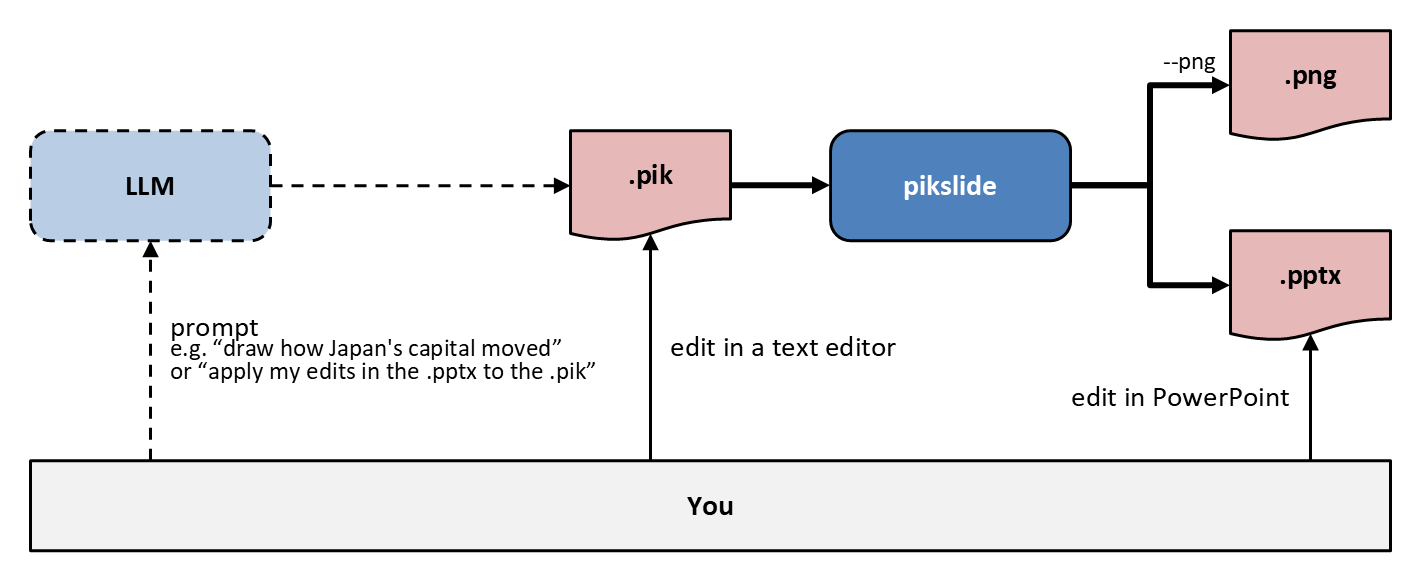
- You prompt the LLM, and it writes a
.pik. - pikslide renders the
.pikto a.pptxand, with--png, to a.pngas well. - You edit the
.pptxin PowerPoint and hand it back to the LLM with your next prompt. The LLM carries your edits into the.pik, so the next render keeps them: each shape in the.pptxis named after its label in the.pik, so the two match up. - Or skip PowerPoint: tell the LLM what to change, or edit the
.pikyourself.
The picture above is pikslide's own, docs/examples/pipeline.pik:
# Drawing a slide with an LLM and pikslide, with a person in the loop.
# The LLM writes a .pik, and pikslide renders it to a .pptx and, with
# --png, a .png. You step in where you like: prompt the LLM, edit the
# .pik, or edit the .pptx in PowerPoint and ask the LLM to apply your
# edits to the .pik.

boxwid = 1.2in
boxht = 0.55in
filewid = 0.8in
fileht = 0.55in

LLM: box "LLM"
arrow 1.5in
Pik: file ".pik"
arrow
Pikslide: box "pikslide" bold fill accent1 lighter 60%
Png: file ".png" with .w at 0.8in right of Pikslide.e + (0, 0.5in)
Pptx: file ".pptx" with .w at 0.8in right of Pikslide.e - (0, 0.5in)
arrow from Pikslide.e right 0.4in then up until even with Png then to Png.w
"--png" small above at 1/2<(Pikslide.e.x + 0.4in, Png.y), Png.w>
arrow from Pikslide.e right 0.4in then down until even with Pptx then to Pptx.w

You: box "You" bold wid (Pptx.e.x - LLM.w.x) ht 0.45in fill bg1 darker 5% \
    with .nw at (LLM.w.x, Pptx.s.y - 0.6in)
arrow "prompt" "e.g. “draw how Japan's capital moved”" small "or “apply my edits in the .pptx to the .pik”" small ljust from (LLM.x, You.n.y) to LLM.s
arrow "edit" ljust from (Pik.x, You.n.y) to Pik.s
arrow "edit in PowerPoint" rjust from (Pptx.x, You.n.y) to Pptx.s
docs/examples/japan-capitals.md is a slide Claude Code drew this way, in one run, with the prompt it was given. docs/ has more examples and a cookbook of diagram recipes.
Install
pikslide needs Python 3.12+. Install it from PyPI as a standalone
pikslide command:
uv tool install pikslide
# or
pipx install pikslide
# or, into the current virtual environment
pip install pikslide
pikslide --version prints the version installed.
To work on pikslide itself, clone the repository and use
uv: uv run pikslide ... runs the clone with
no install step, and uv tool install . installs it as the pikslide
command.
Usage
pikslide diagram.pik diagram.pptx                        # a one-slide deck, sized to the diagram
pikslide diagram.pik diagram.pptx --png                  # and diagram.png, drawn by PowerPoint
pikslide diagram.pik --template corporate.potx           # on the template's slide, in its theme
pikslide diagram.pik --check                             # lay it out, write nothing: errors and where each object went, as JSON
--png (and --pdf) use PowerPoint itself, on Windows or from WSL with
a Windows install, and fall back to LibreOffice otherwise: good for a
quick look, but not for checking exact layout against PowerPoint.
pikslide --help lists every flag. The language reference is built in,
so neither you nor an LLM needs this repository to write a diagram:
pikslide --help intro: the language in one page, the place to startpikslide --help box: a keyword's synopsis, attributes and defaultspikslide --help colors,shapes,keywords, …: the listspikslide --help template: drawing on a template's slidepikslide --help llm: the reference in one text, for an LLM to read once: short enough to come back whole from one command, and the same bytes from the same version, so a prompt that holds it can be cached
The full manuals, the language's design and its grammar, are in this repository: spec.md and grammar.md.
Status
The language's v1 is implemented. Not in it yet: drawing into an existing deck's slide, connectors, auto-layout, and multi-slide decks, among others (spec.md §7).
Development
uv run pytest
The layout stage's simplifications are listed in the docstring of
src/pikslide/pik/layout.py.
Acknowledgments
pikslide descends from Brian Kernighan's pic (1984), which placed named
objects one after another instead of at coordinates, and D. Richard Hipp's
pikchr, which carried that idea into a modern
language emitting SVG. pikslide's tokenizer, grammar, macro expansion and
layout engine began as a port of pikchr's own, default sizes, placement
and edge geometry included, and its test fixtures under
tests/fixtures/examples/ are pikchr's example diagrams. pikchr is
released under the Zero-Clause BSD license; see
NOTICE.
License
1 maintainer

Metadata
1 maintainer
Release files for pikslide 0.1.2
For a detailed explanation of source distributions (sdists) and built distributions (wheels), please see the package formats documentation.
Source distribution (sdist)
| File | Size | Uploaded | Provenance | |
|---|---|---|---|---|
| pikslide-0.1.2.tar.gz | 133.0 kB | Without provenance | Details |
Built distribution (wheel)
| File | Interpreter | ABI | Platform | Reset |
|---|---|---|---|---|
| pikslide-0.1.2-py3-none-any.whl | Python 3 | none | any | Details |
Total release size: 274.5 kB
Release files / pikslide-0.1.2.tar.gz
| Download URL | pikslide-0.1.2.tar.gz |
|---|---|
| Size | 133.0 kB |
| Tags | Source |
|
SHA-256 checksum How to use checksums |
bf637d8d6f88f495e7e5cd212c58a3c161c95ba6df08b8ca3002a75de7a81fab
|
|
BLAKE2b-256 checksum How to use checksums |
eb27a3d227adc683d7bce4ccceaa40f52d02a3719e700968168d595284343633
|
| Upload date | |
|
Uploaded using Trusted Publishing? What is trusted publishing? |
Yes |
| Uploaded via |
uv/0.13.0 {"installer":{"name":"uv","version":"0.13.0","subcommand":["publish"]},"python":null,"implementation":{"name":null,"version":null},"distro":{"name":"Ubuntu","version":"24.04","id":"noble","libc":null},"system":{"name":null,"release":null},"cpu":null,"openssl_version":null,"setuptools_version":null,"rustc_version":null,"ci":true}
|
Release files / pikslide-0.1.2-py3-none-any.whl
| Download URL | pikslide-0.1.2-py3-none-any.whl |
|---|---|
| Size | 141.5 kB |
| Tags | Python 3 |
|
SHA-256 checksum How to use checksums |
8a108082bd376f316212f785a51dc4969b4ca098c24e17a553bbb6a44ba5de85
|
|
BLAKE2b-256 checksum How to use checksums |
4c08f6d0c2c667bf0c357089d921a196d946a0e65afaaf2ee206c8d46120e7f3
|
| Upload date | |
|
Uploaded using Trusted Publishing? What is trusted publishing? |
Yes |
| Uploaded via |
uv/0.13.0 {"installer":{"name":"uv","version":"0.13.0","subcommand":["publish"]},"python":null,"implementation":{"name":null,"version":null},"distro":{"name":"Ubuntu","version":"24.04","id":"noble","libc":null},"system":{"name":null,"release":null},"cpu":null,"openssl_version":null,"setuptools_version":null,"rustc_version":null,"ci":true}
|
Security for pikslide 0.1.2
Provenance
Provenance describes where a file came from. On PyPI, provenance is shared via attestations, which provide a verifiable record of the build or publishing details. View details, limitations and caveats.
No provenance found
None of the files in this release were uploaded with provenance metadata.
A note on package security
PyPI is a repository for distributing packages, not a service for auditing them. While third-party security researchers and our staff do their best to detect and remove malicious packages, PyPI cannot guarantee the quality, security or suitability of any given package.
To learn more about protecting yourself from malicious actors, visit our package security documentation.














