





Website · Install · Quick Start · Modes · CLI Reference · JSON Output · Security
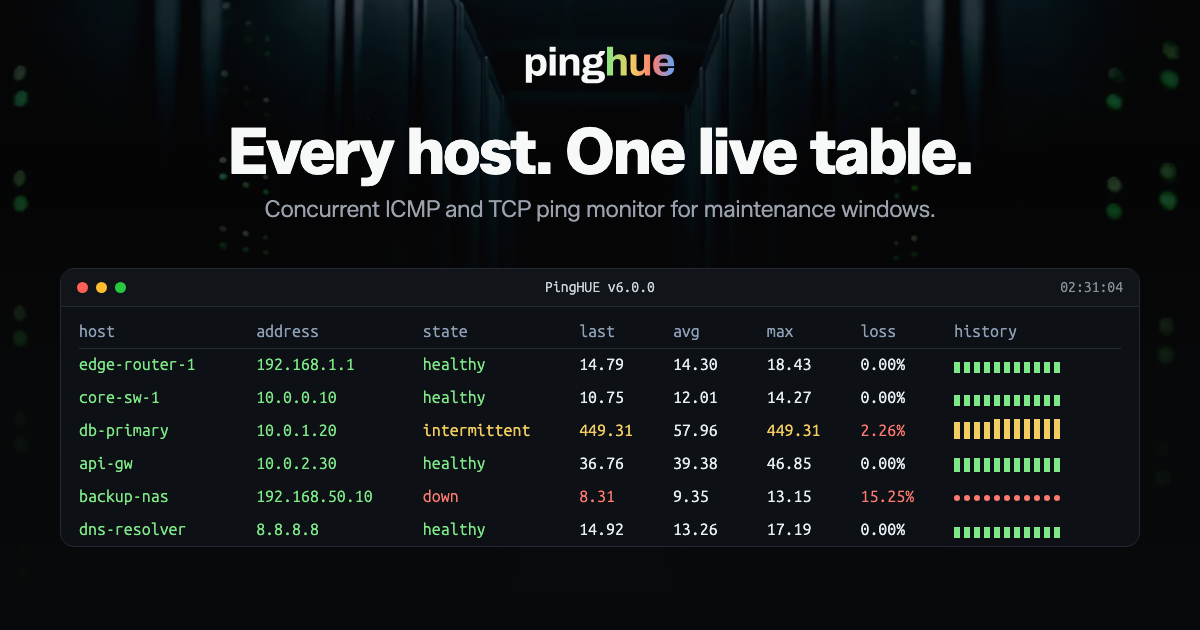
pinghue is a colored, concurrent ICMP/TCP ping monitor for maintenance windows. It gives operators a dense terminal view for many hosts at once and can also write structured JSON for reports, cron jobs, and CI checks.
Current version: 6.0.0. The command-line interface and JSON output are stable public interfaces. JSON output uses schema_version: 1; breaking JSON changes require a new schema version.
Why pinghue
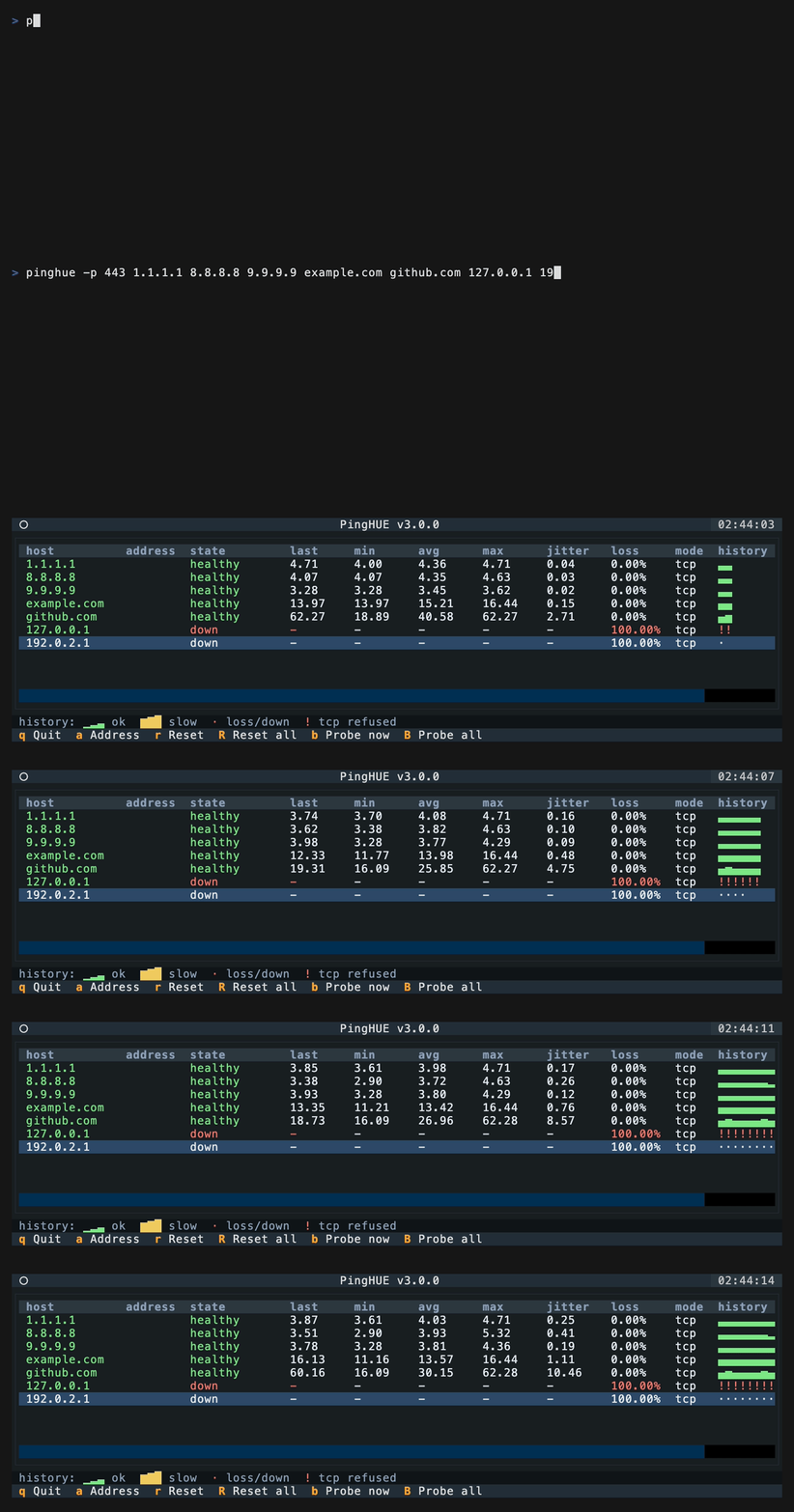
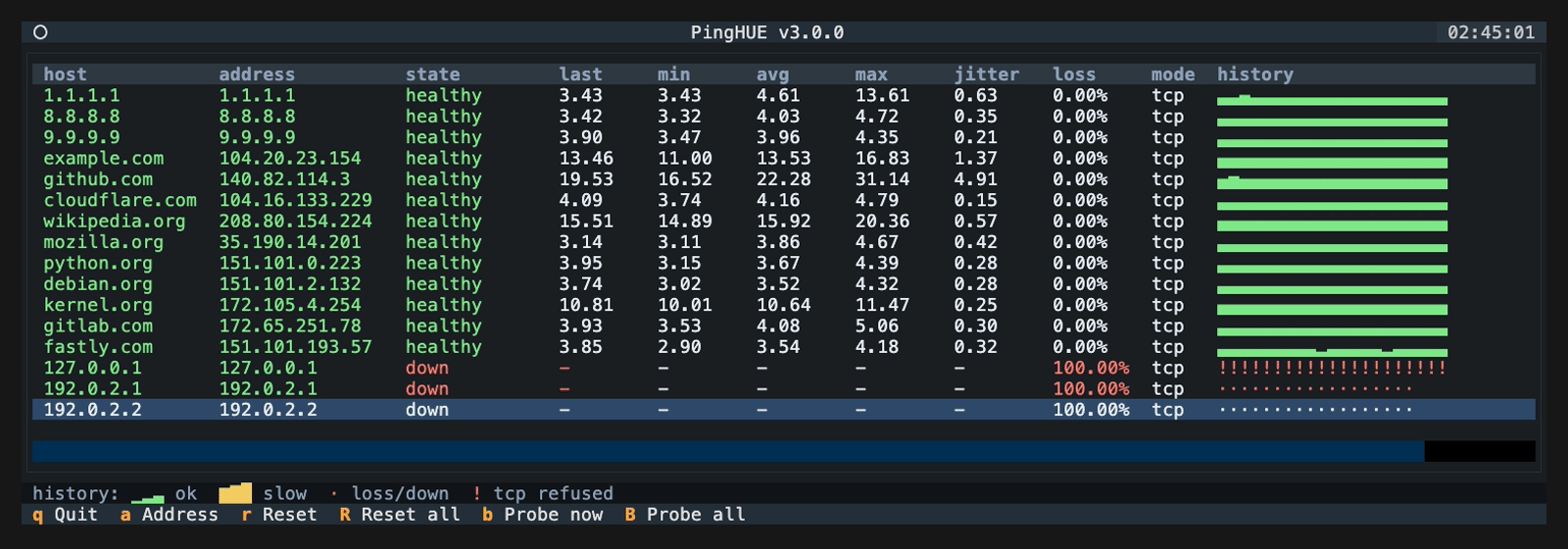
| Dense at-a-glance view Watch many hosts in one readable terminal table — per-host latency, loss, jitter, and a live history bar. |
ICMP & TCP Default ICMP, or TCP connect checks with -p. Up to 1024 concurrent TCP probes; in ICMP mode, a probe slot for every target (up to 5,000). |
Evidence-ready JSON--output writes a stable schema_version 1 summary for reports, cron, and CI. |
| Whole-run accuracy Host states reflect everything that happened in the window, not just the most recent probes. |
Scriptable--no-tui, --count, --duration, and fail-on-down exit codes for automation. |
Local & safe No server, no daemon, no credentials. Runs on macOS and Linux, Python 3.11–3.14. |
Install
Recommended isolated installs from PyPI:
uv tool install pinghue
or:
pipx install pinghue
Plain pip also works inside a virtual environment:
python -m pip install pinghue
Homebrew is available through the inxbit/tap tap:
brew install inxbit/tap/pinghue
The tap repository is inxbit/homebrew-tap; Homebrew exposes it as inxbit/tap.
For contributors, install from a local clone in editable mode:
git clone https://github.com/inxbit/pinghue.git
cd pinghue
python -m venv .venv
. .venv/bin/activate
python -m pip install -e ".[dev]"
The dev extra installs the local package plus the test, type-checking, linting, build, and schema-validation tools used by the repository.
Quick Start
pinghue 1.1.1.1 8.8.8.8 example.com
pinghue -f hosts.txt
pinghue -p 443 example.com
pinghue -p 1 127.0.0.1 -c 1 --no-tui
pinghue --output maintenance.json 1.1.1.1 example.com
pinghue --output maintenance.json --overwrite 1.1.1.1 example.com
pinghue --host-label maintenance-window --output maintenance.json 1.1.1.1
Host files are plain text. Blank lines and # comments are ignored. Inline comments
on host lines are also ignored (host.example # comment).
Host files must be non-symlink regular files, at most 1 MiB, and at most 5,000
lines. A run accepts at most 5,000 unique targets in total, and each target string
is capped at 253 characters. Lines end only at \n, \r\n, or a lone \r. Other
line-break characters, such as form feeds or Unicode line separators, stay inside
the line instead of splitting it into several targets: control characters make
the target invalid, and anything else non-ASCII is shown escaped.
# edge and core checks
1.1.1.1
8.8.8.8
example.com
internal-db.corp
What This Is
- A focused terminal monitor for maintenance windows, migrations, and quick reachability checks.
- A concurrent ICMP/TCP probe runner with a readable Textual TUI.
- A scriptable probe tool with
--no-tui,--count,--duration, and--output. - A JSON-producing report helper for post-maintenance evidence.
- A local operator tool designed for macOS and Linux.
What This Is Not
- Not a Prometheus, Smokeping, Zabbix, or NMS replacement.
- Not a long-running metrics database or alerting system.
- Not a privileged daemon.
- Not a packet capture or traceroute tool.
- Not a service that accepts remote network requests.
Supported Platforms
The supported platform contract is macOS and Linux on Python 3.11 through 3.14. CI runs on both macOS and Linux for every supported Python version. Python 3.10 reached end of life in October 2026, and 6.0.0 dropped support for it.
The TUI assumes an ANSI-capable terminal with Unicode glyph support. Windows and other POSIX platforms are outside the declared support scope unless explicitly added later.
Stability Policy
pinghue treats CLI flags and JSON exports as compatibility contracts. schema_version: 1 is the JSON v1 contract: additive fields are non-breaking, but removing fields, changing field types, changing enum values, or changing required-field behavior requires a new schema version.
CLI removals, flag renames, and incompatible behavior changes are deprecated for at least one minor release before removal. Deprecated flags continue to parse during that window and release notes identify the replacement. Patch releases do not intentionally break CLI or JSON consumers.
A narrowly scoped safety or security limit may be enforced without that deprecation window when preserving the old behavior would leave a material resource-exhaustion or integrity risk. The exception must be identified in the release notes and, when it changes accepted CLI behavior, ships only in a major release.
Starting with 1.0.0, release versions follow semantic versioning: patch releases are bug fixes, minor releases may add compatible behavior, and major releases are reserved for breaking CLI or JSON changes.
2.0.0 changes the default --output behavior: existing regular files are preserved unless --overwrite is passed. Scripts that intentionally reuse the same JSON path should add --overwrite.
The next major release uses the security exception above for --output paths through which another local user could read the report: it refuses an existing FIFO owned by another user, an existing FIFO that group or other users can open in the default private output mode, and an --overwrite target owned by another user (see JSON Output). It uses the same exception for host files, whose lines end only at \n, \r\n, or a lone \r: a host file that separates targets with vertical tabs, form feeds, file/group/record separators, or NEL is refused as an invalid target, and Unicode line and paragraph separators no longer split a line (see Quick Start). The same release treats --output ./- as a file named - in the current directory; only a bare - writes the report to stdout.
Modes
pinghue defaults to ICMP mode:
pinghue 1.1.1.1 example.com
TCP mode is enabled by passing a port:
pinghue -p 443 example.com api.internal
ICMP probes run on the event loop over a few shared unprivileged datagram sockets per address family, so a probe costs no thread or file descriptor of its own. Replies are matched on sequence number, source address, and a random per-probe token (plus the echo identifier on macOS), so another ICMP tool's traffic cannot be credited to a target. A destination-unreachable or time-exceeded error that quotes a probe is reported as unreachable as soon as it arrives, on Linux and macOS. ICMP latency is measured with a monotonic clock; on Linux the kernel's receive timestamp is used when it agrees with that clock, so time the event loop spends elsewhere is not counted and a wall-clock step cannot produce a negative or inflated latency.
TCP latency is the connect time. On Linux it is the kernel's handshake RTT (TCP_INFO) when that is smaller and no SYN was retransmitted, so a busy event loop is not reported as network latency; after a SYN retransmission the full connect time is kept so the delay stays visible.
Use no-TUI mode for scripts, cron, CI, and package smoke tests:
pinghue -p 443 example.com -c 3 --no-tui
Starting the TUI while stdout is not a terminal (for example under cron or a
pipe) prints a warning on stderr; a future major release will switch to
--no-tui automatically in that case.
The TUI draws on stderr, so with stderr closed (for example 2>&-) it does
not start and pinghue exits with status 1.
Example no-TUI output:
2026-05-14T18:32:11.420000+00:00 1.1.1.1 ok latency=9.20ms
2026-05-14T18:32:11.421000+00:00 example.com ok latency=14.08ms
2026-05-14T18:32:12.420000+00:00 api.internal timeout latency=-
Each line is written as soon as its probe result lands, also when stdout is a
pipe or a file. If the reader goes away (for example | head), the run stops as
if interrupted and still writes --output. Any other failure to write a line,
such as a full disk, stops the run the same way after a warning on stderr.
Both modes start probing each target as soon as its own name resolves (IP
literals at once) and spread the targets' first probes evenly across one
interval, or across half the run when --duration is shorter than two
intervals, so a large host list is not probed in one burst.
CLI Reference
pinghue [OPTIONS] [TARGET ...]
| Option | Default | Description |
|---|---|---|
TARGET ... |
none | Hostnames or IP addresses to probe, up to 253 characters each. Required unless --check is used. |
-f, --file PATH |
none | Read targets from a non-symlink plain-text host file. Blank lines and full-line/inline # comments are ignored. |
-p, --port PORT |
ICMP | Enable TCP connect checks against PORT. Valid range: 1-65535. |
--ipv4 |
off | Force IPv4 resolution/probing. |
--ipv6 |
off | Force IPv6 resolution/probing. |
-n, --numeric |
off | Skip DNS and require IP literals. |
-i, --interval SEC |
1.0 |
Seconds between probes. Minimum: 0.1. |
--timeout SEC |
interval | Per-probe timeout in seconds. Must be greater than 0. |
-c, --count N |
continuous | Stop after N probes per target. First probes are spread across one interval, so a run with several targets can take up to one interval longer. A probe that could not run because no resolver thread was free does not count. Intentionally has no upper bound. |
--duration SEC |
continuous | Stop after elapsed seconds. Intentionally has no upper bound. |
--no-tui |
off | Print one line per probe instead of launching the TUI. |
--output PATH |
none | Write a JSON run summary on exit. - writes to stdout, requires --no-tui, and moves per-probe lines to stderr so stdout carries only the JSON document; ./- names a file. Existing regular files are not replaced unless --overwrite is set. A path that would be refused is reported before probing starts. |
--overwrite |
off | Allow --output to rewrite an existing single-link regular file owned by the current user in place. The rewrite is type-safe but not crash-atomic. |
--output-mode {private,umask} |
private |
Permissions for the --output file: private (0600, owner only) or umask (honor the process umask). private also refuses an existing FIFO that group or other users can open. |
--no-samples |
off | Emit empty per-target samples arrays in JSON output. |
--concurrency N |
automatic | Maximum concurrent probes, 1-1024. A probe holds its slot until the reply or the timeout, so the default is sized from the run: enough slots for every target to time out once per probe cycle (targets × timeout ÷ max(interval, timeout + 0.1), plus 25% headroom), at least 64. In ICMP mode an in-flight probe holds no thread or socket of its own, so the default may reach 5000, a slot for every target at the 5,000-target cap, and keeps every host on its interval even when all of them are silent. In TCP mode every in-flight probe holds a socket, so the default stops at 1024 (about 1,100 silent targets when the timeout equals the interval); past that, silent targets stretch every target's cadence and a shorter --timeout restores it. In TCP mode pinghue also raises its soft open-file limit to fit the concurrency, never past the hard limit, and otherwise lowers the concurrency with a warning on stderr. |
--jitter-threshold MS |
50.0 |
Mark jitter as attention-worthy above this RFC 3550 interarrival jitter, in milliseconds. |
--fail-threshold COUNT |
3 |
Classify a previously responsive host as down after this many consecutive failures; all-failure runs are down immediately. |
--fail-on-any-down |
off | Exit 3 when any target finishes down. |
--fail-on-all-down |
off | Exit 3 only when all targets finish down. --fail-on-down remains a compatibility alias. |
--history-style STYLE |
bar |
One of bar, dots, sparkline (an alias of bar), or none. |
--check |
off | Run the environment doctor and exit. |
--resolve-name HOST |
example.com |
With --check, resolve this host for DNS diagnostics, up to 253 characters. Defaults to the first target when provided. |
--quiet |
off | With --check, suppress output and use only the exit code. |
--host-label LABEL |
local |
Operator-controlled host label written to JSON output, up to 128 characters. |
-v, --version |
none | Print the installed version. |
-h, --help |
none | Print help. |
Exit codes
| Code | Meaning |
|---|---|
0 |
Run completed (and no --fail-on-* condition triggered). Interrupting a run with Ctrl-C in --no-tui mode, or with SIGTERM or SIGHUP in either mode, still evaluates the fail conditions and writes --output, matching classic ping behavior; the JSON exit_reason field records interrupted. A SIGHUP that is already ignored when pinghue starts (for example under nohup) stays ignored. In the TUI, use q, which records user_quit. |
1 |
Runtime error (for example the --output file could not be written), or --check found the environment not ICMP-ready. |
2 |
Usage error: unknown flag or invalid value. |
3 |
--fail-on-any-down / --fail-on-all-down condition triggered. |
A target the run never probed, for example one still resolving (shown as
pending in the TUI) when --duration ends, has no evidence that it is up,
so both --fail-on-* options count it as down.
TUI Controls
| Key | Action |
|---|---|
q |
Quit. |
a |
Show or hide resolved addresses. |
r |
Reset the selected host. |
R |
Reset all hosts. |
b |
Probe the selected host immediately. |
B |
Probe all hosts immediately. |
The header shows a fleet summary next to the title: how long ago the stalest host's newest result arrived (oldest 1.2s), then how many hosts are in each state, problems first and healthy last, so a narrow terminal cuts the least useful part. That age turns amber once it falls well behind --interval and --timeout, which means probes are not keeping up. Hosts that have sent all their --count probes, and hosts whose probe loop failed (counted as error), no longer count toward it.
Columns follow the terminal width so the newest history glyphs stay on screen without horizontal scrolling. On narrow terminals the history column shrinks first, then the hidden address placeholder and the mode column collapse before host names are shortened, then the host column shrinks down to 12 characters; below that the min and max columns collapse instead of squeezing host names further. Host names longer than their column keep their start and the part that tells them apart from the other hosts, with a … at each cut: db-primary-001.dc1.exam…, or db-primar…001… on a narrow terminal.
With thousands of hosts, rows on screen refresh every half second, state changes reach every row and the header summary on the next refresh, and other values in rows scrolled out of view catch up within a few seconds, or as soon as they scroll into view. That catch-up runs in short chunks, so redrawing the table never holds up probes for long.
History Legend
The default history style is a fixed-scale colored bar:
- Green bar: successful probe.
- Amber bar: successful probe above the slow-latency threshold.
- Red
./·: timeout, loss, or down state. - Amber
!: TCP refused.
Successful latency uses ▁▂▃▄▅▆▇█.
The fixed mapping keeps rows comparable:
| Latency | Glyph |
|---|---|
<=1ms |
▁ |
<=3ms |
▂ |
<=10ms |
▃ |
<=30ms |
▄ |
<=100ms |
▅ |
<=300ms |
▆ |
<=1000ms |
▇ |
>1000ms |
█ |
Use --history-style dots or --history-style none when a terminal font or workflow needs a simpler display. --history-style sparkline is accepted as an alias of bar.
Host States
pinghue classifies each host from the whole run, not just the most recent probes. Once a host has replied successfully, down requires --fail-threshold consecutive failures. A run with no successful replies is down immediately, even if it ends before the threshold. Any packet loss, or any observed jitter above --jitter-threshold, latches the host as intermittent until you reset it (r or R in the TUI). The reported jitter_ms remains the current decaying RFC 3550 estimate, so it can later fall below the threshold while the whole-run status stays intermittent. This is intentional: a maintenance-window report should reflect everything that happened, not only the final moments.
Hostnames are resolved with the operating system resolver, up to 32 lookups at a time. Each lookup gets 12 seconds, enough for the resolver to fail over from an unresponsive first nameserver (glibc waits 5 seconds per nameserver by default). A name that does not resolve shows dns_failure and is retried after about 10 seconds; a name whose lookups keep timing out backs off to about 30 and then 60 seconds, with jitter so failed names do not retry together. A lookup that runs out of time keeps its resolver thread until the OS resolver returns (at most 128 threads); if every thread is busy, a host waiting for one keeps its current state (resolving before its first lookup) and retries on its next probe instead of being reported as a DNS failure. When a resolved host keeps failing, its name is looked up again in the background, at most once per retry interval, while its known addresses keep being probed; the new answer is used only if the host is still failing. A name that resolves only to 0.0.0.0 or ::, which DNS filters return for blocked names, is reported as dns_failure rather than probed.
In the TUI, a host whose address is known but that has no probe result yet (just resolved, or just reset) shows pending rather than resolving or down; JSON output keeps the underlying status.
Slate + Signal Palette
pinghue uses a low-glare Slate + Signal palette designed for long maintenance windows: dark structure, high-contrast text, and saturated status colors that make the affected metric stand out quickly.
| Role | Hex | Used for |
|---|---|---|
| Background | #101418 |
Terminal body and empty space. |
| Panel | #151b22 |
Table surface and primary content areas. |
| Header | #1b2630 |
Title bars and footer bands. |
| Border | #2a313a |
Table outlines and separators. |
| Text | #e6edf3 |
Normal readable values. |
| Muted | #8ea0b8 |
Labels, secondary text, and inactive chrome. |
| Green | #7ee787 |
Healthy state, successful probes, and normal history bars. |
| Amber | #f2cc60 |
Slow latency, high jitter, intermittent state, and TCP refused markers. |
| Red | #ff7b72 |
Loss, down state, timeouts, and failed history markers. |
| Selection Blue | #58a6ff |
Focus accents and selected-row treatment. |
Doctor
Run the doctor before relying on ICMP mode:
pinghue --check
Linux may block unprivileged ICMP sockets. TCP mode does not need special privileges:
pinghue -p 443 example.com
If pinghue --check reports that your GID is outside net.ipv4.ping_group_range, the preferred fix is to allow only your current group:
gid="$(id -g)"
sudo sysctl -w "net.ipv4.ping_group_range=${gid} ${gid}"
echo "net.ipv4.ping_group_range=${gid} ${gid}" \
  | sudo tee /etc/sysctl.d/99-pinghue.conf
The broader range 0 2147483647 also works, but enables unprivileged ICMP for every local group on the system.
setcap cap_net_raw does not work for pip or Homebrew installs: the pinghue command is a Python launcher script, and Linux ignores file capabilities on interpreter scripts. Use the ping_group_range fix above, or TCP mode. Do not set capabilities on a shared Python interpreter.
The doctor also reports the open-file limit, which bounds TCP mode only. Every in-flight TCP probe holds a socket, and pinghue keeps 448 descriptors in reserve (half the limit, but at least 32, when the limit is below 896): enough for its own files plus every resolver thread holding its sockets while lookups hang during a DNS outage. --concurrency 1024 in TCP mode therefore needs a limit of at least 1472. pinghue raises its own soft limit at startup to fit the TCP concurrency, never past the hard limit; when --check warns that the hard limit caps concurrency, raise the hard limit (for example LimitNOFILE= in a systemd unit or /etc/security/limits.conf). ICMP probes share a few sockets, so the limit does not cap ICMP concurrency; in ICMP mode pinghue still raises its soft limit to the reserve when the hard limit allows.
JSON Output
--output PATH writes one JSON document per run. Existing regular files are preserved by default; add --overwrite when replacing a known report path is intentional. Symlinks, sockets, multiply linked regular files, and other unsupported special nodes are never replaced. Existing character devices and FIFOs are written directly only when they can be opened safely as the same node. This is the breaking 2.0.0 CLI change for scripts that previously reused the same output file. The schema lives at schemas/output-v1.schema.json, and an example lives at examples/pinghue-output-example.json.
In a shared directory such as /tmp, another local user can create the report path before PingHue does. A FIFO is written only when it is owned by the effective user, and --overwrite refuses a regular file owned by anyone else; character devices are accepted regardless of owner, because the only one an unprivileged user can create is the driverless 0:0 whiteout device on Linux, which is refused. In the default private output mode a FIFO is also written only when its permissions give group and other users no access: mkfifo under the usual umask 022 creates mode 0644, which lets every local user open it and read the report, so create it with mkfifo -m 600, or pass --output-mode umask to accept its permissions as they are. The bits are checked when PingHue opens the FIFO, and a chmod does not revoke a reader that opened the FIFO, or was waiting to open it, while group or other users had access, so remove a FIFO that was ever open to them and recreate it with mkfifo -m 600 instead of changing its mode. On macOS a /dev/fd/N path names one of the run's own descriptors, and PingHue judges the file open on it. A pipe, which process substitution passes, is accepted whatever its fixed permission bits show, because it has no name that other users could open it by; a named FIFO behind the descriptor, as in --output /dev/fd/3 3>report.fifo, is judged by its own permissions like any other FIFO. These refusals exit with status 1 and write nothing. PingHue checks the output path before probing starts, so a path it would refuse, an existing node or directory it cannot write, or a parent that is not a directory is reported at once instead of after the run, and checks again when it writes the report. The directory itself is not checked: a user who owns it, or can write to it without the sticky bit, can still replace a finished report, so keep evidence in a directory that only you control.
New report creation is no-clobber and first tries to hard-link a complete temporary report into place atomically. On filesystems without hardlink support (for example exFAT and some FUSE mounts), it falls back to an exclusive create and copy: ordinary errors and handled interrupts remove that fallback file, but an abrupt process or system failure can leave a partial new report. Explicitly overwriting an existing regular file uses a descriptor-verified in-place rewrite so a path race cannot replace a symlink, socket, FIFO, or device node; that path is also not crash-atomic. Evidence workflows should accept a report only after PingHue exits successfully and the JSON parses, then rotate it as a separate step.
pinghue -f hosts.txt --duration 180 --output maintenance.json
pinghue -f hosts.txt --duration 180 --output maintenance.json --overwrite
Use --no-samples when you only need final per-target statistics.
Every output document includes:
schema_versionpinghue_version- run metadata (including
samples_window) - probe configuration
- ordered target results
- per-target stats
- optional per-probe samples
Per-target stats (sent, received, loss, latency, jitter) are computed over every probe in the run, so stats.sent reflects the whole run. The per-target samples array retains only the most recent run.samples_window probes. The window is at most 1000 per target and is reduced uniformly when needed to keep the run-wide retained tail within 100,000 samples. On long runs stats.sent therefore exceeds len(samples) — that is expected windowing, not a truncated file. When reconciling evidence, treat samples as the recent tail and stats as authoritative for the full run; --no-samples emits an empty array for every target.
The run.host field defaults to local to avoid leaking workstation hostnames. Use --host-label when a report needs an operator-selected system or maintenance-window label. Operator-visible target, host-label, and error text is escaped outside printable ASCII so terminal controls and visually deceptive Unicode are represented literally.
Security Model
pinghue is a local CLI/TUI. It does not run a server, accept remote requests, store credentials, or require secrets. The security-sensitive areas are:
- terminal rendering of operator-supplied hostnames and OS error strings
- Linux ICMP privilege configuration
- local output paths selected by the operator
- release workflow integrity
See pinghue-threat-model.md, security-best-practices-report.md, and SECURITY.md.
Release Channels
Published release channels:
- GitHub repository:
inxbit/pinghue - GitHub Actions CI on Linux and macOS
- GitHub Release with sdist and wheel artifacts
- PyPI trusted publishing through a protected
pypienvironment - Homebrew tap:
inxbit/tapfrominxbit/homebrew-tap
The release workflow is tag-driven, but only after the release PR has merged.
Create the signed annotated tag from the merged public main commit:
git fetch --prune origin
git tag -s vX.Y.Z -m "Release vX.Y.Z" "$(git rev-parse origin/main)"
git tag -v vX.Y.Z
git push origin vX.Y.Z
Development
Contributor setup, hash-pinned dependency audits, tests, and build verification are documented in the repository's CONTRIBUTING.md. Those maintainer tools are intentionally not part of the installed package.
License
MIT. See LICENSE.
1 maintainer

Metadata
1 maintainer
Release files for pinghue 6.0.0
For a detailed explanation of source distributions (sdists) and built distributions (wheels), please see the package formats documentation.
Source distribution (sdist)
| File | Size | Uploaded | Provenance | |
|---|---|---|---|---|
| pinghue-6.0.0.tar.gz | 2.0 MB | With provenance | Details |
Built distribution (wheel)
| File | Interpreter | ABI | Platform | Reset |
|---|---|---|---|---|
| pinghue-6.0.0-py3-none-any.whl | Python 3 | none | any | Details |
Total release size: 2.1 MB
Release files / pinghue-6.0.0.tar.gz
| Download URL | pinghue-6.0.0.tar.gz |
|---|---|
| Size | 2.0 MB |
| Tags | Source |
|
SHA-256 checksum How to use checksums |
7aaa96e10ec56957dc37f5fee3d250657cef366f9c88cfde1cce505b8e600508
|
|
BLAKE2b-256 checksum How to use checksums |
36e43d7bcc67abf70c5979db5aaa05bb94ec991912091d33483541d0bf5d6c5e
|
| Upload date | |
|
Uploaded using Trusted Publishing? What is trusted publishing? |
Yes |
| Uploaded via |
twine/7.0.0 CPython/3.13.14
|
Provenance
Provenance describes where a file came from. On PyPI, provenance is shared via attestations, which provide a verifiable record of the build or publishing details. View details, limitations and caveats.


PyPI Publish Attestation
PyPI verified that this artifact, at this checksum, originated from the publisher listed below.
Signed by GitHub Actions, verified by PyPI on Oct 22, 2026.
Transparency logRelease files / pinghue-6.0.0-py3-none-any.whl
| Download URL | pinghue-6.0.0-py3-none-any.whl |
|---|---|
| Size | 81.3 kB |
| Tags | Python 3 |
|
SHA-256 checksum How to use checksums |
9edd0c8559799517f3459a380135e8126f6938bf7270472ce2d99f60a08ed368
|
|
BLAKE2b-256 checksum How to use checksums |
98a2c0aec5c2244f554b9f36be037dc94974a1ba609b3e231d2f8d577cd4671a
|
| Upload date | |
|
Uploaded using Trusted Publishing? What is trusted publishing? |
Yes |
| Uploaded via |
twine/7.0.0 CPython/3.13.14
|
Provenance
Provenance describes where a file came from. On PyPI, provenance is shared via attestations, which provide a verifiable record of the build or publishing details. View details, limitations and caveats.
PyPI Publish Attestation
PyPI verified that this artifact, at this checksum, originated from the publisher listed below.
Signed by GitHub Actions, verified by PyPI on Oct 22, 2026.
Transparency logSecurity for pinghue 6.0.0
Provenance
Provenance describes where a file came from. On PyPI, provenance is shared via attestations, which provide a verifiable record of the build or publishing details. View details, limitations and caveats.
Full provenance
All 2 files in this release have been uploaded with provenance metadata.
Attestation for pinghue-6.0.0.tar.gz
PyPI Publish Attestation
PyPI verified that this artifact, at this checksum, originated from the publisher listed below.
Signed by GitHub Actions, verified by PyPI on Oct 22, 2026.
Transparency logA note on package security
PyPI is a repository for distributing packages, not a service for auditing them. While third-party security researchers and our staff do their best to detect and remove malicious packages, PyPI cannot guarantee the quality, security or suitability of any given package.














