
pipask: Know What You're Installing Before It's Too Late
A safer way to install Python packages without compromising convenience.
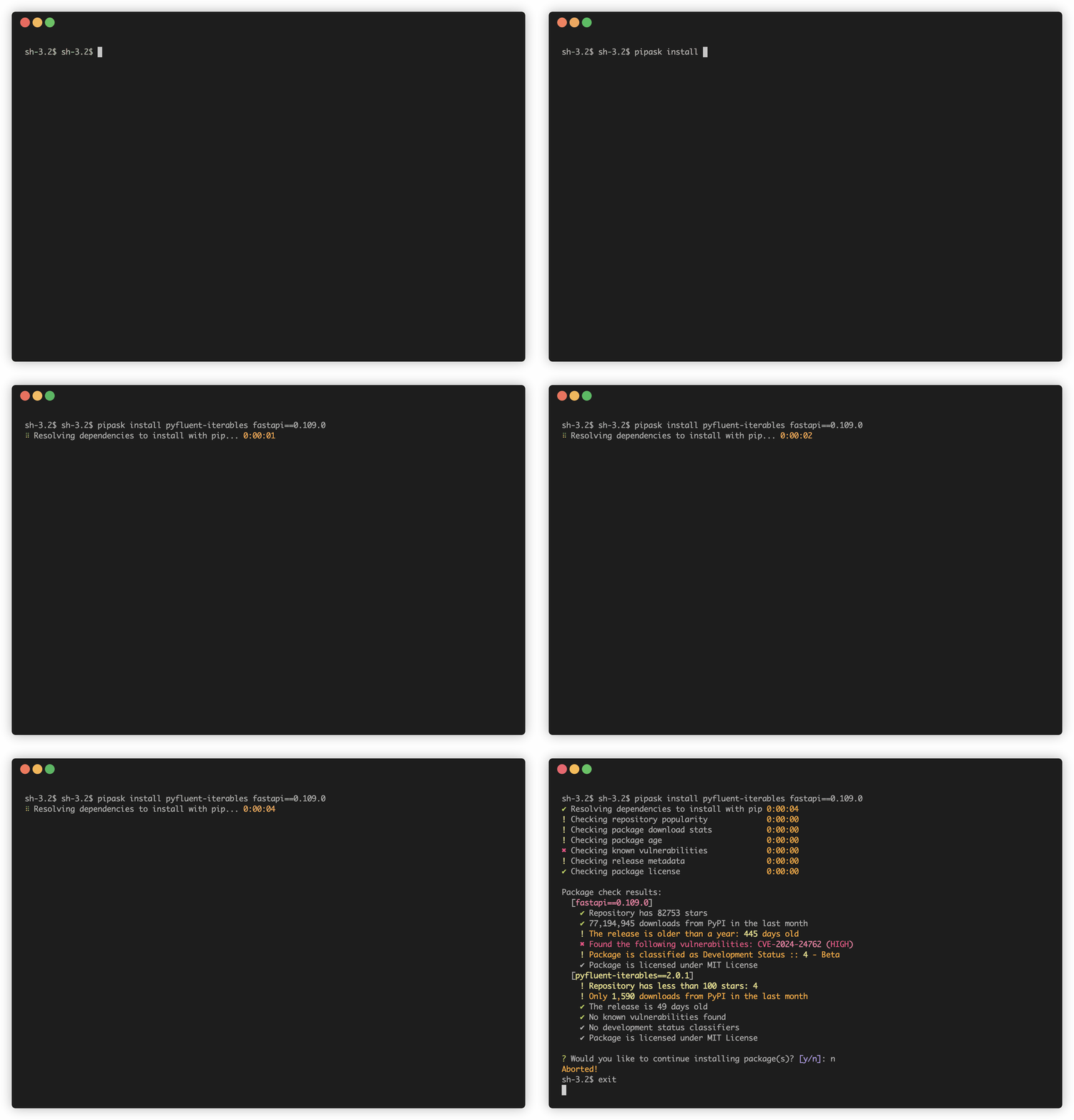
Pipask is a drop-in replacement for pip that performs security checks before installing a package.
Unlike pip, which needs to download and execute code from source distribution first to get dependency metadata,
pipask relies on metadata from PyPI whenever possible. If 3rd party code execution is necessary, pipask asks for consent first.
The actual installation is handed over to pip if installation is approved.
See the introductory blog post for more information.
Installation
The recommended way to install pipask is with pipx to isolate dependencies:
pipx install pipask
Alternatively, you can install it using pip:
pip install pipask
Usage
Use pipask exactly as you would use pip:
pipask install requests
pipask install 'fastapi>=0.100.0'
pipask install -r requirements.txt
For maximum convenience, alias pip to point to pipask:
alias pip='pipask'
Add this to your shell configuration file (~/.bashrc, ~/.bash_profile, ~/.zshrc, etc.). You can always fall back to native pip with python -m pip if needed.
To run checks without installing, use the --dry-run flag:
pipask install requests --dry-run
Security Checks
Pipask performs these checks before allowing installation:
- Repository popularity - verification of links from PyPI to repositories, number of stars on GitHub or GitLab source repo (warning below 1000 stars with bold warning below 100)
- Package and release age - warning for new packages (less than 22 days old) or stale releases (older than 365 days)
- Known vulnerabilities in the package available in PyPI (failure for HIGH or CRITICAL vulnerabilities, warning for MODERATE vulnerabilities)
- Number of downloads from PyPI in the last month (failure below 100 downloads and warning below 5000)
- Metadata verification: Checks for license availability, development status, and yanked packages
All checks are executed for requested (i.e., explicitly specified) packages. Only the known vulnerabilities check is executed for transitive dependencies.
How pipask works
Under the hood, pipask:
- Uses PyPI's JSON API to retrieve metadata without downloading or executing code
- When code execution is unavoidable, asks for confirmation first
- Collects security information from multiple sources:
- Download statistics from pypistats.org
- Repository popularity from GitHub or GitLab
- Vulnerability details from OSV.dev
- Attestation metadata from PyPI integrity API
- Presents a formatted report and asks for consent
- Tip: You may notice some parts of the report are underlined on supported terminals. These are hyperlinks you can open (e.g., with Cmd+click in iTerm)
- Hands over to standard pip for the actual installation if approved
Development
See CONTRIBUTING.md for development guidance.
1 maintainer

Metadata
1 maintainer
Release files for pipask 0.9.7
For a detailed explanation of source distributions (sdists) and built distributions (wheels), please see the package formats documentation.
Source distribution (sdist)
| File | Size | Uploaded | |
|---|---|---|---|
| pipask-0.9.7.tar.gz | 327.0 kB | Details |
Built distribution (wheel)
| File | Interpreter | ABI | Platform | Reset |
|---|---|---|---|---|
| pipask-0.9.7-py3-none-any.whl | Python 3 | none | any | Details |
Total release size: 733.1 kB
Release files / pipask-0.9.7.tar.gz
| Download URL | pipask-0.9.7.tar.gz |
|---|---|
| Size | 327.0 kB |
| Tags | Source |
|
SHA-256 checksum How to use checksums |
fa85b21348be45132c26abc2b9141159a5bd3ab3429fa4e5cbea90e6a2661306
|
|
BLAKE2b-256 checksum How to use checksums |
f1295f4e526f47dc279bca2608668fb17b8f36ec75ebe1d1bc55fa904aec7e4c
|
| Upload date | |
|
Uploaded using Trusted Publishing? What is trusted publishing? |
Yes |
| Uploaded via |
twine/6.1.0 CPython/3.13.7
|
Provenance
Provenance describes where a file came from. On PyPI, provenance is shared via attestations, which provide a verifiable record of the build or publishing details. View details, limitations and caveats.


PyPI Publish Attestation
PyPI verified that this artifact, at this checksum, originated from the publisher listed below.
Signed by GitHub Actions, verified by PyPI on Sep 7, 2025.
Transparency logRelease files / pipask-0.9.7-py3-none-any.whl
| Download URL | pipask-0.9.7-py3-none-any.whl |
|---|---|
| Size | 406.1 kB |
| Tags | Python 3 |
|
SHA-256 checksum How to use checksums |
f413289ab9423d7e70b6630a323051fa3b49ced2c4bc5e20154ce54e5aeb1860
|
|
BLAKE2b-256 checksum How to use checksums |
2d749ec6c2c7871b7232152490096301ed1f952901f2ca5eb5803e4fb2e84ce9
|
| Upload date | |
|
Uploaded using Trusted Publishing? What is trusted publishing? |
Yes |
| Uploaded via |
twine/6.1.0 CPython/3.13.7
|
Provenance
Provenance describes where a file came from. On PyPI, provenance is shared via attestations, which provide a verifiable record of the build or publishing details. View details, limitations and caveats.
PyPI Publish Attestation
PyPI verified that this artifact, at this checksum, originated from the publisher listed below.
Signed by GitHub Actions, verified by PyPI on Sep 7, 2025.
Transparency log













