
Safer python package installation with audit and consent before install
Verified details
These details have been verified by PyPIProject links
GitHub Statistics
Maintainers

Project description
pipask: pip with informed consent
Installation
The recommended way to install pipask is with pipx so that pipask dependencies are isolated from the rest of your system:
pipx install pipask
Alternatively, you can install it using pip:
pip install pipask
Usage
- Once installed, you can use
pipaskas a drop-in replacement forpip, e.g.,:pipask install 'requests>=2.0.0'
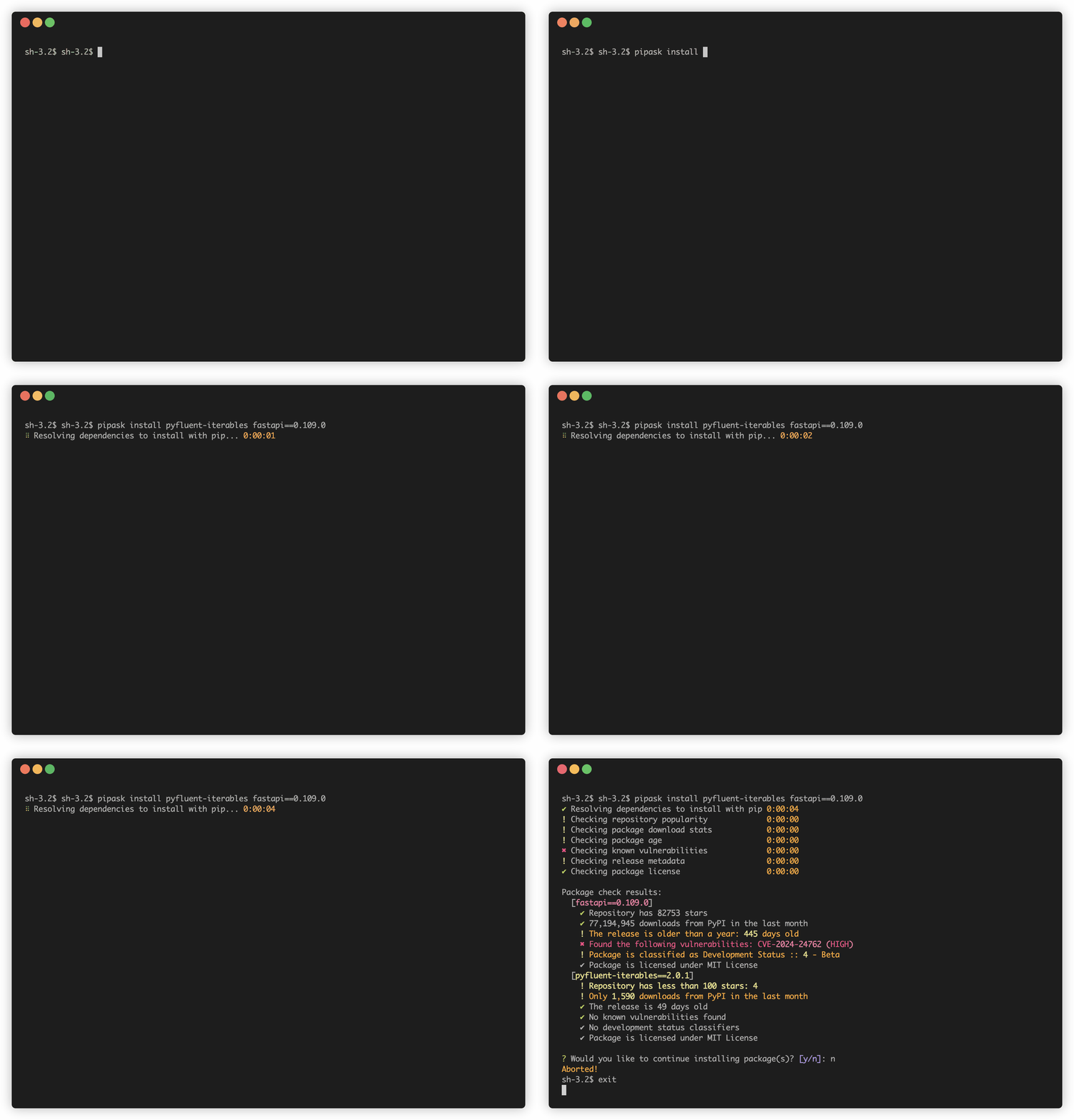
pipaskwill perform checks on the packages to be installed.- You will get a report with the results and be prompted whether to continue with the installation.
- If you proceed,
pipaskwill hand over the actual installation topip.
To run checks without installing, you can use the --dry-run flag:
pipask install requests --dry-run
In order to use pipask as a drop-in replacement for pip, you can alias pip to point to pipask so you don't have to remember to use it. Just add
alias pip='pipask'
to your shell configuration file (~/.bashrc , ~/.bash_profile, ~/.zshrc, etc.). You can always fall back on your native pip with python -m pip if pipask doesn't work for any reason.
Checks
- Popularity of the source repository as measured by the number of stars on GitHub or GitLab (warning below 1000 stars)
- Package and release age (warning for packages with no release older than 22 days, or for releases older than 365 days)
- Known vulnerabilities in the package available in PyPI (failure for HIGH or CRITICAL vulnerabilities, warning for MODERATE vulnerabilities)
- Check for development status and yanked status in PyPI metadata
- Number of downloads from PyPI in the last month (warning below 1000 downloads; take this with a grain of sault for reasons outlined in PyPI documentation)
- License availability
All checks are executed for requested (i.e., explicitly specified) packages. Only the known vulnerabilities check is executed for transitive dependencies.
Feel free to contribute or open an issue to request more checks.
Development
See CONTRIBUTING.md for development guidance.
Project details
Verified details
These details have been verified by PyPIProject links
GitHub Statistics
Maintainers
Release history Release notifications | RSS feed


Download files
Download the file for your platform. If you're not sure which to choose, learn more about installing packages.
Source Distribution
Built Distribution
Filter files by name, interpreter, ABI, and platform.
If you're not sure about the file name format, learn more about wheel file names.
Copy a direct link to the current filters
File details
Details for the file pipask-0.9.2.tar.gz.
File metadata
- Download URL: pipask-0.9.2.tar.gz
- Upload date:
- Size: 324.7 kB
- Tags: Source
- Uploaded using Trusted Publishing? Yes
- Uploaded via: twine/6.1.0 CPython/3.12.9
File hashes
| Algorithm | Hash digest | |
|---|---|---|
| SHA256 |
94cee36eff210b22105c9e598e8c5ed0d9b1dda50ed53833aad850334430acad
|
|
| MD5 |
a123028829144d984b5ae1e554c41b79
|
|
| BLAKE2b-256 |
e190c8d23c8839427269b114ed5778b95e73f72f8f56f6a861852e873f71897f
|
Provenance
The following attestation bundles were made for pipask-0.9.2.tar.gz:
Publisher:
release.yaml on feynmanix/pipask
-
Statement:
-
Statement type:
https://in-toto.io/Statement/v1 -
Predicate type:
https://docs.pypi.org/attestations/publish/v1 -
Subject name:
pipask-0.9.2.tar.gz -
Subject digest:
94cee36eff210b22105c9e598e8c5ed0d9b1dda50ed53833aad850334430acad - Sigstore transparency entry: 202687306
- Sigstore integration time:
-
Permalink:
feynmanix/pipask@8d0134d70633c478e240ea768666389b2613bbfa -
Branch / Tag:
refs/tags/0.9.2 - Owner: https://github.com/feynmanix
-
Access:
public
-
Token Issuer:
https://token.actions.githubusercontent.com -
Runner Environment:
github-hosted -
Publication workflow:
release.yaml@8d0134d70633c478e240ea768666389b2613bbfa -
Trigger Event:
release
-
Statement type:
File details
Details for the file pipask-0.9.2-py3-none-any.whl.
File metadata
- Download URL: pipask-0.9.2-py3-none-any.whl
- Upload date:
- Size: 404.2 kB
- Tags: Python 3
- Uploaded using Trusted Publishing? Yes
- Uploaded via: twine/6.1.0 CPython/3.12.9
File hashes
| Algorithm | Hash digest | |
|---|---|---|
| SHA256 |
0557cf1c2017d2f53de8ff6866b619a378292aa48b71c6a5a25225cc08e66866
|
|
| MD5 |
618fb862938934a0cc72227d81eb6598
|
|
| BLAKE2b-256 |
3cace4efa8096c5f08bf594cf003a1a0ba790484c3c3507b01b5dcaaac1a3dd6
|
Provenance
The following attestation bundles were made for pipask-0.9.2-py3-none-any.whl:
Publisher:
release.yaml on feynmanix/pipask
-
Statement:
-
Statement type:
https://in-toto.io/Statement/v1 -
Predicate type:
https://docs.pypi.org/attestations/publish/v1 -
Subject name:
pipask-0.9.2-py3-none-any.whl -
Subject digest:
0557cf1c2017d2f53de8ff6866b619a378292aa48b71c6a5a25225cc08e66866 - Sigstore transparency entry: 202687310
- Sigstore integration time:
-
Permalink:
feynmanix/pipask@8d0134d70633c478e240ea768666389b2613bbfa -
Branch / Tag:
refs/tags/0.9.2 - Owner: https://github.com/feynmanix
-
Access:
public
-
Token Issuer:
https://token.actions.githubusercontent.com -
Runner Environment:
github-hosted -
Publication workflow:
release.yaml@8d0134d70633c478e240ea768666389b2613bbfa -
Trigger Event:
release
-
Statement type:






