
🍋 pipelime


If life gives you lemons, use pipelime.
Welcome to pipelime, a swiss army knife for data processing!
pipelime is a full-fledge framework for data science: read your datasets,
manipulate them and write back to disk.
Then build up your dataflow with Piper and manage the configuration with Choixe.
Finally, embed your custom commands into the pipelime workspace, to act both as dataflow nodes and advanced command line interface.
Maybe too much for you? No worries, pipelime is modular and you can just take out what you need:
- data processing scripts: use the powerful
SamplesSequenceand create your own data processing pipelines, with a simple and intuitive API. Parallelization works out-of-the-box and, moreover, you can easily serialize your pipelines to yaml/json. Integrations with popular frameworks, e.g., pytorch, are also provided. - easy dataflow:
Pipercan manage and execute directed acyclic graphs (DAGs), giving back feedback on the progress through sockets or custom callbacks. - configuration management:
Choixeis a simple and intuitive mini scripting language designed to ease the creation of configuration files with the help of variables, symbol importing, for loops, switch statements, parameter sweeps and more. - command line interface:
pipelimecan remove all the boilerplate code needed to create a beautiful CLI for you scripts and packages. You focus on what matters and we provide input parsing, advanced interfaces for complex arguments, automatic help generation, configuration management. Also, anyPipelimeCommandcan be used as a node in a dataflow for free! - pydantic tools: most of the classes in
pipelimederive frompydantic.BaseModel, so we have built some useful tools to, e.g., inspect their structure, auto-generate human-friendly documentation and more (including a TUI to help you writing input data to deserialize any pydantic model).
Installation
Install pipelime using pip:
pip install pipelime-python
pipelime ≥ 3.0 requires pydantic v2 — see docs/migration/pydantic_v2.md if you upgrade from 2.x.
To be able to draw the dataflow graphs, you need the draw variant:
pip install pipelime-python[draw]
Warning
The
drawvariant needsGraphvizhttps://www.graphviz.org/ installed on your system On Linux Ubuntu/Debian, you can install it with:sudo apt-get install graphviz graphviz-devAlternatively you can use
condaconda install --channel conda-forge pygraphvizPlease see the full options at https://github.com/pygraphviz/pygraphviz/blob/main/INSTALL.txt
Basic Usage
Underfolder Format
The Underfolder format is the preferred pipelime dataset formats, i.e., a flexible way to
model and store a generic dataset through filesystem.
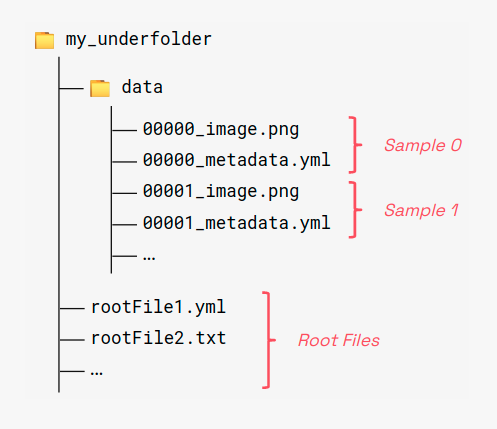
An Underfolder dataset is a collection of samples. A sample is a collection of items.
An item is a unitary block of data, i.e., a multi-channel image, a python object,
a dictionary and more.
Any valid underfolder dataset must contain a subfolder named data with samples
and items. Also, global shared items can be stored in the root folder.
Items are named using the following naming convention:
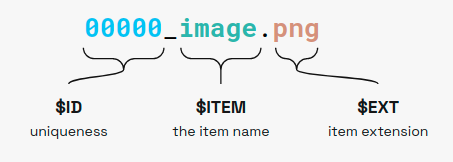
Where:
$IDis the sample index, must be a unique integer for each sample.ITEMis the item name.EXTis the item extension.
We currently support many common file formats and others can be added by users:
.png,.jpeg/.jpg/.jfif/.jpe,.bmpfor images.tiff/.tiffor multi-page images and multi-dimensional numpy arrays.yaml/.yml,.jsonand.toml/.tmlfor metadata.txtfor numpy 2D matrix notation.npyfor general numpy arrays.pkl/.picklefor picklable python objects.binfor generic binary data
Root files follow the same convention but they lack the sample identifier part, i.e., $ITEM.$EXT
Reading an Underfolder Dataset
pipelime provides an intuitive interface to read, manipulate and write Underfolder Datasets.
No complex signatures, weird object iterators, or boilerplate code, you just need a SamplesSequence:
    from pipelime.sequences import SamplesSequence

    # Read an underfolder dataset with a single line of code
    dataset = SamplesSequence.from_underfolder('tests/sample_data/datasets/underfolder_minimnist')

    # A dataset behaves like a Sequence
    print(len(dataset))             # the number of samples
    sample = dataset[4]             # get the fifth sample

    # A sample is a mapping
    print(len(sample))              # the number of items
    print(set(sample.keys()))       # the items' keys

    # An item is an object wrapping the actual data
    image_item = sample["image"]    # get the "image" item from the sample
    print(type(image_item))         # <class 'pipelime.items.image_item.PngImageItem'>
    image = image_item()            # actually loads the data from disk (may have been on the cloud as well)
    print(type(image))              # <class 'numpy.ndarray'>
Writing an Underfolder Dataset
You can write a dataset by calling the associated operation:
    # Attach a "write" operation to the dataset
    dataset = dataset.to_underfolder('/tmp/my_output_dataset')

    # Now run over all the samples
    dataset.run()

    # You can easily spawn multiple processes if needed
    dataset.run(num_workers=4)
1 maintainer

Metadata
1 maintainer
Release files for pipelime-python 3.0.1
For a detailed explanation of source distributions (sdists) and built distributions (wheels), please see the package formats documentation.
Source distribution (sdist)
| File | Size | Uploaded | Provenance | Actions |
|---|---|---|---|---|
| pipelime_python-3.0.1.tar.gz | 170.0 kB | Without provenance | Details for pipelime_python-3.0.1.tar.gz |
Built distribution (wheel)
| File | Interpreter | ABI | Platform | Actions Reset |
|---|---|---|---|---|
| pipelime_python-3.0.1-py3-none-any.whl | Python 3 | none | any | Details for pipelime_python-3.0.1-py3-none-any.whl |
Total release size: 389.4 kB
Release files / pipelime_python-3.0.1.tar.gz
| Download URL | pipelime_python-3.0.1.tar.gz |
|---|---|
| Size | 170.0 kB |
| Tags | Source |
|
SHA-256 checksum How to use checksums |
c07d6f9598dd7c154d4212912db05023f7cdb63d57f47e12cc776eb9527a1edb
|
|
BLAKE2b-256 checksum How to use checksums |
9f9464bc8c5f8a0422027d2edd99edde0b4415095cd26691f4800f5cf9aca54a
|
| Upload date | |
|
Uploaded using Trusted Publishing? What is trusted publishing? |
No |
| Uploaded via |
twine/7.0.0 CPython/3.13.16
|
Release files / pipelime_python-3.0.1-py3-none-any.whl
| Download URL | pipelime_python-3.0.1-py3-none-any.whl |
|---|---|
| Size | 219.4 kB |
| Tags | Python 3 |
|
SHA-256 checksum How to use checksums |
426dc5e834a838904e4ac8438a7a7cdb21eea87424fb68d4e5507fdf852fd263
|
|
BLAKE2b-256 checksum How to use checksums |
316adb817397b622eb8a4ee28043f2bdf7998d4816a1fb3bef0e0da96d743ff3
|
| Upload date | |
|
Uploaded using Trusted Publishing? What is trusted publishing? |
No |
| Uploaded via |
twine/7.0.0 CPython/3.13.16
|
Security for pipelime-python 3.0.1
Provenance
Provenance describes where a file came from. On PyPI, provenance is shared via attestations, which provide a verifiable record of the build or publishing details. View details, limitations and caveats.
No provenance found
None of the files in this release were uploaded with provenance metadata.
A note on package security
PyPI is a repository for distributing packages, not a service for auditing them. While third-party security researchers and our staff do their best to detect and remove malicious packages, PyPI cannot guarantee the quality, security or suitability of any given package.
To learn more about protecting yourself from malicious actors, visit our package security documentation.














