
Helpers to collect, enrich and store Suricata events and network flows.

Project description

Mongoose
Lightweight dead-simple Python library to collect, enrich, store and forward network events such as Suricata alerts and network flows

Website | Documentation | GitHub | Support
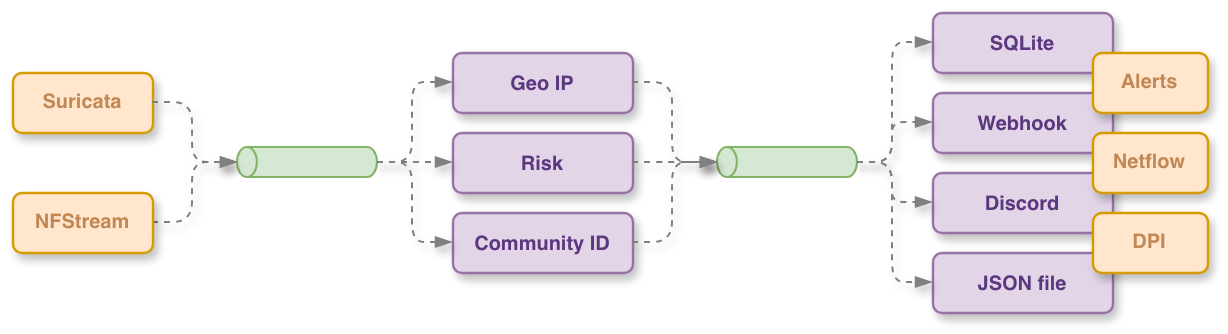
Mongoose — a lightweight dead-simple Python library and daemon to collect, enrich, store and forward network events such as Suricata alerts and Deep Packet Inspection flows.
Purpose
Mongoose provides a modular pipeline to ingest network events and flows, enrich them with metadata (for example GeoIP and Community ID), persist short-term state in a SQLite database, and forward processed records to files, webhooks or other sinks. It is designed to be simple to configure, extend and integrate into other applications.
Overview
Mongoose is a versatile Python-based framework designed for the collection, enrichment, and distribution of network security events and traffic flows. It acts as a central hub for processing data from various network monitoring tools, providing a modular and scalable pipeline for security analysts and researchers.
At its core, Mongoose utilizes a thread-safe pub-sub engine that allows for concurrent processing of different data streams. Data is collected from sources like Suricata EVE logs and NFStream, published to specific topics, and then consumed by various modules for enrichment (e.g., GeoIP, Community ID), persistent storage (SQLite), or forwarding to external endpoints via webhooks or local files.
The project is built with extensibility in mind, making it easy to integrate new data sources and processing logic to adapt to different network monitoring needs.
Key features
- Modular collectors: Suricata EVE, nfstream, file-based replay.
- Enrichment: GeoIP lookup, Community ID calculation and custom enrichers.
- Pluggable forwarders: file, webhook, Discord (extensible to new sinks).
- Lightweight SQLite storage for short-term persistence.
- Thread-safe pub-sub engine and safe caches for concurrent ingestion.
Installation
Install in a virtual environment and editable mode for development:
python -m venv .venv && source .venv/bin/activate
pip install -e .
CLI usage
# show top-level help
mongoose --help

# run mongoose with a configuration file
mongoose --config docs/example_config_test.yaml
Python library usage
Use Mongoose as a library when you can use in your application. The snippet below shows how to instanciate the engine with a config and run it. Replace the config path with your own file.
import time
from mongoose.core.engine import Engine

# Create an Engine from a configuration file and run a single cycle.
configuration_file = "config.yaml"
engine = Engine(configuration_file)
engine.start()
time.sleep(6)
engine.stop()


Download files
Download the file for your platform. If you're not sure which to choose, learn more about installing packages.
Source Distribution
Built Distribution
Filter files by name, interpreter, ABI, and platform.
If you're not sure about the file name format, learn more about wheel file names.
Copy a direct link to the current filters
File details
Details for the file pirogue_mongoose-1.0.0.tar.gz.
File metadata
- Download URL: pirogue_mongoose-1.0.0.tar.gz
- Upload date:
- Size: 45.0 kB
- Tags: Source
- Uploaded using Trusted Publishing? Yes
- Uploaded via: uv/0.7.16
File hashes
| Algorithm | Hash digest | |
|---|---|---|
| SHA256 |
f62f039c7849bb041c3d609c8ebfaff2f2db9f03fb4fbebd86c2503273ae2491
|
|
| MD5 |
66a118d5c8baa3b5cdd4a7f22b183677
|
|
| BLAKE2b-256 |
54c1ba675bdd88b0a128f757189effc0d12a3147364dcf0b5cd30cdb59bce84a
|
File details
Details for the file pirogue_mongoose-1.0.0-py3-none-any.whl.
File metadata
- Download URL: pirogue_mongoose-1.0.0-py3-none-any.whl
- Upload date:
- Size: 58.8 kB
- Tags: Python 3
- Uploaded using Trusted Publishing? Yes
- Uploaded via: uv/0.7.16
File hashes
| Algorithm | Hash digest | |
|---|---|---|
| SHA256 |
3823e8dd63abbc74aabf82db3dc6b4f3819b852d27e5b84d44c173441caa12f1
|
|
| MD5 |
f554ffd981876dda79392fd0b1310e3b
|
|
| BLAKE2b-256 |
50811a4be75013411127aedcb8b09e849e45110729b9bf1c2b4add5faaa7fe06
|






