
A Python daemon and library for collecting, enriching, storing and forwarding network events from Suricata and NFStream.
Verified details
These details have been verified by PyPIProject links
GitHub Statistics
Maintainers

Project description

Mongoose
Collect, enrich, store and forward Suricata alerts and network flows.

Website | Documentation | GitHub | Support
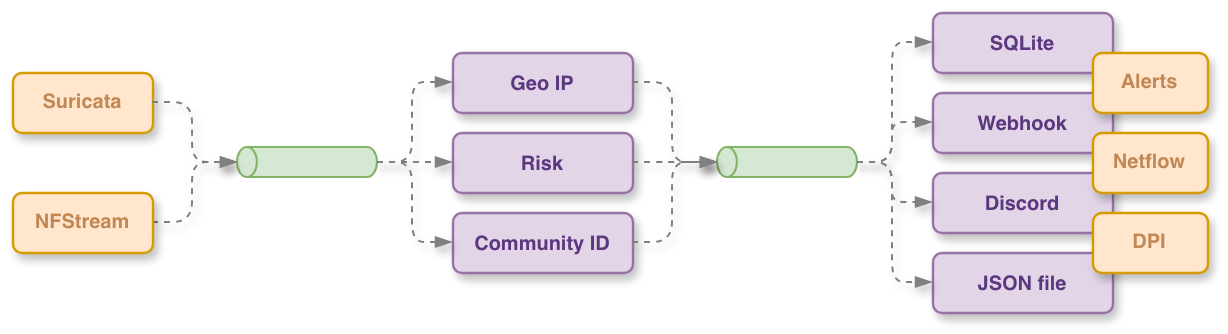
Mongoose is a Python daemon and library for collecting, enriching, storing and forwarding network events from Suricata and NFStream.
It runs a thread-safe pub-sub pipeline (ProcessingQueue) where collectors
publish raw events to topics and subscribers — enricher, SQLite store,
forwarders — consume them concurrently.
Key features
- Modular collectors: Suricata EVE (alerts and netflow via Unix socket), NFStream (live packet capture from a network interface).
- Automatic enrichment: traffic direction (inbound / outbound / local), Community ID calculation, reverse DNS hostname lookup, event type classification, and flow risk scoring via a configurable severity cache.
- GeoIP enrichment: MaxMind (GeoLite2-ASN, GeoLite2-City, GeoLite2-Country) and IP66 databases, with daily automatic database updates.
- Pluggable forwarders: local file output, HTTP(S) webhooks (immediate, bulk or periodic modes with retry logic and multiple authentication methods), and Discord (rich embed formatting).
- Topic filtering: forwarders can be scoped to specific topics and filtered by event attributes.
- Drop-in webhook configuration: new webhook forwarders can be added at runtime by dropping a YAML file into a watched directory — no restart required.
- SQLite storage: enriched events are persisted with configurable history pruning by record count or age.
- Sharded LRU cache: thread-safe severity cache with optional TTL used for flow risk scoring.
- Singleton engine: a single
Engineinstance manages the full component lifecycle (start, stop, reload). - Systemd and PiRogue integration: the CLI daemon supports
sd_notifyand reads the isolated interface frompirogue-admin-clientwhen available.
Pipeline topics
Events flow through the following pub-sub topics:
| Topic | Description |
|---|---|
network-dpi |
Raw DPI flows from NFStream |
network-alert |
Raw Suricata alerts |
network-flow |
Raw Suricata netflow records |
enriched-network-dpi |
Enriched DPI flows |
enriched-network-alert |
Enriched Suricata alerts |
enriched-network-flow |
Enriched netflow records |
Installation
Install in a virtual environment and editable mode for development:
python -m venv .venv && source .venv/bin/activate
pip install -e .
CLI usage
The package installs a mongoosed daemon entry-point:
# show top-level help
mongoosed --help

# run with a configuration file
mongoosed --config /etc/mongoose/mongoose.yaml

# override the network interface used by NFStream
mongoosed --config mongoose.yaml --interface eth0

# set logging verbosity
mongoosed --config mongoose.yaml --logging-level DEBUG
Python library usage
import time
from mongoose.core.engine import Engine

engine = Engine("config.yaml")
engine.start()
time.sleep(6)
engine.stop()
Configuration
Configured via a YAML file. All keys live under a top-level configuration key.
configuration:
  collector:
    suricata:
      socket_path: "/run/suricata.socket"  # Suricata Unix socket
      collect_alerts: true                 # collect Suricata alerts
      collect_netflow: false               # collect Suricata netflow records
      enable: true

    nf_stream:
      interface: "eth0"          # network interface for live capture
      active_timeout: 120        # seconds before an active flow expires
      enable: false

  enrichment:
    geoip:
      source: "ip66"             # "ip66" (default) or "maxmind"
      enable: true

  forwarder:
    webhooks:
      - url: "https://hooks.example.com/ingest"
        auth_type: "bearer"      # none | basic | bearer | header
        auth_token: "${WEBHOOK_AUTH_TOKEN}"
        verify_ssl: true
        retry_count: 3
        retry_delay: 5.0
        timeout: 10.0
        mode: "immediate"        # immediate | bulk | periodic
        bulk_size: 10
        periodic_interval: 5.0
        periodic_rate: 10
        topics:
          - "enriched-network-dpi"
          - "enriched-network-alert"
        enable: true

  database_path: "mongoose.db"

  history:
    max_duration_days: 14  # keep records for at most 14 days
    max_records: null      # optional hard cap on row count per table
    enable: true

  cache:
    severity:
      max_size: 1024       # maximum entries in the severity LRU cache
      ttl_seconds: null    # optional TTL; null means entries never expire
      enable: true

  extra_configuration_dir: "/var/lib/mongoose"
Drop-in webhook configuration
Place a YAML file matching the WebhookForwarderConfiguration schema inside
<extra_configuration_dir>/webhook.d/. The engine watches this directory and
activates new forwarders when a file is created, and deactivates them when it
is deleted.
Project details
Verified details
These details have been verified by PyPIProject links
GitHub Statistics
Maintainers


Download files
Download the file for your platform. If you're not sure which to choose, learn more about installing packages.
Source Distribution
Built Distribution
Filter files by name, interpreter, ABI, and platform.
If you're not sure about the file name format, learn more about wheel file names.
Copy a direct link to the current filters
File details
Details for the file pirogue_mongoose-1.0.1.tar.gz.
File metadata
- Download URL: pirogue_mongoose-1.0.1.tar.gz
- Upload date:
- Size: 38.0 kB
- Tags: Source
- Uploaded using Trusted Publishing? Yes
- Uploaded via: uv/0.7.16
File hashes
| Algorithm | Hash digest | |
|---|---|---|
| SHA256 |
18fb1303fe68f09d680ed98ba6f40c39e6d535f59477bee60e4c5d8f6b1bdde7
|
|
| MD5 |
542ca83b367f84dcf00b49b4b149cac8
|
|
| BLAKE2b-256 |
0ad4b3c65b39f40889d1901e58a98a896468bbb9c97602a929f3783ac46d61d5
|
File details
Details for the file pirogue_mongoose-1.0.1-py3-none-any.whl.
File metadata
- Download URL: pirogue_mongoose-1.0.1-py3-none-any.whl
- Upload date:
- Size: 56.4 kB
- Tags: Python 3
- Uploaded using Trusted Publishing? Yes
- Uploaded via: uv/0.7.16
File hashes
| Algorithm | Hash digest | |
|---|---|---|
| SHA256 |
223d10a4152ce54933f441438e271948336447eb5fd61c2b573237587b4f5c91
|
|
| MD5 |
fa748c3707e238a609b7a1fae571ac55
|
|
| BLAKE2b-256 |
7b1532cf44c499cea8b7f2367227d6f23857d2a208df45b5cd8997c01e785f2d
|






