
 PIVPy
PIVPy
Python-based post-processing PIV data analysis in the repo: https://github.com/openpiv/pivpy



Merging the three packages:
- https://github.com/tomerast/Vecpy
- https://github.com/alexlib/pivpy/tree/xarray
- https://github.com/ronshnapp/vecpy
How do I get set up?
Recommended: use uv (fast, reproducible)
Create a virtualenv and install:
uv venv
uv pip install pivpy
Install this repository (editable / development install):
uv venv
uv pip install -e .
Install with optional dependencies (including lvpyio for LaVision VC7):
uv pip install 'pivpy[full]'
Run in a sandbox (isolated) environment (no persistent venv required):
uv run --isolated --with pivpy python -c "import pivpy; print(pivpy.__version__)"
Or run with optional dependencies in the sandbox:
uv run --isolated --with "pivpy[full]" python -c "from pivpy import io; print(io)"
Run using a specific Python version (uv-managed) in the sandbox:
uv python install 3.14
uv run --isolated --managed-python -p python3.14 --with pivpy python -c "import sys, pivpy; print(sys.version.split()[0], pivpy.__version__)"
Run this repository's tests on Python 3.14 (sandboxed):
uv run --isolated --managed-python -p python3.14 --with-editable . pytest -q
Alternative: use pip:
pip install pivpy
or with optional dependencies:
pip install 'pivpy[full]'
if you use OpenPIV, PIVlab, etc.
Quick start (auto-detect file format):
from pivpy import io
ds = io.read_piv('your_file.vec')
Getting Started
Load a built-in sample dataset, compute vorticity, and plot velocity vectors (quiver) over a vorticity heatmap:
import numpy as np
import matplotlib.pyplot as plt
from scipy.ndimage import gaussian_filter

import pivpy.pivpy  # registers the .piv accessor
from pivpy import io

# Built-in sample data shipped with pivpy (OpenPIV vector file)
ds = io.read_piv('pivpy/data/openpiv_vec/exp1_001_b.vec').isel(t=0)

# Vorticity (stored as ds['w'])
ds = ds.piv.vorticity(name='w')

X, Y = np.meshgrid(ds['x'].values, ds['y'].values)

fig, ax = plt.subplots(figsize=(8, 4.8))

# Background: smoothed vorticity heatmap (robust symmetric color limits)
w = ds['w'].values
w_smooth = gaussian_filter(w, sigma=1.0)
finite_w = w_smooth[np.isfinite(w_smooth)]
vmax = np.nanpercentile(np.abs(finite_w), 98) if finite_w.size else 1.0
vmax = max(vmax, 1e-9)
pcm = ax.pcolormesh(X, Y, w_smooth, shading='auto', cmap='coolwarm', vmin=-vmax, vmax=vmax)
fig.colorbar(pcm, ax=ax, pad=0.02, label='vorticity (smoothed, 1/Δt)')

# Overlay: velocity vectors (make arrows longer by reducing `scale`)
skip = 2
ax.quiver(
    X[::skip, ::skip],
    Y[::skip, ::skip],
    ds['u'].values[::skip, ::skip],
    ds['v'].values[::skip, ::skip],
    color='k',
    angles='xy',
    scale_units='xy',
    scale=5.0,
    width=0.004,
)

ax.set_title('PIVPy sample (OpenPIV vec): quiver over smoothed vorticity')
ax.set_xlabel('x')
ax.set_ylabel('y')
ax.set_aspect('equal')
fig.tight_layout()
plt.show()
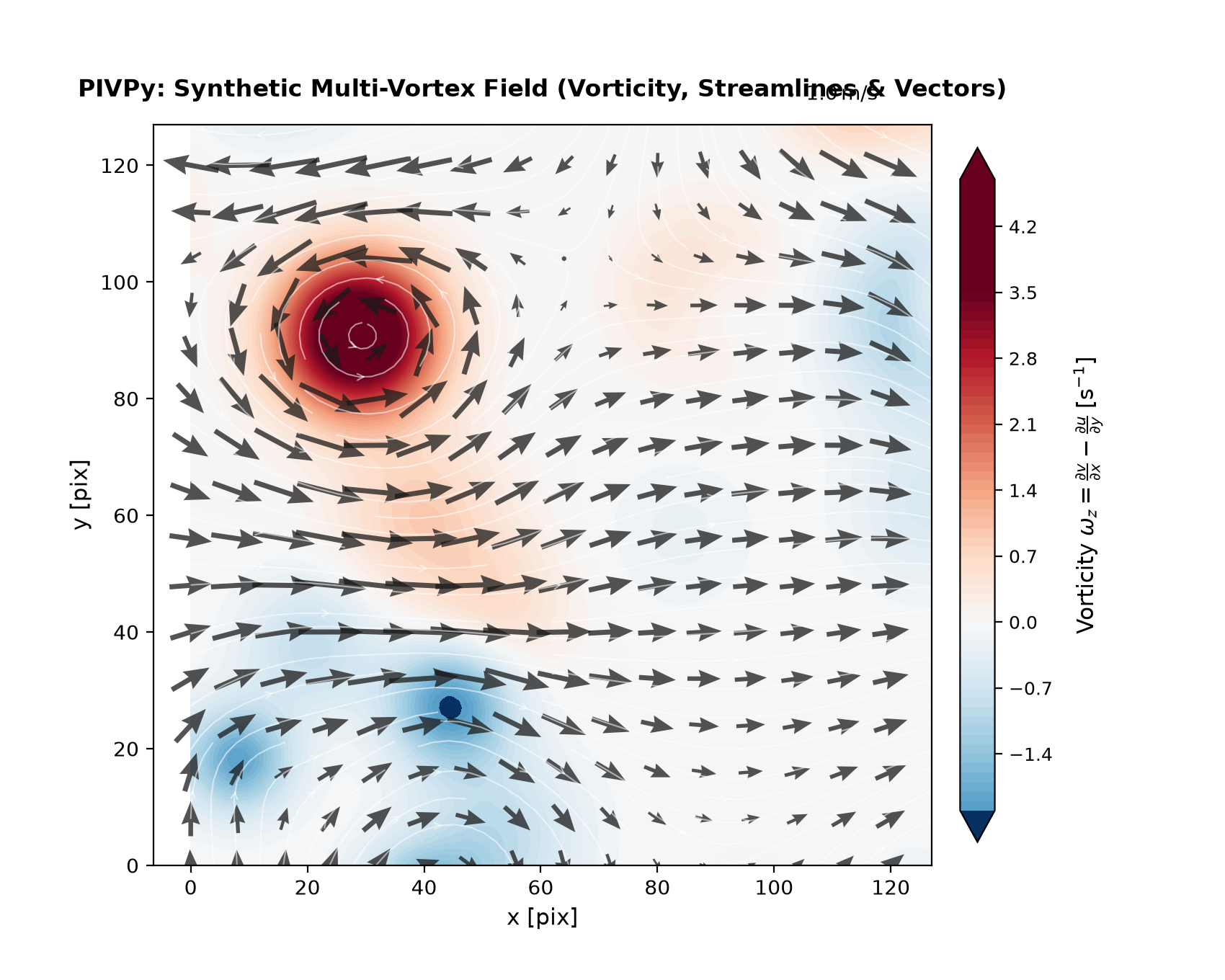
Legacy loaders (still supported):
ds = io.load_vec('your_file.vec')
ds = io.load_openpiv_txt('your_file.txt')
Check whether a newer version is available on PyPI:
import pivpy
res = pivpy.check_update(verbose=True)
# res.status: 0=unavailable, 1=up-to-date, 2=update available, 3=installed newer
PIVMat-inspired methods
PIVPy exposes many post-processing operations via the xarray accessor Dataset.piv.
Several common PIVMat toolbox methods are available with similar names/behavior:
import pivpy.pivpy  # registers the .piv accessor
from pivpy import io

ds = io.create_sample_Dataset(n_frames=10)

# Add noise (similar to PIVMat addnoisef)
ds_noisy = ds.copy().piv.addnoisef(eps=0.1, opt='add', nc=0.0, seed=0)

# Ensemble (temporal) average and optional std/rms (similar to PIVMat averf)
avg = ds.piv.averf()
avg, std, rms = ds.piv.averf(return_std_rms=True)

# Spatial averages (similar to PIVMat spaverf)
ds_xy = ds.piv.spaverf('xy')   # excludes zeros by default
ds_x0 = ds.piv.spaverf('x0')   # include zeros

# Subtract ensemble/spatial average (similar to PIVMat subaverf)
fluct = ds.piv.subaverf('e')
fluct_x = ds.piv.subaverf('x0')

# Azimuthal averaging (similar to PIVMat azaverf)
r, ur, ut = ds.isel(t=0).piv.azaverf(0.0, 0.0, return_profiles=True)

# Temporal resampling and phase average (similar to PIVMat resamplef/phaseaverf)
ds_r = ds.piv.resamplef(tini=range(ds.sizes['t']), tfin=[0.5, 1.5, 2.5])
phased = ds.piv.phaseaverf(12)
Additional PIVMat-inspired utilities:
# Correlation along a dimension (similar to PIVMat corrm/corrx)
cu = ds.piv.corrm(variable='u', dim='x')        # returns DataArray with a 'lag' dimension
cv = ds.piv.corrm(variable='v', dim='y', half=True)

# Spatial correlation function + integral scales (similar to PIVMat corrf)
cor = ds.piv.corrf(variable='u', dim='x', normalize=True)
# correlation curve: cor['f'] over cor['r']
# integral scales: cor['isinf'], cor['is5'], cor['is2'], cor['is1'], cor['is0']

# Fill holes encoded as zeros (similar to PIVMat interpolat.m behavior)
ds_filled = ds.piv.fill_zeros(max_iter=10)

# Extract a rectangular region (similar to PIVMat extractf)
sub = ds.piv.extractf([0.0, 0.0, 10.0, 5.0], 'phys')   # [x1,y1,x2,y2] in physical units
sub = ds.piv.extractf([10, 5, 50, 40], 'mesh')         # 1-based mesh indices (MATLAB-like)

# Spatial convolution filter (similar to PIVMat filterf)
ds_smooth = ds.piv.filterf(1.0, 'gauss', 'same')   # keep same size
ds_smooth_valid = ds.piv.filterf(1.0, 'gauss')     # smaller (conv2(...,'valid') behavior)

# Flip field (similar to PIVMat flipf)
ds_lr = ds.piv.flipf('x')     # left-right mirror (negates u)
ds_tb = ds.piv.flipf('y')     # top-bottom mirror (negates v)
ds_xy = ds.piv.flipf('xy')    # both

# 2D Butterworth filter (similar to PIVMat bwfilterf)
ds_low = ds.piv.bwfilterf(filtsize=3.0, order=8.0, mode='low', trunc=True)
ds_high = ds.piv.bwfilterf(filtsize=3.0, order=8.0, mode='high')

# PIVMat-style option wrapper: opts can include 'high'/'low'/'trunc'
ds_high2 = ds.piv.bwfilterf_pm(3.0, 8.0, 'high', 'trunc')

# Batch processing over filename series (similar to PIVMat batchf)
# fun can be a callable (fun(ds, ...)) or an accessor method name (e.g. 'averf', 'bwfilterf')
from pivpy.io import batchf
results = batchf('pivpy/data/day2/day2a00500[0:5].T000.D000.P003.H001.L.vec', 'averf')
For developers, local use:
Using uv (recommended):
git clone https://github.com/alexlib/pivpy .
cd pivpy
uv venv
uv pip install -e .
Editable install with optional dependencies:
uv pip install -e '.[full]'
Alternative (conda):
git clone https://github.com/alexlib/pivpy .
cd pivpy
conda create -n pivpy python=3.11
conda activate pivpy
conda install pip
pip install -e .
What packages are required and which are optional
lvpyioby Lavision Inc. if you use vc7 filesnetcdf4if you want to store NetCDF4 files by xarraypyarrowif you want to store parquet filesvortexfittingif you want to do vortex analysis ($\lambda_2$ and $Q$ criterions, vortex fitting)numpy,scipy,matplotlib,xarrayare must and installed with thepivpy
Contributors
- @alexlib
- @ronshnapp - original steps
- @liorshig - LVreader and great visualizaiton for Lavision
- @nepomnyi - connection to VortexFitting and new algorithms
How to get started?
Look into the getting started marimo notebook
(open it with uv run marimo edit examples/notebooks/Getting_Started.py, or click the
"Open in molab" badge above to run it in your browser)
and additional notebooks: Notebooks
How to test?
From a command line just use:
pytest
With uv:
uv run pytest -q
Documentation on Github
How to help?
Read the ToDo file and pick one item to program. Use Fork-Develop-Pull Request model to contribute
How to write tutorials and add those to the documentation
Tutorials live as marimo notebooks (.py files) in docs/source/. The Sphinx build
(docs/source/conf.py) exports them to static HTML via marimo export html and embeds them
in the generated docs automatically -- no separate conversion step needed:
uv pip install -r docs/requirements.txt
uv run sphinx-build -b html docs/source/ docs/build/html
generates docs/build/html directory with the documentation
1 maintainer

Metadata
1 maintainer
Release files for pivpy 0.1.2
For a detailed explanation of source distributions (sdists) and built distributions (wheels), please see the package formats documentation.
Source distribution (sdist)
| File | Size | Uploaded | |
|---|---|---|---|
| pivpy-0.1.2.tar.gz | 6.8 MB | Details |
Built distribution (wheel)
| File | Interpreter | ABI | Platform | Reset |
|---|---|---|---|---|
| pivpy-0.1.2-py3-none-any.whl | Python 3 | none | any | Details |
Total release size: 13.6 MB
Release files / pivpy-0.1.2.tar.gz
| Download URL | pivpy-0.1.2.tar.gz |
|---|---|
| Size | 6.8 MB |
| Tags | Source |
|
SHA-256 checksum How to use checksums |
189c929ba48ce60a71e144bba58ff6f5ea2f53e7201e94c18d6a7cd08fe03b3a
|
|
BLAKE2b-256 checksum How to use checksums |
e29a317158805555c8c538542022c0be2c897786347709a0584c1f10f4387596
|
| Upload date | |
|
Uploaded using Trusted Publishing? What is trusted publishing? |
No |
| Uploaded via |
twine/7.0.0 CPython/3.13.14
|
Release files / pivpy-0.1.2-py3-none-any.whl
| Download URL | pivpy-0.1.2-py3-none-any.whl |
|---|---|
| Size | 6.8 MB |
| Tags | Python 3 |
|
SHA-256 checksum How to use checksums |
11f0d46a41c4576fc121fa20203e17cee23a63ca46ece97c6fad1d8240b12162
|
|
BLAKE2b-256 checksum How to use checksums |
f8022c7f1ec8b5da9431b1243de832b8bb1016fa2e068fbe999976a58dfdfd45
|
| Upload date | |
|
Uploaded using Trusted Publishing? What is trusted publishing? |
No |
| Uploaded via |
twine/7.0.0 CPython/3.13.14
|














