
PixCull
AI photo culling for working photographers.
Six calibrated scoring axes · burst folding · style-aware personalization ·
Lightroom / Capture One round-trip. Judged by MiniMax M3, with the local measurements handed to it as evidence — or fully on-device with --vlm-mode off.
AI 摄影分拣:6 轴评分 · 连拍折叠 · 个性化学习 · Lr/C1 双向 round-trip。
MiniMax M3 云端判图,本机实测指标作为证据一并送入;--vlm-mode off 可全程不出网。
Install
pip install pixcull
Python 3.11–3.12. First run downloads the optional scoring models to
~/.pixcull/models/; the measurements they make run on-device and are
Apple-silicon accelerated. Whether the judge is local or cloud is a
separate question — see the last two bullets below.
Upgrading from 3.53.1? The dependency floor moved to numpy 2 and torch 2.5, and five other things behave differently. Read the upgrade notes first.
Quickstart
# score a folder of photos (JPG / RAW) — keep/maybe/cull + per-axis rubric
pixcull run /path/to/photos -o ./out

# write the decisions back as XMP sidecars for Lightroom / Capture One
# (sidecars land next to each original; -t collected gathers them instead)
pixcull export ./out

# score a video → temporal windows + reel candidates
pixcull video clip.mp4 -o ./out

# fold near-duplicates, build a contact sheet, learn your taste, …
pixcull --help
# open the review workspace in your browser (v2.31 — now packaged)
pixcull serve
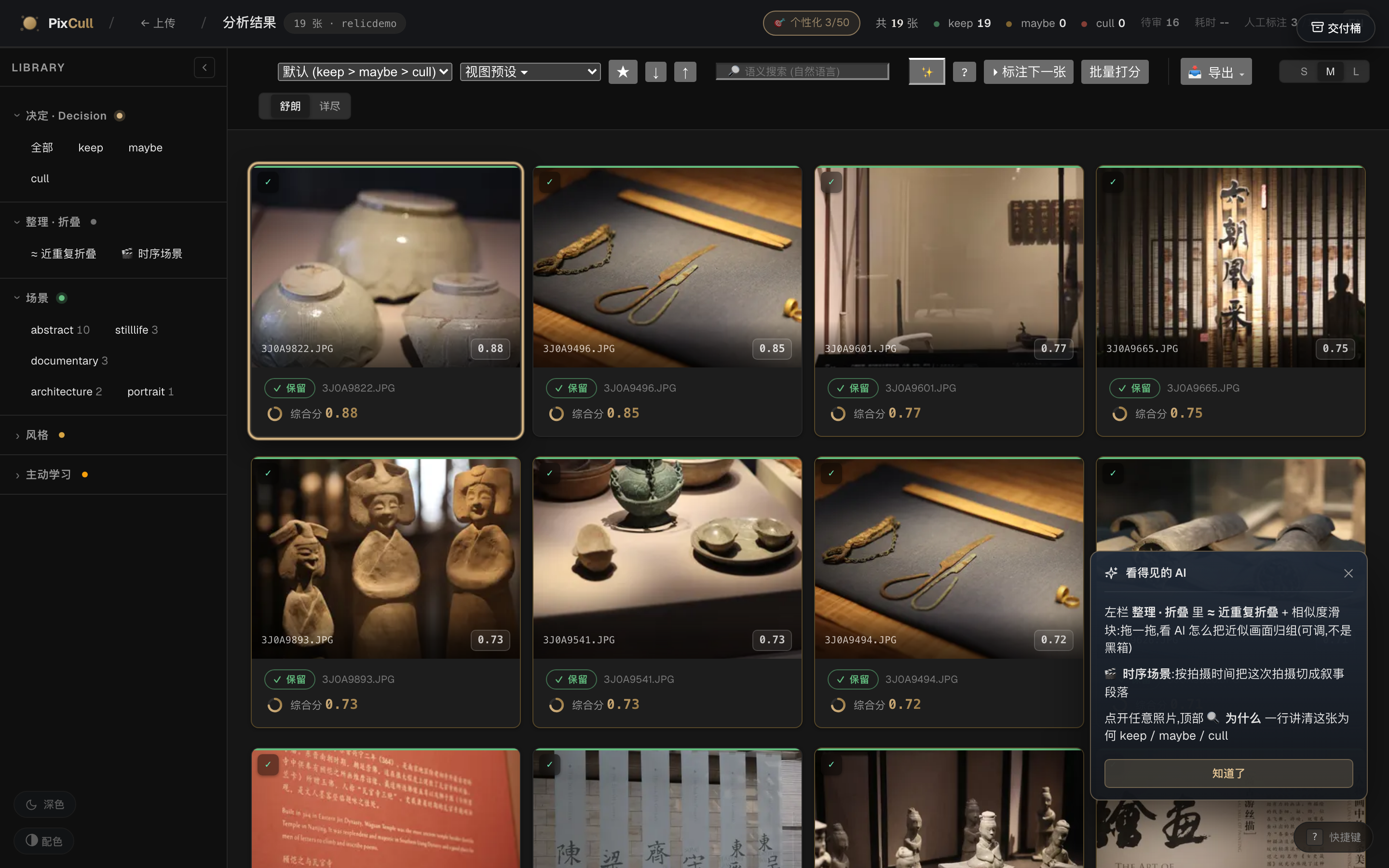
The pip package ships the full scoring engine, the CLI and the
interactive review workspace: keyboard-first grid, ⌘K palette, per-axis
"why" explanations, n-way compare, maybe-resolution queue, XMP export.
pixcull serve stores runs under ~/.pixcull/runs by default
(--root to change, --host 0.0.0.0 to share on a trusted LAN).
Highlights
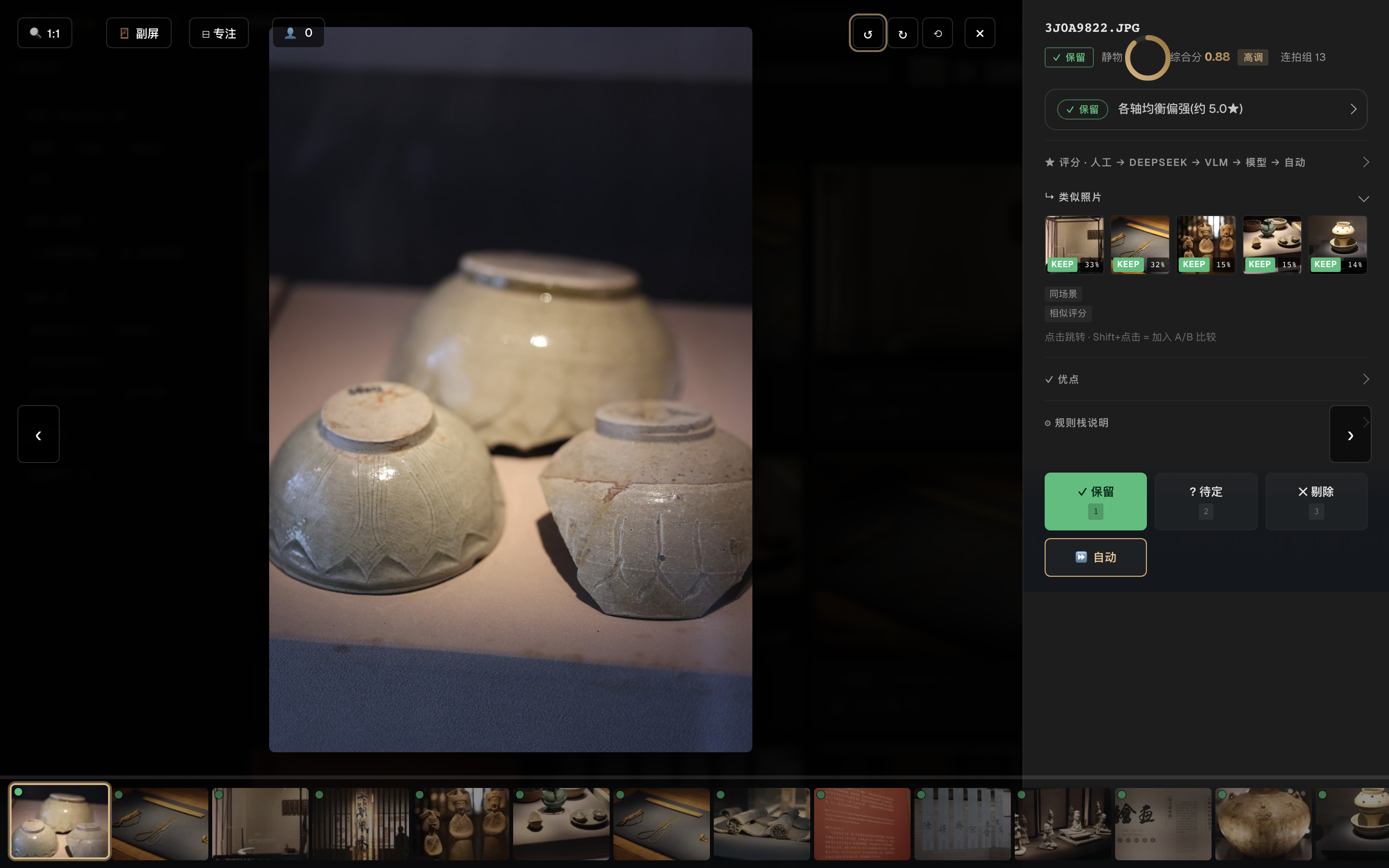
- Glass-box scoring — every keep/cull carries a per-axis breakdown (technical / subject / composition / light / moment / aesthetic) and a plain-language "why", not just a number.
- Learns your taste — corrections feed a personal profile that tilts the axis weights toward what you demonstrably value.
- Burst & near-dup folding — stacks collapse to the peak frame with a one-key compare.
- Video too — temporal scoring and reel-candidate detection with the same glass-box treatment.
- 13 UI languages, dark/light studio-neutral themes, WCAG-conscious.
- You choose where it runs — with a MiniMax key configured, cloud judging is the default and your photos are uploaded to MiniMax (it asks once, and declining keeps you on-device); with no key, a bare
pixcull runnever leaves the machine.--vlm-mode offforces the on-device path outright. No telemetry either way. - Cloud judging needs a funded MiniMax account. It is their API and their bill, paid with your own key. Without balance the API returns 402 and PixCull falls back to the on-device rule stack, so nothing breaks; it just stops being the thing the first bullet describes.
pixcull m3 doctortells you which of those you are in, and distinguishes 'no balance' from 'bad key' — they look identical otherwise.
Links
MIT © Chris Chen
1 maintainer

Metadata
1 maintainer
Release files for pixcull 3.92.0
For a detailed explanation of source distributions (sdists) and built distributions (wheels), please see the package formats documentation.
Source distribution (sdist)
| File | Size | Uploaded | |
|---|---|---|---|
| pixcull-3.92.0.tar.gz | 1.8 MB | Details |
Built distribution (wheel)
| File | Interpreter | ABI | Platform | Reset |
|---|---|---|---|---|
| pixcull-3.92.0-py3-none-any.whl | Python 3 | none | any | Details |
Total release size: 3.7 MB
Release files / pixcull-3.92.0.tar.gz
| Download URL | pixcull-3.92.0.tar.gz |
|---|---|
| Size | 1.8 MB |
| Tags | Source |
|
SHA-256 checksum How to use checksums |
2cd93750f9f12bafebd242733645ccb083779623b554897ff0e239114d05e2db
|
|
BLAKE2b-256 checksum How to use checksums |
cd918acfcd138e4118610225371df934be6bcfc5d2eb1796b3ef1176407cd268
|
| Upload date | |
|
Uploaded using Trusted Publishing? What is trusted publishing? |
No |
| Uploaded via |
twine/7.0.0 CPython/3.12.14
|
Release files / pixcull-3.92.0-py3-none-any.whl
| Download URL | pixcull-3.92.0-py3-none-any.whl |
|---|---|
| Size | 1.9 MB |
| Tags | Python 3 |
|
SHA-256 checksum How to use checksums |
dd883628f22ca37052a2aacc869dbbe0deb54fb0c19ffb95e2a025b477ed2c9b
|
|
BLAKE2b-256 checksum How to use checksums |
5a8f9978068da9d2e3aa41dc4f84e632db6c974b864062e32028be279b660dde
|
| Upload date | |
|
Uploaded using Trusted Publishing? What is trusted publishing? |
No |
| Uploaded via |
twine/7.0.0 CPython/3.12.14
|














