
 PixelPatrol
Image Dataset Quality Control and Exploration


Example Report | Tutorials | Documentation | Viewer | PyPI
Image datasets are rarely as clean or consistent as they appear. PixelPatrol scans your images and builds a shareable, browser-based interactive report - file and image metadata, pixel statistics, quality metrics, and per-dimension slice statistics - so you can compare conditions, catch outliers, and verify batch consistency before you use the data.
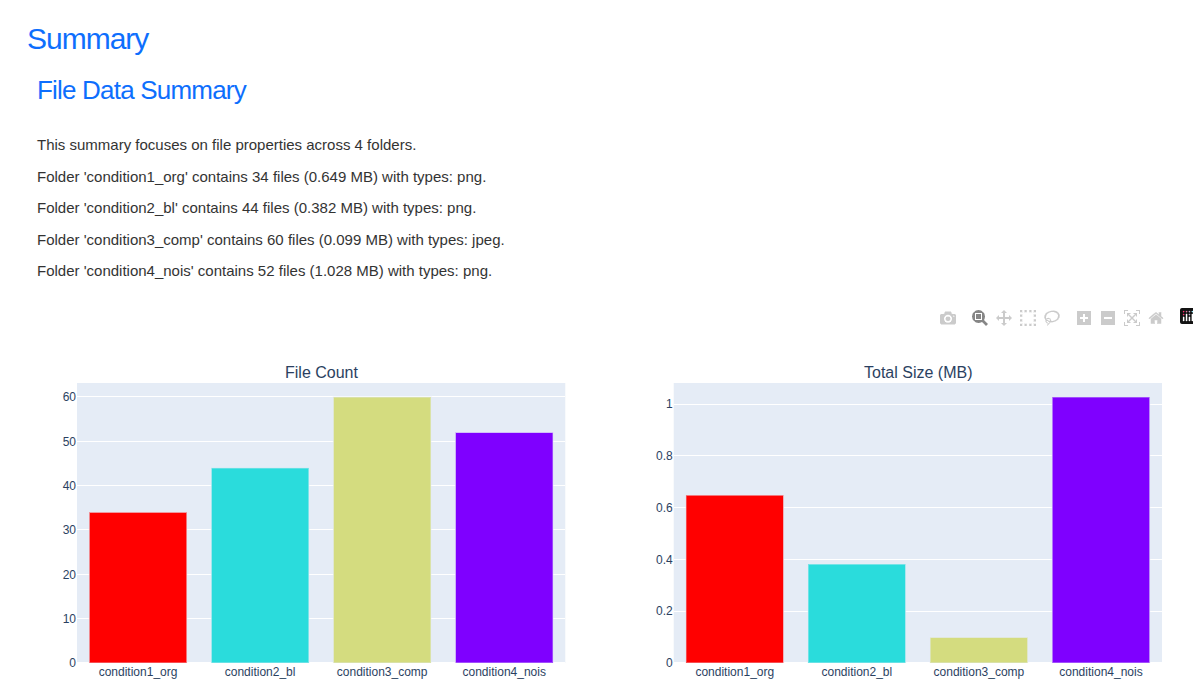
Overview mode - every widget as a tile; click one to expand it in place.
Installation
No terminal? Use the one-click app instead: install guide. It runs PixelPatrol in your browser, with no terminal commands or Python API.
Terminal: requires Python 3.12+. We recommend uv:
uv venv --python 3.12 .venv
source .venv/bin/activate   # Windows: .venv\Scripts\Activate.ps1
uv pip install pixel-patrol
For a modular install (core only + selected add-ons):
uv pip install pixel-patrol-base           # includes image quality metrics
uv pip install pixel-patrol-loader-bio     # BioIO, Zarr, Tifffile, H5 loaders
uv pip install pixel-patrol-loader-medical # NIfTI, DICOM loaders
uv pip install pixel-patrol-geospatial     # GeoTIFF, NetCDF loader
Quickstart
1. Process your dataset:
pixel-patrol process path/to/images/ -o results.parquet --loader bioio
For datasets with experimental conditions:
pixel-patrol process path/to/images/ -o results.parquet --loader bioio \
  -p condition_a -p condition_b
2. Explore in the viewer:
pixel-patrol view results.parquet
Or combine both steps with --view:
pixel-patrol process path/to/images/ -o results.parquet --loader bioio --view
To use viewer parameters, run the two commands sequentially:
pixel-patrol process path/to/images/ -o results.parquet --loader bioio && pixel-patrol view results.parquet
Or use the report manager for a visual interface - list, add, import, and open reports:
pixel-patrol launch
Python API
from pixel_patrol_base import api

if __name__ == "__main__":
    project = api.create_project("my-project", base_dir="path/to/images/", loader="bioio", output_path="results.parquet")
    api.add_paths(project, ["condition_a", "condition_b"])  # optional
    api.process_files(project)
    api.view(project)
Example visualizations
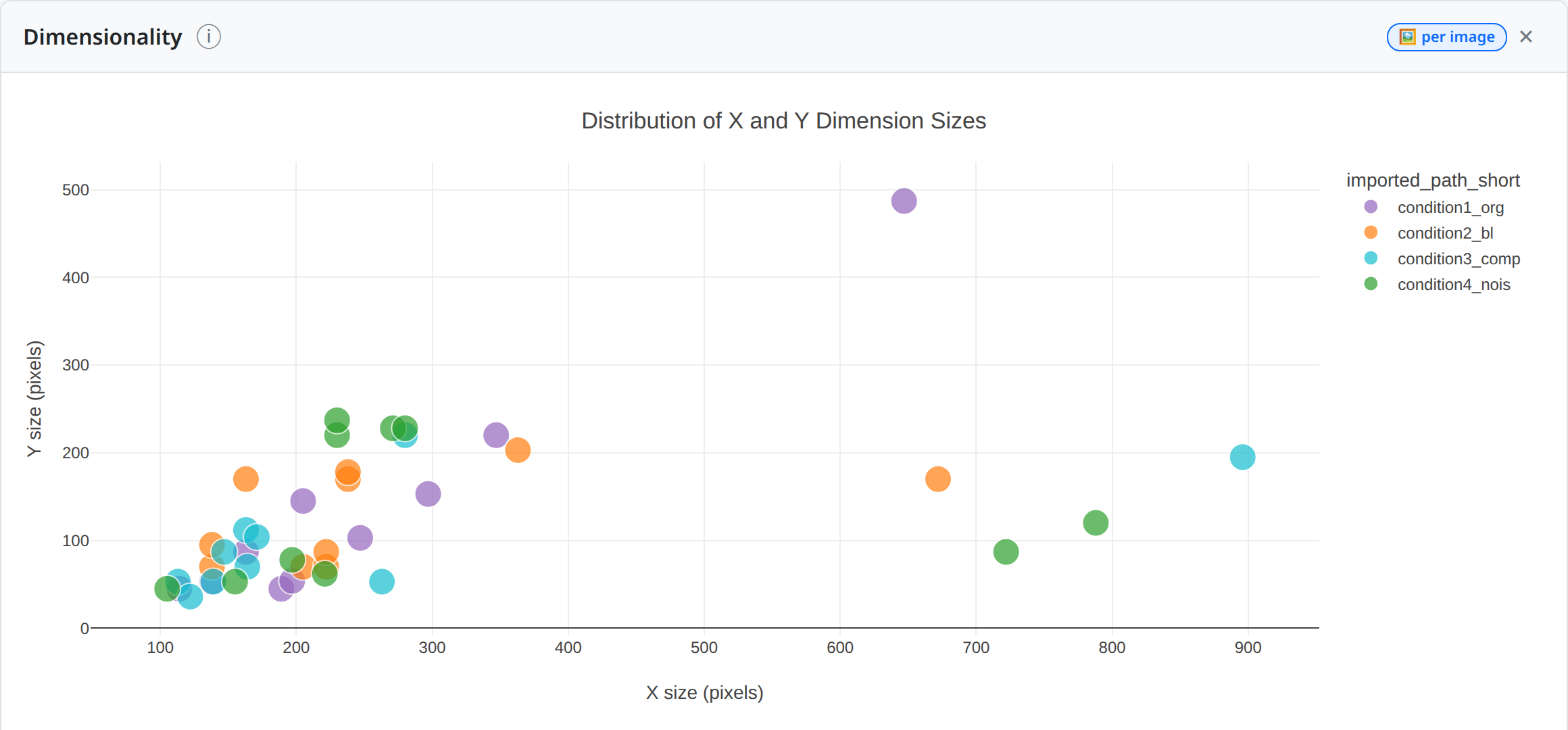
Spot inconsistent crops or resolutions.
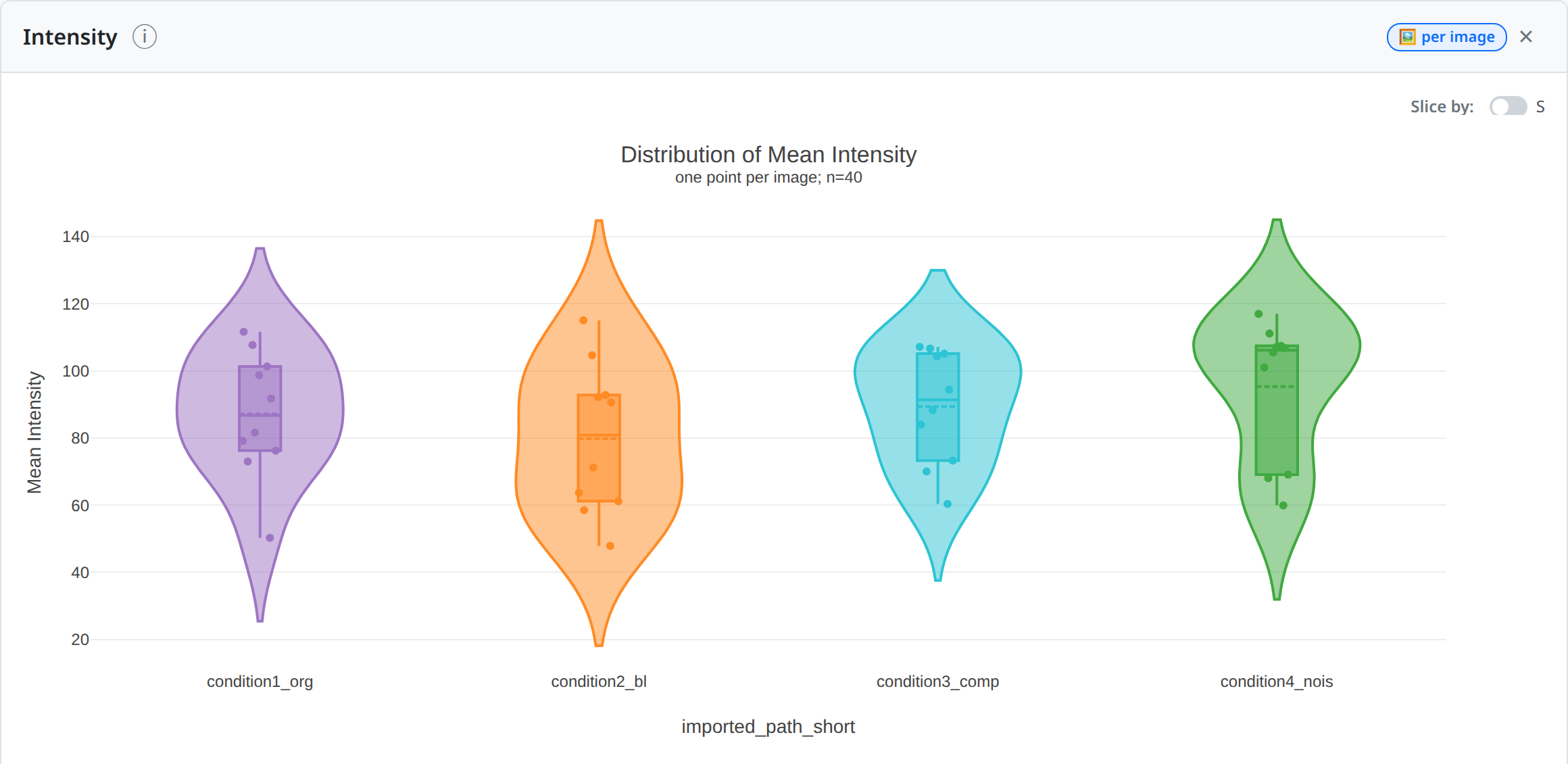
See per-image spread and outliers, e.g. mean intensity, across groups.
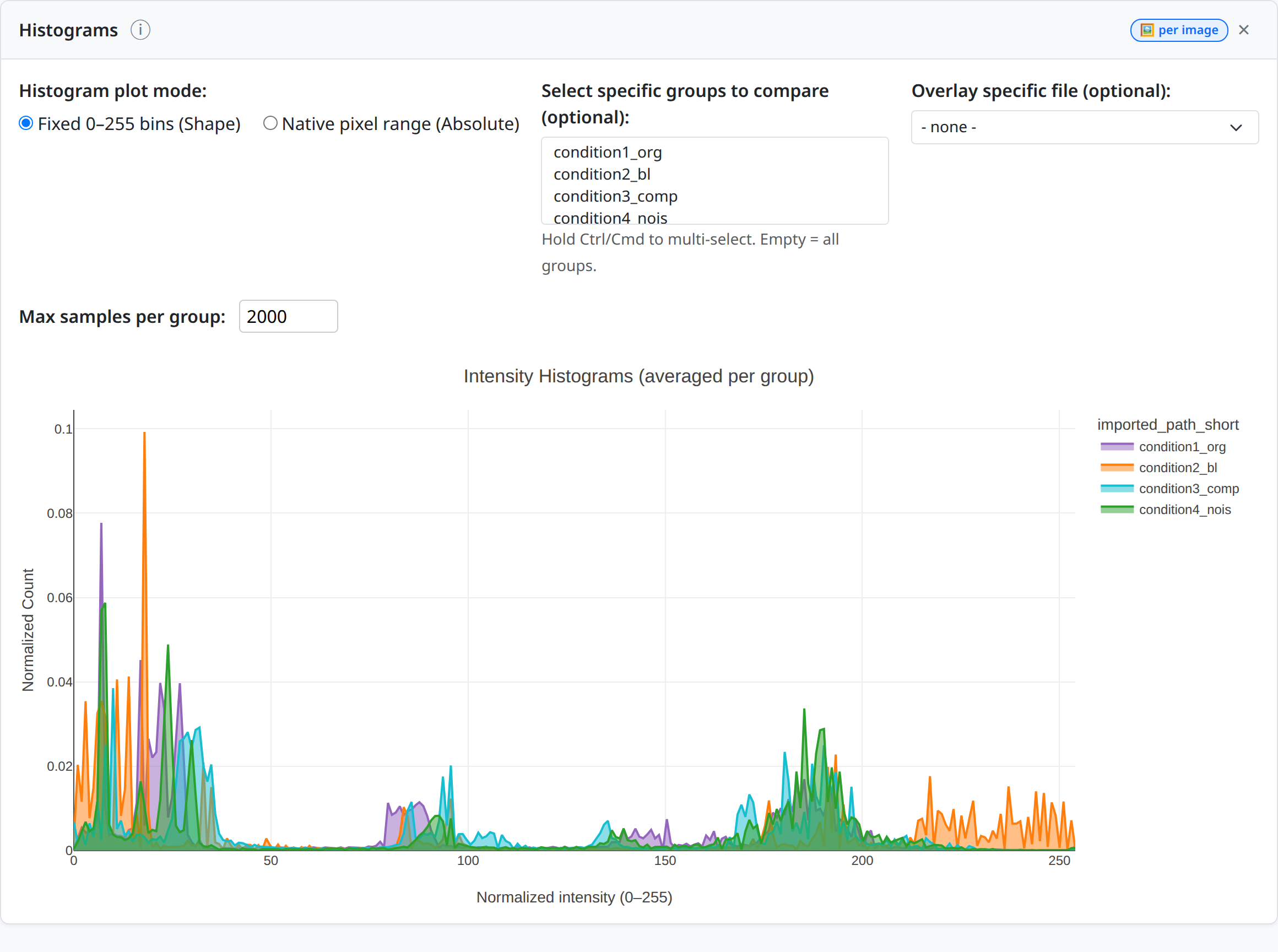
Compare brightness and contrast across conditions.
Sharing PixelPatrol results
Send the .parquet file and open it in the hosted viewer - no installation needed. Or build a self-contained static viewer:
pixel-patrol build-viewer-html -o viewer.html             # light (~7 MB), loads DuckDB WASM from a CDN
pixel-patrol build-viewer-html -o viewer.html --offline   # fully self-contained, works with no network
Note: The static viewer may not load parquet files larger than a few GB. Use
pixel-patrol viewfor large reports.
Extending PixelPatrol
PixelPatrol is designed to be extended with custom loaders, processors, and viewer widgets as standalone Python packages. See pixel-patrol-example-extension for a working template, and the Extensions documentation.
Citation
If you use PixelPatrol, please cite it:
@software{pixelpatrol,
  author = {Bahry, Ella and Rossberg, Thomas and Otto, Maximilian and Schmidt, Deborah},
  title  = {PixelPatrol},
  year   = {2026},
  doi    = {10.5281/zenodo.23479548},
  url    = {https://github.com/ida-mdc/pixel-patrol}
}
3 maintainers


Metadata
3 maintainers
Release files for pixel-patrol 1.0.1
For a detailed explanation of source distributions (sdists) and built distributions (wheels), please see the package formats documentation.
Source distribution (sdist)
| File | Size | Uploaded | Provenance | |
|---|---|---|---|---|
| pixel_patrol-1.0.1.tar.gz | 16.2 kB | Without provenance | Details |
Built distribution (wheel)
| File | Interpreter | ABI | Platform | Reset |
|---|---|---|---|---|
| pixel_patrol-1.0.1-py3-none-any.whl | Python 3 | none | any | Details |
Total release size: 20.3 kB
Release files / pixel_patrol-1.0.1.tar.gz
| Download URL | pixel_patrol-1.0.1.tar.gz |
|---|---|
| Size | 16.2 kB |
| Tags | Source |
|
SHA-256 checksum How to use checksums |
fb6105e8fa96f61bfb1e6e77faf285206121cfc4b87f5e3b8e1628ce4d780479
|
|
BLAKE2b-256 checksum How to use checksums |
02efa7b2c3df83ce937412aab5315e95d1a682c7c62e7a303bfbd683d7853167
|
| Upload date | |
|
Uploaded using Trusted Publishing? What is trusted publishing? |
No |
| Uploaded via |
twine/6.2.0 CPython/3.12.3
|
Release files / pixel_patrol-1.0.1-py3-none-any.whl
| Download URL | pixel_patrol-1.0.1-py3-none-any.whl |
|---|---|
| Size | 4.0 kB |
| Tags | Python 3 |
|
SHA-256 checksum How to use checksums |
582d0226591091b2513a4ee4b53268454612d742bda58551c226a55fbecc2a08
|
|
BLAKE2b-256 checksum How to use checksums |
e774cfbf96d9cf89610906f1777373dda2b9e4cbca9599883abdc7a11b0b835c
|
| Upload date | |
|
Uploaded using Trusted Publishing? What is trusted publishing? |
No |
| Uploaded via |
twine/6.2.0 CPython/3.12.3
|
Security for pixel-patrol 1.0.1
Provenance
Provenance describes where a file came from. On PyPI, provenance is shared via attestations, which provide a verifiable record of the build or publishing details. View details, limitations and caveats.
No provenance found
None of the files in this release were uploaded with provenance metadata.
A note on package security
PyPI is a repository for distributing packages, not a service for auditing them. While third-party security researchers and our staff do their best to detect and remove malicious packages, PyPI cannot guarantee the quality, security or suitability of any given package.














