
 pixrep


📖 Introduction
pixrep is a developer tool designed to bridge the gap between large code repositories and Multimodal Large Language Models.
Instead of feeding raw text that consumes massive context windows, pixrep converts your repository into a structured, hierarchical set of PDFs. This allows you to:
- Save Tokens: Visual encoding is far more efficient than text tokenization (~40% fewer tokens in our demonstrated codebase test; results vary by model, repository and rendering settings).
- Test for Free: Easily share your entire codebase with premium models (like Claude Opus 4.6) on platforms like arena.ai without hitting text limits.
🚀 Why Visual Code?
Traditional text tokenization is expensive. Visual encoding compresses structure efficiently.
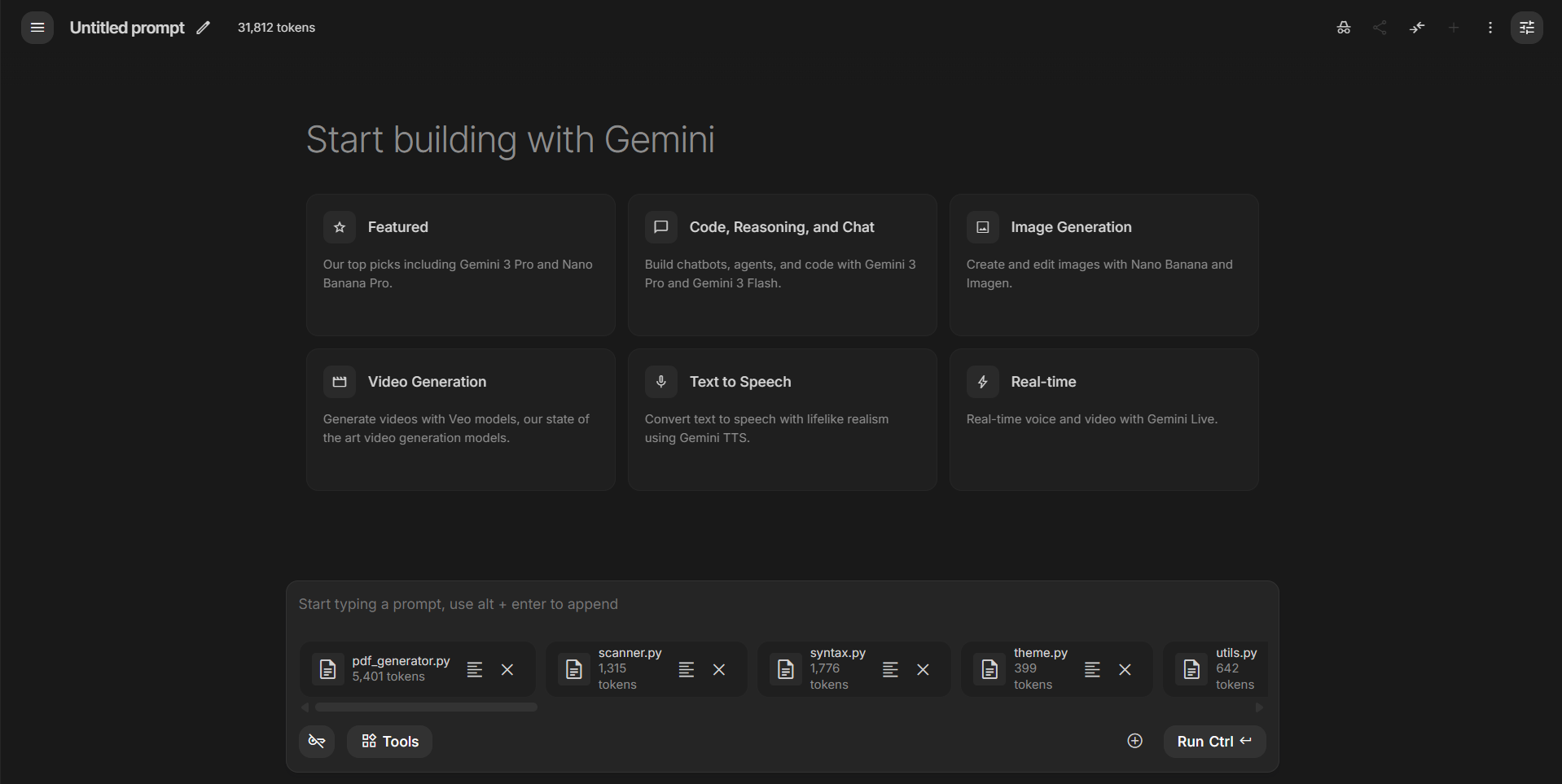
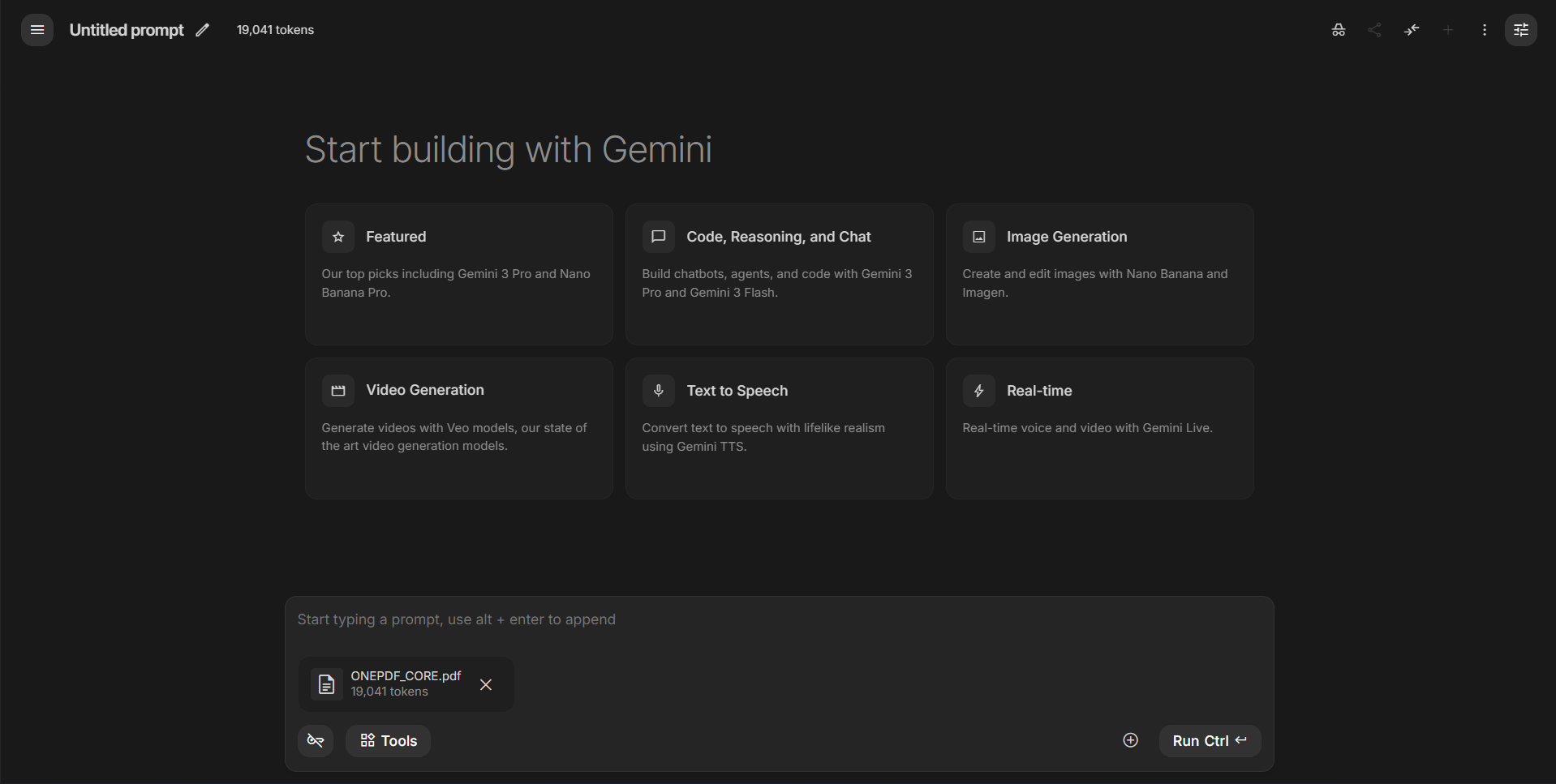
Comparison in Google AI Studio (Gemini 3 Pro):
| Raw Files (Text Input) | pixrep OnePDF (Visual Input) |
|---|---|
 |
 |
| 31,812 Tokens ❌ (Cluttered context) |
19,041 Tokens ✅ (Clean, single file) |
🎓 Academic Backing
The core philosophy of pixrep (rendering code → PDF with syntax highlighting + heatmaps) has been validated by top-tier papers from 2025–2026:
- Text or Pixels? It Takes Half (arXiv:2510.18279): Rendering text as images saves ~50% decoder tokens while maintaining or improving performance.
- DeepSeek-OCR (arXiv:2510.18234): Visual encoding achieves 10–20× compression ratios for dense, structured text.
- CodeOCR (arXiv:2602.01785, Feb 2026): A code-specific study showing that visual input with syntax highlighting improves performance even at 4× compression. In tasks like clone detection, the visual approach outperforms plain text.
Verdict: In the multimodal era, the optimal way to feed code is via "visual perception" rather than "text reading."
✨ Features
- 📉 High Efficiency: Drastically reduces context window usage for large repos.
- ⚡ Faster Scanning: Single-pass file loading (binary check + line count + optional content decode) to reduce I/O overhead.
- 🎨 Syntax Highlighting: Supports 50+ languages (Python, JS, Rust, Go, C++, etc.) with a "One Dark" inspired theme.
- 🧠 Semantic Minimap: Auto-generates per-file micro UML / call graph summaries to expose structure at a glance.
- 🔥 Linter Heatmap: Integrates
ruff/eslintfindings and marks risky lines with red/yellow visual overlays. - 🔎 Query Mode: Search by text or semantic symbols, then render only matched snippets to PDF/PNG.
- 🗂️ Hierarchical Output: Generates a clean
00_INDEX.pdfsummary and separate files for granular access. - 🌏 CJK Support: Built-in font fallback for Chinese/Japanese/Korean characters (Auto-detects OS fonts).
- 🛡️ Smart Filtering: In Git repositories, processes only tracked files by default; in plain directories it applies built-in ignore rules plus any
--ignoreglobs. (.gitignoreitself is not parsed; use--ignoreto add custom rules.) - 📊 Insightful Stats: Calculates line counts and language distribution automatically.
- 🧾 Scan Diagnostics: Prints scan summary (
seen/loaded/ignored/binary/errors) for faster troubleshooting.
📦 Installation
pip install pixrep
For PNG output support (--format png), install optional extras:
pip install "pixrep[png]"
🛠️ Usage
Quick Start
Convert the current directory to hierarchial PDFs in ./pixrep_output/<repo_name>:
pixrep .
Or pack everything into a single, token-optimized PDF (Recommended for LLMs):
pixrep onepdf .
Common Commands
Generate PDFs for a specific repo:
pixrep generate /path/to/my-project -o ./my-project-pdfs
Pack core code into a single minimized PDF (all-in-one):
pixrep onepdf /path/to/my-project -o ./ONEPDF_CORE.pdf
Notes:
- Defaults to
git ls-files(tracked files) when the target is inside a Git repository (including a subdirectory of a larger monorepo). - Defaults to "core-only" filtering (skips docs/tests, except the root
README.md); use--no-core-onlyto include them.
Preview structure and stats (without generating PDFs):
pixrep list /path/to/my-project
list mode now uses lightweight scanning (no file content decode), so large repos respond significantly faster.
Show only top 5 languages in the summary:
pixrep list . --top-languages 5
Query and render only matching snippets:
pixrep query . -q "cache" --glob "*.py" --format png
Semantic query (Python symbols) with interactive terminal preview:
pixrep query . -q "CodeInsight" --semantic --tui
CLI Reference
| Argument | Description | Default |
|---|---|---|
repo |
Path to the code repository. | . (Current Dir) |
-o, --output |
Directory to save the generated PDFs. | ./pixrep_output/<repo> |
--max-size |
Max file size to process (in KB). Files larger than this are skipped. | 512 KB |
--ignore |
Additional glob patterns to ignore (e.g., *.json test/*). |
[] |
--index-only |
Generate only the 00_INDEX.pdf (Directory tree & stats). |
False |
--disable-semantic-minimap |
Turn off per-file semantic UML/callgraph panel. | False |
--disable-lint-heatmap |
Turn off linter-based line heatmap background. | False |
--linter-timeout |
Timeout seconds for each linter command. | 20 |
--list-only |
Print the directory tree and stats to console, then exit. | False |
-V, --version |
Show version information. | - |
⚙️ Performance Notes
pixrep now applies two execution paths:
- Light scan path (
pixrep list,pixrep generate --index-only,--list-only): only metadata and line counts are collected; file content is not loaded. - Full scan path (regular
pixrep generate): file content is decoded only when needed for PDF rendering.
This reduces memory pressure and disk I/O for repository exploration workflows.
Lint/semantic caches are stored in user cache directories by default, namespaced per-repo as <repo_name>-<resolved_path_sha256[:12]> so two repos that share a basename never collide:
- Windows:
%LOCALAPPDATA%/pixrep/cache/<repo_name>-<hash> - Linux/macOS:
$XDG_CACHE_HOME/pixrep/<repo_name>-<hash>or~/.cache/pixrep/<repo_name>-<hash>
Override the cache root with PIXREP_CACHE_DIR.
📂 Output Structure
After running pixrep ., you will get a folder structure optimized for LLM upload:
pixrep_output/pixrep/
├── 00_INDEX.pdf                  # <--- Upload this first! Contains tree & stats
├── LICENSE__a1b2c3d4.pdf
├── README.md__5e6f7a8b.pdf
├── pixrep___init__.py__9a0b1c2d.pdf
├── pixrep_cli.py__3f4e5d6c.pdf
└── ...                           # names follow <safe_path>__<short_hash>.pdf
🧩 Supported Languages
pixrep automatically detects and highlights syntax for:
- Core: Python, C, C++, Java, Rust, Go
- Web: HTML, CSS, JavaScript, TypeScript, Vue, Svelte
- Config: JSON, YAML, TOML, XML, Dockerfile, Ini
- Scripting: Bash, Lua, Perl, Ruby, PHP
- And more: Swift, Kotlin, Scala, Haskell, OCaml, etc.
🤝 Contributing
We welcome contributions! Please feel free to submit a Pull Request.
- Fork the repository.
- Create your feature branch (
git checkout -b feature/AmazingFeature). - Commit your changes (
git commit -m 'Add some AmazingFeature'). - Push to the branch (
git push origin feature/AmazingFeature). - Open a Pull Request.
📄 License
Distributed under the MIT License. See LICENSE for more information.
1 maintainer

Metadata
1 maintainer
Release files for pixrep 0.8.4
For a detailed explanation of source distributions (sdists) and built distributions (wheels), please see the package formats documentation.
Source distribution (sdist)
| File | Size | Uploaded | Provenance | |
|---|---|---|---|---|
| pixrep-0.8.4.tar.gz | 85.7 kB | With provenance | Details |
Built distribution (wheel)
| File | Interpreter | ABI | Platform | Reset |
|---|---|---|---|---|
| pixrep-0.8.4-py3-none-any.whl | Python 3 | none | any | Details |
Total release size: 164.5 kB
Release files / pixrep-0.8.4.tar.gz
| Download URL | pixrep-0.8.4.tar.gz |
|---|---|
| Size | 85.7 kB |
| Tags | Source |
|
SHA-256 checksum How to use checksums |
6c9853bb15fbf6617341b0a5a0ecf5780ecb18bd2606ba4d0428b5dd9fd49e4a
|
|
BLAKE2b-256 checksum How to use checksums |
d0a241a286951a03daed9e952b1fa8edf32e3799c3050c6d90397bfe762abb58
|
| Upload date | |
|
Uploaded using Trusted Publishing? What is trusted publishing? |
Yes |
| Uploaded via |
twine/6.1.0 CPython/3.13.14
|
Provenance
Provenance describes where a file came from. On PyPI, provenance is shared via attestations, which provide a verifiable record of the build or publishing details. View details, limitations and caveats.


PyPI Publish Attestation
PyPI verified that this artifact, at this checksum, originated from the publisher listed below.
Signed by GitHub Actions, verified by PyPI on Jul 24, 2026.
Transparency logRelease files / pixrep-0.8.4-py3-none-any.whl
| Download URL | pixrep-0.8.4-py3-none-any.whl |
|---|---|
| Size | 78.8 kB |
| Tags | Python 3 |
|
SHA-256 checksum How to use checksums |
4d22b18c8ec8572c5e408074962c0cef714d03085a9cbc258a1bf1266a617b80
|
|
BLAKE2b-256 checksum How to use checksums |
20bfa420382563f92b654e3b742dc6c2e7bbe1a469bcbc35f051a2c6f93f9396
|
| Upload date | |
|
Uploaded using Trusted Publishing? What is trusted publishing? |
Yes |
| Uploaded via |
twine/6.1.0 CPython/3.13.14
|
Provenance
Provenance describes where a file came from. On PyPI, provenance is shared via attestations, which provide a verifiable record of the build or publishing details. View details, limitations and caveats.
PyPI Publish Attestation
PyPI verified that this artifact, at this checksum, originated from the publisher listed below.
Signed by GitHub Actions, verified by PyPI on Jul 24, 2026.
Transparency logSecurity for pixrep 0.8.4
Provenance
Provenance describes where a file came from. On PyPI, provenance is shared via attestations, which provide a verifiable record of the build or publishing details. View details, limitations and caveats.
Full provenance
All 2 files in this release have been uploaded with provenance metadata.
Attestation for pixrep-0.8.4.tar.gz
PyPI Publish Attestation
PyPI verified that this artifact, at this checksum, originated from the publisher listed below.
Signed by GitHub Actions, verified by PyPI on Jul 24, 2026.
Transparency logA note on package security
PyPI is a repository for distributing packages, not a service for auditing them. While third-party security researchers and our staff do their best to detect and remove malicious packages, PyPI cannot guarantee the quality, security or suitability of any given package.
To learn more about protecting yourself from malicious actors, visit our package security documentation.














