
Convert code repositories into structured PDF collections for LLM collaboration.

Reason this release was yanked:
PNG is not suitable for long code
Project description
 pixrep
📉 SAVE UP TO 90% TOKENS
Turn Codebases into Visual Context for Multimodal LLMs



📖 Introduction
pixrep is a developer tool designed to bridge the gap between large code repositories and Multimodal Large Language Models.
Instead of feeding raw text that consumes massive context windows, pixrep converts your repository into a structured, hierarchical set of PDFs. This allows you to:
- Save 90% Tokens: Visual encoding is far more efficient than text tokenization.
- Test for Free: Easily share your entire codebase with premium models (like Claude Opus 4.6) on platforms like arena.ai without hitting text limits.
🚀 Why Visual Code?
Traditional text tokenization is expensive. Visual encoding compresses structure efficiently.
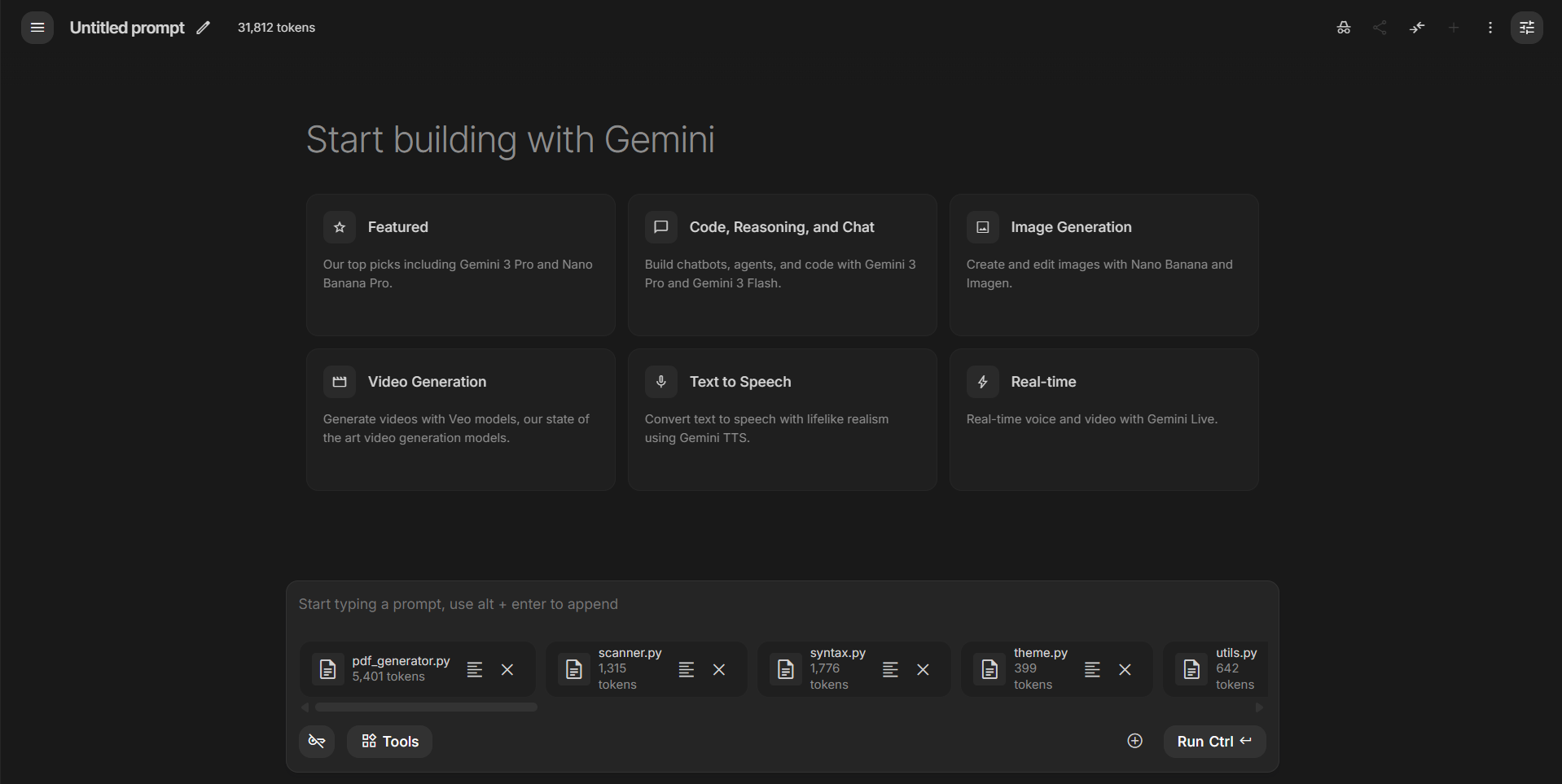
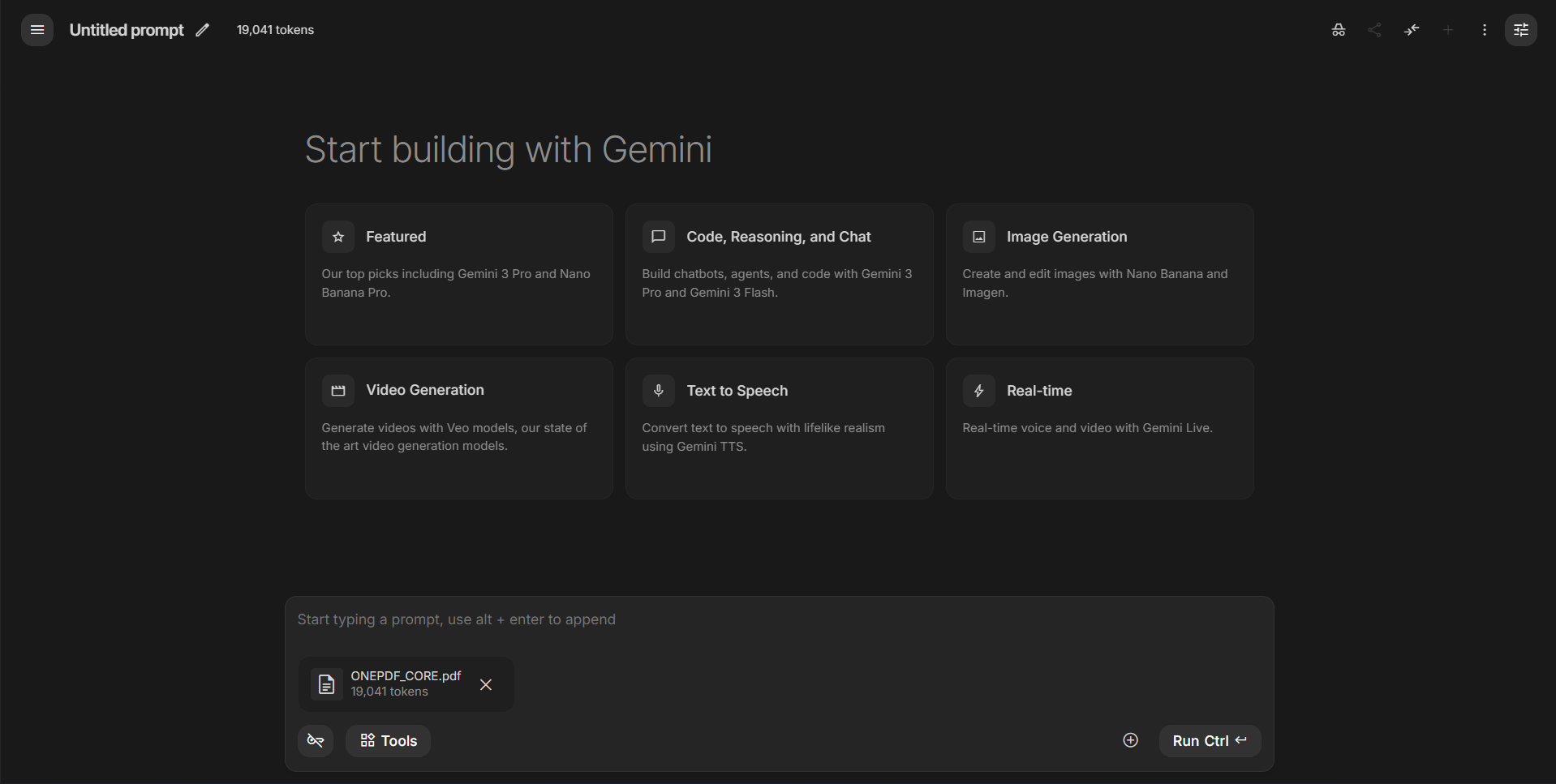
Comparison in Google AI Studio (Gemini 3 Pro):
| Raw Files (Text Input) | pixrep OnePDF (Visual Input) |
|---|---|
 |
 |
| 31,812 Tokens ❌ (Cluttered context) |
19,041 Tokens ✅ (Clean, single file) |
🎓 Academic Backing
The core philosophy of pixrep (rendering code → PDF with syntax highlighting + heatmaps) has been validated by top-tier papers from 2025–2026:
- Text or Pixels? It Takes Half (arXiv:2510.18279): Rendering text as images saves ~50% decoder tokens while maintaining or improving performance.
- DeepSeek-OCR (arXiv:2510.18234): Visual encoding achieves 10–20× compression ratios for dense, structured text.
- CodeOCR (arXiv:2602.01785, Feb 2026): A code-specific study showing that visual input with syntax highlighting improves performance even at 4× compression. In tasks like clone detection, the visual approach outperforms plain text.
Verdict: In the multimodal era, the optimal way to feed code is via "visual perception" rather than "text reading."
✨ Features
- 📉 High Efficiency: Drastically reduces context window usage for large repos.
- ⚡ Faster Scanning: Single-pass file loading (binary check + line count + optional content decode) to reduce I/O overhead.
- 🎨 Syntax Highlighting: Supports 50+ languages (Python, JS, Rust, Go, C++, etc.) with a "One Dark" inspired theme.
- 🧠 Semantic Minimap: Auto-generates per-file micro UML / call graph summaries to expose structure at a glance.
- 🔥 Linter Heatmap: Integrates
ruff/eslintfindings and marks risky lines with red/yellow visual overlays. - 🔎 Query Mode: Search by text or semantic symbols, then render only matched snippets to PDF/PNG.
- 🗂️ Hierarchical Output: Generates a clean
00_INDEX.pdfsummary and separate files for granular access. - 🌏 CJK Support: Built-in font fallback for Chinese/Japanese/Korean characters (Auto-detects OS fonts).
- 🛡️ Smart Filtering: Respects
.gitignorepatterns and supports custom ignore rules. - 📊 Insightful Stats: Calculates line counts and language distribution automatically.
- 🧾 Scan Diagnostics: Prints scan summary (
seen/loaded/ignored/binary/errors) for faster troubleshooting.
📦 Installation
pip install pixrep
For PNG output support (--format png), install optional extras:
pip install "pixrep[png]"
🛠️ Usage
Quick Start
Convert the current directory to hierarchial PDFs in ./pixrep_output/<repo_name>:
pixrep .
Or pack everything into a single, token-optimized PDF (Recommended for LLMs):
pixrep onepdf .
Or generate the exact same all-in-one layout as a single long PNG:
pixrep onepng .
Common Commands
Generate PDFs for a specific repo:
pixrep generate /path/to/my-project -o ./my-project-pdfs
Pack core code into a single minimized PDF (all-in-one):
pixrep onepdf /path/to/my-project -o ./ONEPDF_CORE.pdf
Notes:
- Defaults to
git ls-files(tracked files) when available. - Defaults to "core-only" filtering (skips docs/tests); use
--no-core-onlyto include them.
Pack core code into a single long PNG with the same layout as onepdf:
pixrep onepng /path/to/my-project -o ./ONEPDF_CORE.png --png-dpi 200
Notes:
onepngdefaults to grayscale + palette compression for smaller files.- Fine-tune with
--png-dpi,--png-gray-levelsand--png-compress-level.
Preview structure and stats (without generating PDFs):
pixrep list /path/to/my-project
list mode now uses lightweight scanning (no file content decode), so large repos respond significantly faster.
Show only top 5 languages in the summary:
pixrep list . --top-languages 5
Query and render only matching snippets:
pixrep query . -q "cache" --glob "*.py" --format png
Semantic query (Python symbols) with interactive terminal preview:
pixrep query . -q "CodeInsight" --semantic --tui
CLI Reference
| Argument | Description | Default |
|---|---|---|
repo |
Path to the code repository. | . (Current Dir) |
-o, --output |
Directory to save the generated PDFs. | ./pixrep_output/<repo> |
--max-size |
Max file size to process (in KB). Files larger than this are skipped. | 512 KB |
--ignore |
Additional glob patterns to ignore (e.g., *.json test/*). |
[] |
--index-only |
Generate only the 00_INDEX.pdf (Directory tree & stats). |
False |
--disable-semantic-minimap |
Turn off per-file semantic UML/callgraph panel. | False |
--disable-lint-heatmap |
Turn off linter-based line heatmap background. | False |
--linter-timeout |
Timeout seconds for each linter command. | 20 |
--list-only |
Print the directory tree and stats to console, then exit. | False |
-V, --version |
Show version information. | - |
⚙️ Performance Notes
pixrep now applies two execution paths:
- Light scan path (
pixrep list,pixrep generate --index-only,--list-only): only metadata and line counts are collected; file content is not loaded. - Full scan path (regular
pixrep generate): file content is decoded only when needed for PDF rendering.
This reduces memory pressure and disk I/O for repository exploration workflows.
Lint/semantic caches are now stored in user cache directories by default:
- Windows:
%LOCALAPPDATA%/pixrep/cache/<repo_name> - Linux/macOS:
$XDG_CACHE_HOME/pixrep/<repo_name>or~/.cache/pixrep/<repo_name>
You can override with PIXREP_CACHE_DIR.
📂 Output Structure
After running pixrep ., you will get a folder structure optimized for LLM upload:
pixrep_output/pixrep/
├── 00_INDEX.pdf             # <--- Upload this first! Contains tree & stats
├── 001_LICENSE.pdf
├── 002_README.md.pdf
├── 003_pixrep___init__.py.pdf
├── 005_pixrep_cli.py.pdf
└── ...
🧩 Supported Languages
pixrep automatically detects and highlights syntax for:
- Core: Python, C, C++, Java, Rust, Go
- Web: HTML, CSS, JavaScript, TypeScript, Vue, Svelte
- Config: JSON, YAML, TOML, XML, Dockerfile, Ini
- Scripting: Bash, Lua, Perl, Ruby, PHP
- And more: Swift, Kotlin, Scala, Haskell, OCaml, etc.
🤝 Contributing
We welcome contributions! Please feel free to submit a Pull Request.
- Fork the repository.
- Create your feature branch (
git checkout -b feature/AmazingFeature). - Commit your changes (
git commit -m 'Add some AmazingFeature'). - Push to the branch (
git push origin feature/AmazingFeature). - Open a Pull Request.
📄 License
Distributed under the MIT License. See LICENSE for more information.
Release history Release notifications | RSS feed


Download files
Download the file for your platform. If you're not sure which to choose, learn more about installing packages.
Source Distribution
Built Distribution
Filter files by name, interpreter, ABI, and platform.
If you're not sure about the file name format, learn more about wheel file names.
Copy a direct link to the current filters
File details
Details for the file pixrep-0.6.2.tar.gz.
File metadata
- Download URL: pixrep-0.6.2.tar.gz
- Upload date:
- Size: 58.9 kB
- Tags: Source
- Uploaded using Trusted Publishing? Yes
- Uploaded via: twine/6.1.0 CPython/3.13.7
File hashes
| Algorithm | Hash digest | |
|---|---|---|
| SHA256 |
17ff5cd205226385ad8cf821444677ae45a0d2af7eedf8ce1d9e9209045df5cb
|
|
| MD5 |
eefe59f3608ee688e58b8e90935c4640
|
|
| BLAKE2b-256 |
cfa0d595039011fc5bfd0183f32d4ce74d42fdf3996e324d700e89bd246e43c0
|
Provenance
The following attestation bundles were made for pixrep-0.6.2.tar.gz:
Publisher:
publish.yml on TingjiaInFuture/pixrep
-
Statement:
-
Statement type:
https://in-toto.io/Statement/v1 -
Predicate type:
https://docs.pypi.org/attestations/publish/v1 -
Subject name:
pixrep-0.6.2.tar.gz -
Subject digest:
17ff5cd205226385ad8cf821444677ae45a0d2af7eedf8ce1d9e9209045df5cb - Sigstore transparency entry: 1056191678
- Sigstore integration time:
-
Permalink:
TingjiaInFuture/pixrep@e1bdf44a079364129d622b22c2cca900b6a7095c -
Branch / Tag:
refs/tags/v0.6.2 - Owner: https://github.com/TingjiaInFuture
-
Access:
public
-
Token Issuer:
https://token.actions.githubusercontent.com -
Runner Environment:
github-hosted -
Publication workflow:
publish.yml@e1bdf44a079364129d622b22c2cca900b6a7095c -
Trigger Event:
release
-
Statement type:
File details
Details for the file pixrep-0.6.2-py3-none-any.whl.
File metadata
- Download URL: pixrep-0.6.2-py3-none-any.whl
- Upload date:
- Size: 58.1 kB
- Tags: Python 3
- Uploaded using Trusted Publishing? Yes
- Uploaded via: twine/6.1.0 CPython/3.13.7
File hashes
| Algorithm | Hash digest | |
|---|---|---|
| SHA256 |
034d989250a6849974b8e70f00b4c0964b0ab3abc5c25b0b3084f70c9aeeadbb
|
|
| MD5 |
cbc31a581f3935cbb7d0ae787bf8a3ba
|
|
| BLAKE2b-256 |
81d5a0470d2932fac75eba1f2c0cc0d47c32d7efcfc92642511bbafb6463fac8
|
Provenance
The following attestation bundles were made for pixrep-0.6.2-py3-none-any.whl:
Publisher:
publish.yml on TingjiaInFuture/pixrep
-
Statement:
-
Statement type:
https://in-toto.io/Statement/v1 -
Predicate type:
https://docs.pypi.org/attestations/publish/v1 -
Subject name:
pixrep-0.6.2-py3-none-any.whl -
Subject digest:
034d989250a6849974b8e70f00b4c0964b0ab3abc5c25b0b3084f70c9aeeadbb - Sigstore transparency entry: 1056191684
- Sigstore integration time:
-
Permalink:
TingjiaInFuture/pixrep@e1bdf44a079364129d622b22c2cca900b6a7095c -
Branch / Tag:
refs/tags/v0.6.2 - Owner: https://github.com/TingjiaInFuture
-
Access:
public
-
Token Issuer:
https://token.actions.githubusercontent.com -
Runner Environment:
github-hosted -
Publication workflow:
publish.yml@e1bdf44a079364129d622b22c2cca900b6a7095c -
Trigger Event:
release
-
Statement type:






