
plain.dev
A single command that runs everything you need for local development.
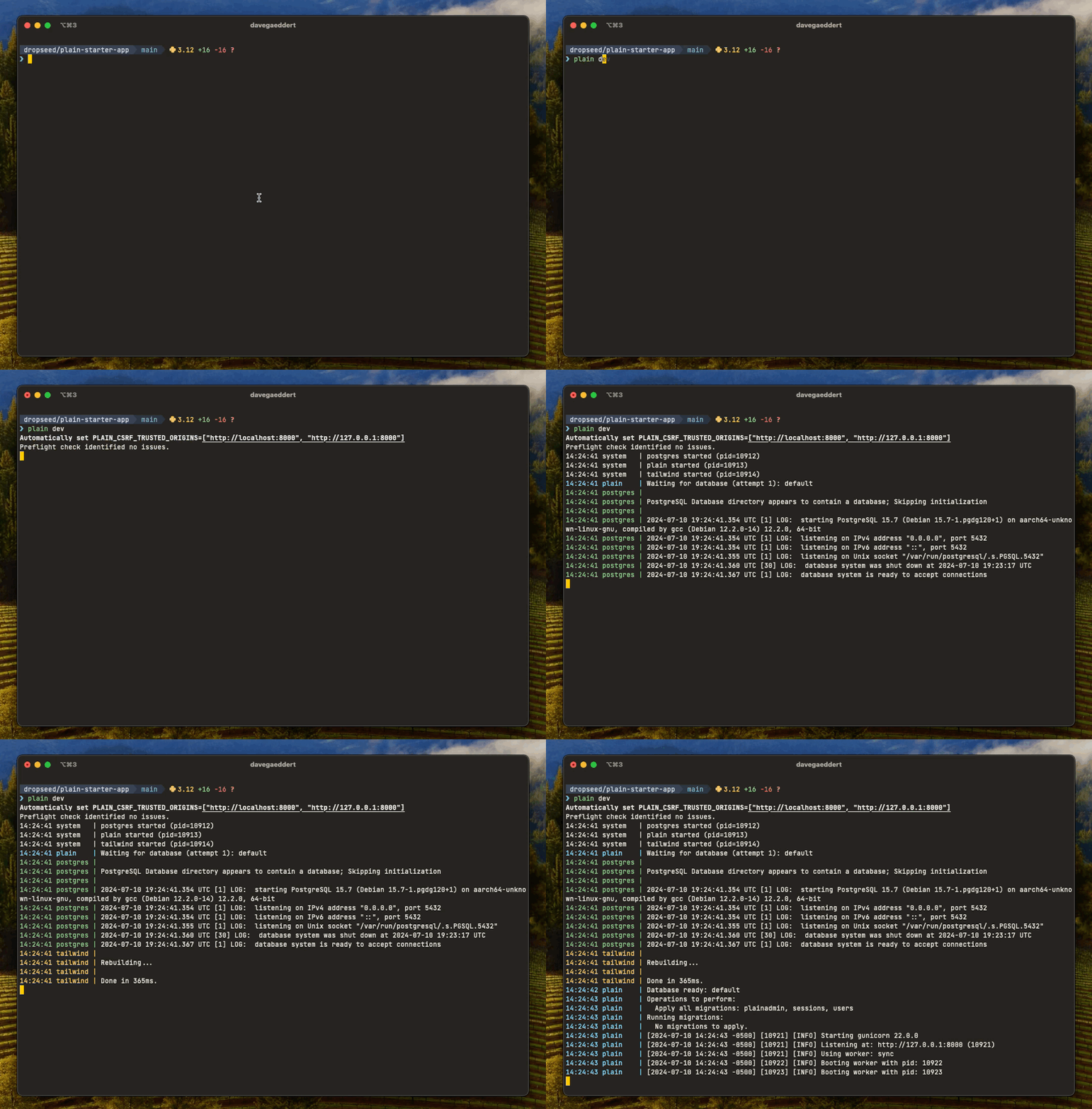
Overview
The plain dev command starts everything you need for local development with a single command:
plain dev
This will:
- Run preflight checks
- Execute pending migrations
- Start your development server with auto-reload
- Build and watch CSS with Tailwind (if installed)
- Start required services (like databases)
- Run any custom processes you've defined
Commands
plain dev
The plain dev command does several things:
- Sets
PLAIN_CSRF_TRUSTED_ORIGINSto localhost by default - Runs
plain preflightto check for any issues - Executes any pending model migrations
- Starts
gunicornwith--reload - Serves HTTPS on port 8443 by default (uses the next free port if 8443 is taken and no port is specified)
- Runs
plain tailwind build --watch, ifplain.tailwindis installed - Any custom process defined in
pyproject.tomlattool.plain.dev.run - Necessary services (ex. Postgres) defined in
pyproject.tomlattool.plain.dev.services
Services
Use services to define processes that your app needs to be functional — a
queue, a mail catcher, a search index. They start automatically in plain dev,
and also in plain pre-commit so preflight and tests have what they need.
# pyproject.toml
[tool.plain.dev.services]
redis = {cmd = "redis-server --port 6399"}
They also start in the background for the commands that use the app: plain test, plain shell, plain request, plain preflight, plain migrations, plain postgres and plain run. They start once the command is known to exist, so a mistyped command starts nothing. Set DEV_SERVICES_AUTO=false to turn that off, and stop them with plain dev --stop.
You don't need a service for Postgres — see Databases below.
Custom processes
Unlike services, custom processes are only run during plain dev. This is a good place to run something like ngrok or a Plain job worker, which you might need to use your local site, but don't need running for executing tests, for example.
# pyproject.toml
[tool.plain.dev.run]
    ngrok = {command = "ngrok http $PORT"}
plain dev services
Starts your services by themselves.
Logs are stored in .plain/dev/logs/services/.
plain dev logs
Show output from recent plain dev runs.
Logs are stored in .plain/dev/logs/run/.
plain dev logs        # print last log
plain dev logs -f     # follow the latest log
plain dev logs --pid 1234
plain dev logs --path
plain pre-commit
A built-in pre-commit hook that you can install with plain pre-commit --install.
Runs:
uv lock --check, if using uvplain check(custom commands, code linting, preflight, migrations, tests)plain assets compile
Custom commands can be defined in pyproject.toml at tool.plain.check.run and will run as part of plain check:
[tool.plain.check.run]
my-check = {cmd = "echo 'running my check'"}
plain request
Makes a request to your app without a server running, against your dev database, and prints what came back:
$ plain request /admin/ --user 1
You can set the method and body (--method, --data, --header, --content-type), make it a user's request by id or email (--user, which needs plain.auth), and assert on the result (--status, --contains, --not-contains) so it works as a quick check in a script. Redirects are followed unless you pass --no-follow.
It makes its requests with the same client your tests use. What's different is the database: this is your dev database, so what a POST writes stays written. The command only runs when DEBUG is on.
Every response also prints a trace: duration, span and query counts, and each distinct statement with how many times it ran and the call sites that issued it, which is usually where an N+1 turns out to live. It reports what ran and leaves the diagnosis to you. A followed redirect chain is several requests, so it prints one block per hop rather than one merged summary.
Two flags control how much of the trace you see:
--trace: the complete query list plus the full span tree.--json: response metadata and the complete trace as JSON, with no response body. This is the form to pipe into other tools.
A request made this way isn't exported anywhere. If plain.connect is sending traces to Plain Cloud, the command sets that aside for the length of the request and puts it back afterwards.
Databases
You don't need to configure a database to start working. If plain.postgres is installed and no database URL is set, plain.dev provides one — a Postgres server for the project, and a database for this checkout.
plain dev          # server started, database created and migrated
plain db status    # see what you got
Configuring a URL means "use this, don't manage Postgres for me." Set PLAIN_POSTGRES_URL (or POSTGRES_URL in settings.py, or DATABASE_URL) and plain.dev stays out of the way entirely — no server is started and nothing is injected. Nothing here is required, and nothing here overrides you.
A database per checkout
Every checkout gets its own database, derived from its directory name. Two worktrees of the same project never share data:
| Checkout | Database |
|---|---|
myapp/ |
myapp |
myapp-feature/ |
myapp_feature |
worktrees/fix-bug/ |
myapp_fix_bug |
Test databases are derived from that name too, and from the run (test_myapp_feature_r48213), so test runs at the same moment don't collide: not in different checkouts, and not in one. Each is a clone of a template the first run built (test_myapp_feature_tca9feecd), which stays for the next run: one per checkout's database, named for the schema it was built from.
All of a project's databases live in one Postgres server, shared by every worktree. That's what makes copying between them instant.
New checkouts start with your data
A new worktree's database is a copy of your main database, data included — because re-seeding a fresh database every time is the actual cost of working in parallel.
git worktree add ../myapp-feature
cd ../myapp-feature
plain dev          # database forked from `myapp`, with its rows
Copying uses CREATE DATABASE ... TEMPLATE when the source is idle, which is a file-level copy and effectively instant at any size. If the source is busy — you're running plain dev against it in another window — it falls back to a streaming dump/restore, which doesn't interrupt anything. You don't choose; it picks.
Use plain db create if you'd rather start empty.
Managing databases
plain db status              # this checkout's database, server, size, branch, pending migrations
plain db list                # every database in the project, and who owns it
plain db fork <name>         # copy a database, data and all
plain db use <name>          # point this checkout somewhere else (no name: back to derived)
plain db create [name]       # a new empty database
plain db reset               # drop and recreate this one, empty
plain db drop <name>         # delete a database
plain db clean --dry-run     # list what is debris and what isn't, and why
plain db clean               # the same list, then ask, then drop the debris
plain db url                 # print the URL and nothing else, for scripts
plain db status and plain db list take --json for scripts and agents.
plain db url ensures the server and database exist before printing, and writes
nothing but the URL to stdout, so export PLAIN_POSTGRES_URL="$(plain db url)"
is safe to build on.
For a psql prompt on this checkout's database, use plain postgres shell — it connects to whatever database is active, managed or not.
plain db drop and plain db reset drop the database you named and nothing else. If something is connected to it they stop and say so; --force throws the connections off.
Cleaning up
Forks are real copies, so deleted worktrees leave real disk behind, and a test run that was killed leaves its databases. plain db clean drops both. It drops databases nobody named, and a dropped database can't be brought back, so it shows its reasoning first:
plain db clean --dry-run
Would drop 1 (8.5 MB):
  shop_old_feature                       8.5 MB  /work/shop-old-feature
      its checkout is gone

Leaving 3:
  shop                                   9.1 MB  /work/shop
      the project's main database, which every checkout forks from
  shop_feature                           8.5 MB  /work/shop-feature
      the checkout at /work/shop-feature is configured to use it
  scratch                                7.2 MB  (no recorded owner)
      no record of which checkout made it
Every database of the project is in one list or the other. plain db clean prints the same two lists, asks, and then drops what is under "Would drop". There is no flag that skips the question. To drop a database without being asked, name it: plain db drop <name> --yes.
A development database is dropped only when all of this is so:
- It isn't the project's main database or this checkout's.
- No checkout of the project is configured to use it. This goes by what each checkout uses now, so a worktree that was moved, or pointed at a database with
plain db use, keeps it whatever the database's metadata says. - Its metadata names the checkout that made it, and that checkout is gone.
- Nothing is connected to it.
A checkout is gone when its directory is missing and git no longer lists a worktree that held it. A worktree git still lists, with its directory missing, may be on a volume that isn't mounted, so its database is left until git worktree prune has run. Outside a git repository the only checkout known is the one you run the command from, and a missing directory counts only when the directory that held it is still there.
A test database is dropped only when it carries the record of the run that made it and that run is dead. The template a database's test runs clone is dropped only when its record says it is of no use now: this checkout's schema has changed since it was built, the database it was built for is gone, or the run building it died before it was done. plain.postgres's testing docs have both rules. A database that is only named like a test database is listed and left.
Nothing is dropped with FORCE. If something connects to a database between the listing and the drop, the drop fails and the database stays.
plain db changes which database you're on; plain postgres sync changes the schema of the one you're on. plain db exists only when plain.dev is installed — it's a development tool with no production counterpart.
Sharing one database between checkouts
plain db use points several checkouts at a single database, which is what you want when you'd rather have no drift than isolation.
The risk is schema, not data: applying a branch-only migration to a shared database changes it for everyone using it. So when plain dev sees that combination — a shared database, plus migrations this branch has that it doesn't — it forks you a private copy instead and tells you so. Applying to the shared database is deliberate: plain db use <name> to point at it, then plain postgres sync.
Switching branches
Databases remember the branch they were last used on. When you switch branches and the database turns out to be ahead of your code — carrying tables from migrations this branch doesn't have — plain dev says so, because nothing else will. Your app keeps working and the schema quietly doesn't match.
It reports and leaves the database alone. plain db fork or plain db reset are there when you want a clean one.
Where the server comes from
Docker if it's available, otherwise a Postgres already listening on 127.0.0.1:5432 that accepts the postgres role. The second is what makes cloud sandboxes and remote agent environments work, where a Docker daemon usually isn't available but a system Postgres often is.
An open port isn't enough — we check that we can actually log in. Homebrew and
Postgres.app both create a superuser named after your macOS account and no
postgres role, so a server like that is reported as unusable rather than
picked and then failed on. Point us at it yourself if you want to use it:
export PLAIN_POSTGRES_URL="postgres://$USER@127.0.0.1:5432/myapp"
# pyproject.toml
[tool.plain.dev.postgres]
backend = "auto"          # auto | docker | local | off
image = "postgres:16"     # any image, for the docker backend
image is a full image reference rather than a version number, so you can use a
build that ships the extensions you need:
[tool.plain.dev.postgres]
image = "pgvector/pgvector:pg16"
Changing image doesn't rebuild an existing container — the image is fixed when
it's created — so plain dev tells you when the two have drifted apart and how
to recreate it. Your data is on a separate volume and survives that.
Data lives in a Docker named volume, never inside your checkout, so deleting a worktree never deletes a database.
Set backend = "off" to turn all of this off.
Server lifecycle
There's one container per project, created the first time something needs a database. Nothing removes one automatically — a container might hold the only copy of something — so they accumulate as you work on more projects. Each idle Postgres holds around 76 MB, which is worth knowing if you have a lot of them.
They deliberately have no restart policy, so a reboot leaves them all stopped and only the projects you actually touch start back up. Starting on demand costs about two seconds, and the port is re-read each time, so a reassigned port is handled for you.
plain db server list      # every project's container on this machine
plain db server stop      # stop it; data is untouched, next command restarts it
plain db server remove    # remove it and its data (--keep-data keeps the volume)
plain db server list is the one to reach for when Docker feels crowded — it
marks the current project and tells you how many are running.
.env files
plain.dev loads .env files for any plain command run on the dev machine. Production deployments should set environment variables through your platform — Plain does not load .env files when plain.dev isn't installed.
Files are read in this order (highest precedence first — the first file to define a key wins):
| File | Committed? | When loaded |
|---|---|---|
.env.{PLAIN_ENV}.local |
No | If PLAIN_ENV is set |
.env.local |
No | Always, except when PLAIN_ENV=test |
.env.{PLAIN_ENV} |
Yes (secrets as encrypted values) | If PLAIN_ENV is set |
.env |
Yes | Always |
Add .env.local and .env.*.local to your .gitignore (not .env*, which would also ignore the committed files).
PLAIN_ENV is set automatically by the CLI: plain dev → dev, plain test → test. plain env sets dev itself, since it runs before any app setup. Other commands leave PLAIN_ENV unset (only .env.local and .env load). Export PLAIN_ENV yourself to override.
Under PLAIN_ENV=test, .env.local is skipped (matches Next.js and Rails dotenv) so test runs stay deterministic and personal credentials don't leak into the suite. plain test sets PLAIN_ENV=test for you and loads .env.test* through this ladder.
A command says which files it loaded, on stderr (Loading .env.dev...). plain test doesn't: a test run's output is what its tests did.
Encrypted values
Secrets can be committed in .env.dev as encrypted values, so a fresh checkout (or a hosted agent) gets every dev credential from git and only needs one key:
PLAIN_ENV_KEY_ID=3f9a1c2b7d4e
GITHUB_APP_PRIVATE_KEY=encrypted:gAAAAABo...
An unquoted value that starts with encrypted: is decrypted by the loader with the project's key, one symmetric key per project. The tag is recognized where it's written, before anything is expanded, so an encrypted value is never expanded — and quoting the value is the escape hatch for text that starts with it (MODE='encrypted:aes' is the string encrypted:aes). An unquoted encrypted: value that doesn't decrypt is an error, not text.
Nothing in the tree is ever a secret. The key lives on each machine in ~/.plain/env-keys/<id>, readable by you alone, and the file names it with the plain PLAIN_ENV_KEY_ID=<id> line — a pointer, not a secret, so it's committed. A clone, a worktree and a fork of the project all find the same key. plain env init generates the key, stores it, and writes the line. Another machine gets the key with plain env unlock, which reads it from stdin so it never passes through a terminal or a shell history:
op read "op://Engineering/myapp/PLAIN_ENV_KEY" | plain env unlock   # e.g. from 1Password
plain env lock                                                    # forget it again
The store is per machine, not a backup: keep a copy of the key somewhere durable that teammates can reach, such as a shared vault. Where there is no machine to unlock — a hosted agent sandbox, or CI that needs dev services — set PLAIN_ENV_KEY in the environment instead. It has to be the key the file names: if it is for some other key and this machine's store has the named one, the store is used, and otherwise the mismatch is an error, never a silently wrong key. Tests need no key at all: keep .env.test plaintext. The loader never leaves the key in the environment: it takes PLAIN_ENV_KEY out on load, decrypts, and moves on, so nothing that runs under plain dev can read it, and a child process finds the values already bound. The PLAIN_ENV_KEY_ID line is a directive to the loader and is never bound as a variable either.
Write and read values with plain env:
plain env init                                  # new project: generate and store the key, write PLAIN_ENV_KEY_ID
plain env set STRIPE_SECRET_KEY sk_test_...     # writes STRIPE_SECRET_KEY=encrypted:... to .env.dev
plain env set GITHUB_APP_PRIVATE_KEY < key.pem  # multi-line values come from stdin
plain env get STRIPE_SECRET_KEY                 # decrypt and print one value
plain env rotate                                # re-encrypt every value in the file under a new key
--file / -f targets another file — the default is .env.{PLAIN_ENV}, which is .env.dev for plain env. set replaces an existing binding in place and appends otherwise; everything else in the file is left byte for byte. It warns if something that loads earlier — your shell, or a higher-precedence file — already binds that name, because the value you just committed would be ignored on your machine.
plain env runs without loading your app, and never decrypts on the way in. So it works on a fresh clone that has no key yet, which is where init and unlock run.
plain env rotate generates a new key, re-encrypts every value in the file under it, updates the PLAIN_ENV_KEY_ID line and stores the new key. The old key stays in the store, so a branch that still names it keeps loading until it's rebased — there is no transition window to manage. Rotating the key does not un-leak history: ciphertext committed under the old key is in git forever, so a leaked key means rotating the underlying credentials, not just the key.
Put encrypted values in .env.dev, not .env: .env loads for every command, including plain test, and then every command would need the key. Without a key (or with the wrong one), loading fails with an ImproperlyConfigured error naming the variable and file — nothing is silently bound empty. Decrypted plaintext is bound literally: no $VAR expansion is applied to it. Encrypted values also can't be referenced from other values — a $NAME pointing at one is an error naming both variables, not a silent empty string.
Nothing in a .env file runs. $VAR and ${VAR} references expand; $(command) is literal text, so a committed file can never execute anything on someone's checkout.
Settings
| Setting | Default | Env var |
|---|---|---|
DEV_REQUESTS_IGNORE_PATHS |
["/favicon.ico"] |
- |
DEV_REQUESTS_MAX |
50 |
- |
See default_settings.py for more details.
FAQs
How do I stop the development server?
You can stop the development server by pressing Ctrl+C in the terminal, or by running plain dev --stop if it was started in the background.
Can I run the server on a different port?
Yes, use the --port or -p option: plain dev --port 8000. If you don't specify a port, it will use 8443 or the next available port.
How do I run the server in the background?
Use plain dev --start to run the server in the background. You can then use plain dev --stop to stop it.
What's the difference between services and custom processes?
Services are processes that your app needs to function (like a database). They run during plain dev and also during plain pre-commit. Custom processes only run during plain dev and are typically for development conveniences like ngrok or a job worker.
How do I back up a development database?
Forks are the everyday safety copy — plain db fork makes an instant, switchable duplicate before you try something risky. For a file that outlives the server itself, plain psql tooling works directly against the database URL:
pg_dump -Fc "$(plain db url)" > myapp.backup
Why am I seeing deprecation warnings?
The development server is configured to show DeprecationWarning and PendingDeprecationWarning messages so you can catch deprecated code before it breaks in future versions. You can override this by setting your own PYTHONWARNINGS environment variable.
Installation
Install the plain.dev package from PyPI:
uv add plain.dev --dev
Note: The plain.dev package does not need to be added to INSTALLED_PACKAGES.
1 maintainer

Metadata
1 maintainer
Release files for plain.dev 0.71.0
For a detailed explanation of source distributions (sdists) and built distributions (wheels), please see the package formats documentation.
Source distribution (sdist)
| File | Size | Uploaded | |
|---|---|---|---|
| plain_dev-0.71.0.tar.gz | 149.4 kB | Details |
Built distribution (wheel)
| File | Interpreter | ABI | Platform | Reset |
|---|---|---|---|---|
| plain_dev-0.71.0-py3-none-any.whl | Python 3 | none | any | Details |
Total release size: 282.7 kB
Release files / plain_dev-0.71.0.tar.gz
| Download URL | plain_dev-0.71.0.tar.gz |
|---|---|
| Size | 149.4 kB |
| Tags | Source |
|
SHA-256 checksum How to use checksums |
e26d609ea7ba146486310e48a06f5c14f9c22c9c5ca801435e09a1e9d7b1d83e
|
|
BLAKE2b-256 checksum How to use checksums |
c27f70b3eabce4b8d72959318d5c696eb371a6418a5b04212e777ff2dbf2163e
|
| Upload date | |
|
Uploaded using Trusted Publishing? What is trusted publishing? |
Yes |
| Uploaded via |
uv/0.12.23 {"installer":{"name":"uv","version":"0.12.23","subcommand":["publish"]},"python":null,"implementation":{"name":null,"version":null},"distro":{"name":"Ubuntu","version":"24.04","id":"noble","libc":null},"system":{"name":null,"release":null},"cpu":null,"openssl_version":null,"setuptools_version":null,"rustc_version":null,"ci":true}
|
Release files / plain_dev-0.71.0-py3-none-any.whl
| Download URL | plain_dev-0.71.0-py3-none-any.whl |
|---|---|
| Size | 133.3 kB |
| Tags | Python 3 |
|
SHA-256 checksum How to use checksums |
5c3de5d348f1fa9c9381a6c9ca444878b966ca7890e99dd3d5af29d235bc0eb9
|
|
BLAKE2b-256 checksum How to use checksums |
61673d0abeb8d83b732c604a219ee2821d1588a25cecae9fe04562ad1a7989f2
|
| Upload date | |
|
Uploaded using Trusted Publishing? What is trusted publishing? |
Yes |
| Uploaded via |
uv/0.12.23 {"installer":{"name":"uv","version":"0.12.23","subcommand":["publish"]},"python":null,"implementation":{"name":null,"version":null},"distro":{"name":"Ubuntu","version":"24.04","id":"noble","libc":null},"system":{"name":null,"release":null},"cpu":null,"openssl_version":null,"setuptools_version":null,"rustc_version":null,"ci":true}
|














