
A single command that runs everything you need for local development.

Project description
plain.dev
A single command that runs everything you need for local development.
Overview
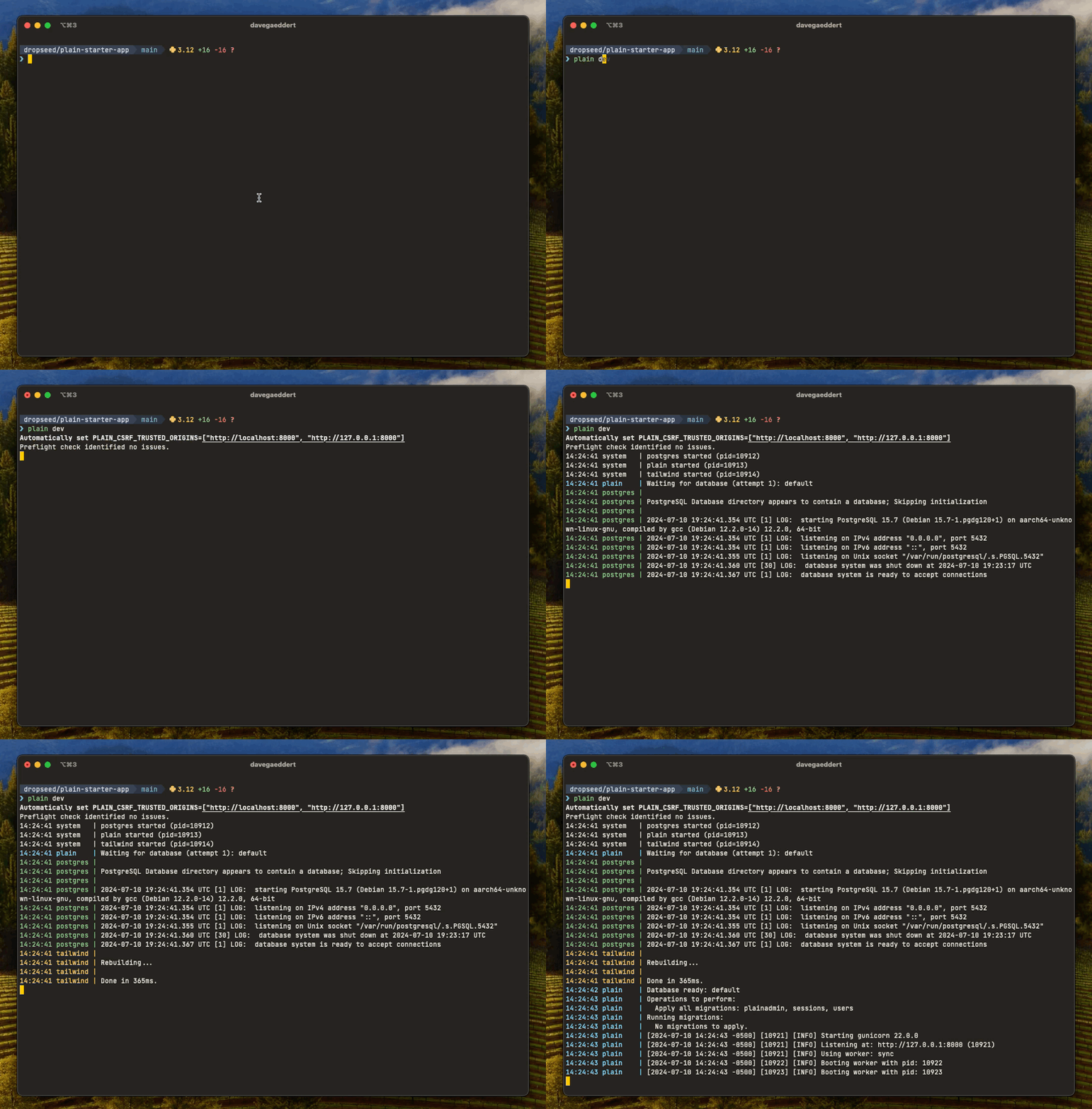
The plain dev command starts everything you need for local development with a single command:
plain dev
This will:
- Run preflight checks
- Execute pending migrations
- Start your development server with auto-reload
- Build and watch CSS with Tailwind (if installed)
- Start required services (like databases)
- Run any custom processes you've defined
Commands
plain dev
The plain dev command does several things:
- Sets
PLAIN_CSRF_TRUSTED_ORIGINSto localhost by default - Runs
plain preflightto check for any issues - Executes any pending model migrations
- Starts
gunicornwith--reload - Serves HTTPS on port 8443 by default (uses the next free port if 8443 is taken and no port is specified)
- Runs
plain tailwind build --watch, ifplain.tailwindis installed - Any custom process defined in
pyproject.tomlattool.plain.dev.run - Necessary services (ex. Postgres) defined in
pyproject.tomlattool.plain.dev.services
Services
Use services to define databases or other processes that your app needs to be functional. The services will be started automatically in plain dev, but also in plain pre-commit (so preflight and tests have a database).
Ultimately, how you run your development database is up to you. But a recommended starting point is to use Docker:
# pyproject.toml
[tool.plain.dev.services]
postgres = {cmd = "docker run --name app-postgres --rm -p 54321:5432 -v $(pwd)/.plain/dev/pgdata:/var/lib/postgresql/data -e POSTGRES_PASSWORD=postgres postgres:15 postgres"}
Custom processes
Unlike services, custom processes are only run during plain dev. This is a good place to run something like ngrok or a Plain job worker, which you might need to use your local site, but don't need running for executing tests, for example.
# pyproject.toml
[tool.plain.dev.run]
    ngrok = {command = "ngrok http $PORT"}
plain dev services
Starts your services by themselves.
Logs are stored in .plain/dev/logs/services/.
plain dev logs
Show output from recent plain dev runs.
Logs are stored in .plain/dev/logs/run/.
plain dev logs        # print last log
plain dev logs -f     # follow the latest log
plain dev logs --pid 1234
plain dev logs --path
plain dev backups
Manage local database backups. Requires plain.postgres.
A backup is automatically created when plain dev detects pending migrations, so you can easily restore your database if a migration changes something unexpectedly.
plain dev backups list              # List all backups
plain dev backups list --branch     # Filter to current branch
plain dev backups create            # Create a manual backup
plain dev backups create my-backup  # Create with a specific name
plain dev backups restore --latest  # Restore the most recent backup
plain dev backups restore my-backup # Restore a specific backup
plain dev backups delete my-backup  # Delete a specific backup
plain dev backups clear             # Delete all backups
Backups are stored in .plain/backups/ and automatically pruned to the 20 most recent per branch.
plain pre-commit
A built-in pre-commit hook that you can install with plain pre-commit --install.
Runs:
uv lock --check, if using uvplain check(custom commands, code linting, preflight, migrations, tests)plain assets compile
Custom commands can be defined in pyproject.toml at tool.plain.check.run and will run as part of plain check:
[tool.plain.check.run]
my-check = {cmd = "echo 'running my check'"}
.env files
plain.dev loads .env files for any plain command run on the dev machine. Production deployments should set environment variables through your platform — Plain does not load .env files when plain.dev isn't installed.
Files are read in this order (highest precedence first — the first file to define a key wins):
| File | Committed? | When loaded |
|---|---|---|
.env.{PLAIN_ENV}.local |
No | If PLAIN_ENV is set |
.env.local |
No | Always, except when PLAIN_ENV=test |
.env.{PLAIN_ENV} |
Yes | If PLAIN_ENV is set |
.env |
Yes | Always |
Add .env.local and .env.*.local to your .gitignore.
PLAIN_ENV is set automatically by the CLI: plain dev → dev, plain test → test. Other commands leave PLAIN_ENV unset (only .env.local and .env load). Export PLAIN_ENV yourself to override.
Under PLAIN_ENV=test, .env.local is skipped (matches Next.js and Rails dotenv) so test runs stay deterministic and personal credentials don't leak into the suite. plain test sets PLAIN_ENV=test for you; the pytest plugin also sets it when pytest is invoked directly — and opportunistically loads .env.test* if plain.dev is installed.
Settings
| Setting | Default | Env var |
|---|---|---|
DEV_REQUESTS_IGNORE_PATHS |
["/favicon.ico"] |
- |
DEV_REQUESTS_MAX |
50 |
- |
See default_settings.py for more details.
FAQs
How do I stop the development server?
You can stop the development server by pressing Ctrl+C in the terminal, or by running plain dev --stop if it was started in the background.
Can I run the server on a different port?
Yes, use the --port or -p option: plain dev --port 8000. If you don't specify a port, it will use 8443 or the next available port.
How do I run the server in the background?
Use plain dev --start to run the server in the background. You can then use plain dev --stop to stop it.
What's the difference between services and custom processes?
Services are processes that your app needs to function (like a database). They run during plain dev and also during plain pre-commit. Custom processes only run during plain dev and are typically for development conveniences like ngrok or a job worker.
Why am I seeing deprecation warnings?
The development server is configured to show DeprecationWarning and PendingDeprecationWarning messages so you can catch deprecated code before it breaks in future versions. You can override this by setting your own PYTHONWARNINGS environment variable.
Installation
Install the plain.dev package from PyPI:
uv add plain.dev --dev
Note: The plain.dev package does not need to be added to INSTALLED_PACKAGES.
Release history Release notifications | RSS feed


Download files
Download the file for your platform. If you're not sure which to choose, learn more about installing packages.
Source Distribution
Built Distribution
Filter files by name, interpreter, ABI, and platform.
If you're not sure about the file name format, learn more about wheel file names.
Copy a direct link to the current filters
File details
Details for the file plain_dev-0.63.0.tar.gz.
File metadata
- Download URL: plain_dev-0.63.0.tar.gz
- Upload date:
- Size: 40.1 kB
- Tags: Source
- Uploaded using Trusted Publishing? Yes
- Uploaded via: uv/0.11.16 {"installer":{"name":"uv","version":"0.11.16","subcommand":["publish"]},"python":null,"implementation":{"name":null,"version":null},"distro":{"name":"Ubuntu","version":"24.04","id":"noble","libc":null},"system":{"name":null,"release":null},"cpu":null,"openssl_version":null,"setuptools_version":null,"rustc_version":null,"ci":true}
File hashes
| Algorithm | Hash digest | |
|---|---|---|
| SHA256 |
13ca9cbb33e96d68d7e18049bb4299426f9ff0bc0cb682ea25018ca412d18674
|
|
| MD5 |
de1101502fd5569cc4d5cd918f180daf
|
|
| BLAKE2b-256 |
545a49a14d352237a8693a19d63a70aa31f0dc8377e1ae235b4f4d953ed0d004
|
File details
Details for the file plain_dev-0.63.0-py3-none-any.whl.
File metadata
- Download URL: plain_dev-0.63.0-py3-none-any.whl
- Upload date:
- Size: 48.8 kB
- Tags: Python 3
- Uploaded using Trusted Publishing? Yes
- Uploaded via: uv/0.11.16 {"installer":{"name":"uv","version":"0.11.16","subcommand":["publish"]},"python":null,"implementation":{"name":null,"version":null},"distro":{"name":"Ubuntu","version":"24.04","id":"noble","libc":null},"system":{"name":null,"release":null},"cpu":null,"openssl_version":null,"setuptools_version":null,"rustc_version":null,"ci":true}
File hashes
| Algorithm | Hash digest | |
|---|---|---|
| SHA256 |
5844aff9651b07d52e723e06f5ea73b86858b3715c084c43a6efa077b2062354
|
|
| MD5 |
e04bb245fd4971bee74a13a787f20216
|
|
| BLAKE2b-256 |
b6b253c958a59e8ff32e6ecae19a25e4f6882d99b641a31816fc5193ec8e5126
|






