
plantcv-mcp
Plant phenotyping over MCP — traits, plus the segmentation overlay they were measured from.






PlantCV as an MCP measurement instrument: it returns plant trait numbers and the picture they were computed from, and refuses to return numbers when the segmentation is degenerate.
Unofficial. Not affiliated with, endorsed by, or sponsored by the Donald Danforth Plant Science Center or the PlantCV maintainers. See NOTICE.
Why you are handed the overlay
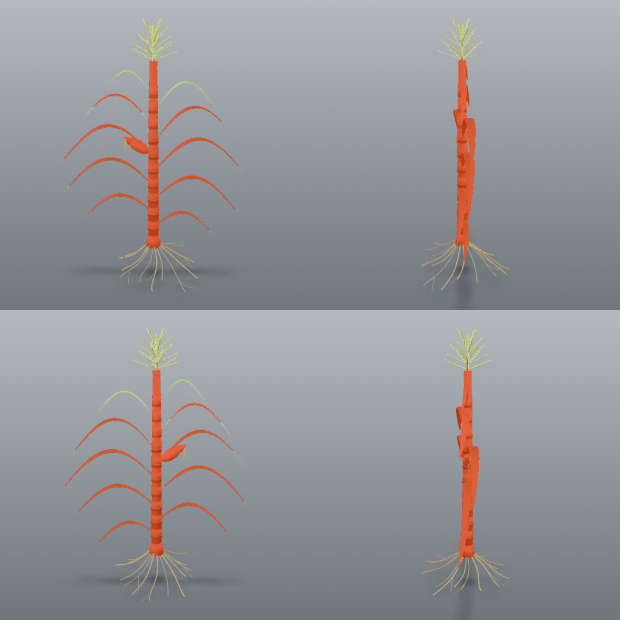
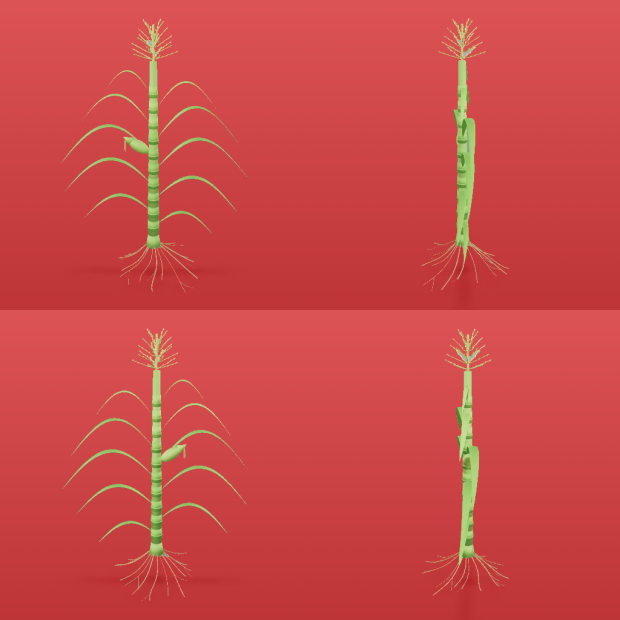
Both images below come from the same file and the same threshold method — the only difference is one parameter.
✅ channel="a", object_type="dark" |
❌ channel="s", object_type="dark" |
|---|---|
 |
 |
Mask covers 3.1% of the frame, 9 components. area=32427 |
Mask covers 96.1% — it is the background. area=1007829 |
The failure on the right is what this server exists to prevent. Without the picture, both runs return seventeen traits with correct units and entirely believable magnitudes. The one on the right is measuring the wall behind the plants.
Red marks the pixels that were measured; a cyan line traces the mask's own boundary, drawn on the mask's edge pixels so it never touches anything unmasked (the tint alone was invisible on a photo of red beans).
segment() returns the overlay and diagnostics but no traits. measure() requires the
session_id that segment() mints. You cannot get a number without first being handed the
image it came from.
That is not a style preference. Measured on real images with PlantCV 4.11.3:
| failure | what you get without the overlay |
|---|---|
| four-view render, whole-image ROI | 17 plausible traits describing four merged plants |
| plant clipped by the frame | size traits that are silently lower bounds |
| empty mask | 17 traits of zeros, with PlantCV reporting in_bounds=True |
All three produce correctly-united, entirely believable numbers.
Install
No install is needed if the host has uv: uvx plantcv-mcp
fetches the current release into its own environment and runs it. Otherwise:
pip install plantcv-mcp
segment_leaves_sam() is the one optional tool: pip install "plantcv-mcp[sam]" adds torch,
torchvision and segment-anything. Without the extra every other tool works and that one
refuses with that command.
Requires Python 3.11+. Installing pulls PlantCV and its scientific stack, so the first
install (or first uvx run) is not fast. From a checkout: uv add /path/to/plantcv-mcp.
Configure your MCP client
claude mcp add plantcv -- uvx plantcv-mcp
Claude Desktop and other stdio hosts:
{ "mcpServers": { "plantcv": { "command": "uvx", "args": ["plantcv-mcp"] } } }
With a pip install, use "command": "plantcv-mcp" (and drop uvx from the claude mcp add
line); from a checkout, "command": "uv", "args": ["run", "--directory", "/path/to/plantcv-mcp", "plantcv-mcp"]. Verify with list_methods().
Flags: --root DIR (repeatable, or PLANTCV_MCP_ROOTS) confines every read, and the one
write, to your imagery: plantcv-mcp --root /data/phenotyping. --no-isolate (or
PLANTCV_MCP_ISOLATE=0) runs analyses in-process instead of in the crash-containing worker.
Tools
| tool | returns |
|---|---|
suggest_segmentation(image_path, channel, method) |
contact sheets, and what each object_type would yield |
segment(image_path, channel, method, ...) |
overlay + diagnostics + warnings — no traits |
refine(session_id, ops) |
a NEW session with a cleaned-up mask, plus its overlay |
measure(session_id, analyses, px_per_mm, ...) |
traits, or a raised error on a degenerate mask |
calibrate_scale_from_marker(image_path, x, y, w, h, marker_length_mm) |
px_per_mm from a marker of known real size |
correct_lens_distortion(image_path, checkerboard_dir, ...) |
a fisheye/wide-angle image undistorted via checkerboard calibration, written next to the input or to output_path |
measure_regions(session_id, nrows, ncols, ...) |
one row per plant in a tray (RGB traits, thermal temperatures or HSI index stats), plus the numbered overlay |
measure_morphology(session_id, prune_size, tangent_size, ...) |
leaf/stem skeleton traits + the numbered-segment overlay |
count_leaves(session_id, min_distance, px_per_mm) |
leaf instances by watershed: an estimated count, per-instance area/centroid/bbox + the numbered overlay |
segment_leaves_sam(session_id, checkpoint_path, device, ...) |
the same count from Segment Anything. Optional: needs the sam extra and a 375 MB checkpoint; CPU by default |
measure_images(image_paths, channel, method, ...) |
one recipe across many images (per plant with a grid); traits only where valid; time-budgeted |
segment_hyperspectral(envi_path, index, threshold, ...) |
an HSI session from a spectral-index threshold + pseudo-RGB overlay |
measure_spectral(session_id, indices, ...) |
index statistics (and, opt-in, per-band reflectance) |
segment_thermal(path, min_c, max_c, ...) |
a thermal session from a °C band + grey-frame overlay |
measure_thermal(session_id, ...) |
max/min/mean/median °C under the mask |
list_methods() |
channels, methods, object types, pinned PlantCV version |
Typical loop: suggest_segmentation → segment → look at the overlay → segment again
with a different channel, method or polarity if it is wrong (or refine if it is nearly
right) → measure. Pass color_correct=true to segment when a ColorChecker is in the
frame: colours are corrected to the reference before segmenting and measuring, and the card
itself is excluded from the mask (exclude_color_card=true does only the exclusion).
The call that produced the left-hand image above:
{
  "image_path": "multi_specimen.png",
  "channel": "a",
  "method": "otsu",
  "object_type": "dark"
}
Its response — verbatim, apart from a shortened session_id and an elided message — with
the overlay arriving beside it as an image:
{
  "session_id": "9d2384c8-…",
  "channel": "a",
  "method": "otsu",
  "object_type": "dark",
  "fill_size": 200,
  "color_correct": false,
  "mask_fraction": 0.031,
  "component_count": 9,
  "major_object_count": 4,
  "largest_area": 8628,
  "overlay_scale": 1.0,
  "overlay_png_bytes": 748233,
  "warnings": [
    {
      "code": "multi_specimen",
      "message": "4 comparably-sized objects detected (areas: [8628, 7981, 7106, 6748]). …"
    }
  ]
}
What it refuses, and why
Every guard was calibrated against a real failure and names the next action. Blocking guards withhold numbers; advisories travel with them.
- Inverted mask (
implausible_coverage) — the right-hand image above: 96% of the frame selected, seventeen believable traits, all describing the wall. - Nothing selected, or
fill_sizedeleted the specimen (empty_mask,fill_erased_mask) — PlantCV returns seventeen zeros within_bounds=True. - Background texture (
noisy_segmentation) — a sorghum photo measured as one 650,000-px plant made of 118 chamber-wall specks. - Several plants in one mask (
multi_specimen) — the number describes the group; usemeasure_regions(), which measures each plant and numbers the overlay. - Wrong scale, wrong kind, changed file — a marker measured 4.35× wrong by PlantCV's own ROI method; a thermal session handed to an RGB measurer; an image edited after segmentation. Each is refused naming the right tool.
- A lens calibration the boards do not determine — a set whose focal length the fit leaves undetermined is refused naming the number, and one that determines it only loosely is accepted with the looseness said. That judgement is made per view, because the fit's uncertainty falls as frames are added whether or not the geometry improves: re-saving the same photographs, or shooting more of the same angle, buys nothing. A frame that fits far worse than the rest, or that moves the answer far more than the others allow, is dropped by name and the camera refitted.
- No colour card when one was asked for —
color_correct=trueraises rather than returning colour traits that look corrected and are not.
Every warning code, every tool's parameters, and the measured facts behind each guard: docs/GUIDE.md — segmenting · traits and units · real-world units · lens correction · polarity · refining · colour correction · trays · morphology · leaf instances · leaf instances with Segment Anything · batches · hyperspectral and thermal · warning reference.
Security
This server reads image files the host user can read and returns them to the model as
images; with no --root there is no allow-list. It writes exactly one thing: the corrected
image from correct_lens_distortion, next to its input (replacing an earlier run's output
of the same name) or at an output_path that must not exist yet — under the same roots,
never through a symlink. Run it as a user whose read
access you are comfortable exposing, set --root, and do not run it as root. PlantCV/OpenCV
analyses run in a worker subprocess, so a native crash is a tool error, not a dead server.
Details:
security · read roots ·
crash containment · limitations.
Attribution and licensing
This project is MIT licensed. It depends on PlantCV, which is licensed under the Mozilla Public License 2.0. No PlantCV source is vendored or redistributed here — it is an ordinary runtime dependency — so the MIT license applies to this project's own files. See NOTICE for the full statement.
More
- docs/GUIDE.md — the full guide
- CHANGELOG.md — what changed, and why
- docs/MUTATION-CHECKS.md — every guard disabled on purpose, and the test that went red for it
- Citing it: CITATION.cff (archived at doi:10.5281/zenodo.21713516)
Images on this page are rendered from tests/fixtures/multi_specimen.png, an original render
by the author, and regenerate from committed code.
1 maintainer

Release files for plantcv-mcp 1.16.0
For a detailed explanation of source distributions (sdists) and built distributions (wheels), please see the package formats documentation.
Source distribution (sdist)
| File | Size | Uploaded | |
|---|---|---|---|
| plantcv_mcp-1.16.0.tar.gz | 3.5 MB | Details |
Built distribution (wheel)
| File | Interpreter | ABI | Platform | Reset |
|---|---|---|---|---|
| plantcv_mcp-1.16.0-py3-none-any.whl | Python 3 | none | any | Details |
Total release size: 3.6 MB
Release files / plantcv_mcp-1.16.0.tar.gz
| Download URL | plantcv_mcp-1.16.0.tar.gz |
|---|---|
| Size | 3.5 MB |
| Tags | Source |
|
SHA-256 checksum How to use checksums |
e4bc13e50d5c497bda6545e3104e2643431cd0e0b1ce76ee9bf3f84f8409eeb2
|
|
BLAKE2b-256 checksum How to use checksums |
38f19118030e077088e0c1976113437dc69cdbe4074c55113b64f6961dff7c7f
|
| Upload date | |
|
Uploaded using Trusted Publishing? What is trusted publishing? |
No |
| Uploaded via |
twine/7.0.0 CPython/3.13.2
|
Release files / plantcv_mcp-1.16.0-py3-none-any.whl
| Download URL | plantcv_mcp-1.16.0-py3-none-any.whl |
|---|---|
| Size | 149.0 kB |
| Tags | Python 3 |
|
SHA-256 checksum How to use checksums |
00496af5573fcf331ea1dd3f08614a0f54dea19757177cbd88dd7c919da6431a
|
|
BLAKE2b-256 checksum How to use checksums |
d8d7f1380ec24c498452254fcaaf942c0d51ac48bfec104d33a62de2db8b2243
|
| Upload date | |
|
Uploaded using Trusted Publishing? What is trusted publishing? |
No |
| Uploaded via |
twine/7.0.0 CPython/3.13.2
|














