
Plot Extractor / Curve Digitizer
Plot Extractor (with care) is a simple PyQt-based tool that allows you to digitize data points from plotted curves inside images. Load a graph image, define the coordinate system, add curves, and click points — the tool converts pixel clicks into real-world X/Y values (linear or logarithmic) and exports them to CSV.
✨ Features
✔ Load an image file (JPG/PNG/BMP etc.)
✔ Define the chart coordinate system manually (in pixels)
✔ Support for linear or logarithmic X/Y axes
✔ Add multiple curves with names & colors
✔ Click to create ordered data points per-curve
✔ Optional point-editing mode
✔ Normalizes pixel coordinates properly even if the window is resized
✔ Export curve data to CSV files
✔ Last-saved folder remembered when exporting
🖥️ Screenshot
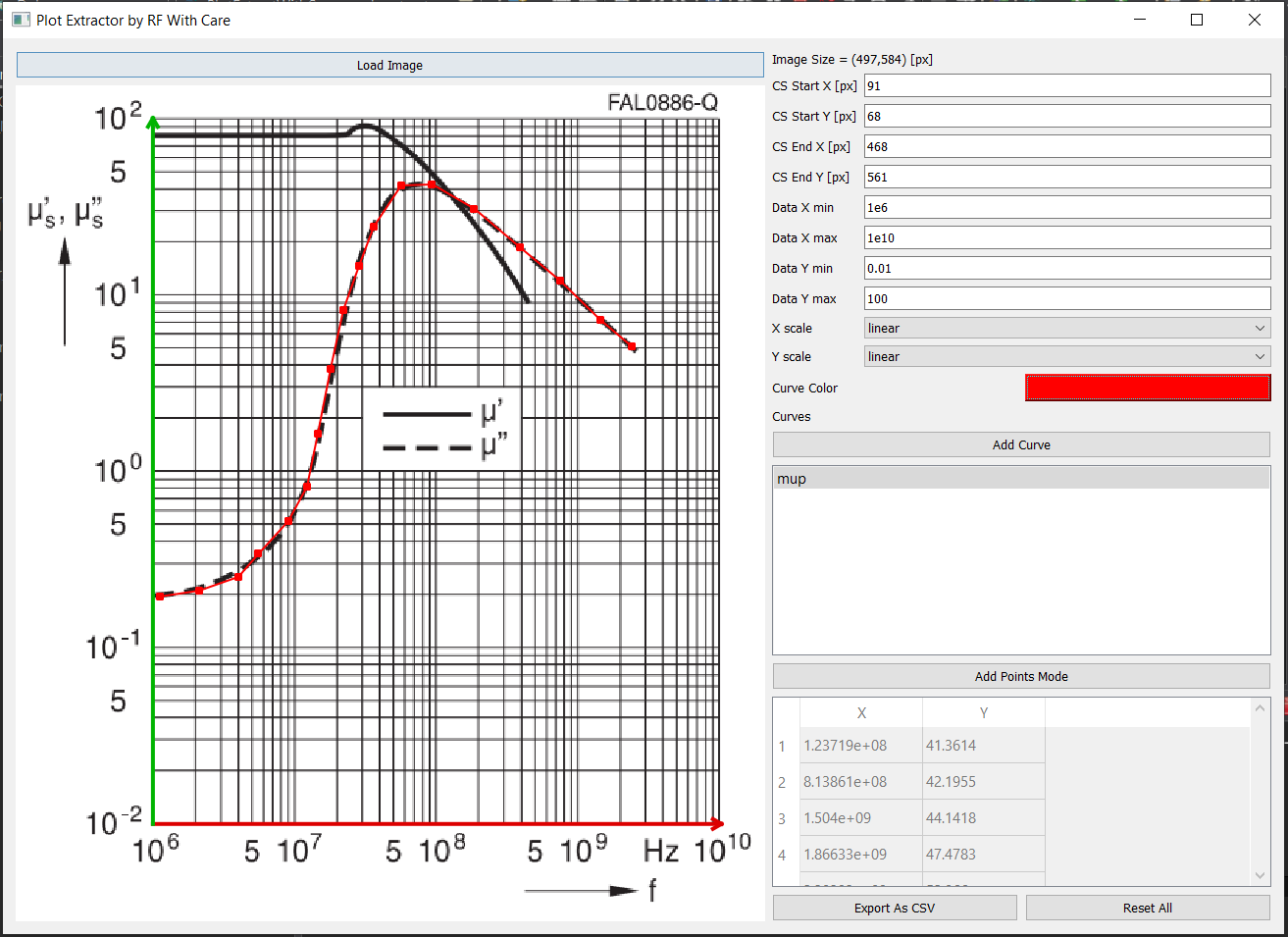
🚀 Installation
Requirements
-
Python 3.8+
-
PyQt5
-
NumPy
Install dependencies:
pip install pyqt5 numpy
(Add others like matplotlib if you later use them.)
🧰 Local Installation
pip install -e <Repository Dir>
Example:
pip install -e C:\Repos\PlotExtractWithCare\
Install From pypi:
pip install plotextractwithcare
▶️ Running the Application
python -m plotextractwithcare
📌 How It Works
Load an image
Enter the pixel locations of the origin and axis endpoints
Enter the real-world coordinate values (min/max for X and Y)
Choose whether X and Y are linear or log scale
Add a curve and begin clicking points
Export your data to CSV when done 🎉
Points are always kept sorted by X-value automatically.
📝 CSV Export Format
Exports contain two columns:
 x,y
 1.23,4.56
 ...
⚠️ Disclaimer
Curve Digitizer is provided without any warranty. See the license section for more details.
📄 License
Plot Extractor (with care)
Copyright © 2026 Gadi Lahav — RF With Care Contact: gadi@rfwithcare.com
This program is free software: you can redistribute it and/or modify it under the terms of the GNU General Public License as published by the Free Software Foundation, version 3 (GPLv3) or (at your option) any later version.
You should have received a copy of the GNU General Public License along with this program. If not, see: https://www.gnu.org/licenses/
🤝 Contributing
Pull requests and feature suggestions are welcome!
🙏 Acknowledgements
Thanks to the open-source community for the tools and libraries that make this possible
1 maintainer

Release files for plotextractwithcare 0.1.2
For a detailed explanation of source distributions (sdists) and built distributions (wheels), please see the package formats documentation.
Source distribution (sdist)
| File | Size | Uploaded | |
|---|---|---|---|
| plotextractwithcare-0.1.2.tar.gz | 24.1 kB | Details |
Built distribution (wheel)
| File | Interpreter | ABI | Platform | Reset |
|---|---|---|---|---|
| plotextractwithcare-0.1.2-py3-none-any.whl | Python 3 | none | any | Details |
Total release size: 49.0 kB
Release files / plotextractwithcare-0.1.2.tar.gz
| Download URL | plotextractwithcare-0.1.2.tar.gz |
|---|---|
| Size | 24.1 kB |
| Tags | Source |
|
SHA-256 checksum How to use checksums |
a7fdab9b182c5c50fbcd6c773fc66b2c00bb748e56236ea72f869e54365ff0b9
|
|
BLAKE2b-256 checksum How to use checksums |
4bfbf095be75394a3c52b4ace81eca3fd8150cd771dedc6ab5bd2c80c95a7159
|
| Upload date | |
|
Uploaded using Trusted Publishing? What is trusted publishing? |
No |
| Uploaded via |
twine/6.2.0 CPython/3.13.7
|
Release files / plotextractwithcare-0.1.2-py3-none-any.whl
| Download URL | plotextractwithcare-0.1.2-py3-none-any.whl |
|---|---|
| Size | 24.8 kB |
| Tags | Python 3 |
|
SHA-256 checksum How to use checksums |
a902b41c80d9ba2b290ad5c56fa270d30f2b7e562a1b2c5796d6e299b827846a
|
|
BLAKE2b-256 checksum How to use checksums |
b1281a0f419fd7f5d127b46148d79bc630be217196e6d4297f2f327e9d5bf972
|
| Upload date | |
|
Uploaded using Trusted Publishing? What is trusted publishing? |
No |
| Uploaded via |
twine/6.2.0 CPython/3.13.7
|














